
Here are two versions of the same Friday. In the first, a couple who have eaten with you most weeks this year book a table for eight o’clock. They are greeted warmly, they order the usual, they pay and they leave. Nothing about the evening tells them you noticed it was their twentieth visit. In the second, the same couple get a message on Thursday: “Your next dessert is on us, you’ve earned it.” They book for Friday, show the code, mention it to the friends they have brought along, and leave feeling like regulars rather than customers. The food was identical. The difference was that the restaurant remembered.
A restaurant loyalty program is a way of remembering at scale. It counts what your regulars already do, rewards it in a way they notice, and gives you a list of the people who keep your quiet nights busy. On WhatsApp, the counting can be automatic and the reward can arrive in the same chat where they book and order.
This guide builds one in DMly, with one honest catch up front: points can only be awarded on sales DMly can see. We cover what to reward, three designs that fit how restaurants take money, setting up points and rewards, redeeming them, telling customers where they stand, birthdays, a specials list, gift cards and what to measure. For the general principles, see our guide to building a loyalty program for a small business.
Step 1: Decide What Your Restaurant Loyalty Program Rewards
Reward coming back. How often matters more than how much.
DMly’s loyalty points are earned one of two ways, and you choose one:
- Earn per activity: a flat number of points for each qualifying sale or visit, whatever it cost. The default.
- Earn per amount spent: points that scale with the bill.
For most restaurants, per activity is the better fit. A couple who eat with you every week are worth more over a year than a party of ten who come once, and per activity rewards the habit, not the one big bill. Spend-based points suit places where order size varies a lot and you want to reward bigger orders, such as a takeaway selling family meals, but they make the first reward slow for your regular solo lunch customer.
The Catch: Points Only Come From Sales DMly Sees
Before you design anything, know exactly which sales can earn points in DMly.
DMly’s loyalty engine awards points when a qualifying activity reaches the status you choose on the Loyalty tab:
- a paid invoice, when it is paid;
- a confirmed order in DMly’s Finance;
- a completed appointment, which for a restaurant means a reservation your host marks completed;
- an attended class, which a restaurant running cookery classes or tasting evenings might use.
Two common restaurant sales are not on that list. A bill rung up on a separate till system never reaches DMly at all. And a WhatsApp cart paid through a Pay now link creates a payment, not an invoice or an order: DMly’s docs say a cart does not become a Finance order, and the loyalty docs describe points on invoices and orders, not on payment links. If most of your sales happen at the till or through WhatsApp carts, test on your own account before you promise customers points on them.
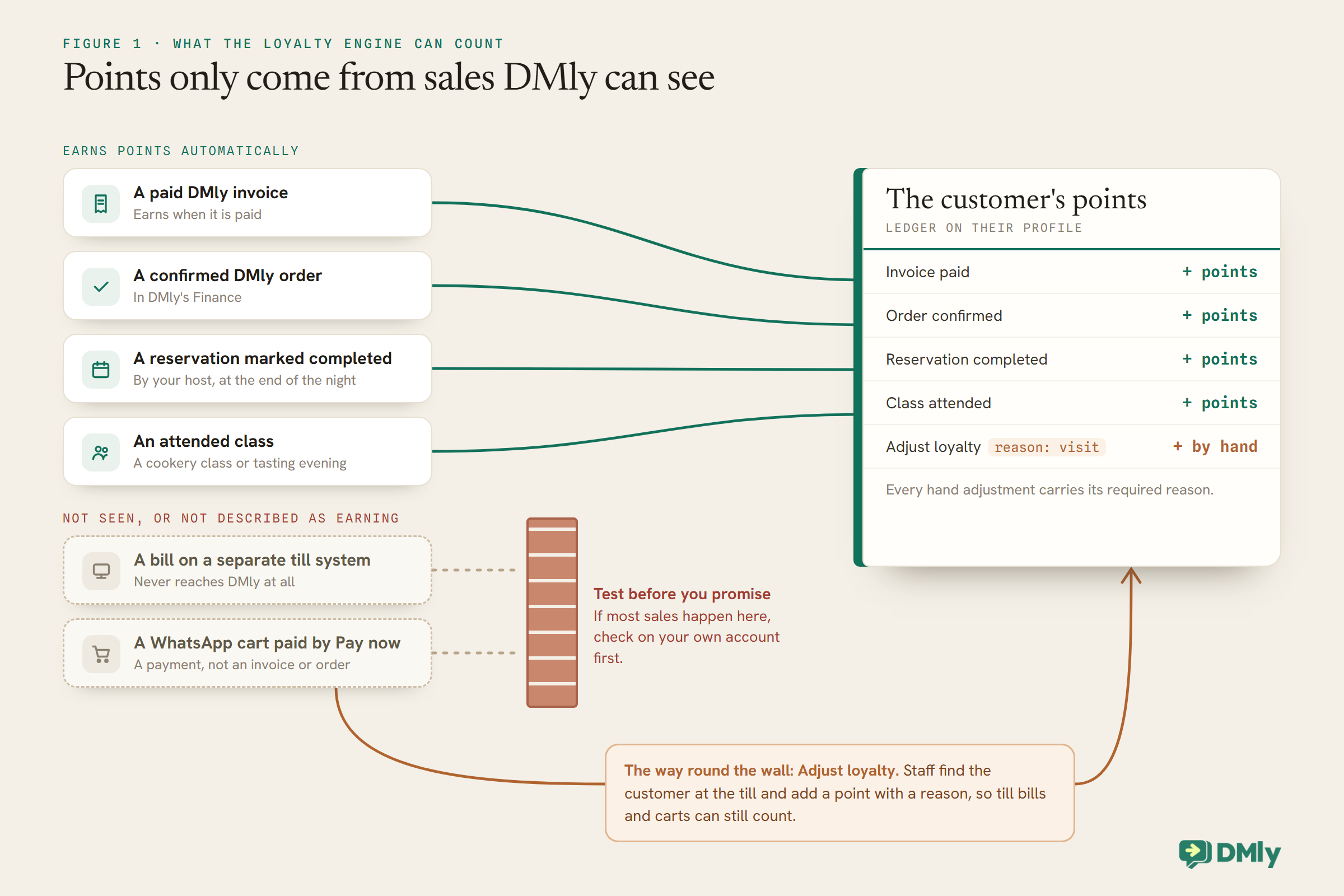
That leaves three designs that work. Pick the one that matches how your restaurant takes money, or combine them.
Design A: Points Per Visit, on Reservations
If most of your regulars book, the reservation is the visit, and the visit can earn the point.
If your tables are booked through DMly, set the Appointment status earning condition to Completed, the default, and choose Earn per activity. Each reservation your host marks completed earns the same points, however much the table spent. It rewards exactly the thing a restaurant wants: people coming back.
Everything depends on the host’s tap. About a day after a reservation’s time, DMly closes off any booking nobody marked, and under the default setting, Count as completed, that counts as a completed visit: it awards the loyalty points and fires the completed trigger, even for a party that never showed up. So set Appointments nobody marked (Appointments, Settings, Booking policy) to Wait for review, which holds unmarked bookings at Needs review with no points and no messages until someone settles them. Then make “mark the table completed” part of clearing the table, or part of the host’s close-of-night routine, and mark no-shows as no-shows. The same tap can drive a thank-you message on the Appointment completed trigger.
The limit is walk-ins: a guest who never booked has no reservation to complete. Cover them with Design C, or accept that the program rewards the regulars who book, who are often the ones you most want to keep.
Design B: Points on Orders You Bill in DMly
If you invoice or record orders in DMly, those sales can earn points automatically.
Some restaurants bill certain sales through DMly already: catering orders, event deposits, set menus paid in advance, cookery classes. A paid DMly invoice earns points when it is paid, and a confirmed DMly order earns in its own right. For those sales, the program runs itself.
WhatsApp cart orders need a decision. As built with the standard cart flow, the customer pays through a Pay now link, which creates a payment rather than an invoice. DMly’s flows have Finance steps that can create and send an invoice or create an order, so it may be possible to bill cart orders as invoices instead; DMly’s docs do not describe those steps’ settings in detail, so build it on a test order and check the points arrive before telling customers that online orders earn. If it does not suit, Design C covers online orders too.
One rule helps here: an invoice for an appointment earns when the appointment is completed, not when it is paid. A prepaid tasting-menu booking therefore earns when the host marks the table completed, and a guest who prepays and does not turn up earns nothing once the table is marked a no-show; on the default setting a booking nobody marks closes as completed about a day later and earns, so mark no-shows or switch Appointments nobody marked to Wait for review.
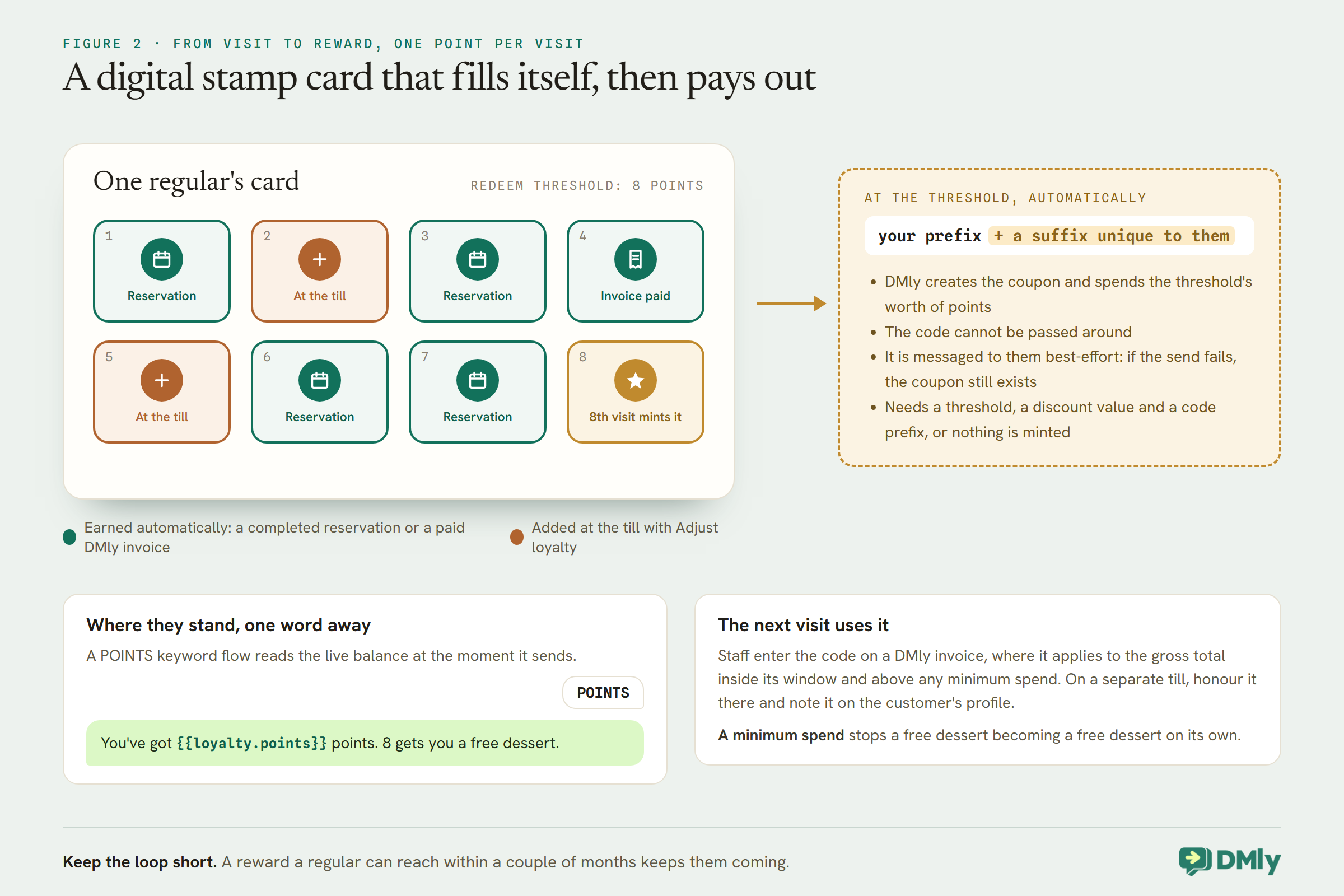
Design C: A Digital Stamp Card, Added at the Till
If your bills live on a separate till, staff can add the points by hand, in seconds.
Many restaurants take payment on a till system DMly never sees. The loyalty program can still live in DMly, with points added by staff. On the customer’s profile, Adjust loyalty takes a number of points to add, or a negative number to remove, and requires a reason, so every change is recorded. A customer who says “I’m on your WhatsApp” at the till is found by name or number, given a point with the reason “visit”, and the rest is automatic: when they reach the threshold, DMly creates their reward.
This is the digital version of a paper stamp card, with two advantages: the customer cannot lose it, and you have their WhatsApp contact. It needs discipline at a busy till, so keep it to one action per visit, and decide who is allowed to add points so the reason field stays consistent.
Step 2: Set Up Points and the Reward
Three settings must be filled in, or points pile up and no reward ever appears.
Loyalty lives at Finance → Settings, on the Loyalty tab, and it is off until you switch it on. According to DMly’s invoice documentation, minting a reward needs three settings, not just the threshold: a redeem threshold above zero, a discount value above zero and a coupon code prefix. Leave any one blank or at zero and customers keep earning points while no reward is ever created, with nothing to tell you why.
When a customer’s balance crosses the threshold, DMly creates a coupon for them automatically, spends the threshold’s worth of points, and gives the code a suffix unique to that customer, so it cannot be passed around. Choosing the numbers:
- The threshold. With one point per visit, a threshold of 8 gives a weekly regular a reward every two months, and a monthly regular one after eight months. Set it with the regular you most want to keep in mind.
- The reward. Something that brings them back and costs you little: a free dessert, a drink, a starter. A fixed-amount coupon matching that item’s price is simplest.
- The reward’s rules. A coupon applies to the gross total, including tax, and can carry a minimum spend and a validity window. A minimum spend stops a free dessert becoming a free dessert on its own.
How long a regular waits for the first reward
With one point per visit, weeks to the first reward is simply the threshold divided by visits per week. At a threshold of 8:
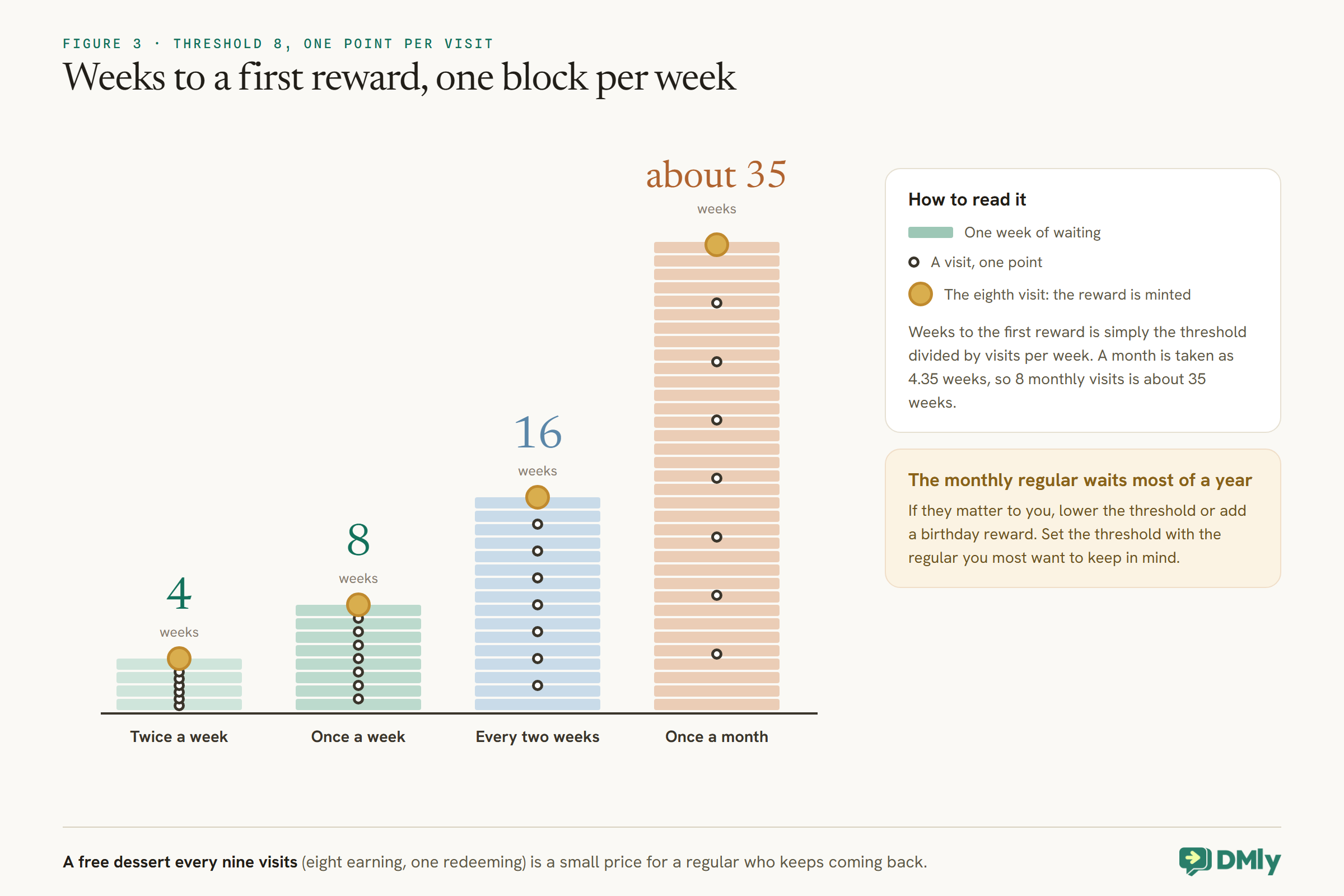
To sanity-check the cost, divide the reward by the visits it takes: a free dessert after every eight visits is a small price for a regular who keeps coming back, especially with a minimum spend on the redeeming bill.
Step 3: Redeeming a Reward
A reward is only worth as much as it is easy to use. Plan the moment at the table or till.
Every DMly loyalty reward is an ordinary coupon, which discounts a DMly invoice or order. If you bill that visit in DMly, staff enter the code on the invoice, and DMly checks it is valid at that moment: inside its window, above any minimum, within its limits. If it is not, the invoice is issued at full price, so check the total before sending.
If you bill on a separate till, the coupon cannot be applied to that bill inside DMly. Decide how staff honour it: for example, apply the reward on the till and add a note on the customer’s DMly profile that it was used. Whatever you choose, make it one simple step, because a reward that causes a fuss at the till stops feeling like a reward.
DMly messages the code to the customer automatically when it is minted, on their active channel, and records it in the Inbox. Delivery is best-effort: if the send fails, for example outside the 24-hour window, the coupon exists but the customer never heard about it. Train staff to look up a customer’s coupon when they ask, and mention it at the table: “you’ve got a free dessert waiting, by the way” is a lovely thing for a server to say.
Launching the Program at the Table
The best place to recruit members is where they have just enjoyed your food.
- Run it quietly for a fortnight with staff and friends, checking that points arrive the way your design says and that a reward is minted at the threshold.
- Put a QR code on the table card and the bill, made with a DMly growth tool, that opens your WhatsApp chat with a prefilled message such as
JOIN. A small flow on that keyword can welcome them, explain the program in two sentences, ask whether they would like specials too, and give a starting point with a tag your team can see. - Give staff one line to say: “Scan this and every visit counts towards a free dessert.” A program nobody mentions stays empty.
- Announce it to customers who already opted in to hear from you. A launch announcement is marketing under Meta’s template guidelines, so send it only to that list, and put the news on the menu and at the till for everyone else.
If you give everyone a head start, do it with Adjust loyalty and a consistent reason such as “launch bonus”, so the ledger explains every balance later.
Customers You Only Meet Through Delivery Apps
Customers who order through a delivery app are invisible to your loyalty program until they reach you directly.
Orders placed through third-party delivery apps never touch DMly, so those customers cannot earn points or appear in your segments. A loyalty program is one of the few ways to invite them into a direct relationship. A card or sticker in the bag with a QR code, “Order direct on WhatsApp and every order counts towards a free dessert”, brings them into your chat, where your own ordering system and program can serve them next time. Check your delivery platform’s terms on what you may put in the bag before you do it.
Keeping Hand-Added Points Honest
If staff add points by hand, a few controls keep the program fair.
- One action per visit, with the same reason every time (“visit”), so the ledger reads cleanly.
- Decide who may adjust points. Editing a contact is a team permission; give it to the people who run the till, not to everyone.
- Look at the ledger on a customer’s profile when something looks odd. Every adjustment carries its reason, so an unusual pattern is easy to spot and to ask about.
- Remember the claw-back. Voiding a DMly invoice, refunding a payment on a paid invoice, or cancelling a confirmed order takes back the points it earned, and deactivates one still-unredeemed loyalty coupon for that customer. Hand-added points are only removed if someone removes them, so add a negative adjustment when you refund a till bill that earned points.
Step 4: Tell Customers Where They Stand
Points nobody can see do not bring anyone back. Make the balance one message away.
DMly’s {{loyalty.points}} token reads a customer’s current balance at the moment a message sends, in any flow. A small flow on a POINTS keyword can reply “You’ve got {{loyalty.points}} points. 8 gets you a free dessert.” Print the keyword on the bill, the table card and the takeaway bag, next to a QR code that opens your WhatsApp chat. Our guide to WhatsApp automation for restaurants covers QR codes and the rest of the restaurant setup.
Resist messaging customers every time they earn. The Loyalty points activity trigger can fire when points are earned, redeemed or revoked, but a message after every visit quickly feels like spam. Let customers check whenever they like, and save your messages for the reward itself.
Birthdays, a Specials List and Referrals
The points reward habit. A few extras reward the people behind it.
Birthdays
The Birthday / key date trigger fires on a contact’s birthday when it is on their record, and a segment can target a Birthday month. A free dessert for a birthday booking is a classic for a reason. DMly’s birthday automation template uses dmly_birthday_offer outside the 24-hour window, and that template is marketing: it needs the customer’s permission for marketing messages and is billed at the marketing rate. Meta’s template guidelines treat birthday greetings as marketing even with no offer attached.
A specials list
A restaurant has something most businesses do not: news people are glad to get. Ask loyalty members whether they want your weekly specials on WhatsApp, and tag a yes as specials-opt-in. That tag becomes the list you send specials to, and it only ever includes people who asked. Customers can reply STOP at any time, and DMly’s broadcasts skip opted-out contacts automatically.
Referrals
DMly lists a referral automation template whose out-of-window fallback, dmly_referral_invite, is also marketing; its docs do not describe the rest of how it works, so test it before you build an offer around it. The simple version needs no special tooling: when a regular brings a friend who joins your list, give the regular a bonus with Adjust loyalty, with the reason “referral”.
Members-only evenings
A tasting night, a wine evening or a cookery class for regulars is a reward in itself, and DMly can run it as a class: a class service with a capacity, sessions on the calendar and a waitlist if it fills. Class bookings earn points when the seat is marked attended, which is the default earning condition, so the evening can count towards the next reward too. Announce it to members who agreed to hear from you, with a segment on a tag such as loyalty-member, and let them book a seat from the link.
Gift Cards and Loyalty
Gift cards bring new customers in through your regulars. Know how they interact with points.
A DMly gift card is a fixed amount of money, sold up front and spent later against any invoice, managed at Finance → Gift cards. Selling one raises a purchase invoice for the buyer. For loyalty, the important rule is that buying a gift card earns nothing: the points come later, from the invoice the card is eventually spent against, so the same money never earns twice. When someone buys a gift card for another person, DMly sends it using the dmly_gift_card template, which Meta classifies as marketing however it is declared.
Know Your Regulars
A loyalty program is also a list. Use it to understand who keeps you busy.
DMly segments can combine your loyalty and sales data with tags. Useful restaurant segments include members with Loyalty points close to a reward, customers whose Last purchase was more than a set number of days ago, and your highest Total spend customers. Two notes: Total spend, Last purchase and Order count can only reflect sales DMly knows about (its docs do not say exactly which records Last purchase reads), so a restaurant billing on a separate till should lean on loyalty points and tags instead; and Order count counts confirmed DMly orders, not WhatsApp carts. Segments are re-checked every time you use them.
How to Tell Whether Your Restaurant Loyalty Program Is Working
The question is not “how many members?” but “are regulars coming more often?”.
- Visits per member. With Design A, the Appointments report at Configurations → Reports → Appointments shows completed bookings; compare a group of members before and after they joined.
- Rewards redeemed. The coupons list’s Usage column counts redemptions. Rewards minted but never used mean the reward is wrong or too awkward to redeem.
- Members near a reward. A segment on Loyalty points shows who is one or two visits away, which is a good moment for a friendly “we’d love to see you” if they agreed to hear from you.
What It Costs
The program is part of DMly. The rewards and some messages are real costs.
The biggest cost is the rewards themselves, which is why a modest reward and a sensible threshold matter. On WhatsApp, replies to a POINTS keyword are free-form messages inside the window the customer opened; from 1 October 2026 Meta charges for those beyond the first 1,000 per business phone number each month. Birthday, referral, gift card and specials messages are marketing templates, billed at your market’s marketing rate and counted against your DMly plan’s broadcast and template allowance.
Restaurant Loyalty Program Mistakes to Avoid
- Promising points on sales DMly cannot see. Till bills and Pay now carts need a plan.
- Leaving reservations to close themselves. Under the default setting the automatic close awards points to no-shows too. Choose Wait for review and mark every table.
- A blank discount value or code prefix. Points accrue; no reward is ever minted.
- A reward with no minimum spend. A free dessert on its own is an expensive visit.
- A threshold only weekly regulars can reach. Monthly regulars give up.
- A message after every visit. Let customers check with POINTS instead.
- Marketing messages to people who never agreed. Birthdays and specials need permission.
Frequently Asked Questions
What should a restaurant loyalty program reward?
Coming back. For most restaurants, a flat number of points per visit rewards regulars better than points that scale with the bill.
Can customers earn points on WhatsApp orders?
DMly awards points on paid invoices, confirmed orders, completed appointments and attended classes. A cart paid through a Pay now link creates a payment, not an invoice, so test on your account or add points by hand.
Our bills are on a separate till. Can we still run it?
Yes. Staff add points with Adjust loyalty on the customer’s profile, with a reason, and DMly still creates the reward automatically at the threshold.
How do customers check their points?
With a POINTS keyword flow that replies using the {{loyalty.points}} token, which reads the live balance.
Why are customers earning points but never getting a reward?
Minting needs a redeem threshold, a discount value and a coupon code prefix all filled in. If any is blank or zero, no coupon is created.
Do gift card purchases earn points?
No. Points come from the invoice the gift card is spent against, so the same money never earns twice.
The Second Friday, Every Friday
Go back to the couple on their twentieth visit. With the program above, their visits were counted without anyone keeping a tally, the reward arrived in the chat where they already book, and a server knew to mention it. Nothing about the food changed. What changed is that your restaurant remembered, and told them so.
A good restaurant loyalty program is that second Friday, repeated for every regular: built on sales DMly can see, rewarding visits rather than big bills, with a reward that brings people back and a balance they can check with one word.
Writing about WhatsApp automation, bookings and growth for local business.
Turn WhatsApp into your busiest channel.
Start free and run message, bookings, payments and reviews in one place.
