
WhatsApp Automation for Restaurants: Orders, Reservations, and Repeat Visits (2026)
The restaurant phone has a cruel sense of timing. It rings hardest exactly when nobody can answer it, mid-service, hands full, and every unanswered ring is an order or a table walking to whoever picks up faster.
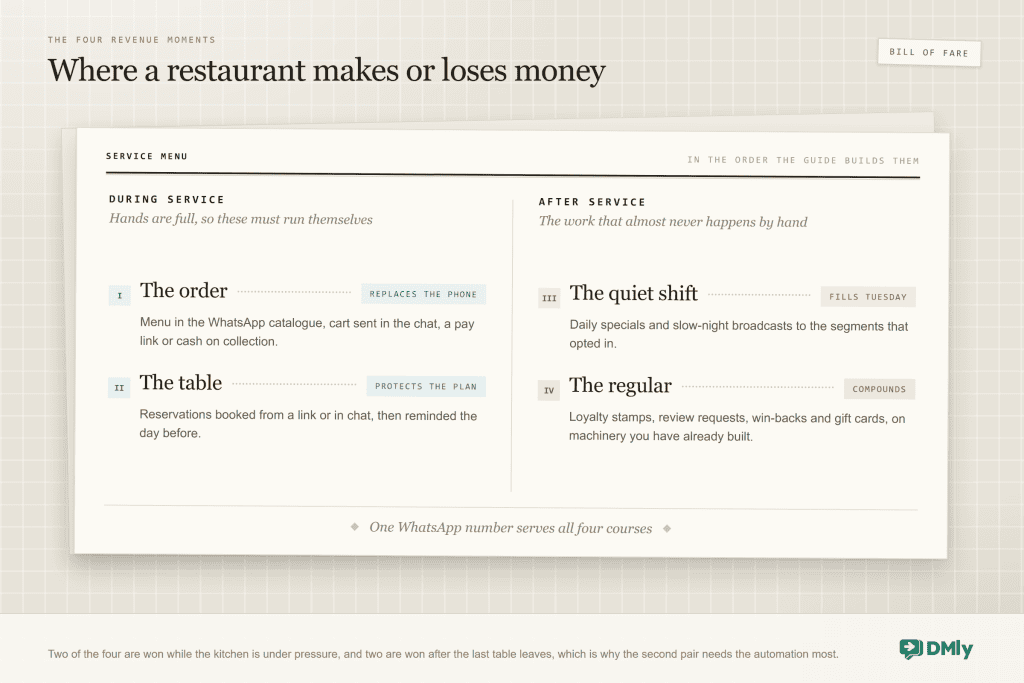
That paradox is the whole case for WhatsApp automation for restaurants: the order arrives as a cart instead of a call, the reservation books itself from a link, the “are you open Sunday?” answers itself in four seconds, and none of it needs a hand free during your dinner rush. Then, after service, the same channel does the work restaurants almost never get to: the daily specials broadcast, the loyalty stamp, the message that brings Tuesday’s regular back.
The difference between food-business builds that work and the ones that stall is honesty about the moving parts, especially around the WhatsApp catalogue, which is more capable and more particular than most guides admit. So this guide walks your four revenue moments in order (the order, the table, the quiet shift, the regular), with the real mechanics, the real limits and the wording that works, all built on DMly.
What WhatsApp Automation for Restaurants Actually Does
WhatsApp automation for a restaurant is the set of customer interactions that run without your staff touching a phone: menu browsing and ordering through the WhatsApp catalogue, table reservations with confirmations and reminders, instant answers to hours-and-menu questions, and the follow-up messages (specials, loyalty rewards, review requests, win-backs) that bring people back. It runs on the official WhatsApp Business API through a platform like DMly, which supplies the bookings calendar, the cart handling, the payments, the CRM and the broadcast tools around the chat.
Why WhatsApp specifically? Because your customer already lives there. Meta reported more than a billion conversation threads between people and businesses every day as of June 2026, and in Meta’s own commissioned Kantar research, 73.3% of people said they would rather message a business than call or email. For a restaurant, that preference has teeth: the customer who will not queue on hold will happily send a cart.
WhatsApp Ordering for Restaurants: The Catalogue, the Cart, and the Kitchen
WhatsApp ordering works through Meta’s catalogue: your menu lives as catalogue items, customers browse it inside the chat, add dishes to a cart and send the cart to you, and your automation takes it from there. Set up honestly, it replaces the phone for collection and delivery orders. Set up naively, it collects carts nobody processes. The difference is knowing exactly how the pieces connect, so here is the truthful version.
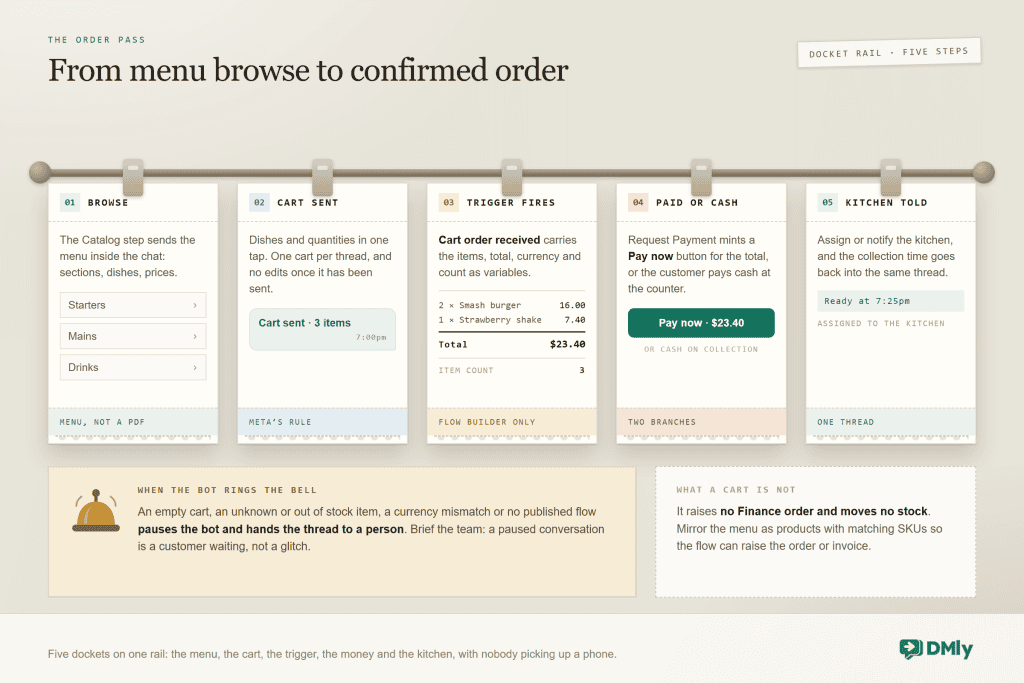
- Build the menu in Meta’s Commerce Manager. The catalogue is Meta’s object, one per WhatsApp Business Account, and items are reviewed by Meta automatically. Photograph the dishes properly; the catalogue is your menu’s shop window and grainy photos read as a grainy kitchen.
- Switch it on in DMly. Bot Setup → Commerce turns on Show catalog and Enable cart for your number, written straight to Meta. Enabling the cart is what unlocks the order machinery below.
- Send the menu in conversation. The Catalog/Product flow step shares the full menu, a single dish or a product list, so “what do you have?” gets your actual menu rather than a PDF that was current in March.
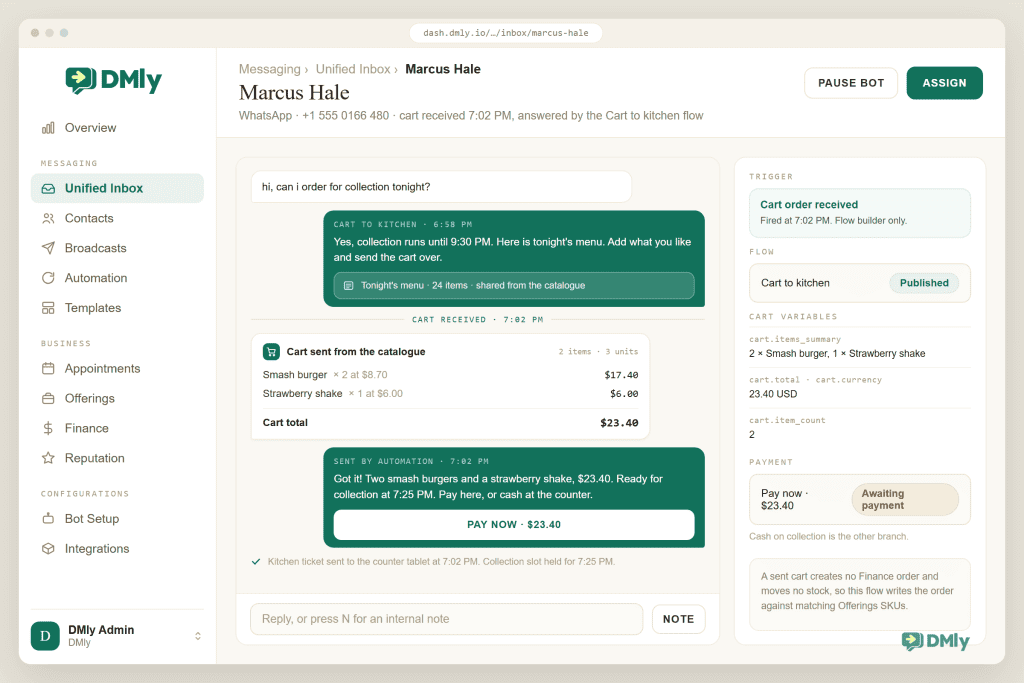
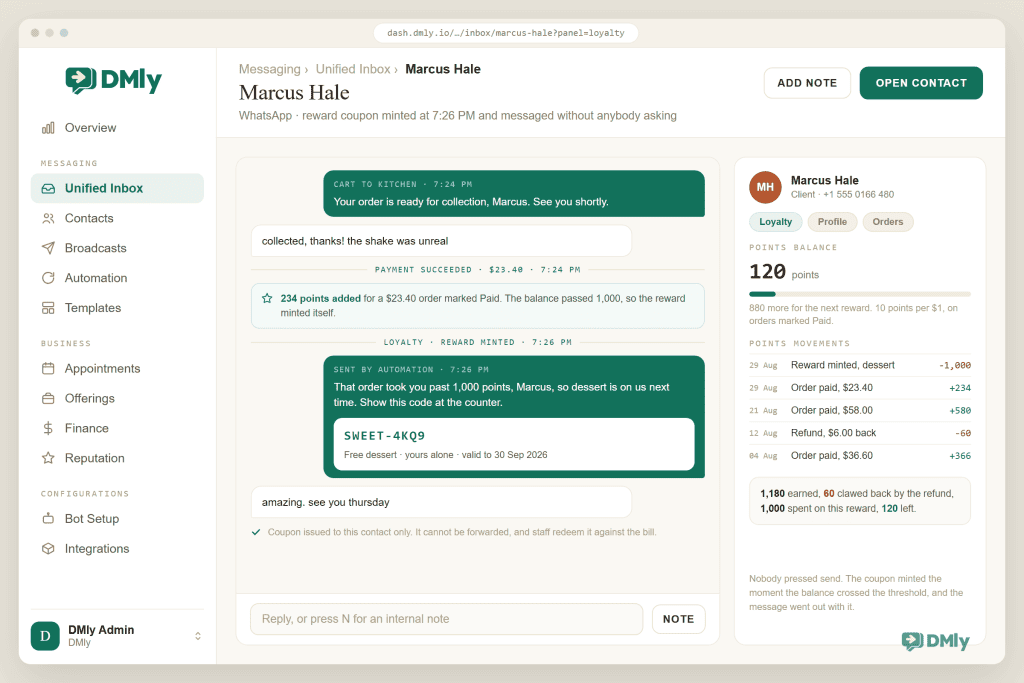
- Catch the cart. A sent cart appears in your inbox and fires the Cart order received trigger, carrying the items summary, the total, the currency and the item count as variables. Your flow confirms it back (“That’s two smash burgers and a strawberry shake, $23.40, ready in 25 minutes”), then offers payment.
- Take payment, or take it at the counter. The Request Payment step mints a Pay now button for the cart total through your connected gateway; cash on collection is a perfectly good branch of the same flow. Either way the confirmation, the timing and the pickup details all live in one thread your customer can scroll back to.
Now the honesty section, because three boundaries decide whether your build survives a busy Friday:
- A WhatsApp cart is not a stock or accounting object. A sent cart creates no order in DMly’s Finance and moves no stock; it is a message with structure. If you also track inventory or want order records, mirror your menu as Offerings products with matching SKUs, and let your flow create the Finance order or invoice. Skip that and your books simply never hear about cart orders.
- Carts have Meta’s rules. One cart per conversation thread, no edits once sent, up to 99 units per item, and menu messages cap at 30 items for a multi-product message and 10 for a carousel. Design your menus into sections (starters, mains, drinks) rather than one giant list.
- Bad carts stop the bot on purpose. An empty cart, an unknown or out-of-stock item, a currency mismatch or a missing published flow pauses the bot with a handover line. That is correct behaviour; brief your team that a paused conversation is a customer waiting, not a glitch.
Restaurant Reservations on WhatsApp: Booked, Reminded, Honoured
Reservations run on DMly’s appointment machinery, and for a restaurant the mapping is simple. A “Table for 2” and a “Table for 4” are services with durations matching your seating turns, capacity comes from how many of each you create or from staff-as-sections, and the booking page or in-chat tappable times do the taking. The confirmation lands in WhatsApp seconds later, which already beats the voicemail your competitor calls a booking system.
The value is in the surrounding behaviour, and three settings carry it:
- The day-before reminder with a cancellation link. Reminder times sit on the service and send as approved templates. Include the way out: a no-show costs you the table, but a cancellation at 3pm costs you nothing because the table resells. The reminder that makes cancelling easy is, counterintuitively, the one that protects your revenue. Make the way out a link or a button with a few words on it, never a reply of just “cancel”: in DMly a message that is only the word cancel opts the guest out, leaves the table booked, and stops your team replying until they opt back in.
- A booking policy with teeth. Minimum notice stops the 6:55pm booking for 7pm; the cancellation deadline in your booking policy decides how late self-service changes stay open. The system enforces the rule so your host never has to.
- Prepaid tables where it matters. For tasting menus, big groups and event nights, the Pay before booking mode holds the slot for 15 minutes while the guest pays. It can take the full price or a deposit: set a Deposit of 1 to 99 per cent on the service and the guest pays just that share to book, with the balance settled on the night. Note the documented shape: the deposit is a percentage of the service price, not an amount per head, so price group bookings as their own services if you want the deposit to match the party size.
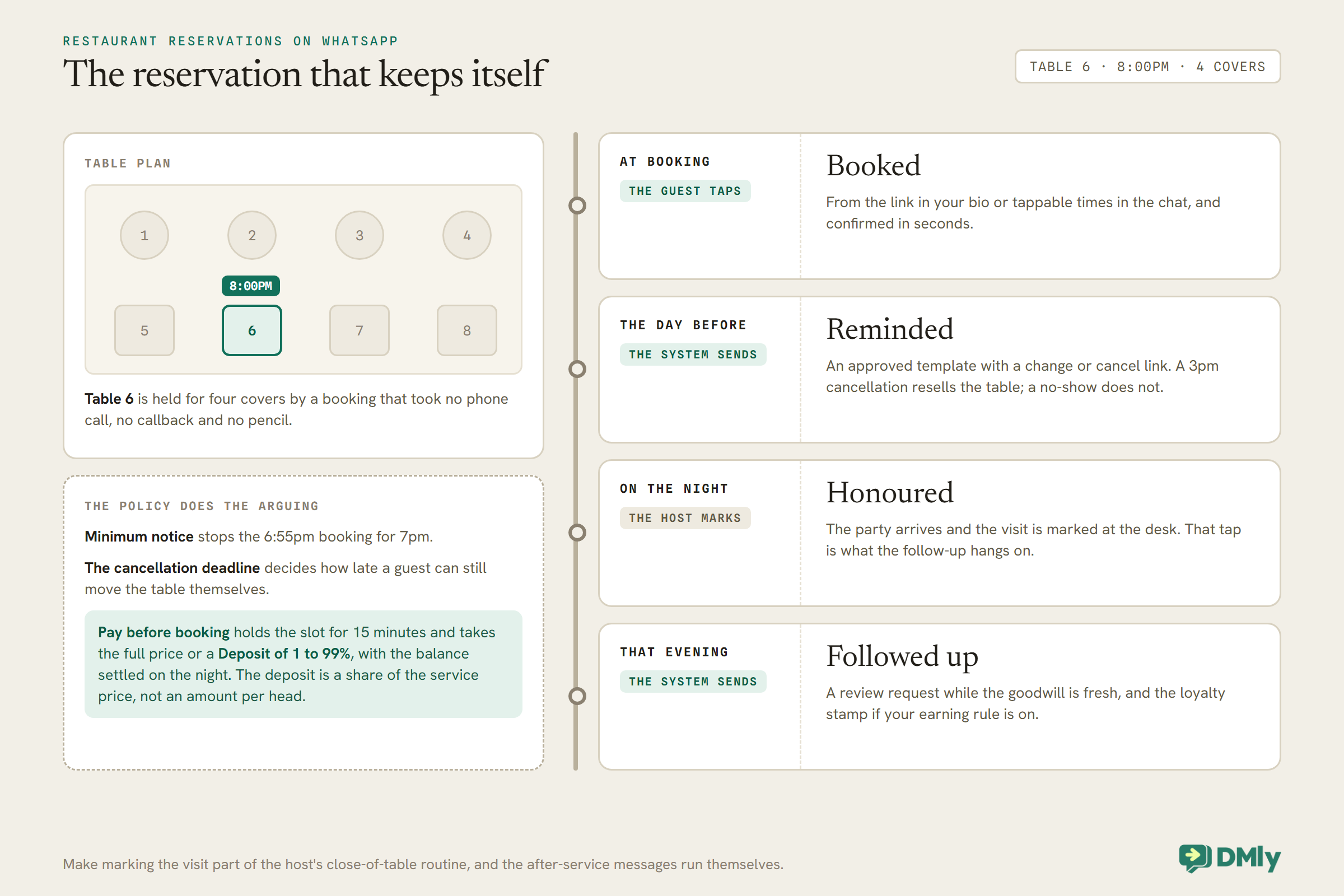
One documented behaviour to build around, familiar from every service business we cover: appointments nobody marked auto-complete about a day after the slot, and on the default setting that fires Appointment completed, so a no-show nobody marked can still get the review request and the loyalty stamp. Set Appointments nobody marked to Wait for review, and make the mark part of your host’s close-of-table routine, and the after-service machinery only runs for guests who came.
Delivery, collection and cash on delivery
If you deliver, the same thread carries the logistics. The Request Location step (a WhatsApp-specific flow step) asks for the drop pin instead of a dictated address, which alone removes a fifth of delivery mistakes. Status updates (“received”, “out for delivery”) are exactly the transactional messages WhatsApp’s utility category exists for, and most of them land inside your customer’s open 24-hour window. That window carries no Meta charge until 1 October 2026, and from that date in-window messages become billable at your market’s utility rate, so plan your order-status cadence with our guide to the October WhatsApp pricing change in view.
Cash on delivery deserves its own flow, because COD’s failure mode is the customer who ordered enthusiastically and answers the door reluctantly. A confirmation message after the cart (“Confirming your COD order of ₹780 to Indiranagar, reply YES to confirm”) filters the impulse orders before your driver leaves, and a driver-en-route message with the amount due removes the doorstep surprise. Restaurants that add the two-message COD pattern report fewer bounced deliveries for the least glamorous reason in this guide: the customer was simply asked twice.
The Six Questions, Answered While You Plate
Every restaurant’s inbox is the same six questions in rotation: are you open, where are you, do you deliver, is there parking, do you have vegan options, can I book for eight. A keyword automation or a trained AI reply answers all six in seconds, any hour, with the menu attached where relevant, and a Handover to Human wired for everything else, allergy questions above all. Answer speed here is not politeness, it is conversion, because the person asking about vegan options at 6:40pm is choosing between you and two other tabs.
Put the doors everywhere your customer already is: the wa.me link in your Instagram bio and Google Business Profile, and QR codes where they earn most, on the door for the walk-past crowd, on tables for “join the list, get the specials”, on the takeaway bag for the reorder. Each QR can carry its own tag, so you learn which door actually feeds the list.
Two boundaries keep the answering machine trustworthy. Allergies are the hard one: an AI that confidently declares a dish nut-free has made a promise your kitchen has to keep, so instruct it explicitly to hand allergy and dietary-safety questions to a human, and test it with exactly those questions before your customers do. Complaints are the soft one: a cold delivery or a forgotten side wants a person inside two minutes, because a complaint answered fast in private is a one-star review that never got written. The automation’s job in both cases is speed of handover, not cleverness of answer, and a restaurant that gets those two boundaries right can automate everything else with a clear conscience.
Filling the Quiet Shift: Specials, Broadcasts and Slow Tuesdays
Here is where restaurants have an advantage almost no other business gets: a product people happily hear about daily. Nobody wants a plumber’s newsletter; plenty of people want to know today’s special. That makes your opted-in broadcast list the single most undervalued asset you own.
The discipline that keeps it working:
- Build the list at the counter, not online. The table QR plus one line (“Get tomorrow’s specials on WhatsApp”) recruits people who have already eaten your food. Opt-in is mandatory for marketing messages, and outside a customer’s 24-hour window a broadcast travels as an approved marketing template, so get the template approved before launch week, not during it.
- Segment by appetite. Lunch regulars, weekend bookers, the delivery-only crowd: each is a saved segment, and “Thursday’s slow, here’s tonight’s special for the lunch crowd” to two hundred of the right people beats a blast to two thousand.
- Make the message a photograph and a deadline. One dish, shot well, “until we run out tonight”. The economics are honest scarcity, and the send takes four minutes. Our live guide to WhatsApp broadcast best practices covers cadence and wording in depth.
- Respect the exits. Opt-outs are honoured automatically, and the shrinking-list panic is misplaced: the list that remains reads you, which is the entire point of the channel. One case study worth knowing, with its label attached: Meta’s Optical 88 study (self-reported, as vendor cases are) measured a 97% coupon open rate and 43 times email’s click-through when coupons moved to WhatsApp. Directionally, that is why the specials list works.
Repeat Visits: Loyalty, Reviews, Win-Backs and Gift Cards
The fourth moment is where the compounding lives, and every piece of it runs on machinery you have already met.
The digital stamp card. DMly’s loyalty gives points per qualifying order, and when a customer’s balance crosses your threshold, the system mints a personal reward coupon and messages the code automatically: tenth coffee free, without the cardboard. Set the earning condition deliberately (orders on Paid or on Confirmed) and let refunds claw points back on their own. The full recipe lives in the restaurant loyalty guide coming as its own piece.
The review request. A few hours after a marked visit or a completed order, the built-in Request Google review step asks at the moment goodwill peaks. Restaurants live and die on local search, and a steady drip of fresh reviews is worth more than any single campaign; our Google reviews guide has the wording.
The win-back. A saved segment on days since last order finds the drifted, and a specific message (“the suya special is back this weekend”) with a short-window coupon reaches the ones who opted in. Specific beats sentimental, every time it is tried.
Gift cards. Sold through their own purchase invoice, delivered as a code, redeemed by your staff against a bill, with expiry handled by a daily sweep. For restaurants they are December’s quiet revenue machine, bought by people who may never eat with you for people who will.
Five Restaurant WhatsApp Messages to Copy
| Message | When it sends | Wording that works |
| Order confirmation | Cart received | “Got it! Two smash burgers and a strawberry shake, $23.40. Ready for collection at 7:25pm. Pay here, or cash at the counter: [link]” |
| Reservation reminder | Day before | “Looking forward to seeing you tomorrow at 8pm, table for four. Plans changed? You can move or cancel here in two taps: [link]” |
| Daily special | To the opted-in segment | “Tonight only: pepper-smoked catfish, whole, with two sides. Twelve portions. Reply SAVE ME ONE and it’s yours till 7.” |
| Win-back | Segment: 45+ days quiet | “The suya platter you used to order is back on this weekend. Your usual table Thursday, or delivery? Either way: [link]” |
| Review request | Evening after a visit | “Thanks for coming in tonight! If dinner earned it, a Google review keeps a small kitchen busy. One tap: [link]” |
The register across all five: specific dishes, real numbers, honest scarcity, and never more than one ask per message. A specials message that also requests a review and mentions the loyalty scheme is three messages wearing a trench coat, and your customers can tell.
Measure the machine monthly, with three numbers: orders arriving by cart versus phone (the migration you are engineering), the reservation no-show count from the appointment reports (the reminder’s report card), and your opted-in list’s size against its opt-out rate (the health of your quiet-shift engine). If all three move the right way for two consecutive months, the phone has been beaten.
How to Set Up WhatsApp Automation for Restaurants
- Connect the number and answer the six questions. Official API through DMly, keyword answers plus the AI for the long tail, and allergy questions routed to humans, always.
- Put the menu in the catalogue and switch on the cart. Commerce Manager for the items, Bot Setup → Commerce for the switches, and the cart flow with payment and cash branches. Mirror SKUs into Offerings if you track stock or want order records.
- Open reservations. Table services with real turn times, the booking link in your bio and profile, the day-before reminder with the cancellation link, and prepayment on the nights that deserve it.
- Recruit the list. Table QRs, the counter line, the takeaway-bag code. Get your specials template approved the same week.
- Turn on the compounding. Loyalty earning rules, the review request on marked visits, the win-back segment. None of these takes an hour, and together they are the difference between a full March and a mystery.
Common Problems With WhatsApp Automation for Restaurants
| Symptom | Cause | Fix |
| Carts arrive but nothing happens | No published flow on the cart trigger, so the bot pauses and waits for a human | Publish the cart flow; brief staff that a paused thread is a waiting customer. |
| Cart orders never reach the books | A WhatsApp cart creates no Finance order and moves no stock by itself | Have the flow create the order or invoice against matching Offerings SKUs. |
| Customer wants to change a sent cart | Meta’s rule: carts cannot be edited once sent | Handle changes conversationally; confirm the corrected order in the thread. |
| The menu message will not send | More than 30 items in a multi-product message, or more than 10 in a carousel | Send the menu in sections, or share the full catalogue instead. |
| Reminders did not go out for a booking | Unconfirmed booking or opted-out contact; reminders skip rather than retry | Check both states before suspecting the system. |
| Review requests and loyalty stamps reach guests who never came | Unmarked visits auto-close as completed about a day later, which fires Appointment completed by default | Set Appointments nobody marked to Wait for review, and make the mark part of closing the table. |
| You wanted a deposit, got full price | The service’s Deposit field is blank, so Pay before booking charges the full price | Set a Deposit percentage on the group service; settle the balance on the night. |
| Broadcast reach keeps falling | Too broad, too often; opt-outs doing their job | Tighter segments, better dishes, fewer sends. |
Restaurant WhatsApp Automation FAQs
Can customers order food directly through WhatsApp?
Yes. Your menu lives in the WhatsApp catalogue, customers browse it inside the chat, add dishes to a cart and send it; your automation confirms the order, takes payment through a link or arranges cash on collection, and the whole exchange stays in one thread. What the cart does not do by itself is create accounting records or move stock, which is why serious builds mirror the menu into DMly’s products.
Can I take table reservations on WhatsApp?
Yes, through the booking machinery: table types as services with turn-time durations, bookable from a link or tappable times in the chat, confirmed instantly and reminded the day before with a change-or-cancel link. Minimum notice and cancellation deadlines are enforced by your booking policy, and high-value nights can require prepayment, in full or as a deposit percentage, that holds the table while the customer pays.
How do I send a daily specials broadcast without annoying people?
Only to people who opted in, ideally recruited at the table or counter, and outside each customer’s 24-hour window the message travels as an approved marketing template. Then let the product carry it: one dish, one photo, one deadline, sent to the segment that actually eats at that time of day. Opt-outs are honoured automatically, and a smaller list that reads you beats a bigger one that mutes you.
Does a WhatsApp loyalty program work for a café?
It is the digital version of the stamp card, minus the cardboard: points per qualifying order, and when the balance crosses your threshold the customer is automatically messaged a personal reward code your counter redeems against the bill. Refunds claw points back on their own, and nobody has to remember to bring anything.
What should never be automated in a restaurant chat?
Allergies and dietary safety, complaints, and anything where a wrong answer has consequences beyond inconvenience. Wire those to a human immediately, and if you run an AI reply for the factual long tail, instruct it to hand over allergy questions rather than answer them. The rest (hours, menu, orders, bookings, parking) automates safely and should.
Do I need a website or an ordering app as well?
Not to start. The catalogue is the menu, the chat is the checkout, the booking link handles tables, and your Google Business Profile plus an Instagram bio link are the doors. Restaurants with an existing site simply add the WhatsApp button beside the order button and let customers choose; the ones without a site lose nothing, because those customers were never going to a website anyway, they were going to the phone.
What does WhatsApp automation for restaurants cost to run?
DMly plans include the catalogue integration, bookings, broadcasts, loyalty and the automations, with a 7-day trial and no card. Meta bills template messages delivered outside a customer’s 24-hour window at its per-message rates, passed through without markup. In-window replies, which is most of your order traffic, carry no Meta charge until 1 October 2026, and from that date they are billable too at your market’s utility rate, which our guide to the October WhatsApp pricing change works through. The specials broadcast is where volume lives, which is also where the revenue does.
Take the phone off the pass
Orders through the catalogue, reservations that remind themselves, specials that fill Tuesday, and regulars who come back. On the WhatsApp number your customers already message.
See ordering and reservations in DMly
The Phone, Retired
Go back to the ringing phone at the top of this page. Every ring was one of four things: an order, a table, a question, or a regular you had not heard from in a while. The build above gives each of them a better door than the phone ever was, and the machinery to follow up in the hours when no restaurant has ever had spare hands.
Start with the six questions and the reservation link this week, add the catalogue when the photos are ready, and recruit the list from the tables you are already serving. By the time the specials broadcast fills its first slow Tuesday, the phone will have become what it should have been all along: the channel of last resort, answered when there is genuinely a hand free to answer it, which in a good restaurant is exactly as rare as it should be.
Writing about WhatsApp automation, bookings and growth for local business.
Turn WhatsApp into your busiest channel.
Start free and run message, bookings, payments and reviews in one place.
