
How to Build a Loyalty Program for Your Small Business
Name your five best customers. Not your five favourite ones, the five who have actually spent the most with you this year.
Most owners get to two and stall. The rest of the answer is buried in the booking history, and that gap is exactly why loyalty schemes get started and then quietly abandoned. Scroll back through a good Saturday and the shape of it shows up: nearly half of the day’s clients were in for the first time, and you can’t remember when the regulars from spring last came in. There’s a drawer of paper stamp cards under the till that nobody remembers to bring.
You’ve thought about a loyalty program before. Points, maybe. A membership, perhaps, like the gym down the road. But every version you’ve looked at either needs an app your customers won’t download, or a plastic card they’ll lose, or a spreadsheet you’ll stop updating by March.
The good news is that the customers who already know you are the cheapest people to bring back, and they’re already on WhatsApp. In this guide, we’ll look at why a loyalty program is worth building, what to decide before you start, how to set up a points-based program and a membership plan step by step in DMly, how it changes by industry, the automations to add next, best practices, troubleshooting, and the questions owners ask most.
Why Build a Loyalty Program at All?
Most local businesses spend their marketing energy on strangers, and the maths points the other way. Ads, first-visit discounts, a boost on the latest Reel. Harvard Business Review, citing Bain & Company research, puts the cost of acquiring a new customer at five to 25 times the cost of keeping an existing one, and notes that lifting retention by 5% can lift profits by 25% to 95%.
- 5 to 25× the cost of acquiring a new customer compared with retaining an existing one. Harvard Business Review, citing Bain & Company
- 25% to 95% profit increase from a 5% improvement in customer retention. Bain & Company research reported by HBR
- 63% of consumers are willing to switch to a competitor after just one bad experience. Zendesk CX Trends 2025
- 1 billion+ conversation threads with businesses every day across WhatsApp, Messenger and Instagram. Meta, Q3 2025 earnings call
A loyalty program is simply the system that turns those numbers in your favour. It gives regulars a reason to choose you again when a competitor is offering 20% off, it gives you a way to notice when someone has gone quiet, and, done well, it makes your best customers feel like members rather than transactions.
There’s a second reason it matters now: the channel. Meta reported more than 1 billion active conversation threads between people and businesses every day across WhatsApp, Messenger and Instagram. A program that lives inside those chats, where the reward arrives as a message and the redemption happens at the counter, has none of the friction of an app or a card. That is the whole idea behind running loyalty on WhatsApp.
Takeaway: retention is the highest-return marketing a small business can do, and chat is where it happens with the least friction.
What You Need Before You Start Your Loyalty Program
Skip this part and you will build a loyalty program nobody joins. Before you touch any settings, get four things straight.
- A single, honest goal “More visits per client”, “more members on a monthly plan” or “bring back lapsed clients” lead to different designs. Pick one to start.
- Your unit economics Know your average ticket and margin. A “tenth coffee free” costs you a coffee; a “10% off every visit” costs you 10% of your best customers’ revenue forever. Rewards should be generous enough to notice and cheap enough to repeat.
- Consent to message people WhatsApp only allows business-initiated messages to people who have opted in, and you must honour opt-outs. Capture opt-in at booking, at the counter (a QR code that opens a chat) and on your website, and store it on the contact. Our guide to sending bulk messages officially covers the consent side in detail.
- Your catalogue and payments in one place Points are earned on real transactions: paid invoices, confirmed orders, completed appointments, attended classes. If your services, prices and payments live in five different apps, no loyalty system can see them. In DMly they live in Offerings and Finance, with a payment gateway connected.
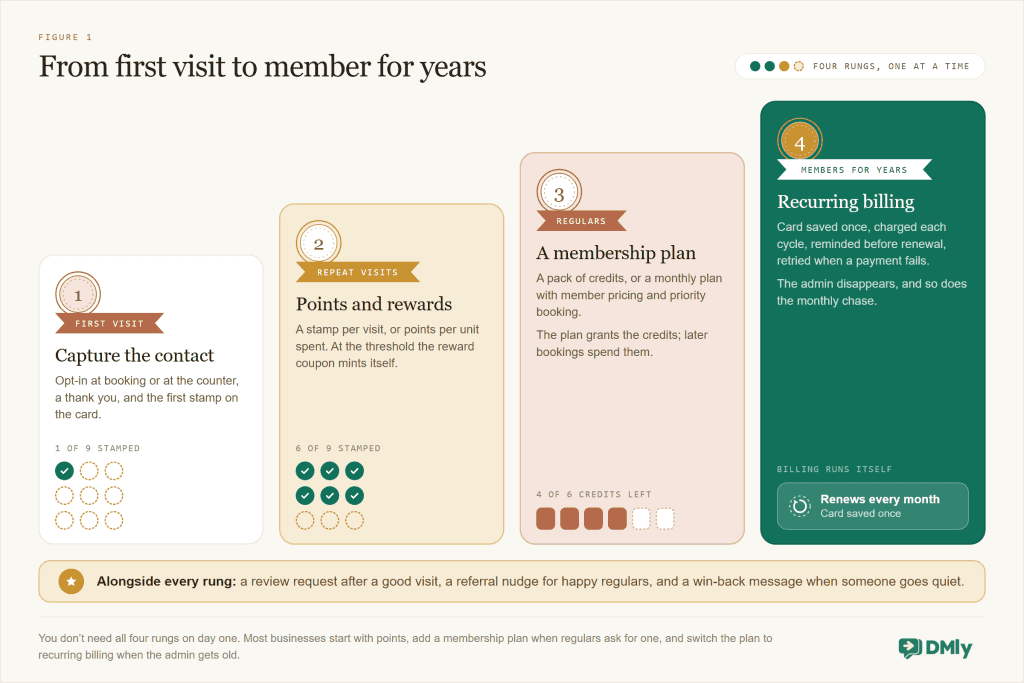
Then choose your mechanic. Most small business loyalty programs are one of four building blocks, and the best ones combine two of them.
| Building block | What the customer experiences | Best for | Watch out for |
| Points and rewards | Earn on every visit or every unit spent; hit a threshold; get a reward automatically | Salons, cafés, restaurants, retail, clinics with repeat treatments | Thresholds set so high nobody reaches them; staff forgetting to log visits |
| Automatic reward triggers | A perk that arrives because something happened: a birthday, a milestone, a lapse | Any business with a contact list and dates | Messages outside the WhatsApp window need approved templates |
| Membership plans | Buy a bundle: eight classes, six massages, a monthly “glow” plan with member pricing | Gyms, studios, spas, tutors, clinics | Credits that never get used; members who feel locked in |
| Recurring subscriptions | Card saved once, billed on a schedule, reminded before renewal, retried when it fails | Anyone selling a monthly plan or retainer | Failed payments and silent churn if nobody follows up |
We compare these more deeply in a companion piece on loyalty points versus discounts versus memberships. The short version: points reward frequency, memberships reward commitment, subscriptions make commitment effortless, and triggers make all three feel personal.
Takeaway: decide the goal, the economics and the consent story first; then pick the rung you’ll build this month.
How to Build a Points-Based Loyalty Program in DMly
With a platform like DMly, your loyalty program isn’t a separate app bolted onto your messaging. It sits on top of the same invoices, orders, appointments and classes you already run, so points are earned by real activity and rewards are delivered in the same WhatsApp chat the customer booked in. Here’s the mechanic first, then the build.
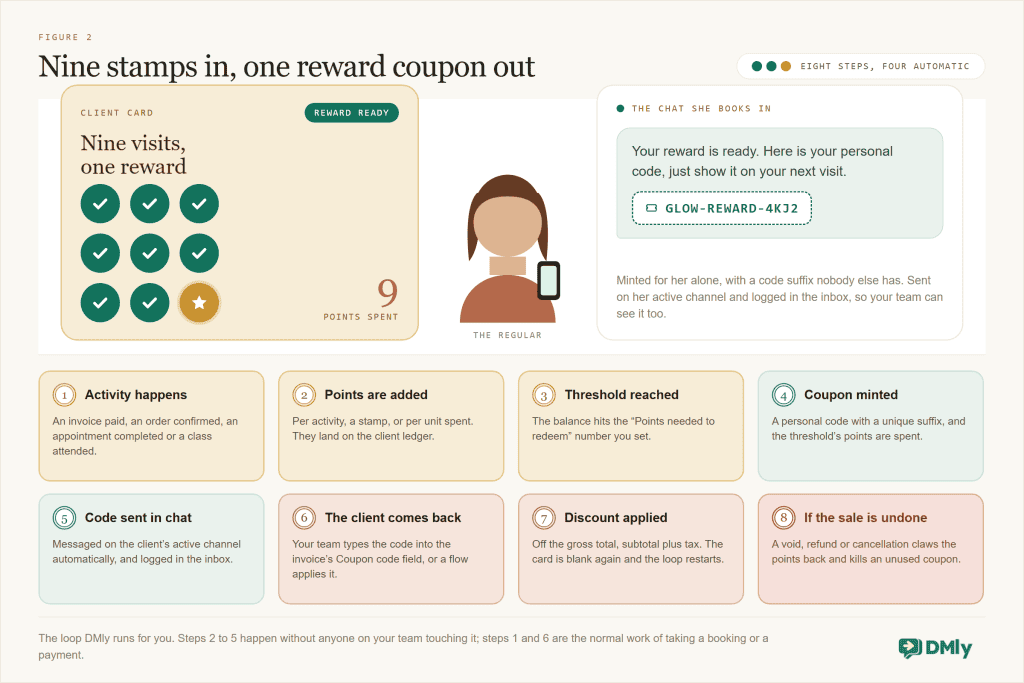
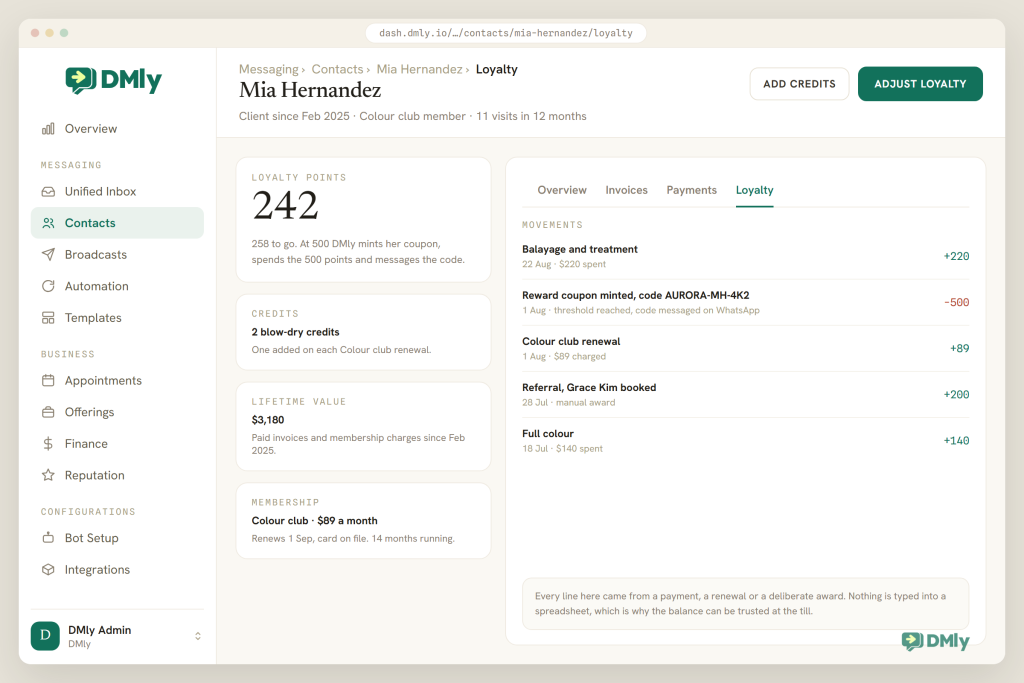
In DMly, every loyalty reward is a coupon. Your clients earn points for qualifying activity; when a balance reaches the threshold you set, DMly mints a coupon for that client, with a code suffix unique to them, and messages the code on their active channel automatically. The client shows the code next time, your team enters it on the invoice, and the discount comes off. There is no second discount system to learn.
Now the build. Budget an hour for the settings and a week of quiet running before you announce it.
- Design the program on paper. Three decisions. How points are earned: per activity (one point per visit or order, a digital stamp card) or per amount spent (one point per unit of currency, which rewards bigger tickets). The threshold: how many points unlock a reward. The reward: a percentage or a fixed amount off, because a DMly loyalty reward is a coupon. A nail studio might choose one point per completed appointment and a reward at 9, so the tenth visit is discounted; a D2C brand might choose one point per unit spent and a reward at 200.
- Get the plumbing in place. Points come from paid invoices, confirmed orders, completed appointments and attended classes, so your services and products need to be in Offerings and a payment gateway connected under Configurations → Integrations (Stripe, PayPal, Paystack, Razorpay, MyFatoorah or Mercado Pago). Cash is fine too: your team records the payment on the invoice and the points still count.
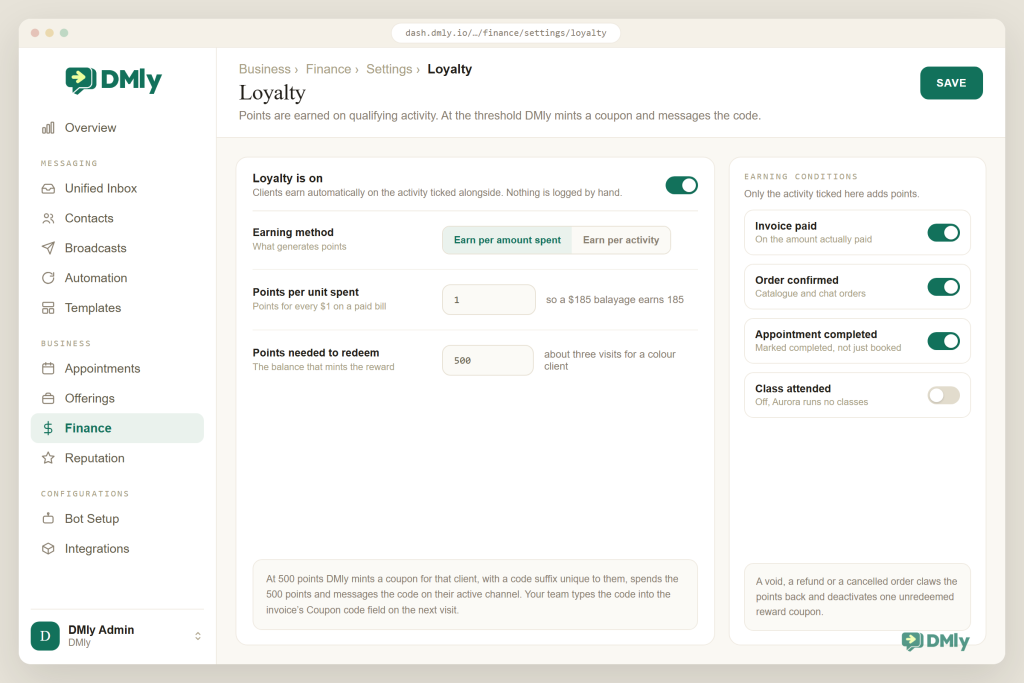
- Open Finance → Settings → Loyalty and set the earning method. The switch offers Earn per amount spent (with a “Points per unit spent” field) or Earn per activity (with “Points per activity”). Per activity is the default and gives a stamp-card feel; per amount spent suits shops and brands where basket size varies.
- Set “Points needed to redeem” and the reward. This is the balance a client has to reach. As soon as it’s reached, DMly creates the coupon for that client and spends the threshold’s worth of points, so the count starts again. Two purchases landing at the same moment can’t mint two coupons or push a balance below zero. Set the reward the coupon carries on the same tab.
- Choose the earning conditions. Three dropdowns decide when activity counts: orders on Paid (default) or Confirmed; appointments on Completed (default) or Confirmed; classes on Attended (default) or Booked. Two exceptions: an invoice for an appointment earns when the appointment is completed, not when it’s paid, so someone who pays upfront and no-shows earns nothing; and an invoice that sells a gift card earns nothing, because the points come later, from the invoice the card is spent against.
- Tell people, in the channel they already use. Build a small flow in the flow builder: on Contact converted to client, send a two-line welcome that explains the program. Add a keyword reply so “POINTS” answers with the live balance using the
{{loyalty.points}}token, and put one line about the program in your booking confirmation. No app, no card, no sign-up form. - Run it as part of normal work. Your team marks appointments completed and classes attended and takes payments as usual; the points follow. For a walk-in that didn’t go through an invoice, or a goodwill gesture, open the contact and use Adjust loyalty: enter points to grant, or a negative number to take points away, with a reason. The profile shows a live “Loyalty points” tile and a Loyalty tab with the latest movements.
- Redeem cleanly. When a client brings their code, your team types it into the “Coupon code (optional)” field while raising the invoice, or a flow applies it with the Apply Coupon step. The discount comes off the gross total (subtotal plus tax). A coupon outside its window or past its limits is refused and the bill is issued at full price, so nobody can double-dip by accident.
Three of those award moments are configurable, and the defaults are the right way round. Orders award on Paid or Confirmed, appointments on Completed or Confirmed, and classes on Attended or Booked. In each pair the default is the later one, because points should follow the thing actually happening rather than the thing being promised. Two consequences catch people out. An invoice raised from an appointment awards its points when the appointment is marked completed, not when the invoice is paid, so a client who settles up front earns nothing until somebody closes the booking. And moving classes to Booked means a customer who reserves six and turns up to one still earns six times over, which is exactly the behaviour a loyalty scheme should not be paying for.
Do the arithmetic once before you set the coupon value. Because the discount comes off the gross total, a 10 per cent coupon on a bill of 100 plus 20 in tax takes off 12, not 10. Budget the cost of your programme against ex-tax figures and it will quietly cost you more than you planned. A minimum subtotal on the coupon is measured the same way, against the gross rather than the subtotal alone.
Worked example: A nail studio sets one point per completed appointment and nine to redeem, with a fixed amount off worth roughly one gel manicure. After a client’s ninth completed appointment, DMly messages her a personal code in the WhatsApp chat she books in; on the tenth visit the receptionist types it into the invoice. Nobody counted stamps.
Takeaway: the settings take an hour; the discipline that makes it work is marking appointments completed and taking payments through DMly, which you should be doing anyway.
How to Add Membership Plans and Recurring Billing
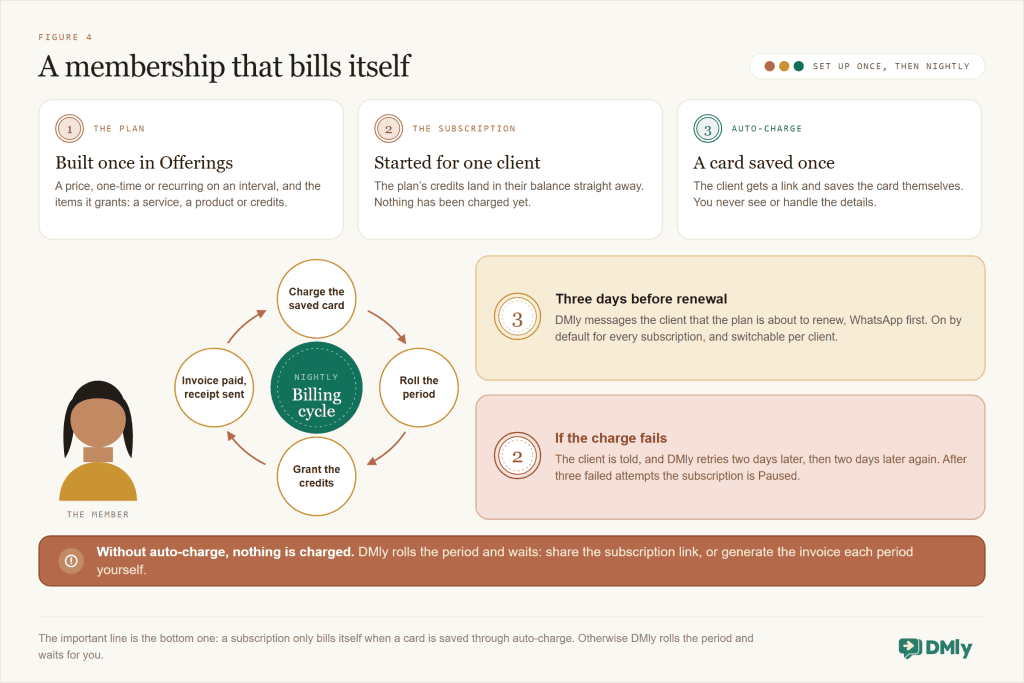
Points reward frequency; memberships reward commitment, and they smooth your cash flow. In DMly a membership is a Plan (the catalogue entry: price, one-time or recurring, and what it includes) plus a Subscription (that plan started for a particular client, with billing attached). Plans can grant credits, a prepaid balance that later bookings spend, which is how “eight classes a month” or “a pack of six massages” works.
- Create the plan in Offerings → Plans. Name it, set the price, and choose One-time (a pack bought once: ten classes, six massages) or Recurring on an interval of days, weeks, months or years. Add items: a Service, a Product with a quantity, or a Credit with an amount. A recurring plan re-grants its credits each cycle that is actually charged; a one-time plan’s credits never expire.
- Put a Credit cost on the services the credits should buy. A yoga class with a credit cost of 1 spends one credit per booking. Two things to know: credits are one pool per contact, not a per-service allowance, so only set a credit cost on services you’re happy for any credit to buy; and cancelling a booking does not give the credit back, so say so in your terms.
- Start the subscription for the client. Finance → Subscriptions → New subscription, choose the client, Select a plan, use Price override if this person pays a different rate, then Start subscription. The plan’s credits land in the client’s balance immediately. Nothing is charged yet.
- Turn on auto-charge. From the subscription’s menu choose Set up auto-charge. DMly sends the client a link to save their card once; you never see or handle the card details. Stripe, PayPal, Paystack, Razorpay and MyFatoorah support this; Mercado Pago takes pay links but can’t auto-charge. From then on, each billing date charges the card, rolls the period, grants the period’s credits, sends and marks the invoice paid, and sends a receipt.
- Or bill by hand, on purpose. Some clients won’t save a card. Share subscription link issues the invoice for the current period and sends a pay link over WhatsApp, SMS or email; Generate invoice drafts one for you to send from Invoices. On a manually billed subscription credits aren’t re-granted each period, so add them from the profile with Add credits when the client pays. Our guide to recurring subscriptions and automatic billing goes deeper on choosing between the two.
- Leave the reminders on. Three days before the next billing date DMly messages the client that the plan is about to renew; receipts and failure notices go the same way, WhatsApp first. They’re on for every subscription and can be switched off per client under Edit notifications (Renewal reminder, Payment receipt, Payment failed).
- Know the controls. Pause subscription stops billing immediately but doesn’t move the billing date, so if you resume after the date has passed the nightly run treats it as due; Adjust end date is usually the better tool for “stop it later”. Change plan swaps the plan at the next renewal or immediately, with the prorated difference invoiced on an upgrade; a downgrade never claws back credits. Cancel subscription stops future billing, refunds nothing and can’t be undone; credits already in the balance stay.
- Sell it in chat. Build a flow that shows the plan with the Send service/product/plan step, offers a button such as “Join Glow Membership”, and uses the Create Subscription step to start it and grant credits. Your team then completes the auto-charge setup or shares the subscription link for the first payment. Selling membership plans through WhatsApp is its own guide, and it also covers letting members pause instead of cancelling.
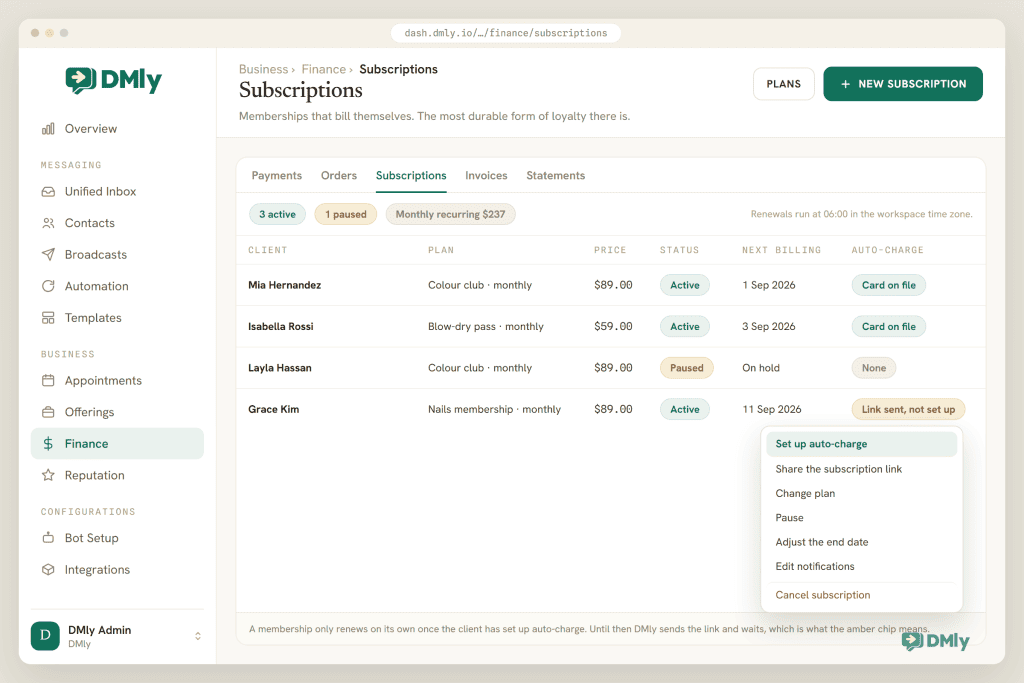
The mistake that costs money: Creating a plan does not sell it, and starting a subscription does not charge for it. A subscription without auto-charge rolls its period on the billing date and stops there: no invoice, no payment. Either set up auto-charge or make sharing the subscription link part of someone’s weekly routine.
Takeaway: a membership is a plan plus a subscription plus a saved card. Get all three in place for your first ten members and the admin disappears.
What a Loyalty Program Looks Like in Six Industries
The mechanics are the same everywhere; the recipe changes. Here’s how we’d start in each of the businesses DMly is built for. Salons, restaurants and gyms each have a fuller loyalty guide of their own, so treat these as starting points.
Salon or spa
Earn per activity: one point per completed appointment. Reward at 9 so the tenth visit carries a fixed amount off, roughly the price of an add-on like a scalp treatment. Add a “Glow” recurring plan: one facial credit a month, billed by auto-charge, with a members-only coupon for add-ons. Win-back segment: no purchase in 60 days.
Restaurant or café
The digital stamp card: earn per activity on confirmed WhatsApp orders, reward at 9 for “tenth coffee free” as a fixed amount off. For dine-in, staff raise the invoice in DMly or Adjust loyalty when the bill is paid. Birthday trigger: a dessert coupon with a per-contact limit of 1 and a 30-day validity window.
Gym or fitness studio
Memberships first, points second. An “Unlimited classes” recurring plan on auto-charge, or an eight-class one-time pack with a credit cost of 1 per class. The low-credit warning fires when a balance drops to 3, which is your cue to offer the next pack. Points per attended class feed a quarterly reward.
Clinic or dental practice
A “Care plan” recurring yearly with two hygiene-visit credits, billed once a year with a reminder three days before. Points on appointment invoices are awarded only when the visit is completed, so no-shows never earn. Keep rewards modest and professional: a fixed amount off, not a percentage.
Tutor or education centre
Monthly billing for a set number of lessons: a recurring monthly plan granting four lesson credits, each lesson costing one credit. Credits from a recurring plan lapse when the cycle ends, which keeps parents booking. Points per attended class can unlock a free assessment.
D2C brand
Earn per amount spent on orders paid through DMly invoices or WhatsApp catalogue orders; reward at 200 points as a fixed amount off. If your store runs on Shopify or WooCommerce, DMly’s store triggers add a “Customer milestone” event (a spend or order-count threshold) that can mint a store discount code and message it.
NGOs and non-profits can use the same tools for supporter recognition: a recurring plan for monthly giving, a receipt each cycle, and the “Birthday / key date” trigger for the anniversary of a first donation, with the language kept to thanks rather than rewards.
Takeaway: appointment businesses lean on points and completed visits; class and studio businesses lean on plans and credits; brands lean on spend-based points. Mix once the first mechanic is running.
Which Loyalty Program Automations Should You Add Next?
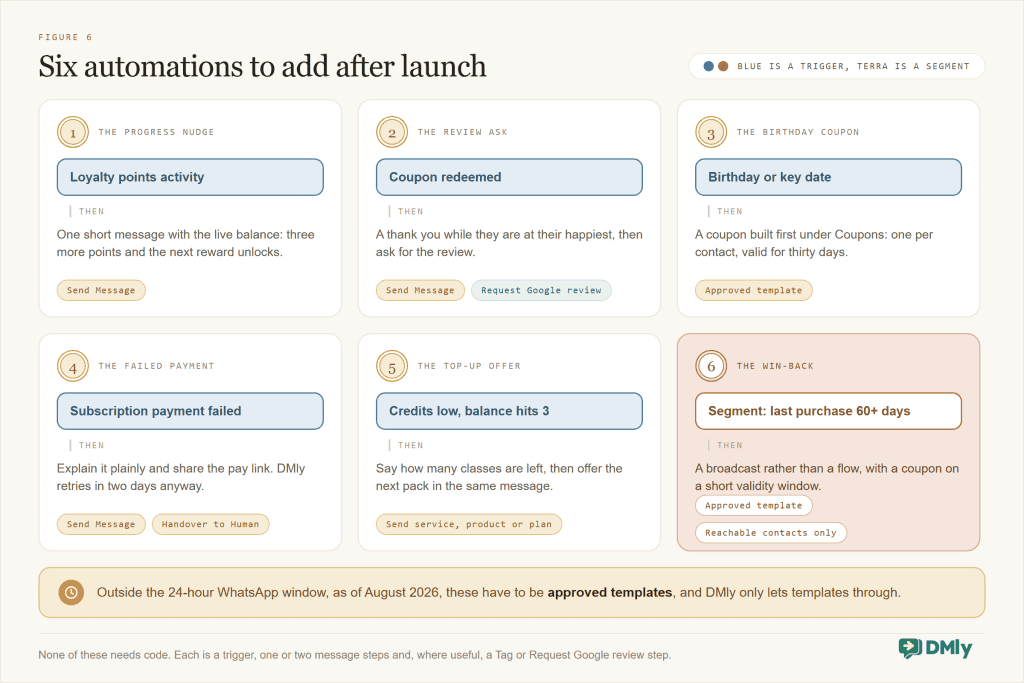
The loyalty program above already runs itself: points accrue, coupons mint, messages go out, cards get charged. The automations below add the personal touches customers remember. Each one is a trigger you pick in DMly’s trigger list plus a few steps in the flow builder. Rewarding repeat customers automatically gets a whole guide of its own; here are the six we’d build first.
1. The progress nudge
Trigger: Loyalty points activity, which fires when a client earns, redeems or has points revoked. Action: a Send Message step with the live balance: “Thanks {{first_name}}, you now have {{loyalty.points}} points. Rewards unlock at 9.” Keep it short. If your points are per unit spent and small purchases are frequent, send the balance from a monthly broadcast to a segment instead of on every movement; the live token works there too.
2. The thank-you and review request
Trigger: Coupon redeemed. Actions: a thank-you, then the Request Google review step. Someone who has just used a reward is your happiest customer of the day; that’s the moment to ask. Our Google Business Profile automation guide covers the review side end to end.
3. The birthday coupon
Trigger: Birthday / key date. First create the coupon under Finance → Settings → Coupons: a fixed amount off, a minimum subtotal if you want one, a per-contact limit of 1 and a validity window of a month. Then the flow sends it with a warm line. Birthdays come from the contact’s date field, so ask for it at booking, and because most birthday messages land outside the 24-hour window, send it as an approved template.
4. The failed-payment message
Trigger: Subscription payment failed. DMly already tells the client and retries two days later, then once more, then pauses after three failures. Your flow adds the human layer: a short explanation, the offer to update the card, and a Handover to Human step if they reply. Recovering failed membership payments automatically gets its own guide; this is the outline.
5. The top-up offer
Trigger: Credits low, which fires once when a deduction takes a balance from above 3 to 3 or below (the threshold is fixed at 3). Action: “You have {{credits.balance}} classes left” followed by a Send service/product/plan step offering the next pack. This is the highest-converting message a studio can send.
6. The win-back
Not a flow trigger but a segment: in Contacts, build a saved segment on Last purchase older than 60 days (or Number of days since last activity), excluding members on an active plan by tag. Use it as the audience of a broadcast with an approved marketing template and a coupon with a short validity window. Segments are re-evaluated when you use them, so the list is always current, and “Reachable contacts only” keeps opted-out contacts out. Our post on driving repeat sales with WhatsApp marketing has the follow-up messages.
Client pays for the ninth appointment → appointment marked completed → 9th point lands → DMly mints a personal coupon and spends the 9 points → WhatsApp: “Your reward is ready, here’s your personal code” → next visit, code typed into the invoice → discount off the total → “Coupon redeemed” fires → thank-you message → Request Google review
Takeaway: add one automation a week. The progress nudge and the review request move the needle most; the win-back keeps the list alive.
Best Practices That Keep the Program Healthy
- Make the first reward reachable. A threshold most regulars hit within six to eight weeks keeps the program alive in their heads. You can raise it later; you can’t rescue a program nobody ever redeemed.
- Reward with a fixed amount, not a percentage, when tickets vary. A fixed amount off is predictable for your margin and easy to explain in a chat message. Percentages are for programs where the average ticket is stable.
- Earn on completion, not on booking. DMly’s defaults (appointments on Completed, classes on Attended, orders on Paid) mean no-shows never earn. Change them only if you understand why.
- Treat the WhatsApp rules as design constraints. As of August 2026, WhatsApp lets you message freely for 24 hours after the customer’s last message; outside that, only approved templates, and offers count as marketing templates that need opt-in. Reward messages usually land inside the window because they follow a visit; birthdays and win-backs don’t, so template them. Never send offers to people who haven’t opted in, and let DMly’s opt-out handling (STOP adds an Unsubscribe tag and suppresses automated sends) do its job.
- Build tiers with segments and tags, not spreadsheets. A saved segment on Loyalty points or Total spend above a level, plus a “Gold” tag applied by a flow, gives you member tiers you can broadcast to and greet by name. Keep two tiers at most.
- Review the numbers monthly. Segments on Loyalty points, Order count and Last purchase show who’s engaged; the Lifetime value tile on each profile shows what a regular is worth; the Subscriptions list shows Active versus Paused. Our post on metrics to track after automating messaging gives you the wider dashboard.
- Be honest about credits. Say when they expire and that cancellations don’t refund a credit. Members who understand the rules stay; members who feel tricked churn loudly.
For the broader retention playbook that surrounds a loyalty program, from response times to re-engagement, see our guide on using messaging to improve customer retention.
Takeaway: generous, reachable, honest, and inside the chat. That’s the whole philosophy.
Troubleshooting: When Points, Coupons or Renewals Misbehave
| Symptom | Likely cause | What to do |
| “She paid but got no points” | The invoice was for an appointment; points are awarded when the appointment is completed, not when it’s paid. Or orders are set to Confirmed, so paid invoices don’t earn. | Mark the appointment completed. Check the earning conditions on the Loyalty tab. |
| Balance dropped overnight | An invoice was voided, a payment refunded or a confirmed order cancelled; each claws points back and deactivates one unredeemed loyalty coupon. | Open the client’s Loyalty tab and read the movements. If the reversal was a mistake, use Adjust loyalty with a reason. |
| Coupon refused at the counter | Outside its validity window, below the minimum (measured against subtotal plus tax), usage or per-contact limit reached, or the invoice already carries a coupon. | Check the coupon’s rules under Finance → Settings → Coupons; the bill is issued at full price when refused, so nothing has been lost. |
| Reward message didn’t arrive | The client’s active channel wasn’t reachable (on WhatsApp, check whether the 24-hour window had closed). | Look in the inbox: the code is logged against the conversation. Send it by hand with an approved template if needed. |
| Membership never charged | Auto-charge isn’t set up; DMly rolled the period and stopped. | Set up auto-charge (the client saves a card once) or Share subscription link each period. |
| Subscription went to Paused by itself | Three auto-charge attempts failed, two days apart. | Open the subscription; the red banner shows the gateway’s reason. Turn off auto-charge, Set up auto-charge for a working card, then Resume subscription. |
| Member says classes “vanished” | Recurring-plan credits lapse when the cycle ends; expiry only removes what wasn’t used. | Show the Credits tab on the profile. Explain the rule at sign-up next time. |
| Resumed a paused plan and it charged immediately | Pausing doesn’t move the billing date; the nightly run saw an overdue date. | Next time: Resume subscription first, then Adjust end date to a future date before the nightly run. |
Takeaway: almost every “bug” is a status that wasn’t set (completed, paid, attended) or a subscription without a saved card. Check those first.
Why DMly Is the Best Place to Run a Small Business Loyalty Program
Plenty of tools will send a WhatsApp message; very few can run a loyalty program off your real transactions. Very few can award a point because an appointment was completed, mint a reward, deliver it in the same chat, take the payment for the membership that goes with it and retry the card when it fails. That’s the difference between a chat tool with a loyalty add-on and a platform that runs the business.
Loyalty is built on your real transactions
Points in DMly come from paid invoices, confirmed orders, completed appointments and attended classes, all of which already happen inside DMly’s appointments, offerings and invoicing. Nobody logs a visit twice, and a refund or a void takes the points back automatically. Chat-only tools can’t do this because they never see the sale.
Rewards arrive where the customer already is
The moment a reward coupon is minted, DMly messages the code on the client’s active channel and records it in the inbox. No app, no plastic card, no “I forgot my code”, and your team sees the same thread the customer sees. Because DMly runs loyalty in chat across WhatsApp, Instagram, Messenger, TikTok, Telegram, SMS and live chat, the program works whichever channel a customer prefers.
Memberships and recurring billing are native
Plans and subscriptions live in the same product: one-time packs and recurring plans with credits, auto-charge with a card saved once through Stripe, PayPal, Paystack, Razorpay or MyFatoorah, renewal reminders three days out, receipts, failure notices, retries two days apart, pause, plan changes with proration, and an end date you can adjust. Most loyalty tools don’t attempt that part.
The CRM already knows who your regulars are
Every contact carries a live Loyalty points balance, credits, lifetime value, tags and stages in the contacts and CRM. Segments filter on Loyalty points, Credit balance, Total spend, Last purchase, Order count and Birthday month, so tiers, win-backs and VIP broadcasts are a filter, not an export.
Triggers, tokens and steps for the personal touches
Loyalty points activity, Coupon redeemed, Credits low, Subscription renewed, Subscription payment failed and Birthday / key date are triggers in the flow builder. {{loyalty.points}} and {{credits.balance}} are live tokens for any message. Apply Coupon, Issue Credits, Create Subscription and Request Google review are steps. The same events go out as webhooks and through Zapier, n8n and the API if you want them in a sheet or another tool.
| What a small business needs | Typical chat or loyalty tool | DMly |
| Earning points | Manual entry, QR scans or a separate POS integration | Automatic on paid invoices, confirmed orders, completed appointments and attended classes; manual Adjust loyalty when needed |
| Delivering the reward | App notification or email | Personal coupon code messaged on the client’s active channel and logged in the inbox |
| Redeeming | Show the app; staff look it up | Code typed into the invoice or applied by a flow; discount off the gross total; refused if invalid; reversals claw points back |
| Memberships | Separate billing tool | Plans with credits, subscriptions with auto-charge, reminders, retries, pause and plan changes in the same product |
| Segments and automations | Export a CSV; messaging triggers only | Saved segments on Loyalty points, Total spend and Last purchase; loyalty, coupon, credit, subscription and payment triggers plus finance steps |
| Cost of messages | Often marked up | No markup on WhatsApp; you pay Meta’s standard rates |
Launch a loyalty program
Points that earn themselves, rewards delivered in WhatsApp, membership plans that bill on schedule and retry when a card fails. Invoices and payments are included on every DMly plan, and the trial is 7 days with no card required.
Final Thoughts
A loyalty program for a small business doesn’t need an app, a card or a marketing agency. It needs a clear reward, a system that counts visits without anyone remembering to, a way to deliver the reward where the customer already is, and, when regulars are ready, a membership that bills itself.
DMly gives you all four in the same place your customers already book and pay: points on real transactions, coupons minted and messaged automatically, plans with credits, subscriptions with auto-charge and retries, and triggers for the birthday, the milestone and the win-back. Start with one rung of the ladder this week, add the progress nudge and the review request next week, and let the regulars you already have become the growth you were paying strangers for.
Frequently Asked Questions
Do my customers need an app or a card to join the loyalty program?
No. In DMly the program lives in chat. Points are added automatically on a booking, an order or a payment (or by your team for a walk-in), the reward code is messaged to the customer, and staff type it into the invoice when they redeem. There’s nothing to download or carry.
Points per visit or points per amount spent: which should I choose?
Per activity (one point per completed appointment, order or attended class) behaves like a stamp card and suits salons, cafés and clinics where visits are similar in value. Per amount spent suits shops and brands where basket size varies. Both are a switch on DMly’s Loyalty tab, with a single “Points needed to redeem” threshold.
How much should the reward be worth?
Enough to notice, cheap enough to repeat. A common starting point is a reward worth about one visit after nine or ten visits, or a few percent back on a spend-based program. Prefer a fixed amount off when ticket sizes vary. Because a DMly reward is a coupon, you can also set a minimum subtotal so a reward isn’t spent on a tiny bill.
What happens to points if I refund a payment or void an invoice?
DMly claws them back automatically. Voiding an invoice, refunding a payment on a paid invoice, or cancelling a confirmed order removes the points and deactivates one still-unredeemed loyalty coupon for that client. A coupon the client has already used is left alone.
Can I run a membership without saving customers’ cards?
Yes, but nothing will charge itself. Without auto-charge, DMly rolls the period on the billing date and stops. Use Share subscription link to issue the period’s invoice and send a pay link over WhatsApp, SMS or email, and add credits from the profile when the client pays. Auto-charge, with the card saved once through Stripe, PayPal, Paystack, Razorpay or MyFatoorah, is the version that runs on its own.
What if a member’s payment fails?
DMly tells the client and retries two days later, then once more after another two days. After three failed attempts the subscription is paused and the failure reason is shown on the subscription in the gateway’s own words. To restart, turn off auto-charge, set it up again with a working card, and resume. A flow on the “Subscription payment failed” trigger can add a personal message and a hand-over to your team.
Can I send reward and win-back messages on WhatsApp at any time?
As of August 2026, WhatsApp allows free-form messages for 24 hours after the customer’s last message; outside that window only approved templates can be sent, and promotional messages need the customer’s opt-in. Reward messages usually land inside the window because they follow a visit or payment; schedule birthday and win-back messages as templates, and let DMly’s opt-out handling exclude anyone who has said stop. Our guide to running a loyalty program on WhatsApp, and which of its messages count as marketing, works through the categories, what they cost and what the customer actually receives.
Writing about WhatsApp automation, bookings and growth for local business.
Turn WhatsApp into your busiest channel.
Start free and run message, bookings, payments and reviews in one place.
