

The business phone lives on the counter. In the morning the owner answers it between customers, at lunch the assistant picks it up, and in the afternoon whoever is nearest replies. By evening there are three different tones of voice in one customer’s chat, two people have answered the same question, and a request that arrived at 1pm is sitting unread because each of them assumed another had seen it. Nobody did anything wrong. One phone was simply never meant to be a team.
The best WhatsApp shared inbox software turns that phone into a team workspace: one WhatsApp number, every teammate on their own login, each conversation owned by someone, and the whole history visible to anyone who needs it. This guide compares eight platforms on how well they share the work, how they stop two people answering at once, how they keep the team informed, and what they cost per person. Prices were read on each vendor’s own pricing page on 25 September 2026.
A disclosure, up front: DMly publishes this blog and is one of the tools compared. We have described every tool, including our own, from its own pages and documentation, and said where each is the better choice. For the wider category, see our guide to the best WhatsApp Business software for small businesses.
When You Have Outgrown One Phone
A shared inbox is worth it the moment more than one person answers WhatsApp.
The signs are familiar: customers get two answers to one question, or none; nobody knows who promised what; staff use their personal phones to keep up; and when someone is off sick, their conversations go quiet. A shared inbox fixes these by putting one business number behind many logins, with conversations assigned to owners and visible to everyone who needs them. Choose a tool that connects through WhatsApp’s official Business Platform, which is also what lets it send approved templates to customers outside the 24-hour window.
What Separates a Good Shared Inbox
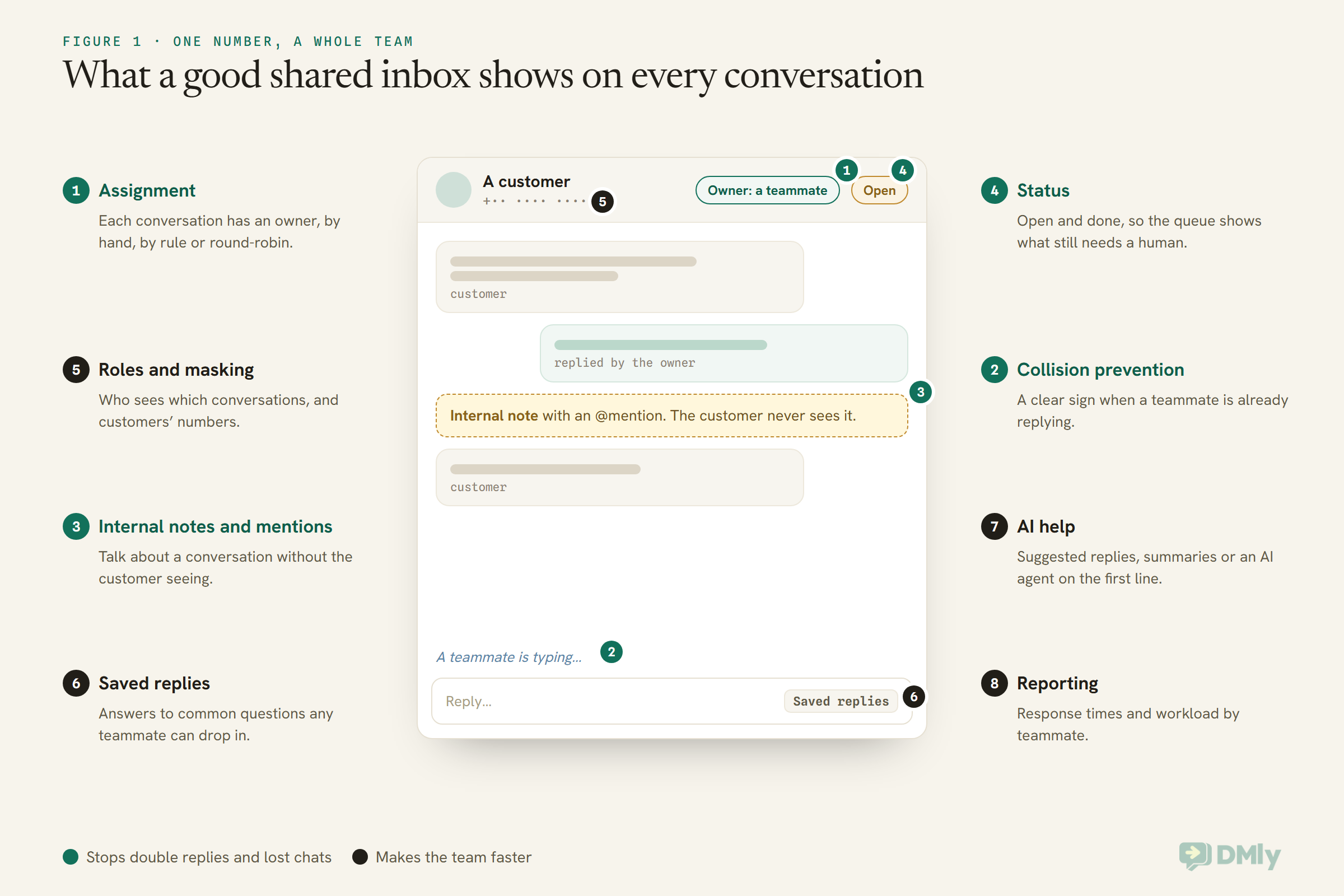
Every tool shows messages. The good ones make it clear who is handling what.
- Assignment: each conversation has an owner, set by hand, by rule or round-robin.
- Collision prevention: a clear sign when a teammate is already replying.
- Internal notes and mentions: talking about a conversation without the customer seeing.
- Status: open and done, so the queue shows what still needs a human.
- Saved replies: answers to common questions any teammate can drop in.
- Roles and masking: who sees which conversations and customers’ numbers.
- AI help: suggested replies, summaries or an AI agent handling the first line.
- Reporting: response times and workload by teammate.
The Quick Answer: Best by Situation
| If you are… | Look first at | Why |
| A local business of 2 to 15 people that books and invoices | DMly | Shared inbox with bookings, payments and CRM, priced per plan with seats included |
| A support team across many channels | Respond.io | Team and custom inboxes, collaborators and a mobile app |
| A European team handling email and messaging together | Trengo | Unified inbox with 10 or 20 users included and phone support on Pro |
| A WhatsApp-first team on a budget | Wati | Low entry price; team inbox with routing on Pro, round-robin on Business |
| A sales team working from their phones | DoubleTick | Mobile and web access with a team inbox and roles on Pro |
| An omnichannel team of ten | SleekFlow | 10 users on the entry plan, ticketing on Premium |
| A lead-heavy team wanting routing rules | Gallabox | Teams, round-robin, inbox views and business hours |
| A sales team that thinks in pipelines | Kommo | Unified inbox attached to deals, priced per user |
The Best WhatsApp Shared Inbox Software, Reviewed
1. DMly: best for small local teams that also book and invoice
How the team shares work. DMly’s inbox covers every connected channel. Assignment belongs to the contact, so one customer has one owner across all their threads. It is deliberately a label, not a lock: everyone who can open the Inbox still sees every conversation. By default, replying takes the conversation, so it follows whoever answered last; an admin can change that. Round-robin assignment is available through a flow step or the AI agent’s auto-assign tool.
Collision and collaboration. When a teammate is typing in the same conversation, others see “name is typing” above the reply box, on every channel. Internal notes support @mentions, which notify the teammate. Conversations are Open or Done; there is no snooze and no automatic close after silence. Saved replies let any teammate insert a stored answer, and anyone can take a conversation over from the bot.
Roles and pricing. Per-member controls can mask customers’ phone numbers and email addresses or remove the Inbox entirely for a teammate. Plans are $29, $65 and $149 a month billed yearly, with 3, 6 and 15 seats, and $10 a month per extra seat.
Watch out for. Only two statuses, and assignment that does not hide conversations, suit small teams; a large support desk wanting queues, snoozes and ticket states will find it simpler than it needs.
Best for: businesses where the people answering WhatsApp also take bookings and payments, so the inbox, calendar and customer record should be one tool.
2. Respond.io: best for support teams across channels
How the team shares work. Respond.io lists team and custom inboxes, collaborators, lifecycle management and contact and call activities, with a mobile app, plus AI assist and AI chat summaries.
Pricing. At 1,000 monthly active contacts, billed monthly: Starter $79 with 5 users (extra users $12), Growth $159 with 10 users ($20), Advanced $279 with 10 users ($24). WhatsApp fees are separate.
Watch out for. Pricing rises with monthly active contacts, so model a busy month.
Best for: support-led teams working WhatsApp alongside email, Instagram and other channels.
3. Trengo: best for European teams mixing email and messaging
How the team shares work. Trengo’s unified inbox handles email, WhatsApp, Instagram, Facebook and more, with its HelpMate AI agent, AI journeys and a website widget. Pro adds phone support and more security and integrations.
Pricing. Billed annually, Boost is €299 a month with 10 users and 6,000 conversations a year, and Pro €499 with 20 users and 18,000; extra users are €25 on Boost and €40 on Pro per month billed annually. Trengo defines a conversation as replies within a seven-day window, and AI-handled conversations carry a surcharge.
Watch out for. A yearly conversation allowance to watch, and a higher entry price than WhatsApp-first tools.
Best for: teams where email is as important as WhatsApp and everything should sit in one queue.
4. Wati: best for WhatsApp-first teams on a budget
How the team shares work. Growth includes team inbox staples: assign, track, automate follow-ups, tag and report. Pro adds an advanced team inbox with teams, auto routing and operator reports; Business adds round-robin chat assignment and multiple WhatsApp numbers, with phone number masking and roles.
Pricing. Billed annually: Growth $39 with 3 users and no option to add more, Pro $79 with 5 users ($24 per extra), Business $199 with 5 users ($59 per extra).
Watch out for. Growth’s three-user cap; a team of four is already on Pro.
Best for: small WhatsApp-first teams that also run campaigns.
5. DoubleTick: best for teams working on their phones
How the team shares work. DoubleTick lists a team inbox with 5 agents on Starter and 10 on Pro, access on mobile and web, and on Pro roles and permissions, number masking and agent and organisation analytics.
Pricing. Starter $170 a month and Pro + AI $308 a month, billed yearly. Its FAQ says there is no free trial, only a demo.
Watch out for. A high entry price and no trial with your own team.
Best for: sales teams who answer from their phones on the move.
6. SleekFlow: best for omnichannel teams of about ten
How the team shares work. An omnichannel inbox centralising messages, emails and calls, with basic analytics on volume, team workloads and individual responsiveness; Premium adds a ticketing system and role-based access control.
Pricing. Pro US$109 a month billed monthly with 10 user accounts and 500 monthly active contacts; Premium US$279; plus US$15 a month for WhatsApp number hosting.
Watch out for. Monthly active contact limits on the entry plan.
Best for: teams that want ten seats from day one across WhatsApp, Instagram, email and more.
7. Gallabox: best for teams that want routing rules
How the team shares work. Teams (up to 5, 10 or unlimited by plan), round-robin within teams, custom inbox views, a waiting message, business hours configuration, agent escalation and, from Essential, an inbox AI copilot.
Pricing. Billed annually: Basic $112 with 3 users as a hard cap, Essential $248 with 6 users ($18 per extra), Advanced $474 with 10 users ($24).
Watch out for. Basic cannot add users.
Best for: lead-heavy teams that want messages routed by rules, not grabbed by whoever is fastest.
8. Kommo: best for sales teams living in a pipeline
How the team shares work. A unified inbox on every plan, attached to sales pipelines, with a calendar, AI reply suggestions and summaries.
Pricing. Per user per month on six-month billing: Base $25, Advanced $35, Pro $45.
Watch out for. Per-user pricing adds up for larger teams, and each plan caps leads per user.
Best for: sales teams whose inbox is really a deal list.
Comparison at a Glance
| Tool | Entry price read | Users on entry plan | Extra users |
| DMly | $29/mo billed yearly | 3 seats | $10 per seat per month |
| Respond.io | $79/mo monthly (1,000 contacts) | 5 | $12 per user per month |
| Trengo | €299/mo billed annually | 10 | €25 per user per month (annual) |
| Wati | $39/mo billed annually | 3 | Not available on Growth |
| DoubleTick | $170/mo billed yearly | 5 agents | Not stated on the page |
| SleekFlow | US$109/mo monthly | 10 | Not stated on the page |
| Gallabox | $112/mo billed annually | 3 (hard cap) | From $18 on Essential |
| Kommo | $25 per user/mo (6-month billing) | Per user | Per user |
All prices exclude Meta’s WhatsApp charges, were read on 25 September 2026, and use different billing periods.
Moving From the WhatsApp Business App
Most teams start on the free app. Know what happens to your number when you move.
A shared inbox runs on WhatsApp’s business platform, and connecting your existing number to it is the step that surprises people. Wati’s pricing FAQ, for example, says you must first delete the WhatsApp account linked to the number before onboarding, and that WhatsApp chat backups cannot be imported. DMly’s documentation quotes Meta’s own sign-up conditions: to onboard through the Cloud API you either delete the existing WhatsApp account or use an eligible WhatsApp Business Account, and by default, connecting a number takes it over exclusively, so the phone app stops working on it.
DMly also offers a co-existence mode for teams that want to keep answering from the phone app on the same number. In that mode, messages sent from the app appear in the DMly inbox against the same contact, so the thread stays in sync, and a setting can pause the bot for a contact whenever someone replies from the phone. Co-existence is chosen once, at sign-up; switching modes means disconnecting and reconnecting the number.
Whichever tool you choose, ask before you connect: what happens to my current chats, can I keep using the app, and what do I need to do first? If you are moving from another provider, DMly’s docs note one more practical step: turn off two-step verification in your WhatsApp Business Manager first, or the migration fails.
Which Shared Inbox by Business Type
| Business | Team shape | Shortlist |
| Salon, clinic, gym, tutor | 2 to 15 people who also book and take payments | DMly |
| Online shop | A support team plus campaigns | Wati, SleekFlow, DoubleTick |
| Service company with email-heavy clients | Support desk handling email and chat | Trengo, Respond.io |
| Sales-led business | Reps owning leads and deals | Kommo, Gallabox |
| Multi-channel support team | Ten or more agents, several channels | Respond.io, SleekFlow |
What Your Team Size Does to the Price
Shared inbox prices are really prices per person. Work out yours before comparing.
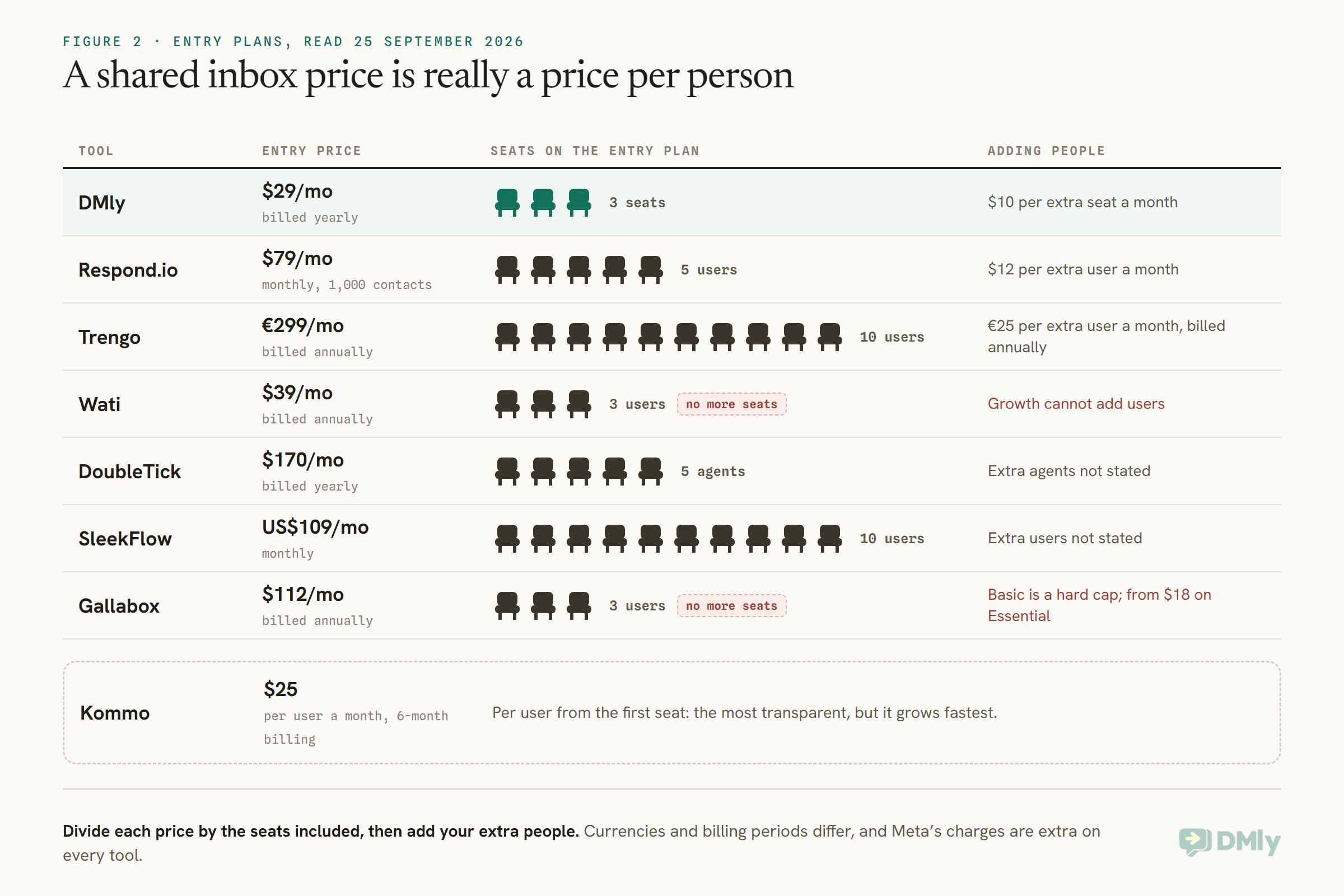
A three-person team and a twelve-person team should shortlist differently. For three people, the cheapest plans with three seats are hard to beat, as long as you will not grow past the cap soon; Wati’s Growth plan and Gallabox’s Basic plan cannot add users at all. For ten or more, plans that include ten or twenty users from the start, like SleekFlow and Trengo, can work out cheaper per person than adding seats one at a time. Per-user pricing such as Kommo’s is the most transparent, but grows fastest.
AI in the Shared Inbox
AI can take the first line, draft replies or summarise long threads. Know which you are buying.
- First-line AI agents answer customers before a person sees the message: DMly’s AI agent, Respond.io’s AI agents, Trengo’s HelpMate, SleekFlow’s AI agents, Wati’s Astra add-on and DoubleTick’s AI agents on Pro.
- AI for the teammate helps the person replying: Respond.io’s AI assist and chat summaries, Gallabox’s inbox AI copilot, Kommo’s reply suggestions and summaries, Wati’s AI co-pilot credits.
- Handover is what decides whether the two kinds work together. In DMly, when the AI hands over, the bot pauses for that customer and the AI stops its turn, so it cannot talk over the teammate who took the chat. Test the equivalent in any tool you trial.
Out of Hours, and Setting Expectations
A shared inbox does not answer by itself at night. Decide what customers get when nobody is there.
Customers message whenever suits them. A shared inbox shows the team what came in overnight, but someone has to decide what the customer experiences in the meantime. The tools approach it differently: Gallabox lists business hours configuration and a waiting message for customers; Trengo, Respond.io, SleekFlow and others offer AI agents that can answer the first line at any hour; in DMly, a flow can hold a message until your working hours with a Smart Delay set to Wait until, and an AI agent can answer from your knowledge and hand anything else to the morning team. Whatever you choose, tell customers honestly when a person will reply, and make the first job of the morning shift the overnight queue.
More Than One Number or Location
If you run several numbers, check how the inbox keeps them apart.
Businesses with several locations or brands often run more than one WhatsApp number. Wati’s Business plan lists multiple WhatsApp numbers with round-robin assignment; DMly plans include one, three or five profiles per channel, so a Premium workspace can run five WhatsApp numbers in one inbox with one set of customers; Respond.io and SleekFlow list multiple workspaces on higher plans for teams that want each brand fully separated. Decide first whether your teams should see each other’s conversations; that tells you whether you need one inbox with several numbers or separate workspaces.
Not Missing Messages, and Measuring the Team
A shared inbox only helps if people notice new messages, and you can see how the team is doing.
Check how each tool alerts people. Respond.io and DoubleTick list mobile access, which suits teams away from a desk. In DMly, the inbox updates live, a chime plays for new messages while the tab is open, desktop notifications cover the times you are in another tab once your browser allows them, and assignments and mentions arrive in the in-app bell. Try the alerts during your trial on the devices your team really uses.
For measurement, look for response times and workload per teammate. DMly’s Team performance report, the first tab under Reports, shows per teammate how many conversations were assigned and closed, how many replies they sent, how many distinct contacts they replied to, and average first response and resolution times, exportable as CSV or PDF. Wati lists operator reports on Pro, DoubleTick agent and organisation analytics on Pro, and SleekFlow individual responsiveness in its basic analytics. Pick two numbers, such as first response time and open conversations at the end of the day, and look at them every week.
Habits That Make Any Shared Inbox Work
The software gives you the tools. A few team habits make them work.
- One owner per conversation, always. Unassigned should mean “nobody yet”, never “somebody, probably”.
- Mark conversations done when they are done, so the open queue is honest.
- Notes for context, not chat. Write internal notes the next teammate can act on.
- Saved replies for the top ten questions, reviewed monthly.
- A named owner for each shift, so the unassigned queue is always someone’s job.
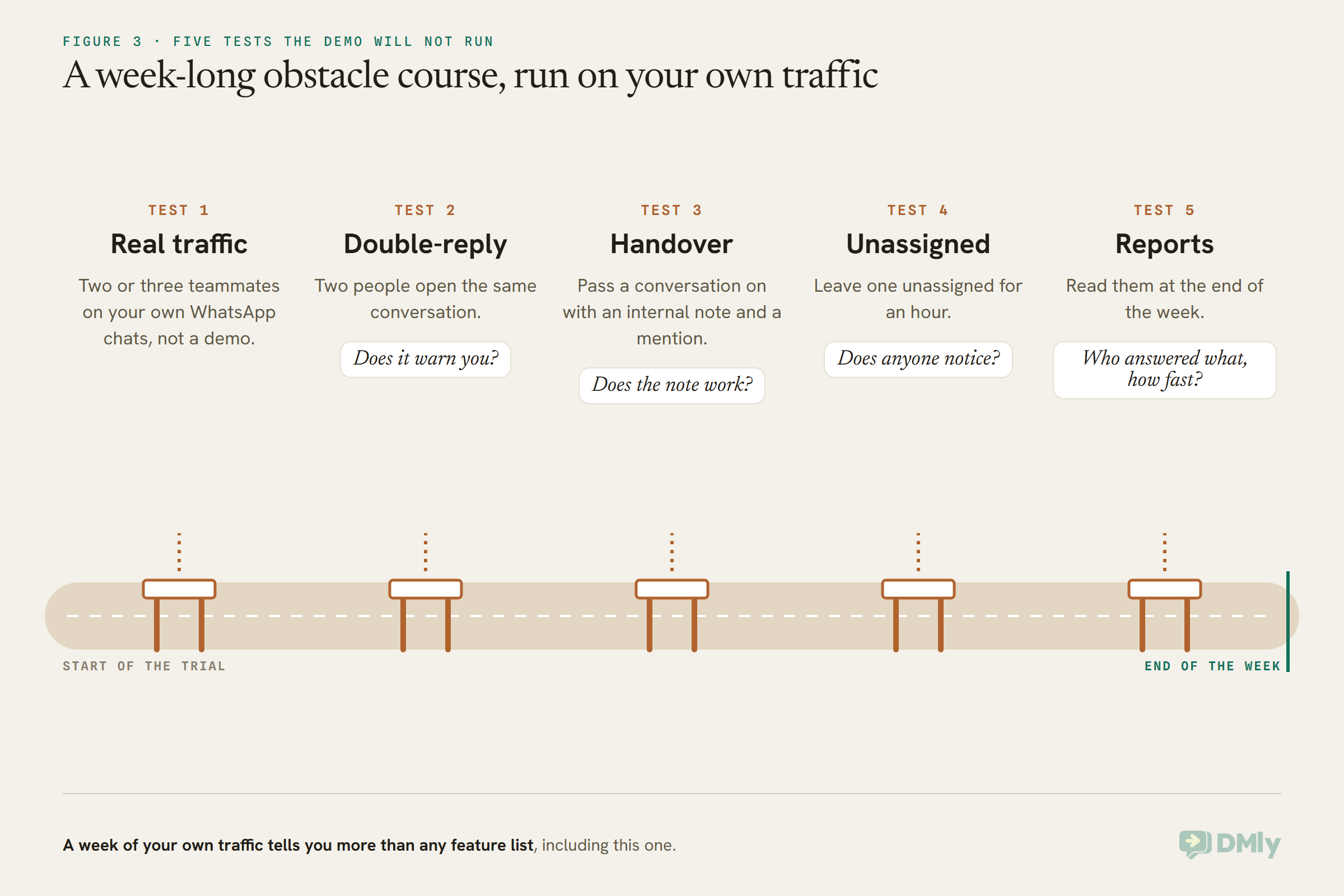
How to Test a Shared Inbox in a Week
- Put two or three teammates on it with your real WhatsApp traffic, not a demo.
- Try to double-reply: have two people open the same conversation. Does the tool warn you?
- Hand a conversation over with an internal note and a mention. Does the note make the handover work?
- Leave a conversation unassigned for an hour. Does anyone notice, and how?
- Look at the reports at the end of the week. Can you see who answered what, and how fast?
Meta’s Charges, on Top of Every Tool
Whichever inbox you choose, WhatsApp messages are billed by Meta. From 1 October 2026, Meta charges for free-form service messages, the replies your team sends inside the 24-hour window, beyond the first 1,000 per business phone number each month, and for utility templates sent in response inside an open window. A busy shared inbox sends a lot of service messages, so a busy month can pass that free tier. Some vendors pass Meta’s rates through with no markup, as DMly states it does; others bill through their own rate cards. Our explainer on the October 2026 pricing change has the detail.
Frequently Asked Questions
What is the best WhatsApp shared inbox software?
For small local teams that also book and invoice, DMly; for support across many channels, Respond.io; for email and messaging together in Europe, Trengo; for WhatsApp-first teams on a budget, Wati. Test with your own team before deciding.
Can several people use one WhatsApp number?
Yes, through a shared inbox on the WhatsApp Business Platform: one number, each teammate on their own login, with conversations assigned and visible to the team.
How do shared inboxes stop two people replying at once?
With assignment and a typing indicator. In DMly, for example, a teammate sees “name is typing” above the reply box when someone else is already replying in that conversation.
How much does a WhatsApp shared inbox cost?
Entry prices read on 25 September 2026 ranged from about $25 per user or $29 a month for three seats, to around €299 a month for ten users, before Meta’s message charges.
Do shared inboxes include AI?
Most now do, either as a first-line AI agent answering customers, as AI help for the teammate replying, or both. Check which kind, and how it is priced, on each plan.
Can we keep using the WhatsApp Business app on the same number?
By default, connecting a number to a business platform takes it over, and the phone app stops working on it. DMly offers a co-existence mode that keeps the app working, with messages sent from the phone mirrored into the shared inbox. Ask other vendors before connecting.
Can I restrict which teammates see customers’ phone numbers?
Several tools offer masking: DMly per member, Respond.io, Wati on Business, DoubleTick and Gallabox on their upper plans.
The Phone, Put Down
Go back to the phone on the counter. With a shared inbox, the owner, the assistant and whoever is nearest each have their own login on the same number. The 1pm request is assigned the moment it arrives, the second person to open it sees that the first is already typing, and the evening’s handover is a note on the conversation rather than a guess. The phone can stay in a drawer.
The best WhatsApp shared inbox software is the one that makes ownership obvious for your team’s size and way of working. Shortlist here; then give each a week of your real messages.
Writing about WhatsApp automation, bookings and growth for local business.
Turn WhatsApp into your busiest channel.
Start free and run message, bookings, payments and reviews in one place.
