
Best WhatsApp Business Software for Small Businesses in 2026
The conflict of interest goes in the first sentence: I write for DMly, DMly is on this list, and you should weigh everything below accordingly.
Here is why the list is still worth your time. Most “best WhatsApp business software” roundups are written by affiliates who have never sent a template message, ranking tools by commission rates. I spend my weeks inside this category, ours and everyone else’s, because writing honestly about competitors is part of this job, and the truth about the category is more useful than any ranking: these platforms are not interchangeable, and the differences are about what kind of business you run, not which tool is “best”. A salon and a support desk need different software that happens to share a channel.
So this guide does three things. It gives you the questions that actually decide the choice, profiles twelve platforms fairly (ours first, flagged as ours), and ends with a chooser by business type rather than a winner’s podium. Where we have published a detailed review of a competitor, it is linked; where prices matter, you will be sent to the vendor’s own pricing page, because quoted prices in listicles go stale faster than anything else on the internet.
How to Choose WhatsApp Business Software: The Four Questions
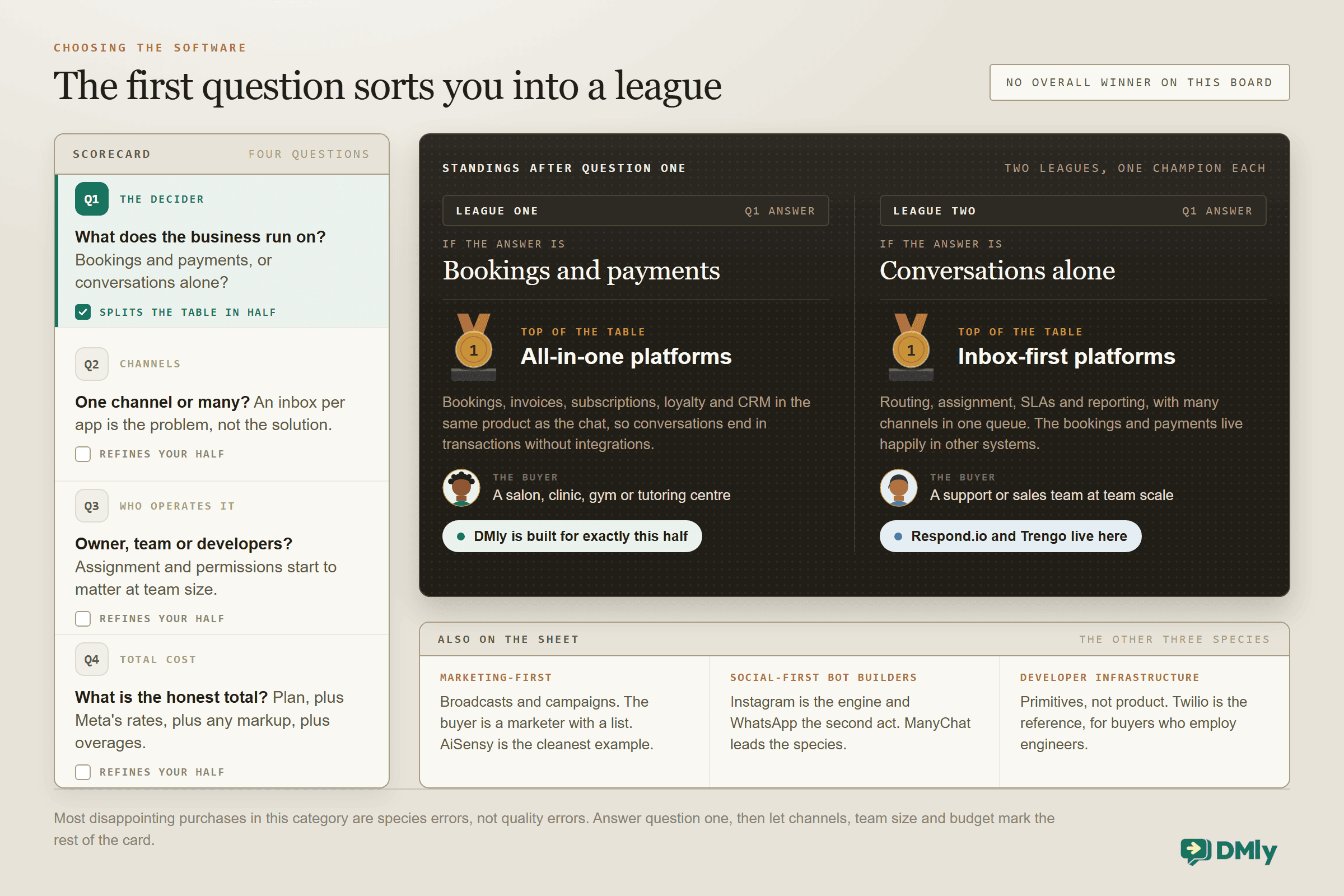
The best WhatsApp business software for you falls out of four questions, and the first one does most of the work. Answer that one honestly and half this page stops applying to you.
- Does your business run on bookings, payments and repeat customers, or on conversations alone? A salon, clinic, gym or tutoring centre needs the calendar, the payment links and the loyalty machinery living with the chat; a pure support operation just needs a superb inbox. This single question splits the category in half.
- One channel or many? WhatsApp-only tools go deep on one channel; omnichannel platforms fold Instagram, Messenger, TikTok, Telegram, SMS and live chat into one inbox. If your customers DM you on three apps, an inbox per app is the problem, not the solution.
- Who operates it? Owner-operators need no-code everything and forgiving defaults; teams need assignment, permissions and reporting; developers change the calculus entirely (APIs, webhooks and integration surfaces start to matter).
- What is the total cost, honestly? Plan price plus Meta’s per-message rates plus any markup the platform adds on those rates plus per-seat and per-contact overages. Two platforms with the same sticker can differ by double at real usage; our pricing page and Meta’s rate card make the arithmetic checkable.
The Five Kinds of WhatsApp Business Software
The category label hides five genuinely different kinds of product, and naming them makes every comparison page, this one included, much easier to read.
- All-in-one business platforms put the working parts (bookings, invoices, subscriptions, loyalty, CRM) in the same product as the chat, so a conversation can end in a booking or a payment without wiring anything together. DMly is one of these; it suits you if your WhatsApp threads are really appointments and payments wearing a chat interface.
- Inbox-first platforms perfect the conversation operation: routing, assignment, SLAs, reporting, many channels in one queue. Respond.io and Trengo are the archetypes; support and sales teams are the buyers.
- Marketing-first tools orbit the broadcast: campaign builders, list tooling, click-to-WhatsApp ad plumbing, template management at volume. AiSensy is the cleanest example; the buyer is a marketer with a list.
- Social-first bot builders grew up on Instagram and Messenger funnels and added WhatsApp later. ManyChat leads this group, and the buyer is someone whose business runs on social engagement, with WhatsApp as the second act.
- Developer infrastructure is not really software for running a business at all: it is raw API access that somebody builds on top of. Twilio is the reference here, and the buyer employs engineers who want building blocks rather than a finished product.
Most disappointing purchases here are not bad tools; they are the wrong kind of tool. A salon buys an inbox-first platform, a support team buys a marketing tool, and both end up blaming the software. Work out which kind you need first, and half the list stops applying to you, which is the point.
The Quick Answer: Best by Situation
| If you are… | Look first at |
| A local service business (salon, clinic, gym, tutor) running bookings and payments | DMly |
| A support-heavy team wanting the deepest omnichannel inbox | Respond.io or Trengo |
| An Indian SMB wanting WhatsApp marketing on a tight budget | Interakt, AiSensy or Gallabox |
| An Instagram-first brand adding WhatsApp second | ManyChat |
| A Southeast Asian commerce team selling in chat across channels | SleekFlow |
| A WhatsApp-only SMB wanting a broad, familiar mid-market tool | Wati |
| A Shopify store selling primarily through WhatsApp | Zoko, or DMly for beyond-store operations |
| A field sales team living on handsets | DoubleTick |
| An engineering team building its own messaging product | Twilio |
The Best WhatsApp Business Software in 2026, Reviewed
1. DMly: best for local businesses that run on bookings, payments and repeat customers
Ours. Judge this entry with that in mind.
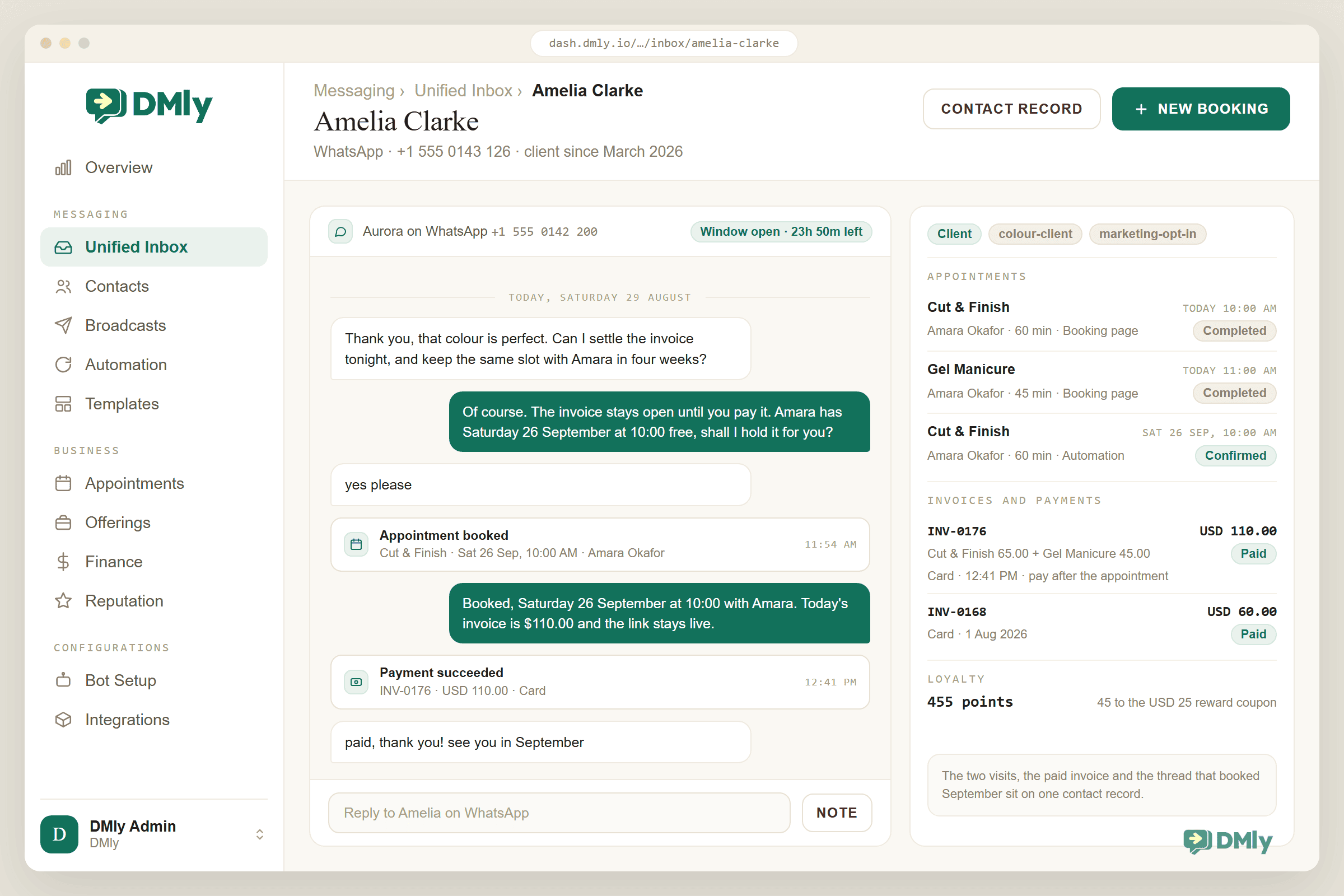
DMly exists for the half of the market the chat-only tools underserve: businesses whose WhatsApp conversations end in an appointment, an invoice or a returning customer. Alongside the omnichannel inbox (WhatsApp, Instagram, Messenger, TikTok, Telegram, SMS, live chat) and the no-code flow builder, the differentiating surface is native: appointment and class booking with waitlists, invoices and payment links through six gateways, subscriptions with auto-charge, loyalty that mints reward coupons, Google review automation, a CRM with segments, plus a REST API, 75 webhook topics and an MCP server for the technically ambitious. Meta’s message rates pass through with no markup, and every plan includes the full feature surface with a 7-day trial and no card.
Where it is not for you: if you need nothing but a support inbox with enterprise routing, the inbox-first platforms below go deeper on that one job; and if your operation lives entirely inside Shopify, a Shopify-native tool may fit tighter (our SuperLemon comparison is the honest version of that conversation).
What buyers typically weigh: the appeal is consolidation, replacing a booking app, an invoicing tool, a loyalty punch card and a chat tool with one system and one customer record; the consideration is commitment, because an all-in-one rewards businesses that actually move their operations in rather than running it as another inbox. The 7-day trial with a real service, a real payment and a real booking is the honest test of which you are.
2. Wati: best known WhatsApp-focused tool for SMBs
Wati is the name most small businesses meet first: WhatsApp-focused, broad feature coverage (inbox, broadcasts, chatbots, catalogue integrations), a large template and integration ecosystem, and plenty of agency familiarity. It is a competent default for WhatsApp-only operations. The trade-offs that push people elsewhere: per-message markup economics at volume, and the absence of native business machinery (bookings, invoicing, loyalty), which live in third-party integrations. Our detailed teardown lives in the live Wati comparison and alternatives guide; verify current pricing on Wati’s site.
3. Respond.io: best omnichannel inbox for support-heavy teams
Respond.io is inbox-first and proud of it: strong multi-channel routing, assignment and automation for conversation operations, aimed at teams where the chat itself is the product. If your business is support and sales conversations at team scale, and your bookings and payments live happily in other systems, it is a serious choice. The flip side is the same fact seen from the other half of the market: the bookings and payments machinery is not the point here, so a service business ends up assembling the rest of its stack around it. A fuller head-to-head comparison is on the way.
4. Interakt: best budget entry for Indian SMBs
Interakt (from the Jio ecosystem) is a high-volume favourite among Indian small businesses: WhatsApp marketing, catalogue and payment integrations tuned to the Indian market, at entry pricing that suits first-time API users. It is strongest exactly there, and thinner on omnichannel breadth and on the beyond-chat business surface. For India-first WhatsApp marketing on a budget, it belongs on the shortlist; verify current plans on Interakt’s site.
5. AiSensy: best for broadcast-led WhatsApp marketing in India
AiSensy positions hard on WhatsApp marketing: broadcasts, campaign tooling and click-to-WhatsApp ad workflows, popular with Indian D2C brands and course sellers. If your model is campaign-led selling to a large opted-in list, it earns its consideration. The trade-offs mirror Interakt’s: single-channel focus and marketing depth over operational machinery. Our full AiSensy review covers the details and the pricing structure to check.
6. ManyChat: best for Instagram-first businesses adding WhatsApp
ManyChat built its enormous user base on Instagram and Messenger automation (comment-to-DM funnels above all), with WhatsApp added to the arsenal. For creators and brands whose engine is Instagram engagement, its social-native automation remains the reference point, and WhatsApp rides along. Choose it for the social funnels; look elsewhere when WhatsApp is the primary business channel and social is the satellite, because the depth runs the other way.
7. SleekFlow: best for omnichannel commerce in Southeast Asia
SleekFlow blends the omnichannel inbox with in-chat commerce (catalogues, payments) and is strongest in its home Southeast Asian markets, where its payment and platform integrations are tuned. Commerce-in-chat teams in that region should evaluate it seriously. Outside its home turf, and outside commerce-led use cases, its case weakens against both inbox specialists and all-in-one platforms.
8. Trengo: best European team inbox
Trengo is a European inbox-first platform: shared multichannel inbox, team workflows and integrations, with WhatsApp as one strong channel among several. European SMB teams wanting a support hub with local sensibility (and European data instincts) shortlist it against Respond.io. As with all inbox-first tools, the booking-payment-loyalty layer is not the offer.
9. Gallabox: best conversational commerce starter for Indian teams
Gallabox rounds out the Indian trio with a conversation-and-commerce angle: shared inbox, no-code bots and WhatsApp commerce features aimed at small teams stepping past a single phone. It competes on approachability. Our Gallabox review carries the detailed comparison; the same single-channel and machinery caveats apply.
10. Zoko: best for Shopify-centric WhatsApp selling
Zoko builds tightly around Shopify commerce on WhatsApp: catalogue selling, order flows and revenue attribution for stores whose world is their Shopify admin. If that describes you, its focus is the appeal; if your business extends beyond the store (services, bookings, multi-channel support), the same focus becomes the ceiling. Store-first teams should also read our SuperLemon comparison for the Shopify-native trade-offs in general.
11. DoubleTick: best mobile-first sales inbox on WhatsApp
DoubleTick pitches a salesperson-friendly WhatsApp inbox: mobile-first, quick to deploy, aimed at field sales teams and SMB sellers who live on their phones rather than at desks. Teams whose sellers work WhatsApp all day from handsets shortlist it for exactly that ergonomics. The familiar caveats apply: single-channel focus, and the operational machinery lives elsewhere.
12. Twilio: best for developers who want infrastructure, not software
Twilio is the odd one out on purpose: not an operator product but programmable messaging infrastructure with WhatsApp as one of its channels. If you employ engineers and want to build your own messaging product on raw primitives, it is the reference choice, with pricing and complexity to match. If you are a small business wanting software you can run on a Tuesday, it is the wrong species entirely, and knowing that saves an expensive detour. (The middle path, a platform with a real API underneath, is what our own API surface exists for.)
Comparison at a Glance
This table is coarse on purpose, because feature-count tables always flatter whoever wrote them. These are the few things that actually separate the category, with honest values in every cell.
| Platform | Channels | Native bookings | Native payments & invoicing | Loyalty & reviews | Best for |
| DMly | 7 (WA, IG, FB, TikTok, TG, SMS, live chat) | Yes, incl. classes & waitlists | Yes, 6 gateways, subscriptions | Yes, native | Local service businesses |
| Wati | WhatsApp-focused | Via integrations | Via integrations | Via integrations | WhatsApp-only SMBs |
| Respond.io | Many | Chat-focused | Chat-focused | Chat-focused | Support-heavy teams |
| Interakt | WhatsApp-focused | Via integrations | India-tuned integrations | Chat-focused | Indian SMBs on a budget |
| AiSensy | WhatsApp-focused | Chat-focused | Via integrations | Chat-focused | Broadcast-led marketing |
| ManyChat | IG/FB-first + WA | Chat-focused | Via integrations | Chat-focused | Instagram-first funnels |
| SleekFlow | Many | Chat-focused | In-chat commerce | Chat-focused | SEA commerce teams |
| Trengo | Many | Chat-focused | Chat-focused | Chat-focused | European team inboxes |
| Gallabox | WhatsApp-focused | Via integrations | Via integrations | Chat-focused | Indian starter teams |
| Zoko | WhatsApp + Shopify | Chat-focused | Shopify-centred | Chat-focused | Shopify WhatsApp selling |
| DoubleTick | WhatsApp-focused | Chat-focused | Via integrations | Chat-focused | Mobile-first sales teams |
| Twilio | Programmable, many | Build it yourself | Build it yourself | Build it yourself | Developer teams |
Reading the table honestly: “chat-focused” is not an insult; it is a design choice that serves conversation-led businesses well. The split to respect is the one from the first question: platforms built to end conversations in bookings and payments, and platforms built to run conversations excellently. Pick your half first, then your tool.
What the table cannot show, and the trials will: execution quality within a species. Two inbox-first tools with identical checkmarks can feel a decade apart in daily use, and the same is true of bot builders. Matrices shortlist; only the bake-off below decides, which is why it gets its own section rather than a closing sentence. And a candid note on the DMly row, since we wrote the table: the native columns are genuinely rare in this category, but native also means opinionated. A business that wants its bookings to work exactly like its current standalone calendar tool should test that assumption in the trial rather than take our checkmark’s word for it.
Which WhatsApp Software by Business Type
| Your business | What decides it | Shortlist |
| Salon, spa, barber | Bookings with reminders, rebooking, deposits via invoices | DMly first; Wati if chat-only suffices |
| Clinic or dental | Reminders with evidence, recalls, message discipline | DMly; inbox tools only if booking stays elsewhere |
| Gym or studio | Class capacity, waitlists, membership auto-charge | DMly; the class machinery is rare in this category |
| Ecommerce / D2C | Cart recovery, catalogue selling, campaign volume economics | DMly or SleekFlow; AiSensy for broadcast-led India; ManyChat if IG-first |
| Support team (SaaS, services) | Routing, assignment, SLAs, reporting depth | Respond.io or Trengo |
| Agency serving clients | White-label, client workspaces, an agency API | DMly white-label; Wati’s agency motion as the alternative |
How to Run Your Own Bake-Off in One Week
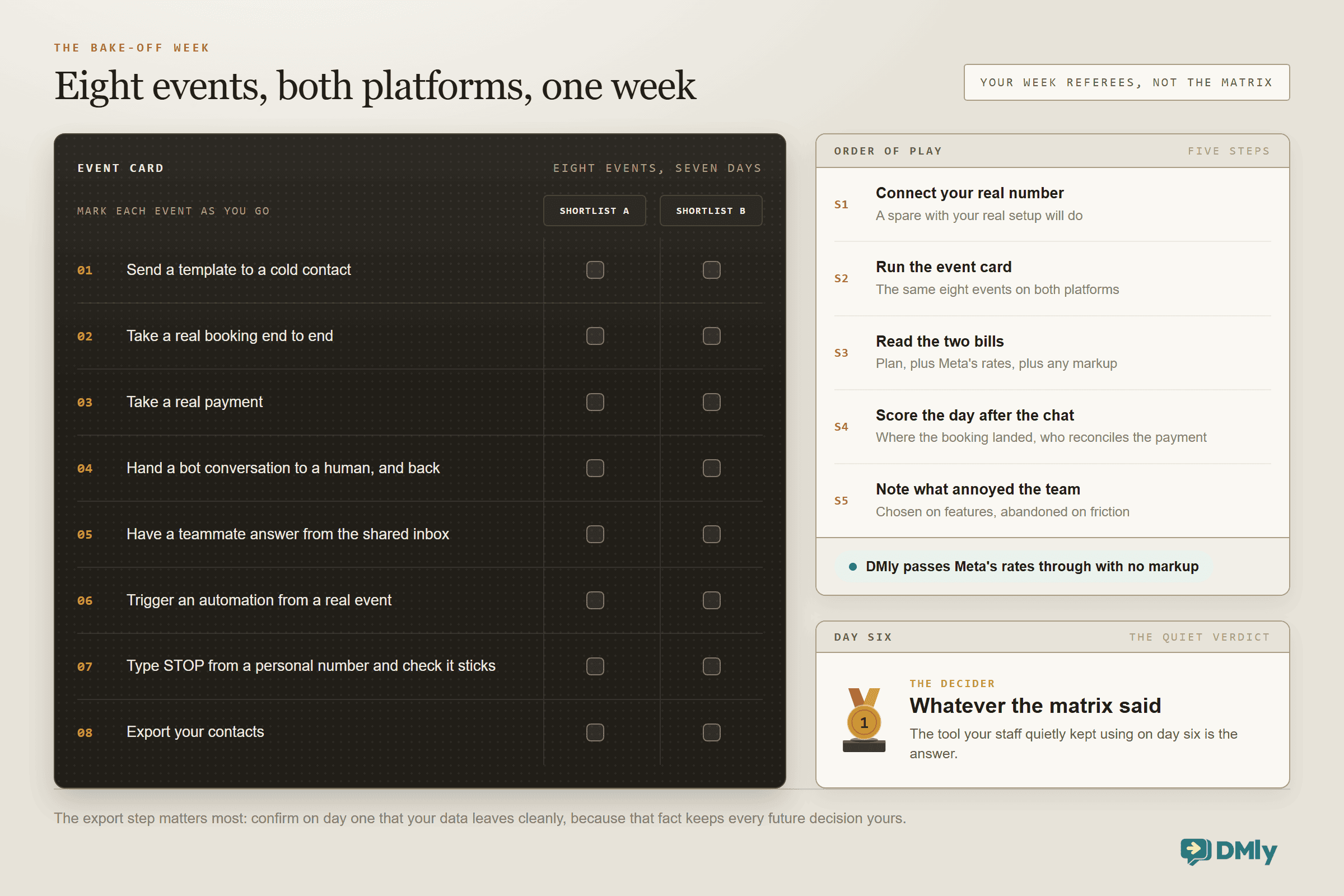
Reviews narrow the list; only a trial decides it, and a week is long enough. Every serious platform on this page offers one, so run the same seven days against your top two and let your actual working week referee.
- Connect your real number, or a spare with your real setup. Demo workspaces flatter every product. Your templates, your services, your team.
- Run the eight-item checklist. Send a template to a cold contact; take a real booking end to end; take a payment; hand a bot conversation to a human and back; have a teammate answer from the shared inbox; trigger an automation from a real event; type STOP from a personal number and confirm the opt-out sticks; export your contacts.
- Read the two bills. The plan you would actually need (seats, contacts, channels), plus a realistic month of Meta’s rates with any markup exposed. Put both platforms’ totals side by side at your volume, not the pricing page’s.
- Score the day after the chat. Where did the booking land, who reconciles the payment, what does the customer record show? This is where the species difference stops being abstract.
- Note what annoyed the team. Software gets chosen on features and abandoned on friction. The tool your staff quietly kept using on day six is the answer, whatever the matrix said.
One honest hour of this beats every listicle in the results, including this one. The export step matters most: whichever platform you choose, confirm on day one that your data leaves cleanly, because that fact keeps every future decision yours. And run the two trials in the same week rather than sequentially, while the comparison is fresh enough to be fair.
Three Mistakes Buyers Make in This Category
- Comparing sticker prices instead of total cost. The real bill is plan plus Meta’s rates plus any per-message markup plus seat and contact overages. Ask every vendor one question: “is your per-message price to me exactly Meta’s published rate?” and check the answer against Meta’s rate card. DMly’s answer is yes, no markup; make everyone answer it.
- Buying the demo’s chatbot instead of the business machinery. Every platform demos a slick bot. Few demos show what happens after the conversation: where the booking lives, who reconciles the payment, how the no-show gets followed up. Ask to see the day after the chat.
- Ignoring the migration question. Your WhatsApp number can only live on one platform at a time, and moving it is a real (if manageable) process. Choose for where the business is going, not just this quarter, and prefer platforms whose trial runs on your real number so switching costs surface early.
Best WhatsApp Business Software FAQs
What is the best WhatsApp business software overall?
There is no honest overall answer, which is why this page opens with a question instead of a winner. For businesses that run on bookings, payments and repeat customers, DMly is built for exactly that shape (and yes, it is ours). For pure conversation operations at team scale, Respond.io and Trengo lead. For budget WhatsApp marketing in India, the Interakt, AiSensy and Gallabox trio compete hard. Pick your half of the market first.
What is the difference between the WhatsApp Business app and business software like these?
The free WhatsApp Business app is a phone app for one person: no team inbox, no real automation, no API. The platforms on this page run on the WhatsApp Business Platform (the API): multiple team members, automations, broadcasts at scale, and integration with bookings, payments and CRM. The app is where most businesses start; the API is where they go when the phone stops scaling.
How much does WhatsApp business software cost?
Two layers: the platform’s plan (from roughly coffee-money entry tiers to serious team pricing across this list; every vendor’s current pricing is on their site, and DMly’s is at dmly.io/pricing with a 7-day no-card trial) and Meta’s per-message rates for template messages, which vary by country and are documented on our rate-card page. Watch for platforms that add a markup on Meta’s rates; at broadcast volume the markup can quietly exceed the plan.
Can I switch WhatsApp platforms later?
Yes; numbers migrate between platforms, contacts export and re-import, and template libraries can be rebuilt. It is a project rather than a click, which is exactly why the trial matters: run your real number and your real week through a platform before committing, and keep your contact data exportable wherever you land.
Do I need business verification or the green tick to use these platforms?
You can start on the WhatsApp Business Platform without full Meta business verification, with a lower messaging limit that grows as you verify and as your quality holds; our guide to getting the API without Facebook business verification walks the path. The green verified badge is a separate, later consideration and not a requirement for any platform on this list. What every platform does require is that your number moves onto the API, which is a one-time setup each trial will walk you through.
Which of these platforms include AI chatbots?
Most now offer some AI reply capability, and the honest differences are in the boundaries: what business data the AI can act on (in DMly’s case it can check availability, book appointments and read CRM fields, not just answer text), how cleanly it hands over to humans, and how usage is metered. Include the AI in your bake-off checklist with your own worst questions, and price the metering at your real volume, because AI allowances vary more across this list than any other line item.
Is unofficial WhatsApp automation software safe to use?
No. Tools that puppet WhatsApp Web or unofficial APIs sit outside Meta’s terms, get numbers banned, and take your customer list down with them. Everything on this page runs on the official WhatsApp Business Platform, which is the only foundation worth building a business channel on.
The trial is the honest comparison
Run your real number, your real bookings and one real week through DMly. Every feature on every plan, 7 days, no card. If the inbox-first half fits you better, this page told you who to call.
The Disclosure, Kept
I said at the top to weigh this page knowing who wrote it, so here is the weighing made easy. If your business runs on conversations alone, two entries on this list serve you better than we do, and both are named plainly above. If it runs on bookings, payments and people coming back, that is the half of the market DMly was built for, and a trial is the cheapest way to find out whether the claim survives contact with your actual week. Either way: choose the half before you choose the tool, check every price at the vendor’s own site, and never let a demo’s chatbot answer the one question that matters, which is what happens the day after the chat.
Writing about WhatsApp automation, bookings and growth for local business.
Turn WhatsApp into your busiest channel.
Start free and run message, bookings, payments and reviews in one place.
