
Best WhatsApp Business API Providers (BSPs) in 2026
Nearly every WhatsApp provider’s website carries the same badge: an official Meta partner. It is worth reading closely, because it tells you less than it seems to. It says the provider is allowed to connect businesses to the WhatsApp Business Platform. It does not say what they charge on top of Meta’s own fees, whether you get an inbox or just an API, how fast support answers when a template is rejected, or whether your number can leave with you if you switch. Two providers with the same badge can cost ten times as much as each other for the same messages.
This guide compares WhatsApp Business API providers on the things the badge leaves out. It covers the three kinds of provider, how each charges, what that means for a small business sending a few thousand messages a month, and what to check before you commit your number. Prices were read on each provider’s own pricing page on 27 September 2026, and they sit on top of Meta’s own charges, which are the same whoever you choose.
A disclosure, up front: DMly publishes this blog and is one of the options compared. We have described every provider from its own pages and documentation, and said where another is the better choice. For the wider comparison of WhatsApp tools for small businesses, see our guide to the best WhatsApp Business software for small businesses.
What a WhatsApp Business API Provider Does
The WhatsApp Business Platform is Meta’s. Providers are the door you walk through to use it.
The WhatsApp Business Platform, often called the WhatsApp API or Cloud API, is how businesses send WhatsApp messages at scale, from software rather than a phone. Meta hosts the platform and charges for certain messages. A provider, often called a Business Solution Provider or BSP, connects your business number to it, handles setup and verification, and offers something on top: an API for developers, an inbox for your team, automation, or support when something goes wrong.
There are three broad ways in, and they suit very different businesses.
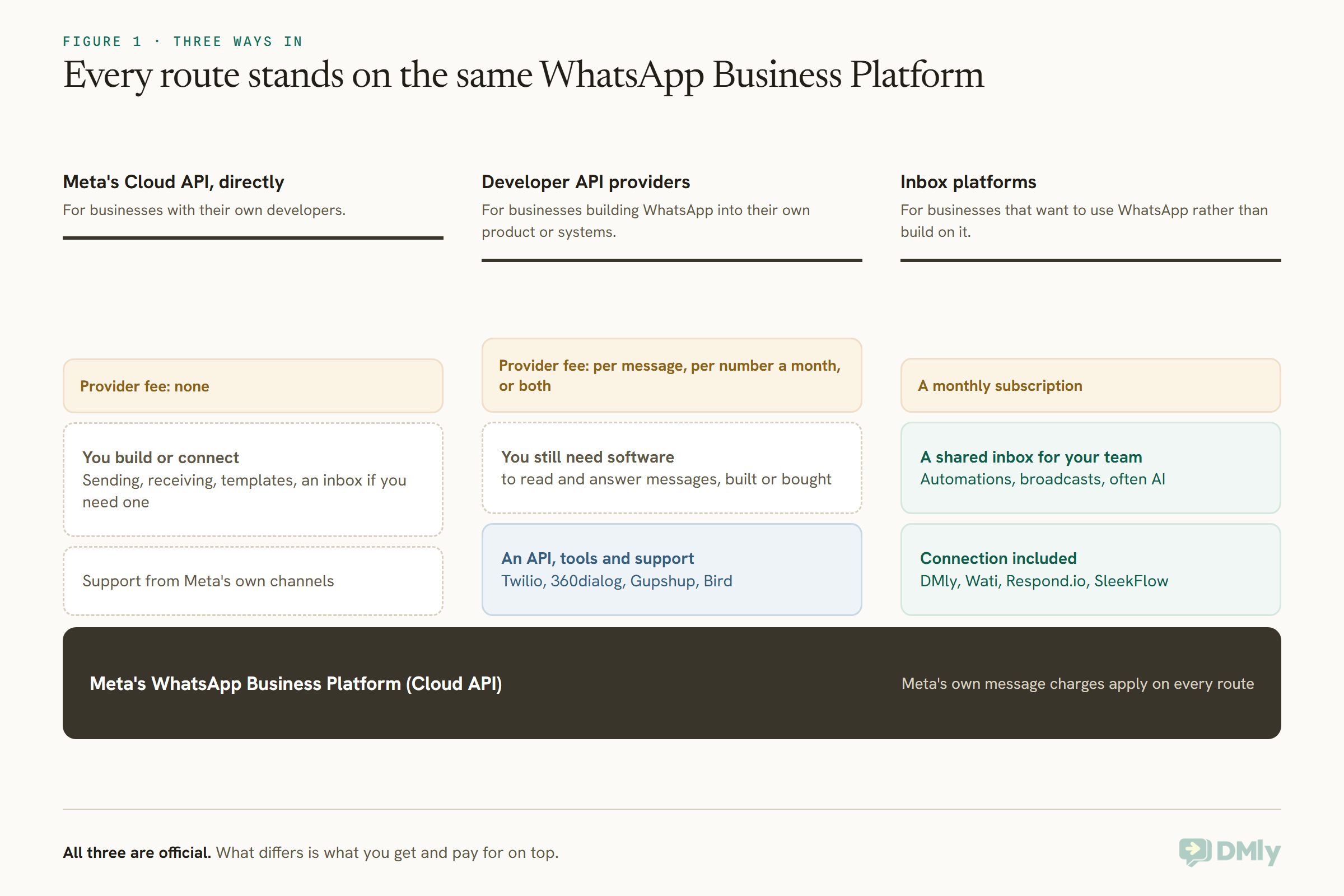
Meta’s Cloud API, directly. A business with its own developers can set up a Meta developer app and use the Cloud API without a provider in between. There is no provider fee, but you build or connect everything yourself: sending, receiving, templates, an inbox for your team if you need one.
Developer API providers. Companies such as Twilio, 360dialog, Gupshup and Bird give developers an API, tools and support, and charge a fee on top of Meta’s: per message, per number per month, or both. They suit businesses building WhatsApp into their own product or systems.
Inbox platforms. Tools such as DMly, Wati, Respond.io and SleekFlow give your team a shared inbox, automations, broadcasts and often AI, for a monthly subscription. They suit businesses that want to use WhatsApp rather than build on it.
How Providers Charge
Every WhatsApp Business API provider sits on top of the same Meta charges. The difference is what they add.
Meta charges per message for templates by category, such as marketing, utility and authentication, and by the recipient’s country, and gives certain windows free, such as the 72-hour free entry point window after someone messages you from a Click-to-WhatsApp ad and you reply within 24 hours. Meta’s charges are changing from 1 October 2026; our article on WhatsApp’s October 2026 pricing explains what changes.
On top of that, providers charge in one of three ways. Per message: Twilio charges a handling fee of $0.005 on every WhatsApp message, inbound or outbound, and Gupshup’s self-serve plan charges $0.001 per template or session message. Per number per month: 360dialog charges €49, €99 or €500 per number per month for API access, depending on the support and throughput you need. Per subscription: inbox platforms charge a monthly plan for the software, and some state that they add no markup to Meta’s fees; DMly’s documentation says it adds no markup and you pay Meta’s standard rates.
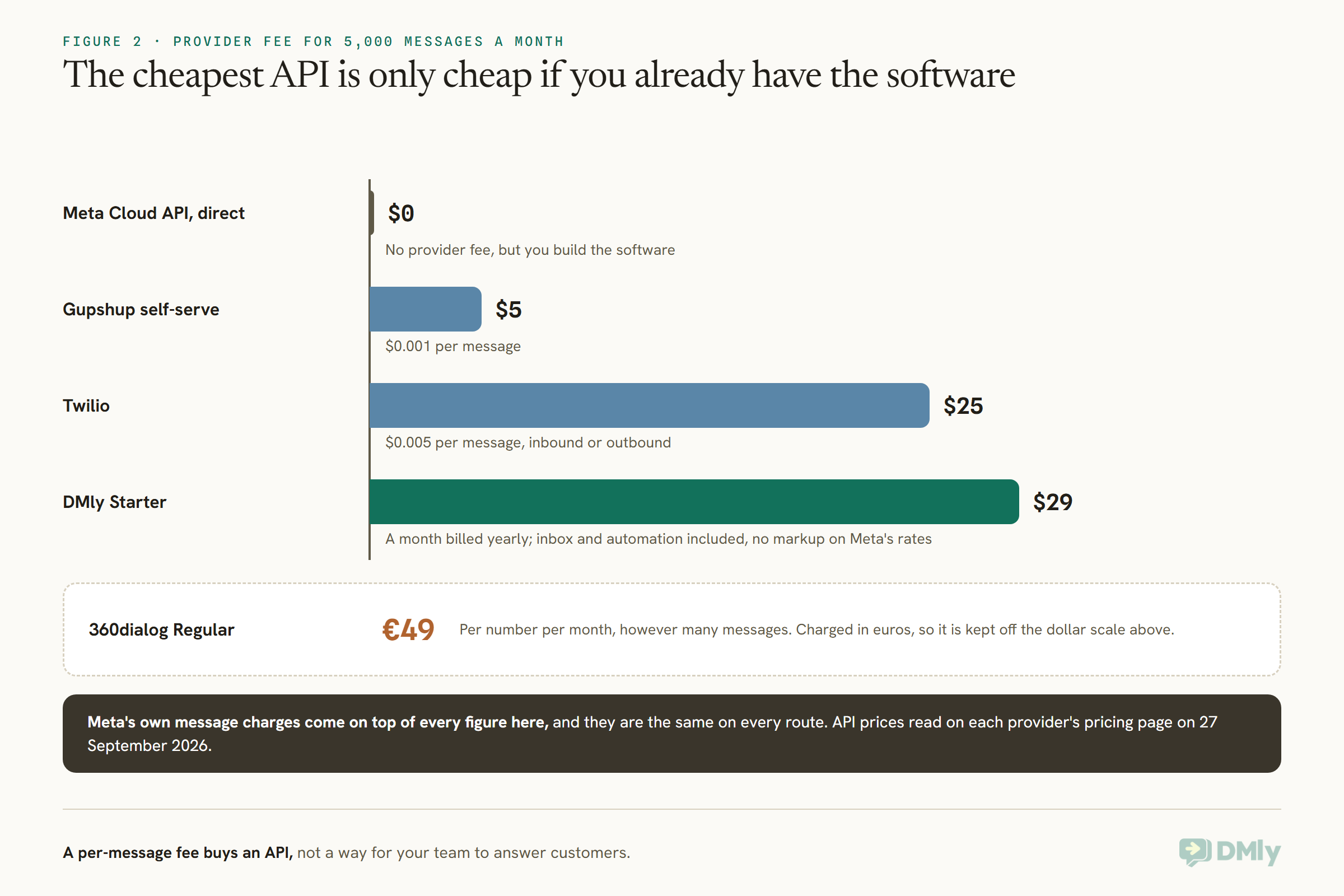
The chart shows why the cheapest-looking provider is not always the cheapest choice. A per-message API fee is small, but it buys an API, not a way for your team to answer customers; you still need software on top, built or bought. An inbox platform’s subscription includes that software. For a small business without developers, compare the platform subscription with the API fee plus the cost of whatever you would use to read and answer messages.
Getting Onboarded: What Meta Asks For
Whichever WhatsApp Business API provider you choose, Meta sets the conditions for getting a number onto the platform.
Meta’s conditions appear during signup, and DMly’s documentation quotes them word for word. To onboard via the Cloud API you either delete the existing WhatsApp account on the number or use an eligible WhatsApp Business Account. Not every WhatsApp Business Account qualifies for Meta’s embedded signup; Meta says only accounts with significant message history and growth potential can onboard that way. And some features may not be available to some accounts because of Meta’s limitations. After registration, the number can still be used for ordinary calls.
Two more steps shape your first weeks. Business verification proves to Meta that your business is real, and it affects how many customers you can message; providers help to different degrees, and 360dialog’s Premium plan, for example, states business verification in 48 hours. And every new number starts on a messaging tier, a cap on how many different customers you can start conversations with in 24 hours, beginning at 250 for an unverified business and rising as you send consistently with good quality. No provider can lift that cap for you; it is Meta’s.
How We Compared Them
We compared WhatsApp Business API providers on their own pricing pages, read on one day, and on the questions a small business should ask before connecting its number.
We read Twilio, 360dialog, Gupshup and Bird’s pricing pages in a browser on 27 September 2026, and the inbox platforms’ on 25 September. Bird lists WhatsApp as pay-as-you-go without showing a figure, so we could not quote a rate; Infobip and Vonage are also widely used but we did not read their WhatsApp pricing at source, so they are not reviewed here. For DMly we used its documentation. We did not test throughput or support response times ourselves; where a provider states them, we say so.
The Quick Answer: Best by Situation
| If you are… | Look first at | Why |
| A local business wanting bookings and payments too | DMly | WhatsApp plus bookings, payments and CRM, no markup on Meta’s fees |
| A small business without developers | An inbox platform such as DMly or Wati | Inbox, automation and broadcasts for a subscription, no building |
| A developer team already using Twilio for SMS | Twilio | One API and billing for SMS, voice and WhatsApp |
| A developer wanting a fixed monthly cost per number | 360dialog | Flat fee per number, with stated support times and throughput |
| A high-volume sender watching per-message costs | Gupshup | A low per-message fee on its self-serve plan |
| A team with its own developers and simple needs | Meta Cloud API direct | No provider fee at all |
The Best WhatsApp Business API Providers, Reviewed
1. DMly: best overall WhatsApp API platform for businesses
What you get. DMly connects your number to Meta’s Cloud API through Meta’s Embedded Signup, which its docs describe as the simple, ten-minute path, or with your own Cloud API keys if you already run a Meta developer app. Its documentation says it adds no markup, so you pay Meta’s standard rates. On top, you get a shared inbox for WhatsApp and other channels, automations and AI agents, broadcasts, and the parts local businesses use every day: bookings, payments, a CRM and reviews. Plans are $29, $65 and $149 a month billed yearly.
Numbers and migration. By default, connecting a number to DMly takes it over, so the WhatsApp Business app stops working on it; a co-existence mode, chosen at signup, keeps the app working on the same number with messages mirrored into DMly. When moving a number from another provider, DMly’s docs say to turn off two-step verification first or the migration fails.
Watch out for. DMly is built for businesses using WhatsApp, not for developers building WhatsApp into their own product; a developer API provider suits that better. Its documentation does not describe DMly as a BSP or a Tech Provider, so if that distinction matters to you, ask.
Best for: salons, clinics, gyms, restaurants and shops that want WhatsApp working for their team without building anything.
2. Meta Cloud API, directly: best if you have developers
What you get. Direct access to the WhatsApp Business Platform through your own Meta developer app, with no provider between you and Meta and no provider fee. You pay Meta’s charges only.
Watch out for. Everything else is yours to build or connect: sending and receiving, template management, webhooks, an inbox for your team, reporting, and retries when something fails. Support comes from Meta’s own channels rather than an account manager. Some inbox platforms let you connect your own Cloud API keys instead of going through their signup; DMly offers this as an advanced option for businesses that already run their own Meta developer app.
Best for: businesses with developers who want full control and no middle layer.
3. Twilio: best for teams already on Twilio
What you get. WhatsApp through the same API and account as Twilio’s SMS and voice, with pay-as-you-go pricing. Twilio’s pricing page says its message handling fee is $0.005 per message, inbound or outbound, and that it passes Meta’s template fees through to customers, with a calculator by country.
Watch out for. The fee applies to inbound messages as well as outbound, so a busy support line costs more than the number of messages you send suggests. It is an API, not an inbox. Twilio’s page described Meta’s fees as of August 2026, before Meta’s 1 October 2026 changes, so check the current position before relying on the free-window details there.
Best for: product and engineering teams already using Twilio, or wanting one provider for several channels.
4. 360dialog: best fixed monthly cost per number
What you get. WhatsApp API access priced per number per month, plus Meta’s fees: Regular at €49, with 24/7 human support and a first response within four hours; Premium at €99, with a first response within 30 minutes, business verification in 48 hours and add-ons such as an inbox and send-outs; and Scale at €500, with migration support and up to 1,000 messages per second. It also offers a marketplace that matches you with a partner tool, at €99 per number, stating that you own your WhatsApp number and can switch tools with no lock-in, and a partner platform for software companies.
Watch out for. The monthly fee applies per number whether you send much or not, so it suits steady senders more than occasional ones. The Regular plan is API access; team tools come as add-ons or partner software.
Best for: developers who want predictable costs, stated support times and a clear path to switch tools.
5. Gupshup: best low per-message fee
What you get. On its self-serve plan, Gupshup’s pricing page says it charges $0.001 per message, for templates and for session messages in and out, with WhatsApp’s own fees billed at actuals, and lists conversations from Click-to-WhatsApp ads as free for the first 72 hours, in line with Meta’s free entry point window. Calls are priced per second on top.
Watch out for. It is an API route; enterprise features and pricing are through sales. Check what support is included on the self-serve plan before relying on it for a customer-facing channel.
Best for: developers and high-volume senders for whom the per-message fee adds up.
6. Bird: pay as you go, multi-channel
What you get. Bird lists WhatsApp among pay-as-you-go channels alongside email, SMS and voice, for developers building communication into their applications.
Watch out for. Its pricing page did not show a WhatsApp rate when we read it, so ask for the per-message fee in writing before comparing.
Best for: teams already using Bird for other channels.
7. Other inbox platforms: Wati, Respond.io, SleekFlow
What you get. Shared inboxes, broadcasts, chatbots and integrations for a subscription. From their pricing pages read on 25 September 2026: Wati’s plans are $39, $79 and $199 a month billed annually; Respond.io’s are $79, $159 and $279 a month at 1,000 monthly active contacts; SleekFlow’s Pro is US$109 a month. Our comparisons of the best WhatsApp business software cover them in detail.
Watch out for. Check each platform’s stance on markup over Meta’s fees, how it prices AI, and what happens to your number if you leave.
Comparison at a Glance
| Provider | Type | Provider fee | Inbox for your team | Best for |
| DMly | Inbox platform | $29 to $149 a month, no markup on Meta | Yes, plus bookings and payments | Local businesses |
| Meta Cloud API | Direct | None | Build your own | Developers |
| Twilio | Developer API | $0.005 per message, in or out | No | Teams on Twilio |
| 360dialog | Developer API | €49, €99 or €500 per number a month | Add-on or partner tool | Fixed monthly cost |
| Gupshup | Developer API | $0.001 per message (self-serve) | Not on self-serve | High volume |
| Bird | Developer API | Pay as you go (rate not shown) | Not assessed | Multi-channel developers |
A Worked Example: A Salon’s Month
Here is what the provider fee looks like for a real pattern of messages, rather than a round number.
A salon takes 400 bookings a month. Each booking gets a confirmation and two reminders, 1,200 template messages, and the salon exchanges about 2,000 other messages with customers in conversations, incoming and outgoing together. Meta’s charges for the templates are the same on every route. The provider fee on top differs: Twilio charges $0.005 on each of the 3,200 messages, incoming ones included, which comes to $16; Gupshup’s self-serve fee of $0.001 per message comes to about $3.20; 360dialog’s Regular plan is €49 for the number, however many messages; and an inbox platform charges its plan, $29 a month billed yearly on DMly’s Starter, with the inbox, automations and booking system included.
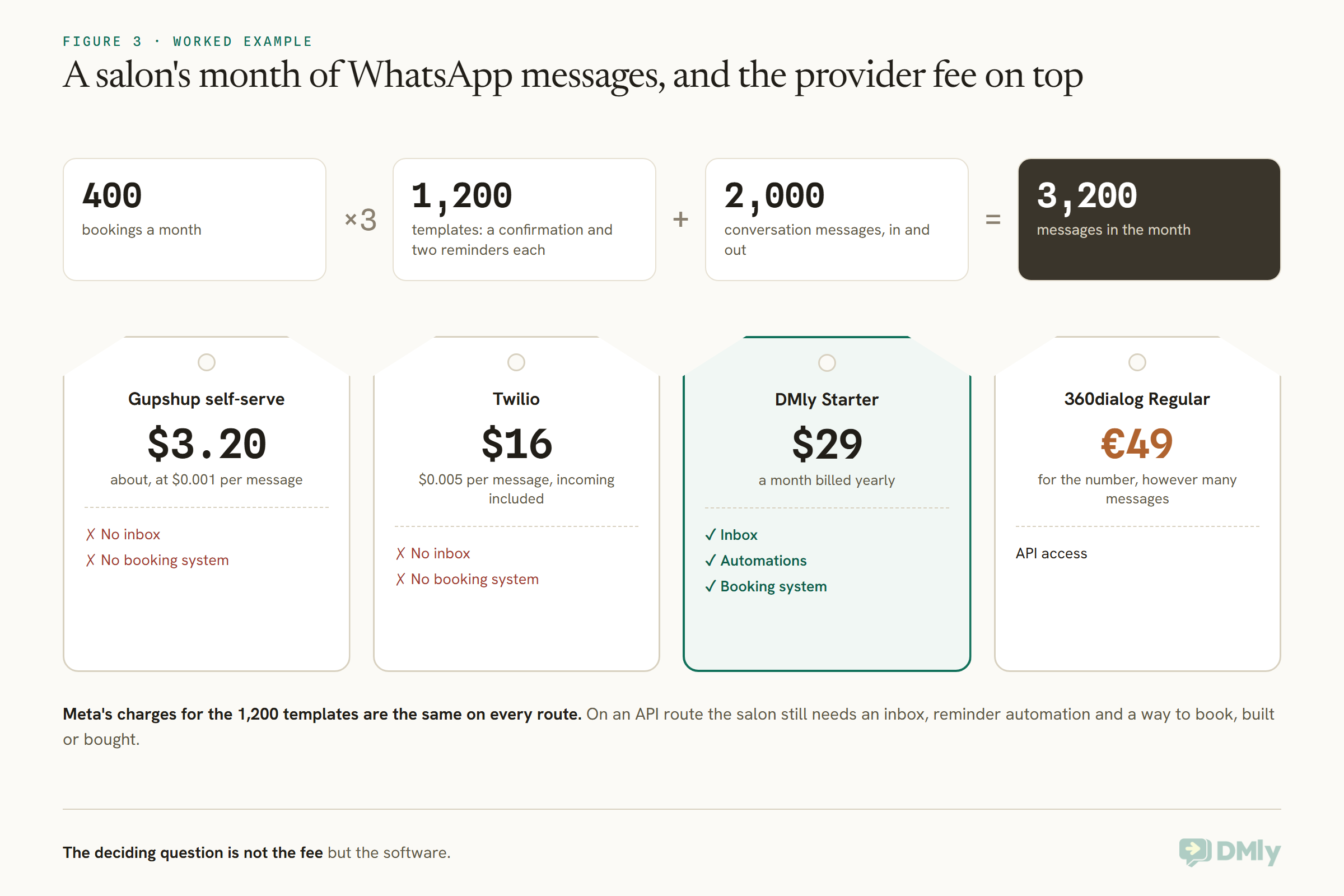
For this salon, the deciding question is not the fee but the software. On an API route, it would still need an inbox for the team, automation for the reminders and a way to book appointments, either built by a developer or bought separately. On an inbox platform, those come with the plan.
AI Agents on Each Route
Many businesses now want an AI agent answering on WhatsApp. How you get one depends on the route.
On Meta’s Cloud API directly or a developer API provider, the AI is yours to bring: you connect the model and write the logic that reads messages and replies, and pay for the AI separately. Some providers help: 360dialog’s Premium plan lists a messaging MCP server for connecting AI agents to WhatsApp. On an inbox platform, the AI usually comes built in. DMly’s AI agent is on every plan, answers from your knowledge base, can book and hand over to a person, and includes 500, 5,000 or 20,000 AI replies a month depending on the plan, with unlimited replies on your own AI provider key where the plan allows. Whichever route you take, the AI still works within Meta’s rules: templates outside the 24-hour window, and a clear route to a human.
What to Check Before You Connect Your Number
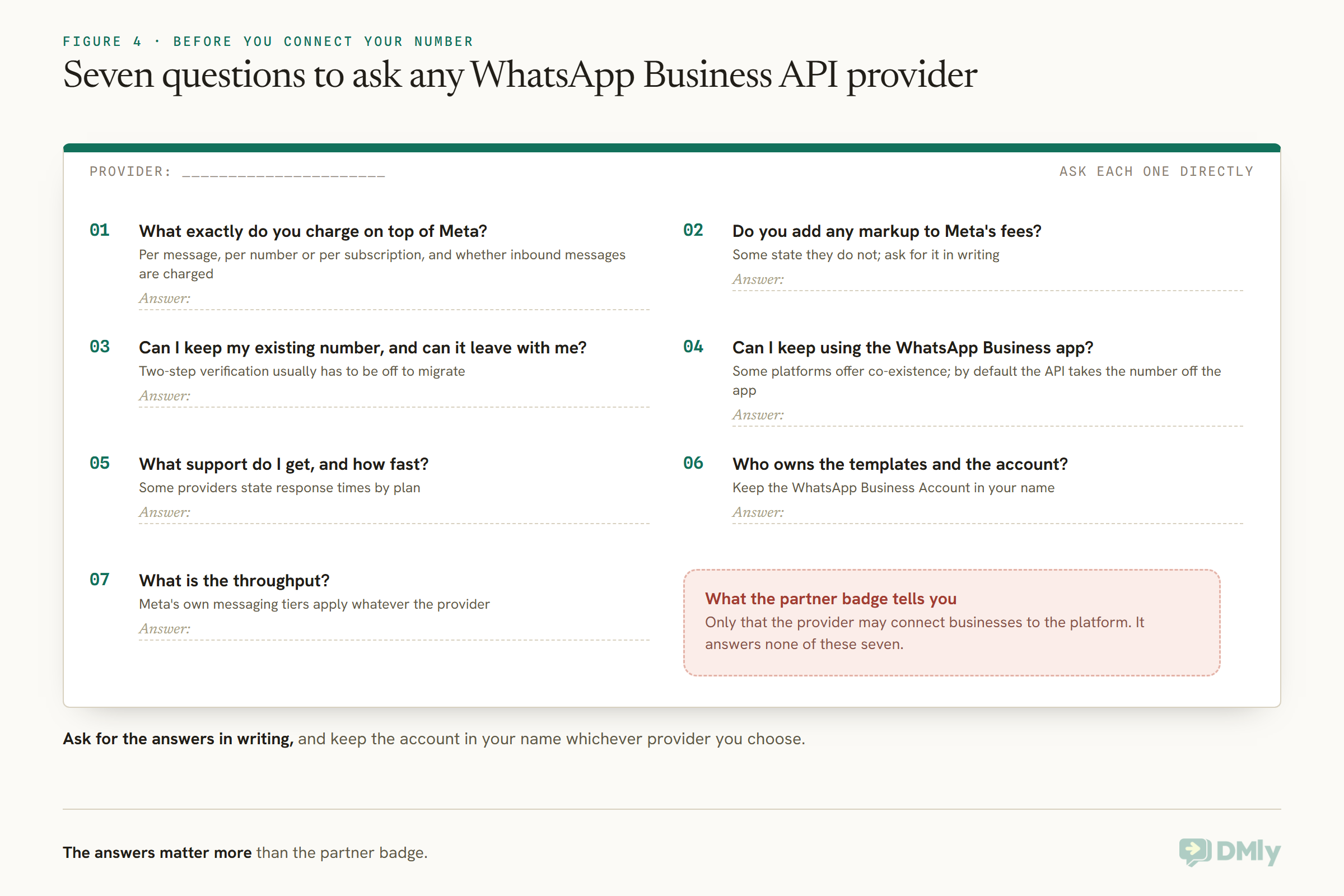
The badge does not answer these questions. Ask each WhatsApp Business API provider directly.
- What exactly do you charge on top of Meta? Per message, per number, per subscription, and whether inbound messages are charged.
- Do you add any markup to Meta’s fees? Some state they do not; ask for it in writing.
- Can I keep my existing number, and can it leave with me? Ask how migration in and out works. When moving between providers, two-step verification on the number usually has to be turned off first.
- Can I keep using the WhatsApp Business app? Some platforms offer co-existence; by default, moving a number to the API takes it off the app.
- What support do I get, and how fast? 360dialog, for example, states response times by plan.
- Who owns the templates and the account? Templates belong to your WhatsApp Business Account; make sure it is in your name.
- What is the throughput? It matters for large broadcasts; Meta’s own messaging tier limits apply whatever the provider.
When Something Goes Wrong
Support matters most on the day a template is rejected or your quality rating drops. Choose with that day in mind.
WhatsApp problems usually come from Meta’s side: a template rejected or paused, a quality rating falling after complaints, a messaging tier that has not risen, a number stuck in registration. Your provider cannot overrule Meta, but a good one can tell you what Meta’s message means, what to change and how to escalate. 360dialog lists a direct Meta escalation path on its API plans; developer providers generally offer tiered support; inbox platforms answer through their own support and documentation. DMly’s documentation, for example, sets out which failures come from DMly and which from Meta, and shows the failed sends for each template with WhatsApp’s reason. Before you choose, ask each provider what happens, and how quickly, when a template your business depends on is rejected.
Switching WhatsApp Business API Providers
You are not locked in forever, but switching takes planning.
A number can move between providers, and your WhatsApp Business Account and templates belong to you rather than the provider when the account is in your name. The usual steps are to turn off two-step verification on the number, start the connection with the new provider, and check templates and webhooks once the number arrives. Plan the move for a quiet period, tell your team, and test sending and receiving before announcing anything to customers. Conversation history held in the old provider’s inbox usually stays there, so export what you need first.
Mistakes to Avoid
- Comparing API fees with platform subscriptions as if like for like. An API needs software on top.
- Forgetting inbound fees. Some providers charge on incoming messages too.
- Letting the provider own the account. Keep the WhatsApp Business Account in your name.
- Ignoring Meta’s own charges. They apply on every route and are changing from October 2026.
- Migrating with two-step verification on. The move fails.
Frequently Asked Questions
Which WhatsApp Business API providers suit a small business?
For a business without developers, an inbox platform such as DMly or Wati, because the software comes with it. For a business with developers, Meta’s Cloud API directly or a developer API provider such as Twilio, 360dialog or Gupshup.
What is a WhatsApp BSP?
A Business Solution Provider: a company Meta allows to connect businesses to the WhatsApp Business Platform, usually adding an API, tools, an inbox or support on top.
Do I need a BSP to use the WhatsApp API?
No. Businesses with developers can use Meta’s Cloud API directly through their own developer app. A provider adds tools and support, and an inbox platform adds software for your team.
Which WhatsApp API provider is cheapest?
On provider fees alone, Meta’s Cloud API direct has none, and Gupshup’s self-serve plan charges $0.001 per message. But for a business without developers, the cost of software to use the API matters more than the fee.
Do providers mark up Meta’s fees?
Some state they do not; Twilio and Gupshup describe passing Meta’s fees through, and DMly’s docs say it adds no markup. Ask each provider in writing.
Can I move my number to a different provider?
Yes. Turn off two-step verification on the number first, then connect it with the new provider and check templates and webhooks.
Does the provider affect my messaging limits?
Meta sets messaging tiers and quality ratings for your number whatever provider you use; providers differ in throughput and support, not in Meta’s limits.
Read Past the Badge
Every provider here is an official way onto the same platform, and Meta’s charges are the same through all of them. What differs is what you pay on top and what you get for it: an API for your developers, or software your team can use today. Choose the route that matches who will run WhatsApp in your business, ask the seven questions before connecting your number, and keep the account in your name. If you want WhatsApp working for a local business without building anything, DMly is worth a look.
Writing about WhatsApp automation, bookings and growth for local business.
Turn WhatsApp into your busiest channel.
Start free and run message, bookings, payments and reviews in one place.
