
Best WhatsApp Ordering Systems for Restaurants in 2026

The photo arrives at 12:40: your own menu, screenshotted from Instagram, with three items circled in red and “x2” scribbled beside one of them, then a voice note, then “same as last time but no onions”. Somebody has to turn that into an order: work out which dish the second circle means, ask whether “x2” applies to the drink as well, look up what “last time” was, write it on a ticket, work out the total, send it back, and wait for a bank transfer screenshot. It is a perfectly good order. It just arrives in a form nobody in the kitchen can use.
A WhatsApp ordering system for restaurants turns that into a structured order: items, quantities, options, collection or delivery, a total and ideally a payment, arriving in a form the kitchen can work from. This guide compares the main kinds of system, with five options priced on their own pages on 27 September 2026. All of them charge a subscription rather than a commission on your orders.
A disclosure, up front: DMly publishes this blog and is one of the options compared. We have described every tool from its own pages and documentation, and said plainly where another is the better choice. For how the WhatsApp side of restaurant automation fits together, see our guide to WhatsApp automation for restaurants.
Three Kinds of WhatsApp Ordering System
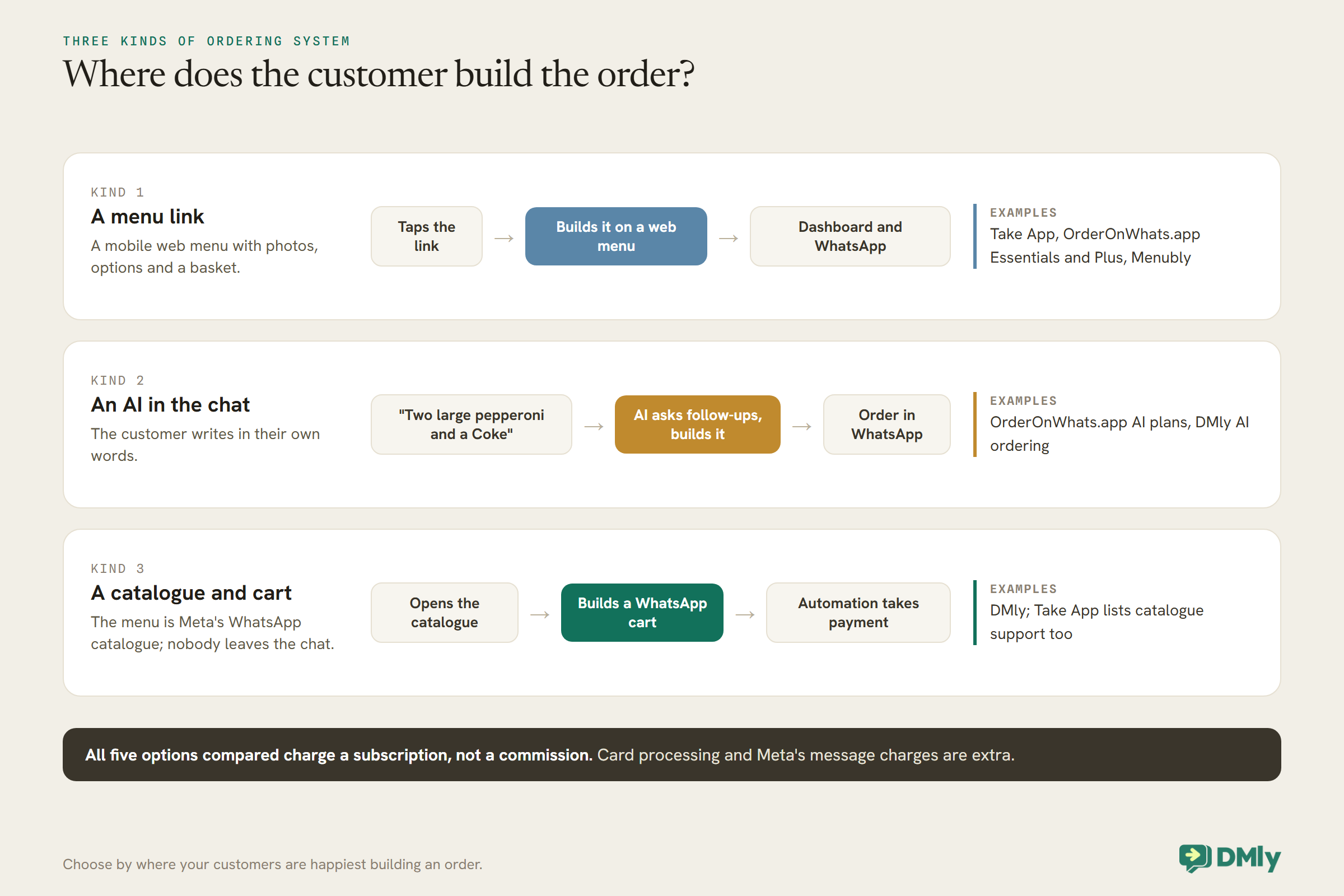
They all end with an order on WhatsApp. They differ in where the customer builds it.
1. A menu link that sends orders to WhatsApp. The customer taps a link, often from your WhatsApp profile, Instagram bio or a QR code, and orders on a mobile web menu with photos, options and a basket. The finished order arrives in a dashboard and on WhatsApp. Take App and OrderOnWhats.app’s basic plans work this way, and Menubly offers an online menu with ordering.
2. An AI that takes the order in conversation. The customer types or talks in their own words, “two large pepperoni and a Coke”, and an AI chatbot on the WhatsApp Business Platform asks the follow-up questions and builds the order. OrderOnWhats.app’s AI plans offer this, and so does DMly’s AI ordering.
3. A catalogue and cart inside WhatsApp. The menu lives in Meta’s WhatsApp catalogue, the customer adds items to a WhatsApp cart without leaving the chat and sends it, and automation handles the payment and confirmation. DMly supports this too, using Meta’s catalogue and cart, and Take App lists WhatsApp catalogue support.
What a Restaurant Needs From Ordering
Beyond taking the order, five things decide whether a WhatsApp ordering system for restaurants works on a busy evening.
Options and modifiers. Sizes, extras, “no onions”: the system has to capture them in a form the kitchen reads without asking again.
Collection or delivery, with the details. Collection time, or a delivery address and fee, captured once.
Payment. Card online, or cash or card on collection, recorded against the order.
Getting it to the kitchen. A dashboard, a printed ticket, a notification or a sheet the kitchen actually watches.
Updates. “Confirmed”, “ready for collection”, “out for delivery”, sent automatically so the phone does not ring asking.
How We Compared Them
Pricing pages read on one day, judged on the restaurant’s five needs.
We read Take App, OrderOnWhats.app and Menubly’s pricing pages in a browser on 27 September 2026, and used DMly’s documentation for DMly. Where a pricing page did not describe a feature clearly, we say so rather than assume. Aggregator delivery apps are not included, because they are marketplaces with their own delivery and commission rather than ordering systems for your own customers on WhatsApp. Card processing fees, WhatsApp message charges from Meta and any hardware are extra unless we say otherwise.
The Quick Answer: Best by Situation
| If you are… | Look first at | Why |
| A restaurant that also takes bookings and wants one WhatsApp system | DMly | AI chat ordering or an in-chat cart, plus reservations, reviews and repeat visits in one inbox |
| A small takeaway starting out | Take App Basic or Menubly Free | A free menu with ordering; Take App saves 50 orders a month on its free plan |
| A busy takeaway wanting card payments and automatic updates | Take App Business | Unlimited orders, card payments and 1,000 automated WhatsApp messages a month |
| A restaurant whose customers type their orders | OrderOnWhats.app AI plans | An AI that takes orders in conversation |
| A café that mainly needs a digital menu | Menubly | A low-cost menu site and QR menu with ordering |
The Best WhatsApp Ordering Systems for Restaurants, Reviewed
1. DMly: best overall WhatsApp ordering system for restaurants
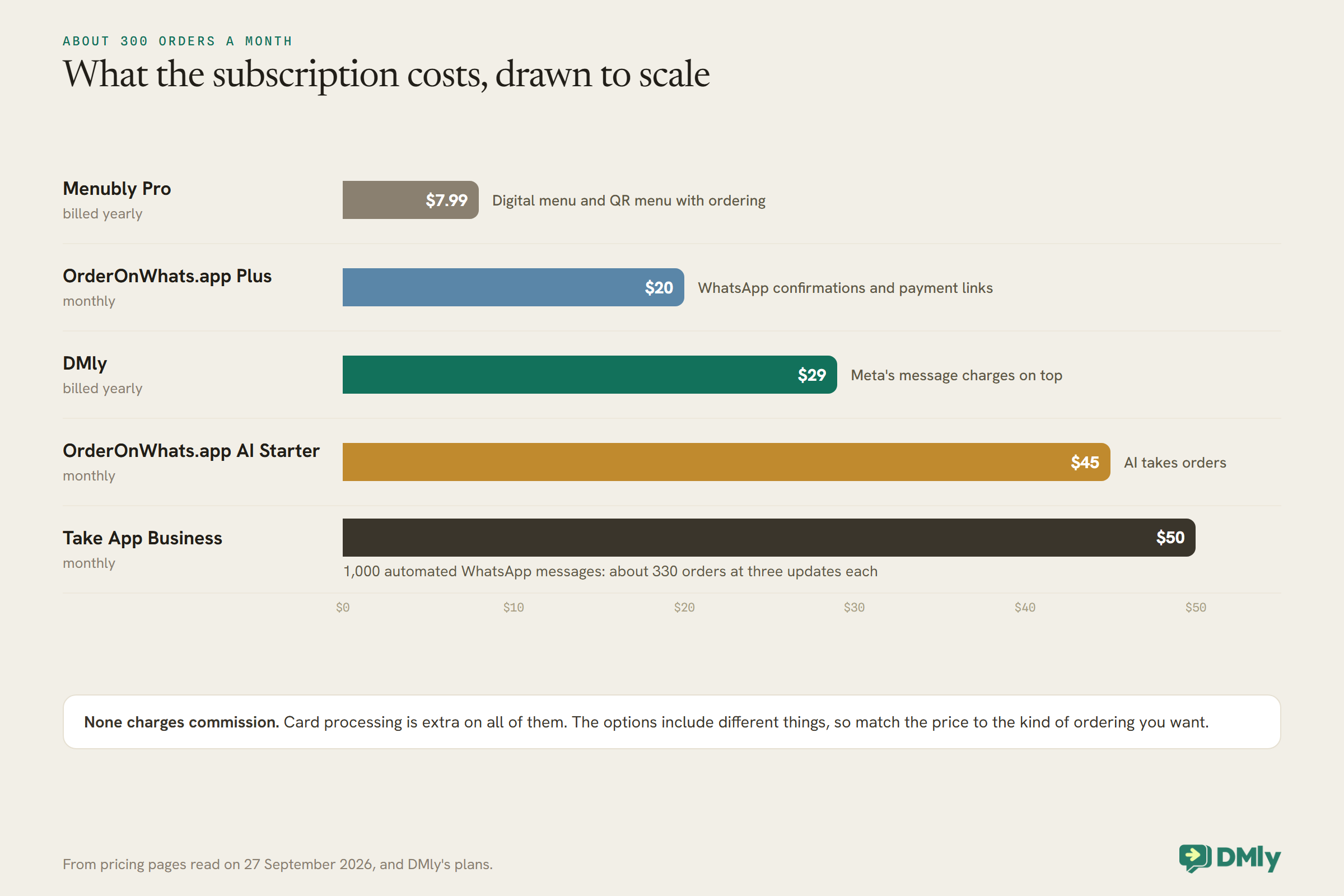
How it works. DMly does not host a menu website. It takes orders inside the chat in two ways. With AI ordering, the AI Food Ordering Assistant takes the order in the customer’s own words from dishes you set up in DMly, with add-ons and pickup, delivery or dine-in details, works out the total from your prices, fees and delivery zones, and leaves a draft order in DMly’s Finance for your team to confirm; you can let it confirm orders the customer approved and send a payment link. Or your menu lives in Meta’s WhatsApp catalogue, built in Commerce Manager, and DMly switches the catalogue and cart on for your number. A flow can send the full catalogue, one item or a list of items into the chat; the customer builds a WhatsApp cart and sends it, and the Cart order received trigger starts your ordering flow with the cart’s items and total. From there the flow can ask collection or delivery, request the customer’s location, send a Pay now button for the cart total through your connected payment gateway, and send confirmations. The same inbox handles reservations, questions, reviews and repeat-visit messages.
Watch out for. DMly’s docs are candid about the limits. The AI assistant never invents a price or a fee: anything left blank makes the quote incomplete and sends the order to your team, it can’t give discounts, and by default every order waits for a person to confirm it. On the catalogue route, a WhatsApp cart does not become a DMly Finance order and does not move stock, so the payment is recorded but the order itself lives in the chat and in whatever you send it to, such as a Slack message or a Google Sheet. Meta’s catalogue has its own rules: one catalogue per WhatsApp Business Account, items reviewed by Meta, one cart per chat per device, up to 99 units of an item, and no edits after the cart is sent. A cart the flow cannot process, such as an unknown item, pauses the bot and hands the conversation to a person. Plans are $29, $65 and $149 a month billed yearly.
Best for: restaurants that want ordering, reservations and customer messaging in one WhatsApp system, and are happy with ordering inside the chat rather than on a web menu.
2. Take App: best all-round order-link store
How it works. Take App gives you an online store your customers open from WhatsApp, where they choose items, options, quantities and pickup times, so orders arrive complete rather than spread across a long chat. Orders are managed in a dashboard with status tracking, order summaries and invoice links. Its pricing page lists WhatsApp Business Platform support, a WhatsApp catalogue, broadcasts, workflows, order notifications and delivery reminders, with 0% commission on orders.
Pricing. Basic is free and saves 50 orders a month to the dashboard; after that, orders still reach your WhatsApp number but are not saved. Business is $50 a month, with a first month for $1 for first-time subscribers, and adds unlimited orders, card payments through Stripe and other gateways, automated WhatsApp updates and broadcasts with 1,000 automated WhatsApp messages a month, 5 stores and 5 staff. Extra automated WhatsApp messages are $0.05 each.
Watch out for. The free plan’s 50-order dashboard limit comes quickly for a busy kitchen. Count your automated messages too: at two or three updates per order, 1,000 messages covers a few hundred orders.
Best for: takeaways and small restaurants that want a tidy order form and dashboard with no commission.
3. OrderOnWhats.app: best AI chat ordering
How it works. OrderOnWhats.app offers two families of plans. The ordering-system plans give you an online ordering site integrated with WhatsApp: Essentials at $13 a month with a dashboard, unlimited products with options, discount codes, delivery fees, stock management and pre-orders; and Plus at $20 a month, adding WhatsApp order confirmations, a point-of-sale tool and payment links. The AI plans put a chatbot on the WhatsApp Business API that takes orders in natural language and answers questions: AI Starter at $45 a month, and AI Professional at $129 a month, adding broadcasts, automated campaigns, a custom personality, human handover and advanced analytics. It states no commission and full setup included.
Watch out for. Human handover is listed on AI Professional rather than AI Starter; for a restaurant, a route to a person for allergy questions and complaints matters. Custom chatbot setup and advanced automation are one-time add-ons starting at $299 and $399.
Best for: restaurants whose customers prefer to type their orders, and that want an AI to handle them.
4. Menubly: best for a low-cost digital menu
How it works. Menubly is an online menu platform: a mini website, a built-in online menu, a QR code menu and online ordering for pick-up and delivery. Free covers the basics; Pro is $7.99 a month billed $95.99 yearly, or $9.99 monthly, adding full menu customisation, PDF menu conversion, a custom domain and custom design. It states no commission on orders and a 30-day trial.
Watch out for. Its pricing page does not describe how orders reach WhatsApp or what automated WhatsApp messages are included, so check that during the trial if WhatsApp is where you want the orders.
Best for: cafés and small restaurants that mainly need a good-looking menu and QR code with simple ordering.
5. General WhatsApp platforms with catalogues
How it works. Several WhatsApp inbox platforms support Meta’s WhatsApp catalogue and cart alongside their inbox, broadcasts and chatbots, as covered in our comparison of the best WhatsApp business software. They suit restaurants that want the WhatsApp tooling first and ordering as one feature.
Watch out for. Check how the cart reaches your kitchen and how payment is taken; a catalogue alone is a menu, not an ordering system.
How an In-Chat Cart Order Flows in DMly
If you choose the catalogue-and-cart route, here is what happens between the cart and the kitchen.
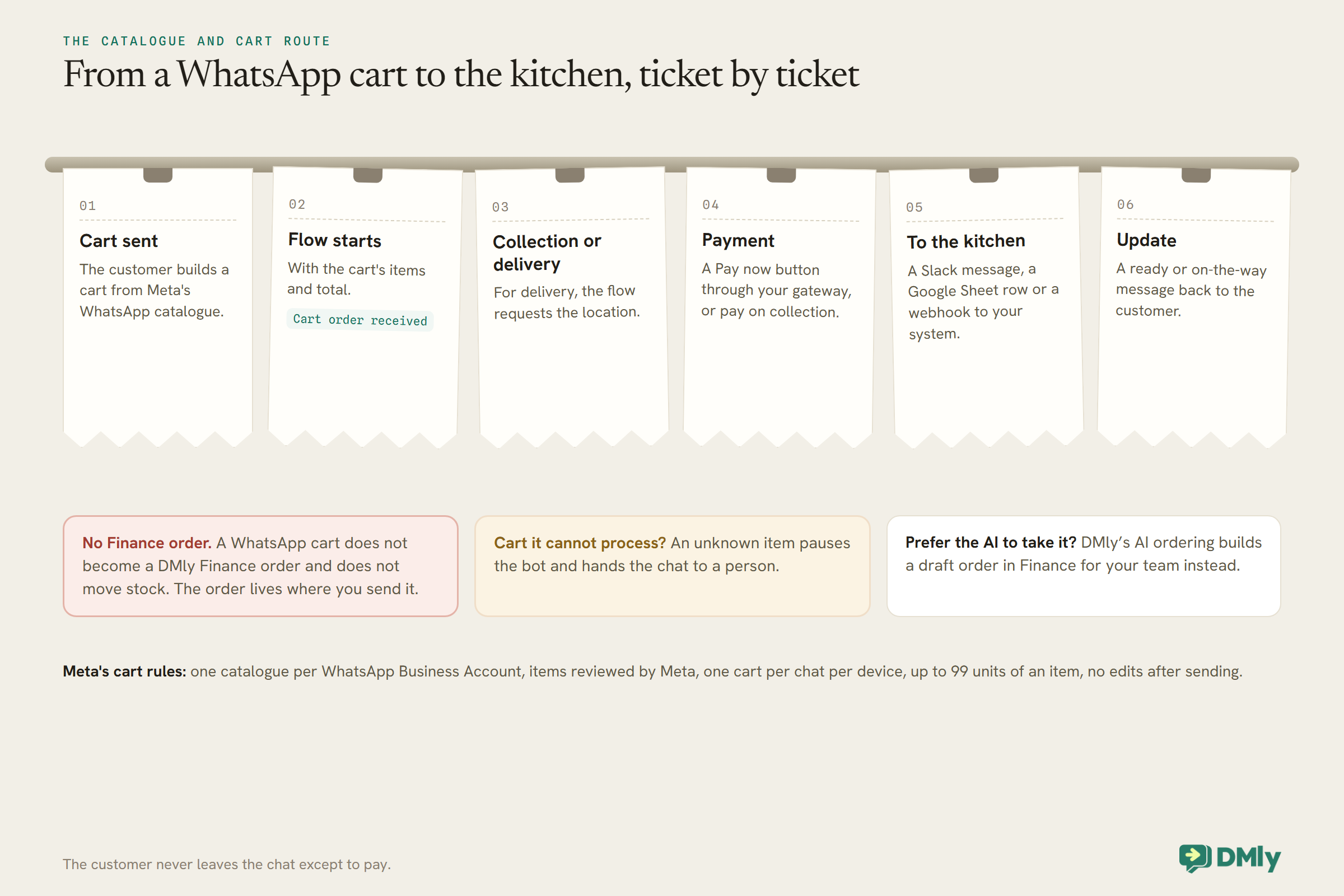
The advantage of this route is that the whole order, and the conversation around it, stays in one thread, and the same inbox handles the customer’s next reservation or question. The trade-off is that the cart is the order: there is no web menu with photos and descriptions beyond what Meta’s catalogue shows, and orders are tracked where you send them rather than in a DMly order screen. (AI ordering, by contrast, puts each order in DMly’s Finance.) Our how-to on building a restaurant’s WhatsApp ordering walks through the flow.
Comparison at a Glance
| Option | Type | Entry price | Card payments | Automated WhatsApp updates | Commission |
| DMly | AI chat ordering, or in-chat catalogue and cart | $29 billed yearly | Pay now button or payment link via your gateway | Built with flows | None |
| Take App | Menu link, catalogue listed | Free (50 orders saved); Business $50 | Business | 1,000 a month on Business | 0% |
| OrderOnWhats.app | Menu link, or AI chat | $13; AI from $45 | Payment links from Plus | Confirmations from Plus | None stated |
| Menubly | Menu site with ordering | Free; Pro $7.99 billed yearly | Not assessed | Not described | None stated |
What It Costs Beyond the Subscription
No commission does not mean no costs. Three extras apply to every option.
Card processing. Whoever processes the card charges a fee on each payment, whether through the ordering system’s gateway or your own. WhatsApp messages. Meta charges for template messages sent outside the 24-hour window, and its pricing is changing from 1 October 2026; order confirmations sent while the customer’s chat is open are handled differently from updates sent later. Some systems include a message allowance, such as Take App’s 1,000 automated WhatsApp messages on Business, with extras charged; see our article on WhatsApp’s October 2026 pricing. Your time. A system that saves orders cleanly but still needs someone to retype them for the kitchen has not removed the work.
Subscription Versus Commission
The reason restaurants move ordering to WhatsApp is usually the commission they are paying elsewhere.
Delivery marketplaces charge a percentage of each order in exchange for bringing you customers and, often, delivering. A WhatsApp ordering system charges a flat subscription and brings you no new customers; it works with the people who already know you. So the sensible use is to move your regulars’ orders to WhatsApp, where you keep the whole order value less processing, while the marketplaces continue to find new customers. Put your WhatsApp ordering link on your packaging, your receipts, your Google profile and your Instagram, and give regulars a reason to use it.
Delivery Zones, Fees and Sold-Out Dishes
Two details that cause most of the back-and-forth on a busy night.
Delivery. Take App lists a delivery fee calculator, delivery schedules and courier tracking; OrderOnWhats.app lists delivery fees on its ordering plans. In DMly, AI ordering has delivery zones, each with its own fee, an optional minimum order and a free-delivery threshold, matched by area name rather than by distance; if a customer’s area matches no zone or more than one, the assistant asks. On the catalogue route, the flow can ask for the customer’s location with a location request and branch on it, but there is no zone calculator, so fees for different areas would be separate items or set by a person. If you deliver across several zones, check how each system prices them before you choose.
Sold out. A dish that runs out mid-service should stop being orderable immediately. OrderOnWhats.app lists stock management on its ordering plans, and Take App lists inventory. On the catalogue route, Meta’s catalogue documentation says that when an item’s availability changes, it is removed from customers’ carts, so marking a dish unavailable in the catalogue is the lever; test how quickly the change shows in the chat before relying on it at peak time.
Status Updates Customers Actually Want
Most “where is my order?” messages disappear when customers are told before they ask.
Three updates cover most orders: a confirmation with the total and the collection time or delivery estimate, a “ready for collection” or “on the way” message, and, for delivery, a note if something is running late. Send them automatically where the system allows it: Take App includes automated WhatsApp order notifications on Business, OrderOnWhats.app sends WhatsApp order confirmations from Plus, and in DMly the ordering flow sends them as steps, with a person able to trigger the “ready” message from the inbox. Keep each update short and specific; “Your order #42 is ready at the counter” does more than “Thanks for your order!”.
Moving Your Regulars Over
An ordering system only pays for itself if customers use it. Make it the easiest way to order from you.
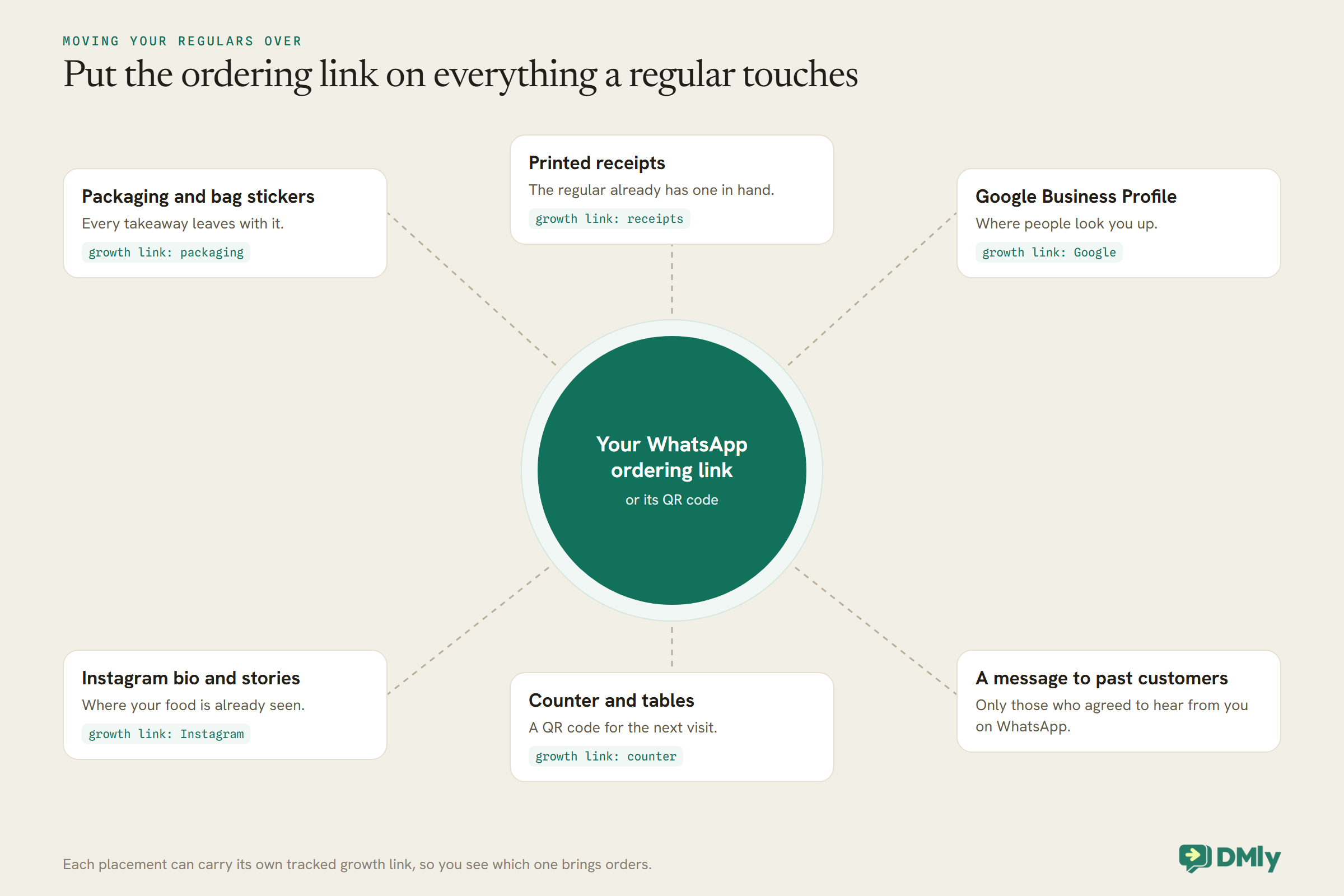
Put the link or QR code on everything a regular touches: packaging, receipts, your Google profile, your Instagram bio, the counter and the tables. Give them a reason to try it, such as a faster collection slot, and tell past customers who have agreed to hear from you on WhatsApp that they can now order there. With DMly, each placement can carry its own tracked growth link, so you can see which ones bring orders.
Pre-Orders and Scheduled Collection
Lunchtime rushes are easier when some orders arrive the day before.
Letting customers order ahead for a set collection time spreads the kitchen’s load and cuts the queue at the counter. OrderOnWhats.app lists pre-orders on its ordering plans, and Take App lets customers pick pickup times and lists delivery schedules. In DMly, the AI ordering assistant collects a requested time, read in your time zone, and each dish can carry a preparation time; a cart flow can ask for a collection time with reply buttons and include it in the kitchen message; for a timed collection that should block capacity, such as a limited number of catering orders a day, a bookable service with a capacity can hold the slot. Decide how far ahead you accept orders and say it in the menu.
Several Branches and a Team
Check how each system handles more than one kitchen and more than one person answering.
Take App’s Business plan includes five stores and five staff members, with extra stores listed as add-ons at $8 each and extra staff at $4 each. OrderOnWhats.app lists multi-location under its custom Enterprise plan. DMly plans include one, three or five profiles per channel, so a restaurant can run a WhatsApp number per branch in one inbox, with 3, 6 or 15 team seats depending on the plan. Whichever you choose, make sure each branch’s orders reach that branch’s kitchen, and that customers see the right branch’s menu and collection address.
Getting Orders to the Kitchen
The best ordering front end fails if the kitchen does not see the order in time.
Link-to-menu systems usually include a dashboard with order status, which works if someone watches it or it alerts loudly; OrderOnWhats.app lists a point-of-sale tool and Take App a dashboard with order tracking. In DMly, AI orders appear in Finance, Orders for your team, and a cart flow can post each cart to a Slack channel or a Google Sheet, or send it to your own system through a webhook, as covered in our guide to a restaurant’s WhatsApp automation. Whatever you choose, test it on a busy evening: place three orders in two minutes and see whether the kitchen could have made all three correctly from what it received.
Allergens and Special Requests
Ordering systems carry information about food; the responsibility for it stays with you.
If you sell food for delivery or collection, the rules where you operate may require allergen information to be available before the customer orders and when the food is delivered; in the UK, for example, the Food Standards Agency’s guidance covers distance selling at both stages. Make sure your menu in whichever system you choose carries the information your rules require, and route allergy questions to a person who knows your kitchen rather than an automated reply. Special requests, such as “no onions”, should appear on the kitchen’s copy of the order, not just in the chat.
How to Test an Ordering System in a Week
- Load your real menu with options and prices.
- Place an order from your phone with two modifiers and a note, and check the kitchen copy shows all three.
- Pay by card, and pay on collection, and check both are recorded.
- Check the confirmation and “ready” messages arrive on WhatsApp.
- Place three orders in two minutes and see how the kitchen copes.
- Mark an item sold out and check it cannot be ordered.
- Work out the month’s cost: subscription, processing and messages.
Mistakes to Avoid
- Choosing on the ordering screen alone. The kitchen view and updates matter as much.
- Forgetting message costs. Automated updates count against allowances or Meta’s charges.
- No route to a person. Allergy questions and complaints need one.
- Hiding the ordering link. Put it on packaging, receipts and your profiles.
- Expecting new customers. WhatsApp ordering serves people who already know you.
Frequently Asked Questions
What is the best WhatsApp ordering system for restaurants?
DMly is our top pick: ordering inside WhatsApp, by AI or by cart, together with reservations, reviews and messaging in one system. For an order-link store, Take App; for standalone AI chat ordering, OrderOnWhats.app; for a low-cost digital menu, Menubly.
Do WhatsApp ordering systems charge commission?
The options compared here charge a subscription, not a commission; Take App states 0% commission. Card processing and WhatsApp message charges are extra.
Can customers pay for their order on WhatsApp?
Yes, usually through a payment link or button that opens a secure payment page. Take App offers card payments on Business, OrderOnWhats.app payment links from Plus, and DMly a Pay now button through your connected gateway.
Can an AI take food orders on WhatsApp?
Yes. OrderOnWhats.app’s AI plans offer it, and DMly’s AI Food Ordering Assistant builds the order in the chat from your own dishes and prices, then hands it to your team to confirm.
Is a free WhatsApp ordering system enough?
For a small takeaway starting out, often yes. Take App’s free plan saves 50 orders a month to its dashboard, and Menubly has a free plan with ordering.
How do orders reach the kitchen?
Through the system’s dashboard or point-of-sale tool, or, in DMly, a Slack message, Google Sheet or webhook from the ordering flow.
From Circled Photo to Kitchen Ticket
The circled menu photo at the top of this page is a customer who wants to order from you on WhatsApp. The right WhatsApp ordering system for restaurants lets them do it in a form your kitchen can use, pays you without a screenshot, and tells them when it is ready. Choose by where your customers like to build an order, count the costs beyond the subscription, and test it on a busy evening. If you want ordering, reservations and messaging in one WhatsApp system, DMly is worth a look.
Writing about WhatsApp automation, bookings and growth for local business.
Turn WhatsApp into your busiest channel.
Start free and run message, bookings, payments and reviews in one place.
