
Best ManyChat Alternatives for Instagram and WhatsApp Automation in 2026

Most people searching for a ManyChat alternative should not switch. ManyChat is good at what it was built for: turning Instagram comments, story replies and DMs into automated conversations for creators and small brands, with a free plan to start on. If that is your whole job, the grass is rarely greener, and moving your automations costs a weekend you will not get back.
But some people should switch, and they tend to hit the same walls: the bill climbing with active contacts, WhatsApp only arriving on a higher plan, a channel cap, or a business that has grown past DMs into bookings, invoices and a team inbox. This guide covers the ManyChat alternatives worth a look in 2026, what each costs according to its own pricing page, where each is stronger or weaker than ManyChat, and how to tell which group you are in before you move anything.
For a wider comparison of WhatsApp platforms, see our Wati, Respond.io, Interakt, AiSensy and DMly comparison.
For Manychat’s own prices in detail, read our Manychat review. To set DMly and Manychat side by side, see DMly vs Manychat.
Why People Look for ManyChat Alternatives
Four reasons come up again and again: price at scale, WhatsApp access, channel limits and outgrowing DMs.
Price that grows with engagement. ManyChat’s plans include a set number of active contacts a month, and each one over the limit is charged. A viral Reel with a comment keyword can multiply active contacts in a week. WhatsApp on higher plans only. ManyChat’s Free and Essential plans do not include WhatsApp, SMS or email; WhatsApp starts on Pro. Channel caps. Free and Essential connect two channels, Pro three, and only Business is unlimited. Outgrowing DMs. A salon, clinic or tutor who started with comment automations eventually wants the conversation to end in a booking, a payment and a reminder, and a DM automation tool is not built for that.
If only the first reason applies to you, read the next section before switching: moving up a ManyChat plan can be cheaper than moving out.
ManyChat’s Plans in 2026, and Whether Staying Is Cheaper
ManyChat moved to a new pricing model on 2 March 2026. Here is what its help centre says each plan includes.
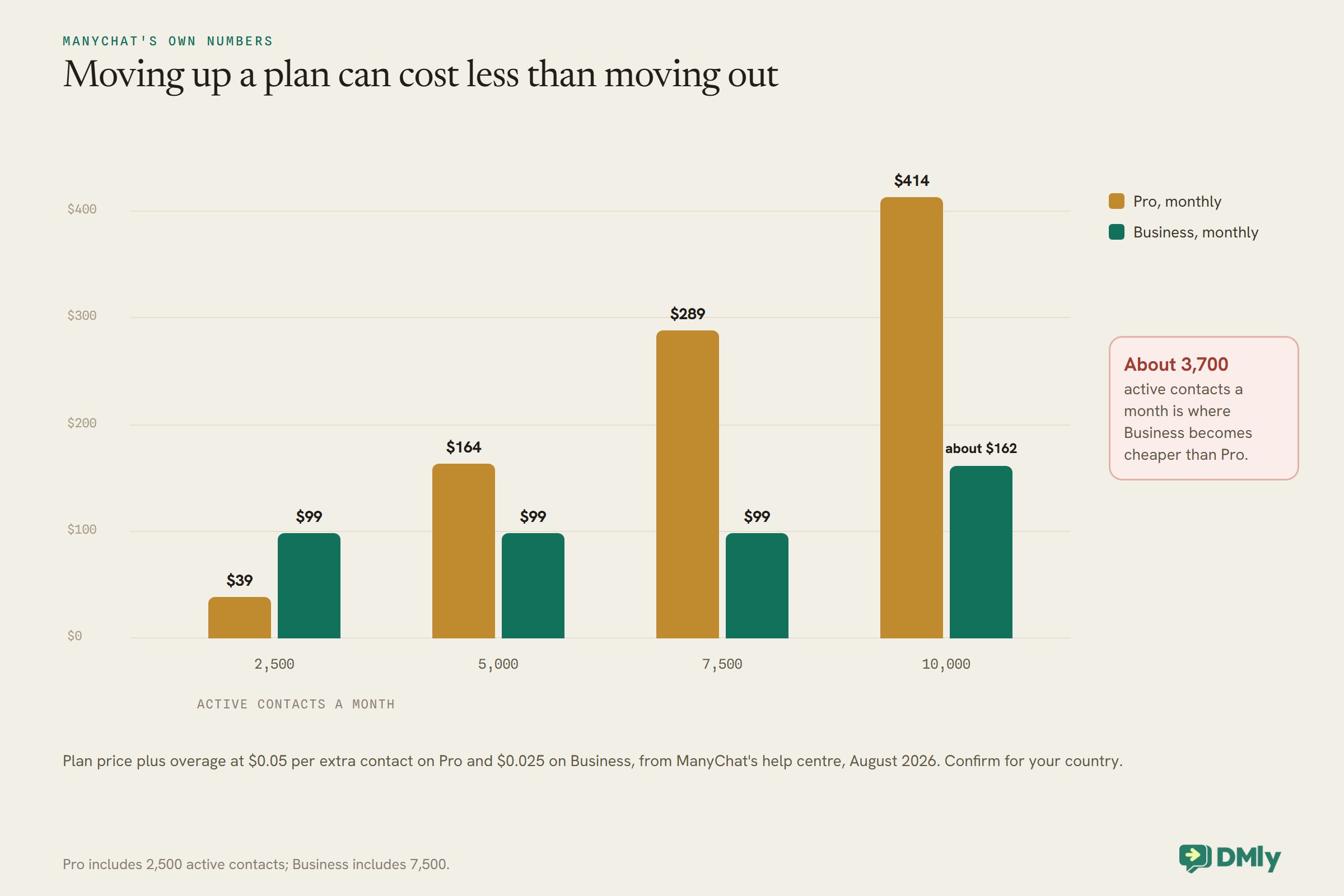
ManyChat’s own help centre, updated in August 2026, describes four plans under the new model, which applies by default to accounts created from 2 March 2026 and is rolling out country by country to older accounts. Free is $0 with 25 active contacts a month, one user, up to two channels from Instagram, TikTok, Messenger and Telegram, and four live automations; no WhatsApp, SMS or email. Essential is $17 a month billed monthly or $14 billed yearly, with 250 active contacts, two users and two channels, still without WhatsApp, and a 14-day trial. Pro is $39 monthly or $29 yearly, with 2,500 active contacts, three users, two inbox seats, three channels including WhatsApp, SMS and email, AI-powered automation and API access, and a 14-day trial. Business is $99 monthly or $69 yearly, with 7,500 active contacts, five users, three inbox seats and unlimited channels, and no free trial.
Overage is where the bill moves. Over the limit, each extra active contact costs $0.10 on Essential, $0.05 on Pro and $0.025 on Business on monthly billing, and a little less on yearly. That makes the higher plan cheaper surprisingly early, as the figure shows. ManyChat’s pricing page itself sits behind a bot check we could not read, so confirm the figures for your country there before deciding.
What ManyChat Still Does Well
Before comparing alternatives, be clear about what you would be giving up.
ManyChat has a genuinely free plan, which none of the WhatsApp-first platforms here offer, and it is enough to learn comment and story automations on a small account. It connects more social channels than most alternatives on this list, including TikTok and Telegram as well as Instagram and Messenger, and from Pro it adds WhatsApp, SMS and email in the same builder. Its paid plans below Business come with a 14-day trial, and Pro adds AI-powered automation and API access. Its plans are written around creators, with automations for new followers, story replies and comment keywords that match how creators actually grow.
So the honest question is not “is ManyChat bad?” but “is it built for what I now need?” If your answer involves a team answering WhatsApp, a calendar or a payment, the alternatives below are worth a look. If your answer is “more Instagram automations for less money”, compare ManyChat’s own plans first.
How We Compared the ManyChat Alternatives
Five questions, answered from each vendor’s own pricing and help pages, read on the same day.
We looked at the ManyChat alternatives through the eyes of a ManyChat user thinking of leaving. Channels: does it do Instagram automation (comments, story replies, DMs), WhatsApp, or both? Pricing shape: what is the bill based on, active contacts, messages sent, users or a flat plan, and how are WhatsApp’s own message fees handled? Automation depth: keyword triggers, flows, AI replies. What happens after the chat: can a conversation end in a booking, an invoice or a payment inside the same tool? Fit: who it is really built for. Prices are as shown on 27 September 2026 and change often, so check them before you buy. We have left out anything we could not read at source.
The Six ManyChat Alternatives Worth a Look
Two Instagram specialists, one chatbot builder, two WhatsApp-first inbox platforms, and our own product, placed where it honestly fits.
1. DMly: for local businesses that need the chat to end in a booking or payment
DMly is a messaging platform for small and local businesses that puts WhatsApp, Instagram, Messenger, TikTok and other channels in one shared inbox, with automation, a CRM, bookings, invoices and payments, and Google review requests in the same product. On Instagram it covers the ManyChat basics: comment triggers with keyword matching on posts and Reels, a public reply and a private DM to the commenter, story replies and story mentions as triggers, ice breakers, and a check on whether the contact follows your account. The difference is what happens next: the same flow can offer booking slots, send a payment link or hand the conversation to a teammate in the inbox.
Pricing (dmly.io/pricing, read 27 September 2026): Starter $29, Growth $65 and Premium $149 a month billed yearly, with 3,000, 10,000 and unlimited active contacts, and 3, 6 and 15 team seats. Every plan includes comment automation, AI agents, bookings, invoices and payments, and a 7-day trial with no card. WhatsApp message fees are paid to Meta at its own rates, with no markup from DMly.
Watch for: DMly connects Instagram Business and Creator accounts, with or without a Facebook Page; Personal accounts cannot be connected. Comments on Instagram ads are not confirmed to trigger automations, and they can’t reach an account connected through Instagram Login at all. And there is no free plan. Best for: salons, clinics, studios, tutors, restaurants and shops that want Instagram and WhatsApp conversations to end in a booking or a sale, with a team answering in one inbox. See our Instagram comment-to-DM guide for how the Instagram side works.
2. Chatfuel: a chatbot builder that has moved towards WhatsApp and AI
Chatfuel is one of the older chatbot builders and now presents itself as an AI assistant for sales and support, with a single Business plan and an Agency tier. Its pricing page lists automatic replies to post and Reels comments, bulk WhatsApp campaigns, booking meetings in WhatsApp, CRM sync, lead scoring, selling in chat and sending WhatsApp conversions to the Meta Pixel. It describes itself as an official Meta partner and WhatsApp Business Solution Provider.
Pricing (chatfuel.com/pricing, read 27 September 2026): Business lists at US$69 a month, including US$20 of AI credits a month; Agency S lists at US$100 a month billed monthly, for three companies with US$100 of AI credits. A limited offer running until 30 September showed Business at a much lower price; check what applies when you read this. “Usage limits apply”, and the page links to separate plan limits. Watch for: AI credits are a monthly allowance, so heavy AI use is a cost to model. Best for: businesses that want WhatsApp sales and support automation with AI, from a tool that also handles Instagram comments.
3. Inrō: an Instagram-only specialist, billed by activated contacts
Inrō focuses on Instagram lead generation: comment and DM automations, campaigns, a CRM of the contacts you reach, and an AI agent. Its pricing charges for contacts you activate each month rather than for everyone who has ever messaged you.
Pricing (inro.social/pricing, read 27 September 2026): Free at €0 with 100 active contacts a month, three active automations and three campaigns a month; Pro from €12.99 a month, scaling with active contacts, with unlimited automations and campaigns, integrations and up to ten team members, and a 14-day trial; an annual Pro option and a managed, done-for-you plan. The comparison table lists payments in DMs, live comments, A/B testing and webhooks on paid tiers. Watch for: it is Instagram-focused; if WhatsApp is part of your plan, it is not the tool. Best for: creators and brands whose automation lives entirely on Instagram and who like a price that follows actual activity.
4. LinkDM: the simplest and cheapest route for Instagram DMs
LinkDM does one thing: send DMs from Instagram triggers such as comments, story replies, story mentions and live comments, with Facebook auto-replies too. It is priced by DMs sent rather than contacts.
Pricing (linkdm.com/pricing, read 27 September 2026): Free with one Instagram account and up to 1,000 DMs a month; Pro $19 a month for up to three accounts and 25,000 DMs, adding comment auto-reply, flows, lead generation, follower growth and branding removal; Platinum+ $99 a month for ten accounts and 300,000 DMs. Watch for: no WhatsApp, and little beyond DMs. Best for: creators and marketers who want comment-to-DM links sent reliably at the lowest cost. We compare it in more depth in our LinkDM alternative guide.
5. Wati: WhatsApp-first, with Instagram automations added
Wati built its name on the WhatsApp Business API and now runs an omnichannel inbox covering WhatsApp, Facebook, Instagram and TikTok, with Instagram DM and comment automations and TikTok and Messenger DM automations listed on its Growth plan, plus broadcast campaigns, click-to-WhatsApp ads and Shopify cart templates.
Pricing (wati.io/pricing, read 27 September 2026, annual billing shown): Growth $39 a month with three users and no additional users; Pro $79 a month with five users and extra users at $24 each; a Business tier above. Messages are charged on Wati’s own rate card, with different rates for marketing, utility and authentication. Watch for: check the rate card against Meta’s own rates for your country, since message fees go through Wati. Best for: teams whose priority is WhatsApp broadcasting and inbox work, with Instagram as a second channel. Our Wati alternatives guide covers it from the other side.
6. Respond.io: an omnichannel inbox for sales and support teams
Respond.io is built around a shared inbox and workflows for teams handling conversations across many channels. Its help centre describes connecting an Instagram Business account to manage direct messages in its inbox, alongside WhatsApp and other channels, with AI agents and workflows on its plans.
Pricing (respond.io/pricing, read 27 September 2026): Starter $79, Growth $159 and Advanced $279 a month on monthly billing, with Growth and Advanced starting at 1,000 monthly active contacts; users 5, 10 and 10 with extra users charged; a 7-day trial with no card. WhatsApp fees are not included in any subscription. Watch for: it is priced and designed for teams, so a solo creator will pay for more than they use; we did not find Instagram comment automation described on the pages we read. Best for: sales and support teams who need routing, reporting and integrations more than growth automations.
ManyChat Alternatives Side by Side
The short version, from the same pages read on the same day.
| Tool | Instagram automation | Entry price read | Bill based on | Best for | |
| ManyChat | Yes | From Pro | Free; Pro $39/mo monthly | Active contacts | Creators and small brands |
| DMly | Yes (Business or Creator accounts) | All plans | $29/mo billed yearly | Plan, with contact limits | Local businesses taking bookings and payments |
| Chatfuel | Comment replies listed | Yes | US$69/mo list | Plan plus AI credits | WhatsApp sales and support with AI |
| Inrō | Yes | No | Free; Pro from €12.99/mo | Activated contacts | Instagram-only lead generation |
| LinkDM | Yes | No | Free; Pro $19/mo | DMs sent | Cheap comment-to-DM links |
| Wati | DM and comment automations listed | Yes | $39/mo billed annually | Plan plus Wati message rates | WhatsApp-first teams |
| Respond.io | DMs in inbox | Yes | $79/mo monthly | Plan, users, active contacts | Sales and support teams |
What Each Bill Is Based On
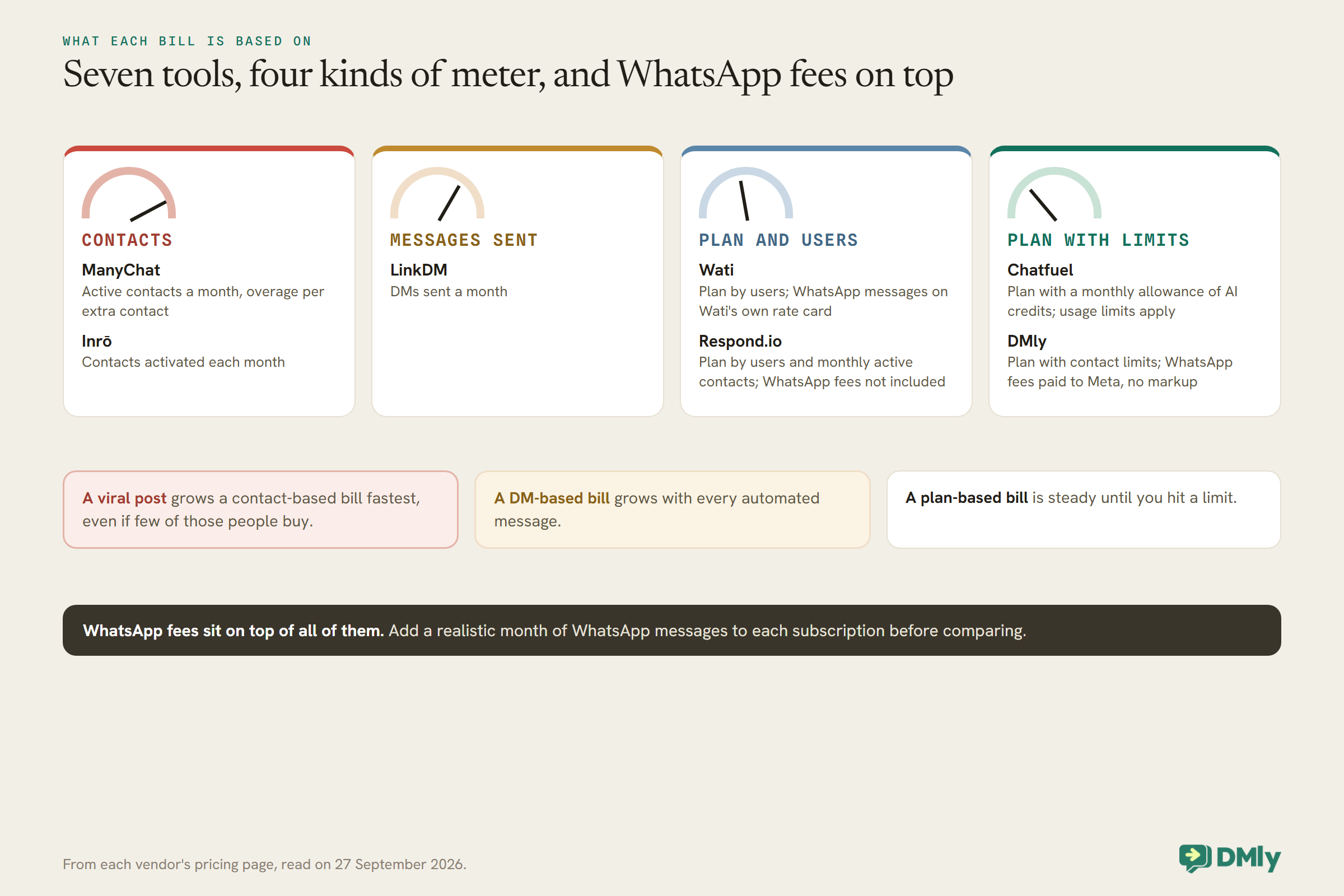
The headline price matters less than what makes it grow. Each tool meters something different.
Two tools can show the same monthly price and cost very different amounts a few months later, because they charge for different things. A contact-based bill grows when a post goes viral, even if few of those people buy. A DM-based bill grows with every automated message. A plan-based bill is steady until you hit a limit, and WhatsApp fees sit on top of all of them. Match the meter to how your business grows.
Which of the ManyChat Alternatives Fits You?
Start from what you need the conversation to do, not from the feature list.
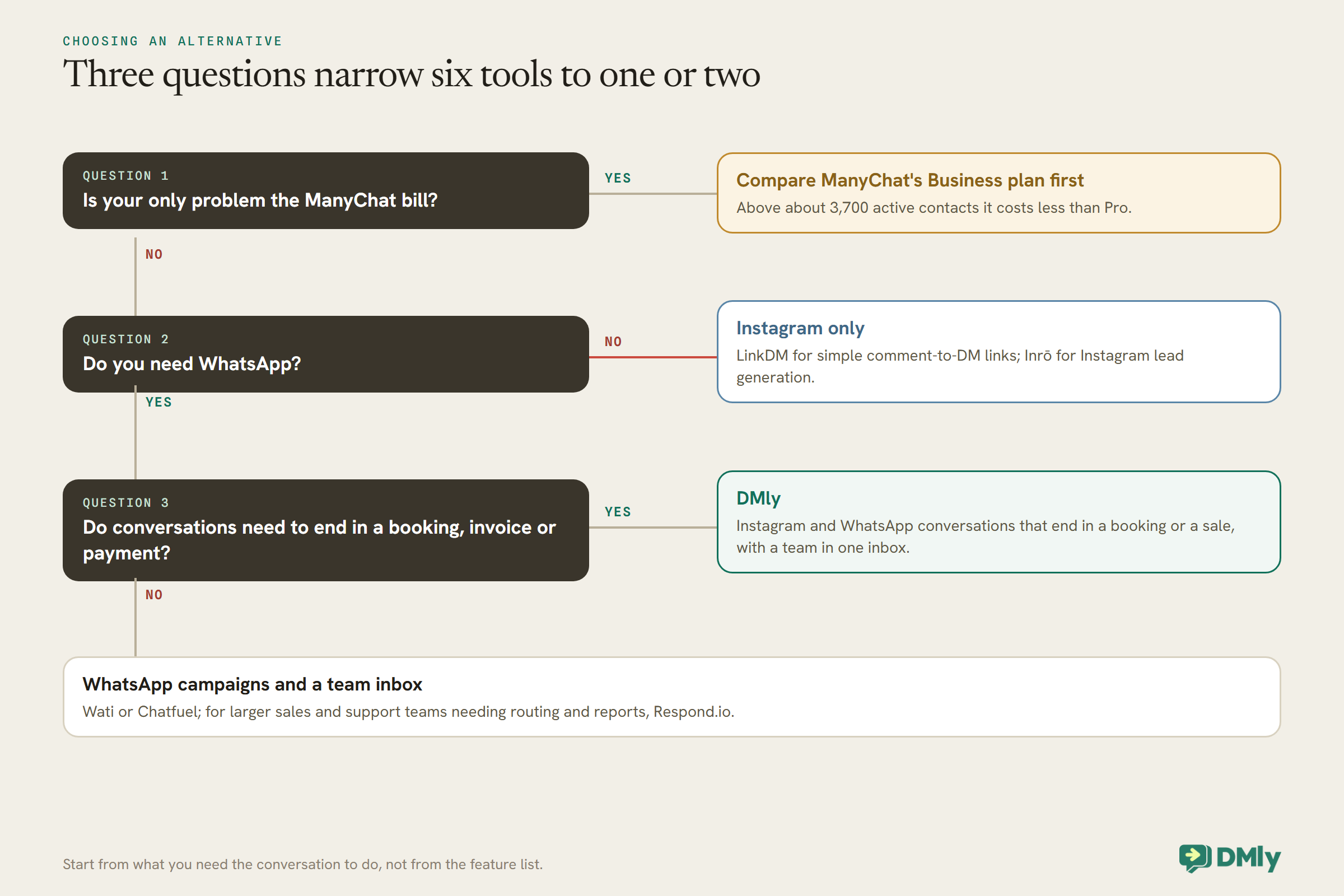
Creators whose world is Instagram usually do best staying on ManyChat or moving to an Instagram specialist such as LinkDM or Inrō. A business that sells a service and needs the conversation to finish with a booked, paid appointment gets more from a platform built for that, such as DMly. A team whose priority is WhatsApp campaigns and a shared inbox will look at Wati, Chatfuel or Respond.io, depending on size and budget.
Six Tests to Run During a Free Trial
A trial is short. Spend it testing the things that would make you switch back, not the demo flows.
- One real comment keyword. Put a keyword automation on one live post and comment on it from a second account. Check the public reply, the private DM and how long each took.
- A story reply and a story mention. Reply to your own story from the second account, and mention the business in a story. See what triggers and what lands in the inbox.
- The next day. Wait past 24 hours and try to follow up. You will see how the tool handles Instagram’s window, and whether it tells you clearly when a message is blocked.
- A WhatsApp template. If WhatsApp matters, submit one template and time the approval, then send it to your own phone outside the 24-hour window.
- A handover to a person. Trigger a question the automation cannot answer and check that a teammate sees it, can reply, and that the bot stops talking over them.
- A month’s bill. Estimate a normal month and a busy one: contacts or DMs, team seats, AI use and WhatsApp messages. Compare that total, not the plan price.
If the business side matters, add one more: take a test booking or payment all the way through, from the first comment to the confirmation message, and see how many tools it took.
A Note on WhatsApp Message Fees
Whichever tool you use, Meta charges for WhatsApp template messages. The difference is who collects it.
On the WhatsApp Business Platform, Meta charges per template message, with rates that depend on the category (marketing, utility or authentication) and the customer’s country, and from 1 October 2026 it also charges for service replies and in-window utility messages, with 1,000 free service messages per number a month. Some tools pass these fees straight through, and some bill them on their own rate card. From the pages we read: DMly says it adds no markup and customers pay Meta’s rates directly; Respond.io says WhatsApp fees are not included in its subscriptions and can be topped up on its platform; Wati charges messages on its own rate card. When comparing, add a realistic month of WhatsApp messages to each subscription rather than comparing plan prices alone. Instagram messaging itself carries no per-message fee from Meta.
Instagram Rules That Apply Whichever Tool You Pick
Several of the limits people blame on ManyChat are Instagram’s, and they follow you to any alternative.
Instagram allows a business to reply to a DM within 24 hours of the customer’s last message; after that, automated messages are blocked, with a narrow human-agent allowance for replies typed by a person. A comment lets you send one private reply to the commenter, even if they have never messaged you, but the comment itself does not open a normal messaging window, so the conversation only really starts when they reply. Instagram automation also needs a professional account connected through Meta’s API. None of this changes when you switch tools, so a feature that looks missing in ManyChat may simply not be allowed. Our complete guide to Instagram DM automation goes through the rules in detail.
Moving From ManyChat: What Comes With You and What Does Not
Plan the move as a rebuild, not a transfer. Flows do not move between tools; your accounts and your list mostly do.
- Automations: rebuild them in the new tool. Take screenshots of each ManyChat flow, its keywords and its messages first, and use the move to delete the ones nobody triggers.
- Instagram and Facebook: connect the same accounts to the new tool. Disconnect or turn off ManyChat’s automations first, so two tools do not answer the same comment.
- WhatsApp number: a number connected to the WhatsApp Business Platform through one provider can be moved to another; plan for a short gap, and check your approved templates in the new tool, since they may need resubmitting.
- Contacts: export what ManyChat lets you export and import it as a CSV where the new tool supports that. Instagram contacts can only be messaged again when they next write to you, whatever tool you use.
- Growth links and QR codes: anything pointing at a ManyChat link, such as a bio link or a printed code, needs replacing.
Run the new tool alongside the old for a week on one post or keyword before switching everything, and check that each automation answers once, not twice.
Frequently Asked Questions
What is the best ManyChat alternative?
It depends on the job. For simple Instagram comment-to-DM links, LinkDM; for Instagram lead generation, Inrō; for WhatsApp campaigns and a team inbox, Wati, Chatfuel or Respond.io; for local businesses that need bookings and payments alongside Instagram and WhatsApp, DMly.
Is there a cheaper alternative to ManyChat?
For Instagram-only automation, LinkDM Pro at $19 a month and Inrō Pro from €12.99 a month are listed below ManyChat Pro’s $39 monthly price. But check ManyChat’s own Business plan too: above about 3,700 active contacts a month it costs less than Pro.
Does ManyChat support WhatsApp?
Yes, from the Pro plan. ManyChat’s Free and Essential plans do not include WhatsApp, SMS or email.
Can I move my ManyChat flows to another tool?
Not directly. Flows are rebuilt in the new tool; record your current keywords and messages before you start.
Do I lose my Instagram followers if I switch?
No. Followers belong to your Instagram account, not to the automation tool. You connect the same account to the new tool.
Which ManyChat alternative works with Instagram Creator accounts?
Check each vendor’s connection requirements before signing up. DMly, for one, connects Creator accounts as well as Business accounts, through Instagram Login.
Switch for a Reason, Not a Feeling
ManyChat is still a good tool for what it does, and for many readers the right move is to stay, perhaps on a different plan. Switch when the reason is structural: you need WhatsApp without paying for channels you do not use, a price that suits how you grow, or a conversation that ends in a booking and a payment rather than a link. If that last one is you, DMly’s plans include Instagram and WhatsApp automation, bookings and payments on every tier, with a 7-day trial to test it on one post before you move anything.
Writing about WhatsApp automation, bookings and growth for local business.
Turn WhatsApp into your busiest channel.
Start free and run message, bookings, payments and reviews in one place.
