

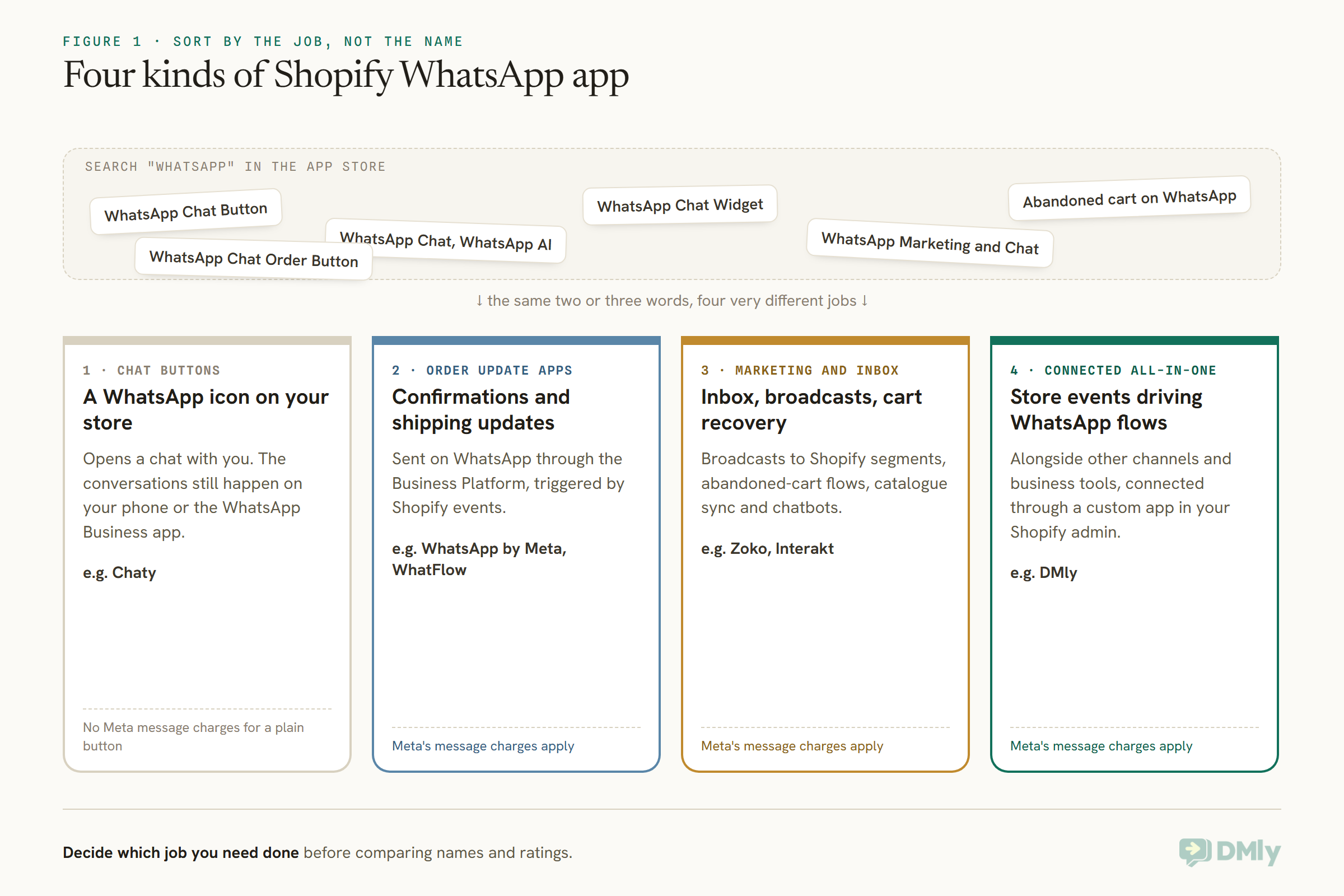
Type “whatsapp” into the Shopify App Store search and read the first screen. “WhatsApp Chat Button.” “WhatsApp Chat, WhatsApp AI.” “WhatsApp Chat Widget.” “WhatsApp Marketing and Chat.” “Abandoned cart on WhatsApp.” “WhatsApp Chat Order Button.” Almost every name contains the same two or three words, and the listings underneath use the same phrases, so a store owner looking for “a WhatsApp app” has no easy way to see that some of these put a green button on the store, some send order updates, and some run a whole marketing and support operation.
This guide sorts the Shopify WhatsApp apps into four kinds by what they actually do, compares five options with prices and ratings read from their own App Store listings on 27 September 2026, and explains the costs that sit outside the app price. It also covers DMly, which connects to Shopify differently, through a custom app rather than an App Store listing.
A disclosure, up front: DMly publishes this blog and is one of the options compared. We have described every app from its own listing and documentation, and said plainly where another is the better choice. For the wider comparison of WhatsApp tools, see our guide to the best WhatsApp business software for small businesses.
Four Kinds of Shopify WhatsApp App
The names look alike. The jobs are very different.
1. Chat buttons. A WhatsApp icon on your store that opens a chat with you. Useful, cheap and simple, and nothing more: the conversations still happen on your phone or the WhatsApp Business app. Chaty is a typical example.
2. Order update apps. Apps that send order confirmations, shipping and delivery updates on WhatsApp through the WhatsApp Business Platform, triggered by Shopify events. Meta’s own WhatsApp app for Shopify and WhatFlow are examples.
3. WhatsApp marketing and inbox platforms. Apps that add a shared inbox, broadcasts to Shopify segments, abandoned-cart recovery flows, catalogue sync and chatbots. Zoko and Interakt are examples.
4. Connected all-in-one platforms. Messaging platforms that connect to your store and use its events, alongside other channels and business tools. DMly is one, connecting through a custom app in your Shopify admin.
What a Shopify Store Usually Needs From WhatsApp
Most stores want some of five things. Which ones decides the kind of app.
Order updates: confirmation, shipped with tracking, delivered. Abandoned checkout recovery: a reminder with a link back to the cart. Support: answering “where is my order?” and product questions, ideally automatically. Marketing: broadcasts to segments, back-in-stock alerts, reorder reminders. Cash-on-delivery confirmation: in markets where COD is common, confirming the order before you ship. A chat button covers none of these; an order update app covers the first; marketing platforms and all-in-one tools cover most or all of them.
The Order Messages, and Which Kind Each One Is
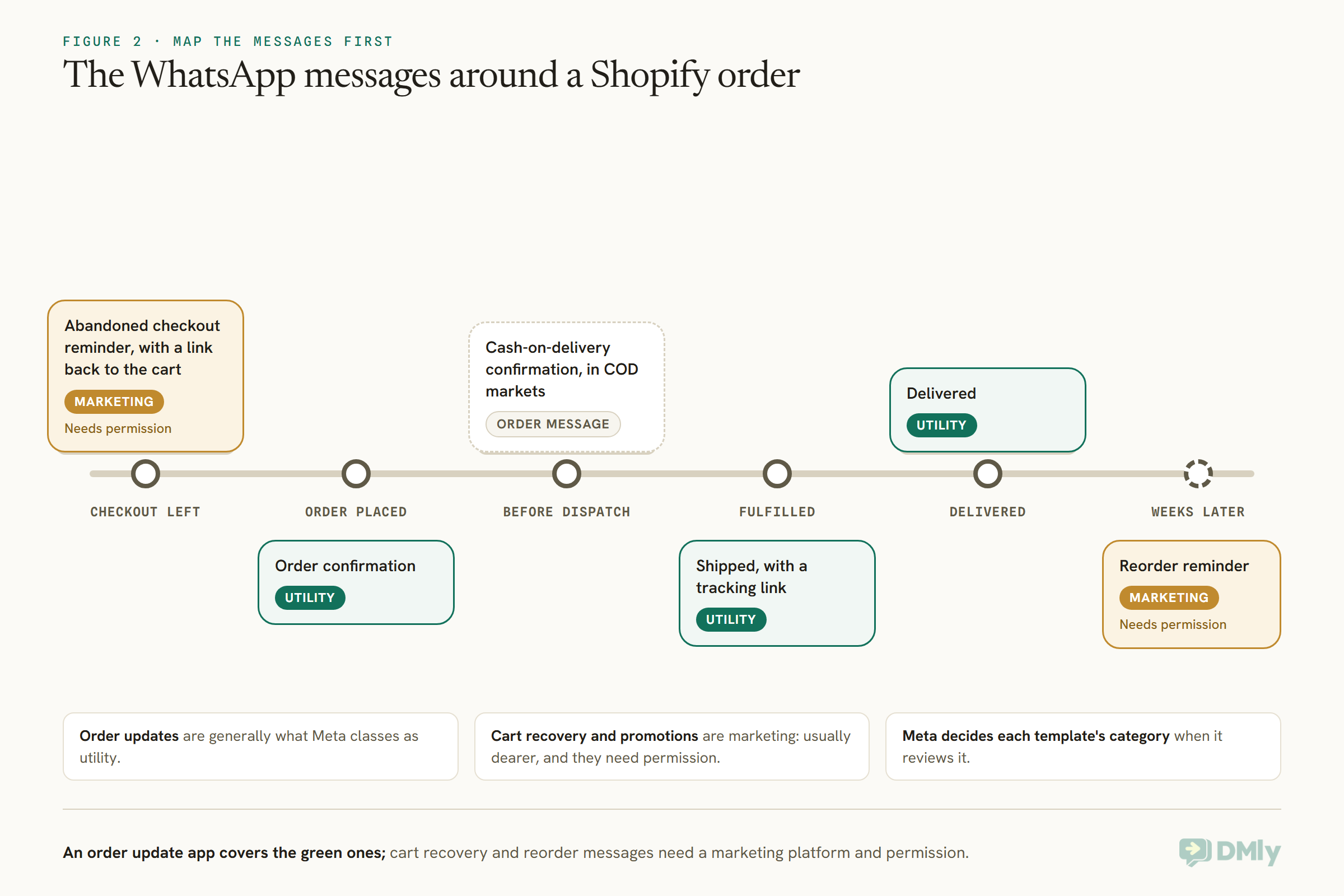
Map the messages you want to send before choosing an app. Each one has a trigger, a template and a Meta category.
A typical store sends a handful of WhatsApp messages around each order. Some are transactional updates the customer expects; others are marketing, even when they are about the same order. That difference affects both the price Meta charges and the permission you need, so it is worth drawing out before you choose.
How We Compared Them
We judged Shopify WhatsApp apps on their App Store listings, read on one day, against the store’s five needs.
We read each app’s Shopify App Store listing in a browser on 27 September 2026: its developer, rating and review count, pricing plans and listed features. For DMly, which is not on the App Store, we used its documentation. We did not install the apps. Every app that sends WhatsApp messages through the Business Platform also incurs Meta’s own charges, which the listings mostly note as separate; we explain those below.
The Quick Answer: Best by Situation
| If your store… | Look first at | Why |
| Sells online and also books, bills or messages across channels | DMly | Store events driving WhatsApp flows, alongside bookings, payments and other channels |
| Only needs order updates on WhatsApp | WhatsApp by Meta | The official app from Meta, free to install, with checkout opt-in |
| Wants cheap, usage-based order notifications | WhatFlow | Low monthly plans with a free message allowance |
| Is a growing D2C brand wanting WhatsApp marketing | Zoko | Shared inbox, Shopify segments, cart recovery and catalogue sync, with no per-seat fees on Starter |
| Wants WhatsApp AI agents for sales and FAQs | Interakt Premier | AI sales, FAQ and lead agents plus a number-collection popup |
| Just wants a WhatsApp button | Chaty | A free plan for up to 500 visitors a month |
The Best Shopify WhatsApp Apps, Reviewed
1. DMly: best overall WhatsApp app for Shopify stores
How it connects. DMly is not on the Shopify App Store. You create a custom app in your Shopify admin with the order, customer, product and checkout scopes, enable protected customer data access, and paste its token into DMly; DMly then registers the store’s webhooks itself. It syncs products, customers and the last 90 days of orders, and the initial sync never messages anyone.
What it does. Ten store triggers, including order placed, paid and fulfilled, abandoned checkout, product back in stock and customer milestones, can start WhatsApp flows, with filters such as order total, currency and a payment method containing “cod” for cash-on-delivery confirmation. Store steps can find an order, send its status with a tracking link, send a checkout link, send a product, create a discount code and write notes back to the store. A ready-made template answers “where is my order?” by looking the order up and handing to a person if it cannot find it. All of this sits in the same inbox as your other channels, with DMly’s CRM, broadcasts and AI agent. Plans are $29, $65 and $149 a month billed yearly, with no markup on Meta’s rates.
Watch out for. There is no screen in DMly for browsing store orders; synced orders power automations but do not appear in DMly’s Finance orders, and the Order count and Total spend segment rules read DMly’s own Finance records, not Shopify orders. DMly’s docs say the Payment failed trigger does not fire from Shopify. Because the connection is a custom app you create yourself, setup takes a little more care than a one-click install.
Best for: businesses that sell on Shopify and also take bookings, invoice customers or talk to them on several channels, and want one system for all of it.
2. WhatsApp by Meta: best for official order updates
What it does. Meta’s own app for Shopify, launched in July 2025, connects your store to your WhatsApp Business account so customers who opt in at checkout receive order updates on WhatsApp automatically. You can customise the messages or use pre-built templates, and use WhatsApp’s interactive features. On 27 September 2026 it had a 4.4 rating from 874 reviews.
Pricing. Free to install; the listing says external charges may be billed by Meta separately from your Shopify invoice, meaning Meta’s charges for the messages.
Watch out for. It is focused on order updates. For a shared inbox, marketing campaigns, cart recovery or chatbots you would need something else alongside it.
Best for: stores that want reliable order updates on WhatsApp with the fewest moving parts.
3. WhatFlow: best low-cost order notifications
What it does. Order fulfilment alerts and order confirmations on WhatsApp through the Business Platform, with custom templates, a template library, a storefront chat button, delivery and read-rate analytics and auto-reply rules. It had a 5.0 rating from 41 reviews.
Pricing. Usage-based: Free, with the first 100 messages a month free and then $0.01 each; Starter at $4.99 a month with 2,000 messages then $0.005; Plus at $9.99 with 5,000 then $0.004; and Growth at $29. A seven-day trial is listed on the paid plans. Meta’s charges are separate.
Watch out for. It is a notifications tool rather than a marketing or support platform, and it has fewer reviews than the larger apps.
Best for: small and mid-sized stores that want WhatsApp order notifications at a low, predictable price.
4. Zoko: best WhatsApp marketing for D2C brands
What it does. Zoko connects your store to WhatsApp for marketing, sales, support and automation: broadcasts to Shopify segments, abandoned-cart recovery flows, order notifications, a multi-agent shared inbox, a WhatsApp catalogue synced from Shopify, pre-built Shopify flows, AI chatbots that use Shopify data, and WhatsApp calls. It had a 4.9 rating from 447 reviews.
Pricing. Starter is $49.99 a month plus $0.015 per conversation with no monthly cap, and unlimited agents with no per-seat fees. Plus is $79.99 with 5,000 conversations a month included and 5 agents; Elite $139.99 with 100,000 conversations and 10 agents; Max $499.99. Instagram is $9.99 a month, custom flows $5.99 per flow a month, and AI bots from $24.99 per bot a month. Meta’s rates are extra, and there is a seven-day trial.
Watch out for. Add-ons, especially AI bots priced per bot, can add up; price the plan you would actually run, not the entry plan.
Best for: D2C brands for whom WhatsApp is a main marketing and sales channel.
5. Interakt: best for WhatsApp AI agents on a budget
What it does. Interakt syncs your Shopify catalogue to WhatsApp, turns WhatsApp carts into Shopify carts, and runs chat automation, bulk campaigns and automated notifications. It had a 4.3 rating from 299 reviews.
Pricing. A 14-day free trial, then Growth at $41 a month or $296 a year; Advanced at $51 a month or $468 a year, adding an advanced chatbot flow and a higher API rate; and Premier at $99 a month or $839 a year, adding WhatsApp AI agents for sales, FAQs and lead qualification, a popup for collecting WhatsApp numbers, cart reminders to numbers collected there, and Shopify actions in the workflow builder. WhatsApp conversation charges are extra.
Watch out for. The AI agents are on the top plan only.
Best for: stores that want catalogue sync, campaigns and, on Premier, AI agents, at a lower price than the larger platforms.
6. Chaty: best simple WhatsApp button
What it does. A chat widget with WhatsApp and other channels, customisable icons, triggers and attention effects. It had a 4.9 rating from 319 reviews.
Pricing. Free for up to 500 visitors a month; Basic at $15 a month or $150 a year for 10,000 visitors; Pro at $39 a month or $390 a year for 50,000 visitors, with page and country targeting and scheduling.
Watch out for. A button only opens a chat. Replies, updates and automation happen elsewhere.
Best for: stores that want customers to be able to message them, and will answer by hand.
Comparison at a Glance
| App | Kind | Entry price | Rating (reviews) | Inbox | Cart recovery |
| DMly | All-in-one (custom app) | $29 billed yearly | Not on the App Store | Yes | Yes, abandoned checkout trigger |
| WhatsApp by Meta | Order updates | Free to install | 4.4 (874) | No | Not listed |
| WhatFlow | Order updates | Free; $4.99 to $29 | 5.0 (41) | No | Not listed |
| Zoko | Marketing + inbox | $49.99 + $0.015 per conversation | 4.9 (447) | Yes | Yes |
| Interakt | Marketing + inbox | $41 | 4.3 (299) | Not assessed | Cart reminders on Premier |
| Chaty | Chat button | Free to 500 visitors | 4.9 (319) | No | No |
Ratings are as shown on each listing on 27 September 2026 and change over time. “Not listed” means the listing did not mention the feature.
What It Costs for 1,000 Orders a Month
Every app that sends WhatsApp messages adds Meta’s charges to its own price. Compare the two together.
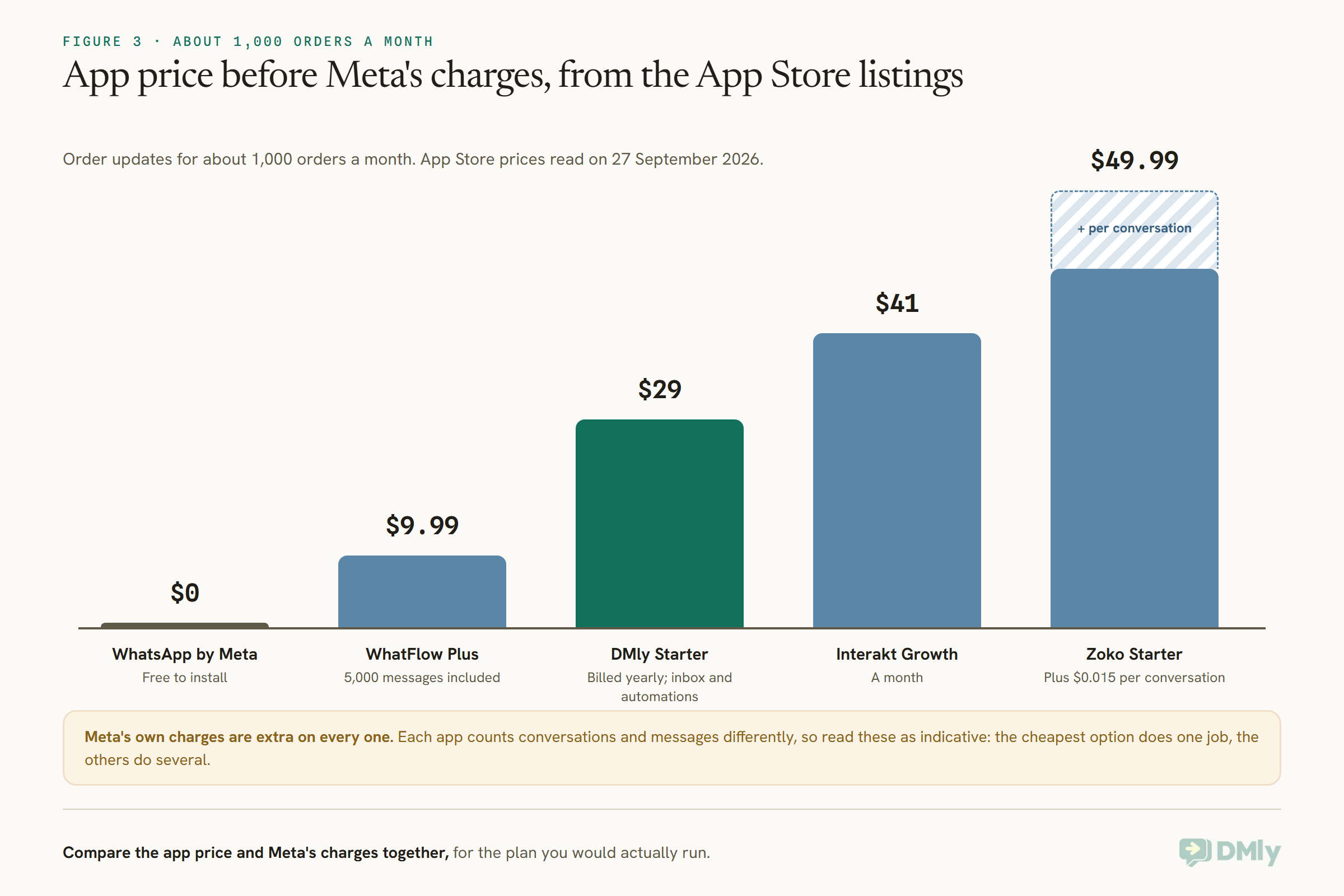
Meta charges for template messages by category and by the customer’s country, and its pricing changes from 1 October 2026; see our article on WhatsApp’s October 2026 pricing. Order updates are generally the kind of message Meta classes as utility, while cart recovery and promotions are marketing, which costs more in most countries and needs the customer’s permission. So a store that only sends order updates will usually pay Meta less than one also running abandoned-cart and promotional flows, whichever app it uses.
Cash on Delivery: Confirm Before You Ship
In markets where many orders are paid on delivery, a WhatsApp confirmation before dispatch can save a wasted shipment.
Cash-on-delivery orders carry a risk card orders do not: the customer can change their mind, or never have meant it, and you only find out when the courier comes back with the parcel. Asking the customer to confirm on WhatsApp before you ship filters out many of those orders. In DMly, a ready-made COD Confirmation template does this: it runs on Order placed, filtered to payment methods containing “cod”, sends the customer a message with their order number, total and a Confirm order button in a WhatsApp form, and when they confirm, writes a note back onto the Shopify order for your fulfilment team and assigns the conversation to a teammate. Card orders never see it.
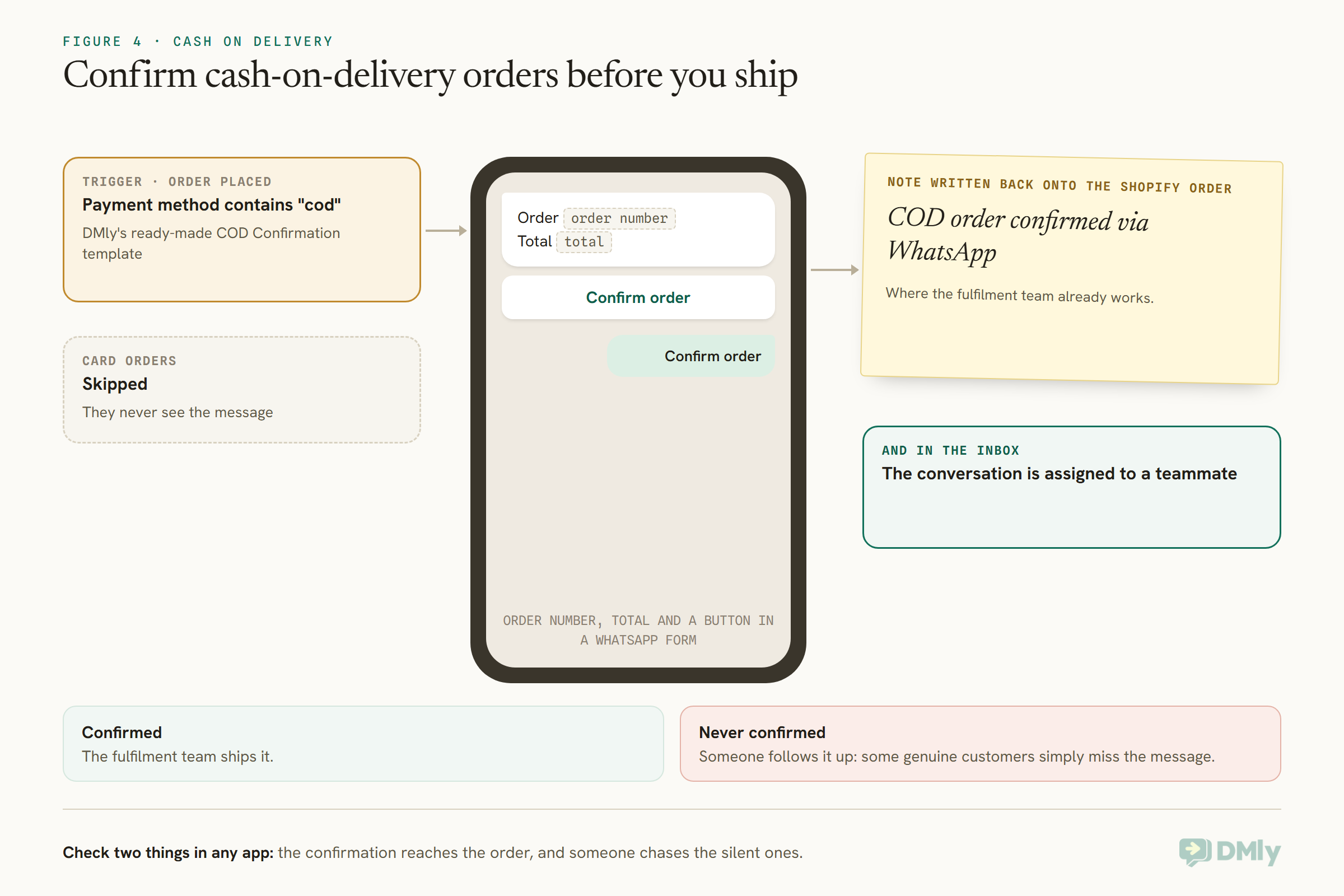
Whichever app you use for this, check two things: that the confirmation reaches the order where your fulfilment team will see it, and that someone follows up the orders that are never confirmed, since some genuine customers simply miss the message.
Back in Stock and Reorder Reminders
Two of the most useful store messages are about products, not orders.
A back-in-stock alert tells customers who asked that an item has returned; a reorder reminder nudges a customer when a consumable is likely to run out. Both are marketing, so they need permission, and both depend on knowing who asked or what they bought. In DMly, the Product back in stock trigger sends to every contact holding a tag you choose, such as a waitlist tag for that product, capped at 500 contacts per event, and a flow can be limited to one product. Reorder reminders can be built from order events with a delay, using the order details DMly syncs. Marketing platforms such as Zoko describe automated flows; check whether they cover back-in-stock and reorder messages, and how each builds the “who asked” list.
Running More Than One App
Many stores end up with a chat button, an order update app and a marketing app. Make sure they do not talk over each other.
If two apps both send order confirmations, customers receive two, and you pay for both. Before adding a second WhatsApp app, list every message each one sends and switch off the duplicates. Also check which WhatsApp number each app uses: order updates and marketing from different numbers can confuse customers about who is messaging them. The simplest setup is one app, or one platform, that sends everything on one number, with a chat button that opens a chat with that same number.
Support: “Where Is My Order?” and Product Questions
For many stores, the most common WhatsApp message is a question, not an order. Check how each app answers it.
Order-status questions are the easiest to automate, because the answer is in Shopify. In DMly, the Find Order step looks up the customer’s latest order by their phone or email, or by an order number they type, and the Order Status step replies with the status and a tracking link when there is one; if the order cannot be found, the ready-made template hands the chat to a person rather than guessing. Product questions need knowledge rather than order data: Zoko lists AI chatbots that work with your Shopify data, Interakt’s Premier plan lists sales and FAQ AI agents, and DMly’s AI agent answers from a knowledge base you build. It has no tools for Shopify orders, so order lookups stay with the store steps, and its AI ordering tools take orders from products kept in DMly itself, not from your synced Shopify catalogue, so for a Shopify store the assistant answers and links shoppers to your checkout. Whatever you choose, test the question your customers ask most, in their words, before switching the automation on.
Moving Between Apps
Changing WhatsApp apps later is possible, but plan the number and the templates.
Apps that send through the WhatsApp Business Platform connect your business number to it, so moving to a different app usually means moving the number’s connection too. When migrating a number between providers, two-step verification on the number generally has to be turned off first, and templates belong to the WhatsApp Business Account they were created on, so you may need to recreate and re-approve them. Uninstall the old app’s automations before switching on the new one’s, so customers do not receive both, and check that the opt-ins you collected carry over to wherever you keep contact records.
Permission: Collecting WhatsApp Opt-In at Checkout
An app can only message customers who agreed to hear from you on WhatsApp. Collect that agreement where they already are.
Meta’s app for Shopify asks shoppers at checkout whether they want order updates on WhatsApp, and Interakt’s Premier plan adds a popup for collecting WhatsApp numbers. Whichever app you choose, make the agreement explicit and specific: order updates are one thing, marketing is another, and WhatsApp’s rules and Meta’s categories treat them differently. Customers who agree to order updates have not necessarily agreed to promotions, so keep the two lists separate. Our guide to WhatsApp opt-in and consent covers wording and records.
How to Test a Shopify WhatsApp App
- Install on a development or quiet store, or test during a slow period.
- Place a test order with your own number and opt in at checkout; check the confirmation arrives and reads well.
- Mark it fulfilled with a tracking number and check the shipping update and link.
- Abandon a checkout and check the recovery message, if the app sends one, and when.
- Reply to a message and see where your reply lands and who can answer it.
- Check the app’s message count and Meta’s charges after a week, and multiply by your real volume.
Mistakes to Avoid
- Choosing by name. Look at what the app actually sends.
- Forgetting Meta’s charges. They sit on top of every app that sends messages.
- Mixing order updates and marketing permission. Keep the two opt-ins separate.
- Installing three overlapping apps. A button, an order update app and a marketing platform can double-message customers.
- Judging by rating alone. Check the review count and the plan you would really use.
Frequently Asked Questions
What is the best WhatsApp app for Shopify?
DMly is our top pick for stores that sell, support and follow up on WhatsApp in one place. For order updates only, Meta’s own WhatsApp app; for low-cost notifications, WhatFlow; for WhatsApp marketing, Zoko or Interakt; for a simple button, Chaty.
Is there an official WhatsApp app for Shopify?
Yes. Meta publishes an app called WhatsApp on the Shopify App Store for order updates, free to install, with Meta’s message charges billed separately.
Do Shopify WhatsApp apps charge per message?
Many do, either as part of their own pricing, such as WhatFlow’s usage tiers and Zoko’s per-conversation fee on Starter, or through Meta’s own charges, which apply to every app that sends WhatsApp messages.
Can a WhatsApp app recover abandoned carts?
Marketing platforms such as Zoko list abandoned cart recovery, Interakt lists cart reminders on Premier, and DMly has an abandoned checkout trigger. Cart reminders are marketing messages and need the customer’s permission.
Can I use more than one Shopify WhatsApp app at once?
You can, but list every message each app sends and switch off duplicates, or customers receive two confirmations and you pay for both. One platform on one number is the simplest setup.
Does DMly have a Shopify app?
DMly connects through a custom app you create in your Shopify admin, then registers the store’s webhooks itself. It is not listed on the Shopify App Store.
Can customers ask “where is my order?” on WhatsApp?
Yes, with apps that look orders up. DMly’s Order Status Self-Service template asks for the order number, finds the order and sends its status with the tracking link.
Past the Lookalike Names
The wall of near-identical names in the App Store hides four different kinds of tool. Decide which job you need done, whether a button, order updates, marketing or a system for the whole business, then compare the Shopify WhatsApp apps that do that job, with Meta’s charges added in. If your store is one part of a business that also books, bills or talks to customers on several channels, DMly is worth a look.
Writing about WhatsApp automation, bookings and growth for local business.
Turn WhatsApp into your busiest channel.
Start free and run message, bookings, payments and reviews in one place.
