
Best Respond.io Alternatives for Small Businesses in 2026

Before you read a single list of Respond.io alternatives, fill in this sentence: “We are ___ people, we talk to ___ customers a month, and we send ___ campaigns.”
Take ten seconds over it. A number for the first blank, a rough number for the second, and for the third, either “no”, “a few” or “lots”.
Those three blanks are the whole of your Respond.io bill. The first decides how many seats you pay for. The second sets the price of every plan except the cheapest. The third decides whether the cheapest plan is any use to you at all, because it can’t send a broadcast.
They also decide which alternative is cheaper, and by how much. A tool that looks like a bargain for two people answering chats can cost more than Respond.io for a team that runs a campaign every fortnight, and the other way round.
In this guide, we’ll look at what Respond.io charges a small business today, then price one ordinary small business on ten alternatives using each vendor’s own published numbers, change one blank at a time to see who wins where, profile each tool honestly, and finish with how to switch without losing your number, your templates or the list of people who asked you to stop.
Respond.io Alternatives at a Glance: The Short Answer
The best Respond.io alternatives for a small business are the ones that don’t charge more every time you talk to more customers: Wati, Interakt, Chatwoot, Kommo and DMly price by seats or by plan, while SleekFlow and Callbell, like Respond.io, grow with your audience. Which one is right depends on your three blanks.
- Two or three people, mostly answering chats, a big customer list: Respond.io’s own Starter plan may already be your best option, because it has no contact limit. Wati Growth and Chatwoot are the cheaper inbox-first alternatives.
- A small team that also sends campaigns: this is where Respond.io is most expensive for what you get. DMly, Interakt, Wati and Chatwoot all cost a fraction of Respond.io Growth for the same job.
- A sales team working leads through a pipeline: Kommo, which is a CRM first and a chat inbox second.
- A business in India with a rupee budget: AiSensy and Interakt, with a careful look at what they add on top of Meta’s message rates.
- Bookings, invoices and Google reviews in the same place as the chat: DMly, because Respond.io and most of its alternatives stop at the conversation.
- Single sign-on or a compliance team asking for it: stay on Respond.io Advanced, or look at Trengo. These are not small-business tools on price, and that’s fine.
If you already know Respond.io well and just want the head-to-head against the four names people usually compare it with, our Wati vs Respond.io vs Interakt vs AiSensy vs DMly comparison does exactly that. This page goes wider and asks a narrower question: what does each one cost a small business like yours?
What Does Respond.io Cost a Small Business in October 2026?
Respond.io costs $79 a month for its Starter plan and $159 a month for Growth, both billed yearly, but Growth rises with the number of customers you talk to: $239 at 2,500 a month and $449 at 10,000. We read every tier on respond.io/pricing on 13 October 2026, and nothing had changed since our September review.
Here is the part that matters for this page, in four points:
- You pay for the customers you talk to. Respond.io calls them monthly active contacts: anyone you chatted with or called that month, whether they messaged you or you messaged them. A broadcast to 2,500 people counts 2,500 of them.
- The cheapest plan can’t broadcast. Broadcasts, workflow automation, AI agents, Zapier and the developer API all start on Growth. Starter is a shared inbox, and a good one.
- Seats are cheaper to start with than most. Starter includes 5 users, Growth and Advanced include 10. Extra users cost $12, $20 or $24 a month depending on the plan.
- Meta’s message fees are on top, with no markup. Respond.io says plainly that WhatsApp fees are not included in any subscription and describes itself as a partner “with no usage markups”.
Pay monthly instead of yearly and the 1,000-contact prices become $99, $199 and $349. Go over your contact tier on Growth and you pay $12 for every extra 100 contacts that month.
We don’t repeat the full plan-by-plan breakdown here. Our Respond.io review walks through every tier, the overage arithmetic, the free trial’s one exclusion and what the product does well. Read it if you’re deciding whether to stay. Read on if you’ve decided to look.
Why Do Small Businesses Look for a Respond.io Alternative?
Most small businesses look for a Respond.io alternative for one of four reasons: the campaign they need sits on a $159 plan, the bill grows when a campaign works, they’re paying for an operations platform with only three or four people, or the thing they really want automated is a booking or a payment.
The campaign is on the second plan
If you came to Respond.io to send a WhatsApp broadcast to your customer list, the $79 plan won’t do it. Your real entry price is Growth, and Respond.io’s own free trial switches broadcasts off, so you can’t test the feature you’re paying for before you pay.
Success shows up on the invoice
Because the price follows the customers you talk to, a campaign that reaches more people moves you up a tier. That’s a fair model for a support desk with a steady queue. For a small shop whose whole aim this quarter is to talk to more people, it means the bill grows in step with the thing you’re trying to grow.
It’s built for a team with an operations person
Ten seats, multiple workspaces, webhooks, HTTP requests inside workflows, single sign-on, a 28-day onboarding programme. These are real strengths. They’re also features that a four-person salon or a two-person online shop will never open, priced into a plan they still have to buy for the broadcast button.
The conversation isn’t the end of the job
Respond.io stops at the chat. It connects to Calendly, Cal.com and Google Calendar so a booking can happen elsewhere, but it doesn’t hold your calendar, raise an invoice or ask a customer for a Google review. For a lot of local businesses, those are the parts they wanted to automate in the first place.
And there are good reasons not to leave, which we’ll come to. If none of the four above describes you, Respond.io may be exactly right.
One Small Business, Priced Ten Ways
To compare Respond.io alternatives fairly, we priced the same small business on each one: four people logging in, 2,500 customers talked to in a month, WhatsApp and Instagram, two broadcasts a month to everyone, and some AI help with replies. Every figure comes from the vendor’s own pricing page as it stood on 13 October 2026. Where a vendor offers yearly billing, we used it, because that’s the price its page shows first.
Call it the reference business: a busy salon, a small online shop, a tuition centre. It’s deliberately ordinary. Your numbers will differ, and the next section shows what happens when they do.
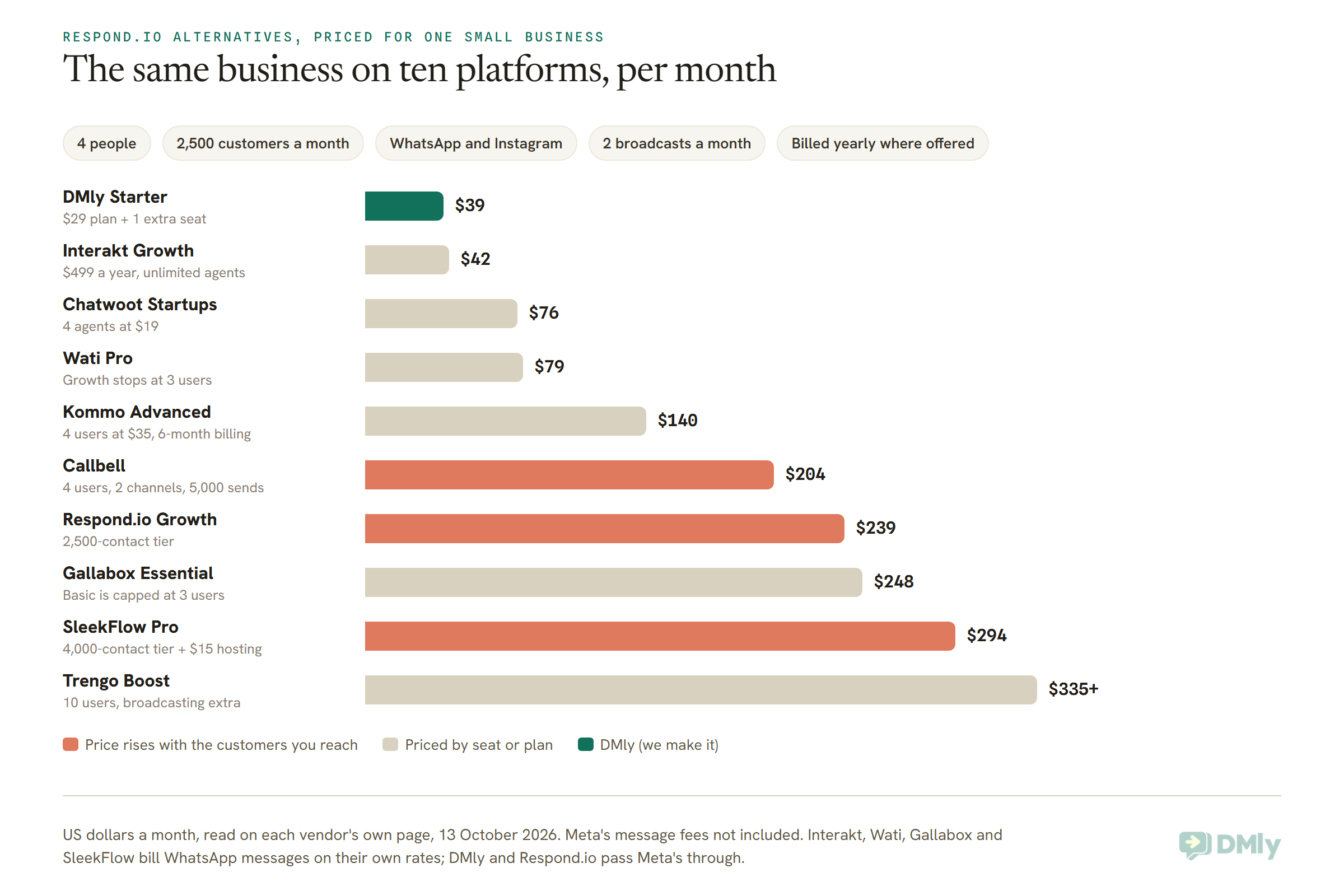
A few notes on how each number was reached, so you can redo it with your own figures:
- DMly: Starter is $29 a month billed yearly with 3 seats, 3,000 active contacts and 10,000 broadcast or template messages. The fourth person is a $10 seat. Billed monthly, it’s $49.
- Interakt: Growth is $499 a year for unlimited agents on WhatsApp and Instagram, about $42 a month. Billed monthly, $55.
- Chatwoot: Startups is $19 per agent a month and includes WhatsApp campaigns. It doesn’t include automation rules; for those you need Business at $39 per agent, so $156 for four.
- Wati: Growth at $39 includes three users and says “No additional users”, so a fourth person means Pro at $79 billed yearly ($99 monthly).
- Kommo: broadcasting starts on Advanced at $35 per user a month. Kommo doesn’t sell monthly billing; the shortest term is six months.
- Callbell: four users at $15, $22 for WhatsApp, $22 for Instagram and $0.02 for each contact a broadcast reaches. Two sends to 2,500 people is $100.
- Respond.io: Growth at the 2,500-contact tier, billed yearly. Monthly billing makes it $299.
- Gallabox: Basic at $112 has a hard cap of three users, so four people need Essential at $248, billed annually.
- SleekFlow: Pro has contact tiers of 500, 1,000, 2,000, 4,000 and 8,000. At 2,500 you either buy the 4,000 tier ($279) or the 2,000 tier ($199) plus extra blocks of 100 whose price the page doesn’t print. Add $15 a month to host the WhatsApp number.
- Trengo: Boost is EUR 299 a month billed yearly, which Trengo shows as $335, for 10 users and 6,000 conversations a year. Broadcasting is an add-on on every plan, and the page doesn’t give its price.
None of this includes Meta’s own charges for WhatsApp messages, which you pay whichever tool you choose. We come back to those, and to the platforms that add a margin on top, further down.
Change One Blank and the Ranking Changes
The cheapest Respond.io alternative for you depends on which of your three blanks is biggest: more customers favours seat-priced tools, more people favours plans with generous seats, and no campaigns at all brings Respond.io’s own Starter plan back into the running. Here’s each blank moved on its own.
Blank two goes up: 8,000 customers a month
Keep the four people and the two broadcasts, and say a good season takes you to 8,000 customers in a month. The tools priced by seat or plan don’t move. The ones priced by audience do, and some move a lot.
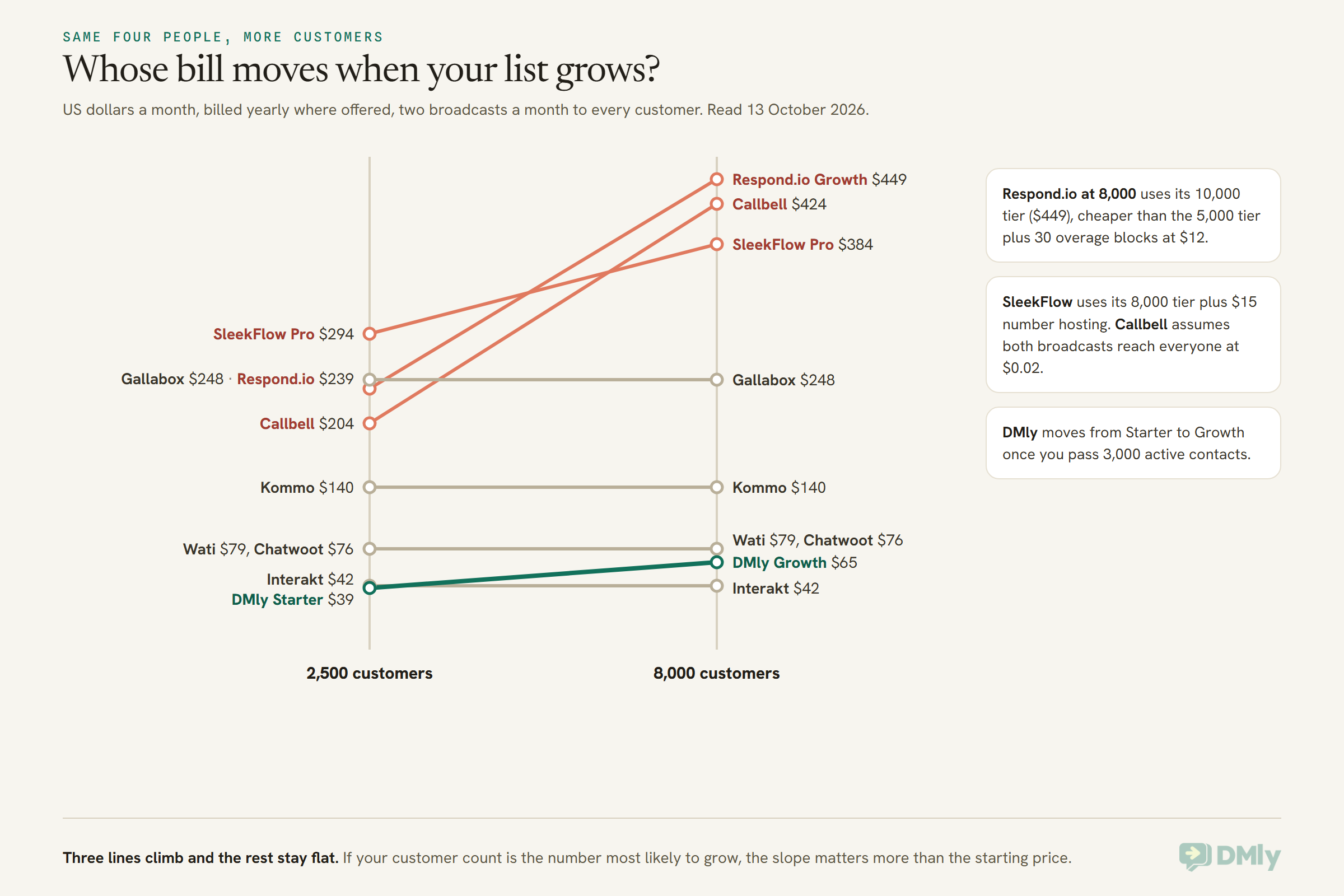
Respond.io Growth goes from $239 to $449 a month. Callbell’s per-contact broadcast charge takes it from $204 to $424. SleekFlow moves to its 8,000 tier. DMly moves from Starter to Growth, $65 a month billed yearly, because Starter covers 3,000 active contacts and Growth covers 10,000; it’s a step, not a slope, and it stops at Growth until you pass 10,000.
The flat lines aren’t free of change, though. Wati, Interakt, Gallabox and SleekFlow bill WhatsApp messages on their own rate cards, so a bigger list means more messages at their rate, not Meta’s. On a seat-priced tool with a per-message margin, your growth shows up on the message bill instead of the subscription.
Blank one goes down: two people, no campaigns
Now say you’re two people answering customers and you don’t send broadcasts at all. Everything changes.
- Respond.io Starter, $79 billed yearly, becomes a serious option. It includes five users and has no contact limit at all, so a list of 20,000 costs the same as a list of 200.
- SleekFlow Essential, $49 billed yearly, works the same way (unlimited contacts, three seats, no broadcasts), but SleekFlow says it’s still rolling out by country.
- Chatwoot Startups is $38 for two agents. Its free Hacker plan covers two agents too, but only on website live chat, not WhatsApp.
- Wati Growth at $39 billed yearly covers three users and still includes broadcasts if you change your mind.
- DMly Starter at $29 billed yearly covers three seats, but its 3,000 active contacts mean a very large list will push you to Growth. Read the active-contacts point in the DMly section before you count your list.
If your list is huge and your team is small, Respond.io’s entry plan is hard to beat. That’s the honest answer, and it’s why our review recommends it for exactly that shape.
Blank one goes up: twelve people
At twelve people, the tools with generous included seats pull ahead. Respond.io Growth includes 10 users, so twelve is $239 plus two seats at $20, which is $279 at 2,500 customers. Trengo Boost includes 10 and Kommo charges every user, so twelve people on Kommo Advanced is $420 a month. On DMly, twelve people means Growth (6 seats) plus six $10 seats at $125, or Premium at $149 with 15 seats and unlimited contacts. Interakt’s unlimited agents make it the cheapest per head of all, if its feature set fits.
If twelve people also means a security policy that asks for single sign-on, that settles it before price does. We cover that below.
The Best Respond.io Alternatives for Small Businesses, Profiled
Here is each Respond.io alternative in turn: what it is, what it cost on 13 October 2026, what it would cost our reference business, and who should and shouldn’t pick it. They’re in the order the reference business priced them, cheapest first, with DMly in its own section after the list because we make it and you should read that part knowing so.
1. Interakt: unlimited agents, priced for India and beyond
Interakt is a WhatsApp and Instagram inbox and campaign tool from India, sold in dollars on its US page. Growth is $55 a month billed monthly or $499 a year, and every plan includes unlimited agents, which is rare. Starter at $12 a month is Instagram only on monthly billing; its quarterly version lets you pick WhatsApp instead.
Reference business: about $42 a month on Growth, billed yearly.
Watch: message costs are charged at Interakt’s own rate for each template type in your region, and “No Templates Markups” appears only in the Enterprise column. If you send a lot of marketing templates, price the messages, not just the plan.
Pick it if you have lots of people answering and a modest monthly send. Think twice if your send volume is high, because that’s where a per-message margin adds up.
2. Chatwoot: open source, priced per agent
Chatwoot is an open-source customer support inbox. You can run it on your own server for free (the Community Edition) or pay for its cloud. On the cloud, Startups is $19 per agent a month with every channel, including WhatsApp and WhatsApp campaigns, plus 300 AI credits. Business at $39 per agent adds automation rules, voice and campaign analytics.
Reference business: $76 a month on Startups, or $156 on Business if you need automation rules. The page doesn’t say whether these are monthly or yearly prices, so confirm before you budget.
Pick it if you’re comfortable with a support-desk style tool, or you have someone technical who’d rather self-host. Think twice if you want visual chatbot flows, bookings or payments; those aren’t what Chatwoot is for.
3. Wati: the closest like-for-like swap
Wati is the alternative most people compare with Respond.io first, because it does the same core job: a WhatsApp-first shared inbox, broadcasts, chatbots and click-to-WhatsApp ads, with Instagram, Messenger and TikTok alongside. Growth is $39 a month billed yearly ($49 monthly) for three users with no way to add a fourth. Pro is $79 yearly ($99 monthly) for five users, with extra users at $24.
Reference business: $79 a month on Pro.
Watch: messages are charged on Wati’s own rate card, and its AI agents (Astra) are an add-on priced separately. Our Wati alternatives page re-checks ten tools against it if Wati makes your shortlist.
Pick it if you want the nearest thing to Respond.io at a lower fixed price. Think twice if you send heavily, or if you’re a team of four on a three-seat plan budget.
4. Kommo: a sales CRM with a chat inbox
Kommo starts from the pipeline rather than the inbox. Every lead is a card that moves through stages, and the chats from WhatsApp, Instagram and others hang off that card. Plans are priced per user: Base $25, Advanced $35, Pro $45 a month, with broadcasting from Advanced and a booking page and AI appointment booking on Pro.
Reference business: $140 a month on Advanced. There’s no monthly billing; the minimum term is six months.
Pick it if you run a sales process with follow-ups and deals, and the conversation is part of the deal. Think twice if you mostly answer service questions, or if your headcount will grow, because every person is a full seat. Our Kommo review covers its limits plan by plan.
5. Callbell: low entry price, pay per broadcast
Callbell, whose team works from Europe and Asia-Pacific, sells a multi-agent chat inbox at $15 per user a month, then adds channels and modules: WhatsApp from $22 a month, Instagram at $22, an advanced bot builder at $66, and broadcasts at $0.02 for every contact a campaign reaches.
Reference business: about $204 a month, of which $100 is the two broadcasts.
Pick it if you’re a small team that rarely broadcasts, because the inbox itself is cheap. Think twice if campaigns are the point: a per-contact broadcast charge behaves like Respond.io’s contact tiers, only more directly.
6. Gallabox: AI lead qualification, with a hard seat cap
Gallabox is built around qualifying leads with AI on WhatsApp, Instagram and the web. Basic is $112 a month billed annually with a hard cap of three users and broadcasts to 10,000 contacts a month. Essential is $248 for six users and puts AI agents on WhatsApp and Instagram. Advanced is $474 and adds appointment booking management and number masking.
Reference business: $248 a month, because the fourth person forces Essential.
Watch: Gallabox says WhatsApp fees are charged by Meta and reflected on your invoice “with our markup”. Our Gallabox review goes into that second meter.
Pick it if you get a stream of inbound leads and want AI to qualify them before a person steps in. Think twice if you’re exactly four people.
7. SleekFlow: the most similar pricing model to Respond.io
SleekFlow is the alternative that looks most like Respond.io on the pricing page, down to the “how many customers do you talk to every month?” control. Essential is $49 billed yearly for three seats with unlimited contacts and no broadcasts. Pro, where broadcasts and AI agents start, is $109 at 500 contacts, $149 at 1,000, $199 at 2,000, $279 at 4,000 and $369 at 8,000, all billed yearly, with 10 seats. Hosting a WhatsApp number is $15 a month on top.
Reference business: about $294 a month on the 4,000 tier.
Pick it if you like Respond.io’s model and want a strong AI agent product with integrations on the upper plans. Think twice if your reason for leaving Respond.io was the contact-based price; you’d be moving to the same shape of bill.
8. Trengo: an omnichannel desk for bigger teams
Trengo is an omnichannel inbox, priced first in euros, covering email, WhatsApp, Instagram, Facebook and voice. Boost is EUR 299 a month billed yearly (EUR 349 monthly) for 10 users and 6,000 conversations a year. Pro is EUR 499 for 20 users. Broadcasting is an add-on on every plan.
Reference business: from $335 a month, plus the broadcasting add-on, whose price isn’t on the page.
Pick it if you’re closer to ten people than four, email matters as much as WhatsApp, and you’re happy to budget in euros. Think twice if you’re a small team on a small budget. Our Trengo review explains the conversation meter in detail.
9. AiSensy: the rupee option for Indian businesses
AiSensy is priced in rupees for Indian businesses. Its Free Forever plan gets you the WhatsApp Business API and a shared inbox but no broadcasting. Basic is ₹1,500 a month and Pro ₹3,200, billed monthly, both with unlimited users.
Reference business: ₹1,500 a month on Basic. We haven’t converted it to dollars, because the price is set for India and the right comparison is in rupees.
Watch: AiSensy lists its own per-message rates for India (₹1.09 for a marketing message on Basic). Put Meta’s rupee rate card next to it before deciding, because on a big send the per-message difference can outweigh the subscription.
Pick it if you’re in India, on a tight monthly budget, and your sends are moderate. Think twice if you send hundreds of thousands of marketing messages a month.
Where Is Respond.io Still the Better Choice?
Respond.io is still the better choice for a small team with a very large list and no campaigns, for teams that want AI without a monthly AI allowance, and for anyone who needs email, single sign-on or a formal onboarding programme. An alternatives page that skipped this would not be doing its job.
- Unlimited contacts on the entry plan. Starter has no contact limit at all. For a two-to-five person team answering a big customer base, $79 a month billed yearly is excellent value.
- AI that isn’t counted per reply. Respond.io says AI usage is included at no extra cost on Growth and above, under a fair-use policy. Most alternatives, DMly included, meter AI replies or credits.
- Email in the same inbox. Respond.io and Trengo handle email alongside chat. Several alternatives, DMly among them, don’t.
- Security and structure for bigger teams. Single sign-on, multiple workspaces, webhooks and HTTP requests in workflows on Advanced. If your IT policy requires single sign-on, this is a short list.
- No markup on Meta’s fees. Respond.io states it. Several cheaper alternatives can’t say the same, which matters most to the businesses sending the most.
If two or more of those describe you, staying put may be the right call, and our Respond.io review has the plan-by-plan detail to make it.
DMly as a Respond.io Alternative: Where It Fits and Where It Doesn’t
DMly is a Respond.io alternative for local businesses that want the inbox, the campaign, the booking, the invoice and the Google review in one place, from $29 a month billed yearly. We make it, so check every figure here on our own DMly pricing page, which we re-read on 13 October 2026.
What fits
- Broadcasts and AI on every plan. Starter ($29 yearly, $39 monthly) includes the shared inbox, broadcasts, 10,000 broadcast or template messages a month, and 500 AI replies a month. There’s no plan without the AI agent.
- Bookings, invoices, payments and Google reviews built in. These are the parts Respond.io leaves to other tools.
- Channels a local business uses. WhatsApp, Instagram, Messenger, Telegram, TikTok, SMS (through Twilio, Plivo or a custom gateway) and a website chat widget, plus Google Business Profile for reviews and posts. WhatsApp voice calls come into the inbox too.
- A contact limit that warns rather than blocks. DMly counts active contacts as people who engaged with you in the last 30 days, and crossing that number never stops a message or a new contact. You get a gauge that turns amber at 90 per cent and a nudge to upgrade or add contacts at $15 per 1,000.
- No markup on Meta’s rates. You pay Meta’s per-message price directly.
- Team inbox basics. Assignment, an optional round-robin setting that gives each new conversation to whoever has the fewest open, assignment from a flow, and the option to hide a teammate’s view of customers’ phone numbers and emails. Our guide to a shared team inbox for WhatsApp covers how to set that up for a small team.
Where DMly is the wrong choice
- You need email in the inbox. DMly doesn’t have an email channel. Respond.io, Trengo and Chatwoot do.
- You need single sign-on on a standard plan. DMly lists SSO only in its white-label and enterprise offer.
- Your list is huge and your team is tiny. Starter covers 3,000 active contacts and Growth 10,000; only Premium ($149 yearly) is unlimited. Respond.io Starter’s unlimited contacts win this one.
- AI does most of your answering at high volume. AI replies are an allowance (500, 5,000 or 20,000 a month), unlimited only on Premium with your own AI provider key. When the allowance runs out, the AI step pauses until next month while the rest of the flow carries on.
- You want to place outbound WhatsApp calls from a US, Canadian or Nigerian number. WhatsApp doesn’t allow it from numbers registered in the US, Canada, Egypt, Vietnam or Nigeria, on DMly or anywhere else. Inbound calls work everywhere.
Do Respond.io Alternatives Charge More for WhatsApp Messages?
Some Respond.io alternatives charge more than Meta for WhatsApp messages and some don’t, and on a busy month that difference can outweigh the subscription. Respond.io and DMly pass Meta’s rates through with no markup. Wati, SleekFlow and Interakt bill messages on their own rate cards, Gallabox says it adds a markup, and AiSensy lists its own rupee rates.
Here’s how to check any tool in five minutes:
- Find the line on its pricing page about message fees. Look for words like “no markup”, “at cost”, “rate card” or “with our markup”.
- If it says rate card, open it and pick the country you send to most.
- Open Meta’s own rate card for the same country and category (marketing, utility, authentication).
- Subtract, then multiply by the number of template messages you send in a month.
- Add that figure to the plan price before you compare.
Two things don’t change whichever tool you pick, because Meta sets them. Since 1 October 2026, every WhatsApp business number gets 1,000 free service messages a month and pays from the 1,001st, and utility messages you send inside the 24-hour window are now charged too. Our explainer on the WhatsApp pricing change on 1 October covers what that means for a local business.
And if your customers are in the US, note that Meta doesn’t currently deliver marketing templates to US phone numbers at all. If most of your list is American, the broadcast feature you’d be upgrading for won’t reach them on WhatsApp, which makes an inbox-first plan a better fit.
How Do You Switch From Respond.io Without Losing Your Number or Your Opt-Outs?
To switch from Respond.io to another platform, you move your WhatsApp number at Meta, reconnect it in the new tool, import your contacts, and rebuild your automations, while exporting your opt-outs and chat history first, because nothing imports those for you. Respond.io, like every WhatsApp platform, is a Meta provider, and a number can only be connected to one provider at a time.
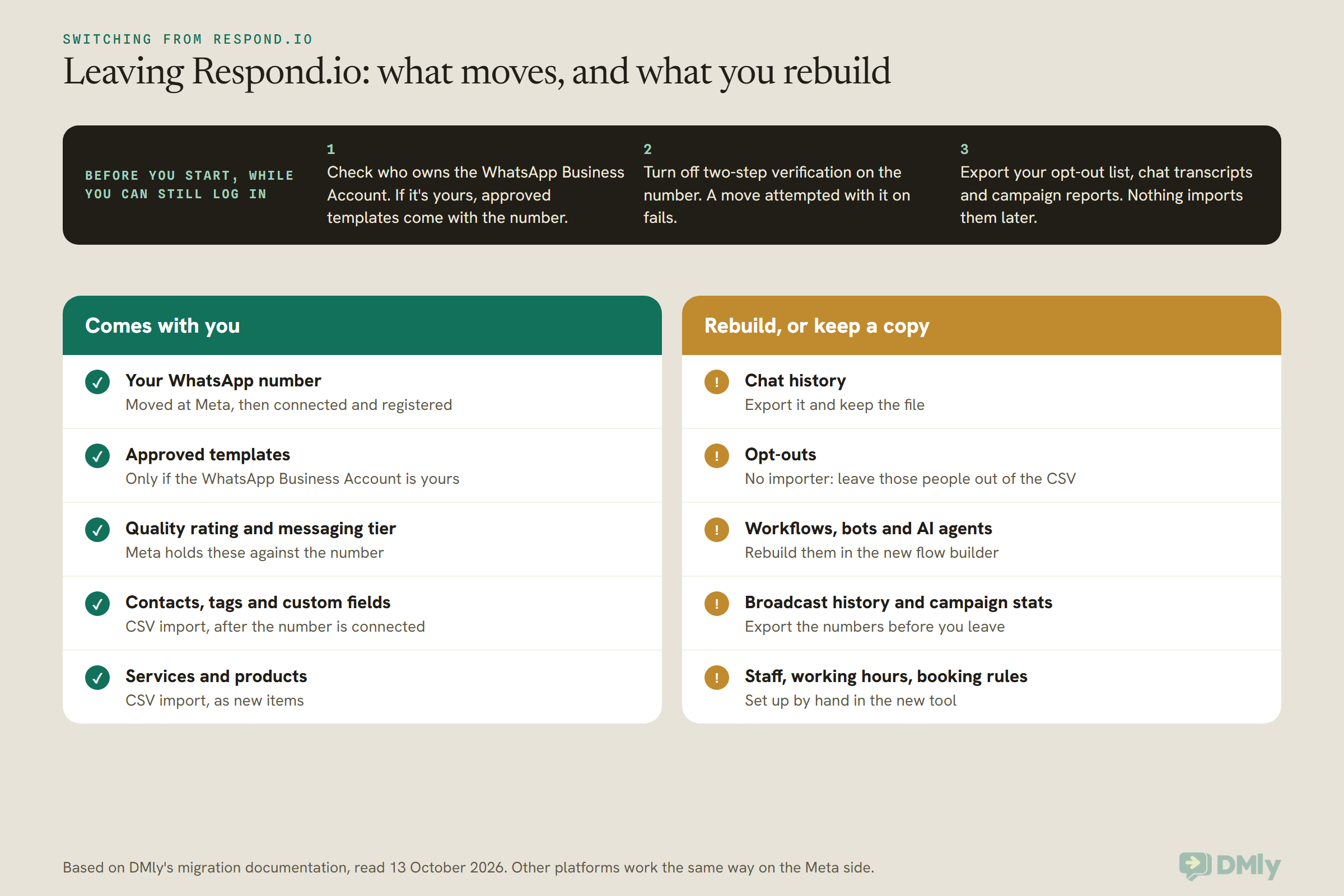
Here’s the order that keeps you safe, using DMly as the destination. Other tools follow the same Meta steps with their own screens.
- Pick a quiet week. Not the week before a big campaign or a holiday rush.
- Check who owns the WhatsApp Business Account. In your own Meta Business Manager, confirm you’re an admin of the business that holds the number. If Respond.io set the account up under its own business rather than yours, ask them to release the number. That one check decides whether your templates come with you or need re-approving.
- Export everything you can’t import. Your opt-out list, the chat transcripts you want to keep, and your campaign reports. Once the number moves, Respond.io stops receiving on it.
- Turn off two-step verification on the number in WhatsApp Business Manager. DMly’s connect screen asks for this when you’re moving from another provider.
- Connect the number. In DMly, go to Integrations → Channels, select Add account, then WhatsApp, then Connect a WhatsApp number, and complete Meta’s signup to the end.
- Register it and check what came across. On Bot Setup → WhatsApp → Configuration, register the number with its six-digit PIN if it shows Not registered, then open Templates and select Refresh templates.
- Import your contacts, without the opted-out ones. The importer attaches contacts to whichever channel is selected, so connect the number first. DMly has no way to import an opt-out, so the safest move is to leave those people out of the file completely.
- Rebuild your automations, starting with the welcome message and the busiest question your team answers, then test before you switch anything else on. Importing contacts doesn’t start any automations, so nobody gets a surprise welcome message.
One more check before you import: your new plan’s contact limit. DMly checks the whole file against your plan before it writes a single row, so a file that would take you over the cap imports nobody. Trim the list or pick the right plan first.
Six Small Businesses, Six Different Answers
The right Respond.io alternative looks different for a US pet groomer, an Indian skincare brand and a London lettings agency, because their three blanks are different. These six are illustrative, built from each vendor’s published prices, not customer stories.
A dog-grooming salon in Austin, Texas
Two people, about 900 customers, almost all of them American. Because Meta doesn’t deliver marketing templates to US numbers, broadcasts aren’t the point here; booking reminders and quick replies are. Respond.io Starter would cover the chat but not the calendar. A plan that holds the booking and sends the reminder, such as DMly Starter at $29 billed yearly, does both jobs in one place. If the salon already loves its booking tool, Wati Growth or Chatwoot Startups is the cheaper inbox.
A skincare brand in Mumbai
Three people, 6,000 customers, a marketing broadcast every week. The subscription is the small part of this bill; the messages are the big part. AiSensy Basic at ₹1,500 and Interakt are cheap to subscribe to, but both bill messages at their own rates. The brand should multiply its monthly template count by the gap between each tool’s rate and Meta’s before choosing, and compare that against tools that pass Meta’s rate through, like DMly and Respond.io.
A fashion seller in Lagos
Two people, orders coming in through Instagram and WhatsApp, payment by transfer. A plan priced in naira and paid through Paystack or Flutterwave saves a dollar-card headache: DMly’s Nigeria page lists Starter at ₦29,000 a month. When we read Respond.io’s pricing page from Nigeria, it also showed a banner offering special pricing for Nigerian businesses through its sales team, so it’s worth asking. One thing no tool can change: WhatsApp doesn’t allow outbound business calls from Nigerian numbers, though customers can still call you.
A lettings agency in London
Twelve people, an IT policy that requires single sign-on, and email as important as WhatsApp. This is the business that should stay on Respond.io Advanced or look at Trengo. Cheaper tools don’t meet the policy, and the policy comes first.
A car-rental desk in Dubai
Six people, enquiries in Arabic and English, and around 8,000 customers in a busy month with a broadcast before each long weekend. On Respond.io Growth that month is $449. Wati Pro at $103 (five users plus one at $24), Kommo Advanced at $210 for six, or DMly Growth at $65 with exactly six seats all stay flat as the season peaks. The deciding question is whether they need a sales pipeline (Kommo) or bookings and invoices (DMly).
A tuition centre in Kuala Lumpur
Four people, 2,500 parents, two broadcasts a month for term dates, and reminders before every lesson. This is our reference business almost exactly. Since 1 October 2026, lesson reminders sent inside an open 24-hour window are billed as utility messages, so the message bill matters more than it used to. A seat-priced tool with no markup keeps both halves of the bill predictable.
Frequently Asked Questions
What is the best Respond.io alternative for a small business?
It depends on your team size, how many customers you talk to and whether you send campaigns. For a small team that sends broadcasts, DMly, Interakt, Wati and Chatwoot all cost a fraction of Respond.io Growth. For a small team with a huge list and no campaigns, Respond.io’s own Starter plan is hard to beat because it has no contact limit.
Is there a cheaper alternative to Respond.io?
Yes, for most small teams that send campaigns. For four people talking to 2,500 customers a month with two broadcasts, Respond.io Growth is $239 a month billed yearly, while DMly Starter with an extra seat is $39, Interakt Growth about $42, Chatwoot Startups $76 and Wati Pro $79. Add each tool’s message charges before you compare.
Which Respond.io alternatives don’t charge by monthly active contacts?
Wati, Interakt, Chatwoot, Kommo, Gallabox and Trengo price by plan, seat or conversation rather than by the customers you talk to. DMly has an active-contacts allowance per plan, but crossing it never blocks messages. SleekFlow and Callbell’s broadcasts grow with your audience, like Respond.io.
Is there a free Respond.io alternative?
Chatwoot’s Community Edition is free if you host it yourself. Chatwoot’s free cloud plan covers two agents on website live chat only, and AiSensy’s Free Forever plan includes the WhatsApp Business API and an inbox but no broadcasts. Meta’s message fees still apply to WhatsApp on any of them.
Does Respond.io’s cheapest plan include broadcasts?
No. Broadcasts start on Growth, along with workflow automation, AI agents, Zapier and the API. Starter is $79 a month billed yearly and is a shared inbox with no contact limit.
Can I move my WhatsApp number from Respond.io to another platform?
Yes. A number can only be connected to one provider at a time, so you move it at Meta and connect it in the new tool. Check that you own the WhatsApp Business Account, turn off two-step verification first, and export opt-outs and chat history before the move, because they don’t import.
Do Respond.io alternatives charge more for WhatsApp messages?
Some do. Respond.io and DMly pass Meta’s rates through with no markup. Wati, SleekFlow and Interakt bill messages on their own rate cards, Gallabox says it adds a markup, and AiSensy lists its own rupee rates. Compare each against Meta’s rate card for your main country.
Which Respond.io alternative includes bookings and payments?
DMly includes bookings, invoices, payments and Google review requests on every plan. Kommo Pro adds a booking page and AI appointment booking, and Gallabox Advanced adds appointment booking management. Respond.io itself connects to Calendly, Cal.com and Google Calendar rather than holding the booking.
The Three Blanks, Filled In: Choosing Between Respond.io Alternatives
Go back to the sentence you filled in at the top. “We are ___ people, we talk to ___ customers a month, and we send ___ campaigns.” Here’s how to read your answer.
- Few people, lots of customers, no campaigns: stay on Respond.io Starter, or try SleekFlow Essential where it’s available. Their unlimited contacts are the best deal in this whole comparison.
- Few people, a growing list, regular campaigns: this is where Respond.io alternatives save the most. Price DMly, Interakt, Wati and Chatwoot with your own numbers, then add the message charges.
- A sales team chasing deals: Kommo.
- An Indian business on a rupee budget: AiSensy or Interakt, after the per-message arithmetic.
- A team of ten or more with a security policy: Respond.io Advanced or Trengo.
- A local business that wants the booking, the invoice and the review in the same place as the chat: DMly.
Whichever way your blanks fall, do the same three things before you sign: put your own numbers into each vendor’s pricing page rather than trusting a headline, open the message rate card next to Meta’s, and run the free trial with your real team on a real week. If it helps to see what a good shared inbox should do before you compare tools, our omnichannel inbox guide lays out the features that matter.
Three blanks, ten tools, one decision. Fill them in honestly and most of the list crosses itself off.
Writing about WhatsApp automation, bookings and growth for local business.
Turn WhatsApp into your busiest channel.
Start free and run message, bookings, payments and reviews in one place.
