
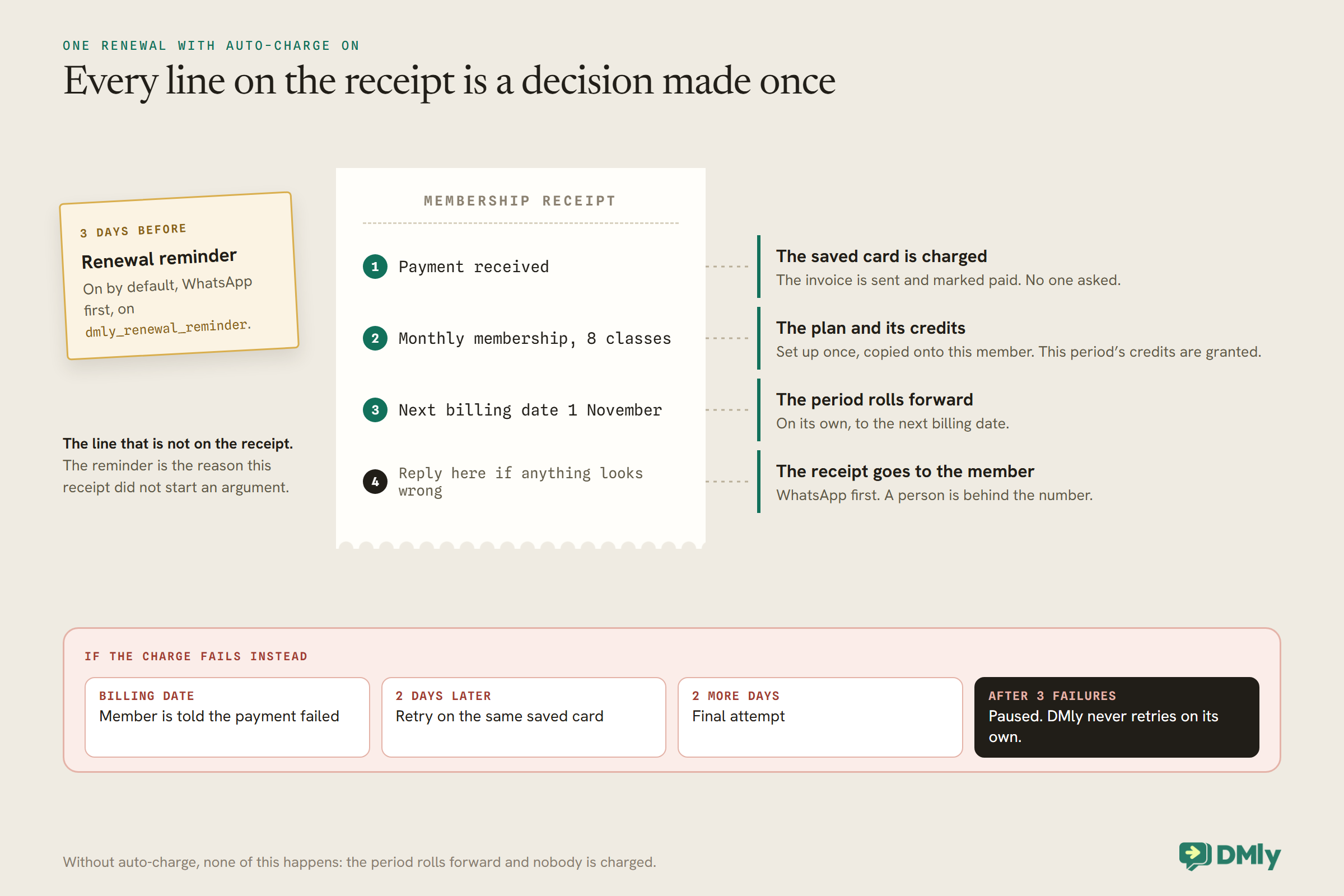
Read a membership renewal receipt one line at a time and every line turns out to be a decision somebody made. “Payment received”: a card was saved and charged without anyone asking. “Monthly membership, 8 classes”: the plan and its credits were set up once and copied onto this member. “Next billing date 1 November”: the period rolled forward on its own. “Reply here if anything looks wrong”: there is a person behind the number. And the line that is not on the receipt, the reminder the member got three days earlier, is the reason this receipt did not start an argument.
When you automate gym membership renewals, you are really making those decisions once, deliberately, so that every renewal after that runs without you. Get them right and renewals become the quietest part of the business. Get one wrong, and the failure is usually silent: a membership that rolls forward without charging anyone, or a freeze that ends in a surprise charge.
This guide builds automated renewals in DMly, step by step: the membership plan, starting subscriptions, auto-charge, reminders and receipts, a recovery routine for failed payments, freezes, upgrades and price rises, cancellations and annual memberships. It is the renewals chapter of our wider guide to WhatsApp automation for gyms.
What It Means to Automate Gym Membership Renewals
With auto-charge on, a renewal is five things happening on one date, plus a reminder three days before.
In DMly, a membership is a recurring Plan (what you sell) started as a Subscription for a member (the billing arrangement). When a subscription with auto-charge reaches its billing date, DMly:
- charges the member’s saved card,
- rolls the subscription into its next period,
- grants the period’s credits, if the plan includes class credits,
- sends the invoice and marks it paid, and
- sends the member a receipt.
Three days before that date, DMly messages the member that the membership is about to renew. If the charge fails, the member is told and DMly retries on a fixed ladder before pausing the subscription. All of those messages go WhatsApp first, and all are on by default.
Step 1: Build Each Membership as a Recurring Plan
The plan is the template every member’s subscription is copied from. Build it carefully once.
Go to Offerings → Plans and select New plan. Name it the way members know it (“Monthly unlimited”, “8 classes a month”), set the price and choose Recurring as the Billing type, with an Interval of day, week, month or year. Build one plan per membership tier.
If a membership includes a class allowance, add it under Plan items as a Credit item, and set a Credit cost on each class service so bookings spend it. Two behaviours to put in your membership terms in plain words:
- Monthly credits lapse. Credits from a recurring plan last for the billing period they were granted for. “8 classes a month” means 8 to use that month, not 8 stacking up.
- Credits only refill when a renewal is charged. On an auto-charged renewal, the period’s credits are granted with the payment. On a membership you bill by hand, they are not re-granted each period, even after the member pays; someone has to add them on the member’s profile.
A plan sitting in your catalogue grants nothing and charges nobody. It only does something once a subscription is started from it.
Step 2: Start Each Member’s Subscription
Starting a subscription begins the first period today and copies the plan onto the member.
In Finance → Subscriptions, select New subscription, choose the member and the plan, and select Start subscription. Use Price override for a member on a different rate, such as a founding member or a staff price, and Notes for anything your team should know. Any credits the plan grants land in the member’s balance straight away, and the contact becomes a client in your CRM.
Starting a subscription never charges anything. The price, interval and credits are copied onto the subscription at this moment, which has a consequence you will meet later: editing the plan afterwards never changes a subscription that is already running. A price rise has to be applied to existing members deliberately (see Step 7).
If members join through a conversation rather than at the desk, a flow’s Create Subscription step can start the subscription from a plan, for example after a trial class. Your team then sends the auto-charge setup link from the subscription’s menu.
Step 3: Switch On Auto-Charge
This is the single decision that makes renewals automatic. Without it, nothing is ever collected.
DMly’s docs are blunt about this, and it is worth repeating: a subscription without auto-charge never charges anyone. When its billing date arrives, DMly rolls the period forward and stops. No invoice is created, no payment is taken, the plan’s credits are not granted, and nothing tells you it happened.
To switch it on, open the subscription’s menu and select Set up auto-charge. DMly sends the member a link to save their card once; you never see or handle the card details. You will see Auto-charge setup link sent, and the Auto-charge badge only appears on the subscription once the member completes the link. Until then, the membership is not collecting.
Check your gateway before you promise anyone automatic renewals:
- Saved-card renewals work on Stripe, PayPal, Paystack, Razorpay and MyFatoorah.
- On Stripe, PayPal and Razorpay the card is saved without charging it. On Paystack and MyFatoorah the hosted page makes a small real charge to save the card, so the member does see one. Tell them in the message that sends the link.
- Mercado Pago cannot auto-charge. DMly picks which connected gateway handles the setup, with no picker, and if it picks Mercado Pago the setup fails, which can happen even when another gateway that does support it is connected.
Never ask a member to type their card number into WhatsApp to “save time”. WhatsApp’s Business Messaging Policy says not to share or ask people to share full card numbers, and the setup link exists precisely so nobody has to.
If you bill some members by hand
Some members will prefer to pay each month, or you may be on a gateway without saved cards. For those subscriptions, bill each period with Share subscription link, which issues the invoice for the current period if one is not open and sends the member a pay link over WhatsApp, SMS or email. Generate invoice only drafts an invoice; you still have to send it from Invoices.
Hand billing is where automation matters most, because nothing prompts you. Put it on a flow: the Invoice overdue trigger fires once per invoice when one passes its due date unpaid, which is the moment for a friendly nudge, and a named person should check the list of manually billed members each week.
Step 4: Reminders and Receipts
The built-in messages cover the basics. Check the templates, then decide what to add.
Three messages are on by default for every subscription and go WhatsApp first: the Renewal reminder three days before the billing date, the Payment receipt and the Payment failed notice. Most will land outside WhatsApp’s 24-hour window, where they go on approved templates: dmly_renewal_reminder, dmly_payment_receipt and dmly_payment_failed, all filed as utility. Check they are approved in your system templates before you rely on them.
You can turn any of the three off for one member with Edit notifications, for example for a corporate member whose company pays. The same panel shows an Invoice sent toggle that currently has no effect: sending an invoice messages the member either way.
An earlier reminder for bigger renewals
Three days is fine for a monthly membership. For an annual one, members usually want more notice. Build a flow on Subscription renewed (or Subscription created for the first year) with a Smart Delay set to Until event and the anchor Before the subscription renews, with an offset such as 30 days, followed by your message. The wait reads the subscription’s real next billing date when it runs, and if the subscription was cancelled in the meantime, the step takes its SKIPPED output instead, so a cancelled member does not get a renewal notice. Do not put this delay in a keyword flow: with no subscription in scope, a Smart Delay does not wait at all.
Keep that message a plain notice: the date, the amount and how to get in touch. Meta’s template categorisation guidelines (updated 15 September 2026) give a payment reminder like “your monthly payment will be billed on this date” as a utility example, but treat messages that “attempt to renew subscriptions” as marketing, even if requested. Add a renewal discount or a persuasive line and the template becomes marketing, billed at the marketing rate and only for members who agreed to marketing messages.
Whether your local consumer rules require a particular notice before a subscription renews, or a particular way to cancel, is a question for your own advisers. The automation can send whatever notice you decide on; it cannot decide it for you.
Step 5: A Recovery Routine for Failed Payments
A failed renewal is the most recoverable moment in a membership. Have a routine ready before the first one.
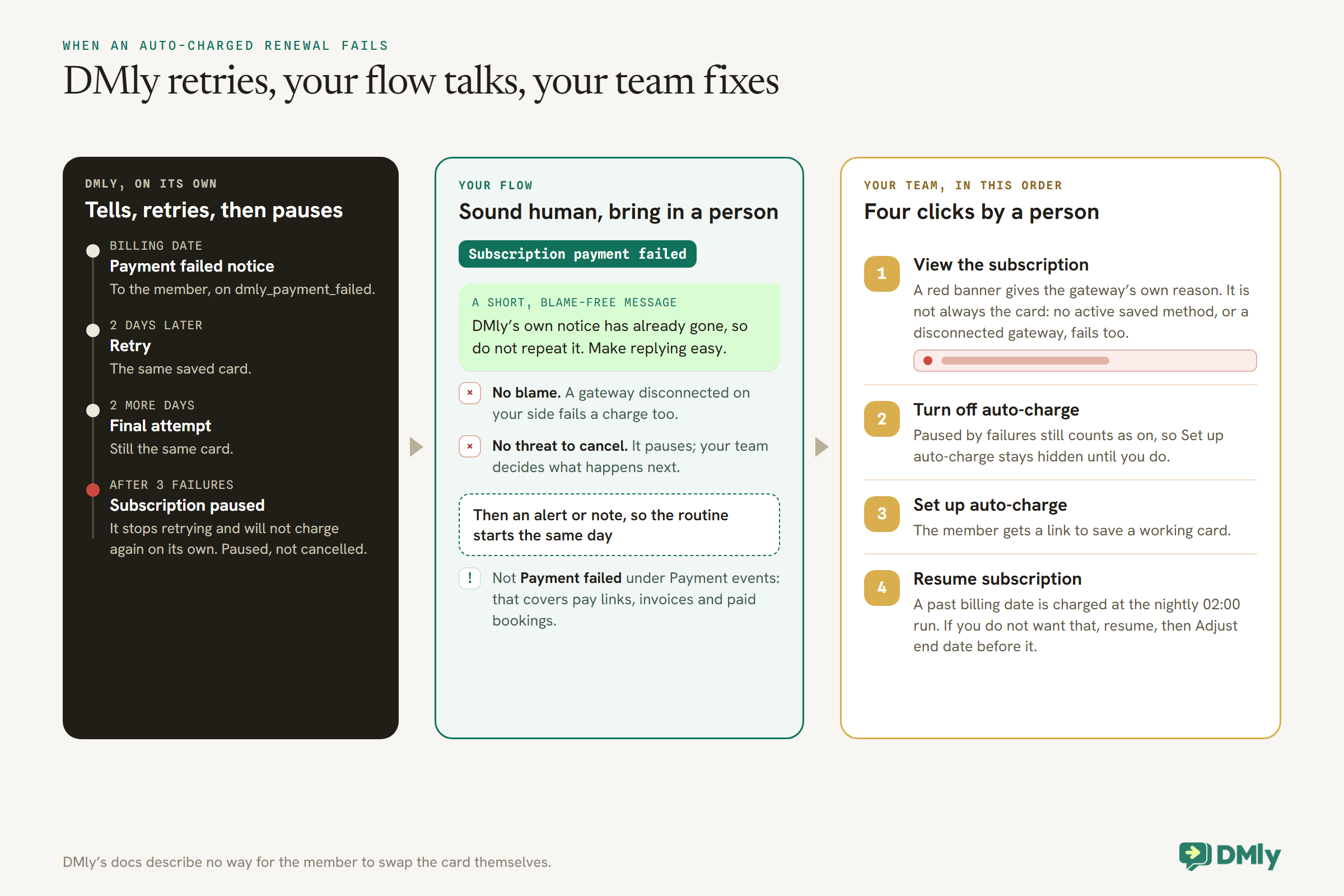
When an auto-charged renewal fails, DMly tells the member, waits two days and retries, waits two more and makes a final attempt. After the third failure it pauses the subscription and stops retrying. It will not charge again on its own.
The retries use the same saved card. Nothing in DMly’s docs describes a way for the member to swap the card themselves, so recovery needs a short routine from your team:
- Find out why. Open the subscription with View. A red banner shows why the last attempt failed, in the gateway’s own words. A failure is not always the card: a charge also fails if the subscription has no active saved payment method, or if the gateway it was set up with has since been disconnected.
- Turn off auto-charge. A subscription paused by failures still counts as having auto-charge on, so Set up auto-charge stays hidden until you turn it off.
- Send a new card link. Select Set up auto-charge, which sends the member a link to save a working card.
- Resume, carefully. Once the new card is saved, Resume subscription. If the billing date has already passed, the nightly run at 02:00 treats it as due and charges it. That is usually what you want for an unpaid month; if it is not, resume first and then use Adjust end date to set a future date before that run.
The flow around it
Build one flow on the Subscription payment failed trigger. DMly already sends its failure notice, so your flow should not repeat it. Its jobs are to sound human, to make replying easy, and to put the member in front of your team: a short, blame-free message, then an alert or note so someone starts the routine above the same day. Use the subscription trigger, not Payment failed under Payment events, which covers failed payments on your gateway in general, such as a pay link, an invoice or a paid booking.
Two wording rules. Do not imply the member did something wrong; a charge can fail because a gateway was disconnected on your side. And do not threaten to cancel: after three failures the subscription pauses, it does not cancel, and your team decides what happens next.
Step 6: Freezes and Holidays
A freeze is where members most often get charged by surprise. Know exactly how pause works.
Pause subscription stops billing and renewals immediately, and Resume subscription starts them again. The catch is that pausing does not move the billing date; it only stops DMly acting on it. Resume after that date has passed and the nightly run at 02:00 treats the subscription as due, and renews or charges it.
For a planned freeze, such as a member away for six weeks, agree the dates with them, then use this order when they come back:
- Resume subscription first.
- Then Adjust end date to the new future billing date you agreed.
- Do both before the next 02:00 run.
The order matters. Adjust end date only moves the billing date on an Active subscription; on a paused one it moves the period end and leaves the billing date in the past, so the charge still lands.
Freeze requests are a good job for a form of automation that stops short of the money. A keyword such as FREEZE can start a flow that asks for the dates, writes them in a note and hands the chat to your team, and the Subscription paused trigger can send the member a confirmation once someone has paused it. A flow’s Pause Subscription step exists too, and only works on an active subscription, but it cannot fix the billing date on the way back, so keep the resume in human hands.
Step 7: Upgrades, Downgrades and Price Rises
Plan changes are handled per member, and a price rise is a plan change.
On an active subscription with a recurring plan, open the menu and select Change plan. Pick the new plan and when it takes effect: At the next renewal changes nothing today; Immediately swaps the name, price, credits and cadence straight away, while the current period’s dates stay put. With Immediately, Charge the prorated difference now is on by default and, on an upgrade, invoices the difference for the days left in the period.
A few rules worth knowing before a member asks:
- Cadence changes always wait. Monthly to annual, or a plan in a different currency, is always scheduled for the next renewal, even if you chose Immediately.
- Downgrades never claw back credits. Credits already granted for the current cycle stay; only future renewals grant the lower amount. An immediate upgrade grants the increase right away, expiring with the current period.
- A failed renewal holds a scheduled change. If the renewal payment fails, the plan swap does not apply either; it stays pending until a renewal succeeds.
- You can cancel a pending change by opening Change plan and picking the member’s current plan again.
Raising prices
Because a subscription copies the plan’s price when it starts, editing the plan’s price only affects new members. To move existing members, create the new-price plan and use Change plan with At the next renewal on each subscription, after telling members in advance. Use Price override for anyone you have agreed to keep on the old rate.
If you message members about their plan change from a flow, note that Subscription plan changed can fire twice for one change: once when you schedule it, and again when it takes effect at the renewal. A flow on that trigger that messages the member will send twice for a scheduled change, so word it for both moments, or send the announcement yourself instead.
Step 8: Cancellations
Cancelling is final in DMly, so make it the last step, not the first.
Cancel subscription asks for confirmation, then stops billing and clears the next billing date. Three things to know:
- It refunds nothing. It stops future billing only. Refund any payment already taken from Payments, separately.
- It cannot be undone from the list. Resume subscription only brings back a paused subscription. A cancelled member who returns needs a new subscription.
- Credits stay. Anything already in the member’s balance remains there.
If your membership terms include a notice period, Adjust end date is usually the better tool than cancelling today, and DMly’s docs suggest it for keeping billing running and stopping later. Cancellation requests themselves should go to a person, who can ask one kind question about why, and a flow on Subscription cancelled can send a warm goodbye with nothing to sell. Keep any win-back offer for later, and only to members who agreed to hear from you.
Annual Memberships
Annual members pay once a year, so each renewal carries more weight.
An annual membership is a recurring plan with a yearly interval, and everything above applies. Three extras are worth building:
- An earlier reminder, with the Smart Delay pattern from Step 4, 30 days or so before the renewal, on top of the built-in three-day reminder.
- A check that the card still works. A card saved a year ago may have expired. Your 30-day reminder can invite the member to reply if their card has changed, so your team can send a new setup link before the renewal rather than after a failure.
- Credits for the year. If an annual plan includes classes, remember that recurring credits last for the billing period they were granted for. On an annual plan, that is the whole year.
The Automations to Build Around Renewals
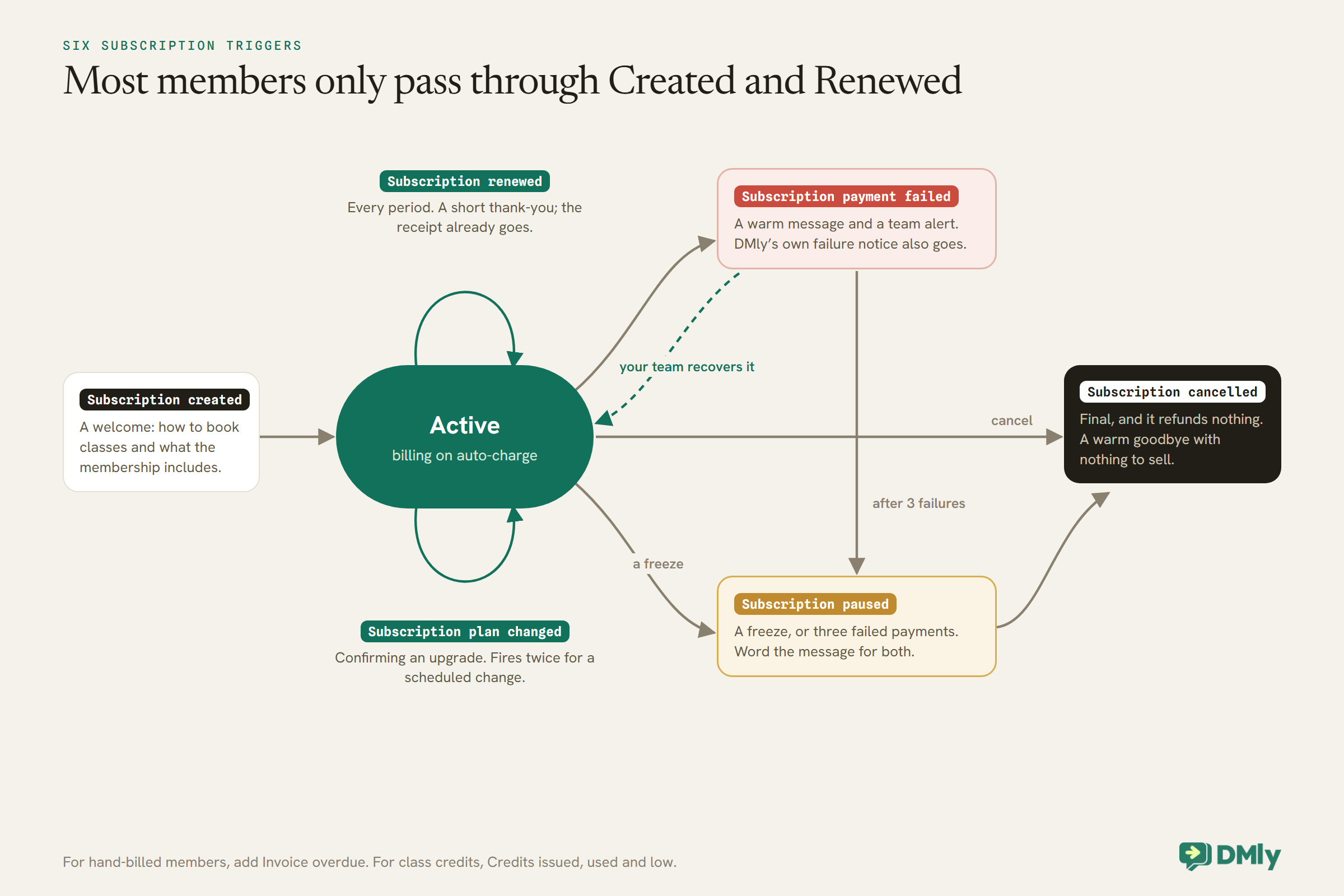
Six subscription triggers cover the whole membership lifecycle. Here is a sensible job for each.
| Trigger | Good for | Watch out for |
| Subscription created | A welcome: how to book classes, what the membership includes | Send the auto-charge link separately so it is not buried |
| Subscription renewed | A short thank-you, and the anchor for an early annual reminder | The receipt already goes; do not repeat the amount |
| Subscription payment failed | A warm message and a team alert | DMly’s own failure notice also goes |
| Subscription paused | Confirming a freeze, with the agreed return date | May also fire when failures pause it; word it for both |
| Subscription cancelled | A warm goodbye | Nothing to sell in this message |
| Subscription plan changed | Confirming an upgrade | Fires twice for a scheduled change |
For hand-billed members, add Invoice overdue, which fires once per invoice. For members with class credits, the credit triggers (Credits issued, Credits used, Credits low) cover the class side.
A Ten-Minute Weekly Check on Automated Renewals
Automated renewals still need a person to glance at them once a week.
- Paused subscriptions. Any paused by failed payments that nobody has started to recover?
- Missing badges. Any active subscriptions without the Auto-charge badge? Each one is a member whose setup link was never completed, and who is not being charged.
- Freezes ending this week. Resume and adjust the date before the 02:00 run.
- Hand-billed members. Any overdue invoices?
- Gateway. Still connected? A disconnected gateway fails every renewal behind it.
One status to ignore: Expired appears in the interface, but DMly never sets it, so no subscription will ever show it.
What It Costs to Run
DMly’s renewal features are part of your plan. The WhatsApp messages are charged by Meta.
The renewal reminder, receipt and failure notice usually go outside the 24-hour window as utility templates, which Meta charges for on the WhatsApp Business Platform. From 1 October 2026, Meta also charges for utility templates sent in response inside an open window, and for free-form service replies beyond the first 1,000 per business phone number each month. For a monthly member, that is typically two or three template messages a month: a reminder, a receipt, and a failure notice when a card fails. Our explainer on the October 2026 pricing change has the detail. Your payment gateway charges its own fees on each renewal.
Mistakes to Avoid
- Starting subscriptions without auto-charge and assuming they collect. They roll forward silently and charge nobody.
- Counting a sent setup link as done. Only the Auto-charge badge means the card is saved.
- Resuming a freeze without adjusting the date, or adjusting the date while still paused. Resume, then adjust, before 02:00.
- Editing the plan’s price and expecting members to move. Running subscriptions keep the price they started with.
- Cancelling when you meant to pause. Cancelled cannot be resumed.
- Messaging on the wrong trigger. Payment failed under Payment events is not the subscription renewal failure.
- Duplicating DMly’s own messages. The reminder, receipt and failure notice already go.
- Asking for card numbers in the chat. Always use the setup link.
Frequently Asked Questions
Can gym memberships renew automatically?
Yes, with a recurring plan and auto-charge. The member saves a card once through a link, and each billing date DMly charges it, rolls the period, grants any credits and sends a receipt on WhatsApp.
Do members get a reminder before they are charged?
Yes. DMly messages the member three days before the billing date by default. You can add an earlier reminder with a flow, which is worth doing for annual memberships.
What happens when a member’s card fails?
The member is told, DMly retries two days later, then once more after another two days. After three failures the subscription pauses and stops retrying. Your team then sends a new card link and resumes it.
Can members update their own card?
DMly’s docs describe no self-service card update. Your team turns off auto-charge and uses Set up auto-charge, which sends the member a link to save the new card.
How do I freeze a membership without charging the member later?
Pause it for the freeze. When the member returns, resume it first and then adjust the end date to a future billing date, before the nightly 02:00 run.
How do I raise prices for existing members?
Create a plan at the new price and move each member onto it with Change plan at the next renewal, after telling them. Editing the old plan’s price only affects new subscriptions.
Which payment gateways support automatic renewals?
Stripe, PayPal, Paystack, Razorpay and MyFatoorah support saved-card renewals in DMly. Mercado Pago does not, so members on it need a pay link each period.
The Receipt, Read Again
Go back to the receipt. “Payment received” is auto-charge, set up once and checked by its badge. “8 classes a month” is a recurring plan with credits that refill on every charged renewal. “Next billing date” is a date you only touch on purpose, in the right order, when a member freezes. “Reply here” is a person, ready with a four-step routine for the day a card fails. And the reminder three days earlier is the reason the member read the receipt and nodded.
To automate gym membership renewals well, switch on auto-charge for everyone who will use it, keep an eye on the badge, have the failed-payment routine written down before you need it, and treat pause, resume and cancel as the three buttons that deserve a second look.
Writing about WhatsApp automation, bookings and growth for local business.
Turn WhatsApp into your busiest channel.
Start free and run message, bookings, payments and reviews in one place.
