
Black Friday WhatsApp Marketing: A Campaign Guide for Small Businesses (2026)
Black Friday WhatsApp marketing is decided on a lock screen. On the morning of 27 November your customer picks up their phone and finds a stack of notifications: a sportswear brand, an airline, a supermarket, a group chat arguing about Christmas, and somewhere in the middle, you.
They will open three or four of those, at most. The rest get swiped away in one movement. Whether yours is opened has very little to do with the size of the discount and a great deal to do with whether they already know you, whether they asked to hear from you, and whether your message reads like it came from a person.
That is good news for a small business. You can’t outspend the big brands, but you can be the message that feels like it was meant for them. In this guide, we’ll look at the 2026 dates and a timeline to work back from, the Meta rules that changed who you can reach, how to get your templates approved in time, ten Black Friday WhatsApp messages you can copy, what a campaign costs, and how to run the whole weekend in DMly without sending the same offer to everyone three times.
What Black Friday WhatsApp Marketing Is, and What Changed for 2026
Black Friday WhatsApp marketing means sending your Black Friday offer to customers who opted in to hear from you, using approved WhatsApp templates, in the days around the last Friday of November. It sits alongside email and social posts, but it behaves differently: the message lands next to your customer’s personal chats, it gets read far more often than an email, and it is governed by rules Meta sets, not you.
If you ran a WhatsApp campaign for Black Friday a couple of years ago, four things are different now.
- Every outbound promotion is a marketing template. Outside a 24-hour conversation window, WhatsApp only delivers messages Meta has approved in advance. An offer is always the Marketing category, whatever you call it. Our guide to WhatsApp message templates explained covers the three categories.
- Meta limits how many marketing messages one person receives. The limit adapts to how engaged that person is with marketing messages in general, across every business, not just yours. On the busiest marketing weekend of the year, that matters.
- Marketing templates don’t reach US numbers. Meta’s documentation states that WhatsApp does not currently deliver marketing template messages to people with United States phone numbers. A US business needs a different route, which we’ll cover below.
- You pay per delivered message. Meta bills each delivered marketing message at your customer’s country rate. Since 1 October 2026, ordinary replies inside the 24-hour window are charged too, after the first 1,000 each month on each number. Our page on the WhatsApp pricing change on 1 October has the detail.
None of these make a WhatsApp Black Friday campaign a bad idea. They change what a good one looks like: smaller, better-targeted sends to people who want them, timed so they arrive when they’re useful.
Black Friday 2026 Dates and Your WhatsApp Campaign Timeline
Black Friday 2026 is Friday 27 November. Thanksgiving is Thursday 26 November, Small Business Saturday is 28 November, and Cyber Monday is 30 November. Most of the work for a WhatsApp campaign happens three to four weeks before any of those dates, because templates need approval and your list needs to grow.
Work backwards from the weekend:
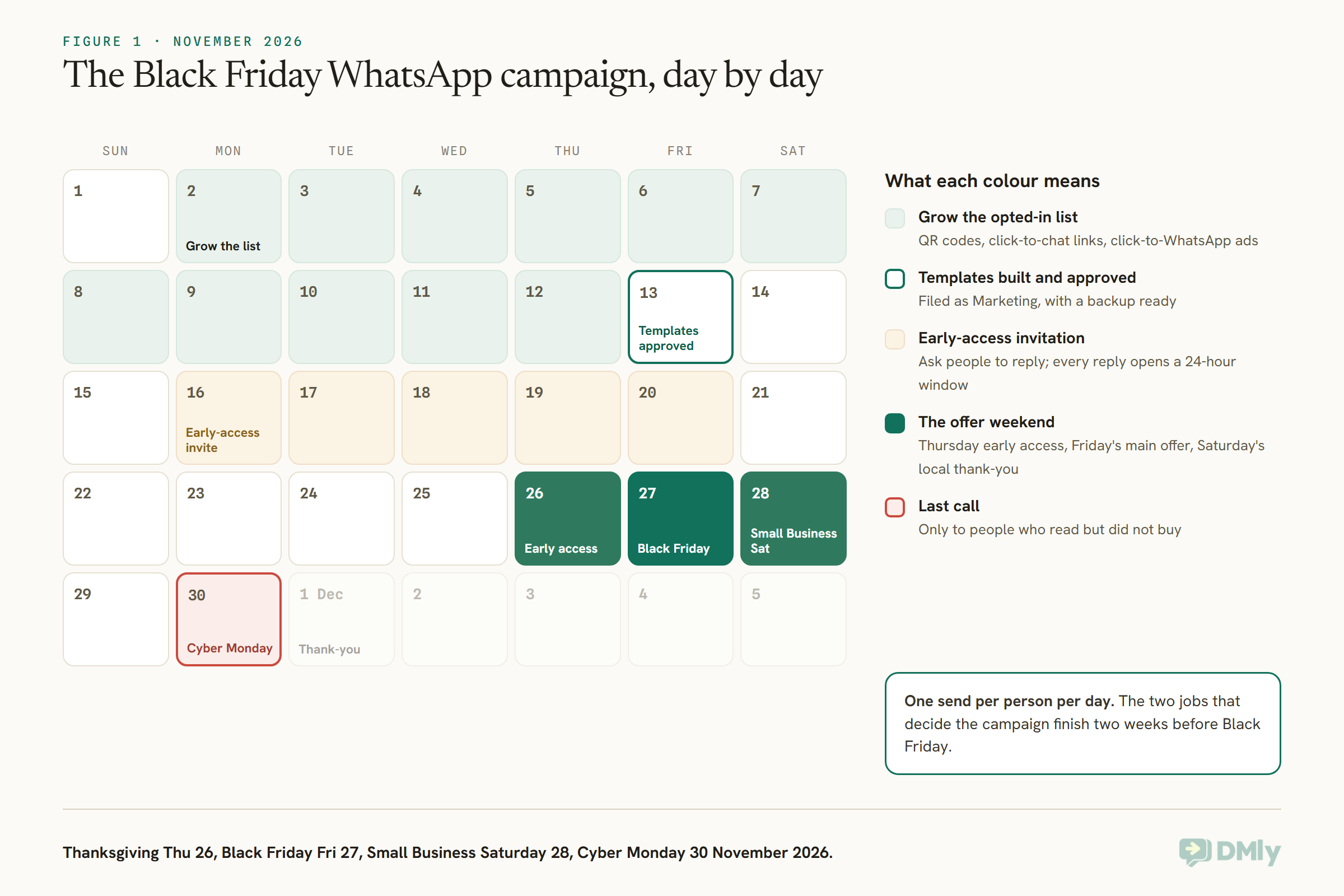
| When | What to do | Why then |
| Now to 13 Nov | Grow your opted-in list: QR codes at the till, a click-to-chat link in your bio, a click-to-WhatsApp ad | You can only send marketing templates to people who agreed to receive them |
| By 13 Nov | Build and submit every template; save your segments | Approval is usually quick but can take longer, and a rejection needs time to fix |
| Week of 16 Nov | Send an early-access invitation that asks people to reply | A reply opens a 24-hour window and tells you who is interested |
| Thu 26 Nov | Early access for everyone who replied | Rewards interest and spreads your sends across days |
| Fri 27 Nov | The main offer, one message per segment | The day people are actively looking |
| Sat 28 Nov | A personal note to regulars for Small Business Saturday | The one day “small and local” is the selling point |
| Mon 30 Nov | A last call, only to people who read but didn’t reply or buy | Everyone else has either bought or told you nothing |
| 1 Dec onwards | Thank-you messages, and voucher redemption in January | Turns a discount weekend into repeat visits |
If you want the whole season in one view, our WhatsApp marketing calendar for 2026 places Black Friday alongside Diwali, Christmas and the January quiet season, with prep-by dates for each.
Who You Can Message on WhatsApp This Black Friday
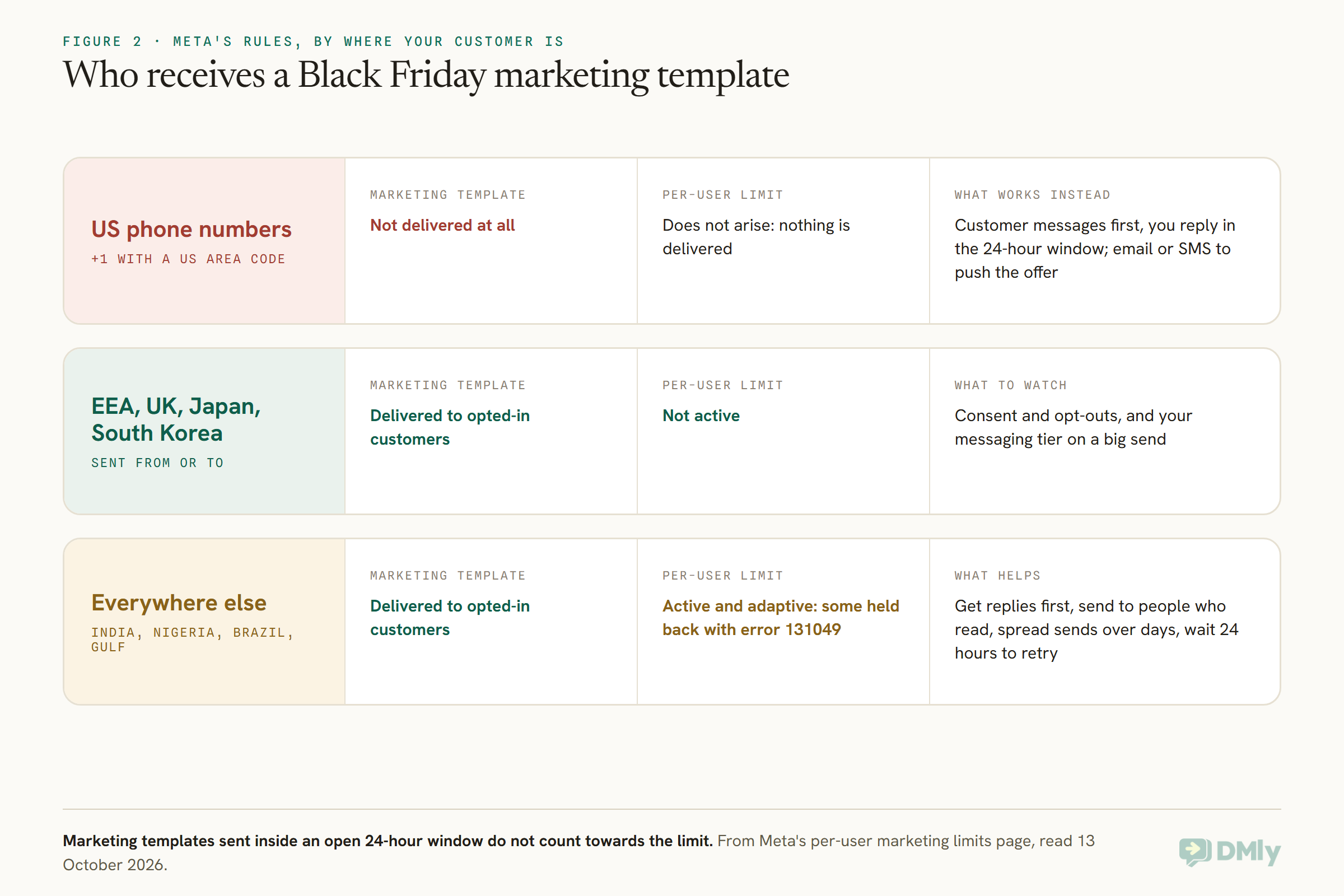
You can send a Black Friday template to anyone who opted in to marketing messages from your business, except people with US phone numbers, and Meta may hold back some messages to people who rarely engage with marketing. Three groups of rules decide whether your offer arrives.
Opt-in comes first
A marketing template needs the customer’s agreement to receive marketing from you. A phone number in your booking system or on an invoice is not the same thing. Our guide to WhatsApp opt-in and how to prove consent covers the wording and the record you should keep. In DMly, anyone who replies STOP or unsubscribes is blocked from every broadcast automatically, at the moment of sending, and you can’t switch that off.
Meta’s per-user marketing limit
Meta may limit how many marketing template messages a person receives from all businesses over a period, when they seem less likely to engage. Meta bases this on that person’s recent marketing read rate and how many messages are already waiting in their inbox. It is not a fixed number, and Meta doesn’t publish one.
When your message is held back for this reason, it fails with error 131049. Meta asks you to wait at least 24 hours before sending it again, and warns that retrying sooner can make further attempts to that person unavailable for up to a day. On a weekend when every brand is sending, expect some of these. Three things help:
- Get replies. When someone replies to a marketing message, a 24-hour customer service window opens, and Meta says marketing templates sent inside that window don’t count towards the limit.
- Send to people who read your messages. The limit leans on engagement, so a smaller segment of recent buyers tends to land better than your whole list.
- Spread the weekend out. An early-access message on Thursday and a main offer on Friday beats three messages on Friday.
The limit is not active for messages sent from a business number in the European Economic Area, the United Kingdom, Japan or South Korea, or sent to people in those countries.
What a US business can do instead
Because Meta doesn’t currently deliver marketing templates to US numbers, a US business can’t broadcast a Black Friday offer on WhatsApp to US customers. What still works is the conversation the customer starts. If a customer messages you, you can reply with your offer inside the 24-hour window as an ordinary message, not a template. So the US playbook is about invitations: a click-to-chat link in your emails and bio, a WhatsApp QR code at the counter that says “message DEALS for our Black Friday prices”, and an automation that answers the keyword instantly. For anything you need to push out, US customers are better reached by email or SMS.
Getting Your Black Friday WhatsApp Templates Approved in Time
Build every Black Friday template by 13 November, file it as Marketing, and check each one still reads Approved the day before you send. Approval usually takes minutes, but it can take longer, and a rejected template needs rewriting and resubmitting.
A few rules save most of the back and forth:
- Pick the honest category. Meta reviews against the category you choose, and a promotion filed as Utility is a rejection.
- Keep inside the limits. The body can be up to 1,024 characters, a text header or footer up to 60, and button text up to 25. A template can carry up to 10 buttons, but at most two web links, one call button and one copy-code button.
- Use variables cleanly. Number them
{{1}},{{2}}in order, and give Meta’s reviewer sample values. A gap in the numbering is a gap you’ll have to fill in when you send. - Add an opt-out line in the footer, such as “Reply STOP to opt out”.
The copy-code button is the one to know about for Black Friday. It lets the customer copy your discount code with one tap, so they don’t have to type it at checkout. A carousel template shows 2 to 10 swipeable cards, each with its own short text and up to two buttons, which suits a shop with a handful of headline deals.
In DMly you don’t have to start from a blank box. Messaging → Templates → Browse library holds 64 ready-made marketing templates, eight for each kind of business, which you can filter by occasions such as flash sale, seasonal, loyalty and win-back. Each one is already written with tidy variables, sample values, quick-reply buttons and an opt-out footer, which are the things Meta most often rejects templates over. You can customise one or submit it as it is.
One warning that matters more than usual this month: DMly checks a template is still Approved at the moment a broadcast sends, not when you scheduled it. If Meta pauses or disables a template in between, the whole broadcast fails at send time. Open your templates the day before and check each one. If one reads Paused by WhatsApp or Disabled by WhatsApp, swap in a backup. If a template is rejected, our guide to fixing a rejected WhatsApp template walks through the usual causes.
Black Friday WhatsApp Message Templates You Can Copy
A good Black Friday WhatsApp message says who it’s from, what the offer is, when it ends, and how to act on it in one tap. These ten are written to be submitted as Marketing templates. Swap the square brackets for your variables, keep the opt-out footer, and cut anything you can’t honestly promise.
1. The early-access invitation (send the week of 16 November)
Hi [Name], it’s [Business]. Our Black Friday prices go live on Friday, but regulars get them a day early. Want in? Tap Yes and we’ll send them to you on Thursday.
Buttons: Yes, send them early / No thanks
Footer: Reply STOP to opt out
This is the most useful message of the campaign. Every reply opens a 24-hour window and tells you who wants the offer, so Thursday’s message goes to a warm audience.
2. The main Black Friday offer, with a code
Hi [Name], Black Friday at [Business] is here: [offer] until [end time] on Monday. Use the code below at checkout.
Buttons: Copy code [CODE] / Shop now [link]
Footer: Reply STOP to opt out
3. For a service business: buy now, book later
Hi [Name], this weekend only, [Business] is selling [service] at [Black Friday price], to use any time before [date]. Lock in the price now and book whenever suits you.
Buttons: Buy now [link] / Ask a question
This works for salons, spas, clinics offering cosmetic treatments, and studios: the customer pays at the Black Friday price and comes in during January, when your diary is quiet.
4. The gift card offer
Hi [Name], sorting Christmas early? [Business] gift cards are [offer] this Black Friday weekend. We’ll send the code straight to you, or to whoever it’s for.
Buttons: Buy a gift card [link] / Reply with a question
5. Thanksgiving early access (for people who said yes)
Hi [Name], as promised, here are our Black Friday prices a day early: [offer]. They’re yours until [end time] on Monday.
Buttons: Copy code [CODE] / See the deals [link]
6. Small Business Saturday
Hi [Name], it’s [your first name] from [Business]. Today is Small Business Saturday, and we just wanted to say thank you for choosing a local business this year. Our Black Friday offer is still on until Monday: [offer].
Buttons: Book or shop [link]
7. Restaurant or café
Hi [Name], [Restaurant] is open all Black Friday weekend with [offer] on [days]. Tables go quickly, so book yours here.
Buttons: Book a table [link] / See the menu [link]
8. Gym or studio membership
Hi [Name], our Black Friday membership offer at [Studio] is [offer], for anyone who joins by [date]. Start in December or January, it’s your choice.
Buttons: Join now [link] / Book a free class
9. Cyber Monday last call
Hi [Name], a quick last reminder from [Business]: our Black Friday offer ends at [time] tonight. After that, prices go back to normal.
Buttons: Copy code [CODE] / Shop now [link]
Footer: Reply STOP to opt out
Send this one only to people who didn’t buy. Everyone else has already acted on it.
10. The thank-you (after the weekend)
Hi [Name], thank you for shopping with [Business] this weekend. If anything isn’t right, just reply here and we’ll sort it. See you soon!
A thank-you with no offer in it is the message that makes your next promotion welcome. Our library of WhatsApp business message templates has more for every stage of the customer journey.
Segment Your Black Friday WhatsApp Campaign Instead of Blasting It
Send your Black Friday WhatsApp campaign to the people most likely to buy first, and give everyone else one message at most. Smaller, well-chosen sends get read more, cost less, and run into Meta’s per-user limit less often.
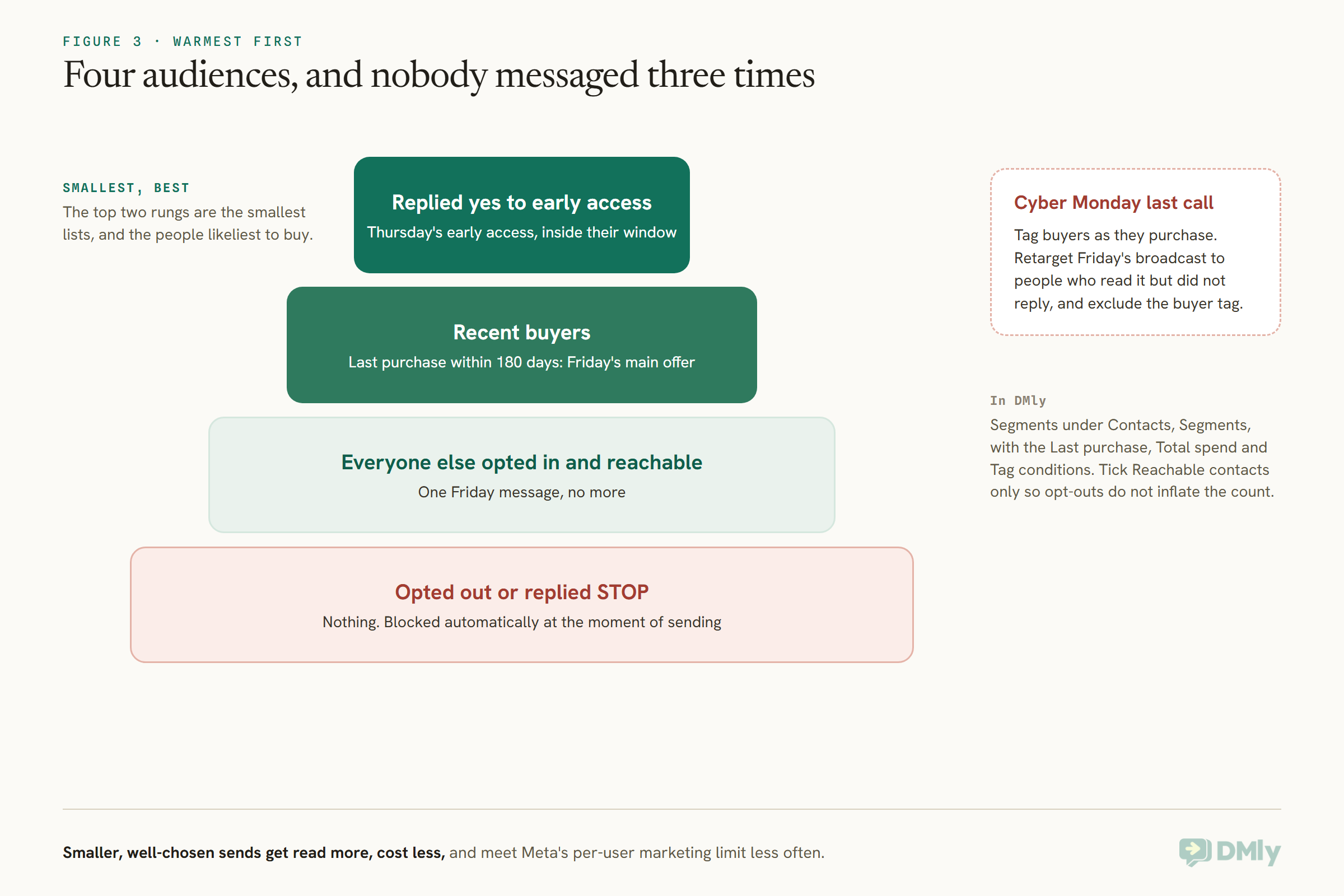
In DMly, a segment is a saved filter that rebuilds itself every time you use it, so you build it once and it stays current through the weekend. You’ll find them under Contacts → Segments. Useful ones for Black Friday:
- Recent buyers: a Last purchase condition of “within the last 180 days”. Orders from a connected Shopify or WooCommerce store count too.
- Big spenders: a Total spend condition of “at least” an amount that means something for your business, for a VIP early-access list.
- Early access: contacts with the tag you apply when someone taps “Yes, send them early”.
- Not yet bought: any of the above with Exclude contacts with tags set to your “Black Friday buyer” tag.
Tick Reachable contacts only when you choose the audience. Opted-out contacts never receive a broadcast either way, but without the tick they’re counted as recipients and then show up as failures, which makes your results look worse than they are. Our guide to segmenting customers by spending, activity and interests goes further into building these.
How Much a Black Friday WhatsApp Campaign Costs
A Black Friday WhatsApp campaign costs Meta’s marketing rate for each delivered message in your customer’s country, plus whatever your platform charges. Messages that fail, including those held back with error 131049, aren’t delivered, so Meta doesn’t bill them.
The sum is simple: delivered messages multiplied by the marketing rate for that country. Rates differ a lot between countries, so check yours on our WhatsApp Business API pricing by country page before you set a budget. As one example, Meta’s list rate for a marketing message to a Nigerian number is US$0.0516, so 2,000 delivered Black Friday messages to Nigerian customers cost about US$103 in Meta charges.
Three routes are cheaper:
- Replies inside the 24-hour window. When a customer messages you first, your replies are service messages, not templates. The first 1,000 a month on each number are free, and after that they’re charged at your country’s utility rate.
- Click-to-WhatsApp ads. A conversation that starts from a click-to-WhatsApp ad opens a 72-hour free entry point window, so your follow-up messages in that window cost nothing from Meta. Our click-to-WhatsApp marketing guide covers how to set them up.
- Smaller segments. Sending 600 messages to people who buy is cheaper and more effective than 6,000 to people who don’t.
On the platform side, DMly doesn’t add anything to Meta’s message charges. Each broadcast message also uses one message from your plan’s broadcast and template allowance, so check you have room on yours before the weekend.
How to Run Your Black Friday WhatsApp Campaign in DMly
In DMly, a Black Friday WhatsApp campaign is a handful of approved templates, three or four saved segments, and a broadcast for each send, scheduled ahead and approved by a teammate. Here’s the order to do it in.
- Grow the list. Put a QR code and a click-to-chat link wherever customers already are, with a reason to scan: “Message us for our Black Friday prices.” DMly’s growth tools create trackable links and QR codes, so you can see which poster worked.
- Build or install your templates. Go to Messaging → Templates, browse the library or add your own, and save. Saving submits it to Meta and marks it Pending.
- Set up the keyword reply. Create an automation that answers a keyword such as EARLY or DEALS with your offer. Because the customer messaged first, your answer goes inside their window, and it reaches US customers too.
- Save your segments under Contacts → Segments, as above.
- Create each broadcast. Go to Messaging → Broadcasts → New broadcast, pick the segment, choose the template, and fill in the variables. A variable can itself be personalised: type
{{first_name}}into a parameter box and DMly fills it in for each recipient. - Schedule it. For a sale that starts at a set moment, choose Schedule for later and leave it on At this time, so everyone gets it together. If your customers are spread across time zones and you’d rather each one got it at their own morning, choose At this time in each contact’s timezone. DMly learns a contact’s time zone when they book on your booking page, and anyone without one gets a fallback time, which DMly counts for you before you send.
- Ask a teammate to approve it. Tick Require team approval before sending. A held broadcast never goes out until someone signs it off, which is a cheap safeguard against a wrong price reaching your whole list.
For Cyber Monday, use Retarget instead of a segment: pick Friday’s broadcast and the engagement type All Read or All Sent But Not Replied, then exclude your buyer tag. On WhatsApp, DMly records reads, so you can reach exactly the people who saw the offer and didn’t act.
A few other DMly features fit the weekend well:
- Coupons. For invoices and orders raised in DMly, a coupon can be a percentage or a fixed amount off, with a minimum spend, a total usage limit, a per-customer limit and a validity window, so a Black Friday code stops working on Tuesday on its own.
- Gift cards. Under Finance → Gift cards, you can sell a gift card and DMly sends the purchase invoice on WhatsApp. The card turns active the moment it’s paid, and the code goes to the recipient automatically.
- Shopify abandoned checkouts. If you sell through Shopify, connecting your store lets an automation nudge customers who started checkout and didn’t finish, which is busy work on a weekend like this. See our guide to recovering abandoned Shopify carts with WhatsApp.
Black Friday Beyond WhatsApp: Instagram, Messenger and SMS
Instagram and Facebook broadcasts only reach people who messaged you in the last 24 hours, so on those channels Black Friday works best as replies, not announcements. Each channel has its own rules.
- Instagram. A standard broadcast reaches people inside their 24-hour window or who gave a one-time notification opt-in. The bigger opportunity is comment-to-DM: post your Black Friday offer and send the details to everyone who comments a keyword.
- Facebook Messenger. Standard broadcasts follow the same 24-hour rule. DMly also supports Meta’s paid Marketing Messages on Facebook Pages, which reach people who subscribed to your ongoing marketing messages, whenever they last wrote. Meta charges each delivered message to your own ad account, sends at most one every 12 hours per person, and the feature depends on your DMly plan including Meta Ads.
- SMS. SMS broadcasts in DMly give you a free-text box with no templates, which makes SMS the practical push channel where WhatsApp templates can’t go, such as US numbers.
- Live chat and TikTok don’t support broadcasts at all.
All of these land in the same inbox in DMly, so a customer who saw your Instagram post and then messaged you on WhatsApp is one conversation, not two.
When Black Friday Messages Fail: Error 131049, Paused Templates and Tier Limits
Most failed Black Friday WhatsApp messages come from one of three places: Meta’s per-user marketing limit, a template paused between scheduling and sending, or a messaging tier too small for the send. Each looks different in your results.
| What you see | What it means | What to do |
| Some recipients fail with error 131049 | Meta held the message back under its per-user marketing limit | Wait at least 24 hours before retrying those people, or reach them later in the weekend |
| Every recipient fails at send time | The template was paused, disabled or rejected after you scheduled | Check templates the day before; keep an approved backup ready |
| Part of a big send fails, the rest lands | Your messaging tier was smaller than the send | Split a large campaign across Thursday and Friday |
| Recipient count is high but many “failed” | Opted-out contacts were counted and then blocked | Tick Reachable contacts only next time |
DMly paces its own sending so a campaign leaves steadily, but it doesn’t count your sends against your Meta messaging tier, so a send bigger than your tier partly fails and still reports as sent. If your number is new or on a low tier, our explainer on WhatsApp quality rating, messaging limits and bans covers how tiers rise, and why a weekend of complaints can lower your rating.
To see why messages failed, open the broadcast and look at Why messages failed, which lists the reasons with counts, most common first.
What to Measure After the Weekend
Judge your Black Friday WhatsApp campaign on replies and purchases per segment, not on how many messages went out. A broadcast’s analytics in DMly show what was sent, delivered, read and replied to, and on WhatsApp you can see reads for each recipient.
Three numbers are worth writing down for next year:
- Read rate by segment. If recent buyers read far more than your wider list, next year’s budget belongs to the top rungs.
- Replies to the early-access invitation. This is the size of your genuinely warm audience.
- Failures by reason. A lot of 131049s means you sent too much, or to people who don’t engage.
Then use what you learned. Customers who bought only because of a discount are worth a gentle check-in in January, and our guide to WhatsApp win-back campaigns covers what to send people who go quiet afterwards.
Black Friday WhatsApp Marketing Ideas by Type of Business
The best Black Friday WhatsApp marketing idea for a small business is usually the one only a small business can offer: a personal message, a booking, or a voucher for later. Here’s how that looks by sector.
- Salons and spas. Sell treatment vouchers at a Black Friday price for January, when diaries are quiet. Offer early access to clients who booked in the last six months.
- Clinics. Keep promotions to services where an offer is appropriate, such as cosmetic treatments or check-up packages, and never make medical claims in a promotion. Use the weekend to pre-sell January appointments.
- Gyms and studios. A joining offer for people who start in December or January, and a “bring a friend” class for members, catch people while their New Year plans form.
- Restaurants and cafés. Black Friday is a busy shopping day, so promote tables for tired shoppers, takeaway for the evening, and gift cards for Christmas.
- Online shops. A copy-code button, a carousel of three to five headline deals, and an abandoned-checkout nudge do most of the work. Our guide to WhatsApp marketing for ecommerce and D2C brands goes deeper.
- Tutors and training centres. Discounted term fees for early enrolment in January, sent to parents who enquired this year but didn’t sign up.
Frequently Asked Questions
What is Black Friday WhatsApp marketing?
Black Friday WhatsApp marketing means sending your Black Friday offers to customers who opted in to hear from you, using approved WhatsApp marketing templates, and answering the replies in the same chat. It works best as a few well-targeted messages over the weekend rather than one big blast.
When is Black Friday 2026?
Black Friday 2026 is Friday 27 November. Thanksgiving is Thursday 26 November, Small Business Saturday is 28 November, and Cyber Monday is 30 November.
Can I send a Black Friday broadcast to WhatsApp users in the US?
Not as a marketing template. Meta doesn’t currently deliver marketing template messages to US phone numbers. You can still reply with your offer when a US customer messages you first, inside the 24-hour window, and reach them by email or SMS.
Why did some of my Black Friday WhatsApp messages fail with error 131049?
Error 131049 means Meta held the message back under its per-user marketing limit, which adapts to how engaged each person is with marketing messages. Wait at least 24 hours before trying that person again, and focus on segments that read your messages.
How early should I submit Black Friday WhatsApp templates?
Aim to have every template built and approved two weeks before Black Friday, which is 13 November for 2026. Approval is usually quick, but a rejection needs time to fix, and you’ll want a backup template ready in case one is paused.
How many messages should I send over the Black Friday weekend?
No more than one per person per day, and fewer for people who haven’t engaged. A sensible pattern is an early-access invite the week before, the offer on Friday, and a last call on Cyber Monday only to people who didn’t buy.
Does a Black Friday WhatsApp message need an opt-out?
Yes. Include a line such as “Reply STOP to opt out” in the footer. In DMly, anyone who opts out is blocked from every future broadcast automatically.
Your Black Friday WhatsApp Marketing Checklist
Black Friday WhatsApp marketing rewards the business that prepared early and sends less. If you do nothing else this week, do these:
- Put a QR code and a click-to-chat link in front of customers, with a reason to message you.
- Build your templates by 13 November, filed as Marketing, with a copy-code button and an opt-out line.
- Save three segments: early access, recent buyers, everyone else who’s reachable.
- Send the early-access invite the week of 16 November and set up the keyword reply.
- Schedule Friday’s offer, have a teammate approve it, and check your templates the day before.
- Send Cyber Monday’s last call only to people who read and didn’t buy.
If you’d like to run the whole weekend from one place, with templates, segments, broadcasts and the replies in one inbox, you can start a free DMly trial and have your first template submitted today. And for the bigger picture of how broadcasts fit into the rest of your year, our guide to WhatsApp broadcasts for businesses is the place to start.
Writing about WhatsApp automation, bookings and growth for local business.
Turn WhatsApp into your busiest channel.
Start free and run message, bookings, payments and reviews in one place.
