
There is a number sitting in most studios’ systems that says more about who is about to leave than any survey: the credits a member has paid for and not used. A member on eight classes a month who, three weeks in, still has seven left has not complained, has not cancelled and has not asked for anything. They have just stopped coming. The number knew before anyone at the desk noticed, and nobody looked at it.
You can win back inactive gym members much more easily while they are still members than after they have gone. Nothing needs to be sold; a class just needs to be booked. The hard part is noticing in time, every month, without someone scrolling through the calendar looking for faces they have not seen.
This guide sets that up in DMly: deciding what “inactive” means for your memberships, letting your booking flows mark who is active, building the segments that list who is not, sending one warm message on a schedule, handling former members with a sequence, answering the replies, and measuring who comes back. It sits under our wider guide to WhatsApp automation for gyms.
Why Win Back Inactive Gym Members While They Still Pay
An inactive member still has a membership, a habit to restart and a reason to come back.
A member who has stopped coming but is still paying has not made a decision yet. They may be busy, injured, bored of the same class, or quietly embarrassed about how long it has been. Each of those has an answer a person at your gym could give in one message: a different class time, a beginners’ session, a freeze while they recover, or simply “we’d love to see you, want me to book you in?”.
After they cancel, the conversation is different. You are asking them to reverse a decision rather than keep a habit, and you can only message them within the permission they gave you. That is why this guide spends most of its effort on noticing early.
One honest limit before you start: DMly knows about bookings. If your members also use an open gym floor without booking anything, DMly cannot see those visits, and a member who trains on the floor every day will look inactive. Apply everything below to members whose visits go through bookings (class members, personal training clients, booked gym sessions), or combine it with your door-access records before you send anything.
Step 1: Decide What “Inactive” Means for Your Gym
“Inactive” should mean something specific for each kind of membership.
| Membership | A useful definition of inactive | How DMly can see it |
| Monthly plan with class credits | Most of this month’s credits still unused late in the month | A segment on Credit balance |
| Unlimited classes | No class booked this month | A monthly activity tag set by booking flows |
| Personal training | No session booked this month | The same tag, set on appointment bookings |
| Frozen | Not inactive: excluded | A frozen tag your team adds |
| Payment failed | A billing problem, not a motivation one | The subscription triggers |
| Cancelled | A former member | The Subscription cancelled trigger |
Keep the payment-failed members out of your win-back entirely. A member whose card failed needs a quick fix from your team, not a “we miss you” message, and mixing the two confuses both.
Step 2: Let DMly Tag Your Members Automatically
Every segment in this guide starts from one tag: who is a member right now.
Build two tiny flows on your subscription triggers, each with one Tag action:
- Subscription created: add the tag
member. - Subscription cancelled: remove
memberand addformer-member. - Subscription payment failed: add
payment-issue. Put this Tag action in the same flow that alerts your team about the failure. - Subscription renewed: remove
payment-issue, because a renewal that goes through means the card problem is solved.
From then on, the tag keeps itself up to date. For members who joined before you built these flows, add member once by hand: filter your contacts list, tick them, and use Add tag from the bulk action bar. A hand-ticked run carries up to 500 contacts, and Select all N matching carries up to 25,000.
One behaviour to know here, because it shapes the whole design: bulk tag changes never start an automation. A bulk Add tag or Remove tag runs with triggers switched off, so it never fires Tag applied or Tag removed. Tagging one contact at a time, from the Inbox, a contact’s own tag editor, a flow’s Tag action or the AI agent, does fire them. So you cannot bulk-tag a list of inactive members and expect a flow to message each one. Use a broadcast for that (Step 6).
For freezes, have your team add frozen when they pause a membership and remove it when they resume. A freeze and three failed payments both leave a subscription paused, so a flow on Subscription paused cannot reliably tell them apart; a person can.
Step 3: Let Bookings Mark Who Is Active This Month
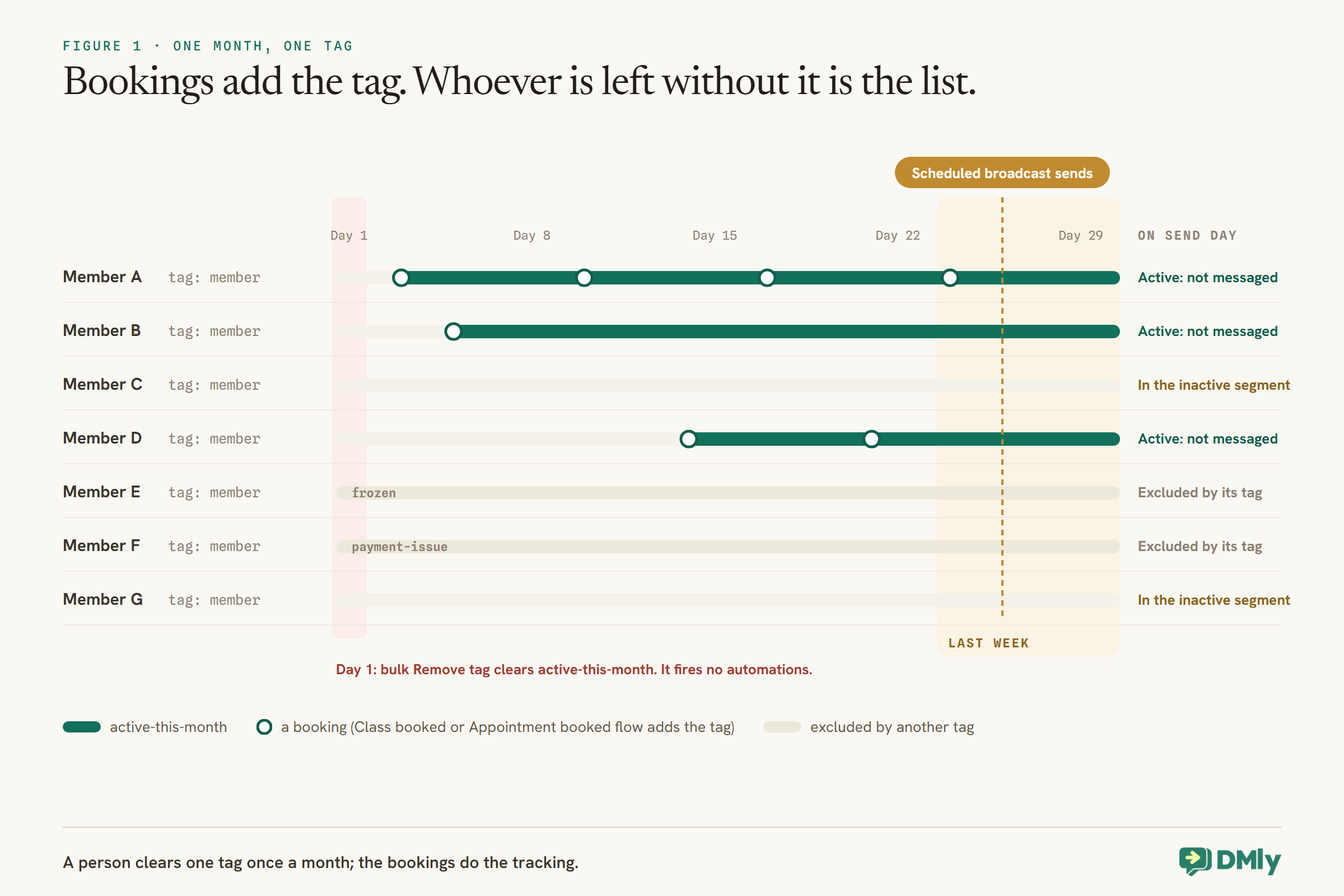
A monthly tag, set every time a member books and cleared once a month, turns “hasn’t been in” into a list.
DMly’s segments have no rule for “last booked more than 30 days ago”. There is a Number of days since last activity filter, but it measures messages, not visits: a member who replies to anything looks active, and one who books quietly through a link can look inactive. Build your own signal instead:
- A flow on Class booked with one Tag action: add
active-this-month. Use Class booked, not Appointment booked, which never fires for class places. - A second flow on Appointment booked doing the same, if you run personal training or other 1:1 sessions.
- On the first of each month, filter your contacts list by
active-this-month, tick the header checkbox, choose Select all N matching and use Remove tag. Because it is a bulk action, it fires nothing. It is a one-minute job; put it in someone’s calendar, or automate it with a recurring Scheduled date flow (see Step 6).
You may notice a dmly_rebook_nudge template in DMly’s system templates, listed as the out-of-window fallback for a “Win back lapsed clients” automation template. DMly’s docs do not describe how that automation decides who has lapsed, so if you see it in your template library, test who it targets on a few contacts before relying on it for members. The monthly tag below does not depend on it.
Through the month, every booking re-adds the tag. By the last week, members without it are the ones who have not booked a single class or session since the first.
For credit memberships, use the balance instead
If your memberships come with monthly class credits, you already have a sharper signal. DMly segments can test Credit balance with numeric rules such as at least. A segment of member with a credit balance of at least 6, looked at in the last week of the month, lists members on an 8-class plan who have used two or fewer. Recurring credits lapse at the end of each billing period, so this is also a kind message to send: “you’ve still got classes left this month, want me to book one?” is useful, not pushy. If your members’ billing dates are spread across the month, the balance tells you less on any single day; the activity tag works whatever the billing date.
Step 4: Build the Inactive Segment
The segment is the list. Build it once and it refreshes itself every time you use it.
In the segment editor, set:
- Contact tags:
member. - Exclude contacts with tags:
active-this-month,frozen,payment-issue,do-not-winbackandnew-this-monthif you tag new joiners (a member who joined last week has not had time to be inactive). - Optionally, a condition on Credit balance for credit plans, as above.
Three behaviours to know. Segments are re-evaluated every time they are used, so the list is always current. The count beside a segment is scoped to the channel you have selected, so build and send it on your WhatsApp channel. And you do not need to exclude opted-out contacts by hand: broadcasts, sequences and automations already skip them.
Members you cannot reach on WhatsApp
Because the segment is counted on your WhatsApp channel, a member with no WhatsApp identity on their contact, for example someone who only ever booked through a link with their email, will not receive the broadcast. DMly’s segments have a Reachable on channel rule with not reachable on, so a second segment of member, not active-this-month and not reachable on WhatsApp gives your team a short list to call or email instead. It may only be a handful of people, and a phone call from the gym is a better win-back than any template.
Look at the list before the first send. If it contains names you saw on the gym floor this week, you have members who train without booking, and they should be excluded or handled differently.
Step 5: Write One Warm Message
The message has one job: make it easy to come back, with no guilt attached.
A message to members who have gone quiet is, in Meta’s terms, marketing. Meta’s template categorisation guidelines (updated 15 September 2026) put messages that strengthen customer relationships, promote offers or retarget people who engaged with you in the marketing category, “even if requested by users”. That has two consequences: it is billed at the marketing rate, and it should only go to members who agreed to receive that kind of message from you. Record that permission when members join.
What works in the message itself:
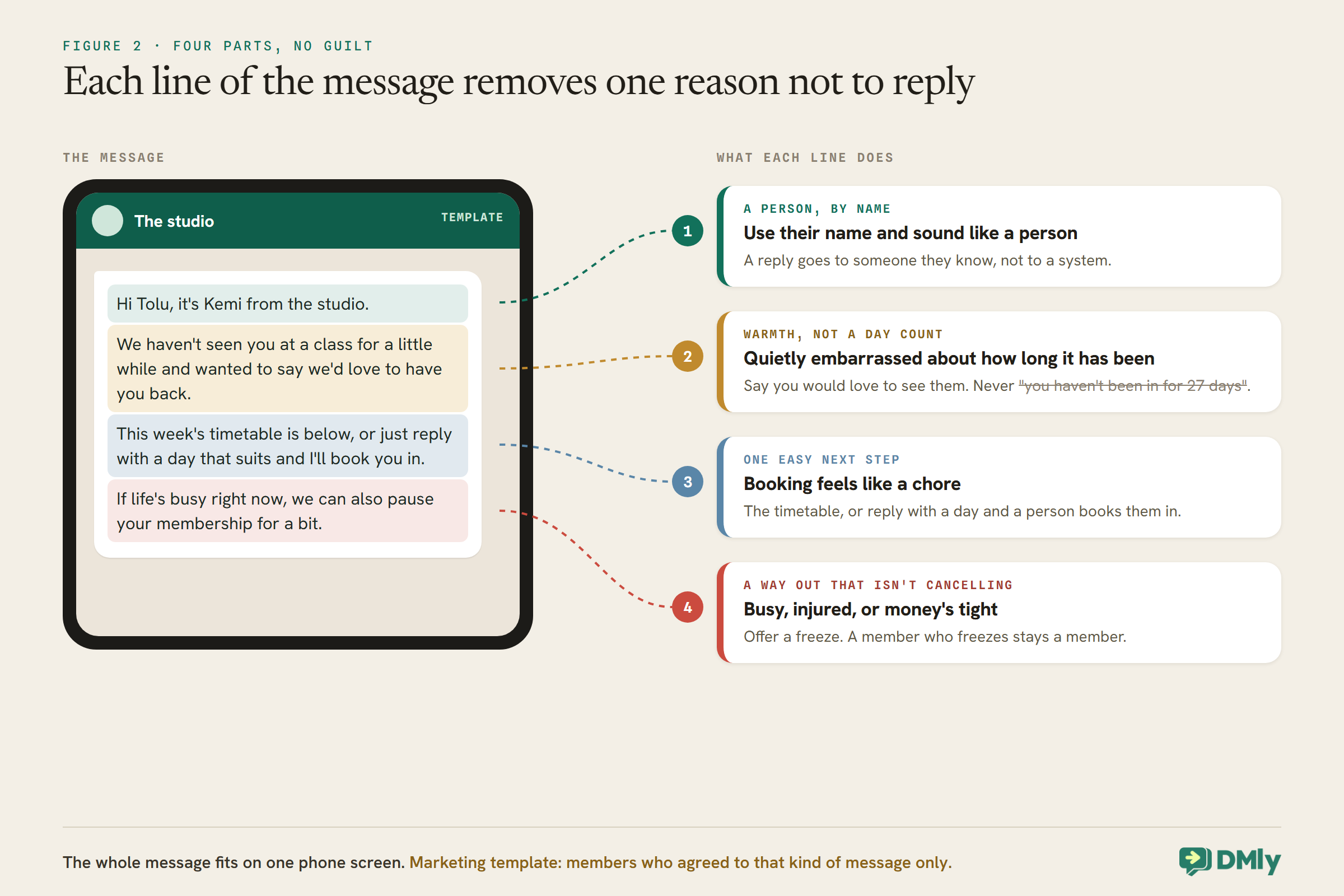
- Use their name and sound like a person. “Hi Tolu, it’s Kemi from the studio.”
- No guilt, no counting. Never “you haven’t been in for 27 days”. Say you would love to see them.
- One easy next step. A button or link to this week’s timetable, or “reply with a day and I’ll book you in”.
- A reason that fits the likely cause. A quieter class time, a beginners’ session to ease back in, or, for credit plans, the classes still left this month.
- A way out that is not cancelling. “If now’s not a good time, we can freeze your membership.” A member who freezes stays a member.
An example to adapt: “Hi {{first name}}, it’s Kemi from the studio. We haven’t seen you at a class for a little while and wanted to say we’d love to have you back. This week’s timetable is below, or just reply with a day that suits and I’ll book you in. If life’s busy right now, we can also pause your membership for a bit.”
Step 6: Send It on a Schedule
A broadcast to the segment, scheduled ahead, is the automatic part of the monthly send.
Create a broadcast with the segment as its audience and your approved marketing template as the message, then choose Schedule for later and a Send at time in the last week of the month. The audience count you see while building it is only an estimate: the real recipient list is expanded when the broadcast sends, so a broadcast scheduled today picks up whoever is inactive on the day it goes. That means you can schedule the next few months’ sends in one sitting and let the segment decide each time who receives them.
Before the first real send, send the broadcast to yourself or a colleague on a test contact, and read it on a phone. Check the timetable link opens the right page.
Broadcasts use your plan’s broadcast and template message allowance, which DMly checks while you compose rather than halfway through a send. If the allowance is gone, the send is refused; the Usage panel on Billing shows what is left and when it renews.
Or make it fully automatic with a Scheduled date flow
DMly has a trigger built for exactly this kind of repeating send. Scheduled date fires when a date and time you set arrives, one-off or recurring, and runs the flow for an audience you choose. DMly’s own guidance is to use a broadcast for a one-off send to a segment and a scheduled flow when the send recurs, or when each contact should go down a different path. Two small recurring flows remove the monthly chores entirely:
- On the 1st of each month, a flow for everyone with
active-this-monthwhose only step is a Tag action removing it. - In the last week of the month, a flow for your inactive segment that sends the win-back template. Start it with the approved template: these members have usually not messaged you in the last 24 hours, and WhatsApp does not allow a free-form message to them.
DMly’s docs describe the audience only as one “you choose”, so check when you build it that the audience picker offers your segment. Test both flows on a small audience first, such as a segment containing only staff contacts, before pointing them at every member. A flow can also do what a broadcast cannot, such as waiting a week and handing non-responders to a person.
Members who stay quiet for a second month
A member who is still inactive next month will be in the segment again and will get the next broadcast. Decide whether that is what you want. Our suggestion: a second, different message the next month, and after that, no third broadcast. Instead, have someone look at who is still in the segment after the second send, and call or message them personally. Two unanswered automated messages is the point where a real conversation does better than a third one.
Former Members: A Sequence That Runs on Its Own
For members who cancel, a short sequence of templates can run completely automatically.
Unlike the monthly list, a cancellation is a single event with a trigger, so it can start an automation directly. Build it like this:
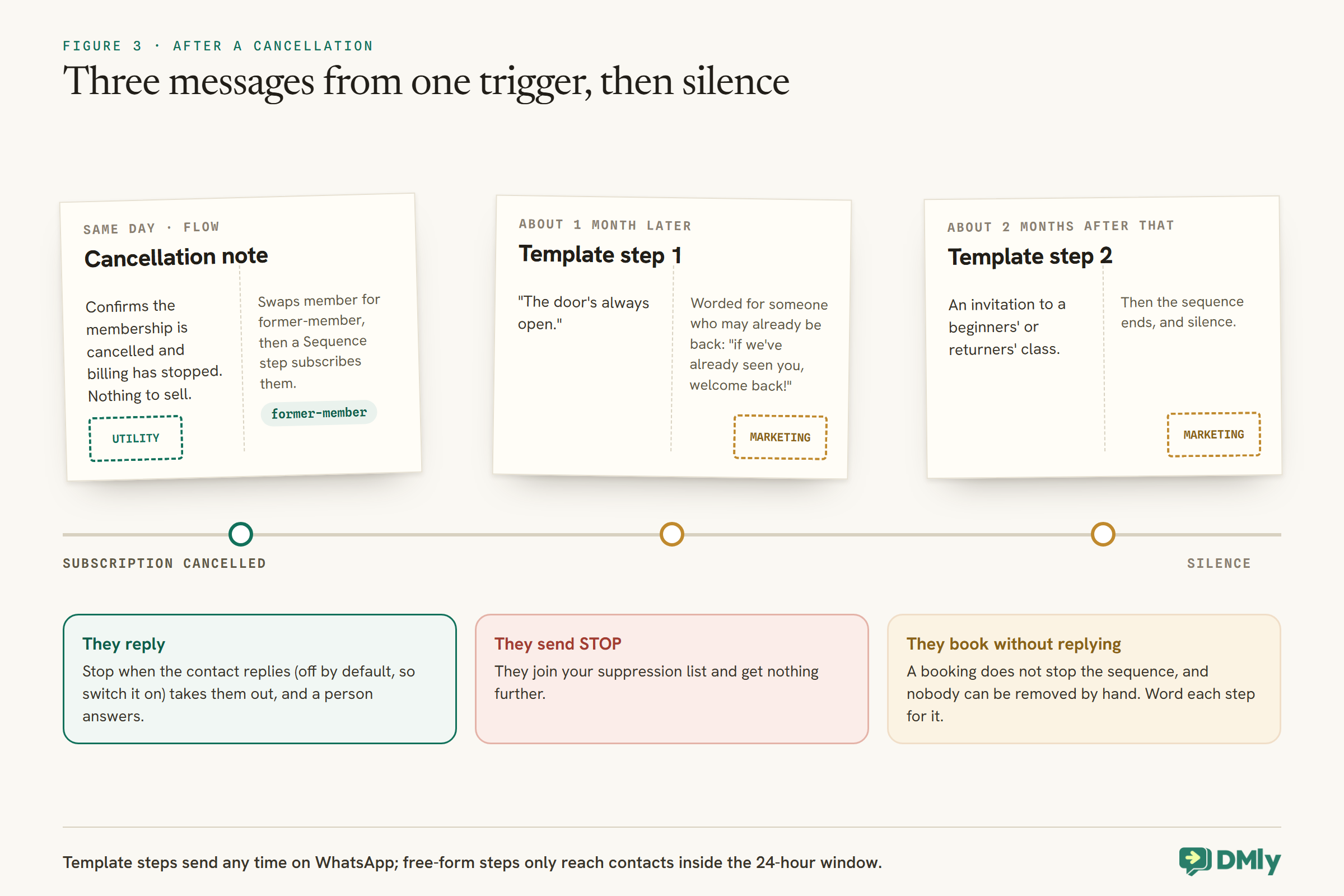
- A flow on Subscription cancelled that confirms the membership is cancelled and billing has stopped, with nothing to sell (a factual account update like this fits Meta’s utility examples; add persuasion and it becomes marketing), updates the tags (Step 2), and then uses a Sequence step to subscribe the contact to a short win-back sequence.
- The sequence holds two or three template steps, spaced weeks apart: for example a “door’s always open” message a month later and an invitation to a beginners’ or returners’ class two months after that. On WhatsApp, template steps send any time; free-form steps only reach contacts who have messaged you in the last 24 hours, so use templates here.
- Turn on Stop when the contact replies on the sequence, so anyone who answers leaves it and gets a person instead. It is off by default.
Two limits to plan around. There is no screen listing who is in a sequence and no way to remove one contact by hand, so plan the way out when you plan the way in. And a normal booking does not take someone out of a sequence: a former member who books a drop-in class next week, without replying, still gets the next step unless something else stops them. Word each step so it still reads well to someone who has already come back (“if we’ve already seen you, welcome back!”). A contact who finishes the sequence and later cancels again starts it from the beginning, which is what you want if they rejoin and leave a second time.
These are marketing messages too, so only former members who agreed to hear from you should receive them. Anyone who replies STOP or another opt-out keyword is added to your suppression list and gets nothing further. Our guide to WhatsApp pricing from October 2026 covers what each message costs.
Step 7: Answer the Replies Like a Person
The message is only there to start a conversation. The replies are where members come back.
Replies land in your Inbox, where a person should answer them the same day. The common ones, and good responses:
- “Yes, Thursday?” Book them in, or send the class link for that day.
- “I’ve been injured.” Say you are sorry to hear it, offer a freeze, and let a coach reply about when and how to return. Do not give advice about the injury in the chat.
- “Money’s tight.” Offer a freeze, or a smaller plan if you have one; a plan change at the next renewal is easy (see our renewals guide for how).
- “I got bored of the same class.” Suggest one they have not tried.
- “Please stop messaging me.” Honour it. DMly’s docs describe opt-out keywords such as STOP and an Unsubscribe Contact step in flows, and note that putting the Unsubscribe tag on someone by hand does not opt them out. So reply kindly, tag them
do-not-winbackso your segment excludes them, and point them to replying STOP if they want no messages at all. WhatsApp’s Business Messaging Policy expects you to respect opt-out requests however they are made.
Step 8: Welcome Them Back, and Count Them
When an inactive member books again, the automation has done its job. Make the return feel noticed.
You do not need a flow to take anyone out of the monthly list: their booking re-adds active-this-month, and the segment drops them on its own. What is worth adding is a small welcome. When someone replies and books, tag them returned by hand from the conversation; that also lets you count them. A coach saying “good to see you back” at the door does more than any message.
To measure the effort, compare three numbers each month: how many members were in the inactive segment when the broadcast went, how many of them booked before the month ended (the segment count shrinking is a quick read), and how many carry returned. The broadcast’s own analytics show delivered, read and replied counts; note that Replied only counts replies that quote the template, so it undercounts real conversations. For attendance itself, the Appointments report at Configurations → Reports → Appointments breaks bookings down by service.
Fewer Members to Win Back Next Time
The cheapest win-back is the one you never need to send.
- The first month matters. Add a Smart Delay of about ten days to your Subscription created flow, then a short “how’s your first week or two going?” check-in. It gives a new member a person to ask before they drift. The same flow can add
new-this-month, which you remove in the same monthly bulk clear. - No-shows are an early signal. Marking a class seat as a no-show on the roster fires Appointment no-show. A kind “missed you today, everything OK?” after a no-show often surfaces the problem a month before the member stops booking altogether. Mark no-shows last on the roster, because Mark all attended overwrites them. A seat nobody marks is closed as completed about a day later on the default setting, so if you rely on this message, mark no-shows every day or switch Appointments nobody marked to Wait for review.
- Unused credits are a nudge, not a loss. Credits that lapse at the end of a period vanish silently; an expiry never starts a flow. The mid-month credit balance segment above is your chance to use them.
- Make booking easy. If booking feels like a chore, it becomes an excuse. A keyword or a door QR code that books tonight’s class removes the excuse; see our guide to online class booking.
What It Costs
Win-back messages are marketing templates, which are the most expensive kind.
Each monthly win-back broadcast and each former-member sequence step is a marketing template outside the 24-hour window, billed by Meta at your market’s marketing rate on the WhatsApp Business Platform, and each also uses your DMly plan’s broadcast and template message allowance. Once a member replies, your team’s answers are free-form service messages inside the window; from 1 October 2026 Meta charges for those beyond the first 1,000 per business phone number each month. For most studios the bill is small next to the value of one member who stays, but send to the segment, not to everyone, and stop after two messages.
Mistakes to Avoid
- Bulk-tagging a list and expecting a flow to fire. Bulk tag changes never start automations. Use a broadcast.
- Using “days since last activity” as “days since last visit”. It measures messages.
- Win-back messages to members whose card failed. They need a fix, not a nudge.
- Messaging members who train without booking. Check the list against what you see on the floor.
- Flows on Appointment booked for classes. Class places fire Class booked.
- Counting days in the message. Warmth, not a register.
- A third automated message. After two, a person should reach out.
- Forgetting the first-of-the-month clear. Without it, everyone stays “active” forever.
Frequently Asked Questions
How do I find inactive gym members in DMly?
Let booking flows add an active-this-month tag on Class booked and Appointment booked, clear it on the first of each month, and build a segment of members without it. For credit plans, a segment on Credit balance shows who has most of the month’s classes unused.
Can the win-back message send fully automatically?
For cancelled members, yes: the Subscription cancelled trigger can start a template sequence. For inactive current members, a recurring Scheduled date flow can send to the inactive segment every month, or you can schedule broadcasts to it, since the segment is re-evaluated when each one sends.
Why doesn’t tagging a list start my flow?
Bulk tag changes from the contacts list run with automation triggers switched off, so they never fire Tag applied. Tagging one contact at a time does.
Is a win-back message marketing or utility?
Marketing. Meta’s categorisation guidelines put relationship, promotional and retargeting messages in the marketing category even when users asked for them, so send them only to members who agreed to that kind of message.
How many win-back messages should I send?
Two at most, a month apart, then a personal call or message from someone at the gym. After that, silence is kinder than a third template.
What if a member asks us to stop?
Reply kindly, tag them do-not-winback so your segment excludes them, and point them to replying STOP if they want no messages at all. Honour the request however it is made.
The Number, Looked At
Go back to the member with seven classes left in the third week. With the build above, their missing booking takes them out of active-this-month, the segment lists them, and a message from a real person arrives before the month and the credits run out: the timetable, a day to reply with, and the option to pause instead of quit. If they reply, someone books them in. If they come in, a coach says it is good to see them.
To win back inactive gym members automatically, let the bookings do the noticing, let a segment do the listing and a scheduled broadcast do the sending, and keep people for the part that actually brings members back: the conversation.
Writing about WhatsApp automation, bookings and growth for local business.
Turn WhatsApp into your busiest channel.
Start free and run message, bookings, payments and reviews in one place.
