
In January 2019, NHS England reported that more than 15 million general practice appointments were being wasted each year “because patients do not turn up and fail to warn surgeries that they will not be attending.” Read that sentence once and it sounds like blame. Read it again and it is a design brief. The problem it describes is not only people not turning up; it is people not warning. The figures behind it make the point: around 5% of roughly 307 million sessions a year were missed “without enough notice to invite other patients.”
That is the lever a clinic can pull. You cannot make every patient attend. You can make it much easier to tell you they cannot, early enough to give the slot to someone else. When clinics set out to reduce appointment no-shows, the most effective design treats a timely cancellation as a good outcome, not a lost one, and makes it the easiest thing for the patient to do.
This guide builds that on WhatsApp in DMly: measuring your real no-show rate, reminders that make cancelling easy, refilling freed slots, what to do after a missed appointment (including when it matters clinically), and where charging for missed appointments fits. It sits alongside our guides to WhatsApp automation for clinics and reducing appointment no-shows. Nothing here is clinical or legal advice.
A Late Cancellation Is Not the Same as a No-Show
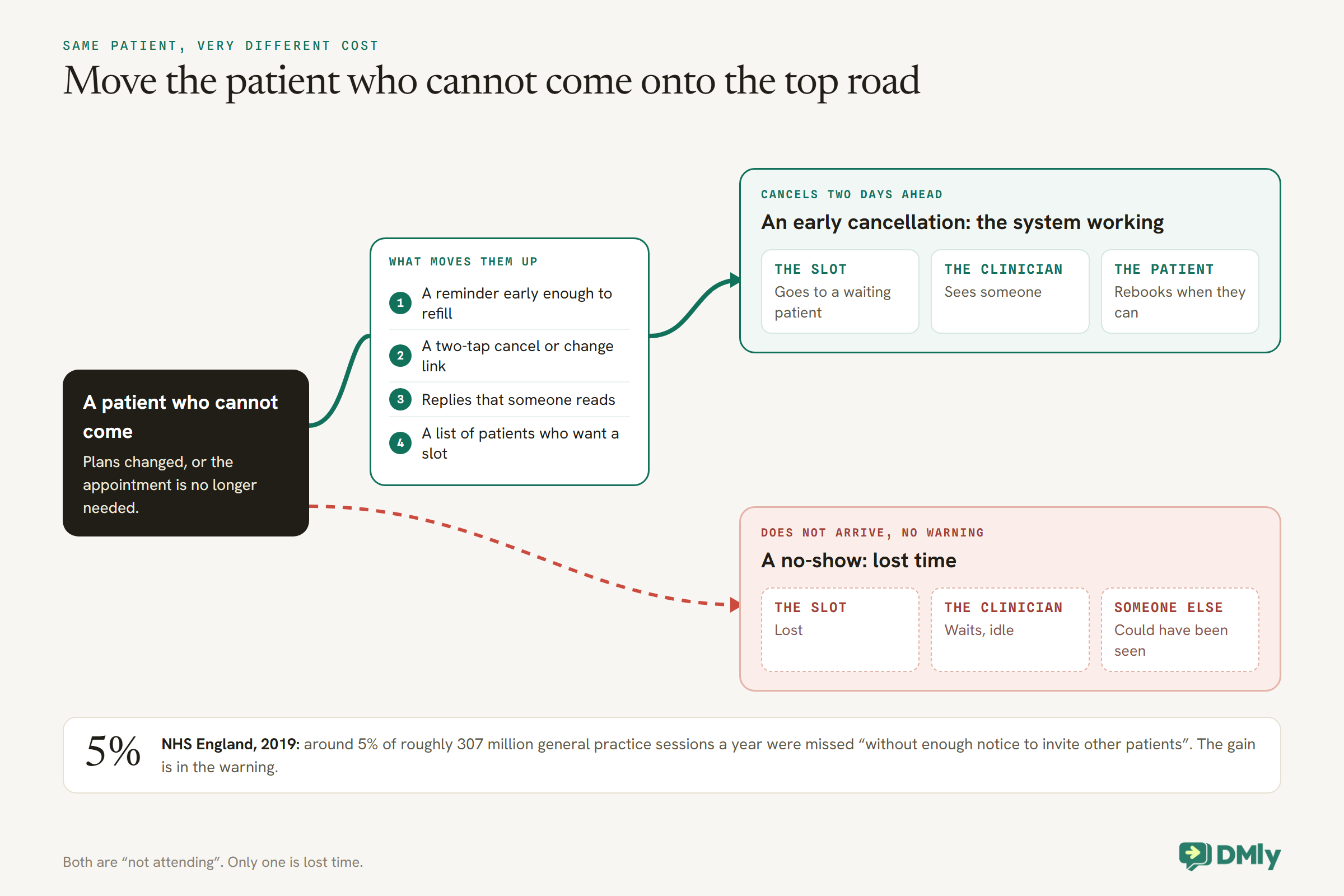
For a clinic, the difference between a cancellation two days ahead and a no-show is whether anyone else can be seen.
A patient who cancels with two days’ notice frees a slot you can offer to someone waiting. A patient who simply does not arrive leaves a clinician idle. Both are “not attending”, but only one is lost time. That is why the NHS England figures specifically count appointments missed without enough notice to invite someone else.
So every part of the system below aims at the same thing: moving would-be no-shows into early cancellations. Reminders that arrive early enough, a cancel link that takes two taps, a reply that someone reads, and a list of patients who would take the slot.
Step 1: Measure Your Real No-Show Rate
Know where no-shows happen before changing anything, and make sure the number is honest.
DMly’s Appointment report, under Configurations, then Reports, then Appointments, shows a No-show rate card and breaks bookings down by service and by practitioner, for any date range, with a CSV of every booking. Look at no-shows by appointment type first: a clinic’s rate is rarely even, and the types with the highest rate and the costliest slots are where effort pays.
One habit makes the number trustworthy. About a day after an appointment, DMly closes any booking still sitting at Confirmed (on the default setting as completed, which fires Appointment completed), and the No-show button disappears from it. On the default setting it is closed as Completed, so a patient who did not attend and was not marked is counted as completed, and thanked for coming. Setting Appointments nobody marked, under Booking policy, to Wait for review holds those bookings as Needs review until someone decides. Mark every appointment Completed or No-show at the end of each session. It is also the habit that lets the follow-up in Step 5 work, because the no-show trigger fires only when someone marks the appointment.
What the missed time costs your clinic
Put a number on it for your own clinic, because it decides how much effort each part of this system deserves. An illustration: a practitioner working 20-minute appointments sees 21 patients over a seven-hour day. If one in twenty does not attend without notice, the rate in NHS England’s figures, that is about one empty slot per practitioner per day. Across four practitioners and a five-day week, that is around 20 slots, nearly seven hours of clinical time, every week. Multiply by what an appointment is worth to your clinic, or by the length of your waiting list, and the case for designing reminders carefully makes itself.
Long lead times need a check-in
Appointments booked months ahead, such as a routine review or a specialist follow-up, are the easiest to forget and the likeliest to be no longer needed. A reminder two days before is too late for the patient who now has a different commitment or has already been seen elsewhere. For those appointment types, add an earlier check-in, two or three weeks ahead, that asks a simple question: “Do you still need this appointment on [date]? If not, please let us know so we can offer it to someone else.” In DMly, the service’s reminder times can include an early one, and the reply goes to your team as usual.
Step 2: Reduce Appointment No-Shows With Reminders That Make Cancelling Easy
A reminder’s most important job in a clinic is to surface cancellations early. Design it for that.
In DMly, reminder times are set on each service, and every booking of that service inherits them. For each appointment type, set the first reminder at the point where a cancellation can still be filled, which for a long specialist appointment may be several days ahead, and the second close to the day. Our guide to automatic WhatsApp appointment reminders covers timing in detail.
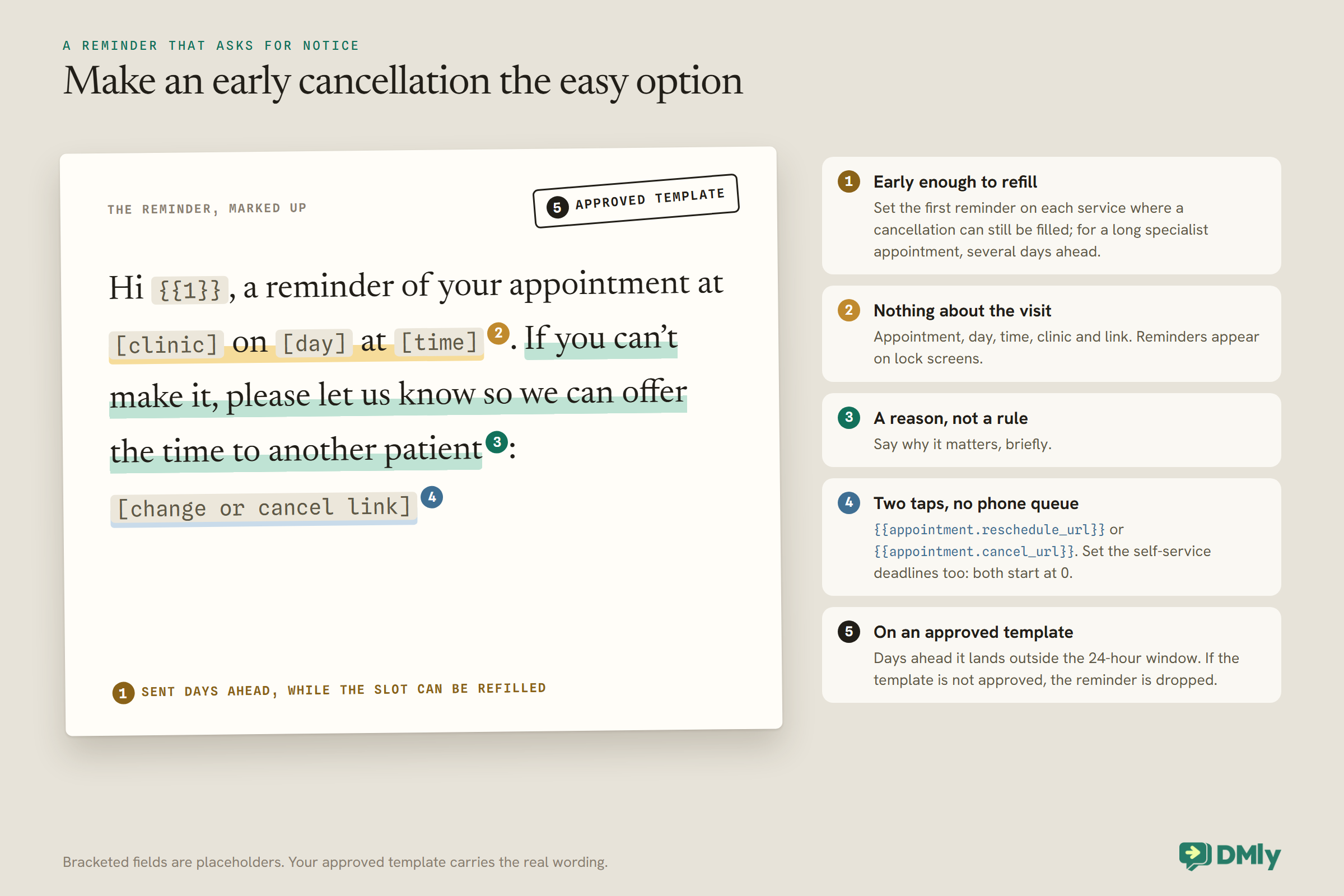
Then make the reminder an invitation to tell you:
- Put the reschedule link in every reminder.
{{appointment.reschedule_url}}opens the patient’s own booking page on rescheduling, and{{appointment.cancel_url}}on cancelling. Two taps, no phone queue. - Say why it matters, briefly. “If you can’t make it, please let us know so we can offer the time to another patient.” A reason is more persuasive than a rule.
- Set the self-service deadlines. Under Appointments, then Settings, in Booking policy, the cancellation and reschedule deadlines decide how close to the appointment patients can change it themselves. Both start at 0. Setting them to your policy keeps late changes coming to a person.
- Keep it clinically neutral. Appointment, day, time, clinic and link. Nothing about the reason for the visit, because reminders appear on lock screens.
Two technical checks make sure reminders arrive at all. A reminder a few days ahead lands outside WhatsApp’s 24-hour window, so it travels on DMly’s approved reminder template; if that template is not approved, the reminder is dropped. And a reminder is skipped, not retried, if the patient has opted out or the bot is paused for them, which happens whenever someone on your team takes over a conversation and forgets to switch it back on.
For your most valuable slots, ask for a reply
For appointments where an empty slot is costly, such as a long specialist session or a procedure with preparation, it can be worth asking patients to reply to confirm, and calling those who do not. Only do this where someone will actually act on the replies and the silences: a request to confirm that nobody checks teaches patients that replying does nothing. In DMly, a booked appointment is already confirmed (on a pay-before service, once the payment or deposit clears), so a reply of “yes” changes nothing in the diary by itself; its value is the phone call you make when it does not arrive.
Check that reminders actually went out
A reminder that silently failed looks exactly like one the patient ignored. DMly’s Logs page records failed sends: a booking confirmation, notification or automated message that could not be delivered appears under Messages with an error and the reason from WhatsApp or Meta. Filter for errors once a week, and after any change to your templates. If reminders are failing, the usual causes are an unapproved template, a patient with no WhatsApp identity, or a patient who has opted out.
Video appointments: the missing link problem
For video consultations, a “no-show” is sometimes a patient who could not find the link. If a service’s location is set to Zoom, DMly creates a meeting and join link for each booking, and the link goes into the confirmation and reminder through the {{meeting.link}} variable, which the default confirmation already includes. DMly also switches automatically to a version of its reminder template that carries the join link for bookings with a meeting link, so the reminder arrives with the link in it even outside the 24-hour window. Check that the link appears in both, send a test to yourself, and put the video platform’s own help page in your confirmation for patients who have not used it before.
Children’s appointments reach a parent
DMly sends reminders on the channel of the contact the booking is for, and a record with no phone number cannot receive a WhatsApp reminder. For children, make sure the booking sits on a record that has the parent’s or guardian’s number, or link the child’s record to the parent’s with Linked contacts and book accordingly. A child’s reminder that goes nowhere is a missed appointment that no reminder system could have prevented.
Clinics with more than one site or number
DMly sends WhatsApp notifications from a Default WhatsApp number, set in Notification settings, unless the patient already talks to you on another of your numbers. Templates are approved per WhatsApp Business Account, so if a site has its own number on its own account, check the reminder template is approved there too, or reminders from that number stop once the window closes. And say which site the appointment is at in every confirmation and reminder, so a patient does not turn up at the wrong door, which counts as a no-show just the same.
Step 3: Make Sure Someone Reads the Replies
A patient who replies “I can’t make Thursday” has done exactly what you asked. Do not leave it unread.
A reply opens a 24-hour window, so your team can answer normally, rebook the patient and free the slot. DMly’s reminders never notify your team, so a reply is often the first anyone knows the reminder went out. Decide who watches the inbox at the times reminders land, and make “freeing the slot” part of answering, not a separate job for later.
Keep reply handling administrative. If a patient replies with anything clinical, such as a worsening symptom, it goes to a clinician, not a script. WhatsApp’s Business Messaging Policy warns against using WhatsApp for health information where your regulations prohibit it on systems without heightened protections, and requires a clear route to a person whenever automation is involved.
Step 4: Refill Freed Slots
An early cancellation only helps if the slot goes to someone.
Keep a short list of patients who would take an earlier appointment: a tag such as wants-earlier, added by your team when a patient asks, and a segment built on it. When a slot frees, message a few of them. Patients who have messaged you in the last 24 hours can be sent a normal message from the inbox; anyone quieter needs an approved template. First to accept gets it, and the tag comes off once they have their earlier appointment.
For clinics that triage their waiting list, the choice of who is offered a freed slot is a clinical one, not a first-come race. In that case, the list is for your team’s use, and the message goes out only once someone has decided who should have the slot.
Step 5: After a Missed Appointment, Involve a Person
For a salon, a missed appointment is a lost sale. For a clinic, some missed appointments matter for the patient’s care.
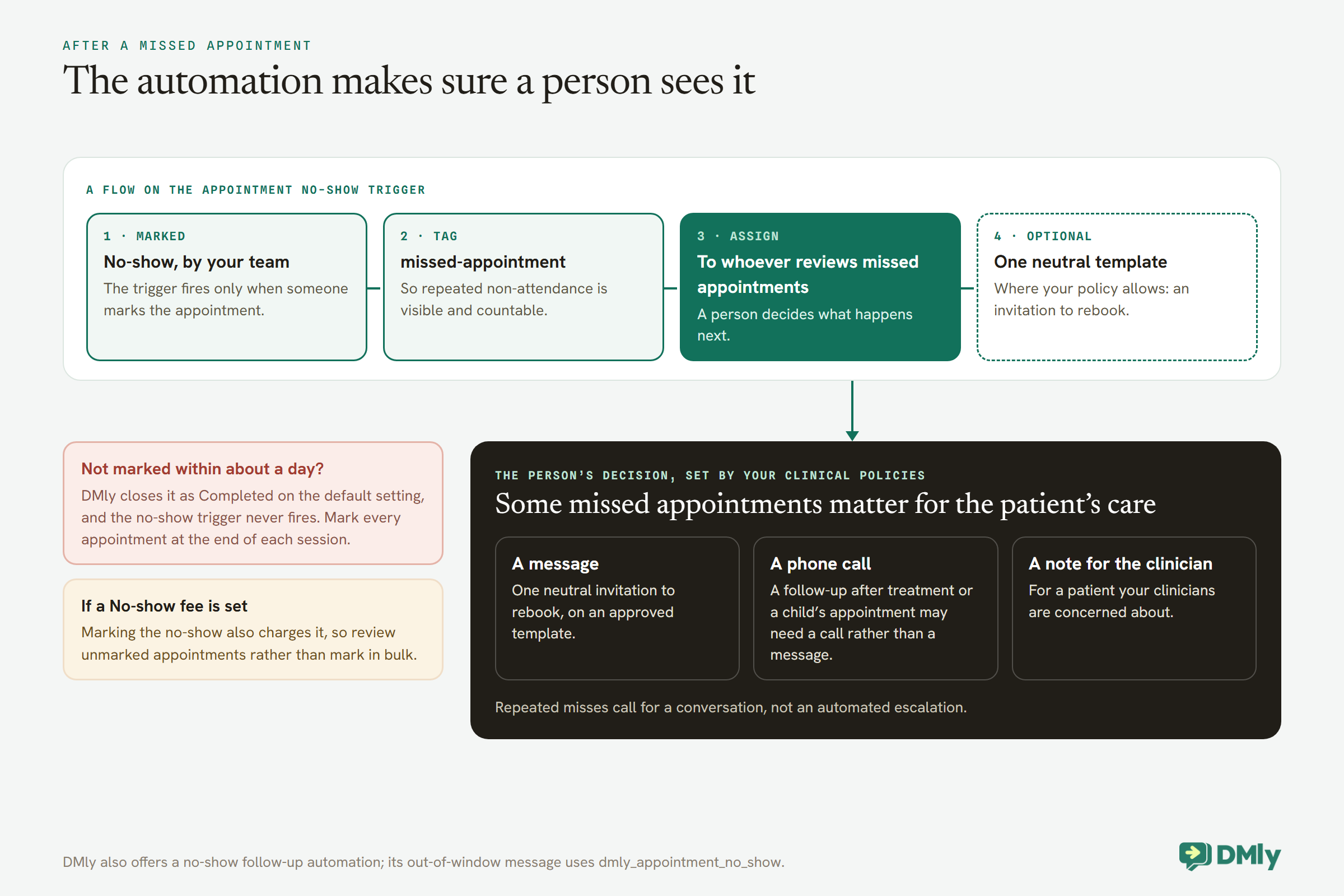
DMly’s Appointment no-show trigger fires when an appointment is marked as a no-show, and a flow can start from it. For a clinic, design that flow around a person rather than a script:
- Tag the patient, for example
missed-appointment, so repeated non-attendance is visible and countable. - Assign the conversation to whoever reviews missed appointments, so a person decides what happens next. Some missed appointments, such as a follow-up after treatment, a child’s appointment or a patient your clinicians are concerned about, may need a call rather than a message. Your clinical policies decide that, not the automation.
- Optionally send one neutral message, where your policy allows: “We missed you today. If you’d like to rebook, reply here or use this link.” By then the patient’s window is usually closed, so it needs an approved template. DMly also offers a no-show follow-up automation, whose out-of-window message uses the utility template
dmly_appointment_no_show, if you install it.
Marking a no-show records what happened and, if the service carries a no-show fee, charges it; nothing else changes. The follow-up is what you build around it.
Patients who miss repeatedly
Most practices have a small number of patients who miss appointment after appointment. In a clinic, the response should be a conversation, not an automated escalation. Repeated non-attendance can be a sign that something is wrong in the patient’s life, and some patients who miss appointments are the ones most in need of care. The missed-appointment tag makes the pattern visible; a segment on it gives your team a list to review. What happens next, a phone call, a different appointment time, a note for the clinician, or your practice’s formal policy, is a decision for people who know the patient, and it should be written down in your clinic’s own policy before anyone applies it.
Step 6: Charging for Missed Appointments, If You Do
Some private clinics charge for missed appointments or take payment at booking. Know what the system does and does not do.
In DMly, marking a no-show charges nobody unless you have set a no-show fee. Three mechanisms put money at stake, and a clinic should choose deliberately:
- Payment at booking. A service set to Pay before booking holds the slot while the patient pays (15 minutes when they book online, two hours when your team books from the calendar) and confirms only when the payment clears. It can charge the full price or a Deposit, a percentage from 1 to 99, with the balance collected by the clinic. A connected payment gateway is required.
- A no-show fee. A No-show fee on the service, or a workspace default, is charged when the appointment is marked as a no-show: to a saved card if the patient pays a subscription automatically, otherwise by a payment link that nothing obliges them to pay. It needs a connected gateway and is charged once per booking. Because it fires on marking, a clinic using it should set Appointments nobody marked to Wait for review and review each unmarked appointment rather than mark in bulk.
Whether charging is appropriate is a question for your clinic, your professional body and your local rules, and many clinics, especially those providing publicly funded care, will not charge at all. If you do, put the policy in your terms, which the booking page’s Terms URL field links at the confirm step, and in your confirmation messages, before any patient is affected. Note too that a single appointment your team adds from the calendar on a pay-before service messages the patient a payment link unless someone ticks Payment taken in person, while a repeating series booked from the calendar takes no payment, which matters for a course of treatment. Our guide to taking deposits or full payment at booking covers the payment side in detail.
Step 7: Reach the Patients WhatsApp Does Not
A reminder that never arrives cannot prevent a no-show.
DMly sends reminders on the channel the booking is attached to, and a patient without a WhatsApp identity does not receive a WhatsApp reminder. Check how many of your patients that is. DMly can send SMS through a connected SMS provider, and for patients who prefer the phone, a daily list of tomorrow’s patients who are not on WhatsApp, rung by reception, still works. Children’s appointments need the booking, or the reminder, to sit on a record with the parent’s number. Ask patients at registration whether they want WhatsApp reminders, and record their answer, because WhatsApp’s policy requires their permission and DMly records opt-outs but not opt-ins.
A Daily No-Show Routine for the Front Desk
Most of this system is automatic. The part that is not takes about ten minutes a day.
- Morning: glance at the day’s list. Any patient who replied overnight to say they cannot come should already be cancelled; check the slot has been offered to someone on the waiting list.
- Through the day: answer replies to reminders as they arrive, and switch the bot back on after every conversation your team takes over, because a paused bot means that patient’s future reminders are skipped.
- End of each session: mark every appointment Completed or No-show. This keeps the report honest and starts the missed-appointment follow-up.
- Weekly: check Logs for failed sends, and look at the week’s no-shows by appointment type.
Write the routine down and give it an owner. A no-show system that depends on someone remembering is the same as not having one.
Learn Why Your Patients Miss Appointments
Your own patients’ reasons are better evidence than anyone’s general figures. Record them.
When a patient who missed an appointment gets back in touch, ask, kindly and without pressure, what got in the way, and note the answer on their record. After a few months, patterns appear: appointments booked too far ahead, a time of day that does not suit working patients, a phone line that is hard to get through to when someone wants to cancel. Each pattern points to a change: an earlier check-in, different session times, or the WhatsApp change link doing the job the phone line could not.
Keep what you record administrative. “Could not get time off work” belongs on the record; anything clinical belongs in your clinical system.
Step 8: Review Every Month
Compare the same appointment types, month on month, with every appointment marked.
Each month, open the Appointment report, filter by the appointment types you are working on, and compare the no-show rate with the month before any change. Look at three things: whether the no-show rate is falling, whether early cancellations are rising (that is the system working), and whether freed slots were refilled. Keep expired and payment-failed bookings separate from no-shows; they are checkout problems, not patients who did not come.
Change one thing at a time. If you move the first reminder earlier, leave the wording alone that month, so you can tell what made the difference.
Mistakes to Avoid
- Treating cancellations as failures. An early cancellation is the system working.
- Reminders without a change link. Make telling you the easy option.
- Not marking no-shows within a day. They are counted as completed, and the no-show trigger never fires.
- Replies nobody reads. A reply is notice; use it.
- Automated follow-up with no person involved. Some missed appointments matter clinically.
- Reminders that name the reason for the visit. Keep them neutral.
- Assuming everyone is on WhatsApp. Check, and cover the rest.
Frequently Asked Questions
Do WhatsApp reminders reduce clinic no-shows?
They help most when they make it easy to cancel or reschedule in time, so a missed appointment becomes an early cancellation that can be refilled. Measure your own no-show rate before and after, by appointment type.
How far ahead should a clinic send reminders?
Far enough that a cancellation can still be filled: often a few days ahead for long or specialist appointments, and a shorter second reminder close to the day. Set them per appointment type.
Should we message patients who miss an appointment?
Route it to a person first. Some missed appointments need a call or a clinician’s review. Where your policy allows, one neutral message inviting the patient to rebook is reasonable.
Can DMly charge a no-show fee automatically?
It can, if you set a No-show fee: it is charged when the appointment is marked as a no-show, by saved card or payment link. Whether to charge is a question for your clinic, your professional body and your local rules, and any policy should be set out in advance.
What about patients who book far in advance?
Add an early check-in for those appointment types, two or three weeks ahead, asking whether the patient still needs the appointment. It catches the plans that changed before a two-day reminder would.
How do I know reminders were actually sent?
Check DMly’s Logs for failed sends, which record the reason from WhatsApp or Meta. An unapproved template, a patient without WhatsApp, or an opted-out patient are the usual causes.
Should we send reminders by SMS as well?
For patients who are not on WhatsApp, yes, if you have an SMS provider connected, or a phone call. For patients on WhatsApp, one channel is enough; two reminders for the same appointment on two channels can feel like pressure.
How do I see our no-show rate?
In DMly’s Appointment report, under Configurations, Reports, Appointments, with every appointment marked Completed or No-show within about a day.
What should a clinic reminder say?
The clinic, the day, the time, a request to let you know if the patient cannot come, and a link to change it. Nothing about the reason for the visit.
The Sentence, Read Twice
NHS England’s line about patients who “do not turn up and fail to warn” reads like a complaint. Read as a design brief, it tells you where the gain is: in the warning. A clinic cannot make every patient attend, but it can make telling the clinic easy, early and obvious, and it can make sure someone acts on every warning and every missed appointment.
That is how clinics reduce appointment no-shows with WhatsApp: early reminders with a two-tap change link, replies someone reads, freed slots offered to patients who want them, and every missed appointment seen by a person. Start by marking every appointment for a month, so you know your real number.
Writing about WhatsApp automation, bookings and growth for local business.
Turn WhatsApp into your busiest channel.
Start free and run message, bookings, payments and reviews in one place.
