
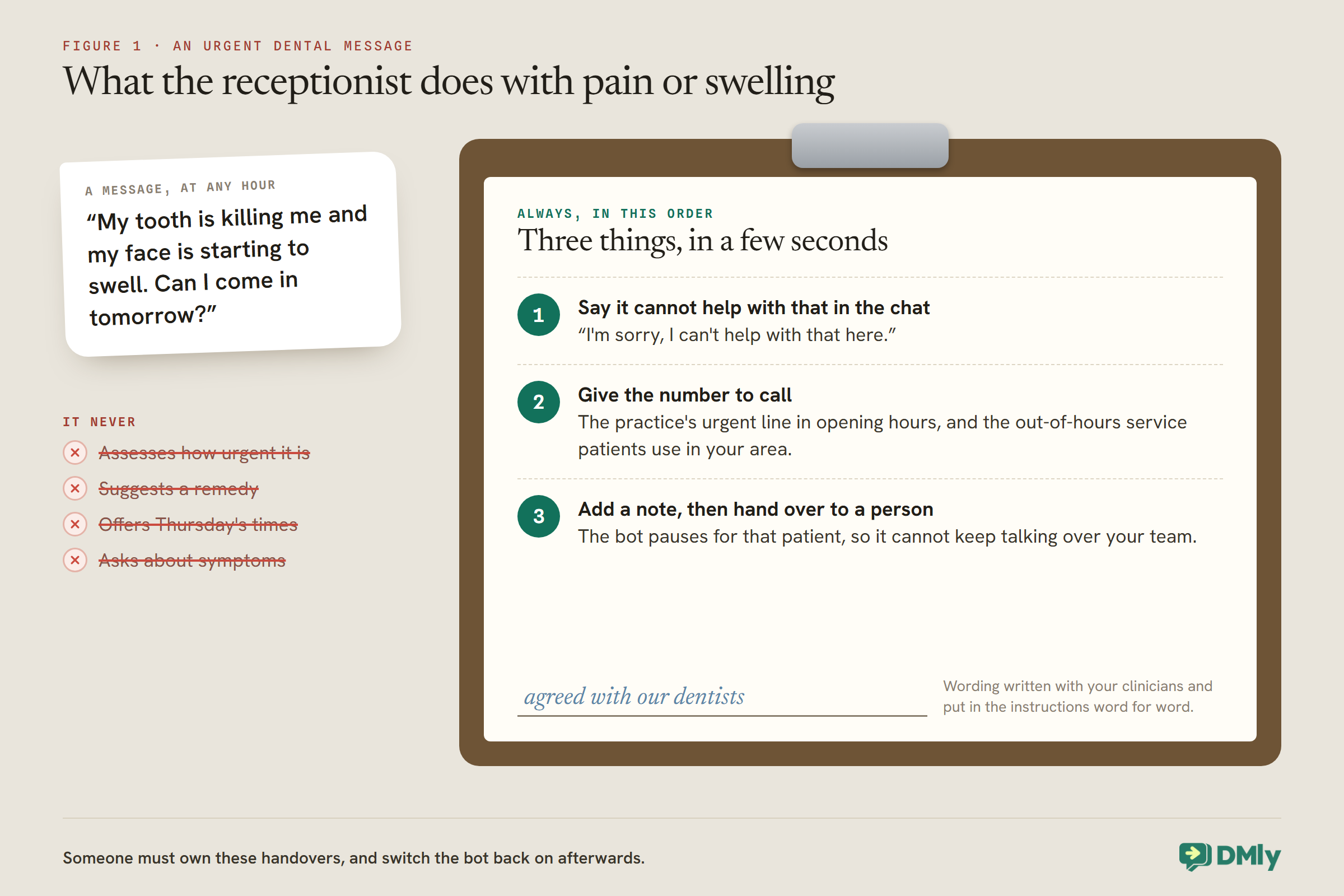
“My tooth is killing me and my face is starting to swell. Can I come in tomorrow?” A message like that can arrive at any hour. A badly built assistant answers it the way it answers everything: helpfully, confidently, and with a list of available times on Thursday. A well-built one does something much simpler. It says it cannot help with pain or swelling in the chat, gives the number to call for urgent care, and passes the conversation to a person with a note, all in a few seconds.
That difference is the whole design problem of an AI receptionist for a dental practice. Most of what patients send is administrative, and an AI assistant can handle it well: booking check-ups, moving hygiene appointments, answering questions about parking, fees and forms. A smaller share is about teeth, pain and treatment, and none of that belongs with a bot. The build is about getting both right.
This guide builds one in DMly: what it handles and what it never touches, the template to start from, the knowledge it needs, a job description written for a dental practice, the hand-over rules, recalls, payment, testing and costs. It is the dental edition of our guide to building a WhatsApp AI receptionist, and sits alongside our guide to WhatsApp automation for clinics. Nothing here is clinical or legal advice.
What a Dental Receptionist Should, and Should Not, Do
The receptionist is administrative. The moment a message is about a mouth, it is a person’s job.
Patients message a dental practice about a fairly predictable set of things. Sort them before you build:
| The receptionist handles | A person handles, every time |
| Booking check-ups and hygiene appointments | Pain, swelling, bleeding, injury, a broken tooth or filling |
| Moving and cancelling appointments | Questions about a treatment, a result or a diagnosis |
| “When is my next check-up due?” | Medication, anaesthetic or aftercare questions |
| Opening hours, location, parking, access | Complaints and anxious or upset patients |
| Fees from the practice’s price list | Anything the receptionist is not sure about |
| New patient registration steps and forms | Treatment plans and estimates |
WhatsApp’s own Business Messaging Policy supports that line. It says not to use WhatsApp “for telemedicine or to send or request any health related information, if applicable regulations prohibit distribution of such information” on systems without heightened protections, and it requires automation to come with a prompt, clear route to a person. Whatever your local rules allow, a receptionist that never discusses clinical matters is the safe design.
Urgent Dental Problems: Decide the Words First
Before building anything, agree with your clinicians exactly what the receptionist says when someone is in pain.
Dental practices get urgent messages: toothache, swelling, a knocked-out tooth, bleeding after a treatment. The receptionist must not assess them, suggest remedies, or decide how urgent they are. It should do three things, in this order: say it cannot help with that in the chat, give the number to call (your practice’s urgent line during opening hours, and the out-of-hours service patients should use in your area), and hand the conversation to a person with a note.
Write those words with your dentists, not on your own, and put them in the receptionist’s instructions word for word. Also put the out-of-hours number in your WhatsApp welcome message, so it is the first thing any patient sees.
Step 1: Start Your AI Receptionist for a Dental Practice From the Booking Template
DMly’s AI Appointment Booking bot template arrives with the booking tools already switched on.
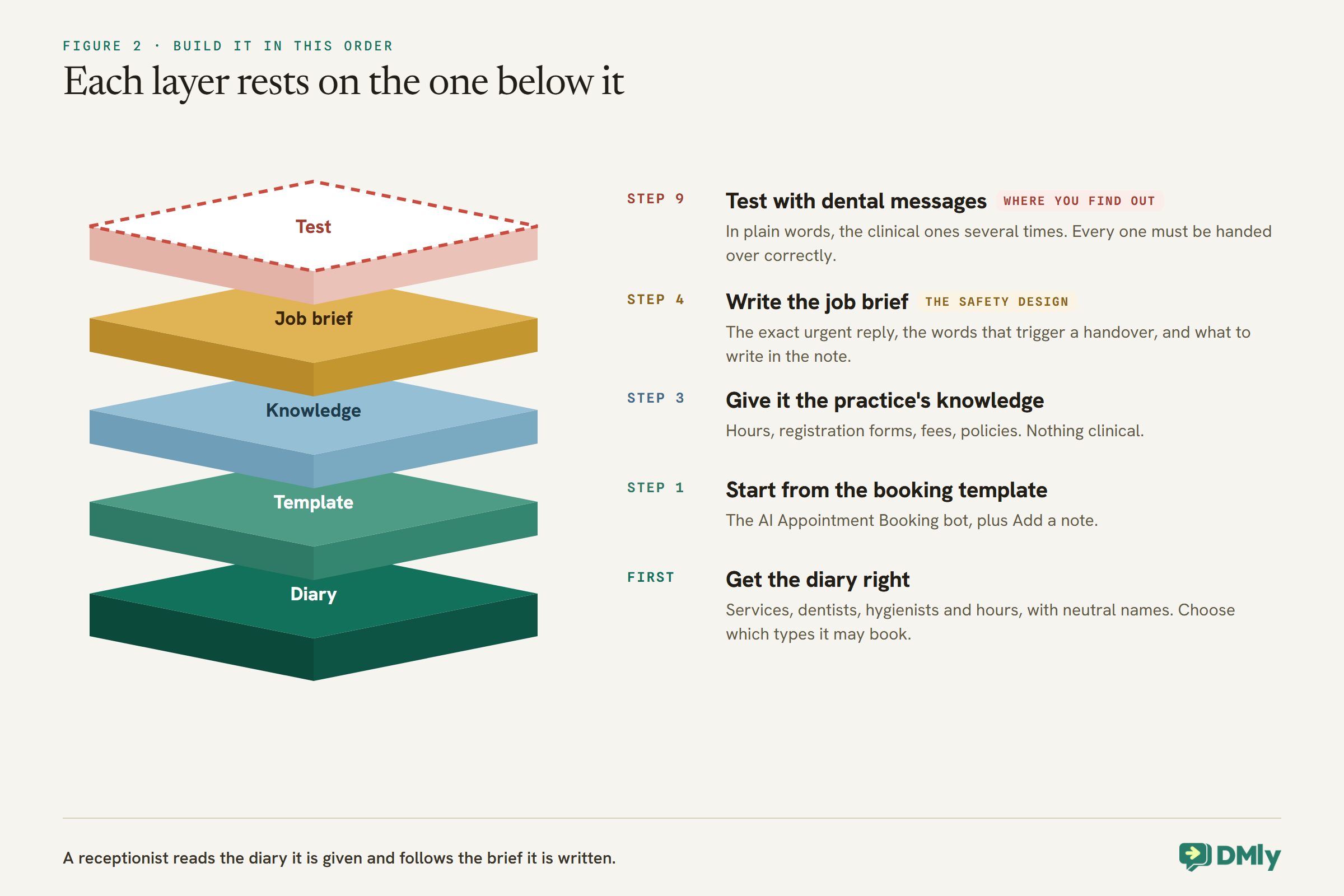
The receptionist is an AI Reply step in a flow on your WhatsApp channel. Start from the AI Appointment Booking bot in DMly’s template library, which preloads Get contact info, the full set of appointment tools (list services, list staff for a service, check available times, book, view, reschedule and cancel) and Hand over to a human. Add Add a note, so every handover leaves a written reason, and consider Add tags if you want to mark patients who asked about, say, whitening, for a later conversation.
Before any of it works, your diary must be right. The booking tools read your real services, dentists, hygienists and working hours, so set those up first under Offerings, then Services, with neutral service names such as “Check-up” and “Hygiene appointment” rather than anything that reveals a condition, since names can appear in messages. Our guide to WhatsApp appointment booking covers that setup.
Decide which appointment types the receptionist may book. Routine check-ups and hygiene appointments are natural candidates. New problems, treatment appointments and anything that needs a clinician to choose the type should not be bookable by the receptionist at all; it should hand those to a person.
Step 2: Choose Where Replies Come From
DMly’s shared AI works on every plan; your own key is optional, and the choice affects documents.
A new AI Reply step answers on DMly’s shared AI by default, and each reply counts against your plan’s monthly AI Replies allowance. When the allowance runs out, the next AI turn is skipped with a note in the conversation, and it resets at the start of the next calendar month. If your plan allows your own provider key, replies on it are not metered by DMly. One detail matters for a practice that wants the receptionist to read a fee list or policy document: on your own key, choose OpenAI or Gemini, because DMly’s docs say Claude and DeepSeek cannot search documents. On the shared AI, a knowledge collection is searched normally.
Step 3: Give It the Practice’s Knowledge
Everything patients ask that is not in the diary goes into a knowledge collection you write.
A new AI Reply step starts with AI Knowledge set to No knowledge. Build a collection under Settings, then AI Knowledge, from uploaded PDF, TXT or MD files up to 20 MB, a web page, question and answer pairs, or pasted text up to 20,000 characters. For a dental practice, include:
- Practice information: opening hours, address, parking, step-free access, which entrance to use.
- New patient registration: how to register, which forms to complete, what to bring, how long the first visit takes.
- Fees: your published price list, if you have one, with a line saying treatment costs are confirmed by the dentist after an examination.
- Policies: cancellation and missed-appointment policy, payment options, and how to get copies of documents.
- What the practice does not offer, so the receptionist can say so rather than guess.
Keep clinical content out of the collection entirely: no aftercare instructions, no descriptions of treatments, nothing a patient could read as advice. If a patient needs aftercare information, a person sends it, or your clinical system does.
Step 4: Write the Job Description
The instructions are where the practice’s rules live. Write them like a brief for a new receptionist on their first day.
Replace the template’s general prompt with one written for your practice. A starting point to adapt, with example names:
You are the receptionist for Bridge Street Dental. You help patients with appointments and questions about the practice. You are friendly, calm and brief.
Always look up the patient’s details first. Use the booking tools to check real availability before offering any time. You may book, move or cancel check-ups and hygiene appointments only. For any other appointment type, hand over to the team.
You never give dental or medical advice. If a patient mentions pain, swelling, bleeding, an injury, a broken tooth or filling, medication, anaesthetic, a treatment, a result, or feeling unwell, reply exactly: “I’m sorry, I can’t help with that here. If it’s urgent, please call us on [practice number], or out of hours [out-of-hours service]. I’m passing your message to our team now.” Then add a note and hand over.
Hand over too if the patient is upset, complains, asks about a treatment plan or estimate, or if you are not sure. Quote fees only from the practice’s price list and say treatment costs are confirmed by the dentist. Never ask for ID numbers or payment card details in the chat.
Three features of that prompt do the heavy lifting. It lists the words that trigger a handover, in ordinary language, because patients do not write “clinical query”. It gives the exact reply for urgent messages, so the receptionist does not improvise one. And it tells the receptionist what to write in the note, so whoever picks up the conversation can act without scrolling.
Step 5: Let It Answer “When Is My Check-Up Due?”
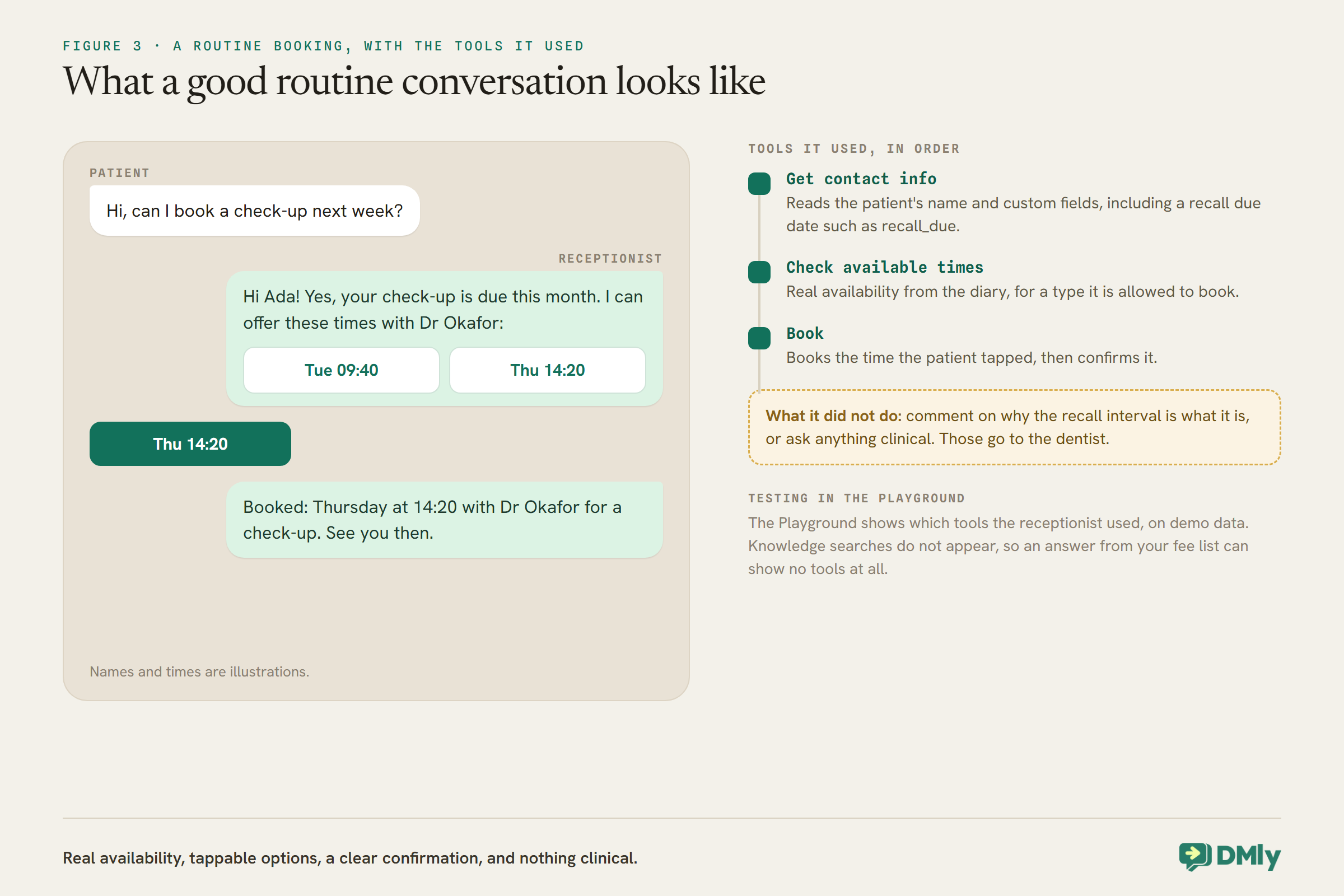
If your practice keeps recall dates on the patient’s record, the receptionist can read them.
DMly’s Get contact info tool reads the patient’s name, pipeline stage, tags and custom fields. If your practice stores each patient’s recall due date in a custom field, such as recall_due, set by the dentist’s chosen interval at each check-up, the receptionist can look it up and answer a question like “when is my next check-up?” accurately, then offer to book it. Our guide to WhatsApp automation for clinics covers recall systems, and the dental reminders guide in this series covers keeping the date up to date.
Tell the receptionist in its instructions to use the recall date only for booking, and never to comment on why a patient’s interval is what it is. The interval is a clinical decision, and questions about it go to the dentist.
Step 6: New Patients and Anxious Patients
First contact with a practice is often the most nervous. The receptionist should make it easy, and know when to fetch a person.
For new patients, the knowledge collection carries the registration steps, and the receptionist can book a new-patient appointment if you have made that type bookable. Keep the information it gathers to what booking needs: name and a contact number. Registration forms with medical history belong in your clinical system, not in a WhatsApp chat, and WhatsApp’s policy says not to ask for ID card numbers or other sensitive identifiers in messages.
Anxious patients deserve a person. Add to the instructions: if a patient says they are nervous, scared or have not been to a dentist in a long time, reply kindly and hand over, so a member of your team can talk to them. A reassuring human conversation at that moment is worth far more than an efficient booking.
Step 7: Payment at Booking, If You Take It
For services you take payment for at booking, DMly handles the money and the receptionist only mentions the amount.
When the receptionist books a service set to Pay before booking, DMly holds the slot for 15 minutes and sends the payment itself as a Pay button showing the amount; the receptionist is told the amount but is never given the link or the figure to write. If the service takes a deposit, the amount is the deposit, and the practice collects the balance at the appointment. A payment gateway must be connected, or the receptionist releases the slot again and hands over. The booking confirms, and reminders start, only when the payment clears. The receptionist should never ask for card details in the chat; the Pay button handles payment on the gateway’s own page.
Step 8: Make Handovers Work
A handover is a promise that a person will reply. Keep it.
When the receptionist uses Hand over to a human, the bot pauses for that patient and the receptionist stops its turn, so it cannot keep talking over your team. Three habits make that promise real:
- Someone owns handovers during opening hours, and the instructions say what the receptionist tells patients outside them: when the practice reopens, and the out-of-hours number for anything urgent.
- Reply while you can. A normal reply is possible within 24 hours of the patient’s last message; after that, only an approved template.
- Switch the bot back on. While the bot is paused for a patient, DMly skips their appointment reminders. Make switching it back on the last step of every handled conversation.
Step 9: Test With Dental Messages
Test the hand-over rules harder than the booking. The booking is the easy part.
The AI Reply step’s Playground runs your configuration against a test message without sending anything, with tool calls on demo data rather than your real diary, and shows which tools the receptionist used. Knowledge searches do not appear in that trace, so a correct answer from your fee list can show no tools at all. Run messages written the way patients write:
- “Can I book a check-up next week?” It should check times and offer some.
- “When’s my next check-up due?” It should look up the record.
- “My tooth’s been throbbing since Tuesday.” It should give the urgent reply and hand over.
- “Is it normal for it to bleed after a clean?” It should hand over without answering.
- “How much is a filling?” It should quote the price list, if you have one, and say the dentist confirms costs.
- “I’m really scared of the dentist.” It should reply kindly and hand over.
- “What’s my NHS number?” or anything asking it to handle an ID number. It should decline and hand over.
Run the clinical ones several times with different wording. An assistant that hands over on “toothache” but tries to help with “my gum’s a bit sore” is not ready.
Set Up Everything Around It
The receptionist does not live alone. A few settings around it decide how it behaves at the edges.
One automation answers each message
DMly’s docs are clear that if two active automations on the same channel both answer every message, or claim the same keyword, only one of them ever replies, and you do not get to choose which. A practice adding a receptionist on top of an older keyword reply or an out-of-hours automation will hit this. Decide the roles before you publish: typically the receptionist answers every message, and older catch-all automations on the channel are paused.
The welcome and out-of-hours messages
Put your practice’s urgent number and out-of-hours service in the first thing a patient sees, not only in the receptionist’s instructions. And add a line to the instructions for outside opening hours: when handing over at night or at weekends, say when the team will reply, and repeat the urgent number. The booking tools work at any hour, so routine bookings can still be made overnight.
Who on your team sees what
Handovers land in your team’s inbox. DMly lets you restrict what each team member sees, including masking patients’ phone numbers and email addresses, and removing access to whole areas such as the inbox or reports, so a practice can give each person the access their role needs. Notes the receptionist adds on handover are visible to the team, which is the point: write them, and read them, as part of the patient’s record.
Other channels
If patients also message the practice on Facebook or Instagram, the same AI Reply step can run there, as a separate automation on each channel, with the same instructions and knowledge. Remember that those channels have no templates, so reminders for patients who only use them may not arrive; collecting a WhatsApp number is worth it.
Tell patients who they are talking to
Patients are more comfortable, and more forgiving, when they know they are talking to an automated assistant. Have the receptionist introduce itself that way in its first reply, “I’m the practice’s automated assistant, and I can help with appointments and questions about the practice”, and say in the same breath that a person is one message away. It sets expectations, makes the hand-over feel natural rather than like a failure, and avoids the awkward moment when a patient realises halfway through a conversation that nobody was there.
Brief the team
Everyone who answers the practice’s messages should know what the receptionist does and does not handle, where handovers land, what the notes mean, and that switching the bot back on is part of finishing a conversation. Walk the team through three or four real conversations in the first week, including a handed-over urgent one, so the process is familiar before it matters. A receptionist is only as safe as the people it hands to.
Review the Conversations Every Week
A receptionist that was right on launch day can drift. A short weekly review keeps it honest.
Set aside half an hour a week, at least for the first two months, to read a sample of the receptionist’s conversations. Look for four things:
- Missed handovers. Any conversation where a patient mentioned something clinical and the receptionist tried to help. Fix the instructions the same day, adding the words the patient actually used.
- Unnecessary handovers. Routine questions it could have answered if the knowledge collection covered them. Add the answer.
- Wrong information. An old price, a changed opening time. Update the source, not just the one conversation.
- System notes. A note in a conversation saying the monthly AI reply limit was reached, or an AI step was skipped, tells you the receptionist went quiet. On the shared AI there is no running counter elsewhere, so these notes are the first sign.
Keep a short log of what you changed and why. When a new receptionist, human or AI, joins the practice, that log is the best briefing you have.
Limits and Costs
- Conversation length. A conversational AI step answers up to 40 turns in a run, then moves on with a note. Each reply can make up to eight rounds of tool calls.
- DMly’s AI replies. On the shared AI, every reply counts against the monthly AI Replies allowance for your plan.
- Meta’s charges. The receptionist replies inside the 24-hour window, so its replies are service messages. From 1 October 2026, Meta charges for service messages after 1,000 free per business phone number each month. DMly adds no markup.
Mistakes to Avoid
- Letting it help with pain. Every clinical message gets the agreed reply and a handover.
- Improvised urgent replies. Put the exact words in the instructions.
- Clinical content in the knowledge collection. Keep it administrative.
- Letting it book every appointment type. Routine visits only.
- Claude or DeepSeek on your own key with a fee document. Neither searches documents.
- Handovers nobody owns. A promised reply that never comes is worse than no receptionist.
- Leaving the bot paused. The patient’s reminders stop.
- Testing only the easy questions. Test the clinical ones, in plain words, repeatedly.
Frequently Asked Questions
Can an AI receptionist book dental appointments?
Yes. With DMly’s booking tools, it reads your real services and practitioners, checks open times, and books, moves or cancels the appointment types you allow, usually check-ups and hygiene appointments.
Will it give patients dental advice?
It should never. Its instructions should require it to give an agreed urgent-care reply and hand over whenever a message is about pain, symptoms, treatment or medication.
What happens with an emergency message at night?
The receptionist replies with the out-of-hours number your clinicians agreed, and hands the conversation to your team for the morning. It does not assess the problem.
Can it tell patients when their check-up is due?
Yes, if you store recall due dates in a custom field. The Get contact info tool reads custom fields, so the receptionist can look up the date and offer to book.
Is it allowed to use WhatsApp for dental patients?
WhatsApp’s policy warns against using it for telemedicine or health information where your regulations prohibit it on systems without heightened protections. An administrative receptionist that never handles clinical information is the safe use; check your own rules with your advisers.
Should it tell patients it is automated?
Yes. Introducing itself as the practice’s automated assistant, with a person one message away, sets the right expectations and makes handing over feel natural. Patients who know what they are talking to tend to ask the right questions of it.
Does it cost extra?
On DMly’s shared AI, replies count against your plan’s monthly allowance. Meta also charges for service messages beyond 1,000 free per business number each month from 1 October 2026.
The Message at 2am, Handled
Go back to the patient with the swelling. With the build above, the receptionist does not offer Thursday. It says it cannot help with that in the chat, gives the number your dentists agreed, writes a note and hands over. In the morning, the first person in reads the note and calls. Meanwhile, the forty other messages that night, the check-ups, the moved hygiene appointments, the parking questions, were answered and booked.
That is what an AI receptionist for a dental practice is for: the administrative load, handled well at any hour, and every clinical message in human hands within seconds. Agree the urgent wording with your dentists first, then build everything else around it.
Writing about WhatsApp automation, bookings and growth for local business.
Turn WhatsApp into your busiest channel.
Start free and run message, bookings, payments and reviews in one place.
