
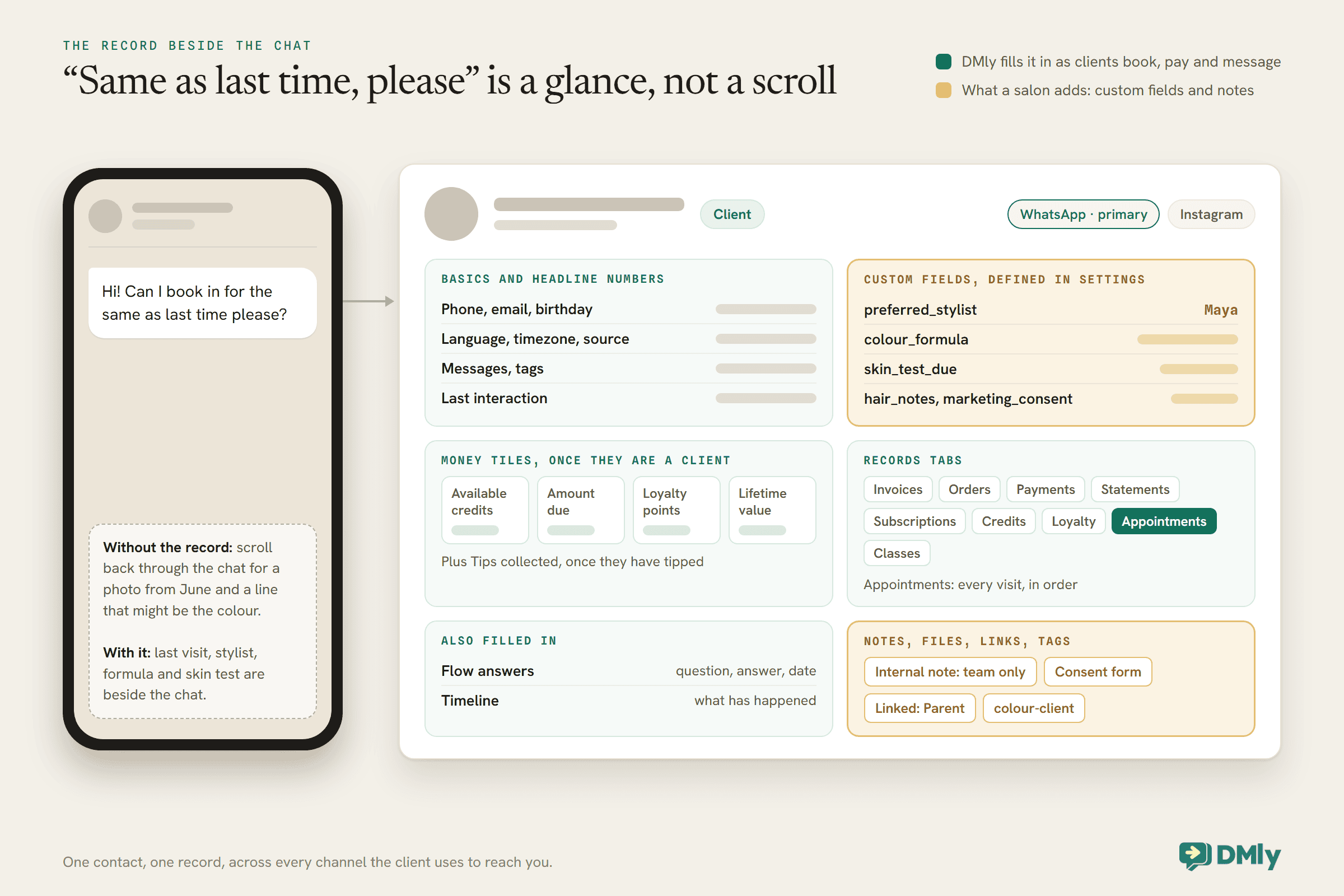
Before: a client messages “Hi! Can I book in for the same as last time please?” and someone at the desk starts scrolling. Back through the chat, past the Christmas messages, to a photo from June, and a line that might be the colour, or might be what they had the time before. Ten minutes later, a best guess. After: the same message arrives, and beside the chat sits the client’s record. Last visit, six weeks ago, root colour with Maya. Formula in the notes. Skin test done in March. The reply takes thirty seconds and is right.
That is the whole idea of a WhatsApp CRM for salons. CRM stands for customer relationship management, which sounds like software for sales teams, but for a salon it means something simple: one record per client, kept beside the conversation, so nobody has to rely on memory or scroll through months of chat to know who they are talking to.
This guide explains how it works in DMly, from a salon’s point of view: what the record holds, what a salon should add to it, where the information comes from, how it drives reminders, rebooking and loyalty, and how to keep sensitive details private. Our general guide to WhatsApp CRM for small businesses covers the wider idea.
One Client, One Record, Every Channel
A client who messages on WhatsApp, books online and comments on Instagram is still one person. The CRM keeps them as one record.
In DMly, a contact is one person, owned by your workspace, across every channel they use to reach you. Their record lists each identity, such as their WhatsApp number and their Instagram account, with one marked as primary, and the replies, history and CRM data are shared across all of them. When the same person does end up as two contacts, which happens when someone books with an email and later messages from a phone number, DMly can merge them, and the profile flags likely duplicates.
For a salon, that matters because clients do not stick to one channel. The client who asked about prices on Instagram, booked through your WhatsApp bot and paid at the till should have one record with all of it, not three half-records.
What the Record Already Holds
Before you add anything, the profile already shows a lot. Knowing what is there stops you duplicating it.
- The basics. Name, phone, email, birthday, language, timezone, and where the contact came from.
- Four headline numbers. Messages exchanged across every channel, tags applied, last interaction, and source.
- The conversation. Their last inbound message, and a timeline of what has happened with them.
- Flow answers. Every question your automations asked them, with the answer and the date.
- Internal notes. Private to your team; the client never sees them.
Once a contact is a client, the profile adds money tiles: Available credits from any prepaid pass, Amount due, Loyalty points, Lifetime value, and Tips collected once they have tipped. Below them sit records tabs for invoices, orders, payments, statements, subscriptions, credits, loyalty, appointments and classes. The Appointments tab is the one a salon will open most: every visit, in order.
What a WhatsApp CRM for Salons Should Add: Custom Fields
Custom fields hold the details your salon cares about that no general CRM would think of.
Define them once under Settings, then Custom fields, and every client record can carry them. Each field has a name and a type, one of text, number, email, phone or date. The type is a label for your team, not a check: DMly’s docs note that a date field will accept “next Tuesday” if someone types it. So agree on formats before the team starts filling them in.
Here is a starting set for a hair salon. Adapt the names to how your team talks.
| Field | Type | What it is for |
preferred_stylist | text | Who the client usually sees, for booking and for the receptionist |
colour_formula | text | The formula used last time, so “same as last time” is answerable |
skin_test_due | date | When the client’s next skin test is due under your colour policy |
hair_notes | text | Anything the stylist wants to remember: length, sensitivities, preferences |
marketing_consent | text | How and when the client agreed to hear from you (see the privacy section) |
Keep field names consistent. Several things write to custom fields by name, and a field saved as Colour Formula by one person and colour_formula by another is two different fields. DMly’s segment builder only offers fields defined in Settings, so a typo on a contact never shows up in a segment.
Where the Information Comes From
A salon CRM that depends on someone typing everything in will go stale. Most of the record should fill itself.
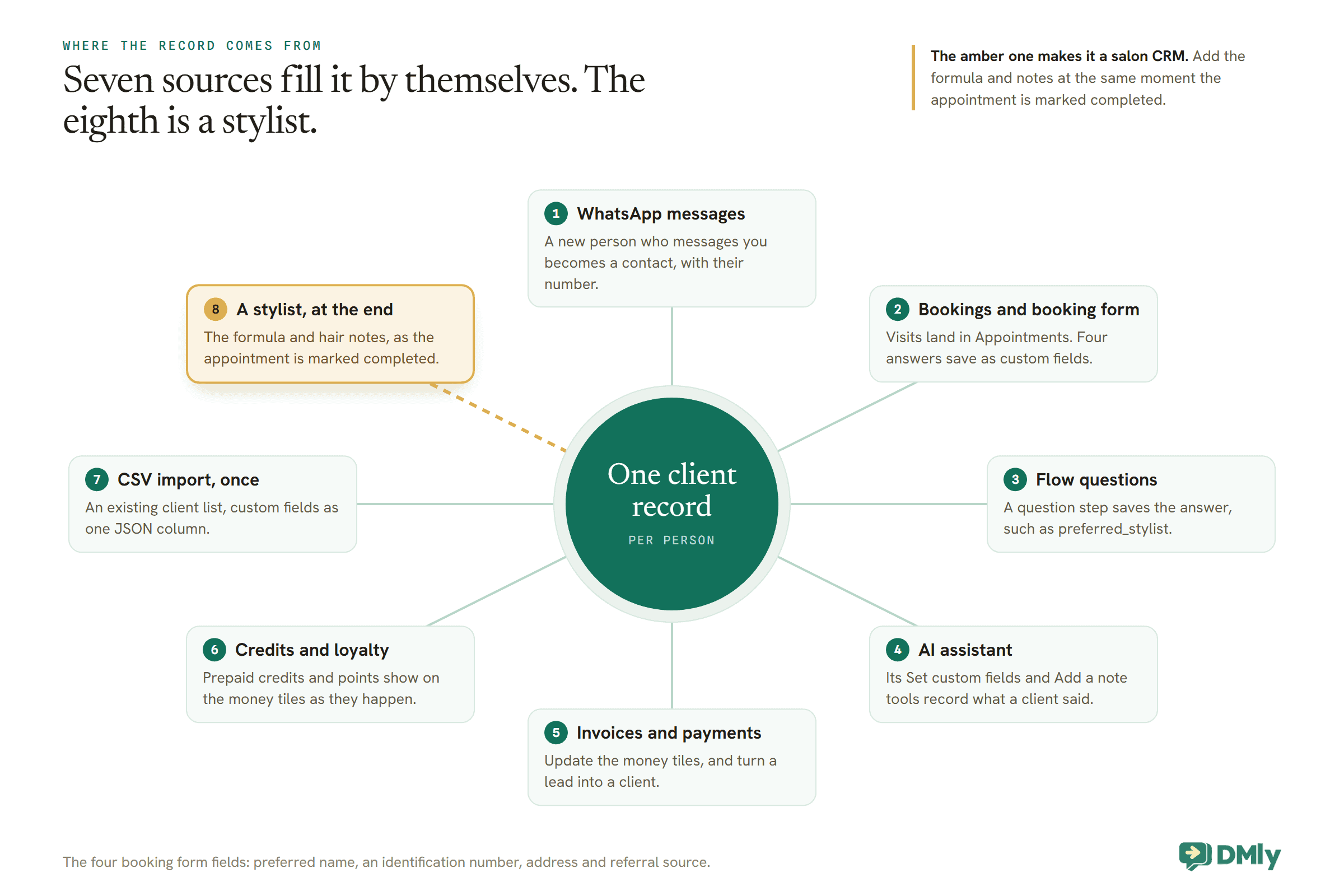
- WhatsApp messages. A new person who messages you becomes a contact automatically, with their number. Our guide to creating CRM contacts from WhatsApp messages covers how.
- Bookings. Every appointment lands in the client’s Appointments tab. DMly’s booking form can also ask a few fixed questions, and four of them save to the contact as custom fields: preferred name, an identification number, address and referral source.
- Your flows. A question step in a flow can save the client’s answer into a custom field. A booking bot that asks “Who do you usually see?” can fill
preferred_stylistwithout anyone typing it. - Your AI assistant. If you run an AI receptionist, its Set custom fields and Add a note tools let it record what a client said, such as a preferred day.
- Payments and loyalty. Invoices, payments, credits and points update the money tiles as they happen.
- A spreadsheet, once. The contacts CSV import brings in an existing client list, including custom fields as a JSON column.
What only a person can add is the salon knowledge: the formula, the notes about how a client likes their hair. Make it part of finishing an appointment, the same moment the appointment is marked completed.
Leads, Clients, and a Salon Catch
DMly sorts contacts into leads and clients. How someone becomes a client matters for any list you build from it.
Every contact has a lifecycle stage. A Lead is the default: someone who has messaged you, been imported or been added by hand. A Client is someone with commercial history. The Contacts page filters on it, and clients get the fuller profile with money tiles and records tabs.
Here is the catch for a salon. DMly promotes a lead to a client automatically when an invoice or an order is created for them, a payment is recorded against them, or a subscription starts. A booking on its own does not do it. A salon that takes payment on a separate card machine, without raising invoices in DMly, can find its most loyal regulars still listed as leads. You can convert them by hand with Convert to client on the profile, and raising invoices in DMly does it for you. Either way, check before you build a segment or a message around “clients”, because the list may be emptier than your diary.
Tags and Segments for a Salon
Tags record facts about a client. Segments are saved questions that find clients by those facts.
A tag is a label you or an automation puts on a contact: colour-client, bridal-2026, no-show. It stays until someone removes it, and it works across every channel the client uses. A segment is a saved set of rules that DMly checks each time you use it, so it always reflects the clients who match now. For a salon, useful segments include:
- Colour clients, by tag, for a colour-specific offer or a note about a new colour range.
- Quiet clients, with Number of days since last activity set to 90 or more.
- Birthday this month, using the Birthday month condition.
- Top clients, by Total spend or Loyalty points, for a personal thank-you.
- Clients who can be messaged, adding Marketing opt-in is opted in and Reachable on channel WhatsApp to any list you plan to send to.
Segments feed broadcasts and help you find people; our guide to WhatsApp automation for salons shows how they fit into the rest of a salon’s messages.
What the Record Can Do Automatically
A CRM earns its keep when the record starts driving messages, not just storing facts.
A skin test reminder from a date field
DMly’s Birthday / key date trigger can fire on a date custom field as well as on a birthday, and can fire a set number of days before the date. With a skin_test_due field filled in, a flow can message a colour client a week before their skin test falls due, inviting them to book one. Two cautions from the docs: the trigger only reaches clients who have the date filled in, and a value it cannot read as a date is skipped silently, with no error. That is why agreeing a date format matters.
Check how the trigger treats the year before you rely on it. DMly’s docs describe the Birthday / key date trigger firing on the day of a date field, or a set number of days before it, and give anniversary as an example of such a field. They do not say whether the year is part of the match. If the trigger behaves like a birthday and repeats every year on the same day and month, a date more than about a year away could fire a year early. Test it before going live: set a test contact’s date 13 months ahead and check nothing fires this year. Until you have confirmed the behaviour, only enter dates that fall within the next 12 months, keeping later ones in a note, and clear or update each date once the recall has done its job.
Branching on what you know
A flow’s Condition step can test a custom field: whether it is a certain value, contains something, or has any value at all. A booking flow can check whether preferred_stylist has a value and, if it does, mention that stylist; if it does not, ask. And {{custom.preferred_stylist}} puts the field’s value into a message.
The rest of the salon stack
Everything else in a salon’s automation reads the same record. Reminders go to the client’s channel. Loyalty points build on the client’s completed appointments. Prepaid credits show on the client’s profile and are spent when they book. Rebooking follows each client from their own last visit. The CRM is not a separate system; it is the thing all of them share.
A Pipeline for Bridal and Event Enquiries
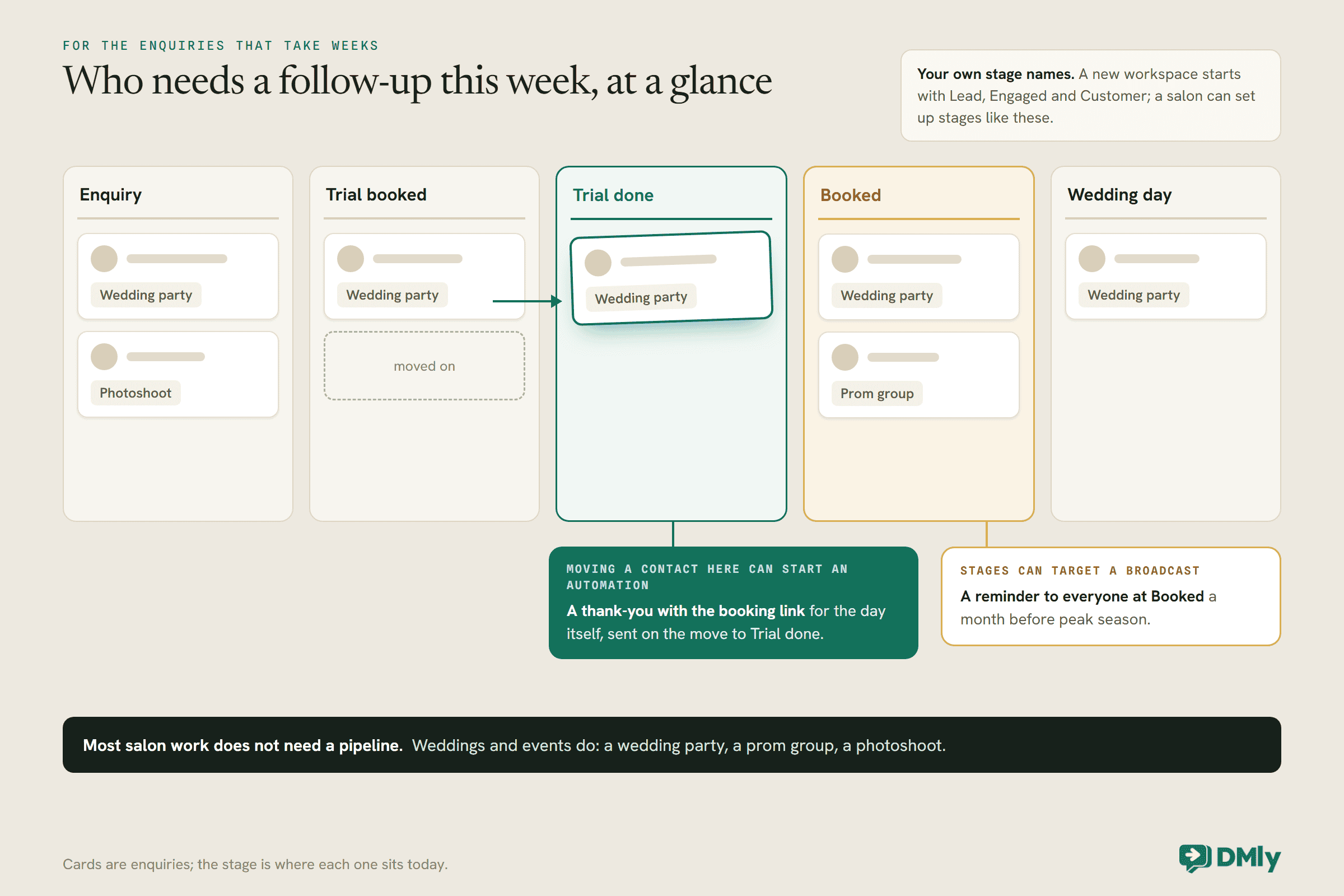
Most salon work does not need a sales pipeline. Weddings and events do.
DMly’s pipeline stages are your own columns for tracking enquiries through to a booking. A new workspace starts with Lead, Engaged and Customer, and you can set up your own. For a salon, a pipeline is worth having for the enquiries that take weeks: a wedding party, a prom group, a photoshoot. Stages such as Enquiry, Trial booked, Trial done, Booked and Wedding day make it obvious which brides need a follow-up this week.
Moving a contact to a new stage can start an automation, so a move to Trial done could send a thank-you with the booking link for the day itself. Stages can also target a broadcast, such as a reminder to everyone at Booked a month before peak season. Our guide to building a WhatsApp sales pipeline covers the setup.
Families and Children’s Cuts
A parent books for a child, and pays, and gets the reminders. The CRM can show that relationship.
DMly’s Linked contacts lets you link two contacts as Parent, Child, Spouse, Guardian, Sibling or Other, and the relationship reads correctly from each person’s profile. For a salon, that means a child’s record can show who their parent is, and the parent’s record can show their children, so the person at the desk can see at a glance that the 4pm kids’ cut belongs to the mum who is booked at 5.
Moving In From a Booking App or a Paper Book
Most salons already have a client list somewhere. Bring it in once, properly, rather than rebuilding it by hand.
DMly’s contacts import takes a CSV file, which any booking app or spreadsheet can produce. Go to Contacts, select Import, and start from the Download sample file so your columns match what DMly expects. A few rules matter for a salon list:
- Every row needs a name and a phone number. Rows missing either are skipped, and DMly tells you how many.
- Select your WhatsApp channel first. Each imported contact is attached to the channel selected when you import, and the importer will not run without one.
- Custom fields come in as one column. The
custom_fieldscolumn takes a small piece of JSON, such as{"preferred_stylist":"Maya"}, so a stylist column from your old system can land straight in the right field. - Tags are replaced on re-import. A second import of the same people replaces their tags with whatever the file says, and a blank tags column removes them. Carry tags in the file if you import twice.
- Your plan’s contact cap is checked before anything is written. An import that would go over it imports nothing at all.
One rule is not about the file. Importing a client list is not the same as clients agreeing to hear from you on WhatsApp. A client you import has no open conversation, so the only thing you can send them first is an approved template, and marketing messages should only go to people who agreed to them. Our guide to WhatsApp opt-in covers how to ask.
Letters: Aftercare Sheets and Consent Forms as PDFs
DMly can turn a template into a branded PDF for one client, filled in from their record.
Client letters live under Contacts, via Client letters in the header. You write a template once, with merge tokens for the client’s name, their custom fields and a reference number, then generate it for one client at a time from the Files & letters tab on their profile. DMly fills in the details, gives the letter a reference such as LTR-0001, and produces a PDF with your business details in the header and a QR code at the foot that verifies it.
For a salon, two uses stand out. An aftercare sheet for a colour or treatment, generated with the client’s name and their stylist from preferred_stylist, feels far more personal than a photocopy. And a skin test or consent record gives you a dated, referenced document on the client’s file. Letters can be shared on WhatsApp from the client’s letters card. A generated letter is a snapshot: editing the template later does not change letters already made. Building templates and generating letters each need their own permission, so decide who in the salon can do each.
Stylists, Staff and Who Sees What
Not everyone in a salon needs to see everything in the record. DMly lets you decide per person.
In DMly, a stylist in the diary is a staff member: a bookable person, not automatically someone who logs in. If a stylist should manage their own bookings, link their staff record to a team account. When you add someone to the team, you can restrict what they see. The per-member options include Mask contact phone numbers and Mask contact email addresses, and turning off whole areas such as the Inbox, Appointments, Broadcasts, Automations or Reports. A junior stylist who needs the diary but not every client’s phone number can have exactly that.
Reports follow permissions too. A teammate without permission to view the team’s appointments only ever sees reports on their own bookings, which is right for a stylist and wrong for whoever reads the salon-wide numbers. Internal notes are shared across the team, so write them as if every colleague will read them, because they may.
Keeping Sensitive Details Private
A salon record can hold personal and sometimes health-related details. Keep only what you need, and control who sees it.
- Keep only what the work needs. A note that a client reacted to a product is useful for their next colour. A detailed medical history is not something a salon record should hold.
- Know who can see documents. You can attach files such as a signed consent form to a client’s record: PDF, image, Word, Excel, CSV and text files up to 20 MB each. DMly’s docs say anyone who can open the profile can see and download what is attached, while uploading and deleting need a separate permission that owners and admins have by default. Think about that before attaching anything sensitive.
- Record consent yourself. DMly records when someone opts out, but not how or when they opted in. If you need proof that a client agreed to marketing messages, keep it in a custom field or a note, which is what the
marketing_consentfield in the table above is for. - Deletion is final. Deleting a contact removes their messages, documents, and their invoices and payments too, which also changes your revenue totals. Only delete when a client asks, and download anything you must keep first.
Internal notes stay private to your team, and a client opting out with STOP stops automated messages to them. If someone must not be messaged at all, block them as well, because opting out does not stop a person in your team from typing a reply.
Two profile actions a salon will use
Pause the bot for one client. The profile has a switch to pause automated replies for a single person, which is useful when a stylist is having a long conversation with a bride and does not want a bot chipping in. Remember to switch it back on: while the bot is paused for a client, DMly skips their appointment reminders too.
Export your client list. The Contacts page exports every contact in the workspace as a CSV, in the same columns the importer reads, including tags and custom fields. It makes a sensible monthly backup of the salon’s client list, and it round-trips: you can add a column of tags in a spreadsheet and import it back.
The Habits That Keep It Useful
A CRM decays when nobody tends it. Three small habits keep a salon’s records worth trusting.
- Finish the record when you finish the appointment. Mark it completed and add the formula or note while the details are fresh.
- Merge duplicates when you see them. The profile flags likely duplicates; merging keeps one history.
- Tag deliberately. Agree a short list of tags and what each means. Twenty tags nobody understands are worse than five everyone uses.
Mistakes to Avoid
- Assuming bookings make clients. Without an invoice, order, payment or subscription, a contact stays a lead.
- Inconsistent field names. Two spellings are two fields, and only defined fields appear in segments.
- Free-form dates in a date field. The key-date trigger silently skips values it cannot read.
- Sensitive files on every profile. Anyone who can open the profile can download them.
- No record of consent. DMly records opt-outs, not opt-ins.
- Leaving the formula in the stylist’s head. Add it before the next client sits down.
Frequently Asked Questions
What is a WhatsApp CRM for a salon?
It is a client record kept beside your WhatsApp conversations: who the client is, their visits, what they spend, their preferences and notes, so anyone replying knows who they are talking to without scrolling back through the chat.
Can I store a client’s colour formula?
Yes. Define a custom field such as colour_formula under Settings, Custom fields, and fill it in on the client’s record after each colour appointment.
Why are my regular clients showing as leads?
Because DMly only promotes a contact to client when an invoice, order, payment or subscription touches them. If you take payment outside DMly, convert them by hand or raise invoices in DMly.
Can the CRM remind clients when their skin test is due?
Yes. Store the due date in a date custom field, and a flow on the Birthday / key date trigger can message the client a set number of days before it. Dates the trigger cannot read are skipped silently, so use a consistent format.
Can I link a child’s record to a parent?
Yes. Linked contacts lets you link two records as Parent and Child, among other relationships, and each profile shows the other.
Can clients see their own booking history?
Yes, if you turn on DMly’s client portal, which is off by default. A client enters their phone number, receives a one-time code on WhatsApp, and sees their bookings and their status. It shows booking history only, not invoices, payments or notes.
Who can see documents attached to a client?
Anyone on your team who can open the client’s profile can view and download them. Uploading and deleting need a separate permission, which owners and admins have by default.
Same as Last Time, Answered Right
The “same as last time please” message is the test of any salon CRM. With the record beside the chat, the answer is a glance: the last visit, the stylist, the formula, the skin test date. Nobody scrolls, nobody guesses, and the client feels remembered.
That is how a WhatsApp CRM for salons works in practice: most of the record fills itself from messages, bookings and payments, and a minute of a stylist’s time at the end of each appointment adds the part that makes it yours. Define your custom fields this week, agree the formats, and start filling them in at the next appointment.
Writing about WhatsApp automation, bookings and growth for local business.
Turn WhatsApp into your busiest channel.
Start free and run message, bookings, payments and reviews in one place.
