
How to Manage WhatsApp, Instagram and Facebook Messages in One Inbox
Count the places a customer message can currently land in your business. The WhatsApp app on one person’s phone. The Instagram app on someone else’s. Page inbox on a laptop, which nobody has logged into since June. Comments under three posts. A story reply that expired. For a business with two or three staff, five or six separate surfaces is normal, and the cost is not the inconvenience. It is the messages that nobody replied to because nobody knew they existed. The obvious answer is to manage WhatsApp, Instagram and Facebook messages in one inbox, and that part is genuinely easy.
The merge itself is straightforward. What catches people out is what happens after: the three channels arrive in the same list but they do not become the same channel. They keep three different reply windows, two of them have no message templates, and the same customer arrives as three separate contact records. A team that does not know that will make three predictable mistakes in the first fortnight.
This guide covers the merge and the aftermath. Connecting all three, the rules that do not merge, how to work the list day to day, and the operating habits that make a shared inbox better than three apps rather than the same chaos in one window.
What Does One Inbox Actually Unify?
It unifies where messages arrive, who can see them, who owns them and what your team can do with them. It does not unify what each platform will let you send. That distinction is the whole article, so it is worth being precise about both halves.
| Unified | Not unified |
| One conversation list, with channel pills to filter | Reply windows, which differ per channel |
| One set of folders: All, Open, Done, Archive | Message templates, which only WhatsApp has |
| Assignment, which follows the contact across channels | Rich formats, which vary by channel |
| Internal notes and at-mentions on any thread | Contact records, which are created per channel |
| Tags, which are workspace-level | Broadcast rules, which follow each platform |
| Search, filters and the unread view | What automation can do once the window closes |
The right mental model is a single control room looking at three different machines. The controls are in one place. The machines still behave differently, and pretending otherwise is how a team promises a customer something the platform will not deliver.
Connecting WhatsApp, Instagram and Facebook to One Inbox
Each of the three has a different connection story, and each has a specific way of failing that looks like something else.
This is the most involved and the most governed. You connect a number, it becomes tied to a WhatsApp Business Account, message templates go to Meta for approval, and your account is assigned a sending tier that rises with good behaviour. Connecting a live number also auto-submits a set of twenty system templates. The WhatsApp channel page covers the process, including what happens to an existing number.
Facebook Messenger
Connect the Page you administer and grant messaging permissions. Connection and permissions are covered on the Messenger channel page. The most common failure is a Page role that looks sufficient and is not, which produces a channel that connects and then receives nothing. The second most common is a Meta password change quietly invalidating the connection weeks later, which is worth knowing because the symptom is simply that messages stop.
For Messenger, the free Facebook Messenger link generator gives you an m.me link to put on your site and posts.
Easier than it used to be. The account must be a professional account, not Personal. With the Instagram tile you sign in with Instagram Login, and a Business or Creator account connects with no Facebook Page at all. With the Instagram via Facebook tile, it must be a Business account already linked to a Facebook Page you administer. Either way, approve the messaging permission, or everything looks fine while no DM ever arrives. Our Instagram channel page has the full sequence.
Once all three are connected, they appear as channel pills above the conversation list, alongside SMS, which is the arrangement our omnichannel inbox guide describes in principle. Telegram, Live Chat, TikTok and Google Business Profile reviews all arrive in the same inbox but do not get their own pill, which is a small interface detail that confuses people looking for them.
The Three Windows Do Not Merge
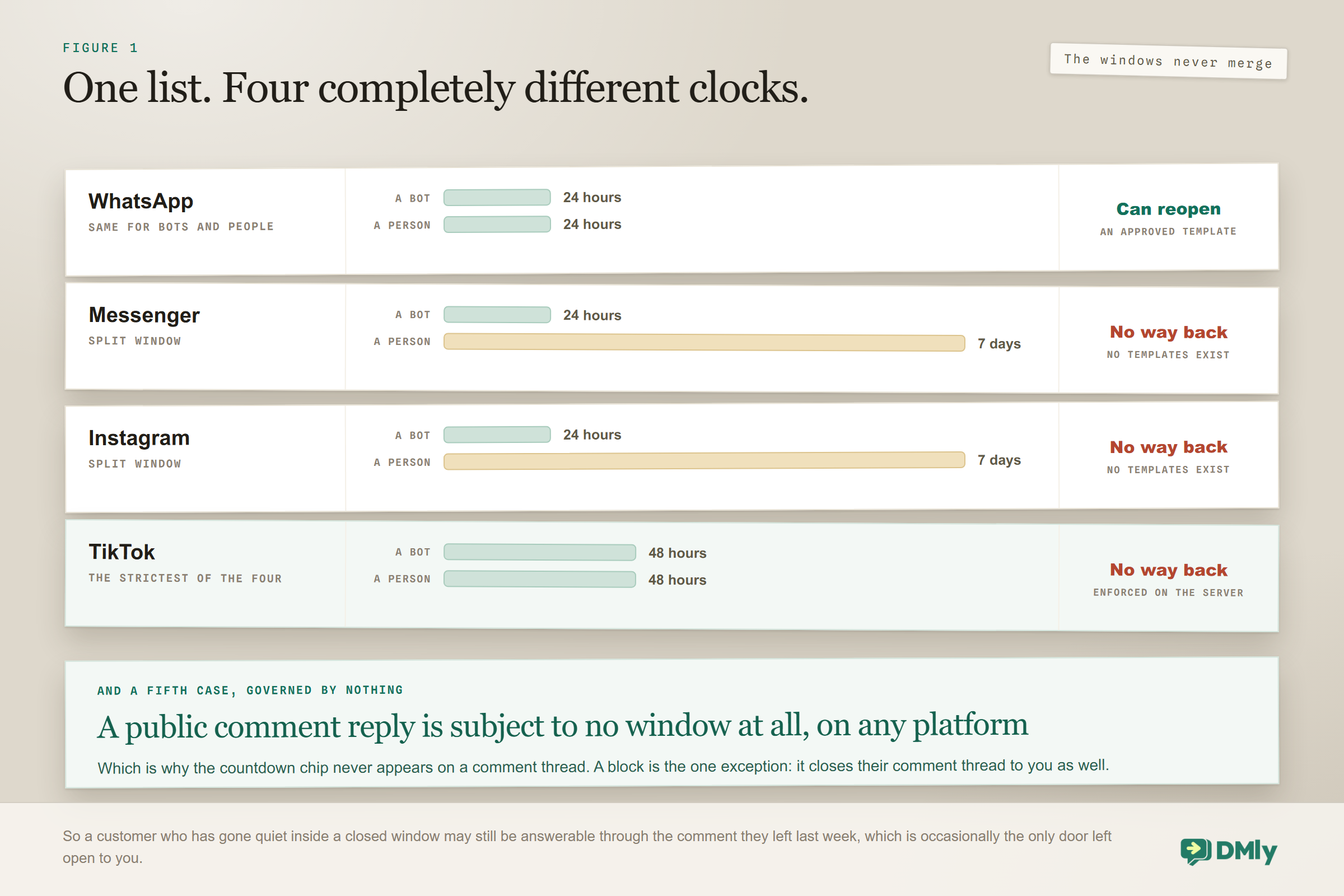
Each channel in one inbox gives you a different amount of time to reply, and only one of them has any way to reopen a conversation once it closes. This is the single most important operational fact in a Meta-channel inbox.
| Messenger | TikTok | |||
| Automation window | 24 hours | 24 hours | 24 hours | 48 hours |
| Human reply window | 24 hours | 7 days | 7 days | 48 hours |
| Reopen a closed window | Approved template | Not possible | Not possible | Not possible |
| Message templates | Yes, three categories | None | None | None |
| Sending tiers | Yes, quality dependent | No | No | No |
Read the second row again, because it is the one that surprises people. On Messenger and Instagram, a person typing in the Inbox can answer for seven days, while your automations stop at one. Your staff genuinely outlast your bots on those channels. On WhatsApp there is no such split: when the window closes it closes for everyone, and only an approved template gets back in. Our guide to the WhatsApp 24-hour window covers that behaviour in detail, including what a failed free-form send looks like.
Three practical consequences follow, and they are worth writing on a wall somewhere:
- Never promise a customer a follow-up on Messenger or Instagram more than a week out. There is no template to rescue it. If it needs to happen later, get a phone number and move to WhatsApp or SMS.
- Treat a WhatsApp thread as more urgent than an Instagram one of the same age. At 23 hours old, the WhatsApp conversation is about to become template-only. The Instagram one still has six days of human time.
- Build automations to the 24-hour rule on all three, because that is the common floor, and reserve the seven-day slack for people rather than flows.
And one place where none of the windows apply at all: A public comment reply is not governed by any window, on any platform. That is why the countdown chip never appears on a comment thread: it exists for DMs only. The single exception is a block, which closes that person’s comment thread to you as well as their DMs. So if a customer has gone quiet inside a closed window, the public comment they left last week is still answerable, which is occasionally the only door left open.
One Person, Three Contact Records
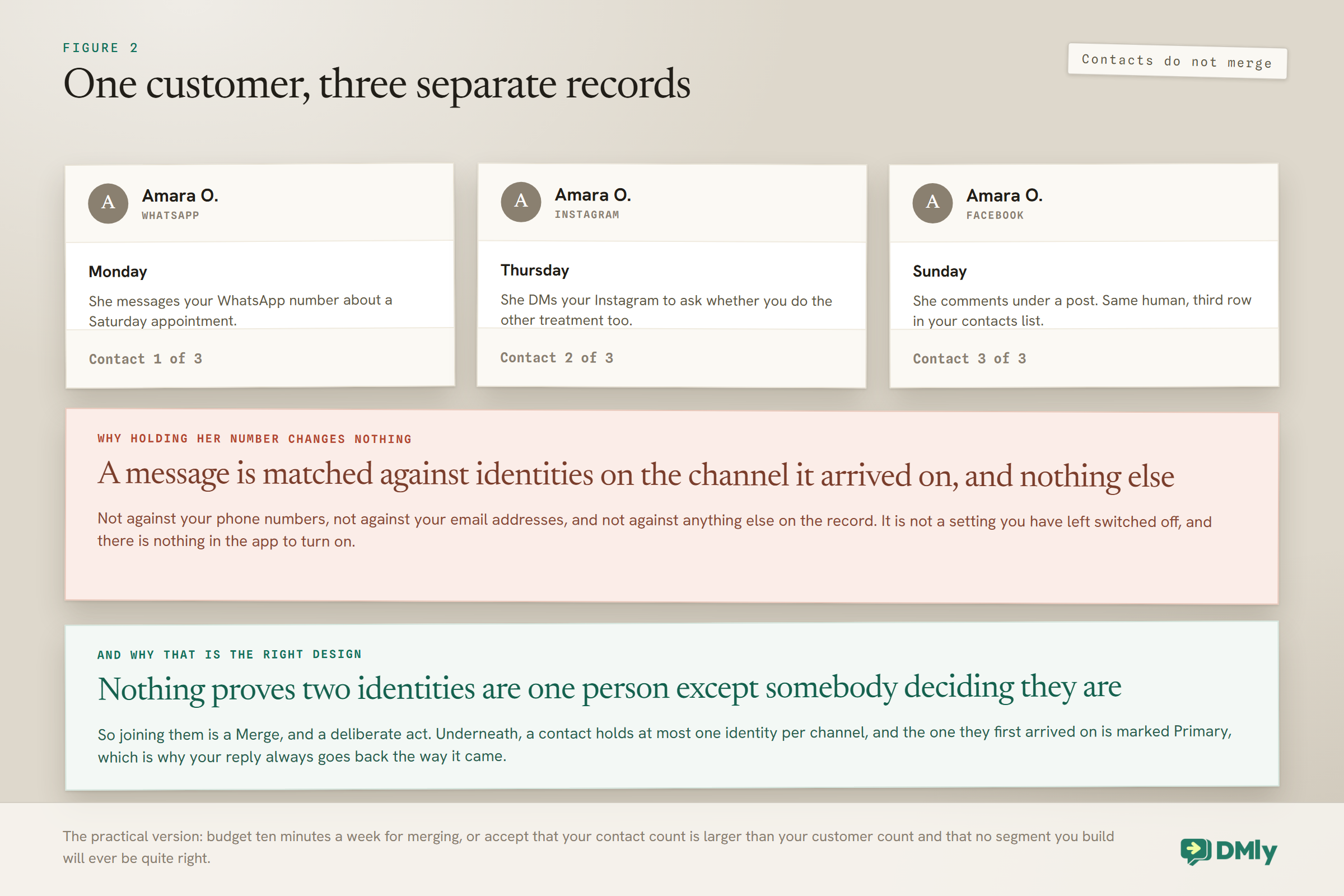
DMly does not link contacts across channels automatically, so a customer who messages you on all three appears as three separate contacts. This is deliberate rather than a shortcoming, because the platforms genuinely do not tell you they are the same person, but it has consequences you have to manage.
Each channel identifies people its own way. WhatsApp and SMS key on the phone number. Messenger uses a page-scoped Meta ID. Instagram uses an account-scoped Meta ID. Live Chat uses a browser session token, and TikTok uses a conversation ID for DMs or a user ID for comments. Within one channel that identifier always maps to the same contact, and a person has at most one identity per channel. Across channels, nothing joins them up on its own.
What that means in practice:
- Your contact count is inflated. Not badly, but enough that reporting on unique customers from raw contact numbers will overstate.
- Tags and notes live on one record. The note explaining that this customer is difficult about parking is on their Messenger record and invisible when they message on WhatsApp.
- An opt-out applies to the record that opted out. This is the one that carries real risk, and it is worth checking before any campaign.
- Purchase history attaches wherever it was created. A client converted through an invoice looks like a client on one record and a lead on the others.
The fix is to merge deliberately. The three-dot menu surfaces Possible duplicates when it finds a candidate, matching on the last ten digits of a phone number or an exact email, but it only scans the 200 most recently active contacts, so it is a housekeeping aid rather than a guarantee. You select exactly two contacts, both on the current page, and the merge cannot be undone. Merging protects the restrictive settings: the earlier opt-out date wins, blocked status survives, the most restrictive calling consent applies, and the earlier conversion date is kept. Our contacts and CRM guide covers the process properly.
One related quirk worth knowing: people who have only ever left a public comment on Facebook, Instagram or TikTok, or a Google review, are not in your Contacts list at all, because there is no channel you could message them on. Their comments are still visible in the Inbox under Comments. The moment one of them sends a DM, including one your comment-to-DM automation prompted, they appear as a contact.
Why the same phone number does not help: An inbound message is matched against the identities on the channel it arrived on, and nothing else. So your best WhatsApp customer sending an Instagram DM lands as a new contact, and the fact that you already hold their number changes nothing at all. This is not something you can turn on. The fix is View full profile and merge, which is a deliberate act by a person, and it is the right design: nothing verifies that two identities are the same human except somebody deciding they are.
Underneath, a contact holds at most one identity per channel, one row saying that this person, on this channel, is this id. The channel they first arrived on is marked Primary. That structure is why replies land correctly: when you answer, DMly sends on the identity the conversation belongs to rather than on whichever channel happens to be listed first.
DMs and Comments Are Two Different Threads
The Inbox has a toggle between DMs and Comments, it defaults to DMs, and there is no combined view. A single contact can hold a separate thread on each, up to a maximum of two threads per contact.
This matters more than it sounds. A business that only ever looks at the default view will not see public comments at all, which on a busy Instagram or Facebook Page means unanswered questions sitting in public under your posts. The comments people leave are frequently the highest-intent messages you receive, because asking in public takes more nerve than asking privately.
Two habits fix this. Put comments in someone’s daily routine explicitly rather than assuming they will be noticed. And where the volume justifies it, automate the first move: a comment trigger that sends a private reply moves the conversation into a DM thread where you can actually work. That is the mechanism behind comment-to-DM, built in the flow builder and covered in our Facebook comment automation guide.
One difference between the platforms worth knowing here: on Messenger, the commenter and the person who then DMs you are the same contact. On TikTok they are two different contacts. Instagram behaves like Messenger. This is exactly the kind of platform detail that a unified inbox cannot paper over.
The one control you have to switch rather than clear: The DMs and Comments toggle sits under the search box, starts on DMs, and has no All. The two kinds never appear in the same list. Worth knowing for two reasons: if you are hunting a comment you answered last week and cannot find it, you are on the wrong tab; and the toggle filters the list rather than the thread you have open, so clicking a notification can leave you reading a comment thread while the list still says DMs.
Working the List Day to Day
The Inbox gives you four folders and a set of filters, and the useful skill is knowing which combination answers which question.
The folders are All, which shows everything except archived, Open for things needing attention, Done for finished conversations, and Archive for filed ones. Archived conversations auto-delete after 30 days, which is worth saying twice: archiving is not filing, it is a slow delete. A conversation moves to Done manually via Mark as done, through an automation, or automatically when a blocked contact messages again.
The filters cover assignee with Anyone and Unassigned, an All channels picker in the extra filters for specific profiles, an All tags picker, and Unread only. Combined with the channel pills, that is enough to build any working view you need.
The limit worth planning around: the conversation list shows the 100 most recent conversations and there is no paging. For a small business that is invisible. For a busy account it is a real constraint, and it means the way to find an older conversation is search or a filter, not scrolling. Teams that discover this during a busy week tend to conclude something is broken.
Three working views cover most of the day:
- Open, assigned to me. Your own queue. This is where you live.
- Open, Unassigned. The triage queue. Someone should own clearing this, and it should be a named person rather than everyone.
- Comments. The view nobody has by default. Add it to a routine or it does not happen.
Where It Genuinely Does Unify
After three sections on what one inbox does not merge, here is the part it does, and it is better than most people expect.
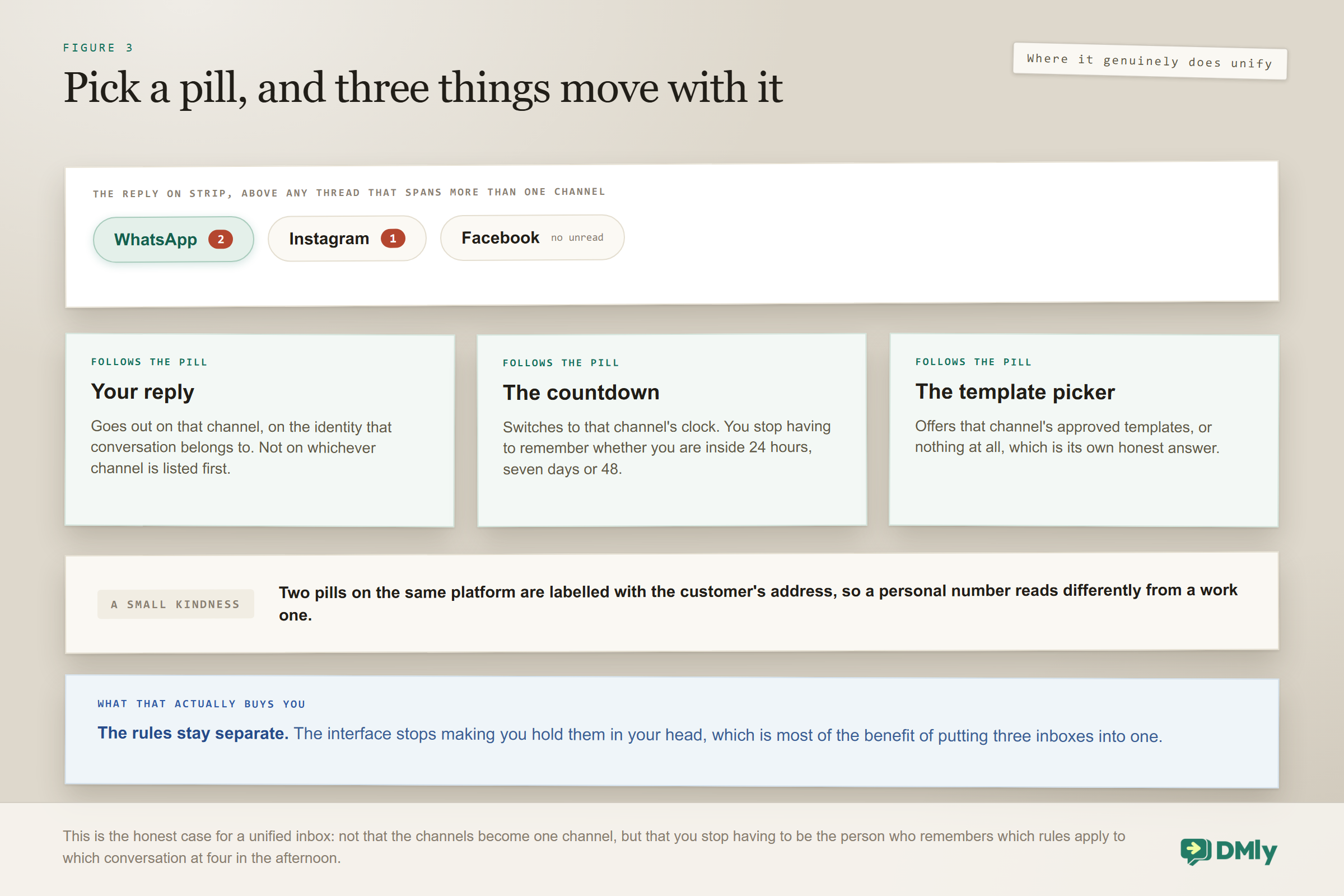
When a conversation spans more than one channel, a Reply on strip sits above the thread with a pill for each channel, and each pill carries its own unread count. Pick one and three things follow it at once: your reply goes out on that channel, the messaging-window countdown switches to that channel’s clock, and the template picker changes to that channel’s templates. Two pills on the same platform are labelled with the customer’s address, so you can tell a personal number from a work one.
That strip is the practical answer to everything above. You do not have to remember which window you are in, because the countdown is showing you. You do not have to remember which channel has templates, because the picker either offers them or does not. The rules stay separate; the interface stops making you hold them in your head.
Assignment Across Three Channels
Assignment in DMly is contact-based, so assigning one conversation assigns every thread with that contact across every channel. For a three-channel inbox that is usually exactly right, because the same person asking the same question on two channels should be one person’s problem.
The behaviour that catches teams out is that replying reassigns silently. When a teammate replies, the conversation moves to them with no notification to the previous owner, no bell and no webhook. That is the workspace default, and an admin can change it so that a reply only claims an unowned conversation, or never changes the owner at all.
The related default that saves the most embarrassment is the bot pause. When a teammate replies, the workspace default is to pause the bot and the running flow, and automation stays paused until someone resumes it. In a three-channel inbox where automations are running on all three, that default is doing more work than most teams realise. The full set of ownership and takeover rules is in our shared team inbox guide.
Assignment does not hide anything. Everyone with Inbox access sees every conversation regardless of who owns it, and the contact sees nothing about assignment at all. It changes filters, notifications and webhooks, not access.
Notes, Mentions and Canned Replies
The collaboration layer is the part of a shared inbox that three separate apps genuinely cannot give you, and it is the reason the merge is worth the setup.
Internal notes are visible to your team and never sent to the customer. They are where the context lives that would otherwise be in someone’s head: this person is a friend of the owner, this refund is already approved, do not quote the standard price. Write them on the thread, not in a group chat, because a group chat is not attached to the conversation the next person opens.
One important limit: internal notes are never shown to the AI. A note explaining a customer’s situation informs your colleagues and nothing else. If the assistant needs to know something, it has to be in the prompt, the knowledge base or a contact field.
At-mentions ping a specific teammate on a thread, which is the correct way to pull someone in without reassigning the conversation to them. On a three-channel inbox this matters, because assignment is contact-based and moves every thread with that person; a mention moves nobody.
Typing indicators show when a colleague is composing on the same conversation, which is the cheapest possible defence against two people answering the same customer at once. It is not a substitute for clear ownership, but it catches the collisions that ownership rules miss.
Quick replies are the saved responses your team reaches for twenty times a day: opening hours, parking, the deposit policy, the link to the booking page. Building a small set is a half-hour job that pays back within a week, and it does more for consistency across three channels than any amount of training. Keep them short enough to work on Instagram, since that is your tightest surface.
Every plan also includes Suggest a reply with AI, which appears whenever AI is enabled and drafts a response for a human to edit rather than sending anything itself. Treat it as a typing aid, not as automation.
What Happens When a Closed Conversation Comes Back
By default, a closed conversation reopens whenever a new message arrives, and that default is right for almost everyone. The alternatives are worth knowing because they change how your Open folder behaves.
The setting offers three choices: always reopen it, reopen only within a set number of hours between 1 and 8,760, or leave it closed. If you choose the windowed option and leave the number blank it defaults to 24 hours. The window is measured from when the conversation was closed, not from the last message, which is a small detail that changes the arithmetic more than people expect.
There is a related behaviour on the other side: a conversation moves to Done manually, through an automation, or automatically when a blocked contact messages again. That last one exists so a blocked contact’s messages do not sit in your Open folder demanding attention.
For a three-channel inbox, always reopen is the safe default because a customer returning after a fortnight on Instagram is a live opportunity, not an archive entry. Change it only if you have a genuine reason, such as a support workflow where a closed ticket must stay closed.
Automations Across Three Channels
Automation is where the three channels stop looking alike, and building once and deploying everywhere works less well than people expect.
What is portable: the trigger types (a message arriving, a comment, a keyword), the flow structure, tags, CRM writes, AI replies, and handover. A well-built qualification flow really can run on all three.
What is not portable:
- Anything that sends after 24 hours. Fine on WhatsApp with a template, impossible on the other two.
- Rich formats. Messenger allows up to 13 quick replies and 3 buttons; Instagram’s quick replies are text only; WhatsApp allows 10 buttons but only 2 URL buttons. A flow built for one will be quietly truncated on another.
- Ice breakers and persistent menus. Both Messenger and Instagram have them at 4 ice breakers and a 3-by-3 menu, but they are configured per channel and pushed to Meta separately.
- Broadcasts. WhatsApp broadcasts an approved template to a saved segment. Instagram broadcasts plain text inside the window. Messenger reaches people in-window plus those holding a notification opt-in. Three genuinely different products.
The sensible approach is one flow per channel for anything customer-facing, sharing the same tags, the same knowledge base and the same handover rules. The Instagram AI chatbot guide shows what a channel-specific build looks like in practice.
A Daily Routine That Actually Holds
Tools do not fix inboxes; habits do. Everything below assumes you already manage WhatsApp, Instagram and Facebook messages in one inbox and now have to work it. This one is deliberately small enough that a two-person business can keep it.
- Morning: clear Unassigned. One person, ten minutes, everything gets an owner. Not everything gets answered, everything gets an owner.
- Then WhatsApp first, by age. Because that is the channel where the window closes hardest.
- Then Comments. The view nobody opens. Five minutes.
- Then your own Open queue. Mark as done aggressively. An Open folder that never empties stops meaning anything.
- End of day: anything approaching 20 hours old on WhatsApp gets answered or gets a template plan. This single habit prevents most template scrambles.
- Weekly: run Possible duplicates. Ten minutes of merging keeps the contact database honest.
What One Inbox Lets You See That Three Apps Did Not
- First response time, split by channel. A blended number hides the channel that is failing.
- Conversations that closed unanswered inside the window. Your real miss rate.
- Unassigned age. How long the triage queue sits. This predicts complaints better than volume does.
- Comment response rate. Almost always the worst number in the building, and the most public.
- Duplicate contact rate. Rising duplicates mean your merging habit has lapsed.
Mistakes Worth Avoiding
- Assuming one inbox means one set of rules. Three windows, one list.
- Declining the messaging permission when you connect Instagram. The account connects and nothing arrives.
- Treating Archive as filing. Archived conversations auto-delete after 30 days.
- Never opening the Comments view. It is not in the default view and it is the most public thing you own.
- Scrolling for an old conversation. The list stops at 100 with no paging. Search or filter.
- Letting a reply silently steal ownership when your team expects a triager model. Change the setting rather than the habit.
- Ignoring duplicates until they matter. They matter at the exact moment you send a campaign.
Frequently Asked Questions
Can I really manage WhatsApp, Instagram and Facebook messages in one inbox?
Yes. All three connect to the same Inbox and appear in one conversation list with channel pills to filter. What does not merge is each platform’s own rules: reply windows differ, only WhatsApp has message templates, and the same customer arrives as a separate contact record on each channel.
Why does the same customer appear more than once?
Because contacts are created per channel and DMly does not link them automatically. WhatsApp keys on a phone number, Messenger on a page-scoped Meta ID and Instagram on an account-scoped Meta ID, and nothing joins those together on its own. Use Possible duplicates to merge them, remembering it only scans the 200 most recently active contacts.
How long do I have to reply on each channel?
Automation reaches contacts on all three for 24 hours after their last message. A person replying by hand has 24 hours on WhatsApp, and 7 days on both Messenger and Instagram. Only WhatsApp can reopen a closed window, using an approved template.
Where are the public comments?
Behind the Comments toggle, which is not the default view. The Inbox defaults to DMs and there is no combined view, so comments are invisible until someone switches over. Each contact can hold one DM thread and one comment thread.
Why can I only see 100 conversations?
That is the documented limit: the list shows the 100 most recent conversations and there is no paging. Use search, the channel pills, tag filters or the assignee filter to reach anything older.
If I assign a WhatsApp conversation, does that assign their Instagram one too?
Yes. Assignment is contact-based, so assigning one conversation assigns every thread with that contact across every channel. That is usually what you want, and it is worth knowing before you wonder why a colleague’s name appeared on a thread you did not touch.
Does the bot keep replying while I am handling a conversation?
Not by default. When a teammate replies, the workspace setting pauses the bot and the running flow, and automation stays paused until someone resumes it. Check that setting has not been changed if you see double replies.
One List, Three Machines
Choosing to manage WhatsApp, Instagram and Facebook messages in one inbox is worth doing on its own merits. Nothing gets lost, everyone can see everything, ownership is explicit, and the customer who asked the same question in two places gets one coherent answer.
Just do not let the single list convince the team that the channels became the same thing. Keep the window differences visible, merge your duplicates on a schedule, and give someone the Comments view. Those three habits are most of the difference between an inbox that helps and an inbox that is simply where the chaos now lives.
Writing about WhatsApp automation, bookings and growth for local business.
Turn WhatsApp into your busiest channel.
Start free and run message, bookings, payments and reviews in one place.
