
WhatsApp Coexistence Explained: What Turns On, and What Turns Off
Start with the losses, because nobody else does.
The day you turn WhatsApp coexistence on, Meta disables broadcast lists on that number. Disappearing messages switch off across every one-to-one chat. View once stops working. Live location sharing goes. And every companion device you have linked, WhatsApp Web on the office computer, the tablet at the counter, is unlinked and has to be set up again.
None of that makes coexistence a bad idea. For most growing businesses it is clearly the right move, and the rest of this page explains why. But a business that turns it on expecting nothing to change, because that is what every article promised, finds out about broadcast lists on the morning it wanted to send one.
So here is the honest version: what coexistence is, exactly what you gain, exactly what you give up, what comes across from your existing chats and what does not, and the two clocks that will quietly disconnect you if you stop paying attention.
What WhatsApp Coexistence Actually Is
It lets one phone number run on the WhatsApp Business app and the Cloud API at the same time, instead of forcing you to pick.
Before it existed the choice was brutal. Move your number to the API and it left the app, taking the interface your team knew with it. Plenty of businesses stayed on the app for years past the point where it had stopped coping, purely because the switch felt like a cliff.
Coexistence removes the cliff. Your number stays in the app, where you carry on tapping out replies exactly as you did yesterday. The same number is also connected to the Cloud API through a provider, where automation, templates, campaigns and a shared team inbox live. Messages move between the two, so a conversation you start on your phone is visible in the software, and vice versa.
The useful way to think about it is a division of labour rather than a migration. The app keeps the jobs it was always good at, which are the personal, one-off, in-the-moment ones. The API takes the jobs the app was never designed for: sending to a list, reminding a hundred people about tomorrow, routing conversations to whoever is on shift, and keeping a record.
What Turns Off the Day You Turn It On
Four app features are disabled by the onboarding itself, and Meta documents all four. They are not bugs, they are not temporary, and they are the part of this decision worth taking seriously before you commit.
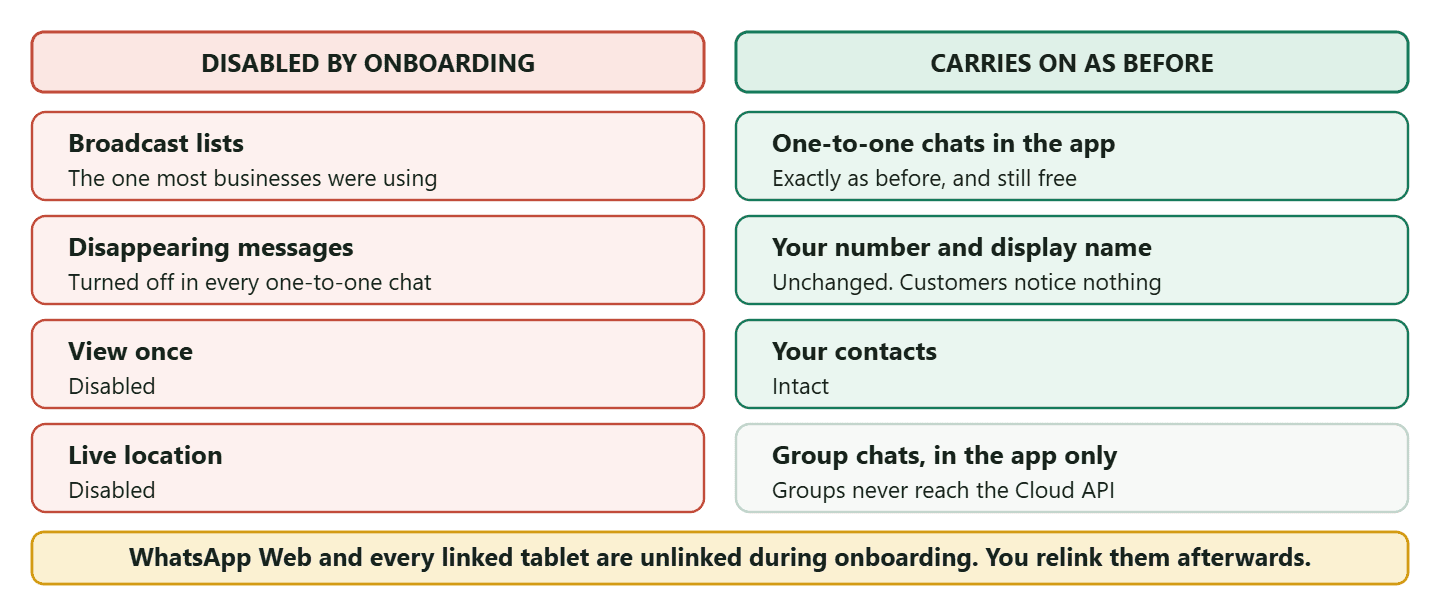
Losing broadcast lists is less painful than it sounds, and here is why. The thing you were using broadcast lists for is exactly what the API side does better: sending the same message to many people at once. The difference is that an API broadcast reaches anyone who has opted in, whereas an app broadcast list only ever reached contacts who had saved your number, which quietly excluded most of your customers. You are not losing the job. You are losing the worse tool for it, and being handed the better one on the same day. What actually governs sending at volume is covered in our guide to sending bulk messages on WhatsApp without getting banned.
The other three are genuinely gone and there is no workaround, but they are also features most businesses were not using for business. Disappearing messages and view once are personal-chat features that sit oddly in a customer conversation you may need to refer back to. Live location matters if you run deliveries and your drivers share it from the business number, and if that is you, this is a real cost worth weighing rather than waving away.
Here is the same thing function by function, including the behaviours that are not switched off but do work differently once both halves are live.
| Function | What coexistence does to it |
| Broadcast lists | Disabled. Sending to many people moves to API broadcasts on approved templates |
| Disappearing messages | Turned off across every one-to-one chat |
| View once | Disabled |
| Live location | Disabled |
| Group chats | Still work in the app. Never reach the Cloud API, and are excluded from the history sync |
| Voice and video calls | Not supported on the Cloud API side. Calling stays a phone job |
| Companion devices | Unlinked during onboarding. Relink them afterwards, and expect messages sent from them to be invisible to the API |
| Messages you type in the app | Still free, and they appear in your provider inbox against the same contact |
| Your number, display name and contacts | Unchanged. Nothing your customers can see is different |
What Comes Across From Your Existing Chats, and What Does Not
Six months of conversation history comes across, groups do not, and the photos inside that history arrive in a way that surprises people. This is the section everybody actually wants, because losing history is the fear that stops businesses making the move.
Meta’s documented behaviour, in plain terms:
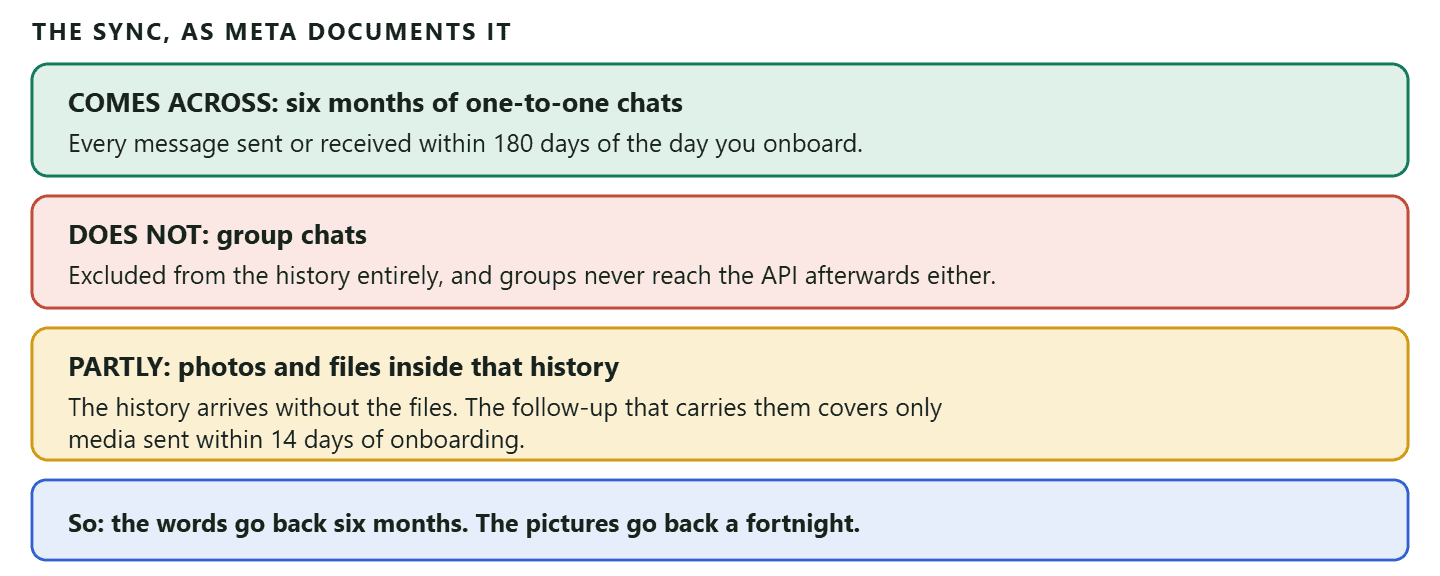
That third row deserves a plain-English translation, because it is easy to misread as a bug. When your history comes across, a message that was a photo arrives as a record that a photo was sent, without the photo attached. Meta then sends the files separately, but only for media from the last fortnight. If you are a plumber whose customers send pictures of leaks, or a clinic that receives photos, the words in those conversations will be in your new inbox and the images from four months ago will not.
The fix is unglamorous and takes an afternoon: before you onboard, go through the conversations that matter and save the photos you would be upset to lose. Nobody tells you to do this because nobody mentions the rule.
Chat history sharing is also something you approve during setup rather than something that happens automatically, so if you skip that confirmation you get a clean inbox and no history at all. Read that screen rather than clicking through it.
The Companion Device Problem Nobody Warns You About
Every device you have linked to that number gets unlinked during onboarding, and the way linked devices behave afterwards causes an error that looks like a bug in your software.
Companion devices are WhatsApp Web on the office computer, the tablet by the till, the second phone in the back room. Meta unlinks them as part of connecting your number to the API. That part is simple enough: link them again afterwards and carry on.
The subtler part is what happens next.
Why messages sometimes do not reach your dashboard
When a message is sent or received on a companion device rather than on the primary phone, it may not be passed through to the Cloud API. The conversation happened, the customer got their answer, and your software has no idea. To anyone watching the dashboard it looks like a message went missing.
Meta has an error code for this situation, and we have a page on it: WhatsApp error 131060 and the companion device problem. If your team works from WhatsApp Web, read it before you turn coexistence on rather than after somebody has asked why half the shift is invisible.
The practical rule
Pick one place for each kind of work and stick to it. If your team is going to answer customers from a computer, answer from your provider’s shared inbox rather than from WhatsApp Web, because the inbox is on the API side where everything is recorded. Keep the phone for the conversations you genuinely want to have on a phone. Mixing the two, with some staff on WhatsApp Web and some in the software, is what produces the gaps.
What You Need Before You Start
The requirements are shorter than most guides make out, and one commonly listed requirement is not real.
- WhatsApp Business app version 2.24.17 or higher. Meta names this one specifically, and it is the requirement almost every write-up omits. Update the app before you begin rather than discovering it halfway through.
- The Cloud API, not the older on-premises API. Coexistence is a Cloud API feature. Any modern provider, including DMly, is on Cloud API, so in practice this is only a problem for businesses with an old bespoke integration.
- A provider to onboard you. The connection is made through a provider’s embedded signup rather than by you alone.
- An active number with real usage. Coexistence is designed for a number that is already being used in the app. A brand new number with no history has nothing to bring across and no reason to be here yet.
One requirement you will read that is not one: You will see “your business must be verified on Meta” listed as a prerequisite, including in the earlier version of this page. Business Verification is not a coexistence requirement. You need a business portfolio to connect through, but you can run the WhatsApp API unverified and always could, at a cost we set out in full in our guide to getting the WhatsApp API without Facebook Business Verification. Verification changes your ceilings. It does not gate this feature.
On country availability, and why this page no longer gives you a list: The earlier version of this article stated that Nigeria and South Africa were not supported. Meta’s coexistence onboarding documentation specifies no country restrictions, and that pair cannot be sourced back to Meta. Rather than repeat a list nobody can stand behind, the honest instruction is to ask your provider whether coexistence is available for your number before you plan around it. Availability in this area has moved more than once.
How to Turn On WhatsApp Coexistence
The setup is a signup flow, not a migration, and it takes about ten minutes. You are not moving anything. You are attaching a second way of reaching the same number.
- Update the WhatsApp Business app on the phone that holds the number, to 2.24.17 or later.
- Start the connection from your provider, choosing the coexistence option. In DMly this is the Connect in co-existence mode button under the prompt asking whether you are already using the WhatsApp Business app. Choosing the ordinary connection instead is the wrong path: that one expects a number that is not already in use.
- Enter the number and the verification code. Standard, and quick.
- Decide about chat history, deliberately. You are asked whether to share it. Yes brings six months of one-to-one conversation across. No gives you an empty inbox. There is no obvious right answer, but there is a wrong way to answer, which is not reading the screen.
- Confirm, then relink your companion devices. WhatsApp Web and any tablets will need setting up again, and the sooner you do it the less it feels like something broke.
Switching modes later is not a toggle: If you connect a number the ordinary way and later want coexistence, or the other way round, you disconnect the number and reconnect it in the other mode. That is our documented behaviour and it is worth knowing before you choose, because it makes the choice at signup more consequential than it looks. Decide once, at the start, with the whole team in the room.
Two Clocks That Will Disconnect You Quietly
Coexistence expects the app to keep being used, and Meta enforces that with inactivity timers rather than warnings. This is the maintenance cost of the arrangement and it is small, but ignoring it takes your number offline in a way that is confusing to diagnose.
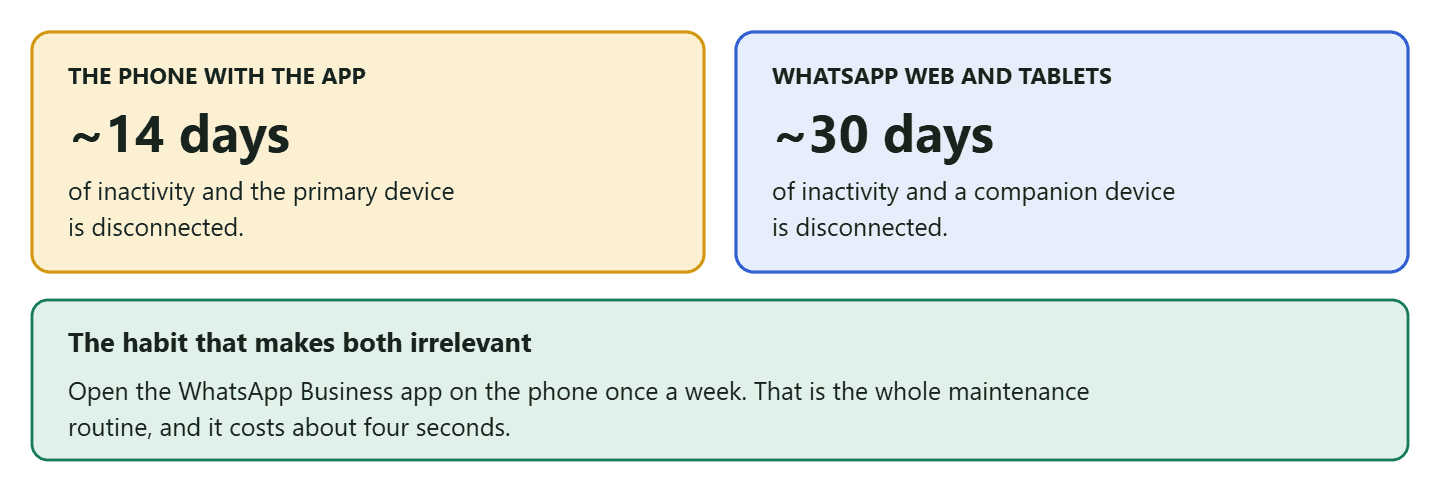
The scenario this actually catches is a business that moves all its answering into the software, does that well, and stops touching the phone at all. The app becomes the thing nobody opens, the timer runs, and the connection drops. If your team has genuinely stopped using the app, put a weekly reminder against it or hand the phone to somebody who will.
Which Jobs Belong on the App, and Which Belong on the API
WhatsApp coexistence only pays off if you actually split the work, and most businesses that are disappointed by it are businesses that changed nothing about how they operate. Having both halves connected and still doing everything by thumb on the phone gets you a monthly bill and no benefit.
The split that works is not about importance. It is about whether the message needs a person and whether it needs to happen on time.
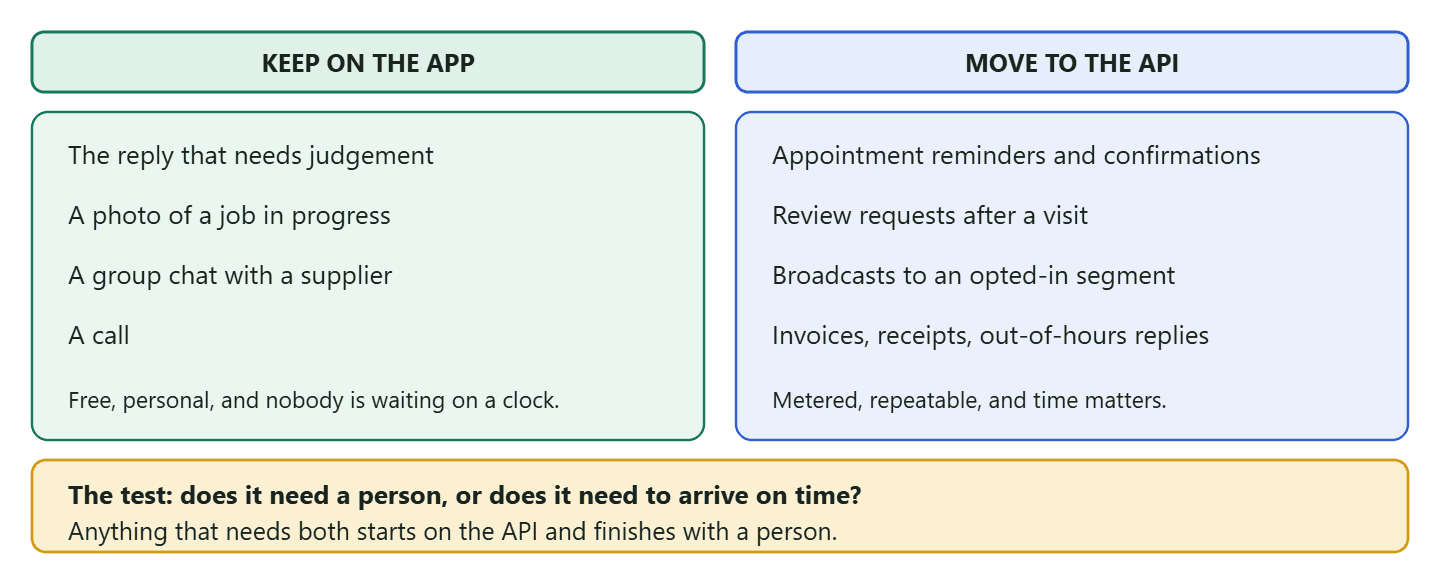
Work through one week of your own messages and sort them into those two piles. It takes twenty minutes and it is more useful than any list somebody else can write for you, because the answer differs by trade. A salon finds that almost everything outbound is a reminder or a rebooking nudge, which is the API pile, and almost everything inbound is a question, which is the app or the inbox. A plumber finds the opposite: most of the value is in one long thread with photos, and the API pile is thin until quoting and invoicing move into it.
Two habits make the split stick. First, decide where the team answers and say it out loud, because a team half in WhatsApp Web and half in a shared inbox produces the gaps described earlier. Second, move one job at a time. Reminders first, because they are the highest-volume repetitive message in most local businesses and the easiest to template. Once that is running unattended for a fortnight, move the next one.
What WhatsApp Coexistence Costs, and What Changes on 1 October 2026
Turning WhatsApp coexistence on does not make your existing conversations paid. It adds a second, metered lane alongside the free one.
Messages you type by hand in the WhatsApp Business app are not billed by Meta. That has not changed and coexistence does not change it. What is billed is the API side: template messages for campaigns, reminders and notifications are charged per message under the pricing model Meta moved to in July 2025, priced by category and by the recipient’s country. On top of Meta’s charge sits whatever your provider costs, which for DMly is a subscription.
That split is the real financial argument for coexistence: the conversations that were always free stay free, and you pay only for the reach you are adding.
A dated change that lands squarely on this arrangement: From 1 October 2026, Meta charges for two things it did not charge for before: service messages, meaning the free-form replies you send inside the 24-hour window a customer’s message opens, and utility messages sent in response to a customer inside that same open window. If your coexistence plan is “answer everything by hand and let the API do campaigns”, the hand-answering half is what the change touches when it happens through the API rather than the app. We have worked the whole change through in what service messages now cost from 1 October. Read it before you decide which lane your replies should run in.
Who Should Not Turn This On Yet
WhatsApp coexistence is not free of cost, and for some businesses the cost is bigger than the benefit right now. An honest list, because the rest of the internet only has the other one.
- If broadcast lists are your main channel and you have no list to import. You lose the lists on day one and the replacement, API broadcasts, needs opted-in contacts and approved templates. That is a better system, but it is a week of work, not an afternoon. Line it up before you switch, not after.
- If your business runs on live location. Deliveries and mobile trades that share live location from the business number lose that. There is no substitute inside WhatsApp.
- If your team works entirely from WhatsApp Web. You can still do it, but you need to move to your provider’s inbox instead, and that is a change of habit for everyone. Do the change deliberately rather than discovering it through missing messages.
- If your volume is genuinely small. If you handle a dozen conversations a day and send nothing at scale, the app alone is still the right tool and coexistence is solving a problem you do not have yet.
None of those are permanent objections. They are reasons to prepare rather than reasons to stay put.
Running WhatsApp Coexistence in DMly
The connection is one button, and what you get on the other side is the half the app was never going to do.
In DMly, coexistence is an explicit choice at connection time: the prompt asks whether you are already using the WhatsApp Business app, and the Connect in co-existence mode button is the coexistence path. Once it is on, messages you send from the phone app appear in the DMly inbox too, recorded against the same contact, so the thread stays in one piece regardless of where it was typed.
What that unlocks is the team side. A shared inbox where conversations are assigned rather than shouted about, automated replies and flows that run while nobody is watching, broadcasts to a segment on approved templates, and the appointment reminders, invoices and receipts that go out on their own. The phone keeps the conversations that deserve a person.
Two things worth being straight about, in the spirit of the rest of this page.
- Switching modes means disconnecting and reconnecting the number. It is not a setting you flip, so choose the mode deliberately at signup.
- Nothing on our side lifts a Meta limit. Your messaging tier and quality rating are read from Meta and shown to you, and no feature in DMly raises either or throttles a send based on one.
Frequently Asked Questions
What is WhatsApp coexistence?
A Meta feature that lets one phone number run on the WhatsApp Business app and the Cloud API at the same time, so you keep chatting from the app while automation, templates and a shared inbox run on the API side.
Will I lose my chat history?
No, but be precise about what comes across. The most recent six months of one-to-one messages transfer, group chats do not, and the photos inside that history arrive without their files except for media from the last fortnight. Save older photos you care about before you onboard.
What stops working after I turn coexistence on?
Broadcast lists are disabled, disappearing messages are turned off in all one-to-one chats, view once is disabled, and live location is disabled. Companion devices such as WhatsApp Web are unlinked during onboarding and need relinking.
Can I still use groups?
In the app, yes. Through the API, no: group chats are not supported on Cloud API and are excluded from the history sync. Anything that has to happen in a group stays a phone job.
Do I need business verification for coexistence?
No. You need a business portfolio and a provider to connect through. Verification changes your messaging limits and your eligibility for the checkmark, but it does not gate this feature.
Is WhatsApp coexistence free?
The app half is. Messages you type in the WhatsApp Business app are not billed by Meta. API messages are charged per message under Meta’s pricing, and your provider will have its own cost. From 1 October 2026 Meta also charges for service messages and for utility messages answered inside an open 24-hour window.
What happens if I stop using the app?
Meta disconnects on inactivity: roughly 14 days for the primary device and roughly 30 days for companion devices. Opening the WhatsApp Business app once a week makes this a non-issue.
Can I turn coexistence on for a brand new number?
You can connect a new number to the API, but coexistence is built for a number already in use in the app. A new number has no history to bring and no established behaviour, so build usage first.
Can I switch out of coexistence later?
Yes, but it is not a toggle. Switching a number between modes means disconnecting it and reconnecting it in the other mode, which is worth knowing before you choose.
Decide With the Losses in Front of You
Almost everything written about WhatsApp coexistence is a list of gains, and the gains are real: your number, your contacts and six months of conversation come with you, and the API side does the work the app was never built for.
But the decision is only sound if you make it knowing that broadcast lists go, that live location goes, that your linked devices come unlinked, and that the photos in your history come across a fortnight deep rather than six months deep. All four are manageable. None of them is a surprise you want on a Monday.
So do the boring half first. Update the app, save the photos that matter, tell the team where they will be answering from tomorrow, and then connect. The version of this that goes badly is always the version somebody did in ten minutes without reading the screen.
Coexistence is one button at connection time: see how DMly connects a WhatsApp number, in coexistence mode or on its own.
Writing about WhatsApp automation, bookings and growth for local business.
Turn WhatsApp into your busiest channel.
Start free and run message, bookings, payments and reviews in one place.
