
“We are open until six today” takes about three seconds to type.
So a saved version of that sentence only helps if you can find and insert it in less than three seconds. Open a list of forty entries, scroll, squint at names somebody else wrote, pick the wrong one, go back: that is nine seconds and a small irritation, and it is why most quick reply libraries get built once and quietly abandoned.
Nearly every guide to WhatsApp quick replies treats the feature as an inbox to be filled. The useful question is the opposite one: what is the smallest set that saves real time, and what makes each of them findable under pressure?
That is what this page is about. The setup is here too, on both the free app and a shared inbox, along with the limits each one has.
The Three-Second Test
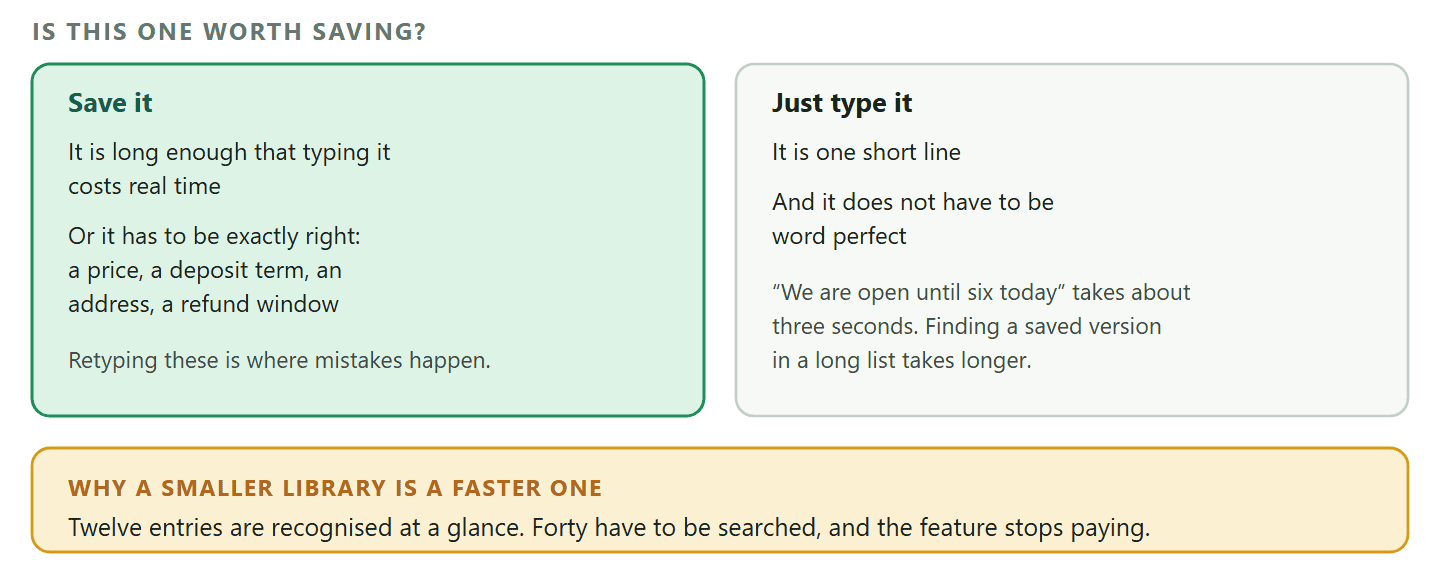
Before you save anything, apply one rule: a quick reply is only worth having if retrieving it beats typing it.
Two things decide whether a saved reply passes.
- How long the answer is. A one-line answer is usually faster typed. A six-line deposit policy with a bank account number in it is not, and getting it wrong has consequences.
- How exactly it has to be right. Prices, terms, addresses, refund windows, opening hours over a bank holiday. These are the sentences where retyping introduces a mistake, and a saved version is worth having even when it is short.
That gives a shortlist rather than a library. The things worth saving are long, or exact, or both. Everything else is faster from your fingers.
The counterintuitive part: A smaller library is a faster library, and the speed is not linear. Twelve entries can be scanned in one glance. Forty cannot, so every retrieval becomes a search rather than a recognition, and the feature stops paying for itself well before you notice. If you already have forty, deleting thirty will make the remaining ten feel faster than they do now.
Three Different Things Called WhatsApp Quick Replies
Worth thirty seconds, because two of them are for you and one is for the customer, and guides mix them constantly.
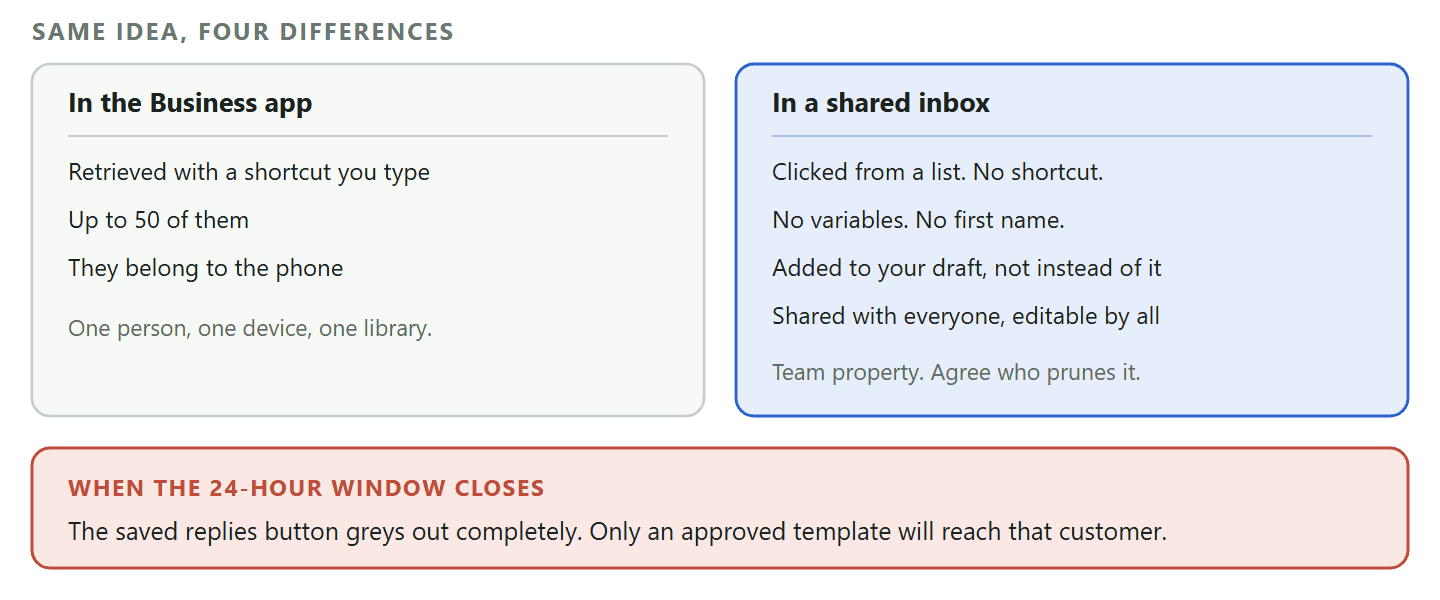
- Quick replies in the WhatsApp Business app. Saved text with a keyboard shortcut, so typing a slash and a word pulls up the message. Yours, on your phone, up to 50 of them.
- Saved replies in a shared inbox. The same idea for a team, on the WhatsApp Business Platform. You click one from a list rather than typing a shortcut, and the library belongs to everybody.
- Quick reply buttons. Not saved text at all. These are buttons your message carries, which the customer taps instead of typing. A completely different feature that unfortunately shares the name.
The first two save your time. The third saves theirs, and it is the one that changes how a conversation goes, so it has its own section further down.
Setting Them Up on the WhatsApp Business App
Setting up WhatsApp quick replies takes ten minutes, there is a hard limit of 50, and one decision determines whether you ever use them.
In the WhatsApp Business app, quick replies live in the business tools alongside greeting and away messages. You create one by writing the message, giving it a keyboard shortcut, and saving. Sending one means typing the slash and the shortcut in a chat, then picking the reply that appears.
WhatsApp caps the library at 50. That sounds generous and it is roughly four times more than most businesses can use well.
The decision that matters is the shortcut, because the shortcut is how you retrieve the thing under pressure.
- Name it for the question, not the answer.
/hours,/deposit,/parking,/where. You are searching with the customer’s question in your head, so the shortcut should be the word they just used. - Keep them short and unambiguous.
/depand/dellook identical at speed./depositand/deliverydo not. - Do not encode a system.
/faq1,/faq2,/faq3is a filing scheme that requires you to remember an index. Nobody does.
Saved Replies in a Shared Inbox, and What Changes
Once more than one person answers the number, the same feature behaves differently in four ways, and three of them will catch you out.
On the WhatsApp Business Platform the equivalent lives in the inbox rather than on a phone. In DMly it is called Saved replies, created and used from the reply box: open a conversation, open the saved replies list, add a title and a message, save. Four things behave differently from the app and they are all worth knowing before you build a library.
- There is no keyboard shortcut. You click a saved reply from the list. Typing a slash does nothing, so every retrieval is a recognition task rather than a typing one, which makes the three-second test above matter more, not less.
- There are no variables. The text is inserted and sent exactly as written, so a saved reply cannot fill in a first name or a booking time. Write replies that read correctly for everybody, and add the personal part by hand.
- Inserting adds to your draft rather than replacing it. The text lands at the end of whatever is already in the reply box, on a new line. That is genuinely useful once you know it: type a personal opener, drop the standard answer underneath, edit, then send.
- The library is shared with the whole team. Everybody sees every reply, and anybody can edit or delete any of them, including the ones you wrote. Treat it as team property and agree who prunes it.
The one that surprises people at the worst moment: WhatsApp only allows a free-form message for 24 hours after the customer’s last message. Once that window closes, the reply box locks and the saved replies button greys out: you cannot insert one at all, because a saved reply is an ordinary message and ordinary messages are not allowed. The template picker sits outside the locked area and stays clickable, so the answer is an approved template rather than a saved reply. On Messenger and Instagram the same thing happens after seven days.
Which is worth planning around. The replies you use most are answers to people mid-conversation, so they are almost always inside the window. The ones you reach for when chasing somebody who went quiet are exactly the ones you will not be able to use, and those need to exist as templates instead.
The Replies Actually Worth Saving
A working set for a service business, chosen because each one is long, exact, or both.
Start with these and add only what your own inbox proves you need.
- Opening hours, with the exceptions. Not “we are open nine to five”, which is faster typed, but the full version including the day you close early and what happens on bank holidays.
- Where you are and how to park. The single longest thing most local businesses type, and the one that costs a customer most when it is vague.
- Prices for your three most-asked services. Exact matters. This is the reply that stops a member of staff guessing.
- The deposit and cancellation policy. Long, exact and occasionally contested, so it needs to be identical every time somebody asks.
- How to pay. Whatever your route is, written once, correctly, with no chance of a mistyped detail.
- Delivery or turnaround times. With the honest range rather than the best case.
- What to do before an appointment. Bring this, avoid that, arrive when. The reply that reduces cancellations quietly.
- The out-of-hours holding message. When you are answering personally at ten at night and want to set expectations without a conversation.
- The polite decline. For work you do not do or areas you do not cover. Written calmly once, rather than curtly at the end of a long day.
- The refund and returns process. Steps and timings, because this is where an improvised answer becomes a promise you did not mean to make.
- The review request. A short thank you and a link, sent when somebody is happy, which is the moment nobody has a sentence ready for.
- The wrap-up. A line that closes a conversation warmly and leaves the door open, so a chat ends rather than trailing off.
Notice what is not in the list: greetings. “Hi, thanks for messaging” fails the three-second test and, worse, a saved greeting inserted by hand is slower and less reliable than a greeting message that sends itself. That belongs to automation, which is the next section.
Four of Them, Written Out
The difference between a saved reply that works and one that reads like a form letter is usually two sentences of care, so here are four done properly.
Each of these passes the three-second test, works without a name in it, and ends by moving the conversation somewhere.
Deposit and cancellation policy. The longest and most-contested thing most service businesses type, and the one where a paraphrase creates an argument later.
To hold the appointment we take a deposit of 30, which comes off the final price on the day.
If you need to move or cancel, just let us know more than 24 hours before and the deposit moves with you. Inside 24 hours we cannot refund it, because the slot usually cannot be filled that late.
Happy to book you in whenever suits. What day works?
Where we are and parking. Write it the way you would give directions to a friend who is already late, and put the awkward part first.
We are on the first floor above the bakery, and the door is the blue one to the left of the shop rather than the shop entrance itself, which catches almost everybody out.
Free parking behind the building for two hours, entrance from Mill Lane. If it is full, the street outside is free after 4pm.
See you soon.
The polite decline. Worth writing calmly once, because the version typed at the end of a long day is always shorter than it should be.
Thanks for asking. That is not something we take on, so I would rather tell you now than waste your time.
For what it is worth, the people who usually do this well locally are worth a look, and if anything else comes up we would be glad to help.
The wrap-up. Conversations on WhatsApp trail off rather than end, which leaves a thread that feels unfinished to the customer and unresolved to you.
That is you booked in. You will get a reminder the day before, and if anything changes just message this number and we will sort it.
Anything else you need in the meantime?
Notice the shape all four share: the fact, then the awkward part stated plainly, then a question. The question is what stops a stock answer feeling like a stock answer, and it is the part most saved replies leave out.
Writing One That Survives Being Reused
A saved reply is read by hundreds of people over a year, which changes how you should write it.
Four rules, and the last one is the one that gets skipped.
- Write it so it works with no name at all. Especially in a shared inbox, where variables are not filled in, a reply that begins “Hi there” and works for everyone beats one written for a specific customer and reused badly.
- Answer, then offer. Give the fact first and the next step second: the hours, then “would you like me to book you in for Thursday?” A stock answer that ends without a question ends the conversation.
- Keep it to what you would actually say. Read it aloud. If it sounds like a form letter, it will read like one, and it undoes the informality that makes WhatsApp work.
- Put a date in anything seasonal, and diary its removal. The Christmas hours reply that is still being sent in March is the classic failure, and it costs more trust than it ever saved time.
Quick Reply Buttons: When the Customer Taps Instead of Typing
The other thing this phrase means, and the one that changes the shape of a conversation rather than its speed.
On the WhatsApp Business Platform you can send a message carrying buttons the customer taps. Instead of asking “would you like to book, ask a question, or speak to somebody?” and waiting for a typed answer, you send three buttons and get a clean, unambiguous reply.
Meta’s limits on these are tight and worth designing around.
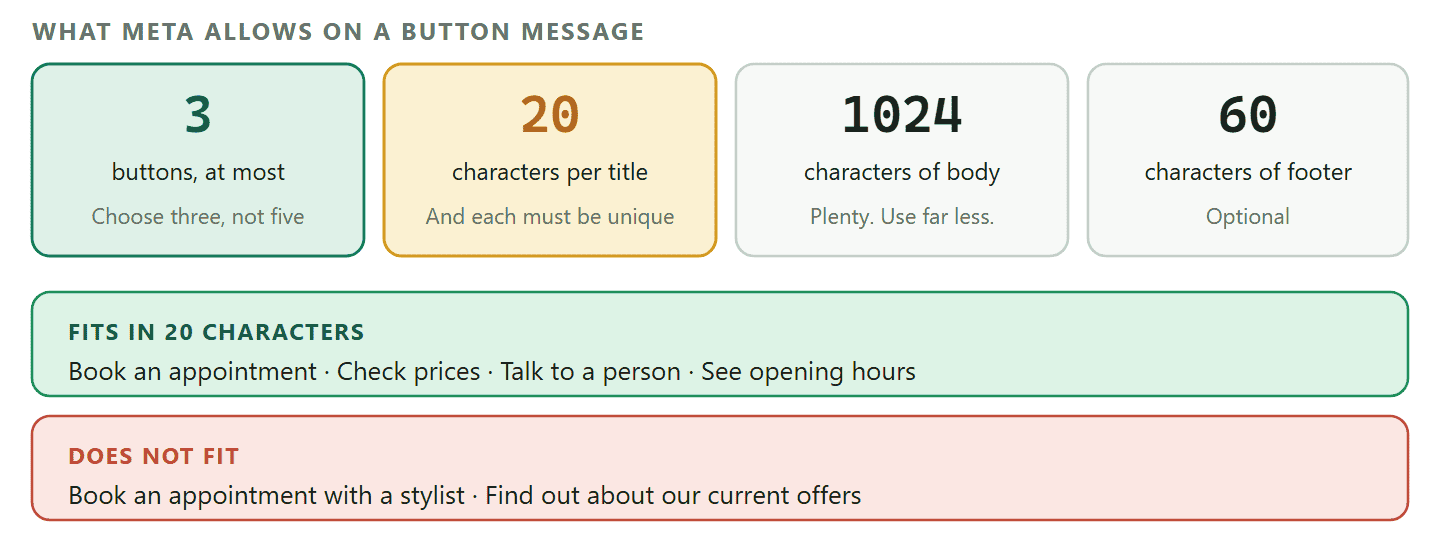
- Up to 3 buttons on an interactive reply-button message.
- Button titles of 20 characters, and they must be unique if you use more than one.
- Body text up to 1,024 characters, and a footer of up to 60 if you use one.
- Each button also carries an ID of up to 256 characters, which is how your system knows which one was tapped.
Twenty characters is the constraint that shapes everything. “Book an appointment” fits. “Book an appointment with a stylist” does not, so the choice has to be phrased as a short verb.
Why buttons beat a numbered list: The alternative is asking somebody to reply “1, 2 or 3”, which works until a customer types “2 please”, “two”, or “the second one”, and your automation has to guess. A tapped button returns a value rather than a sentence, so the branch that follows is reliable. If you are building anything automated, that reliability is the whole reason to use them.
Where WhatsApp Quick Replies Stop and Automation Starts
The clearest line in this whole subject: a quick reply needs a human to insert it, and an automated message does not.
That single difference decides which one you should build.
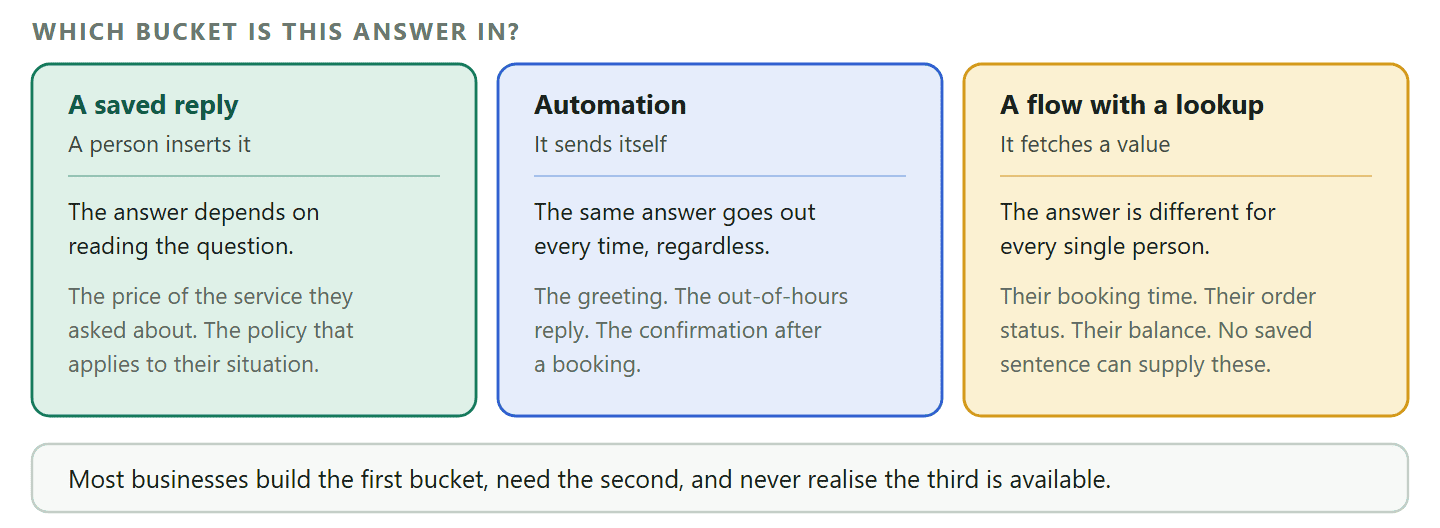
- If the same answer should go out every time, without judgement, it is not a quick reply. The greeting when somebody first messages, the out-of-hours reply, the confirmation after a booking: all of these should send themselves. Saving them as text you insert by hand means they only happen when somebody is looking.
- If the answer depends on reading the question, it is a quick reply. Prices for the service they asked about, the policy that applies to their situation, the honest turnaround for the job they described.
- If it needs to look something up, it is neither. Their booking time, their order status, their balance: those need a flow that can fetch a value, not a saved sentence.
Most businesses arrive at quick replies because they are drowning, and quick replies only bail out one of the three buckets above. Our guide to WhatsApp business automation covers the other two, and our comparison of the three account types covers when a shared inbox becomes the thing you actually need.
The Two That Should Never Be Quick Replies
Greeting messages and away messages look like the same feature and behave completely differently, and putting them in the wrong bucket is the commonest mistake on this subject.
The WhatsApp Business app offers both alongside quick replies, which is exactly why people confuse them. The difference is who does the work.
- A greeting message sends itself when somebody messages you for the first time, or after a long gap. Nobody has to be holding the phone.
- An away message sends itself outside the hours you set, which is the only reason it is useful: it works at eleven at night, which is when it is needed.
- A quick reply waits for a person. If nobody is there, nothing happens.
So saving “Thanks for your message, we will get back to you shortly” as a quick reply is doing by hand something the software will do on its own, and doing it worse, because it only fires when you are already looking at the screen. If you are already there, you can answer properly.
The one honest use for a saved holding message: There is a version worth keeping: the reply you send when you are at the phone, have read the question, and genuinely cannot answer it for a few hours. That is not “we will get back to you shortly”, it is “I have seen this, I need to check the diary, I will come back to you before five”. It is specific, it is true, and no automation can decide when to send it.
Everything else divides into three buckets, and the bucket decides what to build rather than how to word it.
Keeping the Library Small
WhatsApp quick replies are the one feature that gets worse with use, so fifteen minutes twice a year is the maintenance nobody schedules and everybody needs.
- Delete anything you have not used since the last review. If you cannot remember using it, you were not finding it, which is the same as it not existing except that it slows the list down.
- Check every number and date. Prices, deposit amounts, turnaround times, seasonal hours. A saved reply is the most confident way to send an out-of-date fact.
- Read three of them aloud. Tone drifts. A reply written in a rush two years ago often reads colder than you would speak now.
- Move anything that should be automatic. If the same reply goes out every single time, it has outgrown the library.
- In a shared inbox, do it together. The library belongs to everybody, so pruning it alone means deleting somebody else’s work without asking.
DMly puts saved replies in a shared inbox so every colleague answers with the same price, the same policy and the same tone, and automates the ones that should never wait for a person. See the plans, including the 7-day free trial.
Frequently Asked Questions
How many WhatsApp quick replies can I save?
The WhatsApp Business app allows up to 50. That is far more than most businesses can use well: past a dozen or so, finding the right one takes longer than typing the sentence, which is the whole point of the feature.
Can I delete a quick reply?
Yes, in both the app and a shared inbox. In a shared inbox the important detail is that the library belongs to the workspace rather than to you, so anybody on the team can delete anybody else’s. Agree who does the pruning before somebody removes the deposit policy on a Friday.
What is the difference between WhatsApp quick replies and automated messages?
A quick reply needs a person to insert it. An automated message sends itself. If the same answer should always go out, regardless of what was asked, build it as automation instead: a greeting or an out-of-hours reply saved as text you insert by hand only happens when somebody is at the keyboard.
Can a saved reply include the customer’s name?
Not automatically in DMly’s shared inbox: saved replies do not support variables, so the text goes out exactly as written. The workaround is built into how insertion works, because the reply is added to the end of your draft rather than replacing it. Type the personal opener yourself, insert the standard answer underneath, then send.
Why has the saved replies button gone grey?
Because the 24-hour window has closed. WhatsApp only allows free-form messages for 24 hours after the customer’s last message, and a saved reply is an ordinary message. The template picker stays available, so an approved template is the way to reach that person.
Can I use quick replies in more than one language?
Yes, and the sensible approach is one entry per language with the language in the title, such as “Opening hours EN” and “Opening hours FR”. It is also the fastest way to fill a library with entries nobody can scan, so only do it for the handful you genuinely send in both.
What are quick reply buttons and are they the same thing?
No. Quick reply buttons are buttons your message carries that the customer taps, rather than saved text you insert. They are limited to three per message with titles of 20 characters, and their advantage is that a tap returns a clean value instead of a typed sentence your automation has to interpret.
Save Twelve, Not Fifty
WhatsApp quick replies are worth having and worth having narrowly. Twelve replies you can find without thinking will save you more time than fifty you have to search, and the difference shows up on the busiest day rather than the quietest one.
The test at the top of this page is the whole method. Long or exact, save it. Short and forgiving, type it. Sends itself every time, automate it. Different for every person, build a flow. Sort your existing library into those four piles this afternoon and most of it will not survive, which is the point.
So write the long ones, write the exact ones, and let your fingers handle the rest.
Writing about WhatsApp automation, bookings and growth for local business.
Turn WhatsApp into your busiest channel.
Start free and run message, bookings, payments and reviews in one place.
