
WhatsApp Business Profile Setup, and the Name Customers See
Think about the last time an unknown number messaged you on WhatsApp.
You did not read anything. You looked at the top of the screen, saw a number or a name, maybe saw a small photo, and decided in about two seconds whether this was a person, a business or a scam. Only if it survived that did you tap through to see who it actually was.
That is the audience for your WhatsApp Business profile, and it changes what matters. Most guides on this subject treat the profile as a page to be filled in, and grade you on completeness. The useful question is different: of the eight or nine things you can type in, which ones does a stranger see before they decide, which ones do they see only if they tap, and which ones will they never see at all?
The answers are more surprising than they should be. In particular, the business name you carefully typed into the name field is very often not the name your customer sees, and Meta documents exactly why.
What a WhatsApp Business Profile Is, and the Three Layers Nobody Separates
Your profile is not one thing. It is three layers with completely different reach, and almost all the advice you have read treats them as equal.
A WhatsApp Business profile is the set of business details attached to your WhatsApp number: your name, a photo, a category, a description, an address, opening hours, an email address, a website and, if you sell products, a catalogue. It exists on the free WhatsApp Business app and on the WhatsApp Business Platform, the paid route businesses use once they outgrow one phone.
Separating it into three layers is what makes the setup decisions obvious.
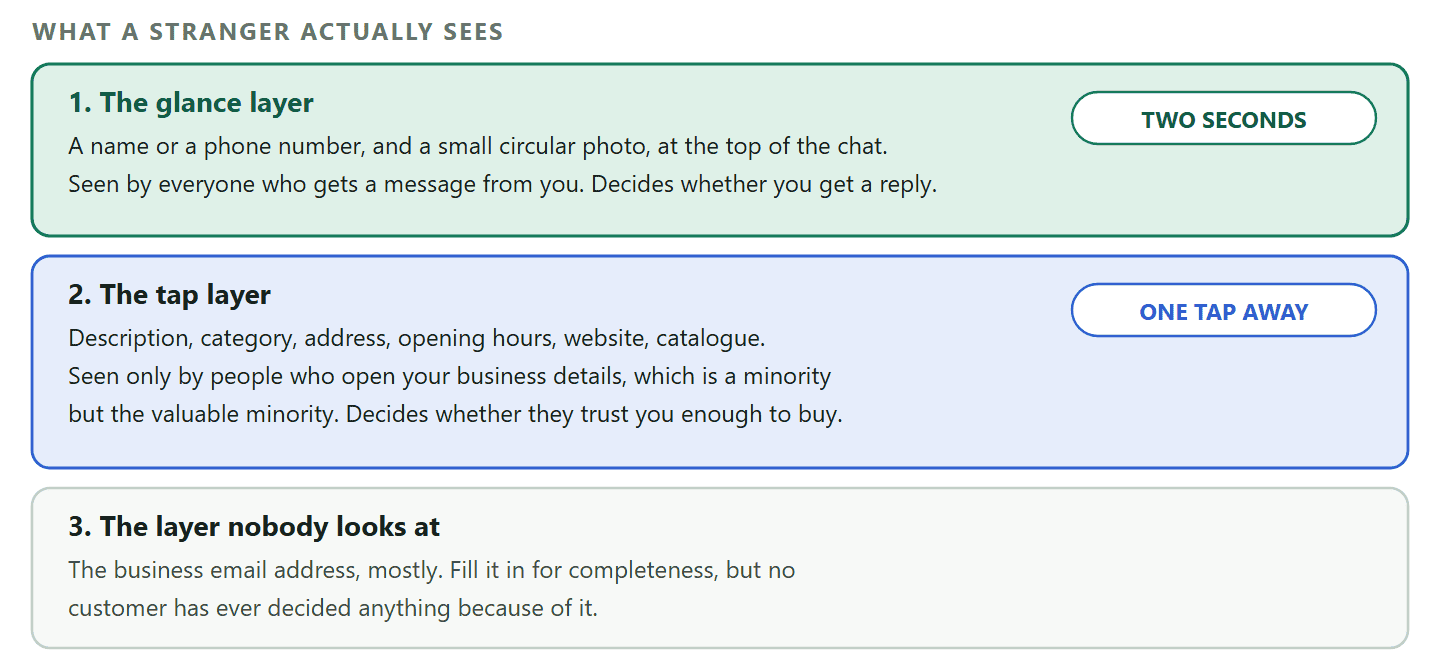
- The glance layer. What appears at the top of the chat before anyone taps anything: a name or a number, and a small circular photo. This decides whether you get a reply at all.
- The tap layer. What appears when somebody opens your business details: description, address, hours, email, website, catalogue. This decides whether they trust you enough to buy.
- The invisible layer. Fields that exist because a form has them. Nobody is going to make a decision based on your business email address.
Most advice spends its effort on the tap layer, because that is where the boxes are. The glance layer has one and a half fields in it, and it carries almost all of the weight.
The Name Customers See Is Not Always the Name You Typed
This is the part almost nobody covers, and it explains why a business with a beautifully filled-in profile still shows up as a bare phone number in somebody’s chat list.
Three different things decide what appears above your messages, and they override each other in a fixed order.
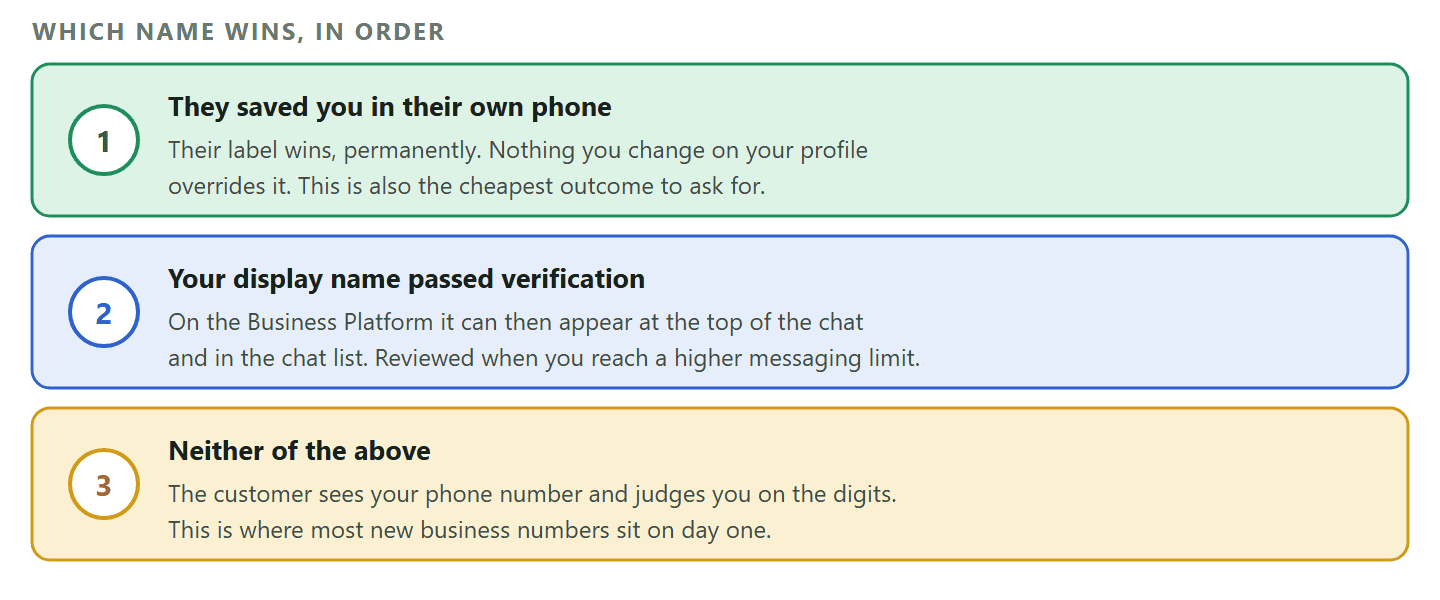
- The customer’s own address book wins, always. Meta puts it plainly: if a WhatsApp user edits your profile name in their WhatsApp app, the name they set appears instead of yours. Somebody who saved you as “plumber guy” sees “plumber guy” forever, whatever you do to your profile.
- Then your approved display name, if you have one. On the WhatsApp Business Platform, your display name appears in your profile from day one, and Meta says it can also appear at the top of individual chat threads and the chat list once your number is approved through display name verification.
- Otherwise, your phone number. Everyone else sees the digits, and decides from the digits.
That middle step is the one worth understanding, because it is not something you apply for on day one. Meta verifies the display name automatically when you reach a higher messaging limit, checking it against its published display name guidelines. When it completes you get a notification and your number’s name status becomes approved or declined, and you can appeal a rejection.
The practical version: A new business number on the Platform starts out showing digits to strangers. Volume and good behaviour move you up a messaging limit, and the name review comes with it. So the name at the top of the chat is earned rather than typed, which is exactly the opposite of what the setup screen implies.
Two more rules on that name, both documented and both easy to trip over. You can change a display name 10 times in any 30-day period, so it is not a field to experiment in. And once a changed name is approved you have 14 days to re-register the phone number to apply it; miss that window and the whole review starts again.
There is one shortcut that beats all of it, and it costs nothing. Ask people to save your number. A saved contact shows your name to that customer whatever your verification status, permanently, which is the same outcome the whole display name process chases. One line at the end of a good conversation does it: save this number so you can find us next time.
Setting Up a WhatsApp Business Profile, Field by Field
Creating a WhatsApp Business profile on the free app takes about ten minutes, and the order below puts the fields that matter first rather than the order the form asks for them.
Download the WhatsApp Business app from the Play Store or the App Store, accept the terms, and register the number you want customers to use. Verification is an SMS code or a call, exactly as on the personal app.
Use a number you are prepared to keep. A number can only be active on one WhatsApp account at a time, so registering an existing personal number moves it across. Two questions decide this: would you be comfortable with a member of staff answering it, and would you still have it if you closed the business tomorrow? If either answer is no, get a second number before you start, because moving a business number later means losing the chat history that lives on it.
After that, the profile itself. Here is what each field is actually for.
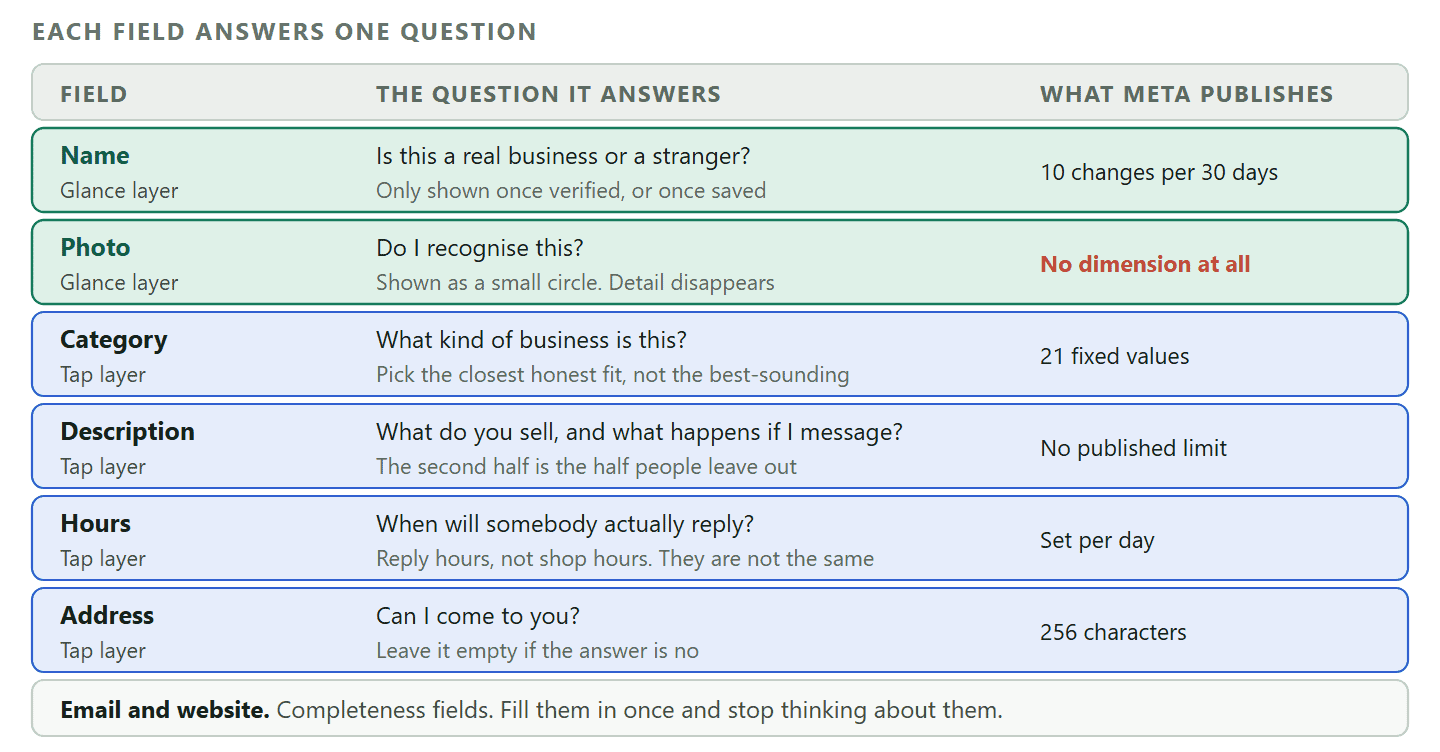
- Business name The name on your signage and your invoices, spelled identically everywhere else you exist. Not a slogan, not keywords. Read the section above before you assume customers will see it.
- Profile photo Your logo, cropped so it survives a circle. Details below.
- Category One choice from a fixed list, which tells a customer at a glance what kind of business you are.
- Description A short paragraph explaining what you do and inviting a message. This is the field most businesses waste.
- Opening hours The field that sets expectations about replies, which is a different job from telling people when the shop is open.
- Address Worth adding if you have a place customers come to, and worth skipping if you do not.
- Email and website Completeness fields. Fill them in, then stop thinking about them.
The Profile Photo: What Meta Requires, Which Is Nothing
Every guide on this subject gives you an exact pixel size for the profile photo. Meta publishes no such requirement, and repeating one is how a good instruction becomes a made-up one.
Meta’s documentation of the business profile lists a profile picture as a field and says nothing about its dimensions, its format or its file size. There is no minimum, no maximum and no recommended square. So the honest instruction is about what the photo has to survive rather than what it has to measure.
It has to survive being small and round. WhatsApp shows profile photos in a circular crop at roughly the size of a thumbnail, so a wide logo with the business name written along the bottom loses the name entirely. A logo mark with plenty of space around it survives; a full logo lockup does not.
A thirty-second test that beats any pixel dimension: Put your intended photo on your phone screen, hold the phone at arm’s length and squint. If you cannot tell what it is, neither can a customer glancing at a chat list. Crop tighter and try again. That test catches the real failure, which is detail rather than resolution.
Two more things worth knowing. A photo of a person works better than a logo for a one-person business, because it is instantly distinguishable from a spam account and logos at thumbnail size mostly look like each other. And the default grey avatar is actively harmful: it is the first thing a scam number also has, so an empty photo puts you in the same visual category as the account your customer just blocked.
Choosing a Category, and the List Meta Actually Recognises
The category is a glance-layer field doing a tap-layer job, and there are far fewer options than people expect.
On the WhatsApp Business Platform, the category is not a free text field: Meta recognises exactly 21 values. They are other, auto, beauty, apparel, education, entertainment, event planning, finance, grocery, government, hotel, health, non-profit, professional services, retail, travel, restaurant, alcohol, online gambling, physical gambling and over-the-counter drugs.
Two things follow from that list. First, most businesses are not on it precisely, so the exercise is picking the closest honest fit rather than the flattering one. A mobile hairdresser is beauty, not professional services. A driving instructor is education. A physiotherapist is health.
Second, four of the twenty one are regulated categories, and choosing one of them is a declaration about what you sell rather than a label. If you genuinely sell alcohol or run gambling, WhatsApp’s messaging policy has rules for you that do not apply to a florist, and picking a neutral category to avoid them is the kind of thing that ends an account rather than protecting one.
Why the category is worth ten seconds of thought: It is one of very few structured facts about you that WhatsApp holds. It travels into the business details panel, and it is the thing that lets a stranger place you in a second. Getting it merely close is fine. Getting it wrong makes the rest of the profile read as careless.
The Description and the About Line Are Two Different Fields
Your profile has a long field and a short one, they do different jobs, and most businesses put the same sentence in both.
The description is the paragraph in your business details. Its job is to answer, in the time it takes to read two lines, what you do, who for, and what happens if the customer sends a message. Almost every bad description fails on the third one.
A bad description reads: “We are a leading provider of quality solutions committed to customer satisfaction.” That is four hedges and no information. A good one reads: “Family-run salon in Kano. Cuts, colour and braids, Tuesday to Saturday. Message us to check today’s availability, and we will reply with the next three slots.”
The second one works because it says where you are, what you sell, when you are open and what will happen next. The last clause is the one that earns messages, and it is the one almost nobody writes.
The about field is the short status line. It is a different field in Meta’s own profile specification, sitting alongside the description rather than replacing it, and it is best used for the thing that changes: “Closed for Eid, back Monday”, “Booking two weeks ahead”, “Delivery paused this week”. Businesses that leave the default text there for a year are wasting the only field on the profile designed to be temporary.
One documented limit worth having: your profile address field accepts free text up to 256 characters. That is more than enough for a street address and nowhere near enough for driving directions, so put the address in it and put the directions in your description or your website.
Hours, Address and the Expectation You Are Really Setting
Your opening hours field is not telling customers when the shop is open. It is telling them how long they will wait for an answer, and those are usually different.
This is the field businesses fill in most carelessly and regret most often. A salon open until eight in the evening publishes eight in the evening, then nobody looks at WhatsApp after six because the last two hours are the busiest on the floor. Every message sent at seven arrives at a business that has advertised itself as available, and lands on somebody the next morning.
The fix is to publish the hours you answer messages, and treat the shop hours as a separate fact that belongs in the description. If they happen to be the same, you have lost nothing. If they are not, you have stopped promising something you cannot do.
Hours also do a second job once you automate anything, because an automated reply outside hours is only reassuring if the hours are true. An away message saying you will reply when you open is helpful; the same message sent while your profile claims you are open reads as a brush-off.
The address is simpler than people make it. Add it if customers come to you. Skip it if they do not. A mobile trades business that publishes a home address gains nothing and gives away something. There is no penalty for leaving it empty, and the trust it buys applies only to businesses with a door.
The Catalogue, and Why It Is Not a Profile Job
A catalogue turns your profile into a small shop, and it is the one part of this setup that deserves its own afternoon rather than a checkbox.
The catalogue lets you list products or services with a name, a description, a price, images and a link, so a customer can browse without leaving the chat and send you a specific item rather than a vague question. On the business side it changes conversations from “how much is it” to “can I have this one”.
It also has real work behind it: photographing everything at a consistent size, keeping prices current, and deciding what happens when an item goes out of stock. A half-finished catalogue with three items and a placeholder photo is worse than none, because it is the clearest possible signal that nobody is minding the account.
We cover the setup, the item structure and the sync properly in our guide to building a WhatsApp Business catalogue. For the purposes of your profile, the decision is binary: either commit to keeping it current or leave it out.
What a WhatsApp Business Profile Cannot Do
Four things people expect from this profile that it does not provide, worth knowing before you spend a morning optimising for them.
- It is not a search listing. Nobody searches WhatsApp and finds your business. There is no directory, no discovery feed and no ranking. Every customer who reaches you got your number from somewhere else: a link, a QR code, an ad, a card, a friend. Our guide to click-to-chat links covers the ways to actually put your number in front of people.
- It carries no reviews or ratings. There is no star rating on a WhatsApp profile and no way for a customer to leave public feedback. Whatever social proof you have lives on your Google listing or your website.
- Filling it in does not make you verified. A complete profile and a verified account are unrelated. The badge, properly called Official Business Account status, is a separate process with its own requirements, and it is not available on the free app at all.
- It does not answer anybody. A profile sets an expectation; a reply keeps it. A business with a perfect profile and a two-day reply time is worse off than one with a plain profile and a fast answer, because the profile raised the expectation the reply then broke.
What Changes When You Move to the Business Platform
The profile you built on the app mostly carries across, but three things behave differently and one of them is the badge everybody asks about.
Businesses move from the free app to the WhatsApp Business Platform when one phone stops being enough: several people answering, automation, message templates, a shared inbox. Our comparison of the three WhatsApp account types covers that decision, and this section covers only what happens to your profile when you make it.
The same fields exist. Meta’s profile specification carries a name, an about line, an address, a description, an email, a profile picture, a list of websites and a category, which is the app’s profile with slightly different labels.
Three things are genuinely different.
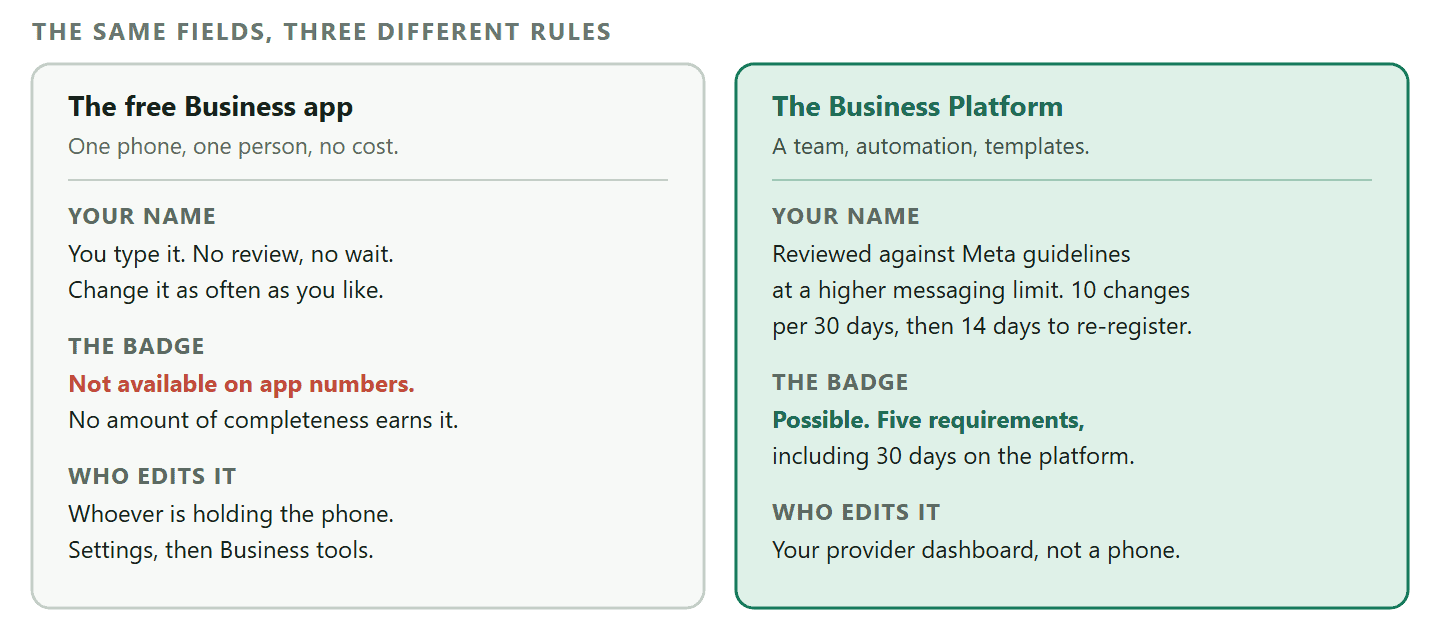
- The name goes through review. On the app you type a name. On the Platform your display name is checked against Meta’s guidelines, automatically, when you reach a higher messaging limit. That review is what lets your name appear above your messages rather than only in your profile.
- The badge becomes possible, and only here. Official Business Account status has five documented requirements: comply with the WhatsApp Business Messaging Policy, have the number registered on the Platform for at least 30 days, have the business portfolio verified through Business Verification, have two-step verification turned on for the number, and have the display name approved. Meta states plainly that it does not grant that status to WhatsApp Business app phone numbers, so this is genuinely a reason to move rather than a feature you were missing. The document step is the slow one, and our walkthrough of Facebook Business Verification covers it.
- Somebody else may be editing it. On the Platform the profile is usually managed through whichever provider connected your number rather than on a phone. In DMly it sits on the Profile tab under Bot Setup, then WhatsApp, with the catalogue on the Commerce tab beside it. That is worth knowing simply because the person who updates your hours is no longer the person holding the handset.
One Meta page disagrees with another, and it matters here: Meta’s older Business Help Centre article on display names still says an Official Business Account requires a “notable business” with a substantial presence in the press. The current developer documentation lists the five administrative requirements above and no notability test at all. We follow the developer documentation, which is the newer of the two, but if somebody quotes the notability rule at you, that is where they read it.
The Fifteen-Minute Review Worth Doing Twice a Year
Profiles do not rot all at once. They rot one changed fact at a time, and the customer who finds the stale one is the customer who needed you.
Put it in the diary for January and July, and do the review from a second phone that has never saved your number, because that is the only way to see what a stranger sees.
- Message yourself from the other phone. Look at the top of the chat. Name or number? That single observation tells you which row of the order above you are in.
- Squint at the photo. At thumbnail size, from arm’s length, is it recognisable as you?
- Read the description as a stranger. Does it say what you sell and what happens if they message? Cut anything that is neither.
- Check the hours against last month. Not against your intentions. Against when somebody actually answered.
- Open every link. Website, catalogue items, anything with a URL. Dead links on a profile are common and they read as abandonment.
- Check the about line. If it still says you are closed for a holiday that has passed, that is the whole review earning its place.
DMly connects your number to the WhatsApp Business Platform so a team can share one inbox, replies can be automated outside your hours, and your profile stops promising more than one phone can deliver. See the plans and what each one includes.
Frequently Asked Questions
Can I use the same number for WhatsApp and WhatsApp Business?
A number can only be active on one WhatsApp account at a time, so registering it in the WhatsApp Business app takes it off the personal app. Most businesses use a separate number so that staff can answer the business one and nobody has to hand over a personal phone. If you are already on the Business Platform, the picture is different: our guide to coexistence covers running the app and the platform on one number, and what that switches off.
Why do customers still see my phone number instead of my business name?
Because the name only rises above your messages in two cases: the customer has saved you in their own address book, or your display name has passed Meta’s display name verification on the Business Platform. On a new number that has done neither, strangers see digits. Ask people to save your number, which is free and permanent for that customer.
What size should my WhatsApp Business profile photo be?
Meta does not publish a required size, format or file size for the business profile photo, so any guide giving you an exact pixel dimension is guessing. What matters is that the image survives a small circular crop: use a logo mark rather than a full logo lockup, keep the important part in the middle, and check it at thumbnail size before you commit.
Can I change my business name after setting up my profile?
Yes, and on the free app it is just a field. On the Business Platform there are limits worth knowing: you can change a display name 10 times in a 30-day period, the new name goes through review, and once it is approved you have 14 days to re-register the number before the review expires and starts again.
Does a complete WhatsApp Business profile get me the green tick?
No. The badge is Official Business Account status, it is blue rather than green now, and it has five specific requirements including Business Verification and 30 days on the Business Platform. Meta does not grant it to WhatsApp Business app numbers at all, so no amount of profile completeness will produce it on the free app.
Can people find my business by searching WhatsApp?
No. WhatsApp has no business directory and no discovery search, so a profile is something customers see after they have your number rather than a way of getting found. Getting the number in front of people is a separate job, done with links, QR codes, ads and everywhere your business already appears.
Should I add my home address if I work from home?
No. The address field earns trust only for businesses customers can visit. If yours is mobile or online, leave it blank and use the description to say which areas you cover, which answers the same question without publishing where you sleep.
Do the Two Seconds First
If you have twenty minutes, spend fifteen of them on the name and the photo, and five on everything else. That split feels wrong because there are so many more boxes further down, but it matches where the decision actually gets made.
Then send yourself a message from a phone that has never saved your number, and look at the top of the screen. Whatever is up there is your WhatsApp Business profile, as far as most people will ever be concerned.
Writing about WhatsApp automation, bookings and growth for local business.
Turn WhatsApp into your busiest channel.
Start free and run message, bookings, payments and reviews in one place.
