
The 3 Types of WhatsApp Accounts, and When to Switch
Nobody regrets the WhatsApp account they picked. They regret the day they had to move off it.
That is the useful way to think about the types of WhatsApp accounts, because on day one they all look the same: a number, a chat list, a green tick on your sent messages. The differences only show up later, on the day a second person needs to answer, or the day you want to message 400 customers, or the day the phone with everything on it goes missing.
So this guide answers two questions rather than one. Which of the types of WhatsApp accounts fits what you are doing now, and what will it actually cost you to change your mind. The second answer has changed recently, and in your favour.
The Three Types of WhatsApp Accounts, Plainly
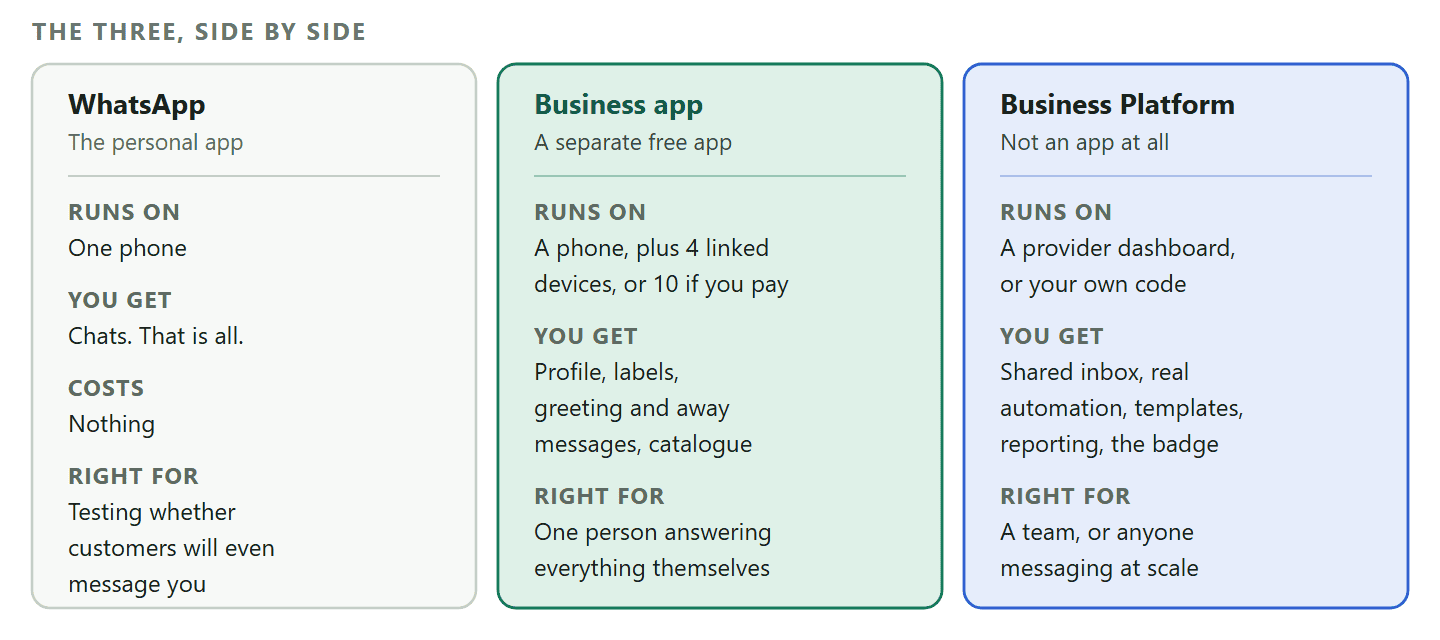
There are two products Meta sells to businesses and one it sells to everybody, and almost all the confusion comes from the third one being called by four different names.
Here they are, with the names Meta itself uses.
- WhatsApp. The personal app. The one on nearly everybody’s phone. Free, instant, no business features, and not designed for you to run a business on.
- WhatsApp Business app. A separate free app you download instead of the personal one. Meta describes it as being for small businesses who personally manage conversations with customers. It looks and feels like WhatsApp with a business profile bolted on, and it runs on a phone.
- WhatsApp Business Platform. Not an app at all. Meta describes it as being for medium to large businesses communicating with customers at scale through programmatic access. You reach it through software: a provider’s dashboard, or your own code.
That third one is where the names multiply. WhatsApp Business API, WhatsApp Cloud API, the Business Platform and, from providers, “the API” all mean the same thing in practice. If somebody quotes you for “the WhatsApp API”, they mean the Business Platform.
One name that means something else: A verified account is not a fourth type. Official Business Account status, the badge people still call the green tick and which is now blue, is something a number on the Business Platform can be granted. It sits on top of the account type rather than beside it, and it is not available on the free app at all.
The Personal App: Fine Until the Second Person Needs Access
Plenty of good businesses start here and there is nothing wrong with it, as long as you know exactly which day it stops working.
A personal WhatsApp account is a phone number and a chat list. No business profile, no labels, no automated replies, no way to tell a customer enquiry from your sister’s birthday plans. For a one-person operation taking a handful of messages a week, that is genuinely enough, and moving to something more structured before you have the messages to justify it is a way of feeling busy rather than being busy.
The day it stops working is the day somebody else needs to answer. Not because Meta forbids it, but because the only way to share a personal account is to share the phone, and every version of that is bad: a handset in a drawer that everyone has to walk to, or a password in a group chat, or a member of staff carrying the company’s entire customer history in their pocket.
The other trap is quieter. If your business number is your personal number, you cannot leave it behind. Not when you take a holiday, not when you sell the business, not when a customer starts messaging at midnight.
The WhatsApp Business App: What Is Free, and Where It Stops
This is the right answer for most small businesses, and knowing its four real limits is more useful than another list of its features.
The Business app is a separate free download. Same conversations, same interface, plus a business profile, labels for organising chats, saved quick replies, a greeting message for first contact, an away message for outside your hours, and a catalogue. For a salon, a garage or a tutor, that is a properly equipped setup and it costs nothing.
Here is where it stops, in the order businesses actually hit it.
- Devices, not people. A WhatsApp account can have up to four linked devices alongside the phone, and the phone has to come online at least once every 14 days or those linked devices disconnect. Meta sells a way past part of that: a Meta Verified subscription for the app raises it to 10 devices and agents, alongside a verification badge, impersonation protection and priority support. Either way it is a device limit rather than a team feature: everyone is looking at the same inbox with no idea who is replying to whom, and nothing assigns a conversation to a person.
- Broadcasting is no longer simply free. Sending one message to many people from the app used to be the free workaround everybody used. That has changed, and it now costs money per message. We worked through what it costs and what the alternatives are in our guide to sending bulk messages on WhatsApp.
- The automation is a doormat, not a system. A greeting message and an away message are two fixed replies. They cannot ask a question, branch on the answer, look anything up, or book anything. They are useful and they are not automation.
- The badge is closed to you. Meta states that it does not grant Official Business Account status to WhatsApp Business app phone numbers. This is not a matter of applying well or waiting longer. If the badge is what you are after, the app is the wrong product, and the slow step is the document check we walk through in our guide to Facebook Business Verification.
The honest test: If one person can comfortably read every message that arrives, the Business app is almost certainly the right answer and anything else is overhead. The moment two people are both meant to be watching it, the app is costing you more in confusion than the alternative costs in money.
The Business Platform, and Why “Going Direct” Means Something Different Now
Most of what you have read about the API being technical and expensive to run describes a product Meta switched off in October 2025.
The WhatsApp Business Platform is not something you download. Your number is registered with Meta, and then software talks to Meta on your behalf: a provider’s dashboard, your own code, or both. What you gain is not a longer feature list so much as a different shape. The conversation stops living on a handset and starts living in a system that several people can work in, that can be automated, and that survives a lost phone.
The out-of-date part is the warning that comes with it. For years, the honest caution about going direct to Meta was that you would need a developer, a server, hosting and somebody to maintain it. That described the On-Premises API, which you ran yourself. Meta has retired it in stages: from January 2024 new features went to Cloud API only, from July 2024 numbers could only be registered for Cloud API, and the final supported version expired on 23 October 2025, after which messages to or from numbers still registered for it are not delivered at all.
What survives is Cloud API, which Meta hosts. There is no server to rent and no infrastructure to maintain, and access to the API itself is free. So the real question about going direct is no longer about hosting. It is about whether you want to build the things a provider already gives you.
What “direct from Meta” still means in practice: Cloud API is an interface, not a product you can use. There is no inbox, no contact list, no campaign screen, no reporting and no way for a non-technical colleague to answer a customer. Somebody has to write all of that. Going direct is the right call for a business with developers and an existing system to plug into, and the wrong call for almost everyone else, but the reason is now “you would have to build an app” rather than “you would have to run a server”.
The provider route is the other one: your number is registered through a platform that already has the inbox, the automation, the templates and the reporting built. DMly is one of those, and the honest version of the pitch is that you are buying the software around the API rather than access to the API, because Meta gives that away. If you want the access and pricing question on its own, our guide to the WhatsApp Business API for small businesses works through it in detail.
Coexistence: the Rung That Turned Out Not to Be a Rung
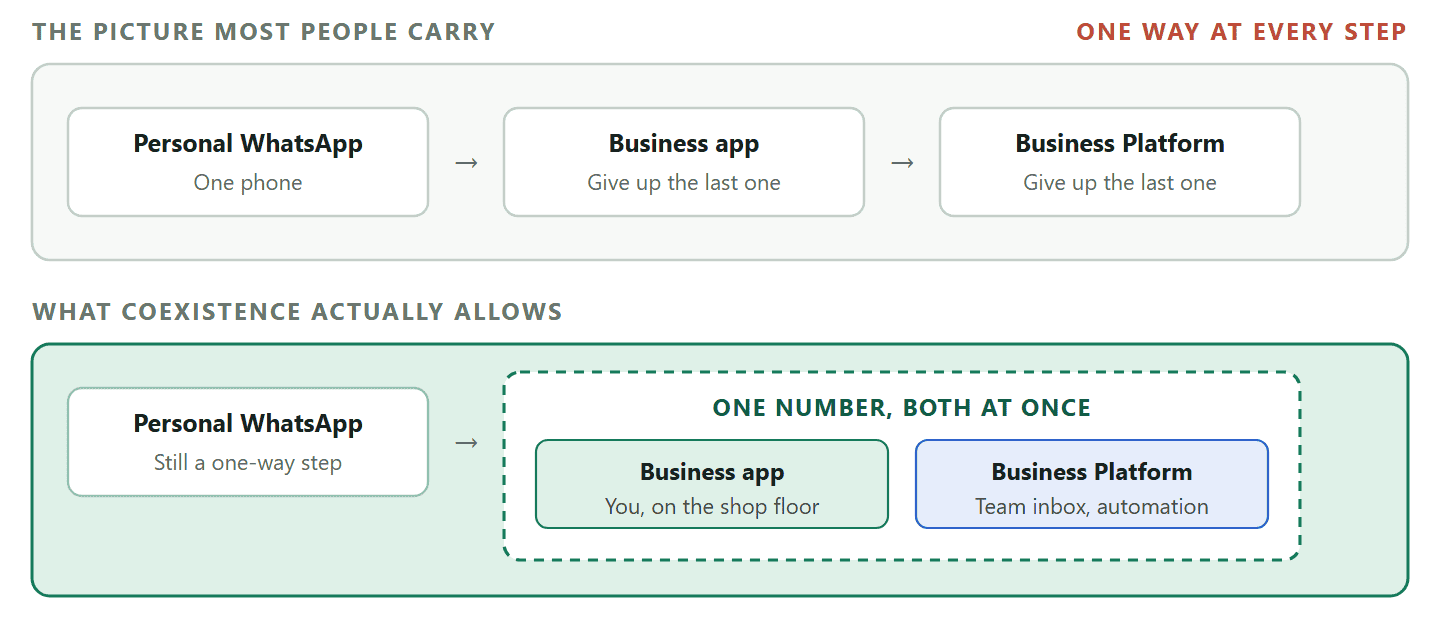
The old rule was that a number could be on the Business app or the Platform but never both. That is no longer true, and it changes the whole calculation.
For most of WhatsApp’s history, moving a number to the API meant losing the app on that number. It was a one-way door, and it is why so many businesses stayed on the app for a year longer than they should have: the cost of being wrong was giving up a working setup.
Coexistence removes that. A number connected in coexistence mode keeps working in the WhatsApp Business app and runs on the Platform at the same time. In DMly it is a deliberate choice at signup: the connect screen has a separate section, Already using the WhatsApp Business app?, with its own Connect in co-existence mode button. Pick that instead of the normal one and the rest of the Meta signup is identical.
Two behaviours follow, and both are the point.
- Messages sent from the phone appear in the shared inbox too, recorded against the same contact, so a colleague at a desk sees what the owner just typed on the shop floor.
- Automation can run on the same number as the app. If you would rather the bot stay quiet on any conversation you have personally answered from the phone, there is a Pause the bot when I reply from the phone app switch, off by default, and it pauses the bot for that one contact only.
Coexistence is not pure gain, and it is not a toggle: Turning it on switches some things off on your number, including broadcast lists, and it unlinks your companion devices. It is also a connection choice made once at signup rather than a setting: to move a number between modes you disconnect and reconnect it. Read our guide to what coexistence turns on and turns off before you choose, because the list of what it disables is the part nobody mentions.
One claim you may meet and we will not repeat: that coexistence is unavailable in particular countries. Meta’s coexistence documentation specifies no country restrictions, and the country lists circulating cannot be traced back to Meta. Ask your provider about your own market rather than trusting a list, ours included.
The One Thing Moving Up Takes Away
Almost every guide to the types of WhatsApp accounts presents the Platform as pure gain. It is not, and the thing it takes away is the thing app users rely on most.
On the WhatsApp Business app you can message anybody. Type a number, start a chat, send whatever you like, whenever you like. That freedom feels like the baseline because it is how personal WhatsApp has always worked.
The Business Platform does not work that way. Meta allows an ordinary typed message only inside 24 hours of the customer’s last message to you, a period Meta calls the customer service window. The clock starts on their message, not on yours, and replying does not reset it. Once it closes, the only thing WhatsApp will deliver to that person is a template Meta approved in advance.
So a business that moves up on Monday and tries on Tuesday to message a customer who last wrote three days ago discovers that it cannot, in the plainest possible way. This surprises people badly, and it is the single most common regret in the first fortnight after switching.
There is a second constraint stacked on top. Meta caps how many different customers you can start a conversation with in any rolling 24 hours, on a ladder that runs 250, 2,000, 10,000, 100,000 and then unlimited. The cap is set at the level of your business portfolio and shared by every number in it, so adding a second number buys no extra headroom, and a new business starts at the bottom of the ladder.
The workaround, and it is a better habit anyway: Get people to message you first. A click-to-chat link on your website, a QR code on the counter or on a receipt, and a line in your email signature all open a fresh 24-hour window the moment somebody taps them, at which point you can talk normally. Businesses that plan this before they switch barely notice the window; businesses that discover it afterwards spend a month annoyed by it.
Worth being clear about what the trade actually is. You give up the ability to message anyone at any time, and you get replies that go out at three in the morning, a colleague who can pick up a conversation you started, and a customer history that survives a broken phone. For a business with one person and forty customers that is a bad trade. For a business with a team and a diary it is not close.
The Three Types of WhatsApp Accounts, Compared
The three types of WhatsApp accounts in one table, with the rows most comparison tables get wrong marked honestly.
| What you are asking | Personal WhatsApp | WhatsApp Business app | WhatsApp Business Platform |
| How you use it | An app on a phone | An app on a phone | Software talking to Meta |
| Business profile | None | Full profile, catalogue included | Same fields, edited by your provider |
| People who can answer | Whoever holds the phone | Phone plus 4 linked devices, or 10 with Meta Verified, and no assignment either way | A team, with conversations assigned |
| Automated replies | None | A greeting and an away message | Flows that ask, branch, look up and book |
| Messaging a list | Not for business use | Paid per message | Approved templates, at scale |
| Reporting | None | Basic counts | Delivered and read, per campaign |
| Official Business Account badge | Not applicable | Not available at all | Possible, after five requirements |
| What it costs | Nothing | Free, except broadcasts | Per message to Meta, plus your platform |
| Running it alongside the app | No | It is the app | Yes, in coexistence mode |
The row worth pausing on is the badge. Comparison tables across this whole category list the Business app as having “limited eligibility” for verification. It has none: Meta states it does not grant Official Business Account status to WhatsApp Business app phone numbers.
What Each One Actually Costs
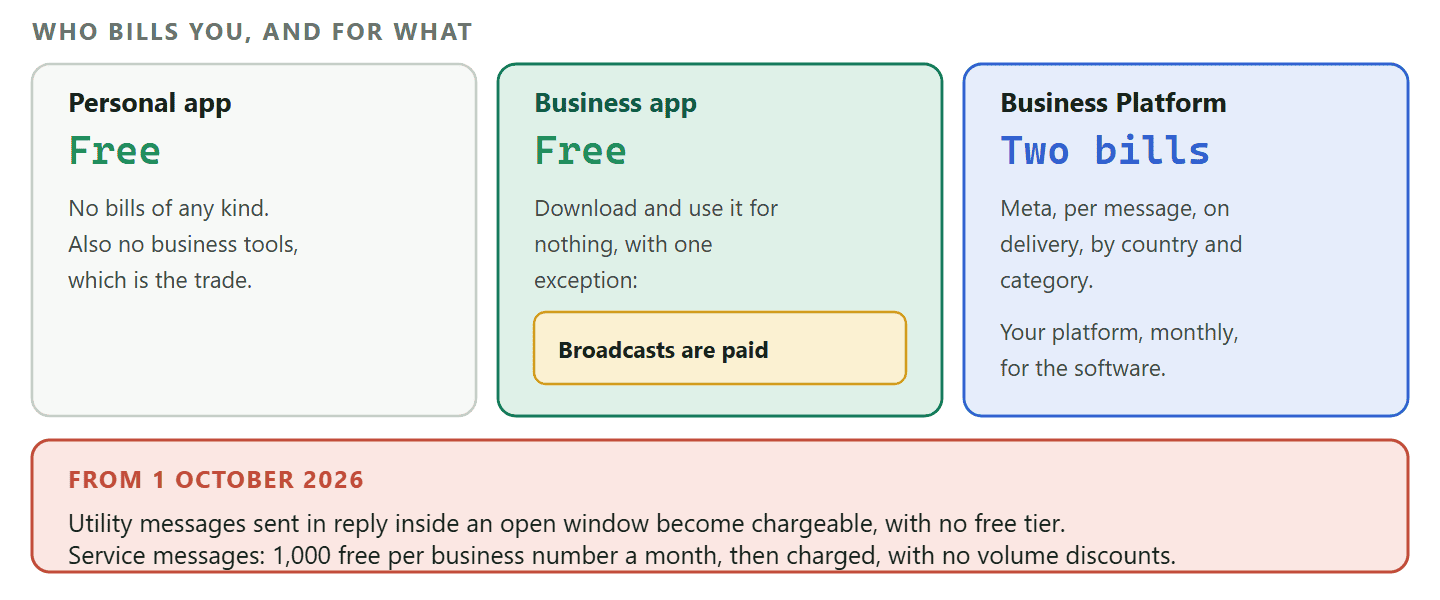
Two of the three types of WhatsApp accounts are free to use and one of those has a paid feature buried in it. The Platform is the one people misprice, usually by assuming a monthly fee is the whole bill.
The personal app and the Business app are free to download and use. The exception is broadcasting from the Business app, which is now charged per message.
The Business Platform has two separate bills and they behave differently.
- What Meta charges you. Since 1 July 2025 Meta bills per message, and only when a message is actually delivered. What you pay depends on the recipient’s country and on which of four categories the message falls into: marketing, utility, authentication or service. Today Meta does not charge for service messages, or for utility messages sent in reply to a customer inside an open conversation.
- What your platform charges you. A subscription for the software: the inbox, the automation, the reporting. DMly’s documentation states that DMly adds no markup on Meta’s rates, so Meta’s bill reaches you at Meta’s prices, and every plan has a 7-day free trial with no credit card.
The date that changes this arithmetic: 1 October 2026: From 1 October 2026 Meta starts charging for utility messages sent in reply to a customer inside an open conversation, which are free today, and that is the part most businesses will actually see on the bill. Service messages, the ordinary replies you send inside that same window, become billable too, but every business phone number gets 1,000 free service messages a month, resetting monthly with no rollover, so the service side stays free unless you are past a thousand replies. Above the allowance service messages get no volume discounts, so a long back-and-forth costs in a straight line. If you are pricing the Platform against the app, price it against the new rules rather than today’s. We worked it through in our guide to the October pricing change.
The way to sanity-check the cost is not to compare a subscription against zero. It is to compare it against the hours somebody currently spends retyping the same answer, and against the enquiries that arrive at nine in the evening and are answered at eleven the next morning.
Five Questions That Settle It
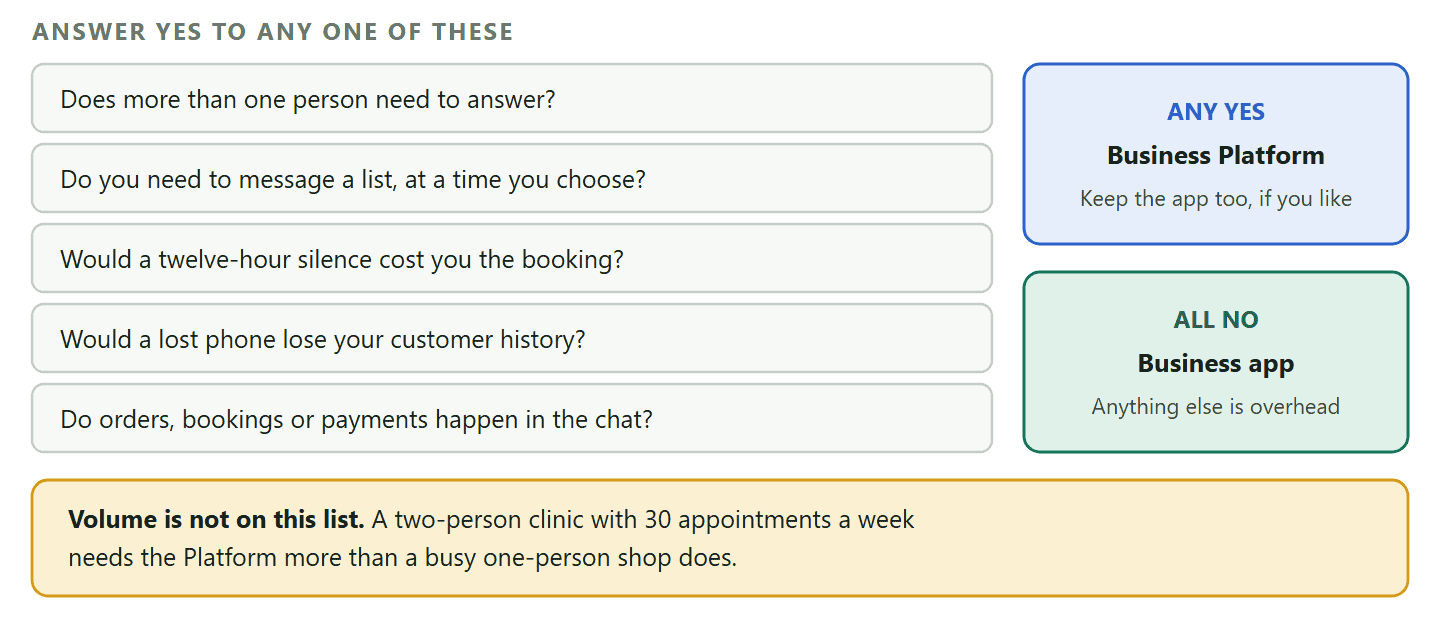
Skip the feature lists. These five questions decide the answer for almost every business, and the first one decides it on its own most of the time.
- How many people need to answer? One, and the Business app is right. Two or more, and you need a system that knows who is handling what, because a shared handset is not a shared inbox.
- Do you need to start conversations, or only finish them? Answering people who message you first is easy on any of the three. Reaching out first, to a list, at a time you choose, is what the Platform is for and what the app now charges for.
- Would a customer notice if nobody replied for twelve hours? If a late reply costs you the booking, you need automation that answers at two in the morning, and two fixed auto-replies will not do it.
- What happens if the phone is lost tomorrow? On the app, the answer is usually “we lose everything and start again”. That question alone moves plenty of businesses, and it has nothing to do with volume.
- Is WhatsApp where the money is made, or just where questions arrive? If orders, bookings and payments happen in these conversations, the Platform stops being an upgrade and starts being where your business runs.
Notice that only one of those five questions is about size. The usual way of ranking the types of WhatsApp accounts, by how big you are, gets the trigger wrong. The usual advice, that you graduate to the API once you are big enough, gets the trigger wrong. A two-person clinic with 30 appointments a week needs the Platform far more than a one-person shop selling 300 items a month, because the clinic has reminders to send, a second person to coordinate and a no-show cost. Volume is not the trigger. Coordination and timing are.
What Switching Actually Costs
The real question behind choosing an account type, and the one this whole guide has been building towards.
Moving from the personal app to the Business app is easy and mostly invisible: same number, chats carried across, nothing to relearn. Moving from the Business app to the Platform is the one worth planning, and coexistence changes what that plan looks like.
If you connect normally, the number moves to the Platform and the phone app stops working on it. If you connect in coexistence mode, both keep running. Either way, three things are worth knowing before the day.
- Templates take time. Anything you want to send to somebody who has not messaged you in the last 24 hours has to be an approved template, and approval is not instant. Submit the ones you know you need before you need them.
- Chat history does not fully follow. What comes across, and how far back, depends on how you connect. Save anything you would be upset to lose, especially photos customers have sent you, before the switch rather than after.
- Going back down is the expensive direction. Moving up is a signup. Moving back means disconnecting the number and rebuilding, and anything that lived in the platform rather than on the phone stays behind.
Which is why the honest advice is not to pick the most powerful option or the cheapest one. Pick the one that matches how many people answer today, and pick a provider that lets you add the other one to the same number when that changes.
DMly connects your existing number in coexistence mode, so the phone keeps working while a shared inbox, automation and templates run alongside it. Every plan has a 7-day free trial and no credit card is needed to start. See the plans and what each one includes.
Frequently Asked Questions
Can I use the WhatsApp Business app and the API on the same number?
Yes, in coexistence mode. Connected that way, your number keeps working in the WhatsApp Business app while the Platform runs alongside it, and messages you type on the phone appear in the shared inbox too. Connected the normal way, the phone app stops working on that number, so the mode you pick at signup decides it. Coexistence also switches some things off, including broadcast lists, so read what it changes before you choose.
Which of the types of WhatsApp accounts should a new business start with?
The WhatsApp Business app, almost always. It costs nothing, it takes ten minutes, and it gives you a real business profile before you have spent anything. Start on the Platform only if you already know two people will be answering, or that you need to send reminders and confirmations from day one. Everyone else should let the five questions above tell them when to move, rather than paying for capability they are not using yet.
Can I have two WhatsApp Business accounts?
Yes, on separate numbers. A phone number can only be active on one WhatsApp account at a time, so two accounts means two numbers. Businesses commonly run one number for sales and another for support, or a separate number per branch.
Is the WhatsApp Business API free?
Access to Cloud API is free and Meta hosts it, so there is no fee for the API itself and no server to rent. What you pay for is messages, billed by Meta per message on delivery, and the software you use to work with it. A provider’s subscription buys the inbox, automation and reporting that Meta does not supply.
Can I get the WhatsApp API without a provider?
Technically yes, and the reason to think twice has changed. It is no longer that you would have to run a server, because Cloud API is hosted by Meta. It is that the API has no interface: no inbox, no contact list, no campaign screen, nothing a colleague can use. Going direct means building all of that, which is sensible if you have developers and an existing system, and a lot of work if you do not.
Which type of WhatsApp account is best for e-commerce?
The Business Platform, and earlier than most shops expect. Not because of order volume but because e-commerce is full of messages that have to go out at a particular moment to a particular person: order confirmed, out for delivery, cart abandoned. Those are exactly the messages the app cannot send on its own.
Can the WhatsApp Business API send bulk messages?
Yes, using templates Meta has approved in advance, and only to people who opted in. That is the supported route for messaging a list at scale, and the rules around it are worth reading before your first campaign rather than after.
Does the WhatsApp Business app get the verified badge?
No. Meta states that it does not grant Official Business Account status to WhatsApp Business app phone numbers. Comparison tables that show the app as having limited eligibility are wrong: the badge exists only on the Business Platform, where it has five documented requirements including 30 days on the platform and a verified business.
Pick for Today, Choose the Exit
The three types of WhatsApp accounts are not a ranking, and the most capable one is not the best one for a business that does not need it. A one-person shop running well on the free Business app is not behind.
What is worth deciding deliberately is the exit. Know which of the five questions above would flip your answer, and pick a setup that lets you add the next thing to the number you already have rather than starting again on a new one.
Writing about WhatsApp automation, bookings and growth for local business.
Turn WhatsApp into your busiest channel.
Start free and run message, bookings, payments and reviews in one place.
