
WhatsApp Ads: What Is Actually Live, and What It Can Target
Here is the entire list of what Meta uses to decide who sees an ad in WhatsApp Status: your country or city, your language, the channels you follow, and how you have reacted to ads before.
That is it. If somebody has connected WhatsApp to Meta’s Accounts Center, their wider ad preferences come into it too. Otherwise, four signals.
Compare that with a Facebook campaign, where you can target a lookalike of your buyers, or people who visited a page last week, and the picture of WhatsApp ads changes shape. This is not a precision instrument. It is a very large, very cheap-feeling room with 1.5 billion people walking through it every day, and almost no way to pick which ones see you.
Which is worth knowing before you budget, because it decides what kind of campaign is worth running at all.
Two Different Things Are Called WhatsApp Ads
Almost every argument about whether these work is two people talking about different products. Separate them first.
There are ads that appear inside WhatsApp, and ads elsewhere that send people to WhatsApp. They have almost nothing in common except the name.
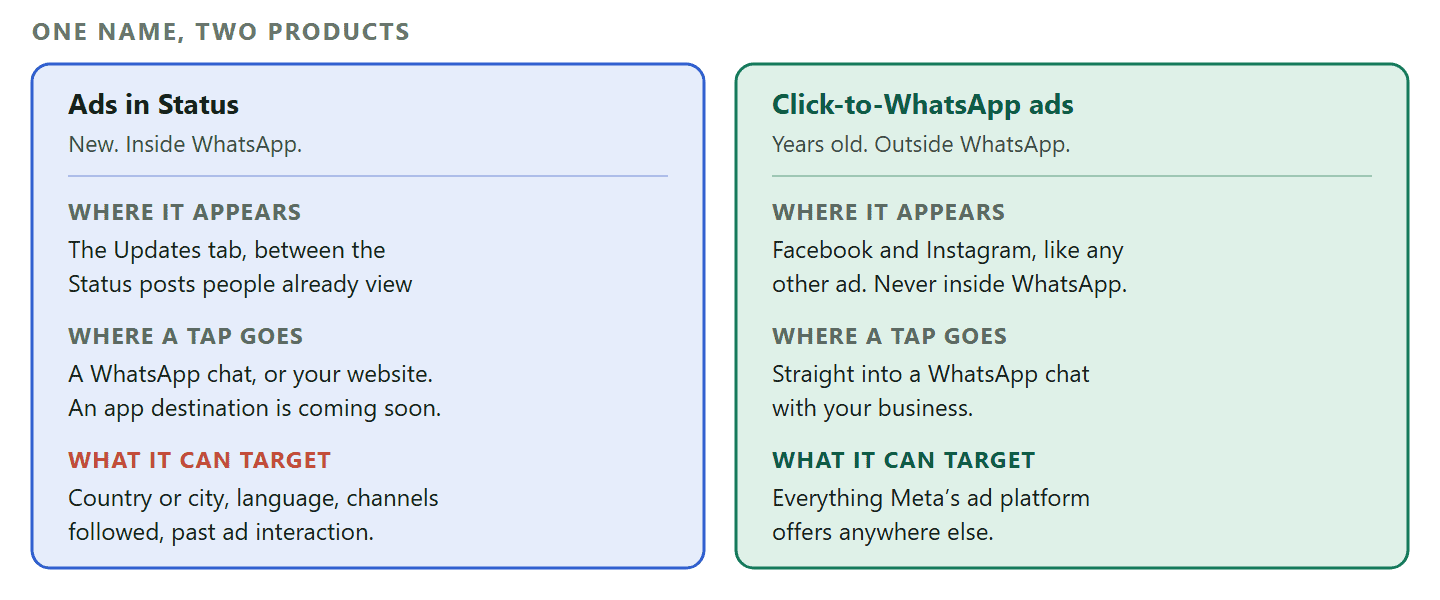
- Ads in Status. New. Your ad appears in WhatsApp’s Updates tab, between the Status posts a person is already flicking through, and a tap can open a chat with you or go to your website. This is the thing people mean when they say WhatsApp started running ads.
- Click-to-WhatsApp ads. Years old and thoroughly proven. Your ad runs on Facebook or Instagram like any other, and instead of going to a landing page the button opens a WhatsApp conversation with your business. Nothing about it appears inside WhatsApp at all.
The second one is where almost all the money and almost all the results are today, and it is where a small business should start. The first is genuinely new inventory and worth understanding, but the targeting section below explains why it suits a different kind of campaign.
Where the boundary sits between our own guides: This page is about ads as a product: what is live, what Meta can target, and what a campaign costs. Our complete guide to click-to-WhatsApp marketing is about the programme around it, across every entry point, including how you tell which ad, link or QR code actually produced a lead. If you want attribution, start there.
Ads in Status: What They Are and Where They Sit
A full-screen ad in the tab people open to see what their friends are up to, and Meta has been careful about which tab that is.
WhatsApp’s Updates tab holds two things: Status, the photos and videos that disappear after a day, and Channels, the one-way broadcasts people follow. Meta says 1.5 billion people visit that tab every day. An ad in Status appears between the organic Status posts somebody is already tapping through.
Two things are worth being precise about, because this is the part that generated the most noise when it was announced.
- The ads are only in the Updates tab. Not in personal chats, not in group chats, not in calls. Meta’s wording is that if you only use WhatsApp to chat with friends and family, nothing about your experience changes.
- They cannot be built from your messages. Personal messages, calls and statuses stay end-to-end encrypted, and Meta states plainly that they cannot be used to show ads.
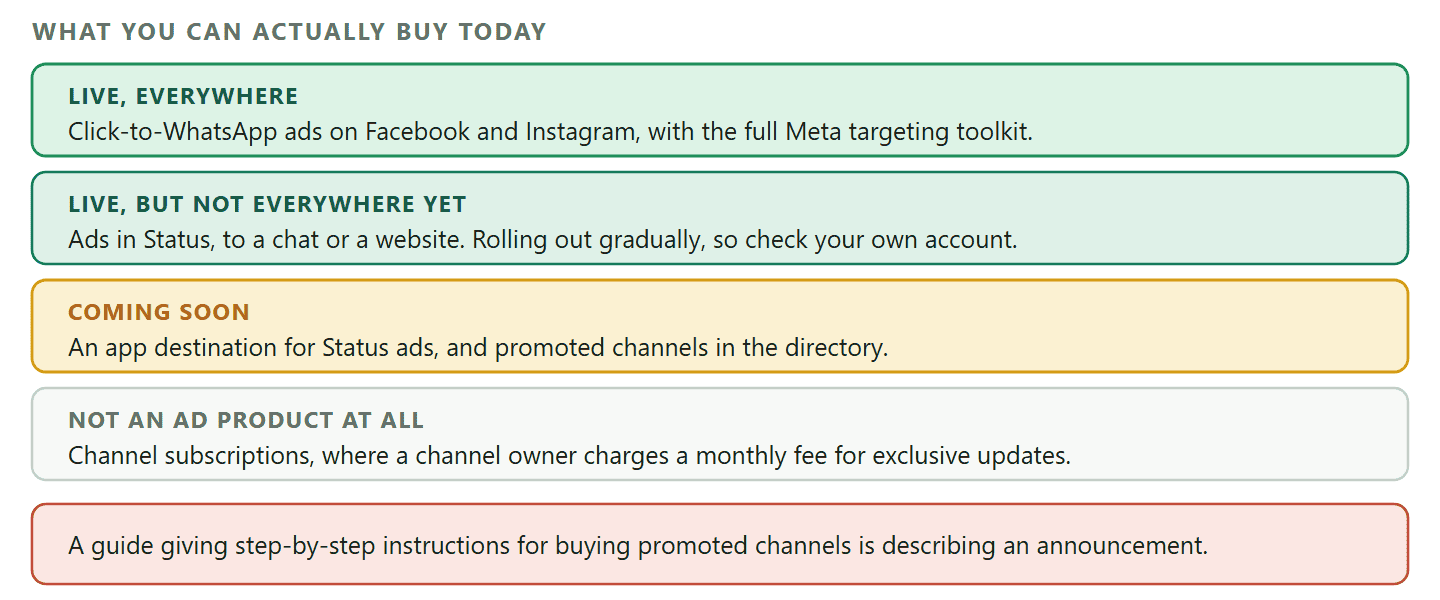
From the advertiser’s side, a Status ad is an extension of a Meta campaign rather than a separate system: you run it alongside your Facebook and Instagram placements. A tap can take somebody into a WhatsApp chat with you, or to any page on your website. An app destination is announced and coming soon rather than available.
Check availability before you plan anything: Meta’s own help centre says today that ads in Status and Channels are rolling out gradually and may not be available to you yet. The rollout started in some markets well ahead of others, and India has been furthest along. Open Ads Manager and look for the placement before you build a campaign around it, because there is no point writing creative for inventory you cannot buy.
What Meta Can and Cannot Use to Target Them
This is the section that should decide whether you spend anything here, and it is missing from every other guide on this subject.
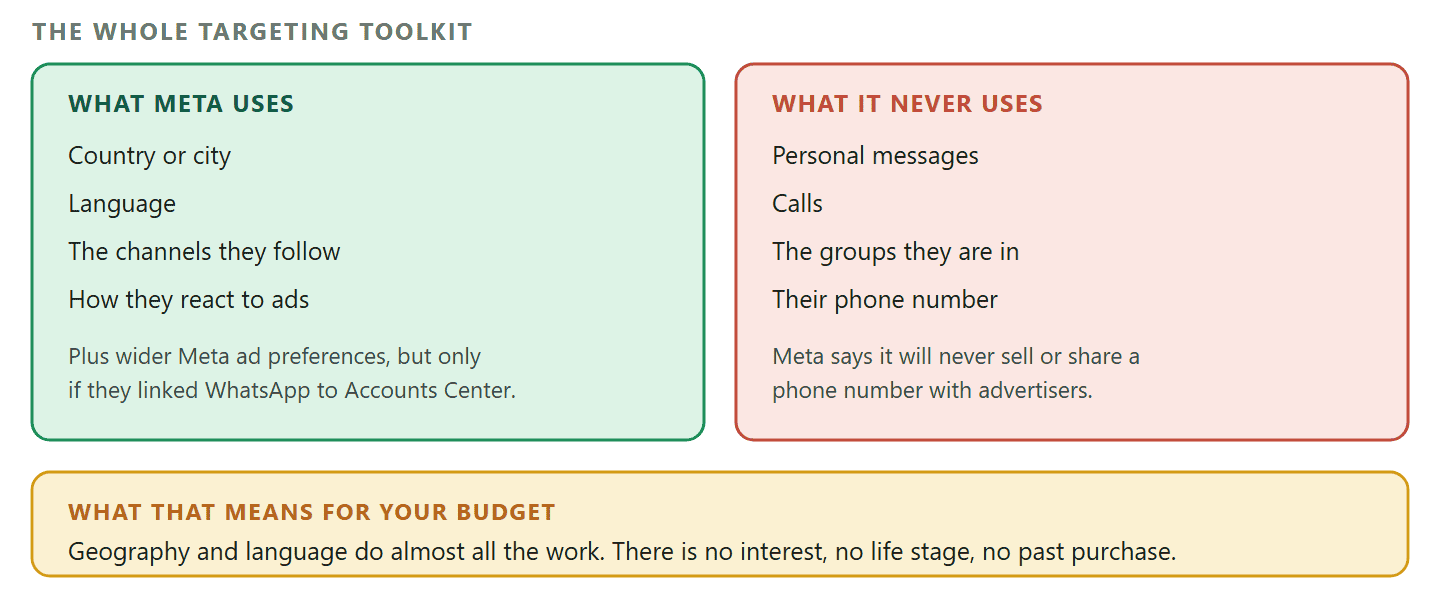
Meta is explicit about the signals behind an ad in Status. It uses limited information: your country or city, your language, the channels you follow, and how you interact with the ads you see. If a person has connected their WhatsApp account to Meta’s Accounts Center, their ad preferences and information from across their Meta accounts come into it as well.
And it is explicit about what is excluded. Your personal messages, calls and the groups you are in are not used to determine the ads you see. Meta also says it will never sell or share your phone number with advertisers.
For a person, that is reassuring. For an advertiser, it is a constraint that changes the campaign.
- You cannot target an interest. Not gardening, not weddings, not new parents. The nearest thing available is the channels somebody follows, which is a blunt proxy and only exists for people who follow channels at all.
- You cannot retarget from your own data in the usual way. Anyone whose WhatsApp is not connected to Accounts Center is reachable only through those four signals.
- Geography and language do most of the work. Which is fine for a business whose customers are defined by geography, and close to useless for one whose customers are defined by what they care about.
Who this actually suits: A business whose market is a place. A restaurant, a clinic, a driving school, a car dealership, a gym. If your honest answer to “who is your customer” is “people within six miles who speak this language”, Status is a genuinely good fit and the thin targeting costs you nothing. If your answer involves an interest, a life stage or a past purchase, spend the money on a click-to-WhatsApp ad instead, where all of that is available.
Promoted Channels and Subscriptions: Announced, Not Buyable
Worth understanding, worth planning for, and not worth waiting on if you need customers this quarter.
Alongside Status ads, Meta announced two more things for the Updates tab. Promoted channels would let a business pay to have its channel surfaced in the directory where people browse for channels to follow. Channel subscriptions let a channel owner charge a monthly fee for exclusive updates.
Promoted channels are labelled coming soon on Meta’s own advertising page for WhatsApp. So if you have read a guide with a step-by-step for buying them, that guide is describing something that has been announced rather than something you can buy.
What is worth doing now is the free half. A channel costs nothing to run, and a channel with a real audience is what a promoted channel product would eventually amplify. Building one this quarter is a reasonable bet; budgeting for promotion of it is not, yet.
Click-to-WhatsApp Ads: the Route That Already Works
Unglamorous, available everywhere, and where the results are. If you are choosing one thing from this article to spend money on, choose this.
A click-to-WhatsApp ad is an ordinary Facebook or Instagram ad with a message button instead of a link button. Somebody taps it, WhatsApp opens with a chat to your business already started, often with a prefilled first message. From your side, an enquiry arrives with a name attached instead of an anonymous form submission. The same mechanism, without the ad spend, is a click-to-chat link or QR code, and the difference in what each one costs you is worth knowing.
Three things make it work better than the equivalent landing page for most local businesses.
- No form to fill in. The friction is one tap instead of a name, an email and a phone number typed on a phone.
- The conversation is the conversion. You are not waiting for somebody to call back. They are already in a chat, and a good first reply carries them.
- It opens a window that is free for 72 hours. Meta documents free entry point conversations for click-to-WhatsApp ads and Facebook Page call-to-action buttons: a 72-hour window in which messages are not charged for delivery. It only applies when the person taps from the Android or iOS app, because desktop and web are not supported.
One thing we will not claim: Meta documents that 72-hour free window for click-to-WhatsApp ads and Page buttons. Whether a Status ad that opens a chat also opens a free entry point conversation is not something Meta states in that documentation, and we are not going to assume it. Budget a Status campaign as though the replies are charged normally. If it turns out they are free, you have a pleasant surprise rather than an overspend.
What You Need Before You Run Either
Five things, and the fifth is the one that decides whether the money is wasted.
- A Facebook Page. The advertising account hangs off it and there is no route around this.
- A Meta Ads Manager account with a working payment method. Not the same payment setup as your WhatsApp messaging billing, which is a separate arrangement and a separate set of failures.
- A WhatsApp number connected to the Page or the ad account. This is what a tap actually opens.
- Creative that survives a small screen. Status is full-screen and vertical, so a landscape crop of a photo from your website will look like a mistake.
- Somebody or something that answers. This is the real requirement. An ad that produces twenty conversations at nine in the evening and gets answered at eleven the next morning has bought you twenty annoyed strangers. If one person cannot cover it, our comparison of the three WhatsApp account types covers what changes when a team needs to share the number.
That last point is not a sales line, it is the arithmetic. Ad money buys the tap. What happens in the following two minutes decides whether the tap was worth anything, and on WhatsApp people expect the pace of a conversation rather than the pace of an inbox.
Setting the Campaign Up
The mechanics are ordinary Meta advertising, and the only WhatsApp-specific decisions are the destination and the first message.
- Create a campaign in Ads Manager and choose an objective that supports messaging as a destination.
- Pick WhatsApp as the destination and connect the number the conversation should land on. Check the number carefully: an ad pointing at a number nobody watches is the most expensive mistake available here.
- Set audience, budget and schedule. For a Status campaign, remember that geography and language are most of what you have.
- Choose placements. Status appears here as a placement rather than a separate product, and it is where you find out whether it is available to you at all.
- Upload creative for the shape it will appear in. Vertical and full-screen for Status; the usual mix for feed placements.
- Write the prefilled first message. Vastly more important than it looks: make it something a customer would actually send, like asking about availability this week, rather than a blank or a slogan.
- Set up what happens on the reply before you switch the campaign on, not after the first enquiry arrives.
Meta also documents creating a Status ad from inside the WhatsApp Business app itself rather than through Ads Manager, which is worth knowing if you are a one-person business without an ads account. The route exists in Meta’s help centre alongside the Ads Manager one.
The Creative Has a Different Job in Each Place
A Status ad and a feed ad are not the same picture with a different crop, and treating them as one is the most common way a first campaign underperforms.
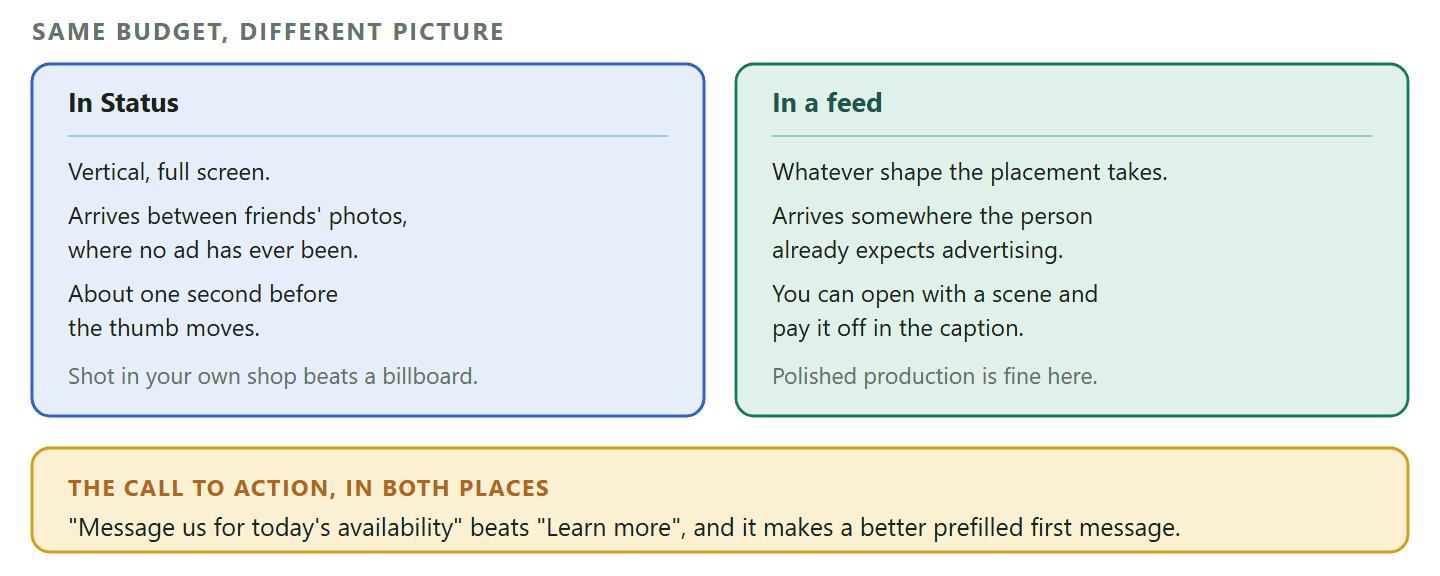
Somebody looking at Status is mid-flick through their friends’ photos. The ad arrives full-screen, uninvited, in a place that has never carried advertising before, and it has about a second before a thumb moves. Somebody scrolling a feed is already in an advertising environment and has been all day.
That difference changes three things.
- Shape. Status is vertical and full-screen. A landscape photograph cropped to fit reads instantly as something that was made for somewhere else, which is the same signal as an unsolicited message from a stranger.
- The first beat. In a feed you can open with a scene and pay it off in the caption. In Status the offer has to be legible before the thumb moves, so put the thing you are selling and the place you are in at the top rather than at the end.
- Tone. Status is where people post the inside of their week. An ad that looks like a billboard sits badly there. Something that looks like it was taken in your own shop, on a phone, does not, and for a local business that is an advantage rather than a compromise.
The call to action is worth its own sentence, because it is where most of the waste happens. “Learn more” asks somebody to volunteer for homework. “Message us for today’s availability” tells them what will happen and gives them a reason it is worth doing now, and it is also a far better prefilled first message than the blank most campaigns ship with.
What It Costs, and What to Measure
Two bills, one of which most people forget, and one metric that matters more than the one Ads Manager shows you.
The advertising is priced like any Meta advertising: an auction, with the cost depending on the country, the audience and the competition. There is no published price for a WhatsApp ad and anybody quoting one is quoting their own account.
The second bill is the one people miss. Every conversation an ad produces is a conversation, and messages on the WhatsApp Business Platform are charged per message on delivery. A campaign that works costs you twice: once for the tap and once for the talking. The 72-hour free entry point window on a click-to-WhatsApp ad is exactly what makes that second bill tolerable, which is another reason that format is the sensible starting point.
On measurement, the number Ads Manager puts in front of you is cost per click or cost per conversation started. Neither is the number that decides whether this worked.
- Cost per qualified conversation. Not everybody who taps is a customer. Some taps are accidents. Track how many conversations reached a real question.
- Cost per booking, order or quote. The only number that connects to money.
- Reply time. Not an ad metric at all, and probably the biggest single lever on the two above.
Where the tracking actually has to happen: Ads Manager can tell you a conversation started. It cannot tell you that the conversation became a booking three days later, because that happened in your inbox rather than in the ad platform. Connecting those two ends is the whole subject of our click-to-WhatsApp marketing guide, which covers how to tell which entry point produced which lead.
Retargeting, and What It Actually Means Here
People arrive at this subject expecting pixel-based retargeting and find something different, simpler and in some ways better.
On Facebook, retargeting means showing an ad again to somebody who visited a page or abandoned a basket. That machinery still works for the ad half of this: a click-to-WhatsApp ad is an ordinary Meta ad, so the audiences and the pixel behave as they always did.
Inside WhatsApp, the useful version of retargeting is a different thing entirely. You already have the conversation, so instead of buying another impression you message the person again, on the basis of what they did last time. In DMly a broadcast can be built as a Retarget audience, taking the recipients of an earlier broadcast and narrowing them by what happened: All Sent, All Delivered, All Read, All Replied, All Sent But Not Replied, or All Failed.
That last but one is the interesting one. Everybody who received your offer and did not answer is a real audience, it costs nothing to define, and it is far more specific than anything an ad platform will sell you about the same people. The rules that govern sending to that audience are in our guide to opt-in, templates and broadcast timing.
The sequence that works: Ad, conversation, then a follow-up to the people who read the first message and said nothing. The ad buys the introduction once. The follow-up is a template message, costs a fraction of another campaign, and reaches people who have already told you they are interested enough to open it. Doing it the other way round, paying for a second impression to somebody already in your contact list, is buying something you already own.
Five Ways to Waste the Money
Each of these is common, and each one is cheaper to avoid than to discover.
- Running a Status campaign for a niche audience. With four targeting signals, a campaign for wedding photographers or diabetic footwear is buying impressions from everybody. Geography-defined businesses only.
- Pointing the ad at a number nobody watches. Check which number the button opens, on the actual ad, before it goes live.
- Leaving the prefilled message blank. A blank chat asks a stranger to compose the first sentence, and a meaningful proportion of them will not.
- Budgeting for the ad and not the conversation. The second bill is per message, and a campaign that performs well is a campaign that costs more twice.
- Measuring cost per click. It is the number that is easiest to get and the one least connected to money. Cost per booking is harder and it is the only one that settles the argument.
DMly picks up every enquiry an ad produces in one shared inbox, replies automatically outside your hours, and connects the conversation to the booking or the invoice that follows. See the plans, including the 7-day free trial.
Frequently Asked Questions
Are WhatsApp ads available in my country?
Ads in Status are rolling out gradually and Meta says they may not be available to you yet, with India furthest along. Click-to-WhatsApp ads, which run on Facebook and Instagram and open a WhatsApp chat, have been available broadly for years. The way to find out about Status is to look for the placement in Ads Manager rather than to read an article about it, including this one.
Will ads appear in my personal chats?
No. Meta places them only in the Updates tab, which holds Status and Channels, and says that somebody who uses WhatsApp purely to message friends and family will see no change. Personal messages, calls and statuses remain end-to-end encrypted and cannot be used to show ads.
What data is used to target me?
Country or city, language, the channels you follow, and how you interact with the ads you see. If your WhatsApp is connected to Meta’s Accounts Center, your ad preferences and information from your other Meta accounts are used too. Your personal messages, calls and groups are not, and Meta says it will never sell or share your phone number with advertisers.
How much do WhatsApp ads cost?
There is no published price. It is an auction, so the cost depends on your country, your audience and who else is bidding. Budget for a second cost as well: the conversations the ad produces are charged per message once they start, unless they fall inside the 72-hour free entry point window that a click-to-WhatsApp ad opens.
Can I buy promoted channels yet?
No. Meta labels promoted channels as coming soon on its own advertising page for WhatsApp. Building the channel itself costs nothing and is the sensible thing to do while the promotion product is not yet buyable.
Do these work better than Facebook ads?
They are not really alternatives. A click-to-WhatsApp ad is a Facebook or Instagram ad with a different button, so the comparison is between a landing page and a conversation rather than between two platforms. For local service businesses the conversation usually wins, because there is no form to complete and the reply can happen immediately.
Do I need the WhatsApp Business Platform to advertise?
Not to run the ad. You need a Facebook Page, an ads account and a WhatsApp number the button can open. You will want the Business Platform once the ad works, because that is what lets several people answer, automates the first reply, and keeps the conversation attached to the booking that follows.
Buy the Conversation, Then Answer It
The genuinely new thing here is inventory, not capability: a very large room with very simple doors on it. If your customers are defined by where they are, that is a real opportunity and it is worth testing as soon as the placement appears in your account.
If they are defined by anything else, the older, duller click-to-WhatsApp ad is still the better buy, and the thing that decides whether either pays for itself is not the ad at all. It is what happens in the two minutes after somebody taps it.
Writing about WhatsApp automation, bookings and growth for local business.
Turn WhatsApp into your busiest channel.
Start free and run message, bookings, payments and reviews in one place.
