
Complete WhatsX Review: Is It Worth It + 7 Better WhatsX Alternatives
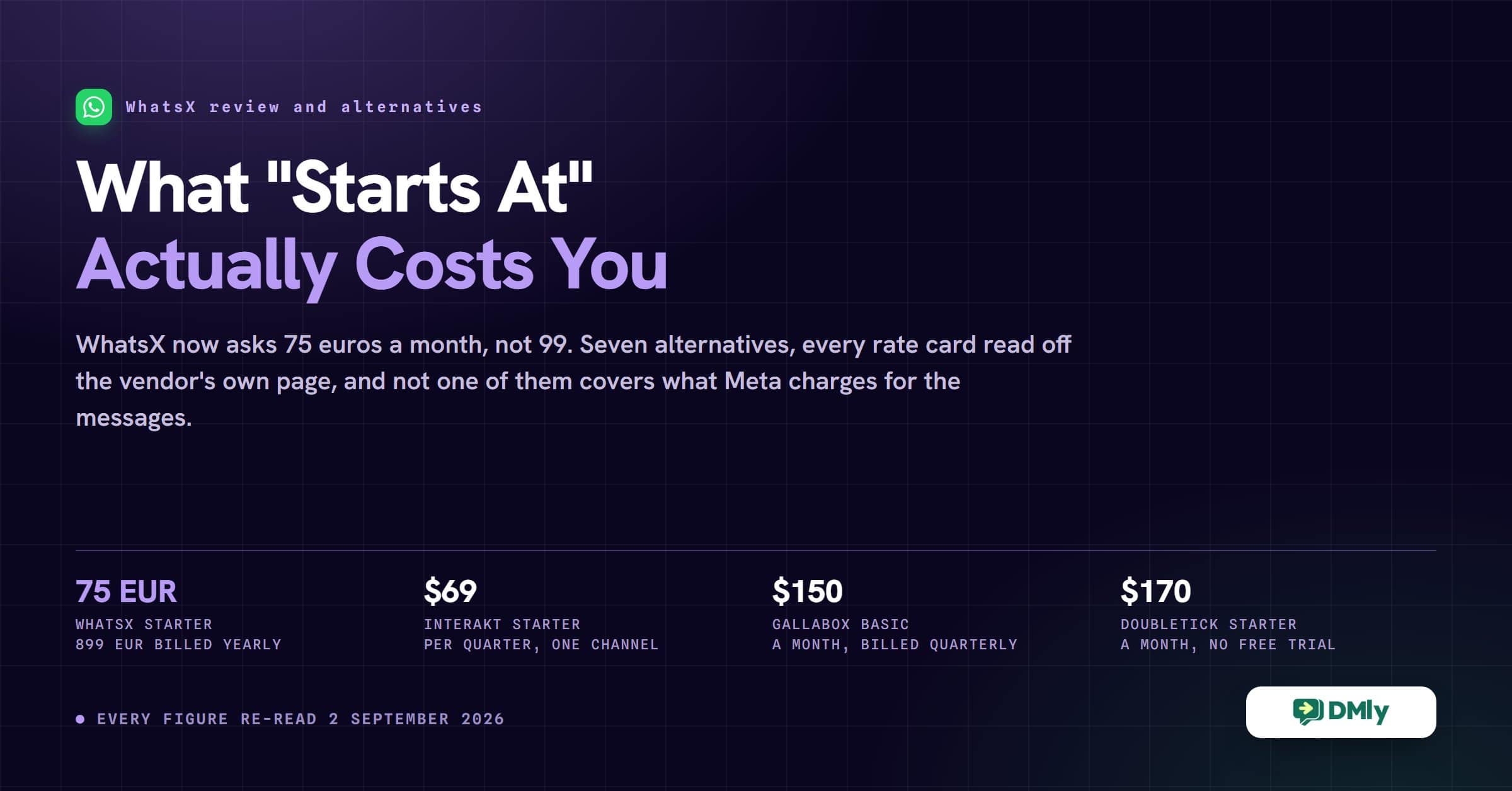
Every WhatsApp platform on this page advertises a price that starts with the word “from”. Almost none of those numbers means what it looks like. One is a quarter, not a month. One is only that low if you pay for a full year up front. One marks up every conversation you have. And WhatsX itself now charges a quarter less than the figure most reviews still quote.
So this is a WhatsX review with the arithmetic done. What the platform actually does, what it costs today, the one question you should ask before you pay it, and seven WhatsX alternatives with every rate card read off the vendor’s own page on 2 September 2026.
Two corrections before anything else. Until 6 September this page recommended Flowcart as one of those seven, at .99 a month. On that date we replaced it, saying the company had stopped trading. That was wrong, and we apologise to Flowcart. We checked flowcart.io and flowcart.com, and neither of those is Flowcart’s site. Flowcart is trading, at flowcart.ai. What has genuinely changed is that it no longer publishes plan prices: every tier now reads “Get a Quote”. Because this page compares published entry prices, Flowcart falls outside that comparison, so Zoko keeps the place. Corrected 8 September 2026.
What Is WhatsX?
WhatsX is an AI assistant that answers your WhatsApp messages for you, and that is close to the whole product. It replies to enquiries, chases leads that went quiet, sends bulk campaigns and books meetings, all inside WhatsApp, so an enquiry that arrives at eleven at night is not still sitting there when you open up.
It is aimed squarely at small businesses that live on WhatsApp: restaurants, shops, agencies, coaches, estate agents, local services. The company behind it is Quirro Ltd, registered in London, and its data sits in European data centres in Frankfurt and Paris on Amazon Web Services. If data residency comes up in every supplier conversation you have, that is a real point in its favour.
What WhatsX is not is an omnichannel platform. Your Instagram DMs, your Facebook messages and the chat widget on your website are somebody else’s problem. Whether that is the right trade for you is most of what this review is about.
Key Features of WhatsX
There are dozens of WhatsApp platforms competing for the same shop owner, so the useful question is what WhatsX chose to build instead of everything else. It went narrow and deep on one channel rather than wide and shallow across five.
AI Sales Assistant
This is the reason to buy WhatsX, and everything else is supporting cast. The assistant does not stop at answering the first message: it follows up on its own when a lead goes quiet, keeps replying while you are closed, and hands you a warmer conversation in the morning than the one you left. You give it a personality and a tone of voice through a setup wizard rather than by writing prompts.
Personalized Bulk Messaging
You can send the same campaign to hundreds of customers with each message carrying their own name and details, instead of copying and pasting your way through a contact list. Both paid plans say “unlimited messages”, which is a claim about what WhatsX will let you send, not about what the messages cost you. More on that under pricing.
Business Integrations
WhatsX connects to the tools a small business already has open in another tab. Its own site names Google Calendar, HubSpot, Mailchimp, Shopify, Slack, Zapier, n8n and a custom API, so a booking made in a chat can land in the calendar you already use rather than in a second one you have to remember to check.
Analytics Dashboard
You get dashboards for how many people are chatting, booking and buying. WhatsX puts advanced analytics on the Business plan, so the cheaper tier gives you the conversations and the dearer one tells you what they were worth.
WhatsX Pros and Cons
WhatsX does the thing it set out to do. If your business runs on WhatsApp and nobody is free to answer it, the AI follow-ups earn their keep quickly. The awkwardness starts when your customers begin arriving somewhere else, or when you ask what a message actually costs.
| Pros | Cons |
|---|---|
| The AI assistant follows up on its own, so a lead that goes quiet still gets chased while you are closed | Built for WhatsApp only. Instagram, Messenger, SMS and website chat are not covered at all |
| Personalized bulk messaging to hundreds of customers at once, without copy and paste | Automated campaigns, CRM and contact lists, and voice messages are all crossed off the Starter plan |
| Setup is a wizard, not a prompt. You describe the personality and tone rather than writing prompts | At 75 euros a month, Starter costs more than the entry plan of most alternatives on this page |
| One euro buys seven days of full access and 100 messages, with nothing to cancel afterwards | The pricing page says unlimited messages but does not say whether Meta per message charges sit inside that or on top |
| Data is held in EU data centres in Frankfurt and Paris on AWS, which is easy to evidence to a customer | WhatsX says no Meta account is needed and publishes nothing about who owns the WhatsApp Business Account |
| Integrations with Google Calendar, HubSpot, Mailchimp, Shopify, Slack, Zapier, n8n and a custom API | Automation is aimed at the conversation rather than at a full customer journey with behaviour triggers |
| Prices were cut in 2026, so it is cheaper than most published reviews of it say | The Documentation link in the WhatsX footer returns a 404, so there is nothing to read before you buy |
WhatsX Pricing in September 2026
WhatsX has cut its prices, and most reviews have not caught up, which is the single most useful thing in this WhatsX review. The Starter plan was 99 euros a month and is now 75. The Business plan was 259 euros a month and is now 200. Both figures below were read off the WhatsX pricing page on 2 September 2026, and both are quoted in euros because that is the only currency WhatsX publishes.
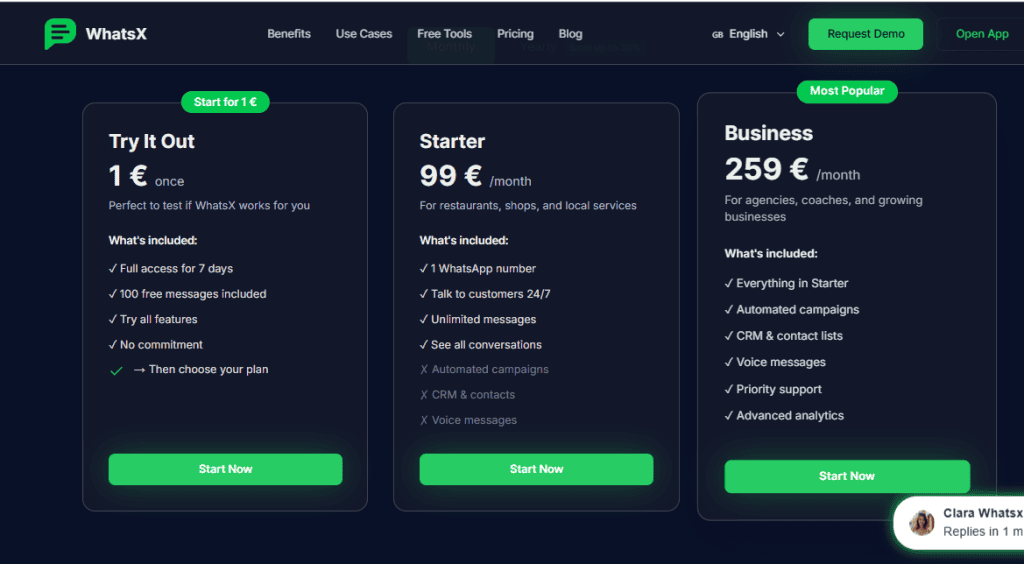
Try It Out, 1 euro once
One euro, paid once, buys seven days of full access and 100 messages. There is no monthly commitment attached and no card to cancel later. As a way to find out whether an AI assistant suits how you talk to customers, a euro is about as low as the risk gets.
Starter, 75 euros a month
Pay for the year instead and it is 899 euros, which WhatsX presents as saving 200 euros. The plan is built for a single-location business: one WhatsApp number, the AI talking to customers around the clock, unlimited messages and a shared view of every conversation.
Three things are explicitly crossed off on the Starter card, and they are the three most people assume are included: automated campaigns, CRM and contact lists, and voice messages. If you want to send a promotion to your customer list, Starter is not the plan.
Business, 200 euros a month
Or 2,399 euros for the year, presented as saving 700. This is Starter plus the three things Starter crosses off, and it adds priority support and the advanced analytics. WhatsX marks it Most Popular, which is a fair reflection of the fact that campaigns and a contact list are what most businesses came for.
The jump from 75 to 200 euros is the real decision point: 125 euros a month, or 1,500 a year, for the ability to message your own customer list.
What the subscription does not cover
On every platform in this article, including ours, WhatsApp itself charges you separately for certain messages, and the subscription does not include it. Meta bills per message by country and by message category, and the bill arrives on top of whatever you pay your software provider.
WhatsX does not publish how that works on its plans. The trial card says “100 free messages included”, which implies messages are counted somewhere, but the paid cards say “unlimited messages” without saying whether Meta’s per message charges sit inside that word or outside it. Ask before you commit, because on a busy month the message bill can be larger than the subscription. Our country by country WhatsApp rate card shows the range you are dealing with.
The One Question to Ask WhatsX Before You Pay
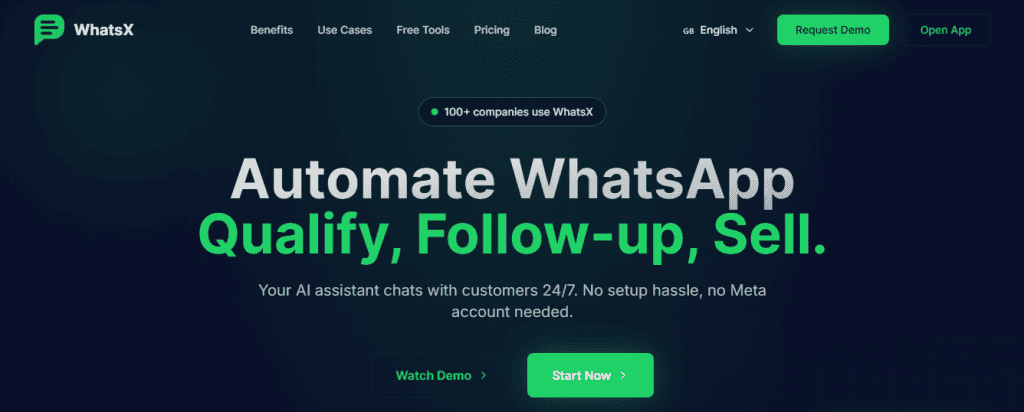
WhatsX says, on its own home page, that you need no Meta account. The exact line under the headline is “No setup hassle, no Meta account needed”, and it is visible in the screenshot at the top of this page.
That is worth pausing on, because the official WhatsApp Business API always involves a Meta business portfolio and a WhatsApp Business Account somewhere. If you do not have one, somebody else does, on your behalf. That arrangement is entirely legitimate and plenty of good providers work that way, but it changes three things you will care about later.
We could not settle it from WhatsX’s own material. Their terms of service, last updated in March 2025, do not mention Meta or the WhatsApp Business API at all. The Documentation link in their footer returns a 404. So rather than guess, here are the three questions to put to them in writing before you pay, and why each one matters:
- Who owns the WhatsApp Business Account my number sits in, me or you? If it is theirs, your number and your message history move only with their cooperation.
- Can I take my number to another provider, and what does that involve? Ask for the actual steps, not a yes.
- Are my campaigns sent as Meta approved message templates? This one decides whether you can message a customer who has not written to you in the last 24 hours, which is most of your list most of the time.
None of this makes WhatsX a bad buy. It makes it a buy you should understand, and any provider worth using will answer all three in a sentence each. For the background before you ask, we wrote up what Meta actually allows when you message customers in bulk, including the 24 hour rule these questions turn on.
Is WhatsX Pricing Worth It?
For a single-location business that lives on WhatsApp and nothing else, yes, and more so since the price cut. Seventy five euros for an assistant that answers every message at midnight is straightforward value if messages are the thing you keep dropping.
The calculation changes in two situations. The first is when you need to run campaigns, which pushes you to 200 euros a month. The second is when your customers start arriving on Instagram, or on the chat widget on your site, or by text, because WhatsX will not follow them there and you will end up buying a second tool. That is the point at which the WhatsX alternatives below get interesting.
Top 7 WhatsX Alternatives to Consider
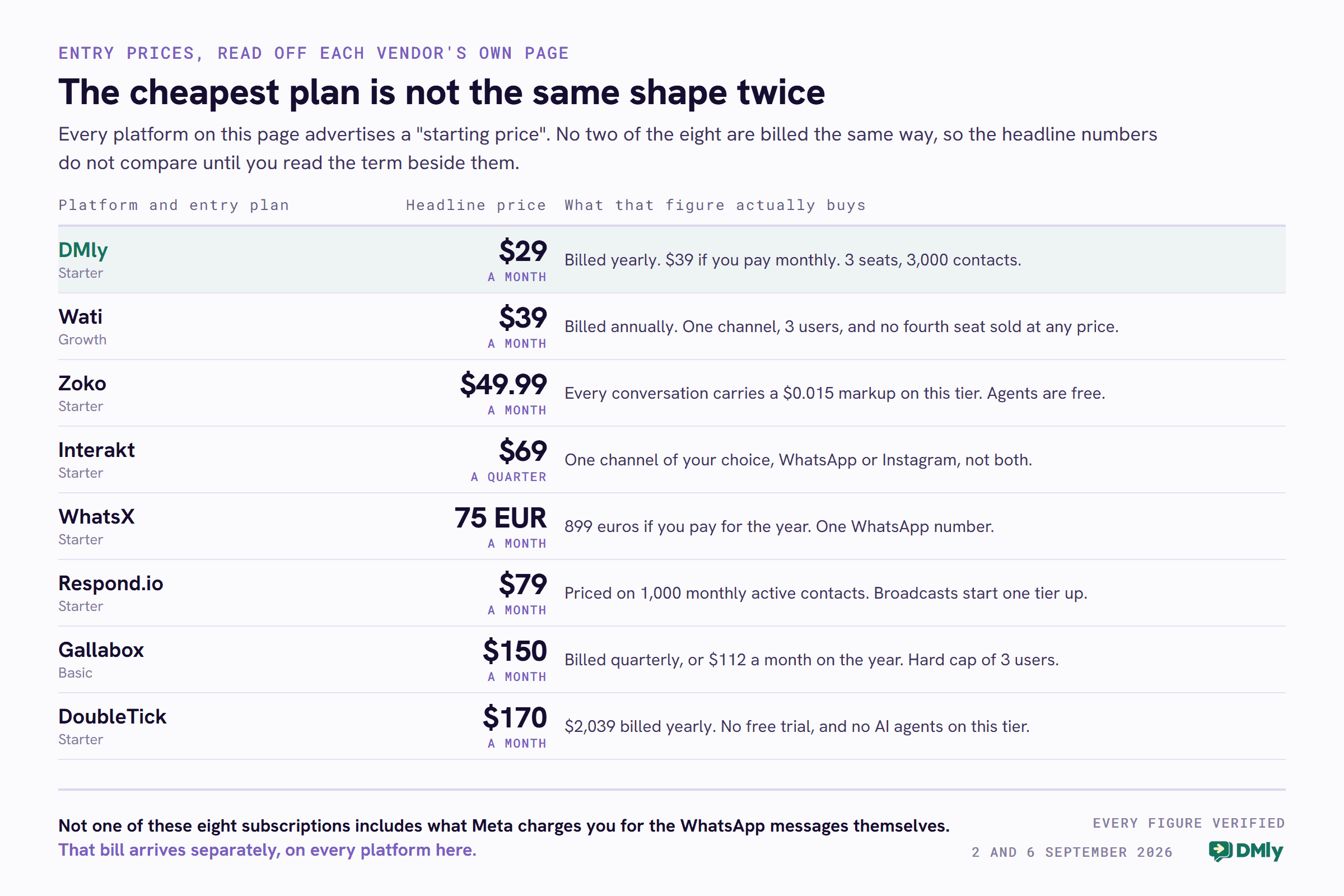
These seven WhatsX alternatives were chosen because each one answers a problem WhatsX leaves open, whether that is a second channel, a cheaper entry price or a checkout inside the chat. Every price below was read off the vendor’s own pricing page on 2 September 2026, except Zoko, which was read on 6 September 2026 when it took the place Flowcart used to hold here. Several had moved since this article was first published. Where a plan is only that cheap on an annual commitment, or is billed by the quarter, or carries a percentage on top, the table says so, because a starting price without its billing term is not a price.
| Platform | Best for | Entry price, verified 2 September 2026 (Zoko, 6 September) | The catch worth knowing |
|---|---|---|---|
| DMly | Eight channels, bookings, invoices and reviews in one app | $29 a month billed yearly ($39 monthly) | Broadcast reports show no replies and no clicks. See the section below |
| Wati | An established WhatsApp team inbox | $39 a month billed annually | Growth includes 3 users and no fourth seat is sold at any price |
| Zoko | Selling a Shopify catalogue inside the chat | $49.99 a month | Every conversation on that tier carries a $0.015 markup |
| Interakt | A WhatsApp platform with a sales CRM attached | $69 per quarter | One channel of your choice on Starter, and AI agents are a $74.99 add-on |
| WhatsX | An AI assistant on one WhatsApp number | 75 EUR a month (899 EUR yearly) | Campaigns and CRM need the 200 EUR plan |
| Respond.io | Larger teams across many messaging apps | $79 a month | Broadcasts, workflows and AI agents all start on the $159 tier |
| Gallabox | Qualifying a heavy flow of inbound leads | $150 a month billed quarterly | No monthly billing at all, and a hard cap of 3 users on Basic |
| DoubleTick | Catalogue sharing and high volume campaigns | $170 a month ($2,039 yearly) | No free trial, and no AI agents on the Starter tier |
1. DMly
We build DMly, so treat this section as an interested party being specific rather than a neutral verdict. Everything below is either in our documentation or on our pricing page, including the parts that do not flatter us.
The difference that matters is that DMly is not a WhatsApp tool. It handles eight channels in one inbox: WhatsApp, Facebook Messenger, Instagram, Telegram, SMS, TikTok, the live chat widget on your own site, and your Google Business Profile. So the customer who found you on Instagram and the one who messaged your Google listing land in the same place as your WhatsApp enquiries, with the same contact record and the same automations behind them.
What DMly does that WhatsX does not
- Answers on eight channels, not one. Two of those come with limits worth knowing up front: the live chat widget and TikTok cannot send broadcasts, and Google Business Profile handles your reviews and posts rather than customer chat.
- AI agents that can actually do things, not just answer. An agent can read and update the contact record, move someone along your pipeline, add and remove tags, write a note, check your real availability, book, reschedule or cancel an appointment or a class, answer from your own uploaded documents, search the web, and hand the chat to a person the moment it is out of its depth.
- Bookings, invoices and payments in the same app. A conversation that starts with “are you free Saturday” can end in a booking and a paid invoice without anybody leaving the chat.
- Reviews as a built-in job. Google reviews are requested, tracked and replied to from the same place, which is a whole separate subscription on most of this list.
- Segments that rebuild themselves. You can filter on lifecycle stage, source, tags, birthday month, your own custom fields, which channels someone is reachable on, marketing opt-in, total spend, order count, last purchase, loyalty points and credit balance. A segment is a saved question rather than a saved list, so it is right every time you use it.
What DMly cannot do, so you hear it here
Broadcast reporting is thinner than the dashboards suggest, and you should know that before you rely on it. The Replies count on a broadcast report is always zero, on every channel, because nothing in DMly counts replies to a broadcast. There is no click tracking on a broadcast at all. The “Engagement over time” chart shows the same fixed shape for every campaign and is placeholder data, not your numbers.
What does work, and what we would tell you to judge a campaign on: Delivered, which is available on WhatsApp and SMS, and Opened, which is WhatsApp only. Alongside those, the Team report gives you average first response and average resolution time per agent, filtered by date and exportable, and each automation carries its own analytics for runs, completion rate and messages sent. Those are real numbers. The broadcast engagement chart is not, and pretending otherwise would waste your time.
One more, since it comes up: the segment builder’s commerce filters read DMly’s own orders, not your Shopify order history. To segment on what somebody spent in your Shopify store, use the customer milestone trigger to add a tag when they cross a threshold, then segment on the tag. It works, and it is one step more than you would expect.
DMly pricing
Three plans, billed yearly at a 20 per cent discount, or monthly at the higher figure in brackets.
- Starter, $29 a month billed yearly ($39 monthly). One profile per channel, 3 team seats, 3,000 active contacts, 10,000 broadcast or template messages, 10 active bots per profile with unlimited flows, and 500 AI replies a month.
- Growth, $65 a month billed yearly ($79 monthly). Three profiles per channel, 6 seats, 10,000 contacts, 50,000 broadcast messages, unlimited active bots and 5,000 AI replies a month.
- Premium, $149 a month billed yearly ($199 monthly). Five profiles per channel, 15 seats, unlimited contacts, 300,000 broadcast messages, and unlimited AI replies if you bring your own AI keys.
Extra seats are $10 a month and an extra profile set is $15. Meta’s WhatsApp charges are billed to you by Meta, and DMly adds nothing to them.
2. Wati

Wati is the established choice, and the one most likely to already be in your industry’s group chat. It is built on the official WhatsApp Business API, it has been at it longer than most of this list, and its shared inbox and no-code chatbot builder are mature rather than promising.
Key features
- Shared team inbox with assignment, tagging and follow-up automation
- No-code chatbot builder
- Click-to-WhatsApp ads, so leads from Meta campaigns land in the inbox
- Broadcast campaigns, 15,000 a month on the entry plan
- Comment and DM automation on Instagram and Facebook Messenger
- WhatsApp catalogue, plus Shopify abandoned cart and order templates
Pros
- Large user base, so help and templates are easy to find
- Zero-fee WhatsApp setup, including help with verification
- Genuinely capable automation once it is set up
- Easy for a growing team to adopt
Cons
- The entry plan gives you one channel, not several
- Seat limits bite early, and see the pricing note below
- Costs rise with messaging volume on top of the subscription
Pricing
Growth is $39 a month billed annually, Pro is $79 and Business is $199. The detail that catches people out is on Growth: it includes three users and Wati sells no fourth seat at any price. The fourth person on your team is an upgrade to Pro, not an add-on. Extra users are $24 a month on Pro and $59 on Business. We go through this in detail in our head to head on Wati’s seat limits and what the tiers really include.
3. Respond.io
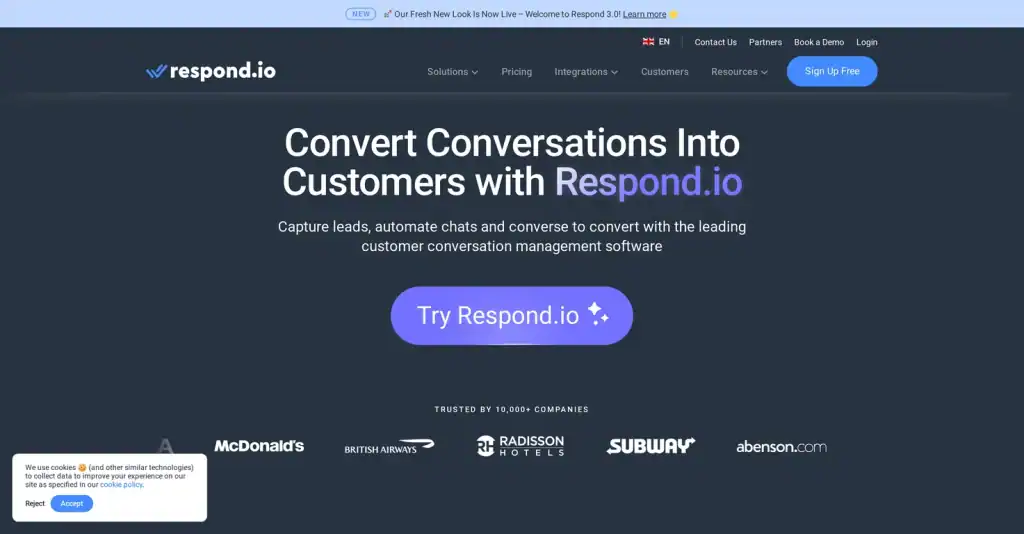
Respond.io is the option for a business whose customers arrive on six different apps. WhatsApp, Instagram, Messenger, Telegram, LINE, email and more all land in one workspace, and its workflow builder is the most powerful on this list by some distance.
Key features
- Omnichannel shared inbox with team and custom inboxes
- Workflow automation builder, with HTTP requests on the top tier
- Lead assignment and routing
- Zapier and Make integrations, plus a developer API, from the Growth tier
- AI agents, AI Assist and AI Prompt
- Single sign-on and multiple workspaces on the Advanced tier
Pros
- The strongest omnichannel coverage here
- Automation that will not run out of road
- Serious CRM integration ecosystem
- A seven day free trial with no card required
Cons
- The highest entry price of the software-only options here
- Priced on monthly active contacts, so a busy month costs more
- Too much platform for a two-person business
Pricing
Starter is $79 a month, Growth $159 and Advanced $279, each priced at 1,000 monthly active contacts and rising as that number does. Extra users are $12, $20 and $24 a month respectively. The catch is what Starter leaves out: broadcasts, workflow automation and AI agents all begin on Growth at $159, so the automation most people are shopping for is twice the advertised entry price. Our full Respond.io review works through the contact-based pricing tiers if you are close to deciding.
4. Gallabox
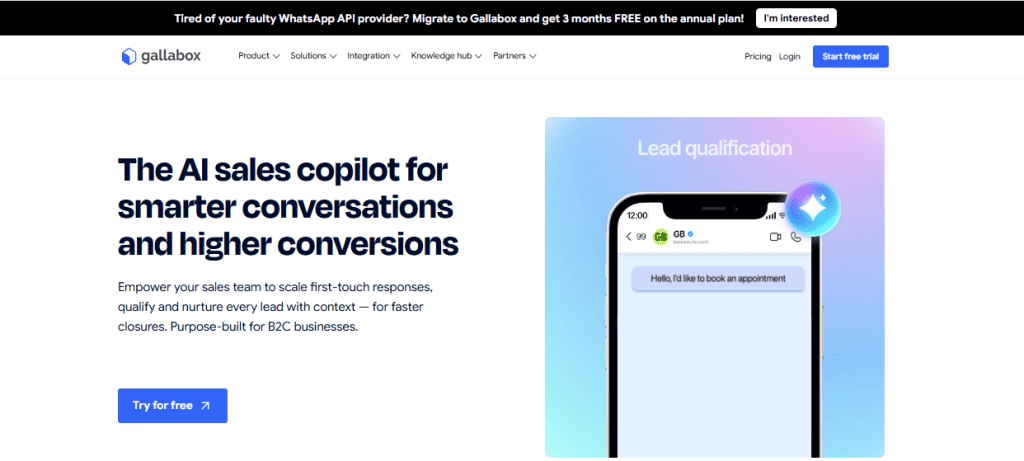
Gallabox is built for businesses drowning in inbound enquiries that need qualifying. It covers WhatsApp, Instagram and a web widget, and its AI agents exist to work out which of the fifty messages you got today are worth your afternoon. Note the tier, though: the entry plan gives you web AI agents only, and AI agents on WhatsApp and Instagram start on the plan above it.
Key features
- AI agents metered in AI credits, web only on the entry plan
- Shared inbox across WhatsApp, Instagram and a web widget
- Click-to-WhatsApp widgets for your website
- Broadcast campaigns on every tier, drip campaigns from Essential
- Catalogue and payments in chat
- Ads attribution through Meta’s conversions API, from Essential
Pros
- Genuinely good at lead qualification and routing
- Free onboarding support, though not on the entry plan
- A free trial with 500 AI credits and no card
- Straightforward to learn
Cons
- Far more expensive than its reputation suggests, see below
- Three users on the entry plan, and that is a hard cap
- AI work is metered, so a busy month can exhaust your credits
- No monthly billing option at all
Pricing
This is the biggest correction on the page. Gallabox is not a twenty five dollar tool and has not been for some time. Basic is $150 a month billed quarterly, or $112 a month if you commit to the year. Essential is $331 a month quarterly and Advanced is $632. There is no monthly plan: your choice is a quarter or a year. Basic includes 500 AI credits and three user accounts as a hard cap, meaning you cannot buy a fourth. Extra users on the higher tiers are $18 and $24 a month. Our Gallabox review goes through the AI credit model and the three-user ceiling.
5. Interakt

Interakt is a WhatsApp platform with a sales CRM attached, and it is priced for businesses watching every pound. It suits ecommerce brands and growing teams that want the customer conversation and the sales pipeline in the same window.
Key features
- Shared inbox with unlimited agents, though the entry plan is owner roles only
- Built-in CRM for leads and customer relationships
- Broadcast campaigns, with advanced campaign triggers higher up
- Chatbot builder, linear on Growth and branching on Advanced
- Instagram automation for price enquiries and giveaway campaigns
- Catalogues, native payments and a Shopify integration
Pros
- The cheapest genuine entry point on this list
- Unlimited agents rather than per-seat pricing, so a big team costs no more
- No restriction on contacts
- Fourteen day free trial, no card needed
Cons
- The entry tier gives you one channel, not two
- Billed by the quarter, so the smallest payment is three months
- WhatsApp AI agents are a paid add-on, not included
- Chatbot flows only get useful two tiers up
Pricing
Starter is $69 a quarter, Growth $149 and Advanced $189, with 8 per cent off quarterly and 20 per cent off yearly. Two things are easy to miss. Starter includes one channel of your choice, WhatsApp or Instagram, not both, and WhatsApp AI agents are a $74.99 add-on available on Growth and Advanced only. The Sales CRM roles are also priced separately, at $135 a quarter for five sales agents. Our Interakt review looks at what happens to that price as you scale.
6. Zoko
Zoko is for Shopify stores that want the catalogue, the checkout nudge and the support queue on one WhatsApp number. It syncs your Shopify catalogue into WhatsApp and sells from it inside the conversation, and it ships eleven prebuilt ecommerce flows for the jobs that actually move money: recovering an abandoned checkout, confirming a cash-on-delivery order, chasing a reorder and asking for a review. It is the closest thing on this list to the in-chat checkout Flowcart used to offer, and unlike Flowcart it is still selling.
Key features
- Shopify catalogue synced into WhatsApp, with products sold inside the chat
- Eleven ecommerce flows included free, including abandoned checkout recovery and cash-on-delivery confirmation
- A flow builder for anything else, billed at $5.99 a month for each custom flow you publish
- WhatsApp, Facebook and Instagram in one inbox, with Instagram carrying a $9.99 a month platform fee
- Bulk broadcasts, a chat widget, pop-up campaigns and click-to-WhatsApp ad support
- AI agents sold one at a time at $24.99 a month each, for FAQs, order tracking and taking orders
Pros
- Agents are free and unlimited on the entry plan, which nothing else on this page offers
- A seven day free trial that does not ask for a card
- Monthly or yearly billing, and you can change plan at any time
- From the Plus plan upwards, conversations are passed through at Meta’s own rate with no markup
Cons
- The entry plan is the exception to that: every conversation on it carries a $0.015 markup
- Everything is prepaid, so you top up conversation credits before you can send
- The AI agent that takes orders for you charges 3 per cent of order value
- Built around Shopify, so much of the value goes if your store is somewhere else
Pricing
Zoko publishes all four of its prices, on the page rather than behind a form: Starter $49.99 a month, Plus $79.99, Elite $139.99 and Max $499.99, read on 6 September 2026. The number that decides it is not the subscription, it is the conversation. Starter is the only tier that marks conversations up, at $0.015 each, while Plus includes 5,000 conversations at Meta’s own rate and charges $0.00199 after that, Elite includes 100,000 and Max five million. Agents run the other way: unlimited and free on Starter, then 5, 10 and 30 included with extra seats at $15, $12 and $9. Everything is prepaid, so the subscription is taken on the first day of the period and you top up conversation credits before you can send. Above 30 agents you have to ask them for a price.
7. DoubleTick

DoubleTick is a WhatsApp marketing platform for teams that send a lot of campaigns and share a lot of products. Catalogue sharing, bulk broadcasts and a well-organised team inbox are its strengths, and it is aimed at ecommerce and at sales teams working from a shared number.
Key features
- Team inbox, five agents free on Starter and ten on Pro
- Bulk broadcasts with detailed broadcast analytics
- Product catalogue sharing inside chats
- Customer segments, unlimited tags and custom contact fields
- AI agents with a knowledge base, on Pro and above
- Google Sheets integration, Excel import and export
Pros
- Five team members included at the entry tier
- Catalogue sharing is genuinely well done
- Onboarding promised within 24 hours
- Strong broadcast reporting
Cons
- The most expensive entry price here
- No free trial, only a demo
- No AI agents at all on the Starter plan
- WhatsApp only
Pricing
DoubleTick has put its prices back on its website, and they are higher than the figures still circulating. Starter is $170 a month, or $2,039 billed yearly, and it has no AI agents. Pro with AI is $308 a month, or $3,694 yearly, and adds up to ten AI agents, a 50MB knowledge base and 3,500 AI credits a month. Enterprise is on request. There is no free trial on any tier. Our DoubleTick review covers what the AI credit allowance actually buys.
The One We Can No Longer Compare: Flowcart
Until 6 September, number six on this list was Flowcart, at .99 a month plus 1.5 per cent of your WhatsApp revenue above ,000. We then removed it on the basis that it had stopped trading. That was our mistake. We checked flowcart.io and flowcart.com; the first is an unrelated “Launching Soon” holding page and the second redirects to an events business. Flowcart’s own site is flowcart.ai, it answered normally when we re-checked on 8 September 2026, and it is still selling.
What is true is narrower, and it still matters to a buyer. Flowcart no longer publishes its prices. Where the tiers once read .99, 9 and 9, every plan now says “Get a Quote”. That is a legitimate way to sell, but it puts Flowcart outside a comparison built on published entry prices, which is what this page is. If you want it costed, you will have to ask them. Zoko holds the place on this list because its prices are published and can be compared with the rest.
What Changes on 1 October 2026
From 1 October 2026 Meta starts charging for two categories of WhatsApp message that are free today, and it applies whichever platform on this page you choose. The software you pay for does not change the bill Meta sends you.
- Service messages, meaning the free-form replies you send inside the 24 hour window after a customer writes to you. These have been free since November 2024. Every business phone number gets 1,000 free service messages a month, so Meta only charges you from the 1,001st. The allowance resets each month and does not roll over, and service messages have no volume tiers, so above 1,000 the cost scales with how long your conversations run.
- Utility messages sent inside an open 24 hour window, which have been free since July 2025. If you send order confirmations, delivery updates or appointment reminders, this is likely to be the larger of the two for you.
Nine markets move to their own standalone rate cards at the same time. The free WhatsApp Business app on your phone is not affected, so if you have not moved to a platform yet, nothing changes for you on that date. We have worked the whole thing through in our breakdown of what service messages cost from 1 October.
How to Choose Between These WhatsX Alternatives
Feature lists across these WhatsX alternatives are close to interchangeable. What separates them is which business each was designed for, and these are the five questions that actually decide it.
Where will your customers be in a year?
If WhatsApp is genuinely your only channel and you expect that to hold, a WhatsApp-only platform is the cheaper and simpler answer. If you already have Instagram DMs going unanswered, or a chat widget on your website, buying a WhatsApp-only tool now means buying a second tool later and moving your history twice.
Do you need conversations, or customer journeys?
Every platform here says “automation” and they mean different things by it. Some automate a reply to a common question. Others let you build a sequence that reacts to what someone did: abandoned a cart, missed an appointment, has not been in for six months. If you only need the first, do not pay for the second.
How many people need to be in the inbox?
This is the single most expensive detail on this page and the one buried deepest. Wati’s entry plan has three seats and no fourth is purchasable. Gallabox caps its entry plan at three users, hard. DoubleTick includes five. Interakt has no seat limit at all, and neither does Zoko on its entry plan. Count the people who will actually need a login, including the weekend cover, and price against that number rather than against the headline.
What is the second bill?
Every subscription on this page sits on top of what Meta charges you per message, and some add more of their own. Zoko marks up every conversation on its entry plan, at $0.015 each, and the agent that takes orders for you charges 3 per cent of order value. Gallabox and DoubleTick meter AI work in credits. Interakt sells AI agents as an add-on. Ask each vendor for a worked example at your volume, not a rate card.
Can you leave?
Several of these WhatsX alternatives will not sell you a single month at their headline rate, so the cheapest price is also the longest commitment. Before you take the annual discount, ask who owns the WhatsApp Business Account, how you would export your contacts and conversations, and what moving your number to another provider actually involves. If those answers are hard to get, that is the answer.
FAQs
How much does WhatsX cost?
Every figure in this WhatsX review was checked on 2 September 2026, when WhatsX had three options: a Try It Out plan at 1 euro once, covering seven days and 100 messages; Starter at 75 euros a month, or 899 euros billed yearly; and Business at 200 euros a month, or 2,399 euros billed yearly. Starter and Business were previously 99 and 259 euros, so any review quoting those figures is out of date. What WhatsApp itself charges for your messages is billed separately.
Is WhatsX good for small businesses?
Yes, for a small business whose customers reach it on WhatsApp and nowhere else. The AI assistant is the strongest part of the product and it does the job it promises. The two things that push small businesses off it are needing campaigns, which means the 200 euro plan, and picking up customers on Instagram or a website widget, which WhatsX does not cover.
Does WhatsX need a Meta account?
WhatsX’s own home page says no Meta account is needed. The official WhatsApp Business API always involves a Meta business portfolio and a WhatsApp Business Account somewhere, so if it is not yours, it belongs to someone acting on your behalf. WhatsX does not publish which arrangement applies, and their terms of service do not mention Meta. Ask them who owns the WhatsApp Business Account, whether you can take your number elsewhere, and whether your campaigns go out as Meta approved templates.
What is the best WhatsX alternative?
The best of the WhatsX alternatives depends on what pushed you off it. If it was the price of campaigns, Interakt and Wati are cheaper. If it was lead qualification, Gallabox. If you sell products in chat from a Shopify store, Zoko. If your team is large and your channels are many, Respond.io. If the problem is that your customers are spread across several apps and you want one inbox, bookings, invoices and Google reviews in the same subscription, that is what we built DMly for, from $29 a month billed yearly.
Are there cheaper WhatsX alternatives?
Yes, several. Measured against the 75 euro Starter plan, the cheapest WhatsX alternatives here are Interakt at $69 a quarter, DMly at $29 a month billed yearly, Wati at $39 a month billed annually and Zoko at $49.99 a month. All four carry a condition worth reading first: Interakt gives you one channel at that price, Wati caps you at three seats with no fourth available, DMly and Wati both need an annual commitment to hit those figures, and Zoko adds $0.015 to every conversation on that tier. Gallabox, Respond.io and DoubleTick all cost more than WhatsX at the entry tier.
Can WhatsX work for Instagram?
No. WhatsX is a WhatsApp product. It integrates with calendars, CRMs and payment tools, but its conversations are WhatsApp only. Of the WhatsX alternatives on this page, Interakt covers WhatsApp and Instagram, Zoko adds Instagram and Facebook for a $9.99 a month platform fee, Gallabox adds a web widget, and Respond.io and DMly go wider still.
Does WhatsX offer a free trial?
Not a free one, but close. WhatsX charges 1 euro once for seven days of full access with 100 messages included and no commitment afterwards. Among the WhatsX alternatives on this page, Interakt offers 14 days free, Respond.io and Zoko both offer 7 days free with no card, Gallabox offers a free trial with 500 AI credits, and DoubleTick offers no trial at all.
Writing about WhatsApp automation, bookings and growth for local business.
Turn WhatsApp into your busiest channel.
Start free and run message, bookings, payments and reviews in one place.
