
WhatsApp Click-to-Chat Links: The Format, the Cost, and What You Cannot Measure
A plus sign. That is the character that breaks most of these links, and a leading zero is the runner-up.
Somebody builds a WhatsApp click-to-chat link from the number as they write it on their van, drops it into an Instagram bio, and nothing happens when people tap it. No error, no explanation, just a page that will not open a chat. A week later they conclude that WhatsApp links do not really work and go back to asking customers to save the number.
The rule is one sentence long and WhatsApp publishes it: use the full number in international format and omit any zeroes, brackets or dashes. That is the whole fix, and this page starts there before moving on to the two things that matter more once the link works: how to put a message in it, and why the same link costs you a different amount depending on where you paste it.
What a WhatsApp Click-to-Chat Link Is, and the Exact Format
A WhatsApp click-to-chat link is one URL that opens a chat with your number, and the only hard part is writing the number the way WhatsApp expects.
There is nothing to install and nothing to configure. Anyone who taps the link lands in a conversation with you, whether or not they have your number saved, and it works on a phone and on WhatsApp Web. That last part matters more than it sounds: your link does not depend on the customer doing anything except tapping.
The format WhatsApp documents is https://wa.me/<number>, where the number is the full phone number in international format. WhatsApp’s own instruction is to omit any zeroes, brackets or dashes, and its own example makes the point better than any explanation:
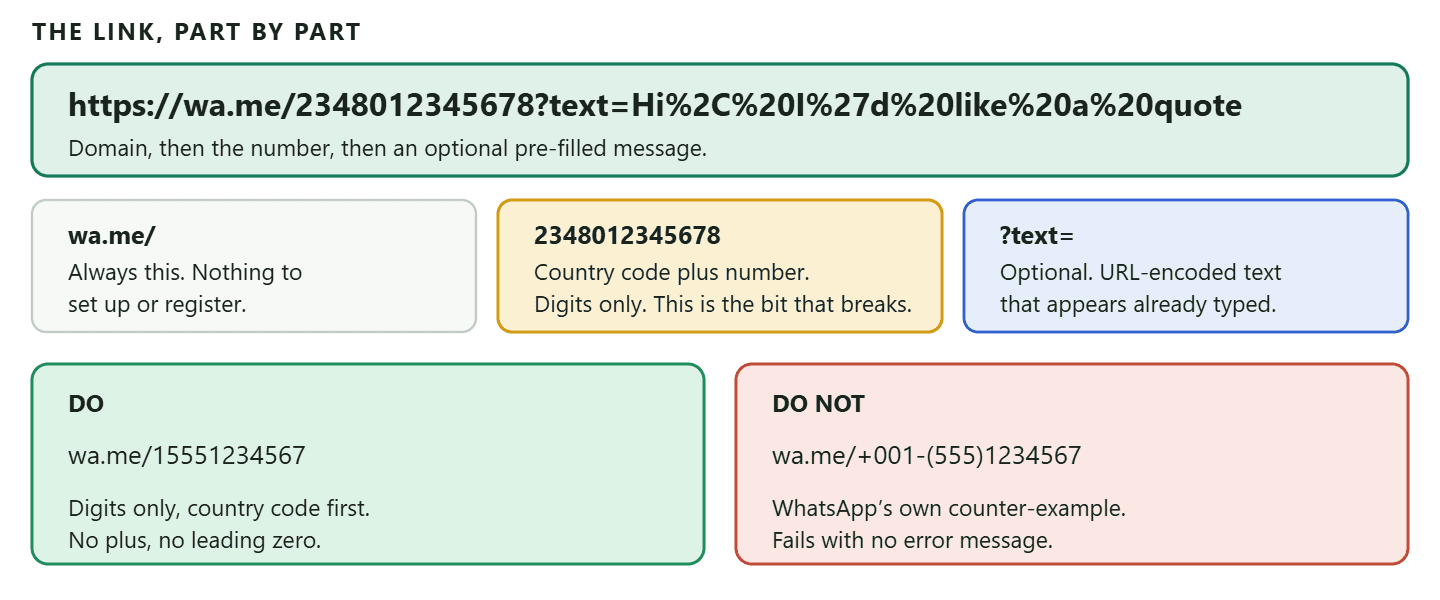
The leading zero deserves its own warning. In most of the world a mobile number is written and spoken with a zero at the front, and that zero is a domestic dialling convention rather than part of the number. A UK number written 07700 900123 becomes 447700900123. A Nigerian number written 0801 234 5678 becomes 2348012345678. If you keep the zero, the link points at a number that does not exist and the failure is silent.
The Pre-filled Message, and the Limit Nobody Mentions
Adding a message to the link is a single URL parameter, and it is the difference between a chat that starts and a chat that stalls.
An empty chat window asks the customer to compose something, and a surprising number of people simply do not. A pre-filled message removes that: the chat opens with the first line already written, they press send, and you have a conversation.
The syntax is https://wa.me/<number>?text=<url-encoded message>. The message has to be URL encoded, which sounds technical and means only that spaces and punctuation get replaced by codes. In practice you never do this by hand.
- Write the message you want, for example Hi, I would like a quote for a boiler service.
- Paste it into a generator, which encodes it for you. Ours is at the free WhatsApp link generator, which takes a number and a message and hands back the finished link and a QR code, with a preview of what the customer will see.
- Test the finished link on your own phone before it goes anywhere.
Two different limits, and it is worth knowing which one you are under: A ?text= parameter on a wa.me link is an ordinary URL parameter, so there is no published character limit on it. Meta’s own QR codes and short links are different: their prefilled message can hold up to 140 characters. If you are creating a short link through the WhatsApp Business app or the QR Codes API, that is the ceiling you are writing to. Either way, short is better. The pre-filled message is an opening line, not a pitch.
Write the message from the customer’s side, not yours. The text appears as though they typed it, so “Hi, I would like a quote” works and “Thank you for contacting Bright Plumbing, how can we help?” reads as though the customer has lost their mind. This is the most common mistake after the number format, and it is entirely cosmetic until you notice how odd it looks in a real chat.
Three Ways to Make a WhatsApp Click-to-Chat Link
All three produce a working link. They differ in how much control you get and how tidy the result looks.
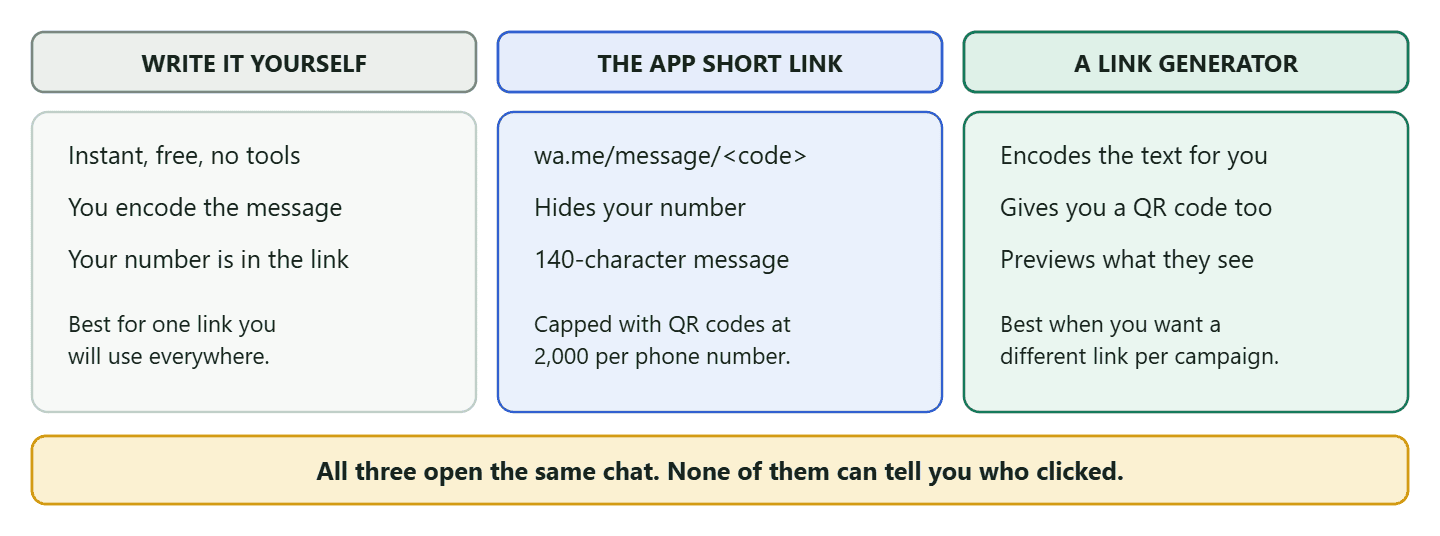
Writing the URL yourself
Take https://wa.me/, add your number in digits, and you are finished. This is the right choice when you want one link and you will use it in a few places. The cost is that your phone number is visible in the URL, which is fine on your own website and less ideal on a poster somebody can photograph.
The WhatsApp Business app short link
The app generates one for you under Business Tools, and it comes out in the shape wa.me/message/<code> rather than showing your number. It can carry a prefilled message of up to 140 characters, and it can be updated or deleted later. One limit worth knowing before you build a system on it: a single business phone number cannot be associated with more than 2,000 QR codes and short links, which is generous for a shop and finite for anyone generating one per customer.
Using a link generator
A generator does the encoding, hands you the QR code at the same time, and shows you what the chat will look like before you commit. Our free WhatsApp link generator is free to use without an account. Be a little careful which one you use: a link generator sees your number and your message, and some of them wrap your link in a redirect of their own that can stop working later. If a tool gives you back anything other than a plain wa.me URL, understand why before you print it.
The Same Link Costs Different Amounts Depending on Where You Put It
This is the part almost nobody covers, and from 1 October 2026 it can start showing up on your bill.
Every click-to-chat link produces a conversation the customer started, which opens the 24-hour customer service window. What differs is whether Meta charges you for what happens inside it, and the deciding factor is the entry point rather than the link itself.
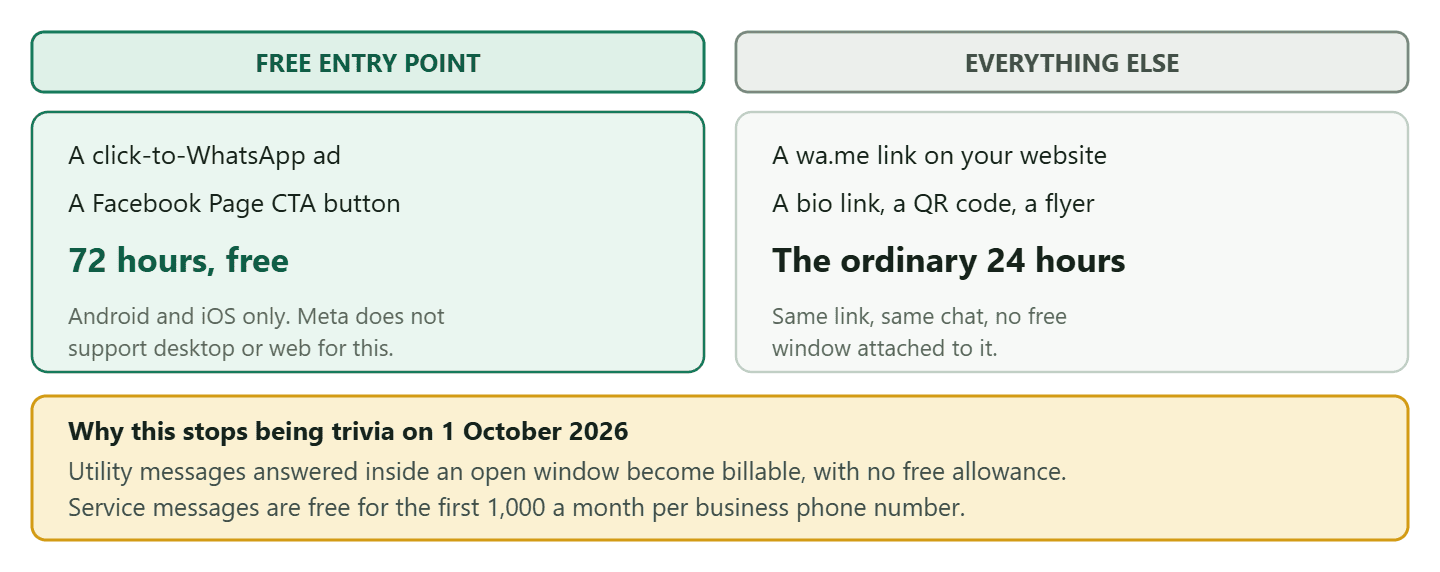
Meta documents free entry point conversations for two specific entry points: a click-to-WhatsApp ad and a Facebook Page call-to-action button. Answer within the customer service window and the reply is free, and it opens a 72-hour window in which anything you send costs nothing. There is one condition people miss: this works when the customer taps from the Android or iOS app. Meta states that desktop and web are not supported.
A wa.me link on your own site, in your Instagram bio, on a flyer or behind a QR code is not on that list. It opens the ordinary 24-hour window, and until now that did not matter much because replying inside it was free anyway. From 1 October 2026 it does matter, because Meta begins charging for utility messages sent in response to a customer inside an open window, and for service messages beyond a free monthly allowance. Every business phone number gets 1,000 free service messages a month, more than most small businesses will ever send, and the utility messages have no allowance at all. We have set the whole change out in what service messages now cost from 1 October.
The practical consequence is not “stop using links”. It is that if you are already spending on ads, routing them into WhatsApp buys you three free days of conversation that the same link on your website does not, and that is worth knowing when you decide where the budget goes. The mechanics of running those ads sit in our guide to WhatsApp ads.
What Happens After the Tap, on Your Side
The customer’s tap starts a clock, and knowing how that clock behaves is what separates a business that answers well from one that keeps missing people by an hour.
When somebody messages you, a 24-hour timer starts. Meta calls it the customer service window, and it is the single most important mechanic in WhatsApp business messaging. Two things about it are worth learning properly.
Inside the window, you can send anything
While the window is open you can reply with whatever you like: a normal typed message, a photo of the part you are quoting for, a price list as a PDF, a booking link. No approval, no template, no format. This is why an inbound conversation is worth so much more than an outbound one, and why a click-to-chat link that gets somebody to message you first is doing real work.
The timer also resets. If the customer messages or calls you again before it expires, you get a fresh 24 hours. So a live back-and-forth conversation effectively stays open as long as it is genuinely a conversation.
Outside the window, only a template will go
Once 24 hours pass with no word from them, that freedom ends. Meta is explicit: a message template is the only type of message that can be sent to a WhatsApp user outside a customer service window, and templates have to be approved in advance.
This is where businesses get caught. Somebody enquires on Friday afternoon, nobody answers until Monday, and the reply that would have taken ten seconds on Friday now needs a pre-approved template that nobody wrote. The practical answer is not to work weekends: it is to have two or three approved templates sitting ready for exactly this, and an automatic reply that goes out inside the window so the conversation does not go cold in the first place.
A tap is not marketing permission
Somebody messaging you through your link has consented to that conversation. They have not consented to your newsletter. This distinction gets blurred constantly, usually by businesses who quietly add every inbound enquiry to a broadcast list.
An inbound message is the cleanest form of contact there is, and it entitles you to answer generously and helpfully for as long as the window is open. Sending marketing later is a separate thing that needs its own opt-in, asked for plainly, and it is worth asking for at the natural moment: at the end of a good conversation, when somebody has just had a pleasant experience of you, rather than three weeks later out of nowhere.
QR Codes: The Offline Version, With Four Rules
A QR code is the same link with a camera instead of a tap, and it is the right tool the moment your audience is standing in front of you rather than scrolling. A window, a receipt, a van, a menu, the back of a business card.
Four things worth knowing before you print anything.
- Meta recommends SVG. Its documentation suggests outputting the code as a scalable vector graphic, because a vector stays sharp at any size and a small PNG scaled up to a shop window does not. If your printer asks for a file, ask for the vector.
- The prefilled message is capped at 140 characters on Meta’s own QR codes and short links. Keep it to one line anyway.
- The 2,000 cap applies here too, shared across QR codes and short links on one business phone number.
- They can be updated or deleted at any time, which is the argument for using a proper QR code rather than encoding a raw link: if the message needs to change, the printed code does not.
Our free WhatsApp QR code generator takes a number and an optional message and gives you a PNG or JPEG with your own colours, free and without an account. It is a static code, so it does not expire, and it works whether your number is on the regular app, the Business app or the API.
The mistake that ruins printed QR codes: Contrast and size, in that order. A code in two light colours will not scan reliably in the wrong light, and a code smaller than about two centimetres square struggles from any distance. Print a test on the actual material and scan it from where a customer will actually stand, which for a shop window means the pavement, not your desk.
Where to Put the Link, in Order of Return
A link that nobody sees converts nothing, and the best places are the ones where somebody has already decided they are interested. In rough order of how much they tend to be worth for a local business:
- Your website, on the pages where people hesitate. Not the homepage: the service page, the pricing page, the checkout. The question people want to ask arrives at the moment of doubt, and a link there catches it.
- Your social bios. One tap from a profile that people are already looking at, with a pre-filled message that matches what they came for.
- Your Google Business Profile and directory listings, wherever a website field will take a URL.
- Your email signature. Small, cumulative, and free. It quietly converts the people who were never going to reply to an email.
- Printed material, as a QR code. Receipts, packaging, the van, the window, the appointment card.
Match the pre-filled message to the placement. A link on a boiler service page should open with a boiler service question; the same link in a bio should open with something general. This costs nothing, doubles as your only real measurement, and is the single highest-return habit on this page.
What that looks like for one real business
Take a salon with one WhatsApp number and four places worth putting a link. The number never changes. The message does, every time, and after a month the owner can tell at a glance which surface is earning its keep.
- The booking page on the website: Hi, I would like to book an appointment. This is the highest-intent placement and the message should say so, because the enquiry arrives already halfway to a booking.
- The Instagram bio: Hi, I saw you on Instagram. Broad on purpose. Somebody arriving from a profile has not decided anything yet, and a message that presumes a booking pushes them away.
- A QR code on the mirror at each station: Hi, I would like to rebook. The client is sitting in the chair having just had their hair done, which is the best moment of the entire month to ask for the next appointment, and nobody has to say it out loud.
- The appointment card and the receipt: Hi, I need to change my appointment. This one saves you money rather than making it, because a change is a filled slot and a no-show is an empty one.
Four links, four opening lines, one number. When the messages start arriving, the first line tells you which placement produced it without a single analytics tool being involved. That is the whole method, and it works for a plumber, a clinic or a takeaway with the nouns swapped.
What You Cannot Measure, and What to Do Instead
Meta does not give you analytics on this, and it says so plainly rather than hiding it.
In Meta’s words: analytics are not available for QR codes and short links, as we limit the amount of data we log to protect user privacy. That is a design decision rather than a missing feature, so there is no setting to enable and no roadmap to wait for.
What can be counted is the step before WhatsApp. If your link points at an address you control, which then forwards the person on to the chat, that redirect can count the tap on the way through. This is not a loophole and it is not tracking the conversation: it is your own server noticing that somebody passed through a door you own, a moment before WhatsApp takes over. Every honest link tool works this way, and a tool claiming to count scans of a raw wa.me QR code, with no redirect of its own, is claiming something that cannot be done.
So you have two levers, and they answer different questions.
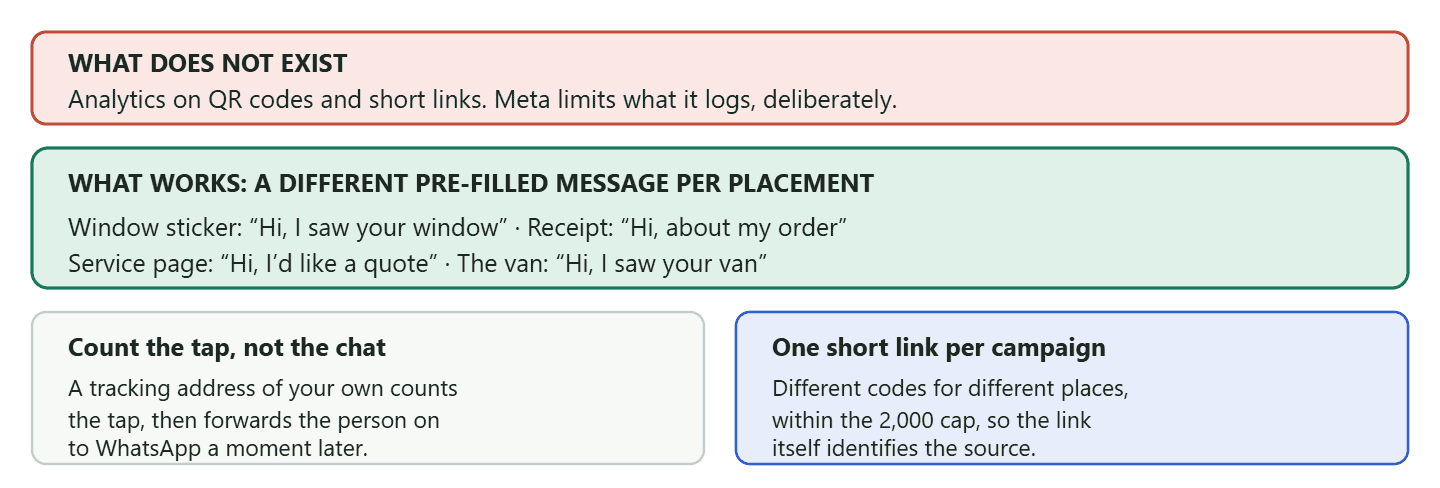
The prefilled message is the lever that survives contact with reality. A conversation that opens with “Hi, I saw your van” is better attribution than most paid analytics, because it comes from the customer and it arrives attached to a real enquiry rather than to an anonymous event. Keep a note of which message goes where, and after a month you will know which placements are earning their space.
The tap count answers the other half of the question. A placement can produce plenty of taps and almost no conversations, which tells you the surface is working and the opening line is not. Or it can produce very few taps and a high proportion of them converting, which usually means it is in front of the right people and not enough of them. You cannot read either of those from the messages alone, which is why counting the tap is worth doing where you can.
Why Your WhatsApp Click-to-Chat Link Is Not Working
Almost every broken WhatsApp click-to-chat link fails for one of five reasons, and four of them are in the number.
- A plus sign, a bracket, a dash or a space. Digits only after the slash.
- A leading zero. The domestic dialling zero is not part of the international number.
- A missing country code. The link has no idea where you are.
- The number has no WhatsApp account. A landline or a number that has never been registered will open a dead end.
- The pre-filled message was not encoded. Raw spaces and ampersands break the URL, which is why a generator is worth the ten seconds.
Test on a phone that does not have your number saved, because your own phone will happily open a chat that a stranger’s cannot. That single check catches most of the list.
Turning Those Conversations Into Something You Can Run
A link is a doorway, and a doorway is only useful if somebody is behind it. The failure that follows a successful click-to-chat link is not technical: it is a business that suddenly has forty conversations arriving on one phone and no way to keep them straight.
That is the point at which the link stops being the interesting part. What matters then is a shared inbox where those conversations can be assigned rather than fought over, automatic replies for the questions that arrive at eleven at night, and the reminders and confirmations that follow once an enquiry becomes a booking.
DMly also does the counting half, and it is worth being precise about how. Our growth tools are trackable links and QR codes that point at a short tracking address on your DMly account: somebody taps or scans, DMly records the click, and forwards them straight on to the chat. Each tool carries its own running total, labelled clicks on a link and scans on a QR code, and when the person then messages you, DMly can stamp that tool’s name onto the contact as their source. A tool can also start a flow when the conversation begins, so the poster in the window opens a conversation that already asks the right first question.
Two honest notes to keep this straight. Nothing in DMly changes what a click-to-chat link is: it is Meta’s URL, it works the same whoever you use, and our link generator is free precisely because it is not a product. And the flow trigger has a documented limit worth knowing before you build on it: on WhatsApp, starting a flow from a growth tool fires only for a brand-new contact. A returning customer scanning the same code reaches you, not the flow, which is usually what you want and is occasionally a surprise.
If what you are really planning is a campaign rather than a link, with ads, placements and attribution as one piece of work, that is a bigger subject with its own page: our guide to click-to-WhatsApp marketing, from ads and QR codes through to attribution. This page is about the link itself.
Frequently Asked Questions
How do I create a WhatsApp click-to-chat link?
Take https://wa.me/ and add your full number in international format with no plus sign, no leading zero, no brackets and no dashes. Add ?text= and a URL-encoded message to pre-fill the first line. A generator does the encoding for you.
Why is my WhatsApp link not working?
Nearly always the number. A plus sign, a leading zero, a space, a bracket or a missing country code will all produce a link that fails without an error. Test it from a phone that does not have your number saved.
Can I add a pre-filled message to a WhatsApp link?
Yes, with ?text= followed by the URL-encoded message. Write it in the customer’s voice, because it appears as though they typed it. Meta’s own QR codes and short links cap that message at 140 characters.
Does a click-to-chat link cost anything?
The link is free. What can cost is your reply. A link on your website opens the ordinary 24-hour window, and from 1 October 2026 Meta charges for utility messages answered inside it, and for service messages once a number passes the 1,000 it gets free each month. A click-to-WhatsApp ad or a Facebook Page call-to-action button opens a free 72-hour window instead.
Can I track how many people click my WhatsApp link?
Not through WhatsApp itself: Meta states that analytics are not available for QR codes and short links because it limits the data it logs. What can be counted is the tap before WhatsApp, by pointing the link at a tracking address of your own that forwards people on. DMly’s growth tools do exactly that and count clicks and scans per tool. For the conversation side, give each placement its own pre-filled message.
How many short links and QR codes can I have?
A single business phone number cannot be associated with more than 2,000 QR codes and short links combined. That is plenty for placements and campaigns, and not enough for one per customer.
Does the customer need to save my number first?
No. That is the entire point of the link. They tap, the chat opens, and nothing has to be saved by anyone.
What is the difference between a click-to-chat link and a share link?
A click-to-chat link opens a conversation with your business. A share link lets somebody forward content to their own contacts inside WhatsApp. One brings people to you; the other sends something outward.
Get the Number Right, Then Get the First Line Right
A WhatsApp click-to-chat link is the cheapest conversion device most local businesses have, and it fails for embarrassingly small reasons: a plus sign, a leading zero, an empty chat window that nobody wants to be the first to fill.
So do the two things that matter. Build the link with digits only and test it from somebody else’s phone. Then write the opening line as your customer would write it, and write a different one for every place the link lives, because that line is both the reason they send and the only attribution you are ever going to get.
Everything after that is a question of who is on the other side of the door when it opens.
Build a link and a matching QR code with the free WhatsApp link generator, and see how DMly handles the conversations that arrive.
Writing about WhatsApp automation, bookings and growth for local business.
Turn WhatsApp into your busiest channel.
Start free and run message, bookings, payments and reviews in one place.
