
WhatsApp Automation for Clinics: Reminders, Recalls, and Patient Messaging (2026)
Most software decisions in a clinic run on vendor promises. This one runs on trial data.
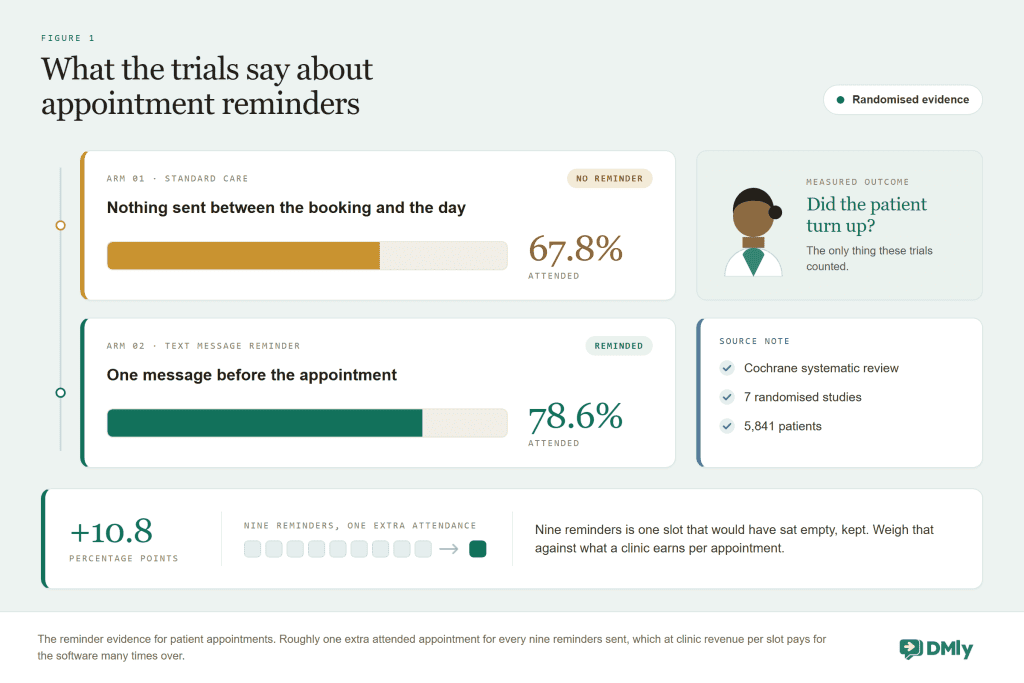
Across 105 published studies, roughly 23% of outpatient appointments end as no-shows. And in the Cochrane review of text-message reminders, seven randomized studies covering 5,841 patients, attendance was 67.8% without reminders and 78.6% with them. That is the entire pitch for WhatsApp automation for clinics in two sentences, and neither of them came from a marketing department.
Clinics are the one setting where this argument can be made from evidence rather than analogy, so this guide is built the way a clinician would want it. The numbers first, then the machinery (patient appointment reminders, the recall system that quietly fills next quarter, booking without the phone queue), then the part that matters more in healthcare than anywhere else: the line between what your practice should automate and what must never leave a human’s hands. Everything is built on DMly and checked against how it actually behaves.
What WhatsApp Automation for Clinics Actually Does
WhatsApp automation for a clinic is the set of patient messages that send themselves: booking confirmations, appointment reminders, recall invitations, follow-ups and payment requests, delivered through the official WhatsApp Business API on the number your patients already message. A platform like DMly supplies the appointment calendar, the patient records, the triggers and the templates around the chat, so your front desk stops spending its day on the telephone repeating the same three sentences.
What it is not is a medical tool. It books, reminds, recalls and collects; it does not diagnose, triage or discuss results, and this guide will be blunt about keeping it that way. The clinics that get real value from patient messaging are the ones that automate the logistics completely and the clinical conversation not at all.
The No-Show Evidence: What Reminders Actually Do
Missed appointments are the most expensive quiet problem your clinic has: the clinician is paid, the room is lit, the slot is gone, and the patient who needed it is somewhere else entirely. The research on this is unusually good, so here are the three numbers worth keeping and the one claim to distrust.
To see where your practice is losing patients between enquiry and visit, take the free clinic marketing audit.
- ~23% of outpatient appointments are missed on average, across 105 studies worldwide (Dantas 2018). Your own rate sits somewhere around that, and DMly’s appointment reports will tell you exactly where.
- Reminders lift attendance from 67.8% to 78.6% in the Cochrane randomized evidence, a relative improvement of about 14%.
- Reminded patients are roughly 23% more likely to attend, with no-show rates of 15% against 21% in the Robotham meta-analysis.
And the claim to distrust: any vendor telling you reminders “cut no-shows by up to 50%”. No controlled study supports it. The honest arithmetic is smaller and still decisive: if your clinic runs 200 appointments a week at a 20% no-show rate, the trial-sized effect returns somewhere around eight to ten appointments a week to your diary. Price a slot and do the multiplication; it will not be close.
Why WhatsApp rather than SMS, when the trials used SMS? Because what actually works is the message being seen, and WhatsApp is where your patients’ attention already lives, with the same message thread carrying their replies, their reschedules and their questions back to you. SMS remains a fine fallback, and DMly can route notifications there for patients without WhatsApp.
There is a second effect the trials could not measure, and it is arguably worth as much as the reminder itself: the reply. An SMS reminder is a dead end, so a patient who cannot make it either ignores it or joins your phone queue. A WhatsApp reminder is a conversation, so “can’t make Tuesday” comes straight back into the same thread, the reschedule link turns it into a moved appointment, and the vacated slot goes back on sale with days of notice instead of none. In clinic economics, a no-show converted into a 48-hours-ahead reschedule is nearly as good as an attendance, because the slot gets resold. The literature counts attendance; your revenue counts both.
Patient Appointment Reminders in DMly
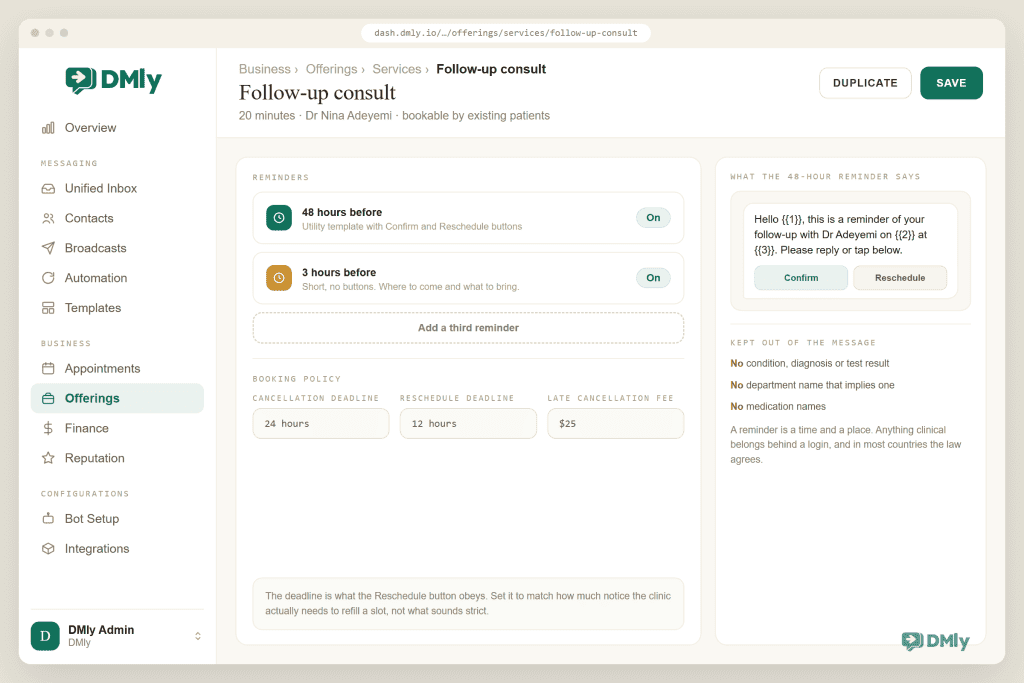
Setting up patient appointment reminders in DMly takes minutes. You set the reminder times on each service, and the messages go out as approved WhatsApp templates, which is what lets them reach a patient whose 24-hour messaging window has closed. The craft is in the details around that, and four of them decide whether your reminder system actually behaves the way the trials did.
- Set two reminder times, not one. A few days ahead, so a clash can become a reschedule while the slot is still sellable, and the day before, which is the forgetting-fix the evidence measured. Both are just reminder times on the service.
- Always include the reschedule link. A reminder without an easy way out converts conflicts into no-shows with a guilty conscience. The reschedule link converts them into moved appointments, and your cancellation deadline in the booking policy decides how late self-service stays open before it becomes a phone call.
- Keep the wording purely logistical. Date, time, clinician if appropriate, location, the link. Nothing about why the patient is coming. That is both the safe habit (more in the boundary section) and, under Meta’s rules, what keeps the template in the cheaper utility category rather than marketing.
- Know when a reminder will not send. DMly skips rather than retries: an unconfirmed booking, or a patient who has opted out of messages, gets no reminder and no error. When someone insists they were never reminded, the booking’s status and the contact’s opt-out state are where the answer lives.
The no-show follow-up completes the pair. When your front desk marks a missed appointment as a no-show, that trigger is your chance to send something kind within the hour: no lecture, one tap to rebook. A patient who misses an appointment is usually embarrassed, and clinics that make coming back easy recover a meaningful share of the misses. The ones that make it awkward never see those patients again, which in healthcare is a worse outcome than the lost slot.
The Patient Recall System: Refilling Next Quarter’s Diary
Reminders protect appointments that already exist; recalls create the ones that don’t exist yet. For dental practices, physiotherapists, opticians, vets and any clinic with review intervals, your recall list is the most valuable asset the practice owns, and the one most often run off a spreadsheet and good intentions.
A recall system on WhatsApp needs exactly two ingredients in DMly, and both are ordinary features pointed at the job:
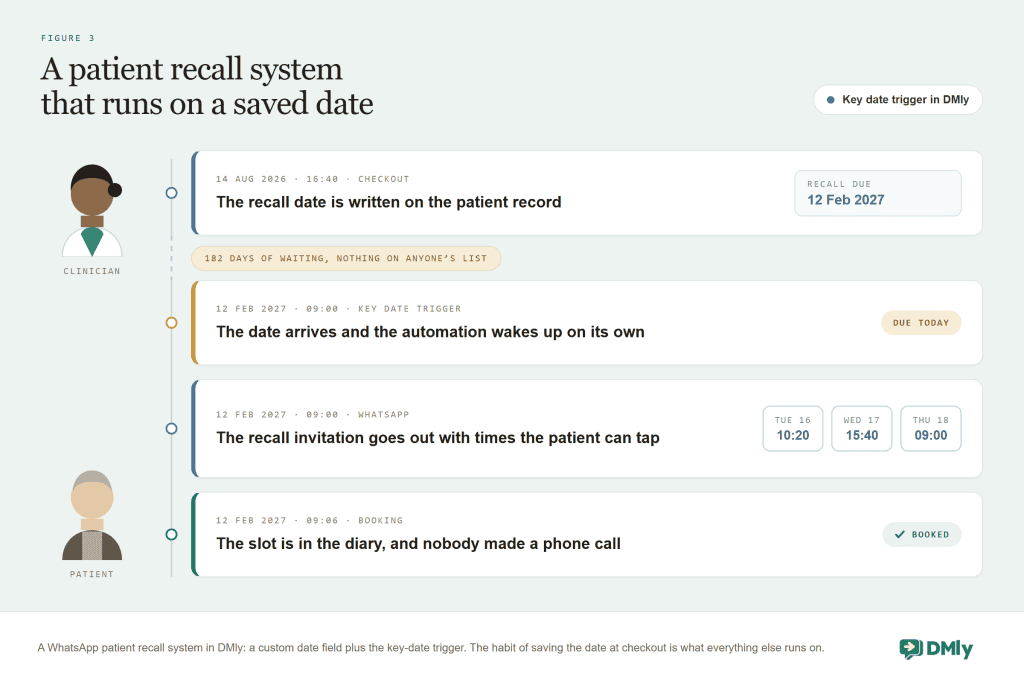
- A custom date field on the patient record, called something like “Next recall due”. DMly’s custom fields include a date type, which is the whole trick: at checkout, your front desk sets it six months out, or whatever the clinician says, the same way they would have written it on a card index in 1985.
- The Birthday / key date trigger, which fires when a contact’s date field arrives, and only for contacts who have that date filled in. Point it at the recall field, attach a warm invitation with tappable booking times, and next quarter’s diary starts filling itself the day each patient falls due.
Two refinements make it a system rather than a message. Add a follow-up leg for non-responders: if no booking exists a week after the recall, send one gentle second nudge, then raise a task for a human, because a phone call to a patient who ignored two messages is a better use of your front desk’s time than a hundred cold recalls. And segment the stragglers: a saved segment of patients whose recall date passed more than a month ago, with no future appointment, is your reactivation list, ready for a small careful broadcast whenever the diary needs it.
The same key-date machinery covers annual reviews, vaccine schedules for veterinary practices, and lens replacement cycles for opticians. Anywhere the standard of care includes “come back in N months”, the field-plus-trigger pattern is your recall system, and it costs nothing beyond the checkout habit.
WhatsApp Booking for Clinics, Without Breaking Triage
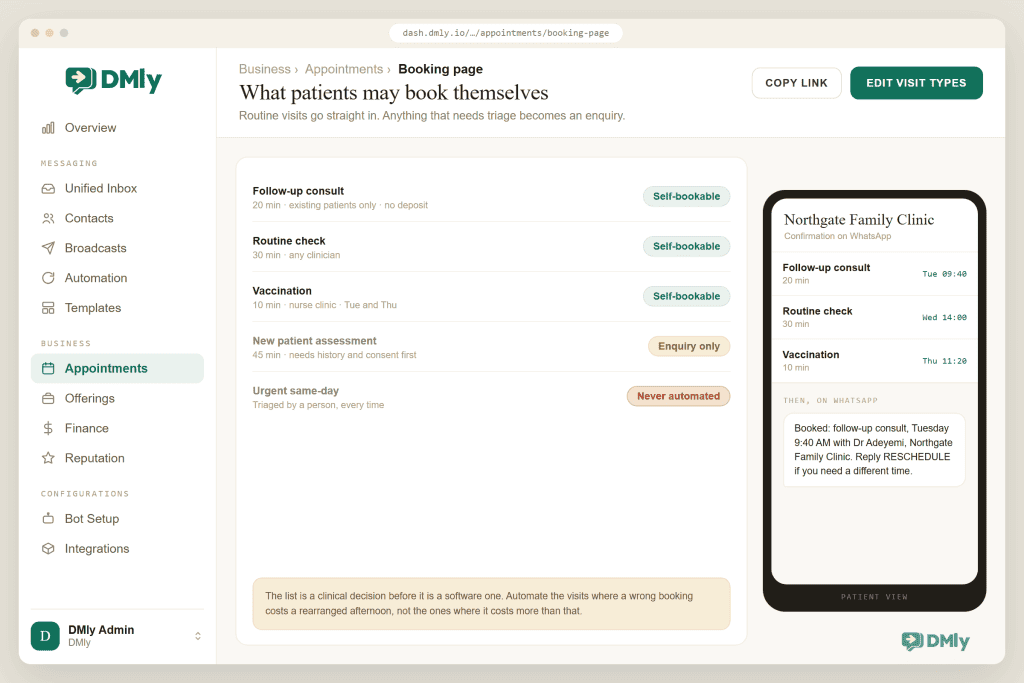
Patients can book two ways, and both end in your WhatsApp thread. They can use the booking page, reached through a wa.me link, your website or your Google Business Profile, or they can book inside the chat itself, where an automation offers tappable times. Services carry their own durations, buffers and minimum notice, clinicians have their own working hours, and the confirmation lands back in WhatsApp seconds later. For routine, patient-bookable visits (check-ups, hygiene, the follow-ups you have designated as self-service) this removes the 8:30am phone queue that every practice pretends is fine.
The clinical judgement is deciding what is bookable at all, and the honest design respects your triage. Not every appointment type should be patient-selectable: keep the self-service list to visit types where the patient cannot choose wrongly, and route everything else to a short conversation first. An automation can still do the sorting politely (“Is this for a routine check-up, or something that’s bothering you now?”), with the second answer handed straight to a human. Urgency belongs with people, and the words “if this is an emergency, call” belong in your welcome message, permanently.
Two payment patterns cover most clinics. Pay after the appointment on a service confirms the booking immediately and sends the payment link when the visit is done, which suits consultations. Treatment plans that spread over months suit an invoice with part payments: one invoice for the plan, a deposit now, the balance link re-minting for what remains, and the patient’s statement answering “what have I paid so far?” without anyone digging through folders. The mechanics live in our invoicing guide. Patients can also manage their own bookings through the client portal, which they enter with a 6-digit code sent to them, so there’s no password to forget.
Patient Messaging Without Crossing the Line
This is the section that keeps you out of trouble, and it comes down to one sentence you can brief the whole team on: the chat handles the diary; humans handle the health.
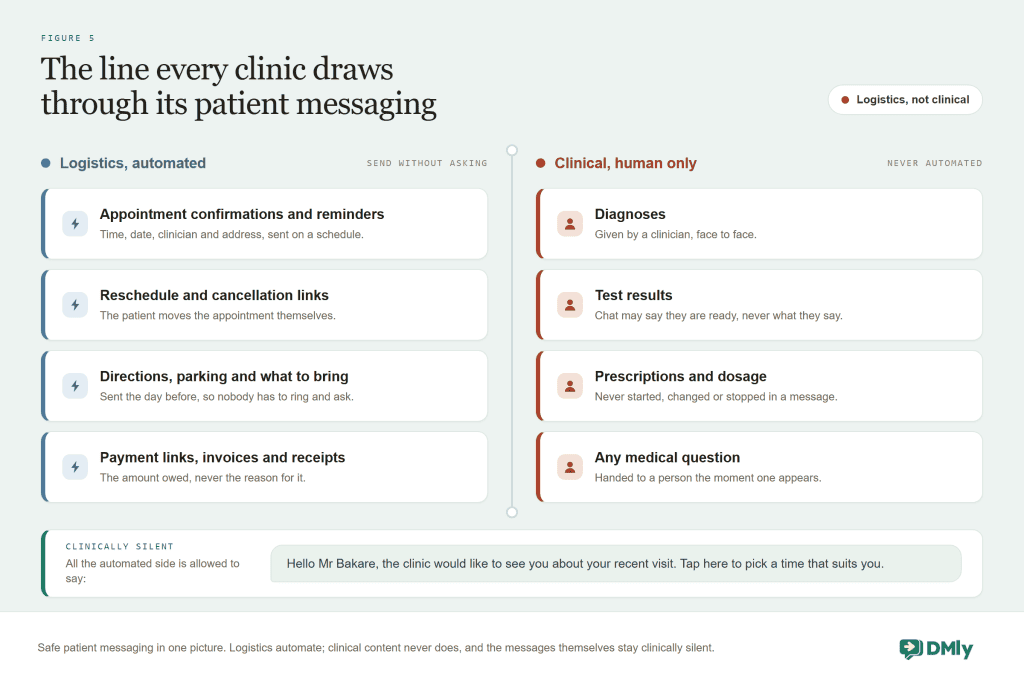
Three habits put that picture into practice:
- Write clinically silent messages. “A reminder about your appointment tomorrow at 2pm” works for every patient. “A reminder about your dermatology biopsy follow-up” has just disclosed health information to whoever glances at a lock screen. Appointment, time, place, link. Nothing else, ever, including in your template wording.
- Wire the handover, and advertise it. Every automated flow needs an obvious route to a person, and anything resembling a medical question takes that route immediately. If you use AI replies for the administrative long tail (parking, insurance paperwork, opening hours), instruct it explicitly to hand over on anything health-shaped rather than improvise. A confident wrong answer about an opening time is an inconvenience; about a symptom, it is a harm.
- Own your compliance homework. Health-data rules differ by country and profession, and neither WhatsApp nor any platform vendor can do that duty for you. Decide with your own advisers what your rules permit in patient messaging, write it down, and configure the system inside those lines. This guide deliberately offers no legal reassurance, because the honest version of this paragraph is that nobody selling software can.
Five Patient Messages to Copy
Wording matters more in a clinic than anywhere else, because every message has to work hard while saying almost nothing. These five earn their place, and all of them are deliberately clinically silent.
| Message | When it sends | Wording that works |
| Booking confirmation | On booking | “You’re booked, Mr Adeyemi: Tuesday 12 Mar, 2:30pm with Dr Okafor. Need to change it? Tap here. If anything is urgent before then, please call us.” |
| Early reminder | 3 days before | “A reminder about your appointment this Tuesday at 2:30pm. If the time no longer works, you can move it here in a few taps.” |
| Day-before reminder | The day before | “See you tomorrow at 2:30pm. Reply here if you have any questions about getting to us; parking directions: [link].” |
| Recall invitation | Key date arrives | “Hello Mrs Bello, our records show you’re due a routine visit. You can pick a time that suits you here, and it takes under a minute.” |
| No-show follow-up | Marked no-show | “We missed you today, and that’s completely fine, life happens. When you’re ready, here’s a quick link to find another time.” |
Read them again and notice what none of them mention: a condition, a treatment, a result, a reason. The recall says “routine visit”, not “hygiene appointment following your gum treatment”. That restraint is the whole craft of patient messaging, and it costs you nothing except the temptation to personalise the wrong way.
Which Clinics This Fits Best
The machinery is the same across healthcare; what changes is which part carries the value for you. Dental practices and hygienists live on the six-month recall, so the key-date engine is their whole business case. Physiotherapists and chiropractors run course-of-treatment bookings, where the reschedule link and the treatment-plan invoice with part payments matter most. Opticians recall on lens and test cycles measured in years, which is exactly the kind of interval no human diary survives. Veterinary practices are the sleeper fit: vaccine schedules per animal map perfectly onto date fields, and pet owners are the most WhatsApp-native patient group there is. Aesthetics and dermatology clinics get the most from deposit-style invoicing and review automation, with extra care on message silence, since discretion is part of the product.
Multi-clinician practices need one planning note. Each clinician’s availability is managed through their own working hours and time off inside DMly, and the Google Calendar connection is workspace-wide, meaning one calendar whose busy time blocks every practitioner. Manage individual diaries inside the platform rather than expecting six personal calendars to sync, and your booking page stays truthful for all of them.
What the Front Desk Gains
The quiet beneficiary of all this is the person answering your phone. A practice that moves booking, reminding and recalling into WhatsApp automation takes three of the front desk’s four repetitive jobs away, and upgrades the fourth: when a patient does message with something that needs a person, whoever picks it up sees the whole relationship beside the chat, their appointments, their balance, their notes, so the answer comes from context rather than from interrogation.
Two smaller pieces complete the picture. Saved replies cover the administrative questions that arrive daily in identical form, so every team member answers them the same way in seconds. And the review request, sent a few hours after a completed visit through the built-in Google review step, does for your practice’s local search presence what recalls do for its diary; the wording that works is in our Google reviews guide. Measure the whole system monthly in the appointment reports, where the no-show rate you started with either falls or tells you which reminder timing to adjust.
How to Set Up WhatsApp Automation for Clinics
- Connect the number and define the services. Your WhatsApp number onto the official API through DMly, then each visit type with its true duration, buffers and minimum notice, and clinicians with their real working hours. Decide now which types are patient-bookable.
- Confirm the reminder templates are approved, then set the two reminder times. A few days out and the day before, both with the reschedule link, both clinically silent.
- Create the recall field and the key-date flow. One custom date field, one trigger, one warm invitation with booking times. Then brief the checkout habit: the date gets set before the patient leaves the desk.
- Write the welcome and the boundary. The welcome message with the emergency line, the handover wiring on anything non-administrative, and the AI, if you use one, instructed to stay off medical topics.
- Add the no-show follow-up and the review request. Both are single flows, and both compound: one recovers patients, the other builds the reputation that brings you new ones.
- Read your baseline, then read it again in a month. The appointment reports’ no-show rate before and after is the number that tells you what this was worth, in your clinic rather than in a study.
Common Problems With WhatsApp Automation for Clinics
| Symptom | Cause | Fix |
| A patient never received a reminder | The booking was unconfirmed or the patient opted out; reminders skip rather than retry | Check the booking status and opt-out state before suspecting the system. |
| Reminders fail outside 24 hours of a chat | The template is not yet approved, and only approved templates deliver outside the window | Verify template approval on the WhatsApp Templates page before launch. |
| Recalls go to nobody | The key-date trigger only fires for patients whose date field is filled, and the checkout habit lapsed | Audit the field weekly at first; the habit is the system. |
| Post-visit flows reach patients who never came | Built on Appointment completed; an unmarked visit auto-closes as completed about a day later, and on the default setting that fires the trigger | Set Appointments nobody marked to Wait for review, and make marking the visit complete or no-show part of checkout. |
| A reminder disclosed too much | Clinical detail crept into a template or a service name patients can see | Rename services neutrally and strip the wording to logistics only. |
| Patients book the wrong visit types | Everything was made self-bookable | Restrict self-booking to visit types where a wrong choice is impossible; route the rest through a short conversation. |
| The AI answered a medical question | It was never explicitly bounded | Instruct it to hand over on anything health-related, and test it with exactly those questions before patients do. |
Clinic WhatsApp Automation FAQs
Do WhatsApp appointment reminders really reduce no-shows?
The randomized evidence says yes, with honest effect sizes: attendance rose from 67.8% to 78.6% in the Cochrane review of text reminders, and a meta-analysis found reminded patients about 23% more likely to attend. Treat any “cuts no-shows in half” claim as marketing. The real effect is smaller and still comfortably pays for itself at clinic slot values.
Is WhatsApp suitable for patient communication?
For appointment logistics, in most settings, yes, and that is the boundary this guide teaches: confirmations, reminders, recalls, directions and payments, with no clinical content in any message. Whether and how your practice may use it is governed by your local health-data rules and professional obligations, which are yours to confirm with your own advisers. No software vendor can make that call for you.
How do patient recalls work on WhatsApp?
Through a date and a trigger. Your front desk saves the next recall date on the patient’s record at checkout, and when the date arrives, DMly’s key-date trigger sends the invitation with tappable booking times. It fires only for patients whose date is filled in, so that checkout habit is the entire system.
Can patients book appointments themselves on WhatsApp?
Yes, for the visit types you choose to make self-bookable: they pick a time on your booking page or tap one offered in the chat, and the confirmation arrives in the same thread. Keep clinically-judged visit types off the self-service list and route them through a short conversation instead, so booking convenience never overrides your triage.
What does WhatsApp automation for clinics cost to run?
DMly’s plans include bookings, automations and the templates, with a 7-day trial and no card required. Meta bills template messages delivered outside a patient’s 24-hour window per message, passed through without markup, and your reminder traffic is modest. One date to note: free-form replies inside that window carry no Meta charge until 1 October 2026, and from that date they are billable too, alongside utility templates delivered inside an open window, which our guide to the October WhatsApp pricing change explains. Set the whole bill against the trial-sized recovery of missed appointments at your slot value; the arithmetic is rarely close.
Can I send test results or prescriptions through it?
Technically the channel can carry a message; this guide’s advice is that clinical content should not travel in it, both because message wording is visible on lock screens and because your professional and legal obligations around results and prescriptions are stricter than any chat channel is designed for. Keep results delivery in your clinical systems, and use WhatsApp to book the conversation about them.
Fewer empty slots, calmer front desk
Appointment reminders with trial evidence behind them, a recall system that runs on one date field, and patient messaging with the boundary built in. On the number your patients already use.
The Number to Watch
Everything in this guide narrows to one figure: your no-show rate, in your own appointment reports, before and after. The literature says to expect it to move meaningfully but not miraculously. The recall field says next quarter’s diary should stop depending on anyone’s memory. The boundary says your patients’ trust survives the automation intact.
Start with the reminders this week, add the recall field the week after, and let the reports referee. The boundary section is the one to brief the whole team on before anything goes live, because it is the part that cannot be patched afterwards. In a field where every other software claim asks to be taken on faith, this one will show you its working.
Writing about WhatsApp automation, bookings and growth for local business.
Turn WhatsApp into your busiest channel.
Start free and run message, bookings, payments and reviews in one place.
