
How to Build an AI Customer Service Chatbot for WhatsApp
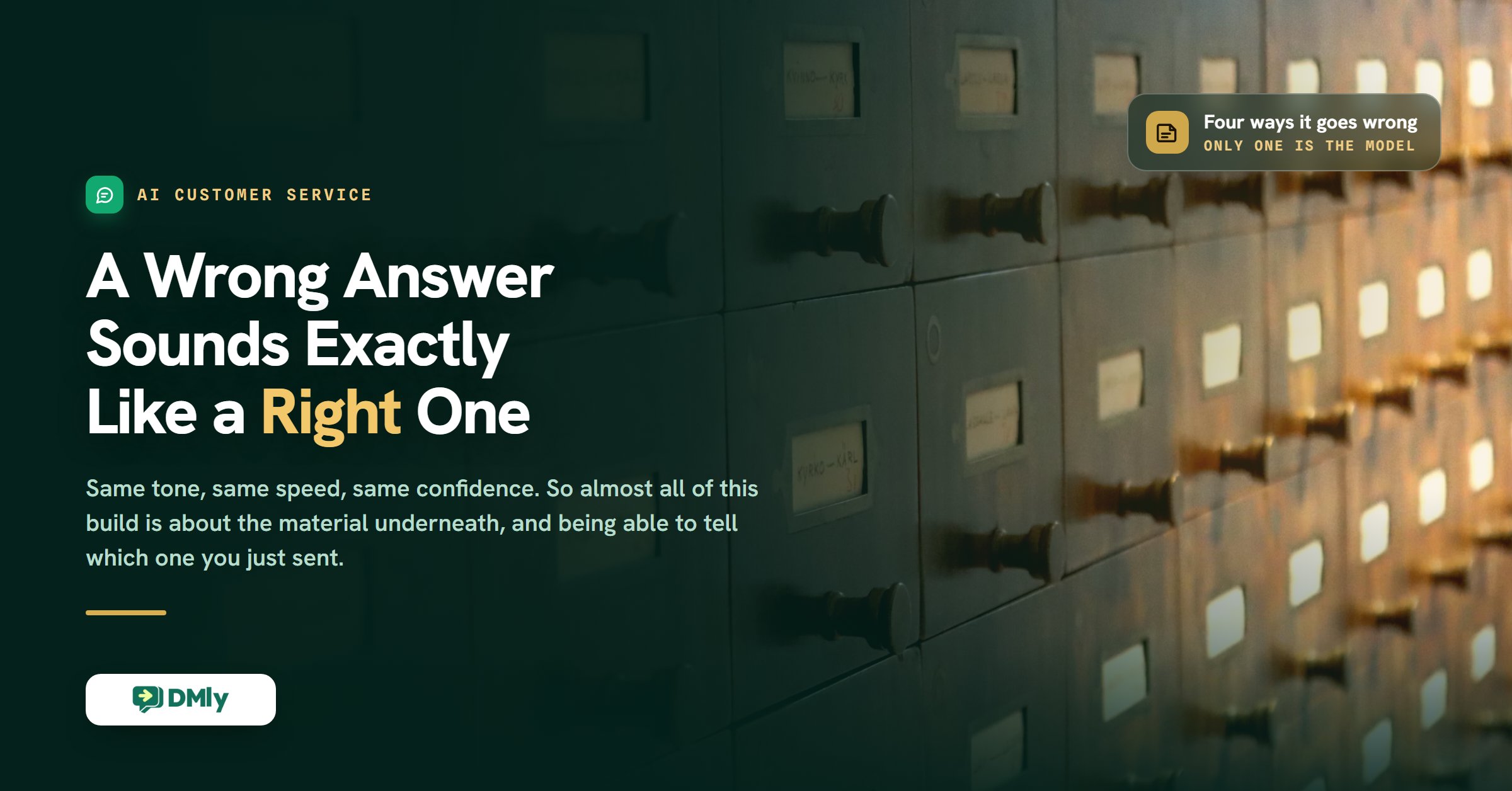
Here is the failure that should worry you, and it is not the one people expect. A customer asks what a treatment costs. Your assistant answers immediately, in your voice, with a specific figure and a warm closing line. It is a genuinely good message. The figure is from last spring, because the old price list is still sitting in the knowledge base underneath the new one, and nothing anywhere marked the old file as retired.
That is the shape of the problem with an AI customer service chatbot: you find out three weeks later, when somebody arrives expecting to pay the old price. Nobody complained in the meantime. That is the thing about a well-written wrong answer: it does not look like a fault, so nothing reports it and nobody escalates it.
An AI customer service chatbot is worth building, and it will answer the majority of what arrives at 11pm better than a form and faster than a person. But the interesting part of the build is not making it talk. It is making it right, and then being able to tell whether it is. This guide is organised around that: the four ways one of these produces a confident wrong answer, the specific setting or habit that closes each one, and what you can honestly measure afterwards.
If you are still weighing whether an assistant belongs on your WhatsApp at all, our guide to WhatsApp AI chatbots for small businesses makes that case. This page assumes you have decided, and that the thing you care about is accuracy.
What Makes It Different From a Keyword Reply
A keyword rule matches a word and fires a saved message; an AI customer service chatbot reads the actual question and writes the answer from documents you supplied. The middle part is the whole distinction, and it is why this belongs on WhatsApp in particular.
People do not write support tickets in a chat window. They write “hey do u still do the 3 for 2 thing” and “whats the latest i can cancel”. A keyword rule breaks on both, because neither contains the word you thought of when you built it. An assistant that reads the question handles the sixty ways people phrase the same thing, which is most of the value.
It is not a replacement for saved replies, though, and the two sit together well. Quick replies are for the human half: the conversations the assistant hands over, where somebody needs to answer fast without retyping. The assistant takes the factual load underneath.
The Four Ways an AI Customer Service Chatbot Answers Wrongly
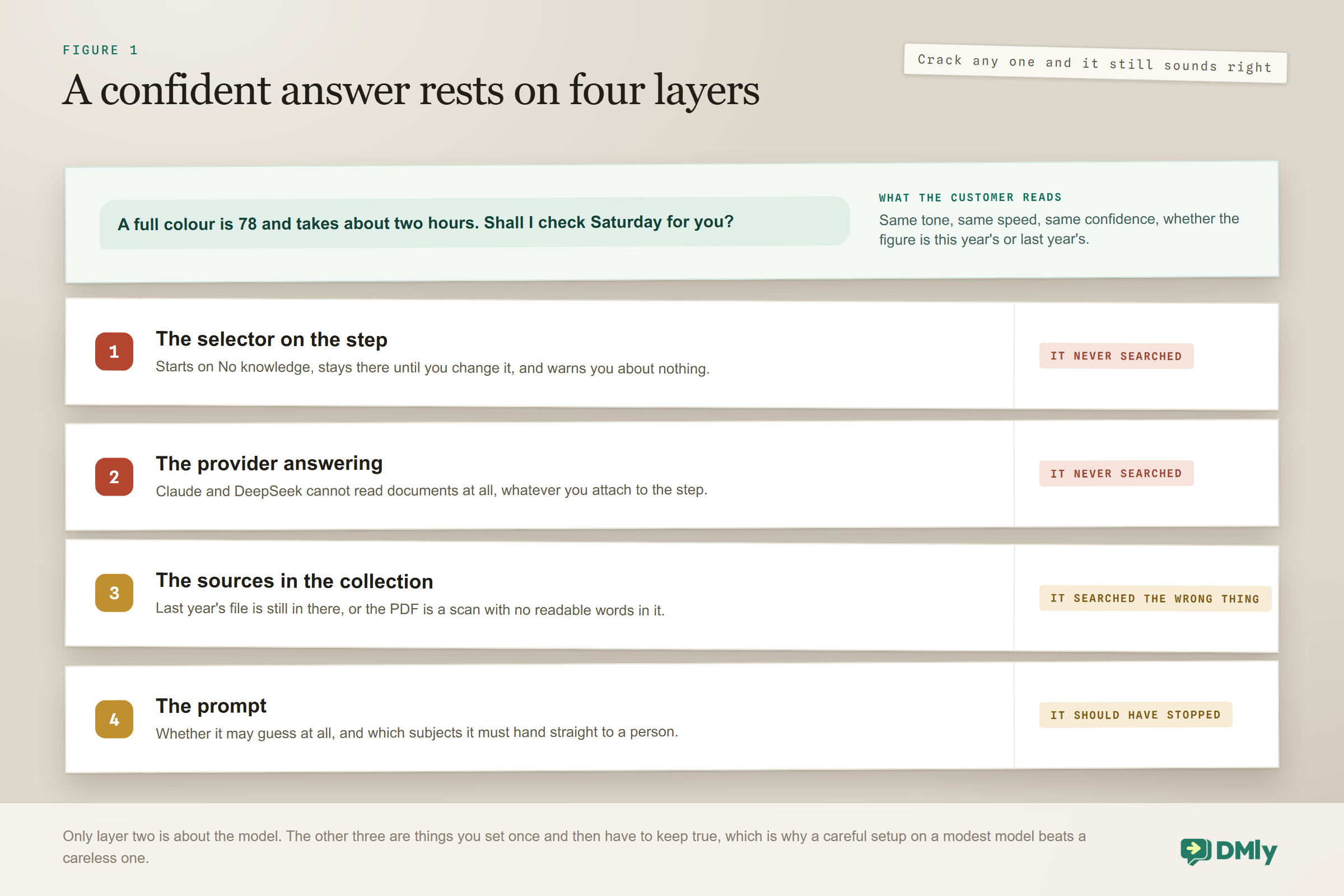
Every bad support answer I have traced back has been one of these four, and only one of them is really about the model. Read them before you build, because each maps to something specific you are about to set.
One: it never searched at all. The assistant answered from its own general knowledge because it did not look at your material. There are four documented causes, and the first is by far the most common: the step’s AI Knowledge selector is still on No knowledge, which is where every new step starts and where it stays until you change it. There is no warning when you leave it. The others are that the step replies on Claude or DeepSeek, which cannot search documents at all; that the collection is empty or everything in it is still indexing; or that the collections were built on a different AI account from the one now answering, which has its own section below.
Two: it found two versions of the truth. This is the one from the opening, and it is the hardest to notice. Adding a new price list adds to the collection; it does not replace what was there. Both files are searchable, so the assistant can find and quote either, and it will do so confidently in both cases. The fix is a habit rather than a setting: when you upload a new version, remove the old row, or build a fresh collection holding only the new file and point the step at that instead.
Three: it searched something that contains nothing. A scanned PDF, meaning an image of words rather than words, contributes nothing to the search. Nothing errors and nothing warns you; the source sits in the list looking perfectly healthy. The test is thirty seconds: open the PDF and try to select the text with your cursor. If you cannot, neither can the search. Re-export it from the original document, or retype the handful of facts that matter as pasted text.
Four: it should have stopped and did not. A complaint, a refund, anything with a judgement call in it. This one is not a knowledge problem at all, it is a prompt problem, and it is fixed by naming the categories explicitly rather than hoping the assistant infers them.
Notice that three of the four are about what you gave it and what you told it, not about which model you picked. That is why a carefully set up assistant on a modest model beats a careless one on the best model available, every time.
Build the Knowledge Base First, Because It Is the Product
The knowledge base is the thing you are actually building, and the AI customer service chatbot is the interface on top of it. It lives at Settings, AI Knowledge, and it is workspace-wide, so a collection you build once can be searched by any automation you ever write.
You group material into collections, named for what is in them. One collection per subject beats one collection for everything, because you pick them by name later and because a sales assistant and a support assistant should usually read different things. Prices, Policies and Support is a perfectly good day one.
There are four kinds of source, and knowing what each is for saves an afternoon:
| Source type | Use it for | Worth knowing |
| Upload file | A document you already have | PDF, TXT or MD only, up to 20 MB each. A spreadsheet, a Word file or an image is rejected, so export to PDF first |
| Web page URL | A page on your site that already says it | The page is fetched and its readable text indexed. Prefer this over a PDF of the same page, for the reason below |
| FAQ | A question you are asked constantly | Question and answer are separate boxes, stored as a pair. The answer can run to 20,000 characters |
| Pasted text | Something not written down anywhere yet | A title and a text box, also up to 20,000 characters. The fastest way to get opening hours or a parking note in |
The reason to prefer a web address over a file is small and useful. Only a source with an address can be linked back to the customer. When the assistant answers from one, it appends that address to its reply as a plain link, at most two links per reply and never one the answer already contains. A file, an FAQ or pasted text has no address, so the assistant can name it but never link it. Nothing breaks either way; you simply lose a free route from the answer to the page.
If your answers are already on your website: Import pages on a collection takes a sitemap address or a pasted list and brings the pages in in bulk, up to 100 pages per import. A large site needs several runs, and the confirmation tells you how many are outstanding so you can run it again from where it stopped. Re-running is safe: a page already in the collection is skipped rather than added twice. A sitemap is read to the first 2,000 addresses it lists, which is the ceiling on what one import can ever consider.
Whatever goes in can be quoted back to a customer: Keep staff notes, your margins, supplier costs and anyone else’s personal details out of a collection entirely. This is not a permissions setting you can tune afterwards. If it is in there, the assistant may say it out loud to whoever asks the right question.
How to Write Material an AI Customer Service Chatbot Can Actually Find
Retrieval quality is a writing problem far more than a technology one, and it is the least discussed part of the whole build. The assistant does not read your library on every message. It searches it, pulls a few passages, and writes from those. Material written for a human skim-reader often retrieves badly, and the fixes are all small.
- Write for the question, not for the page. A document shaped like an FAQ, a heading that is the question with a short answer under it, is far easier to search than a brochure. If people ask “do you take walk-ins?”, have a line that says exactly that. The FAQ source type exists for precisely this.
- Put the answer in the first sentence. Then add the detail. If the search only pulls a short passage, you want that passage to be the answer rather than the run-up to it.
- Say the specifics. Prices, hours, addresses, service names, how long something takes, what is included. These are what people actually ask for, and they are exactly what the assistant cannot invent honestly.
- Write figures as plain sentences as well as in tables. A number living only inside a complicated PDF table can survive extraction badly. If a figure matters, make sure it also appears in a sentence somewhere.
- Spell out what everyone in the business already knows. That you close for two weeks in December, that the deposit is non-refundable inside 48 hours, that parking is behind the building. Institutional knowledge is invisible until an assistant needs it.
- Keep one current version of anything. This is failure two from the list above, and it is worth repeating because it is the expensive one.
Two things actively hurt. Marketing copy, which is pages of tone with no facts in them, gives the assistant nothing to answer with. And importing everything, blog posts and press releases included, buries the price list among things nobody has ever asked about. Import the pages that answer questions.
A useful way to think about it: Treat it like onboarding a new receptionist. If a document would not get a new hire to the right answer on their first day, it will not get the assistant there either. That test catches almost everything, and it does not require you to know anything about how search works.
Building the Assistant, Once the Material Exists
Six steps to a working AI customer service chatbot, and the third is the one people skip.
- Start from the AI Customer Service bot template. Go to Automations, create a new one, and the template picker opens by itself. It arrives as a draft: a message trigger, an AI Reply step, an end. It also arrives with five tools already ticked, which are the right five for support. If the canvas is unfamiliar, the no-code automation guide covers it from zero.
- Choose OpenAI or Gemini. If your plan lets you connect your own provider key, this choice is on the Configuration tab and it is the one that decides whether document search happens at all. If your plan does not, the tab is not there and the model is managed for you, which is fine: knowledge works on the built-in AI too.
- Point the step at your knowledge. On the Built-in Tools tab, change AI Knowledge from No knowledge to something else. All workspace knowledge is the right answer for most support assistants, because a collection you add next month is then searched without editing the flow. Choose Selected collections when a sales assistant and a support assistant should read different material.
- Leave web search off. It is off by default and it should stay off here. Your prices, hours and policies are not on the open web, and an assistant that can browse will occasionally answer a question about your business using somebody else’s website.
- Write the prompt. The next section has one to paste. Keep the default tools on while you are there: Get contact info, Add a note, Add tags, Hand over to a human and Move to unassigned queue all arrive enabled and all five earn their place on a support assistant.
- Test the knowledge, then test the assistant, then publish. Those are two different tests in two different places, and the next section is about the one almost nobody opens.
Test Knowledge, the Screen Almost Nobody Opens
There is a test panel on the knowledge page itself, and it answers a different question from the one the Playground answers. The Playground tells you whether the assistant behaves well. Test knowledge tells you whether the answer is in your material at all, which is a more useful thing to know first and a faster thing to fix.
It sits at the bottom of Settings, AI Knowledge, once you have at least one collection. Leave the scope on all collections or pick one, type the question the way a customer would type it, and you get an answer plus Retrieved snippets naming the source each one came from. Nothing is sent to anybody and nothing lands in your inbox.
Two things make it more useful than it looks. First, it is deliberately strict: it answers only from the documents it actually retrieved, and says it could not find the answer otherwise. So “could not find it” is a real result rather than a shrug, and it means the material genuinely is not there, or is not phrased anything like the question. Second, the snippets name their sources, which is how you catch failure two: ask what something costs, and if two different files come back with two different figures, you have found the old price list before a customer does.
Spend twenty minutes here with the fifteen questions your team is sick of answering, before you go anywhere near publishing. It is the highest-value twenty minutes in this whole build.
A Support Prompt You Can Paste
The prompt for an AI customer service chatbot differs from a sales or booking prompt in one way: most of it is about restraint. You are not teaching it to persuade anybody. You are teaching it to be accurate and to know where its job ends.
Two lines do most of the work. Never guess pushes the assistant toward its search and away from its imagination, and it is the single most valuable sentence in the file. And you have answered twice and they are still asking catches the loop where an assistant rephrases the same unhelpful answer while the customer gets steadily angrier. That loop is the most damaging pattern in automated support, and almost nobody writes a rule against it.
One more thing worth knowing while you are in the prompt: ticking a tool makes it available, but the prompt is what makes the assistant reach for it. If a tool you switched on never seems to fire, the prompt is not telling it to.
Which Provider Can Actually Read Your Documents
Two of the four supported providers cannot read uploaded documents at all, and they look exactly like the other two in the dropdown. This is the setting that quietly decides whether your afternoon of knowledge writing does anything.
| Provider | Can search your knowledge | Web search | Worth knowing |
| OpenAI | Yes | Yes | Also the only one with a reasoning-effort setting. The usual default for support |
| Claude | No | Yes | Cannot read documents. The knowledge selector is still offered on the tab, and searches nothing |
| Google Gemini | Yes | Yes | Knowledge and web, without the reasoning control |
| DeepSeek | No | No | Neither. It runs on the prompt alone |
If you have written good material and the assistant keeps inventing answers, check this before you check anything else. A knowledge base attached to a provider that cannot read it produces exactly the symptom of a badly written knowledge base, and no amount of rewriting will fix it. The knowledge page itself will tell you when this is the problem, with a line reading that AI Knowledge needs a knowledge-capable AI.
One related surprise, because every team hits it at least once. Internal notes are never shown to the assistant. A colleague writing context onto a conversation is writing it for other humans. If the assistant needs to know something about a customer, it has to reach it through the prompt, the knowledge base or a contact field, not through the notes your team has been diligently keeping.
The Trap That Can Empty Your Knowledge Base Overnight
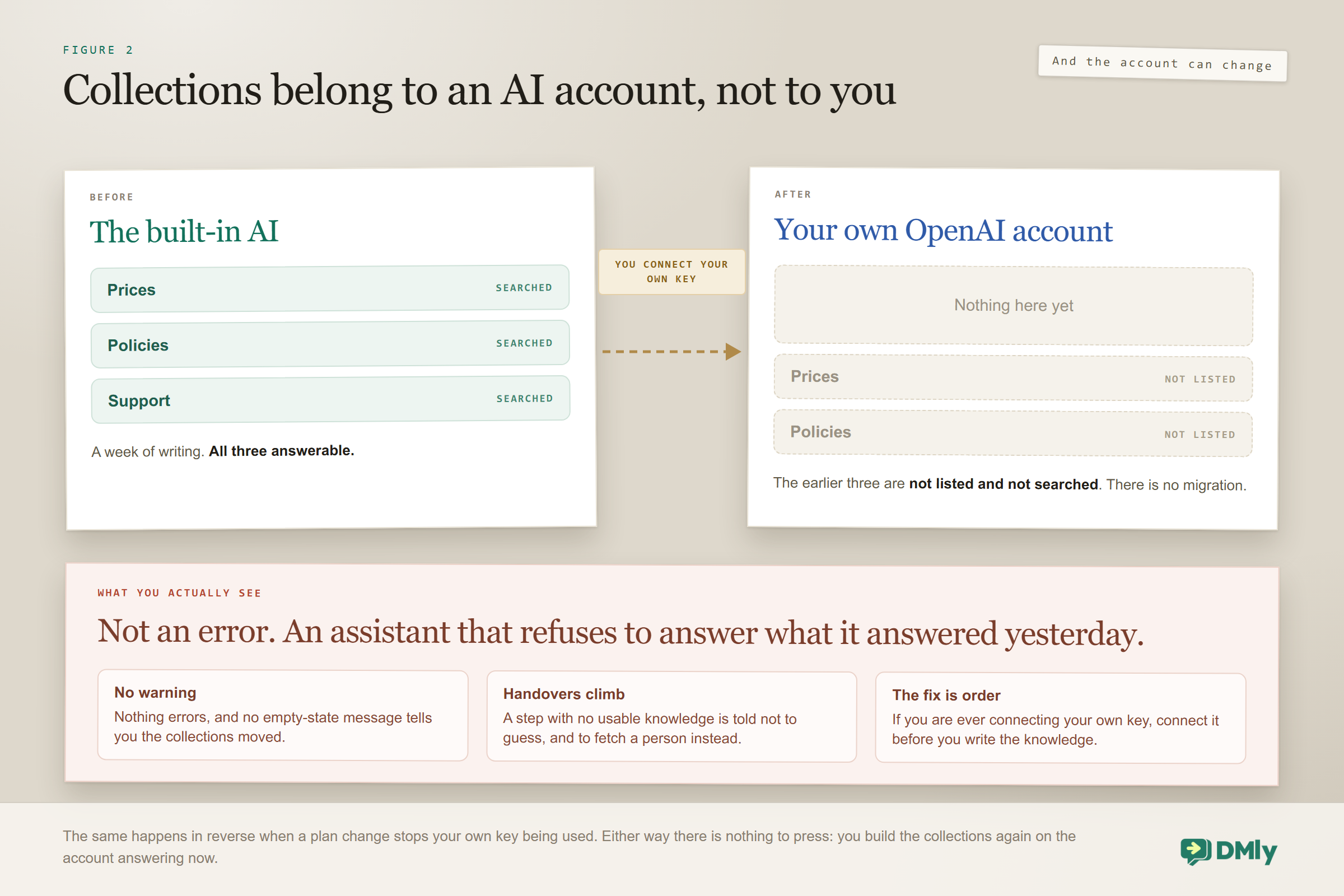
Your collections belong to the AI account that created them, and that account can change under you without warning. This is the least obvious thing in this guide and the one most likely to cost somebody a confusing morning.
Knowledge runs on whichever AI answers for your workspace: your own connected OpenAI or Gemini key if your plan allows one and you have connected it, otherwise DMly’s built-in AI. Build collections on the built-in AI, then connect your own key later, and the page shows the new account’s collections. The ones you built on the built-in AI stop being listed and stop being searched. The same thing happens in reverse if a plan change stops your own key being used.
What it looks like from the outside: Not an error, and not an empty page with a helpful message. An assistant that suddenly refuses to answer things it used to know. A step that finds no usable knowledge is told not to guess business facts and to hand over to a human instead, so the visible symptom is a sharp rise in handovers and a support assistant that has apparently become unhelpful overnight.
There is no migration and nothing to press. If you move accounts, you build the collections again on the new one. So the practical advice is to make the decision early rather than later: if you are ever going to connect your own provider key, connect it before you spend a week writing knowledge, not after. And if the assistant goes vague on you for no reason, this belongs near the top of the list you check.
A smaller cousin of the same problem: each collection’s line counts the automations using it, and only published automations count. A collection wired into a draft flow reads zero, which looks exactly like a collection nothing uses.
Getting the Handover Right
Handover is what makes a mixed human and AI inbox workable, and it is the tool worth keeping even if you switch off everything else. When it fires, the assistant pauses the bot and stops its turn there and then, rather than carrying on talking over the colleague who has just started typing. That behaviour is why it arrives switched on.
Where the conversation lands, and how somebody picks it up without re-reading the whole thread, is the job of your shared inbox. Two habits make the landing better. Keep Add a note switched on, so the assistant can write context onto the contact before it steps back and save your colleague the first two questions. And set the fallback message, which is what sends if the provider errors or returns nothing. Its default begins “Sorry, I couldn’t process that just now”, and if you clear it the customer receives nothing at all and simply watches the conversation stop.
One design limit worth knowing: a conversational AI step answers up to 40 turns in a run and then moves on, leaving a note that a teammate should take it from here. If a support conversation is still going at turn 40, something went wrong long before that no amount of prompting would have fixed.
Can an AI Customer Service Chatbot Really Handle Questions 24/7?
Yes for the factual majority, which is where nearly all of the value sits, and no for anything needing judgement. Worth separating those two clearly, because the second is a prompt decision rather than a technical limit.
The questions that arrive at 11pm are overwhelmingly the ones with a single correct answer. Are you open tomorrow. How much is this. Do you deliver to my area. Where exactly are you. Can I bring the dog. An assistant with good material answers all of those at any hour, and the customer gets on with their evening instead of waiting until morning and quite possibly not bothering.
What should not happen overnight is an attempted resolution. A complaint at 11pm deserves an honest acknowledgement and a promise of a person in the morning, not an assistant trying to make it better. That is the difference between something that protects your reputation while you sleep and something that damages it.
Two mechanical details shape how it behaves across a night. The assistant sees the last 12 messages by default, and that can be raised as far as 50, which matters when somebody returns to a thread the next day and expects it to remember. And only real messages count toward that history, because internal notes are never included.
What You Can Honestly Measure, and What You Cannot
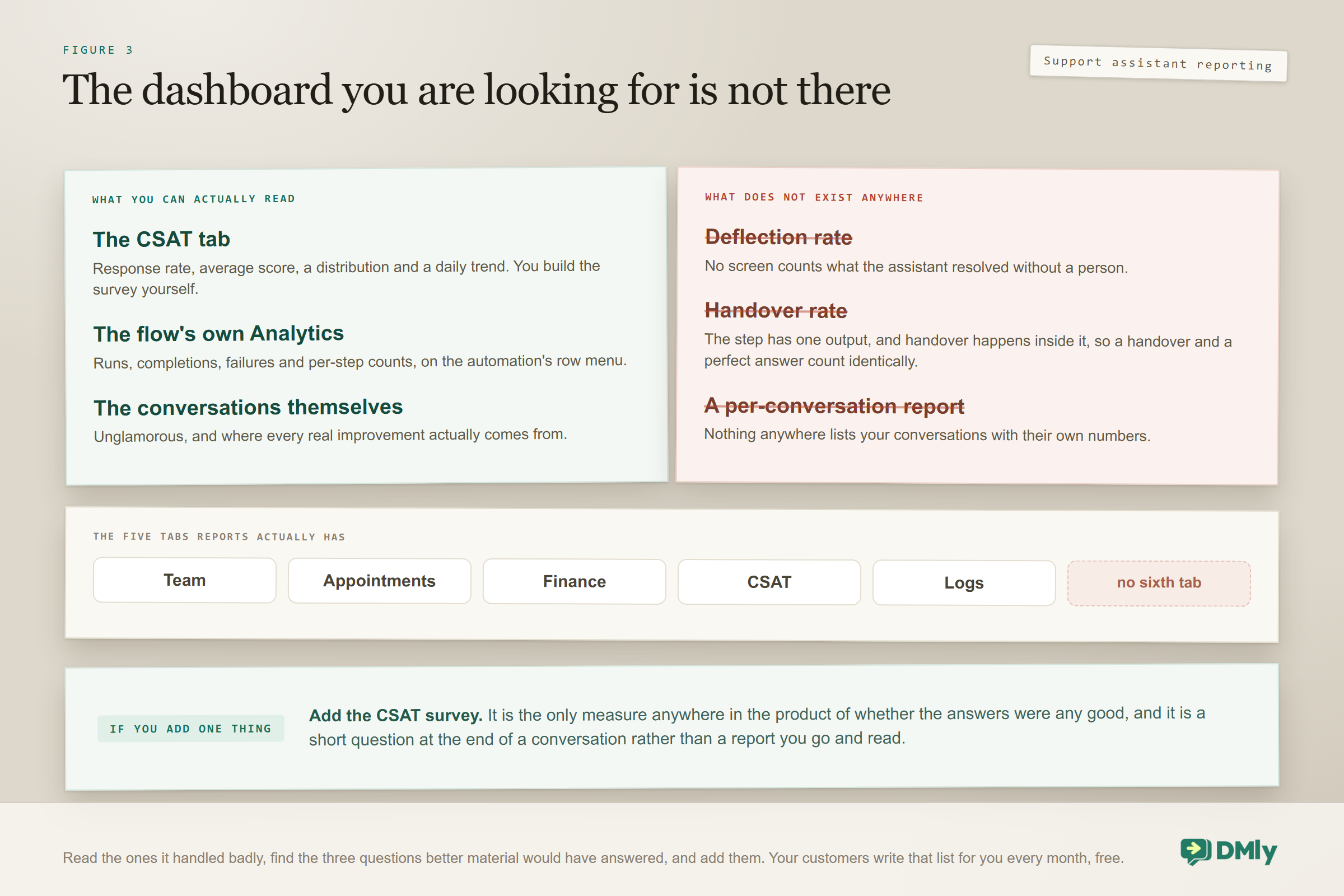
There is no deflection rate and no handover rate for an AI customer service chatbot anywhere in DMly, and it is better to know that now than to go looking for a dashboard that does not exist. Reports has exactly five tabs, Team, Appointments, Finance, CSAT and Logs, and there is no per-conversation report at all: nothing lists your conversations with their own numbers against them.
There is also a subtler reason a handover rate is hard to get at. The AI Reply step has one output, and handover happens inside the step rather than as a branch out of it. So a run that ended in a perfect answer and a run that ended in a handover look identical in the flow’s per-step counts. The counts tell you how many people reached the assistant, not how many it satisfied.
Three things do work, and between them they are enough:
- CSAT, which you build yourself. A short survey after the conversation is the only thing in the product that measures whether the answers were any good. The CSAT tab then gives you response rate, average score, a distribution and a daily trend. If you only add one measurement to a support assistant, add this one.
- The flow’s own Analytics. On the automation’s row menu: runs, completions, failures and per-step counts. This tells you whether the thing is running and how often, which is a different and still necessary question.
- The Team tab, for the half a person handled. It gives an Avg first response and an Avg resolution per teammate, measured from the moment a conversation was assigned to them. A bot reply is never attributed to a person, so this measures how fast your team picked up what the assistant handed over, which is the part your customers actually feel.
- Reading the conversations. Unglamorous, and it is where the actual improvements come from. Every month, read the ones it handled badly, find the three questions it could have answered with better material, and add them.
That third habit is the one that compounds. A support assistant gets measurably better through its knowledge base, not through prompt tinkering, and the questions it fumbled this month are a to-do list somebody has written for you for free.
What It Costs to Run
Two billing routes, and the choice interacts with the knowledge-account trap above, so make it deliberately.
Replies on DMly’s shared AI count against your plan’s monthly AI replies allowance, which is the simplest way to begin and needs no account anywhere else. Connecting your own provider key instead makes replies un-metered by DMly on the plans that allow it, and you pay OpenAI or Google directly for what you use. Since connecting a key also moves which account your collections live on, the cheapest sequence is to decide this first and write the knowledge second.
For most small businesses the model spend is minor next to the messaging itself. Our breakdown of what a WhatsApp chatbot costs goes through that, and current plan prices are on the pricing page.
One habit protects both your costs and your number. An assistant that answers well is also an assistant people do not block, and message quality and opt-outs feed straight into your WhatsApp quality rating. A support assistant that argues with unhappy customers is a fast route to a restricted number, which is a much more expensive problem than a model bill. The wider habits are in our guide to messaging-based customer support.
Six Ways a Support Assistant Goes Wrong
Each of these turns up in an otherwise well-built AI customer service chatbot, each is fixable in an afternoon, and none of them announces itself.
Leaving the knowledge selector on No knowledge. The single most common cause of an assistant that ignores everything you wrote. It is where every new step starts and there is no warning if you leave it.
Picking a provider that cannot read documents. Claude and DeepSeek search nothing whatever you attach, and the symptom is identical to badly written material.
Uploading the new price list without removing the old one. Two versions in one collection means two answerable truths, and the assistant is equally confident about both.
Uploading a scanned PDF. It looks perfectly healthy in the list and contributes nothing. Try selecting the text before you trust it.
Writing brochure copy and calling it knowledge. Pages of tone with no numbers in them give the assistant nothing to answer with, and they retrieve as vaguely as they read.
Never opening Test knowledge. Twenty minutes there with your fifteen most-asked questions finds more problems than a week of prompt tinkering, and it works before anything is published.
Frequently Asked Questions
How is an AI customer service chatbot different from quick replies?
Quick replies are saved messages a person picks and sends, so they save typing but still need somebody in the chair. An AI customer service chatbot reads the question itself and composes the answer from your own material, at any hour, with nobody present. Most businesses end up running both: the assistant takes the factual load, and the team uses quick replies on the conversations it hands over.
Will it make things up?
It can, and preventing that is most of the build. Three things do the work: a knowledge base holding the real answers, a provider that can actually search documents (OpenAI or Gemini, since Claude and DeepSeek cannot), and a prompt that explicitly forbids guessing and tells it to say it is not certain instead. Together those turn most invention into an honest handover, which is the outcome you want.
What can I upload as knowledge?
Four kinds of source. Files as PDF, TXT or MD up to 20 MB each, with spreadsheets, Word files and images rejected. Web page addresses, which are fetched and indexed. FAQs, where the question and answer are separate boxes. And pasted text. The last two both accept up to 20,000 characters, which is plenty for opening hours, a parking note or a cancellation policy you have never written down.
Why is it ignoring my knowledge base?
Four causes, in the order worth checking. The step’s AI Knowledge selector is still on No knowledge, which is the default. Or it replies on Claude or DeepSeek, which cannot search documents. Or the collection is empty, or its sources are still indexing rather than ready. Or the collections were built on a different AI account from the one now answering, which happens when you connect your own provider key after building them.
It is answering with old prices. Where is that coming from?
The old file is still in the collection. Adding a new one adds to the collection, it does not replace what was there, so both versions stay searchable and the assistant can quote either. Remove the old row, or make a fresh collection containing only the new file and point the step at that one instead. You can confirm you have fixed it in Test knowledge, which names the source of every snippet it retrieves.
Can I see how many questions it answered without a human?
No, not directly. There is no deflection rate and no handover rate anywhere in the product, and no per-conversation report either. Reports has five tabs: Team, Appointments, Finance, CSAT and Logs, and the Team tab measures your people rather than the assistant, since a bot reply is never attributed to anybody. What you can do instead is build a short CSAT survey, which is the only thing that measures whether the answers were any good, and read the flow’s own Analytics for runs, completions, failures and per-step counts.
Why does the Tool calls trace look empty when it clearly read my documents?
Because knowledge search runs inside the AI provider rather than inside DMly, so it never appears in the trace. An assistant answering perfectly from your collections still shows an empty Tool calls list, and the same is true of web search. The only visible sign is that when the answer came from a source ingested from a web address, the assistant appends that address to its reply as a plain link.
Do I need to retrain it after adding a document?
No. There is no training step and no publish step for knowledge. A new source starts as processing while it indexes, and once its status reads ready it is searchable on the very next reply. If something has been processing for a long time, reload the page; indexing is also reconciled in the background whether or not anyone is watching.
Put your prices, policies and hours somewhere an assistant can search, and let it answer from your own words while your team sleeps.
The Knowledge Base Is the Product
If you take one thing from this, take the order. Almost everybody builds the assistant first and then wonders why it is vague, when the assistant was never the hard part. The hard part is having your prices, your policies and your genuinely awkward answers written down somewhere searchable, in the shape of the questions people actually ask, with exactly one current version of each.
Do that, point the step at it, pick a provider that can read it, and tell your AI customer service chatbot plainly what to do when it does not know. Then go and read what it said. The answers it got wrong this month are the pages you are missing, and nobody else is going to write that list for you.
Writing about WhatsApp automation, bookings and growth for local business.
Turn WhatsApp into your busiest channel.
Start free and run message, bookings, payments and reviews in one place.
