
Customer Segmentation by Spending, Activity and Interests
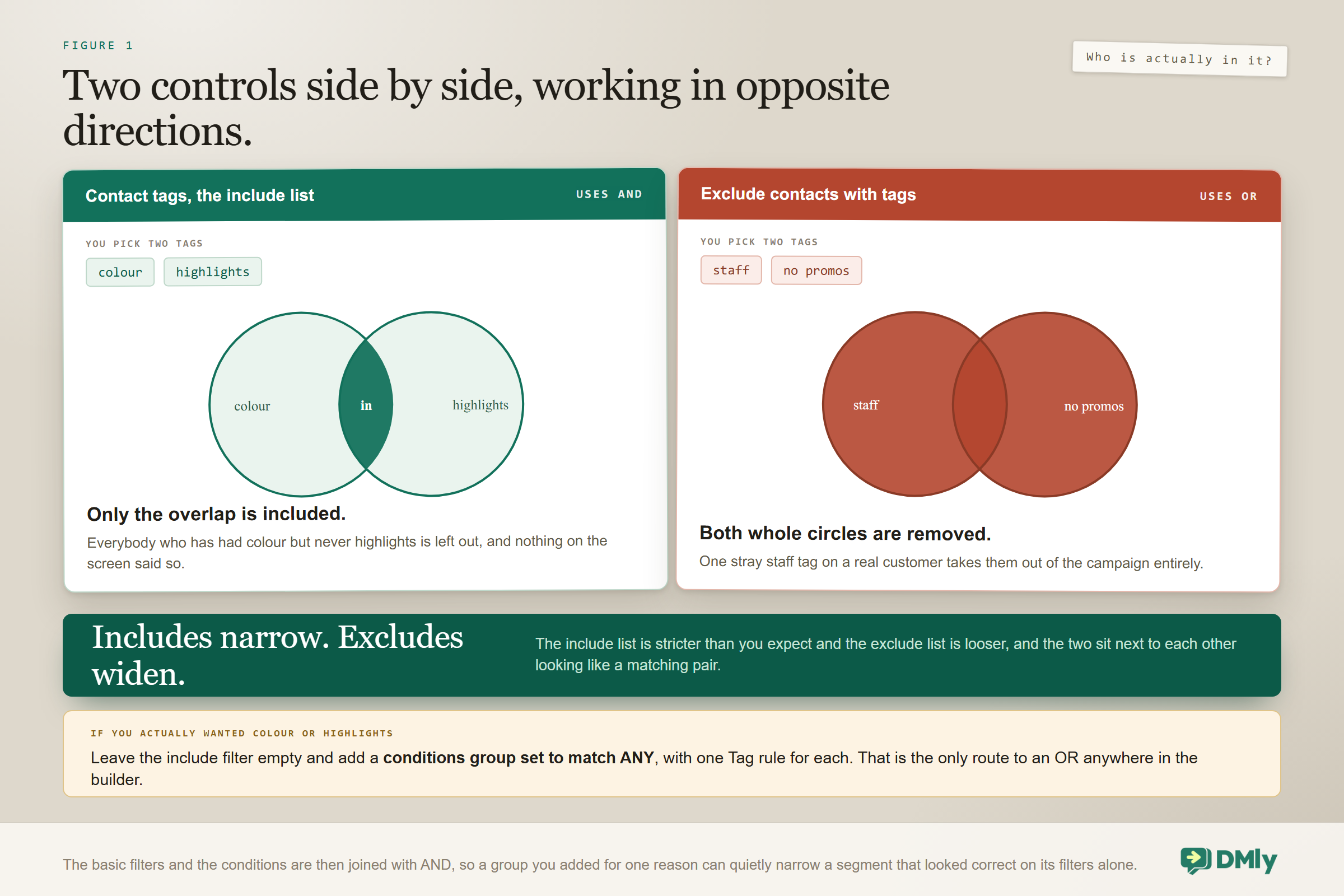
Here is an audience that looks entirely reasonable. A salon owner wants to promote a colour offer, so she includes the tags colour and highlights, excludes the tags staff and no promos, and sends. What she pictured was everybody interested in colour or highlights. What she actually built was everybody who has had both, minus anybody carrying either exclusion.
The first half of that is much narrower than she expected and the second half is much wider. Neither is a bug. The include filter uses AND and the exclude filter uses OR, and the two controls sit next to each other looking like a matching pair. Customer segmentation is the highest-leverage thing you can do with a customer list, and that asymmetry is the first of about six behaviours that decide whether the audience you build is the audience you imagined.
This guide covers all of them: every condition the builder offers and what each one is genuinely good for, the quiet ways a segment returns the wrong people, ten segments worth building on a wet afternoon, how to choose your own numbers instead of borrowing somebody else’s, and the gap between the count your segment shows you and the number of people who actually receive the message.
If you want the wider picture of how tags, segments and stages fit together, our guide to running a WhatsApp CRM covers that. This page is the builder itself.
A Saved Question, Not a Saved Answer
A segment holds rules, never people, and it works the answer out fresh every time you use it. That single fact explains most of what follows, and it is the one idea customer segmentation in DMly is built on, so it is worth sitting with for a moment before you build anything.
Three things follow from it, and each is useful once you expect it.
- Membership is never stored. A customer who stops matching falls out silently. Nobody is told, nothing is logged, they simply are not in it the next time you look.
- You cannot freeze one. If you need a group that stays exactly as it is, “everybody who came to the October open day”, a segment is the wrong instrument. A tag is the only thing in DMly that holds still.
- Editing one changes every future use. There is no version history and no warning, so a tweak made for Thursday’s campaign silently changes next month’s.
Deleting a segment removes only the saved question. Not one contact is touched. Deleting a tag is the opposite and worth being careful about, because it strips that tag from every contact who has it, and any segment built on it starts behaving differently immediately.
The rule that comes out of all this is short: use a segment for a rule and a tag for a decision. “Spent over 500 and not seen for 60 days” is a rule, and it should keep answering itself. “This person is a VIP” is a decision somebody made, and no rule will ever re-derive it.
Where Customer Segmentation Lives: Spending, Activity and Interests
The three dimensions in the title are not three features; they are three different places in one builder. Knowing which is which saves you hunting for a control that was never going to be there, and it is the fastest way into customer segmentation for somebody who has never opened the builder.
The segment editor has two layers. Four basic filters sit at the top, always visible and all optional. Underneath them is an optional rule builder called Conditions. You can use either layer alone or both together, and when you use both they narrow the same audience: a contact has to satisfy the basic filters and the condition groups to match.
| What you want to ask about | Where it lives | What you can actually ask |
| Spending | Commerce conditions | Total spend, last purchase, order count, loyalty points, credit balance |
| Activity | A basic filter, plus Engagement conditions | Days since last activity, marketing opt-in, reachable on a channel |
| Interests | Tags, plus Contact conditions | Tags in and out, custom fields, source, birthday month, lifecycle stage |
None of this works if the answers are not on the record in the first place, which is a different job entirely. A workspace where four contacts in five carry no tags does not have a segmentation problem; it has a capture problem, and no amount of clever conditions will fix it.
The Four Basic Filters, and the One That Surprises Everybody
These four do most of the work in most segments, and one of them behaves in the opposite direction from the one beside it.
- Contact stage. Your own pipeline stage. Leave it on Any stage to ignore it entirely.
- Contact tags. The include list. It uses AND. Pick two tags and a contact needs both of them, not either.
- Exclude contacts with tags. The exclusion list. It uses OR. One match is enough to drop somebody.
- Number of days since last activity. Quiet for that long or longer, and the spine of nearly all re-engagement work.
Say the asymmetry to yourself in the form that sticks: includes narrow, excludes widen. Each behaviour is individually sensible. Together they catch everybody once, and they catch some people repeatedly, because nothing on the screen tells you they differ.
If what you actually want is people interested in colour or highlights, the include filter simply cannot express it. Use a conditions group set to match ANY, with a separate tag rule for each, which is the next section.
Contact stage is not lifecycle stage: The basic filter called Contact stage is your own sales pipeline, the columns you named yourself. Down in the conditions layer there is a different field called Lifecycle stage, which is DMly’s own axis: Lead, Client, Inactive or Archived. They look alike, they do not sync, and two of the default pipeline columns are called Lead and Customer, which is exactly the collision you would design if you were trying to confuse somebody. Read a rule twice before you trust it.
Every Condition You Can Ask For
The conditions layer is where segmentation stops being tag management and starts being worth the afternoon. There are twelve fields across three sections, they cover every question the builder can answer, and the comparisons available depend on the field rather than being interchangeable.
The Contact section: who they are and what you know about them
| Field | Comparisons | What it is genuinely good for |
| Lifecycle stage | is, is not, contains, does not contain, has any value, is empty | Separating people who have never spent anything from people who have. Spending behaves very differently either side of that line |
| Source | The same text set | Splitting by the channel or process that created the contact. Read the warning below before you plan a campaign on it |
| Custom field | The text set, plus greater than, less than, at least and at most for fields you fill with numbers | Anything specific to your trade: service preference, frame size, recall date, postcode, how they heard about you |
| Birthday month | is, is not | A month-ahead birthday campaign, which is about the least intrusive personal message a business can send |
| Tag | has, does not have | Interest and preference, and the only way to build the OR that the basic filter refuses |
Source does not mean what most people assume: The built-in Source field is set automatically by whichever channel or process created the contact, so its values look like WhatsApp, Telegram or Booking Portal. It is not your marketing source. If you want to segment by which flyer, advert or link somebody came from, that has to live in a tag or a custom field you write yourself, and the Source condition will not help you. Plenty of people build a “where did they come from” campaign on this field and get a list of everybody who happens to use WhatsApp.
The Engagement section: whether you can reach them at all
| Field | Comparisons | What it is genuinely good for |
| Reachable on channel | reachable on, not reachable on | Cross-channel work, such as finding everybody on WhatsApp who is not on Telegram. It rarely earns its place in a broadcast segment, because the audience is already limited to the channel you are sending on |
| Marketing opt-in | opted in, opted out | Keeping your counts honest. It is not the safety net people assume, and the section below explains what actually protects you |
The Commerce section: what they have actually spent
| Field | Comparisons | What it is genuinely good for |
| Total spend | is, is not, greater than, less than, at least, at most, between | Tiering by value, which remains the most reliable single predictor of who will buy again |
| Last purchase | within the last n days, more than n days ago, never purchased | Recency. That third comparison is the useful one: it separates enquiries from customers cleanly and nothing else does |
| Order count | is, is not, greater than, less than, at least, at most, between | Frequency. One order is a trial, three is a habit, and the gap between them is where most growth is sitting |
| Loyalty points | The same numeric set | Nudging people who are close to a reward, which converts unusually well and stops a loyalty programme becoming decorative |
| Credit balance | The same numeric set | Reminding people to use what they have already paid for, which is good for them and good for your renewals |
Those first three fields, spend and recency and frequency, are the classic customer-value model, and you get it here without building anything. Most businesses use the first two and stop. The third is usually where the surprise is.
Two comparisons that do not exist are worth knowing so you stop looking for them. The four numeric commerce fields are numeric only: they offer no contains, no has any value and no is empty. And Reachable on channel offers only its two comparisons and nothing else.
Combining Groups Without Building Something You Cannot Read
Rules live in groups, and there are two independent ALL or ANY switches, which gives you real power and a real opportunity to build something nobody understands next month.
Within a group, ALL means a contact needs every rule in it and ANY means one rule is enough. Across groups, the top-level switch decides whether a contact must satisfy every group or just one. Picking ANY across groups of ALL rules gives you the classic pattern: (stage is Consultation AND spend at least 500) OR (has tag VIP). There is exactly one level of grouping, so a group holds rules and never holds another group, which is a limit worth knowing before you design something nested in your head.
The discipline that keeps this readable is to give each group one job. One group for value, one for recency, one for interest. When a segment stops making sense, it is almost always because two unrelated ideas ended up in the same group.
Write the segment out as a sentence before you build it. If you cannot say it in one sentence, it is two segments, and you will be happier with two.
Six Ways Customer Segmentation Quietly Returns the Wrong People
Every one of these fails silently. None of them produces an error, a warning or a red box, which is exactly why they survive for months.
- Half-filled rules are dropped on save. Set a between comparison and fill in only one of the two numbers and that rule vanishes the moment you save. Same for Reachable on channel with no channel picked. Nothing tells you, and your segment is now wider than you designed it. Look at the preview count after saving, not only before.
- A contact with no client profile counts as zero spend, not as excluded. This is the sharpest one. A rule reading “total spend less than 100” quietly includes every enquiry who has never bought anything in their life, because zero is less than a hundred. If you meant customers, add last purchase is not never purchased or a lifecycle rule alongside it.
- Order count counts confirmed orders only. Draft and cancelled orders do not count towards it, so somebody whose only order was cancelled reads as having none.
- A contact with no birthday never matches Birthday month “is”, and always matches “is not”. An empty field is not a neutral field. A segment built as “birthday month is not October” hands you everybody whose birthday you have never recorded.
- Contact counts are scoped to the channel you are in. The same segment shows a different number after you switch channels. Nothing is wrong; it is counting a smaller pool. Read the number in the context you are going to send in.
- The preview updates a moment after you stop typing, not as you type. A count that has not moved may simply not have caught up.
There is a seventh that is not a trap so much as the design working: contacts fall out silently. The person who matched last week and does not match today gets no send and generates no notice at all. For a recurring campaign that is exactly what you want. Occasionally it is also how a good customer quietly stops hearing from you for a year.
A Segment Says Who Matches, Not Who Gets It
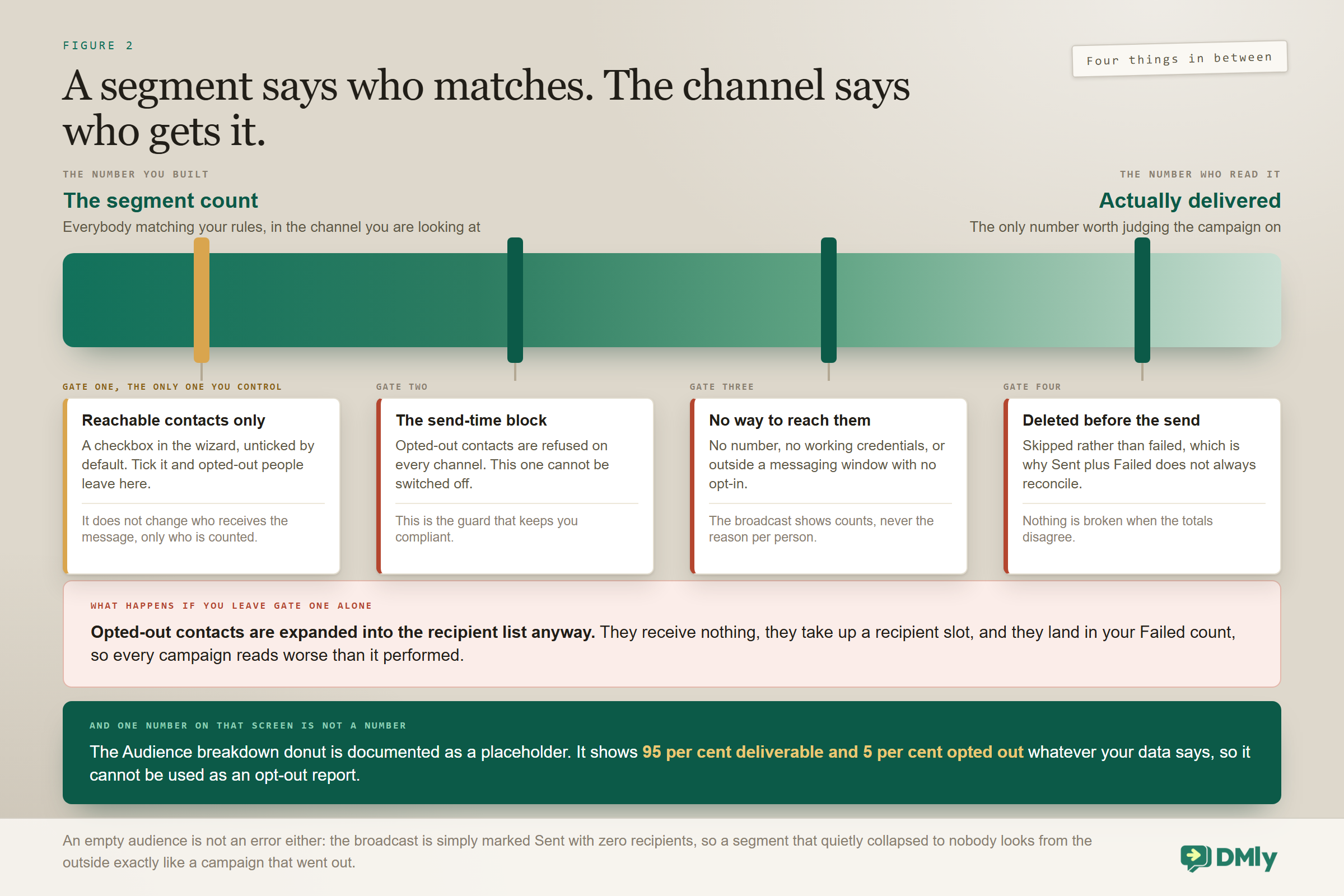
The number on your segment is not the number of people who receive the message, and the gap between them is the part of customer segmentation nobody warns you about. A contact can match your rules perfectly and still be skipped at the moment of sending, because a segment decides who matches and the channel decides who is reachable.
Four things happen between the count and the delivery, and all four are worth knowing before you judge a campaign.
- Opted-out contacts are always blocked at send time, on every channel, whatever audience you chose. That guard cannot be switched off and it is what keeps you compliant. It also means excluding the Unsubscribe tag in your segment is belt and braces rather than a requirement, which is the opposite of what most guides tell you.
- But they still consume a recipient slot. The broadcast wizard has a checkbox called Reachable contacts only, it is unticked by default, and it is the only thing that removes opted-out contacts from the audience beforehand. Leave it unticked and they are expanded into the recipient list, receive nothing, and land in your Failed count, which makes every campaign look worse than it performed.
- A contact deleted before the send is skipped rather than failed, so Sent plus Failed will not always add up to the recipient total. That is not a reporting bug.
- An empty audience is not an error. The broadcast is simply marked Sent with zero recipients. A segment that collapsed to nobody looks, from the outside, exactly like a campaign that went out.
One number on that screen is a placeholder, as of September 2026: The Audience breakdown donut on the Schedule and Review steps of the broadcast wizard, including its “opted out” figure, is documented as a placeholder: it always shows 95 per cent deliverable and 5 per cent opted out regardless of your actual data. Do not use it as an opt-out report and do not size a campaign on it. Your real opt-out picture is on the Contacts side, under Suppressions. This is stated plainly in DMly’s own documentation, which is the reason it is repeated here rather than left for you to discover.
The practical consequence is a habit rather than a setting. Tick Reachable contacts only on every broadcast, then judge the campaign on the numbers that come back rather than on the audience count you started with. Our guide to WhatsApp broadcasts covers what those numbers mean once they arrive.
Ten Segments Worth Building
Concrete beats abstract, so here are the ten customer segmentation recipes that earn their place in most local businesses, with the rules that build them. Notice how few of them need more than three conditions.
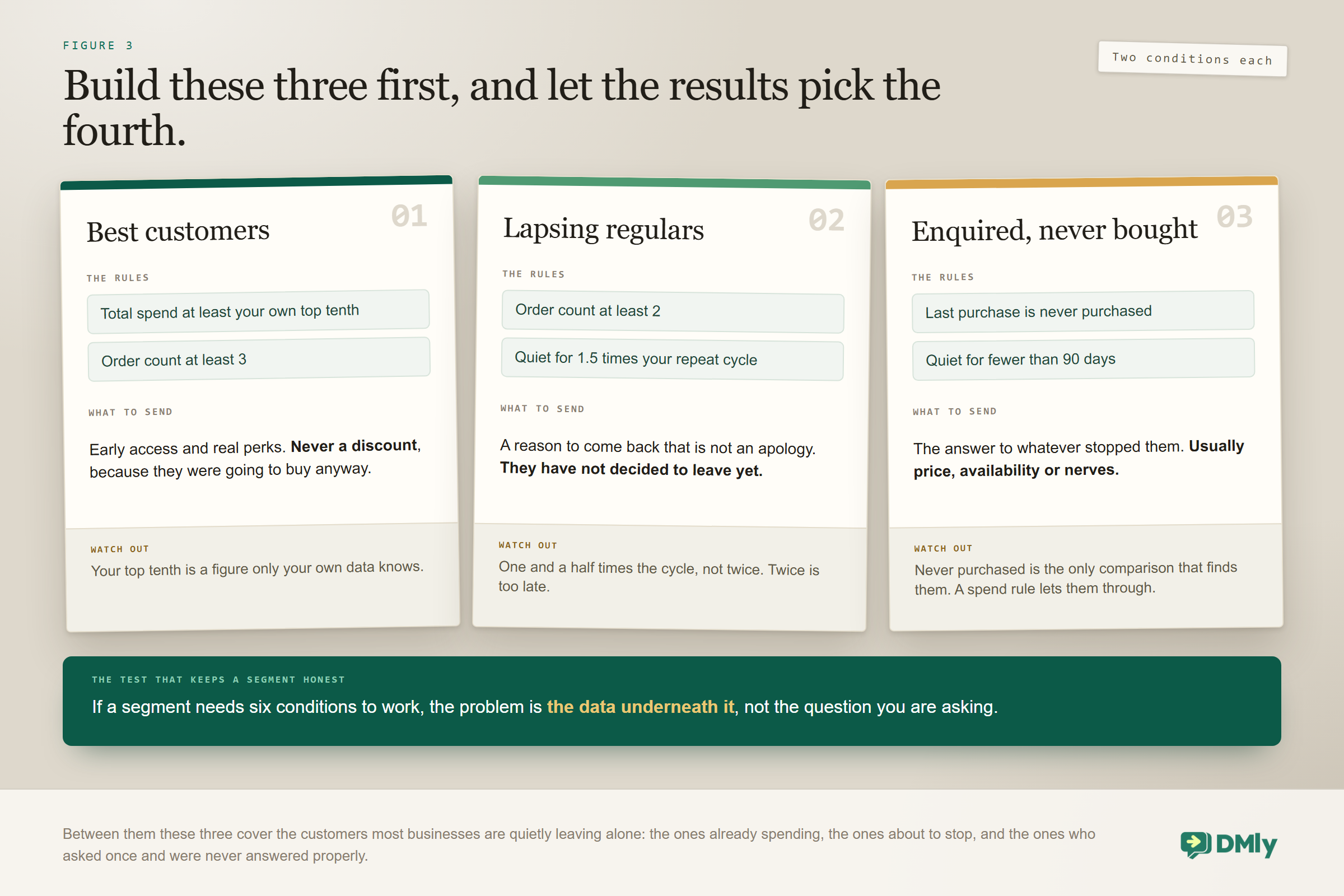
- Best customers. Total spend at least your own top-tenth figure, plus order count at least three. This is the audience for early access and genuine perks, not for discounts.
- Lapsing regulars. Order count at least two, plus days since last activity past one and a half times your natural repeat cycle. The highest-value re-engagement audience you own.
- Enquired, never bought. Last purchase set to never purchased, plus days since last activity under 90. Warm, numerous and almost universally ignored.
- One and done. Order count is 1, plus last purchase more than 60 days ago. The single biggest growth pool in most businesses, because a second purchase changes the odds of a third enormously.
- Interested in one particular service. A conditions group set to ANY with a tag rule for each related service. This is the OR the basic filter will not give you.
- Nearly at a reward. Loyalty points between a floor and your redemption threshold. A small audience with an unusually high conversion rate.
- Unused credit. Credit balance greater than zero, plus days since last activity over 30. Reminds people to use what they already paid for.
- Birthday next month. Birthday month is the coming month. Build it once and reuse it every month, and remember that everybody with no birthday on file is simply absent from it.
- Everybody on this channel but not that one. Reachable on your main channel, not reachable on the other. This is where the reachable condition genuinely earns its place, and it is how you find out who to invite onto a second channel.
- A campaign cohort. A tag or custom field you wrote yourself when they arrived, plus a lifecycle rule. Not the built-in Source field, for the reason given further up. This tells you not how many enquiries a flyer produced but what became of them, which is the number that decides next year’s budget.
Complexity in a segment is usually a sign that the data underneath is thin rather than that the question is subtle. If a segment needs six conditions to work, the honest fix is upstream.
Choosing the Actual Numbers
The hard part of segmentation is never the builder. It is deciding what counts as high spend and what counts as lapsed for your particular trade, and no amount of customer segmentation will rescue a borrowed number. Borrowed thresholds are the most common reason a well-built segment underperforms, because a number that describes a coffee shop describes nothing whatsoever about a wedding photographer.
Two rules get you most of the way there.
For spend, use your own distribution rather than a round number. Sort your customers by total spend and look at where the top tenth begins. That figure, whatever it turns out to be, is your VIP threshold, and it will almost certainly not be the number you would have guessed. Do the same at the halfway mark for a middle tier. The whole point of a tier is that it separates people who behave differently, and only your own data knows where that line falls.
For inactivity, use one and a half times your natural repeat cycle. If customers normally come back every six weeks, somebody at nine weeks is genuinely lapsing rather than merely late. Set it too early and you pester people who were coming back anyway. Set it too late and they have already booked somewhere else.
| Business | Natural cycle | Days since last activity |
| Barbershop | 3 to 4 weeks | 45 |
| Hair salon | 6 to 8 weeks | 75 |
| Restaurant or cafe | Weeks | 60 to 90 |
| Gym or studio | Weekly | 21 |
| Dental or clinical recall | 6 to 12 months | Recall date plus 30 |
| Home services | Annual | 400 |
| Online shop | The replenishment gap | 1.5 times the typical reorder gap |
Write both numbers down somewhere the team can see them. A threshold that lives only inside a segment gets quietly changed by whoever builds the next campaign, and then nobody in the building agrees on what lapsing means.
Segmenting When You Have Almost No Commerce Data
Plenty of service businesses take payment outside the platform, which leaves the whole Commerce section empty and makes it look useless. It is not useless. You substitute, and three substitutes work, in order of how much they cost to set up.
- Tag at the point of service. A tag applied when a job is finished, or when a booking is marked attended, gives you frequency without any invoicing at all. Order count becomes a tag count, and a conditions group can approximate the tiers.
- Use appointment history as the activity signal. Days since last activity already reflects engagement, so for a booking-led business it is often a better recency measure than last purchase would ever have been.
- Record value in a numeric custom field. Written by a flow, or by hand at the end of a job. Crude, but numeric custom fields support greater than, less than, at least and at most, which is enough to tier on.
The one habit worth adopting regardless is to raise invoices in the platform for whatever work you can. Doing so fills in total spend, order count and last purchase for free, and it also converts the contact to a client automatically the moment the invoice is created. Two problems solved by one piece of admin you were doing anyway.
Using a Segment Once You Have One
Customer segmentation earns nothing until a segment is pointed at something, and segments have two jobs that most people only ever discover one of.
The obvious one is as a broadcast audience. The broadcast wizard has no filters of its own at all: no tag picker, no stage picker, no custom field box. You pick one saved segment, or one of the two built-in audiences (All contacts and Active contacts), and everything more specific than that is built once in the segment editor and then chosen here by name. The audience resolves at send time rather than when you built it, so a scheduled campaign picks up contacts added in between.
The second job is quieter and more useful day to day. On the Contacts list, open Filters and pick a segment from the dropdown, and you are looking at exactly the people a broadcast would reach. That is the honest way to check an audience: not by staring at conditions but by reading five real profiles.
There is also a third kind of audience that is not a segment at all. Instead of a segment you can retarget an earlier broadcast, filtered by what people did with it: everybody it reached, everybody who read it, everybody who replied, or the one that actually earns its keep, everybody it was sent to who did not reply. That is a follow-up audience you cannot build any other way, because a segment has no idea what happened in a previous campaign.
Two habits are worth adopting. Name a segment after the question it answers rather than the campaign that used it, because the campaign is temporary and the question is not. And check the preview count after every edit, because the count is the only feedback the builder ever gives you.
Keeping Your Customer Segmentation Honest
Segments rot in a particular way: the data underneath them changes shape while the rules sit still. A quarterly review takes about twenty minutes and catches nearly all of it.
- Look at every segment’s count. One that has collapsed to almost nothing has usually lost a rule to the silent-drop behaviour, or was built on a tag somebody deleted.
- Check the thresholds. A spend tier set two years ago is now the wrong number, and probably by a lot.
- Delete the ones nobody used. A list of forty segments is a list nobody reads, and picking the wrong one from it is easy.
- Check tag hygiene. Two tags that mean the same thing split your audiences invisibly. Rename freely, because segments match tags by identity rather than by name, so renaming never breaks a rule. Deleting does.
- Compare a segment against reality. Open five contacts from it and ask honestly whether you would send them the thing you are about to send.
That last one catches more problems than any amount of staring at conditions, and it is worth doing before every large campaign. Our guide to the metrics worth tracking covers what to watch afterwards.
Mistakes Worth Avoiding
- Assuming the include tags filter uses OR. It uses AND. Two tags means both.
- Assuming the exclude tags filter uses AND. It uses OR. Either one removes the contact.
- Writing a “spend under” rule and expecting customers. Everybody who has never bought counts as zero and is included.
- Trusting a segment you have not previewed since saving. Half-filled rules are dropped in silence.
- Building a campaign cohort on the Source field. It records the channel that created the contact, not your advert.
- Using a segment where you needed a tag. If the group has to stay fixed, a segment cannot do it.
- Editing a segment for one campaign. The change applies to every future use of it, with no warning and no history.
- Leaving Reachable contacts only unticked. Your failed count then includes people who were never going to be messaged.
- Doing customer segmentation before the data exists. Sophisticated conditions over empty fields return nobody, and it looks like a tool problem when it is a capture problem.
Frequently Asked Questions
How do I do customer segmentation by spending in DMly?
Use the Commerce conditions: total spend, last purchase, order count, loyalty points and credit balance. All of them except last purchase are numeric, offering is, is not, greater than, less than, at least, at most and between. Last purchase instead offers within the last n days, more than n days ago, and never purchased, which is the one that separates customers from enquiries.
If I pick two tags, do I get people with either tag?
No. The Contact tags basic filter uses AND, so a contact needs both. For either or, leave that filter empty and use a conditions group set to match ANY with a separate Tag rule for each. The exclude filter works the opposite way round, using OR, so one match removes somebody.
Does a segment store the list of people in it?
No. It stores the question and works out the answer every time you use it. Contacts fall out silently when they stop matching and there is no way to freeze one. If you need a group that stays exactly as it is, apply a tag instead.
Why does my segment show a different number than yesterday?
Either the underlying data changed, which is the entire point of a segment, or you are looking at a different channel. The count beside a segment is contacts in the channel you are currently in, not across the whole workspace, so switching channel changes it without anything being wrong.
Why did one of my rules disappear?
Half-filled rules are dropped silently when you save. A between comparison with only one number filled in, or a Reachable on channel rule with no channel picked, will not survive. Check the preview count after saving, not just before.
Do I need to exclude opted-out contacts from my segments?
No. Broadcasts, sequences and automations all block opted-out contacts at the moment of sending, on every channel, and that guard cannot be switched off. What is worth doing instead is ticking Reachable contacts only in the broadcast wizard, which is unticked by default and is the only thing that keeps them out of the recipient list and out of your failed count.
Can I use a segment outside of broadcasts?
Yes. Open Filters on the Contacts list and pick a segment from the dropdown, and you can read exactly who a broadcast would reach before you send anything. It is the most useful check available and almost nobody uses it.
Start With Three
The temptation, once customer segmentation is available to you, is to construct fifteen segments in an afternoon and then use two of them. Build three instead: your best customers, your lapsing regulars, and everybody who enquired and never bought. Those three will carry most of the revenue you are currently leaving on the table, and they are the three you will still be using in a year.
Write down in one sentence what each of them means. Check the count after every edit. Tick the reachable box before every send. Then let the results tell you which fourth segment you actually need, rather than guessing at it now.
And if any of those three comes back nearly empty, the answer is almost never in the builder. It is that the answers were never captured in the first place, which is the job our lead generation guide and the CRM guide deal with, and it is where the afternoon is better spent.
Writing about WhatsApp automation, bookings and growth for local business.
Turn WhatsApp into your busiest channel.
Start free and run message, bookings, payments and reviews in one place.
