
WhatsApp Customer Service: Response Times, Routing, and Automation
Most businesses believe they reply quickly. What they mean is that when they see a message, they answer it fast. The gap between those two things is where customers are lost, and it is almost never visible from the inside.
Good WhatsApp customer service is not about typing faster. It is about making sure a message is seen by someone whose job it is, before the customer has decided you are not going to answer.
This guide covers three things: how to route messages so they land with a person, what the response-time report does and does not measure, and which parts to automate so the humans are only doing the work that needs a human.
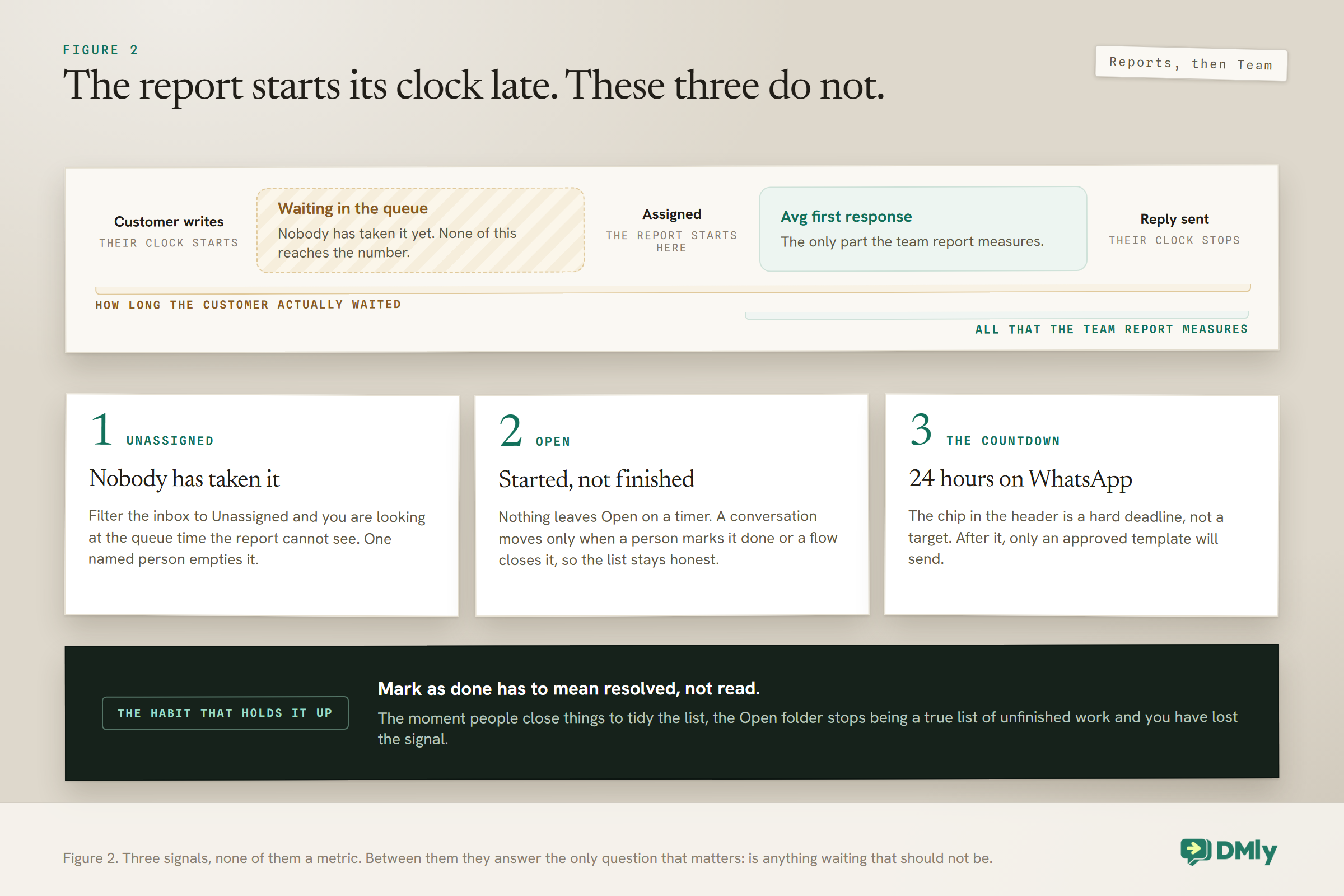
Something to know before you go looking for it: DMly does report response times. Reports → Team shows Avg first response and Avg resolution for the team and for each person, filtered by date and exportable. But read the definition before you trust the number: Avg first response counts from the moment a conversation is assigned to someone, not from the moment your customer wrote. A message that sits unassigned in the queue all morning and is then answered in ninety seconds reports as ninety seconds. That gap is what most of this guide is about.
Where the Time Actually Goes
Slow replies are almost never caused by slow typing. They are caused by a message sitting somewhere nobody has taken responsibility for it.
Watch a real week in a small business and the delay is nearly always one of four things:
- Everybody saw it and assumed somebody else had it. The most common cause, and the reason assignment exists at all.
- Nobody saw it, because it arrived on a channel one person checks and that person was off.
- Somebody saw it, could not answer it, and put it down intending to come back. Nothing marks it as still open.
- It was answered, the customer replied again, and the thread dropped back down a list that nobody re-reads.
None of those is fixed by asking the team to be quicker. They are fixed by ownership, and by making unanswered things look different from answered things.
It also helps to separate two things that usually get argued about as one. Response time is how long the customer waits before a human acknowledges them. Resolution time is how long until the thing is actually sorted. They are different problems with different fixes, and only one of them is urgent.
A customer who gets a real reply in four minutes saying “I have got this, give me until the afternoon to check with the supplier” is a happy customer. A customer who waits four hours in silence and then gets a perfect answer has already messaged two of your competitors. Speed belongs to the first contact. Quality belongs to the last one. If you can only fix one, fix the first.
Routing: Getting a Message to a Person
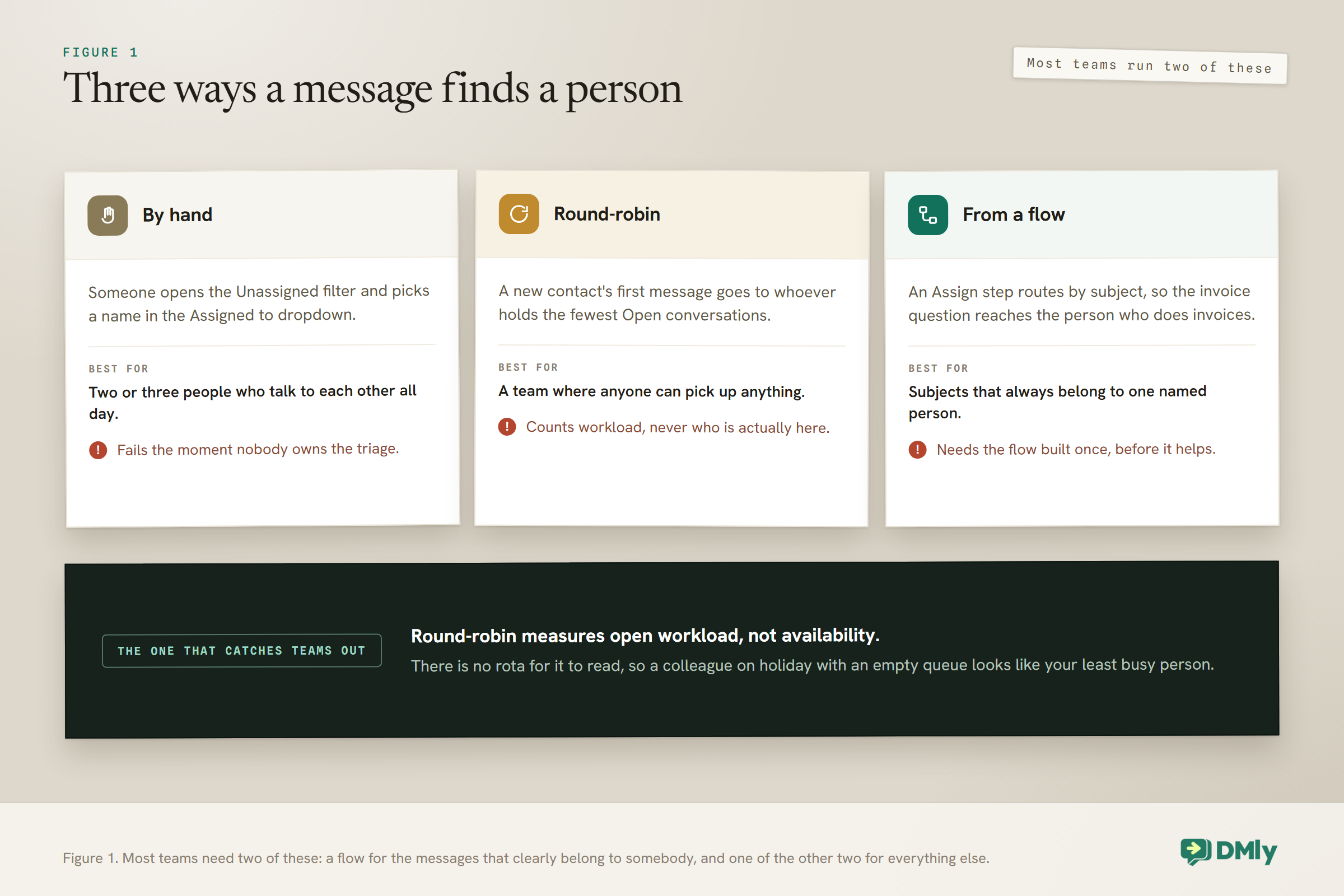
Routing is where WhatsApp customer service either works or quietly fails, because assignment is how a conversation stops being everybody’s problem and starts being one person’s. In DMly you assign from the Assigned to dropdown on the conversation, or leave it Unassigned.
Two things about it are worth understanding early, because both surprise people.
Assignment belongs to the contact, not the conversation. Assign one thread to Bisi and every thread that contact has is assigned to Bisi, across channels. That is usually what you want in a small business, where a customer should have one person who knows them. It is occasionally not, and it is better to know now.
Assignment is a label, not a lock. It does not hide the conversation from anyone else, does not restrict access and does not remove permissions. Everybody still sees everything. What it does is tell your team who is holding it.
The behaviour that quietly reassigns your team’s work: By default, replying to a conversation assigns it to you, even if it already belonged to somebody else. So a colleague answering one quick question inherits the whole customer. If that is not what you want, an admin can switch on “Only claim it if nobody owns it” in Conversation settings, and replies will stop stealing ownership.
For teams that do not want to assign by hand, there is round-robin. Switch it on and each new conversation goes to whoever currently has the fewest Open conversations. Notice what that is measuring: open workload, not who is logged in, because there is no availability or rota setting to read. Somebody on holiday with an empty queue is, as far as round-robin is concerned, the least busy person in the building.
You can also assign from inside a flow with an Assign step, which is how you route by subject rather than by fairness. A message containing “invoice” to whoever does the books, anything else round-robin. The AI agent hands over using the same round-robin logic.
Making a Slow Reply Visible, Including the Part the Report Misses
Since the report starts counting at assignment, you also manage the thing it cannot see: how long a conversation sits in the Open folder. That is measurable by eye, and by eye turns out to be enough for most businesses.
The inbox gives you four folders. All is everything except archived. Open is what still needs attention. Done is finished. Archive is filed away, and archived conversations delete themselves after 30 days.
The important thing about Open is that nothing leaves it on its own. Nothing closes on a timer. A conversation becomes Done only when a person hits Mark as done, or an automation runs a Close conversation step. So the Open folder is an honest list of unfinished work, provided your team actually marks things done.
Three habits turn that into a working system:
- Mark as done means done, not read. If people close things to tidy the list, the list stops meaning anything and you have lost your only signal.
- Someone owns the Unassigned filter. Filter to Unassigned and that is your triage queue. If nobody owns emptying it, messages sit there, which is the first failure in the list at the top of this page.
- Check Open at fixed points, not continuously. Twice a day beats a vague intention to keep an eye on it.
One more thing genuinely helps, and it is free. When a customer replies to a conversation you had marked Done, it reopens automatically. So a returning customer surfaces on their own rather than being buried in an archive nobody reads.
The countdown you should be watching: Each conversation on a channel with a messaging window carries a countdown chip: 24 hours on WhatsApp, seven days on Messenger and Instagram, 48 hours on TikTok. That is not a service target, it is a hard deadline. When it runs out you can only reply with an approved template, so a WhatsApp conversation with two hours left on the chip is genuinely more urgent than one that arrived after it.
Finding the Message That Is About to Cost You
The inbox shows the 100 most recent conversations, with no paging and no infinite scroll. Once you are busier than that, browsing stops working and search becomes the tool.
That sounds like a limitation and mostly is not, because scrolling was never a system. What replaces it:
- Search is the fastest way back to a specific customer, and it reaches past the 100.
- Unread only isolates what nobody has opened.
- The Anyone or Unassigned filter is your triage view.
- Channel pills let you check a channel that only one person usually watches, which is where messages go quiet.
- Tags let you build a view for anything you care about repeatedly, such as complaints or quotes waiting on a decision.
- The DMs and Comments toggle matters if you run Instagram or Facebook, because public comments are a different queue with a different urgency.
If you are new to running everything in one place, our guide to what an omnichannel inbox is covers the channels and the concept, and the shared team inbox page covers what your team actually gets.
The First Reply Does Not Have to Be the Answer
An acknowledgement sent in seconds is worth more than a perfect reply sent in three hours. This is the cheapest improvement available to any business, and it is the one most often skipped because it feels like cheating.
It is not cheating. The customer is not sitting there hoping for a full quotation within nine seconds. They are trying to find out whether this is a real business that reads its messages. Answer that question and you have bought yourself hours.
A holding message that works does three things:
- Confirms a human will reply, not just that the message arrived. “Thanks, we have got your message” is weak. “Thanks, one of us will come back to you this morning” is a commitment.
- Gives a rough time, and one you can keep on your worst day rather than your best.
- Offers something useful while they wait. Prices, opening hours, your address, or a booking link. Some customers will answer their own question and never need you, which is the best possible outcome for both sides.
What makes these backfire is length and tone. A four-paragraph automated greeting with menus and options reads as a wall, and a customer who wanted to ask one question now has homework. Two or three lines is right.
The other thing to get right is that only one automation answers a given message. If you build a general acknowledgement and a keyword rule separately, they are competing for the same incoming message rather than working together, and the one that wins is not always the one you expected. Build the greeting and the keyword answers as a single flow so you decide the order rather than discovering it.
Our guide to setting up automated WhatsApp replies walks through building that flow, including the ordering trap.
What to Automate in WhatsApp Customer Service, and What to Leave Alone
Automation buys you time rather than replacing the reply. The right target is the gap between a customer writing and anybody knowing about it.
Three things worth automating, in this order:
The acknowledgement. An instant reply is not an answer, but it stops the clock in the customer’s head. It is the single highest-value automation in customer service and takes minutes to build.
The repeat questions. Prices, hours, location, whether you do a thing. If a question is asked weekly, it should not be reaching a human at all. Our guide to setting up an FAQ auto-response system covers working out which questions actually repeat, which is harder than it sounds because everyone guesses wrong.
The routing. An Assign step in a flow puts the message in front of the right person before anyone has read it, which is the only routing that happens at machine speed.
What to leave alone: complaints, anything with a number you have not checked, and anything where the customer has already had one automated reply and written back. That second automated message is what makes people feel they are talking to a wall.
When a person does take over, the bot needs to get out of the way. Pause bot (human takeover) stops flows, sequences and the AI for that conversation, and a teammate replying triggers takeover by default. Resume bot puts it back. Worth knowing the flip side: while a conversation is paused, every automation for that contact is frozen, so a paused chat is also a chat that will not get its reminders.
If you are weighing up how much of this an AI agent should handle, our guide to WhatsApp AI chatbots for small businesses covers where they help and where they annoy.
The Half of Customer Service Nobody Counts
A conversation that goes quiet after your reply is a failure that never appears in any queue. The customer asked, you answered, and nothing happened. Your Open folder looks healthy.
There is a trigger for this called Customer didn’t reply. You choose how long to wait and it fires if they have not written back. One follow-up, a day later, phrased as a question rather than a repeat, recovers more business than any speed improvement on the first reply.
Timing matters more than wording here. Same day feels pushy, because the customer may simply be at work. A week later feels like you forgot. A day is usually right, and it is long enough that a genuine reason for the silence has had time to resolve itself.
Send one. A second occasionally helps and a third reliably annoys, and annoyance on WhatsApp is not just rude, it is expensive: blocks and reports are what drive your quality rating down, which our guide to quality rating and messaging limits explains in detail.
Setting a Target You Can Actually Keep
Pick a response time, write it down, and put it where customers can see it. Because the report cannot see the queue, the discipline has to come from the promise as well as the dashboard.
With a report that starts its clock late, the promise is what holds WhatsApp customer service to a standard. A workable pattern for a small business: an automated acknowledgement within seconds, a human reply within one working hour, and out-of-hours messages answered by the first person in. Say that in your auto reply and you have converted an internal target into an external commitment, which is much harder to quietly let slip.
Then audit it by hand, occasionally. Once a month, open ten conversations from the previous week and look at the gap between the customer’s message and the first human reply. Ten is enough to know whether you are at fifteen minutes or four hours, and four hours is the kind of thing a team genuinely does not know about itself.
Two cautions. Do not promise a time you cannot hit on your busiest day, because the promise is what people remember. And do not treat the acknowledgement as the reply, which is the most common way businesses convince themselves they are fast.
If ten conversations sounds unscientific, it is, and it is still better than what most businesses have, which is a feeling. Ten is enough to spot a pattern, and the pattern is the useful part. If eight were answered inside an hour and two took most of a day, the interesting question is what was different about those two. Usually it is a channel, a time of day, or a person who was covering alone.
Setting Up WhatsApp Customer Service Without Stopping Work
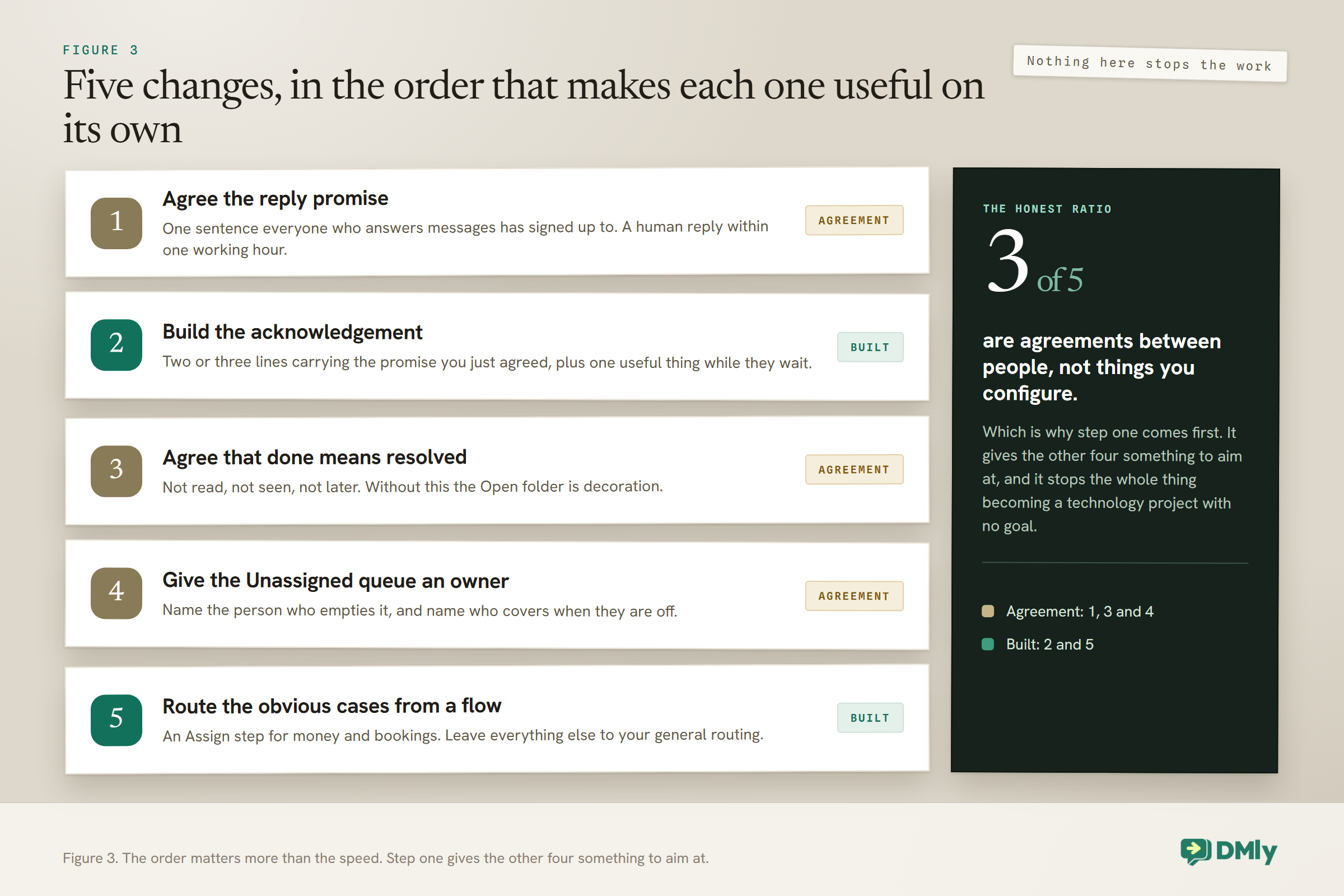
You do not need to redesign your customer service to get most of the benefit. Five changes, in this order, and each one keeps working whether or not you get to the next.
First, decide the reply promise. One sentence, agreed by whoever answers messages. “A human reply within one working hour.” Everything else follows from it, and doing it first stops the rest becoming a technology project with no goal.
Second, build the acknowledgement. It takes minutes and it is the change customers actually notice. Put your promise in it, in the same words you agreed.
Third, agree what Mark as done means. This is a conversation rather than a setting, and it is the one people skip. Done means resolved. Not read, not seen, not “I will get to it”. Without this the Open folder is decoration.
Fourth, give the Unassigned queue an owner. A named person who empties it, and a named person who covers when they are off. If you switch on round-robin this matters less, but somebody still needs to notice the things it hands to a person who is not there.
Fifth, route the obvious cases from a flow. Only after the first four. Build an Assign step for the one or two subjects that always belong to a specific person, usually money or bookings, and leave the rest to whichever general routing you have chosen.
What you will notice, doing it in this order, is that steps one, three and four are agreements between people, and only two and five are things you build. That is the honest ratio in customer service. The tooling is the easy half.
Five Ways Teams Get WhatsApp Customer Service Wrong
Each of these is common, each shows up in otherwise well-run WhatsApp customer service, and each is fixable in an afternoon.
Everyone owns the inbox, so nobody does. Assignment exists precisely because shared responsibility is not responsibility. Even a two-person business benefits from knowing who has it.
Marking things done to clear the list. This destroys the only honest signal you have. If it is not resolved, leave it Open and let the list be uncomfortable.
Treating round-robin as a rota. It distributes by open workload, not by who is working. If half the team is off, round-robin will cheerfully hand them the morning’s messages.
Still scrolling for messages. Past a hundred conversations the list stops being a way to find anything, because there is no paging and no infinite scroll. Teams that keep scrolling start missing things and assume they are just busy. Search and the filters are the replacement, and the switch is a habit rather than a setting.
Answering fast on one channel and slowly on another. The customer does not know which channel you prefer. A business that replies in five minutes on WhatsApp and three days on Instagram is a slow business with a fast channel, and our guide to WhatsApp Business automation covers bringing the rest up to the same standard.
Frequently Asked Questions
Does DMly show my average response time, and can I trust it?
Yes, and with one caveat that matters more than the number. Reports → Team gives you Avg first response and Avg resolution, for the whole team and per agent, over a date range you choose, exportable as CSV or PDF. The caveat is what the clock measures: first response runs from the moment a conversation was assigned to that agent, not from the moment the customer wrote, and only counts a reply sent before the conversation moved to somebody else. So the report tells you how quickly your people answer once work reaches them, which is worth knowing, and tells you nothing about how long it took to reach them. For that you still need the Open folder, the Unassigned filter and the window countdown, which between them are enough to run WhatsApp customer service to a response time you have set yourself. Most small teams find that managing the queue directly works better than watching an average, because an average hides the one conversation that has been sitting for two days.
How do I assign a WhatsApp conversation to a specific team member?
Open the conversation and pick the person from the “Assigned to” dropdown, or leave it Unassigned. Remember that assignment follows the contact rather than the single thread, so assigning one conversation assigns every thread that contact has, on every channel. Assignment is a label rather than a lock: it does not hide the conversation from anyone else.
Why did a conversation reassign itself to someone else?
Because they replied to it. By default, replying claims the conversation for the responder even if somebody else owned it. If your team keeps inheriting each other’s customers, an admin can switch on “Only claim it if nobody owns it” in Conversation settings, after which a reply will not take ownership from the existing owner.
What is round-robin assignment based on?
The number of Open conversations each person currently has. New conversations go to whoever has the fewest. It is not based on who is logged in, on shift or available, because there is no availability or rota setting for it to read. That means someone on leave with a clear queue counts as your least busy person, which is worth remembering before you rely on it during holidays.
Can I set business hours or an on-call rota for customer service?
Not as a routing feature. There is no availability schedule for chat, and the “On call duty” toggle governs WhatsApp voice calls rather than which teammate gets messages. Out-of-hours messaging is handled by building it, which our guide to WhatsApp away messages and business-hours replies covers.
How many conversations does the inbox show at once?
The 100 most recent, with no paging and no infinite scroll. Once you pass that, search becomes the way back to older threads, and the filters, particularly Unassigned and Unread only, become the way you work rather than scrolling a list.
What happens to a conversation after I mark it as done?
It moves out of Open, and it stays there until the customer writes again, at which point it reopens automatically. Archived conversations behave the same way but delete themselves after 30 days. Nothing closes on a timer, so a conversation only becomes Done when a person marks it or an automation runs a Close conversation step.
Should an automated reply go out before a human sees the message?
Yes, in almost every case. An acknowledgement within seconds answers the question the customer is actually asking, which is whether this is a business that reads its messages. Keep it to two or three lines, say when a human will reply, and include something useful such as your hours or a booking link. Build it as part of one flow with your keyword answers, though, because only one automation responds to a given message and two separate ones will compete for it.
How do I stop the bot replying once I have taken over a conversation?
Use “Pause bot (human takeover)”, which stops flows, sequences and the AI for that conversation, and in most setups a teammate replying triggers takeover on its own. Worth knowing the trade-off: while a conversation is paused, every automation for that contact is frozen, so a paused chat will not send its reminders either. Use “Resume bot” once you are finished.
Writing about WhatsApp automation, bookings and growth for local business.
Turn WhatsApp into your busiest channel.
Start free and run message, bookings, payments and reviews in one place.
