
API vs Webhooks vs Zapier vs n8n: Which Integration Should You Use?
“Integration” sounds like one thing: a cable between two apps, and your only job is to pick the brand of cable. That definition is quietly wrong, and it is why comparing API vs webhooks vs Zapier vs n8n feature by feature can end in the wrong choice. They are not four brands of the same cable. Two of them are doors into your WhatsApp platform, pointing in opposite directions. The other two are workshops that use those doors so you do not have to build anything yourself.
Once you see them that way, the choice mostly makes itself. You ask which way the information is travelling, and who is going to look after the connection once it is built. This guide walks through both questions, then takes each option in turn: what it does, what it asks of you, what it costs to run, and where it breaks. The examples use DMly, but the shape of the decision is the same on any WhatsApp platform with an API.
The Short Answer
Use a native integration if one exists. Otherwise, Zapier if nobody on the team writes code, n8n if you want more control without writing much, and the API with webhooks if you have a developer.
- REST API: your software tells DMly to do something, now. Send a message, create a contact, raise an invoice.
- Webhooks: DMly tells your software that something happened, the moment it happens. A message arrived, an invoice was paid.
- Zapier: a no-code workshop that listens to DMly’s events and passes them to the apps Zapier supports. Sending into DMly from Zapier is possible, but takes a paid Zapier plan and a REST API key.
- n8n: a visual workflow builder, in the cloud or on your own server, with a DMly node that works in both directions.
On DMly, all four are available on every plan: the plan comparison lists “API, webhooks & integrations” as included on each of them. The costs that differ are the ones outside DMly, which are covered further down.
The Two Questions That Decide It
Direction and upkeep. Answer those two honestly and at most two options are left standing.
Question one: which way is the information travelling?
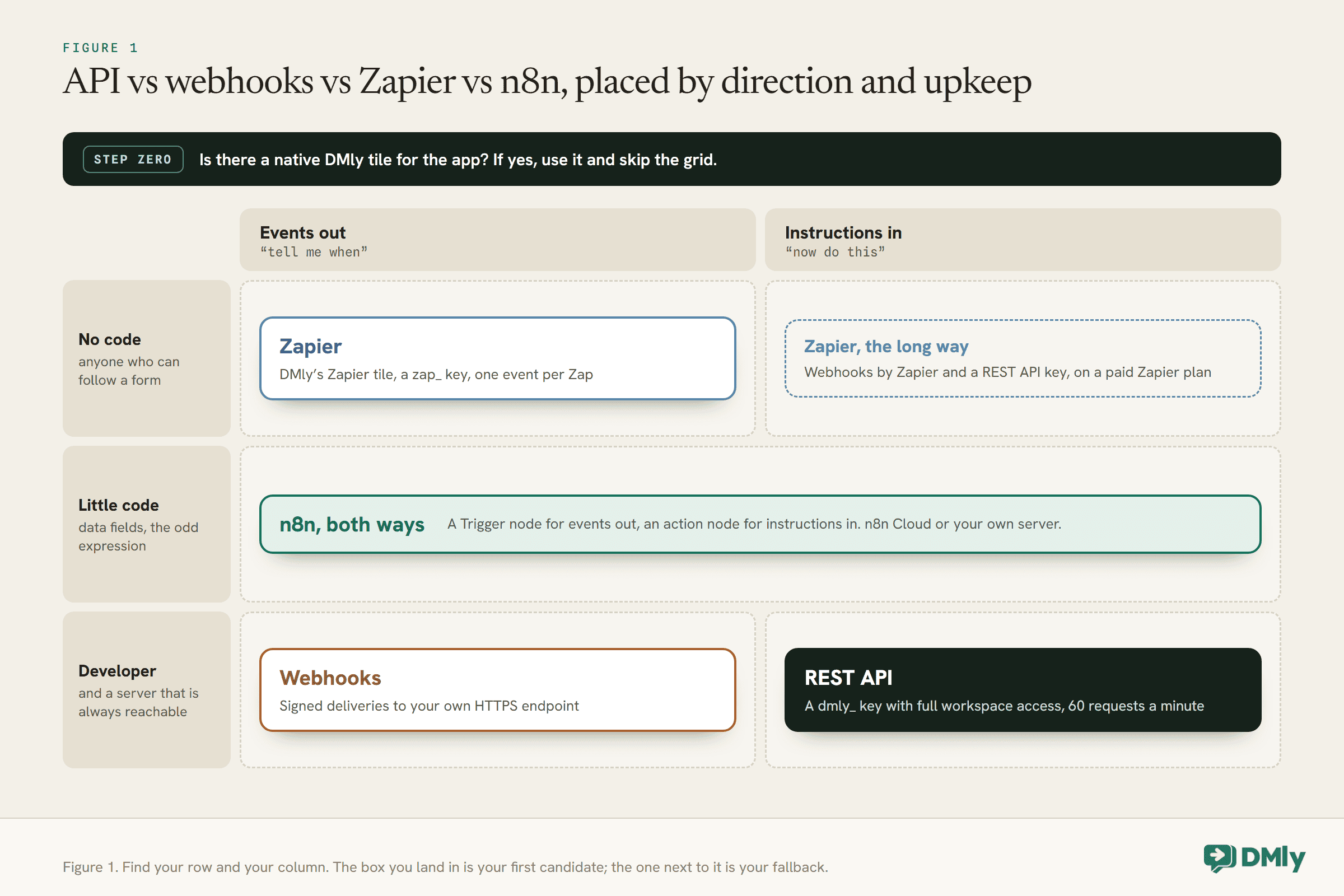
Every integration job is either “tell me when” or “now do this”. Tell me when: a customer sends a WhatsApp message and your CRM should know. Now do this: a customer pays on your website and WhatsApp should send the receipt. The first is information travelling out of your WhatsApp platform. The second is an instruction travelling in.
Webhooks only go out. The REST API is how instructions come in (it can also read data out, but only when you ask). Zapier’s DMly tile is events out only. n8n’s DMly nodes go both ways. So if the job is “now do this”, webhooks are off the list straight away, and Zapier becomes the longer route.
Question two: who looks after it?
Every integration needs somebody to notice when it breaks. With Zapier, the somebody can be anyone who can follow a form. With n8n, it helps to be comfortable with data shapes and the odd expression, and if you host n8n yourself, somebody also has to keep the server running. With the API and webhooks, it is a developer, and a server that is always reachable.
Be honest about this one. An integration built by a freelancer who has since moved on can easily become an integration nobody can fix. The right tool is often the one the people you actually have can maintain.
Step Zero: Check for a Native Integration
A built-in integration is usually the better choice, because there is less in the middle to break.
DMly’s Integrations page has tiles for Google Sheets, Google Calendar, Zoom, Slack, HubSpot, Mailchimp, Shopify and WooCommerce, plus payment gateways, SMS providers and AI providers. If the app you want is on that list, connect the tile and use it from your flows. Our guide to no-code WhatsApp automation shows how flows use them.
There is also a fifth door that is not on the comparison list but is worth knowing about: DMly’s MCP server, which lets an AI assistant such as Claude look things up and, if you allow it, act in your workspace. If the job you are trying to automate is really “let me ask questions about my business in plain English”, our explainer on what MCP is is the better starting point than anything below.
Only when neither fits do you need the API, webhooks, Zapier or n8n.
The REST API: “Now Do This”
The API is how your own software gives DMly instructions. It is the most flexible option and the one that asks the most of you.
An API is a set of addresses your software can call to make something happen. DMly’s REST API lives at https://dash.dmly.io/api/v1, and every call carries a key in an x-api-key header. With it, your software can create and update contacts, send WhatsApp messages, book appointments, raise invoices and read almost anything in the workspace. Our WhatsApp automation API guide goes into the developer detail.
What it asks of you:
- A developer. Somebody has to write the code that calls it, and change that code when your needs change.
- Care with the key. Keys start
dmly_, are shown once when you create them, and grant full access to everything in the workspace, including customers’ phone numbers and conversations. DMly’s docs recommend one key per integration, so any one of them can be revoked without breaking the rest. - Respect for the rate limit. The workspace API allows 60 requests per minute per key. Go over it and you get a
429response with aRetry-Afterheader telling you how many seconds to wait. Lists come back at most 100 records per page, so a full export pages through. - WhatsApp’s rules, enforced for you. The API does not let you break Meta’s messaging rules. A free-text message to someone whose 24-hour window has closed is refused, and so is a template that does not exist; you get an error back rather than a message that silently never arrives. Outside the 24-hour window, you send an approved template.
Choose the API when your own system, a booking platform you built, a customer portal, an internal tool, needs to make things happen in WhatsApp, and you have someone who can build and maintain it.
Webhooks: “Tell Me When”
A webhook is DMly calling your software, the instant something happens, so your software never has to keep asking.
You give DMly a web address and a list of events, and DMly sends a small package of data to that address each time one of those events happens. DMly offers 75 events across contacts, conversations, calls, message delivery, appointments, classes, invoices, orders, payments, subscriptions, credits, the store, automations and broadcasts. Our explainer on what webhooks are covers the idea from the beginning.
What it asks of you:
- A server that is always reachable. The address must be public and use HTTPS. If it is down when an event happens, DMly retries twice more, after roughly 10 seconds and then 60 seconds. After three failed attempts, the delivery is logged as failed and dropped.
- A fast answer. DMly allows 8 seconds for your server to acknowledge a delivery. The docs are clear about the pattern: acknowledge immediately, then do the slow work afterwards.
- A signature check. DMly generates a signing secret for each endpoint and signs every delivery to your own endpoints with it. Your code should check the signature before trusting the data, using a constant-time comparison, so nobody can pretend to be DMly.
- Handling duplicates. Deliveries are at-least-once, not exactly-once, so a hiccup can deliver the same event twice. Every delivery carries an
idthat stays the same across retries; use it to skip what you have already handled.
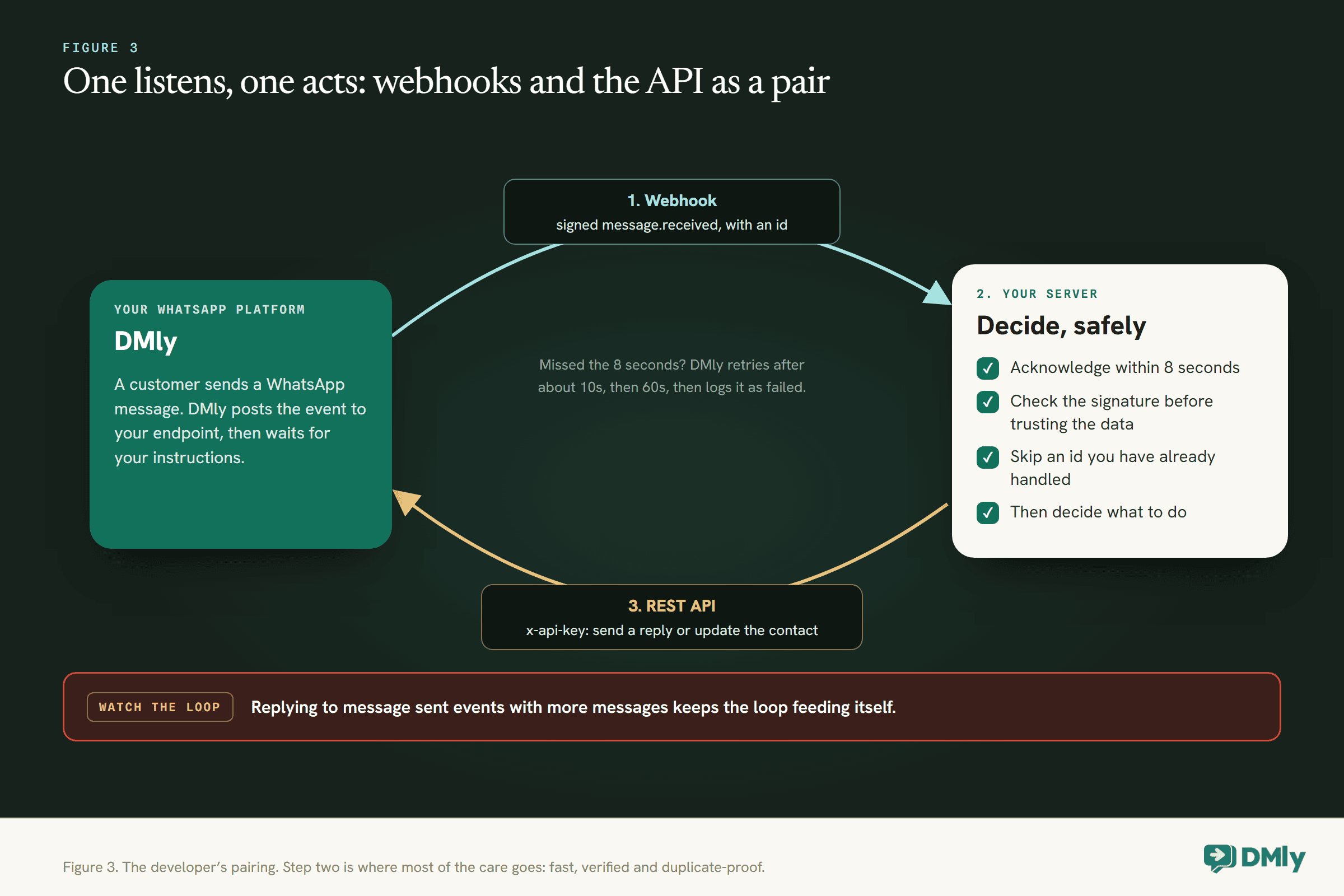
Webhooks pair naturally with the API. Your server hears “message received” by webhook, decides what to do, and uses the API to do it. If you build that loop, be careful which events you subscribe to: a server that replies to every “message sent” event with another message will keep itself busy indefinitely.
Choose webhooks when a system you control has to react to WhatsApp activity in real time, and you have a developer to build and host the receiving end.
Zapier: No Code, Mostly One Way
Zapier is often the quickest route from a WhatsApp event to one of the apps Zapier supports, and nobody has to write code.
In DMly, the Zapier tile on the Integrations page generates a key that starts zap_ and a base URL. You paste both into Zapier, pick an event, and from then on DMly pushes that event to your Zap as it happens. Each Zap subscribes to one event. The key is deliberately narrow: it only works for Zapier’s connection, and cannot read or change anything else in your workspace.
What it asks of you:
- Accepting that it is mostly one way. The Zapier tile is events out only. To send a WhatsApp message from a Zap, you use Webhooks by Zapier to call DMly’s REST API, which needs a REST API key with full access and a Zapier plan above Free, since Webhooks by Zapier is not available on the Free plan.
- Paying per action. Zapier counts a task for every successful action a Zap runs. Triggers never use tasks. A Zap that fires on every inbound message and runs three steps each time adds up quickly on a busy day, so filter early.
- No signature to check. Zapier’s hook addresses are not signed by DMly; DMly’s docs describe them as unguessable capability URLs instead. That is Zapier’s model, and it means the address itself is the secret.
Choose Zapier when WhatsApp events need to reach another app, nobody on the team writes code, and the volume is modest. Our APIs and integrations page lists what connects natively before you reach for it.
n8n: Both Ways, More Control
n8n is a visual workflow builder that can listen to DMly and give it instructions, from the cloud or from your own server.
DMly publishes an official n8n community node, n8n-nodes-dmly. Installing it adds two nodes. The DMly Trigger node starts a workflow when something happens in DMly, by registering a signed webhook for you. The DMly action node reads and writes the workspace by mirroring the REST API across 24 resources, from contacts and messages to appointments, invoices, orders and subscriptions. Both use one DMly API credential, created from a REST API key. Our guide to connecting WhatsApp to n8n walks through the setup step by step.
What it asks of you:
- A little more technical comfort than Zapier. Nobody writes code, but you will work with data fields, filters and the occasional expression.
- A public address. For the Trigger node, n8n must be reachable at a public HTTPS address. n8n Cloud already is; a self-hosted n8n has to be published to the internet or put behind a tunnel.
- A choice about hosting. n8n Cloud is run for you. The self-hosted Community Edition is available on GitHub, and running it means keeping a server up, updated and backed up.
- One thing to know about the webhook. The Trigger node’s Automatic mode registers its own subscription while the workflow is active and removes it when you deactivate it. If an existing webhook subscription is in the way, the node tells you rather than quietly taking it over, and a Manual mode lets you register the address yourself.
The node verifies DMly’s signature by default and filters deliveries to the events you picked, and n8n’s own pricing counts whole workflow runs, “not for each step”, which changes the arithmetic for long workflows compared with per-action pricing.
Choose n8n when you need both directions, branching logic, or higher volumes, and you would rather configure than code.
API vs Webhooks vs Zapier vs n8n, Side by Side
The same facts as above, in one table, for the moment you need to explain the choice to someone else.
| REST API | Webhooks | Zapier | n8n | |
| Direction | Instructions in, and reads on request | Events out | Events out; in only via Webhooks by Zapier and the API | Both |
| Code needed | Yes | Yes, to receive | No | Little or none |
| Hosting | Your software | An always-on HTTPS endpoint | Zapier’s | n8n Cloud, or your own server |
| Key | dmly_, full workspace access | A signing secret per endpoint | zap_, Zapier connection only | A dmly_ key stored as an n8n credential |
| Checking it is really DMly | Not applicable | HMAC-SHA256 signature | Unguessable hook address | Signature, verified by the node |
| When it fails | 429 with Retry-After, or an error explaining why | Three attempts, then logged and dropped | DMly delivers the event; what happens inside the Zap is Zapier’s to report | Webhook delivery rules, since the Trigger node is a signed webhook |
| Outside cost | Developer time and hosting | Developer time and hosting | Zapier plan, tasks per action | n8n plan per execution, or your own server |
| Best for | Your own system driving WhatsApp | Your own system reacting instantly | Events into other apps, no code | Two-way workflows with logic |
Five Common Jobs, and the Right Tool for Each
Abstract comparisons only go so far. Here is the choice applied to five jobs small businesses often want to automate.
These are illustrations of the reasoning, not case studies.
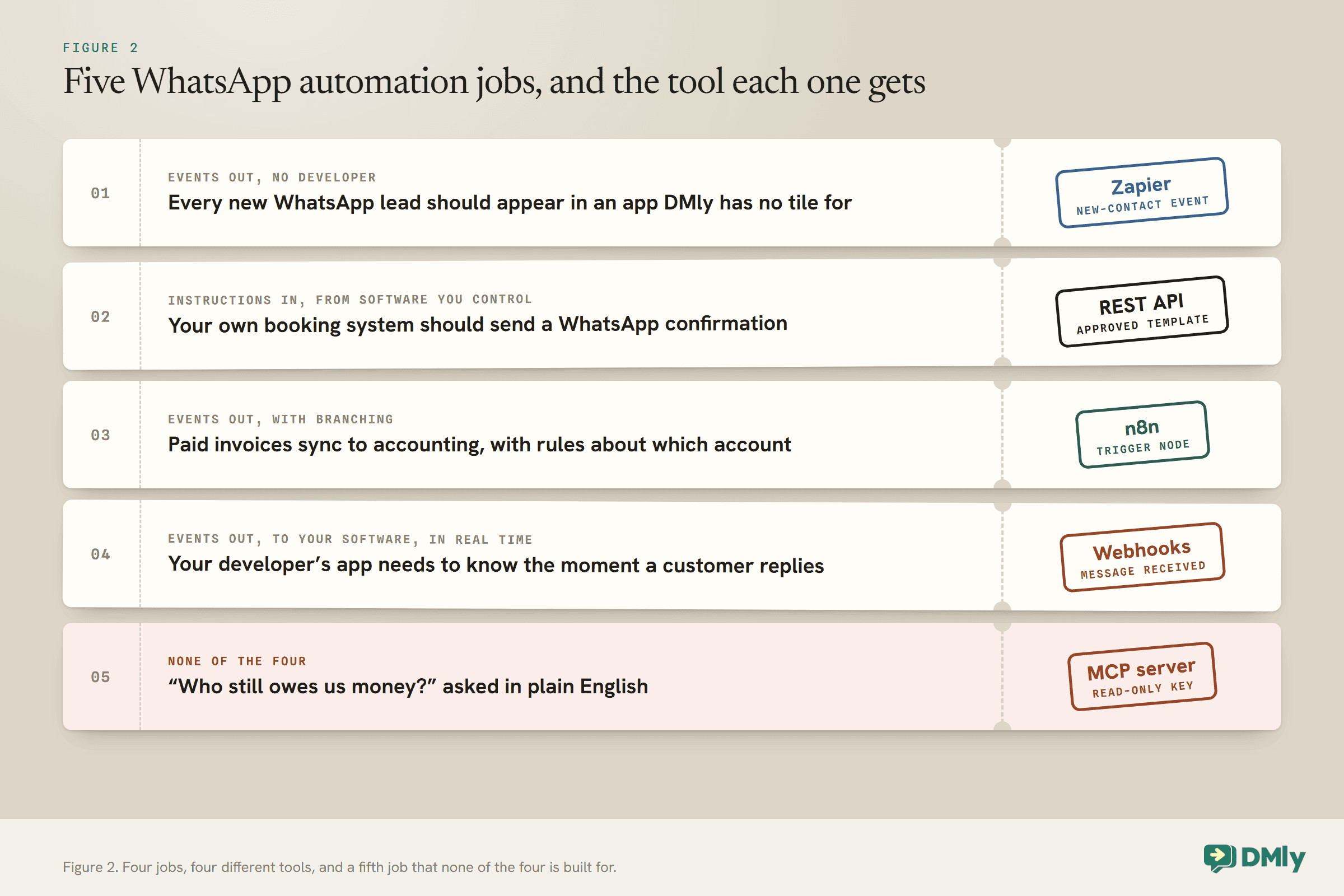
1. Every new WhatsApp lead should appear in an app DMly has no tile for
Events out, and a team with no developer. Zapier. A Zap on the new-contact event adds the lead to the other app. If the app does have a DMly tile, such as HubSpot or Mailchimp, use the tile instead and skip Zapier altogether.
2. Your own booking system should send a WhatsApp confirmation
Instructions in, from software you control. REST API. Your booking system calls DMly’s messages endpoint with an approved template when a booking is made. If your bookings are made in DMly itself, none of this is needed: DMly’s own appointment messages already cover it.
3. Paid invoices should sync to accounting software, with rules about which account each one goes to
Events out, with branching. n8n. The DMly Trigger node listens for the paid-invoice event, and the workflow applies your rules before creating the entry. You could do this in Zapier too, but every action step is another task on every invoice.
4. Your developer’s app needs to know the moment a customer replies
Events out, to software you control, in real time. Webhooks on the message-received event, acknowledged within 8 seconds, deduplicated on the event id.
5. You want to ask “who still owes us money?” and get an answer
None of the four. MCP. Connect an AI assistant to DMly’s MCP server with a read-only key, and ask. Our walkthrough on connecting Claude to your WhatsApp, CRM and invoices shows how.
Many Setups Use Two of Them
The options are not rivals. A working setup often pairs one that listens with one that acts.
The common pairs look like this:
- Webhooks plus the API. The developer’s pattern. A webhook reports the event, your code decides, and the API acts.
- Zapier’s tile plus a native tile. Zapier carries events to an app DMly does not connect to, while native tiles cover the apps it does.
- n8n on its own. Because its DMly nodes go both ways, n8n can be the listener and the actor in the same workflow.
- DMly flows plus any of the above. Plenty of logic never needs to leave DMly. A flow can tag a contact, send a template, call a webhook with its HTTP Request step or write to Google Sheets. The outside tools are for what flows cannot reach.
What to avoid is two tools doing the same job. A new contact that Zapier adds to your CRM and n8n also adds to your CRM ends up there twice. Keep a short list of which tool owns which job, and check it before building the next one.
Access and Security: Who Can Do What
The options differ most in how much of your business a leaked credential would expose.
- A Zapier key starts
zap_and only works for the Zapier connection. The narrowest of the lot. - A webhook signing secret lets a receiver prove a delivery came from DMly. It cannot be used to read or change anything in DMly.
- A REST API key grants full access to the workspace, customers’ phone numbers and conversations included. It is the key n8n’s credential and Webhooks by Zapier both use. Store it as a credential, never in a plain text field, and give each integration its own.
- An MCP connection can be read-only or allowed to act, and a key is limited by the role of whoever created it. DMly’s docs suggest starting read-only.
A useful habit whichever you choose: when somebody leaves the business, list the keys and integrations they built or had access to, and rotate or rebuild them. A key does not leave with the person who made it.
What Each One Costs to Run
On DMly’s side, the answer is the same for all four. The real differences are outside DMly.
DMly’s plan comparison lists “API, webhooks & integrations” and the MCP server as included on all three plans. Beyond that:
- API and webhooks cost developer time and hosting. There is no per-call charge on DMly’s side, but there is the 60-requests-a-minute limit per key.
- Zapier costs a Zapier plan. Actions count as tasks, triggers do not, and sending into DMly needs a plan that includes Webhooks by Zapier.
- n8n costs an n8n Cloud plan, priced on workflow executions rather than steps, or the time and server to self-host the Community Edition.
- Meta’s charges apply whichever route sends the message. A template sent by the API, by n8n or by a Zap is billed by Meta exactly as one sent from the inbox would be, and it counts against your DMly plan’s broadcast and template allowance.
Two integrations that do the same job can have very different running costs once volume grows. Before committing, estimate how many times a month the trigger will fire and how many steps run each time.
Mistakes to Avoid
- Picking the tool before the direction. Webhooks cannot send a message, and the Zapier tile cannot either.
- Building what a native tile already does. Two moving parts where one would do.
- Sharing one REST API key across integrations. One leak, or one revocation, takes them all down.
- Processing a webhook before acknowledging it. DMly waits 8 seconds, then retries, and you handle the same event twice.
- Ignoring duplicates. Deliveries are at-least-once. Deduplicate on the event
id. - Forgetting WhatsApp’s rules. No integration gets round the 24-hour window, templates or opt-in.
- Letting two tools own the same job. Keep a list of which tool does what.
Frequently Asked Questions
What is the difference between an API and a webhook?
An API is something your software calls when it wants something done or wants to read data. A webhook is DMly calling your software when something happens. The API is “now do this”; a webhook is “tell me when”.
Is n8n better than Zapier?
For different people. Zapier is quicker to learn and needs no hosting. n8n works in both directions with DMly’s nodes, can be self-hosted, and prices per workflow run rather than per step, which suits longer workflows. Pick the one your team can maintain.
Can Zapier send WhatsApp messages?
Not through DMly’s Zapier tile, which is events out only. A Zap can send a message by using Webhooks by Zapier to call DMly’s REST API with an approved template, which needs a paid Zapier plan and a REST API key.
Do I need a developer to connect WhatsApp to other apps?
Not always. Native tiles and Zapier need no code, and n8n needs little. You need a developer for the REST API and for receiving webhooks on your own server.
Are the API and webhooks included in every DMly plan?
Yes. DMly’s plan comparison lists API, webhooks and integrations as included on all three plans, along with the MCP server.
What happens if my webhook endpoint is down?
DMly retries twice more, after roughly 10 seconds and then 60 seconds. If all three attempts fail, the delivery is logged as failed and dropped, so an endpoint that stays down for longer misses those events.
The Definition, Corrected
An integration is not a cable you buy. It is a direction and a person: which way the information travels, and who will fix it when it breaks. Answer those and the comparison of API vs webhooks vs Zapier vs n8n shrinks to one or two candidates, usually before you have opened a pricing page.
Check for a native tile first. Use Zapier for events out when nobody codes, n8n for two-way workflows with logic, and the API with webhooks when you have a developer and a system of your own. Then write down which tool owns which job, so the next person does not have to work it out again.
Writing about WhatsApp automation, bookings and growth for local business.
Turn WhatsApp into your busiest channel.
Start free and run message, bookings, payments and reviews in one place.
