
WhatsApp Automation API: Setup, Integration, and Best Practices (2026)
Let’s argue with the search phrase that brought you here. “WhatsApp Automation API” reads like the name of a thing you can sign up for, get a key, and call. It isn’t. It’s an umbrella over at least three different layers, and most of the frustration I see in developer forums comes from people holding documentation for one layer while calling another.
I’ve been building WhatsApp automations since the days when the official option involved running Meta’s container on your own hardware. That option is dead now, properly dead, and what’s left is a stack: Meta’s Cloud API at the bottom, business solution providers in the middle, and platform APIs on top that trade raw control for finished business objects. Which layer you build against is the only architectural decision that matters here, and almost nobody frames it that way.
So that’s what this guide does. In plain terms: it tells you which of the three layers to write code against, and what you inherit if you pick the wrong one. The map first, then a hands-on look at both realistic paths, the webhook side that everyone underinvests in, what to build first, and the specific walls the WhatsApp automation API puts in front of you, with numbers, because “you may encounter rate limits” is the kind of sentence that helps nobody.
The Map: Four Things “WhatsApp Automation API” Can Mean
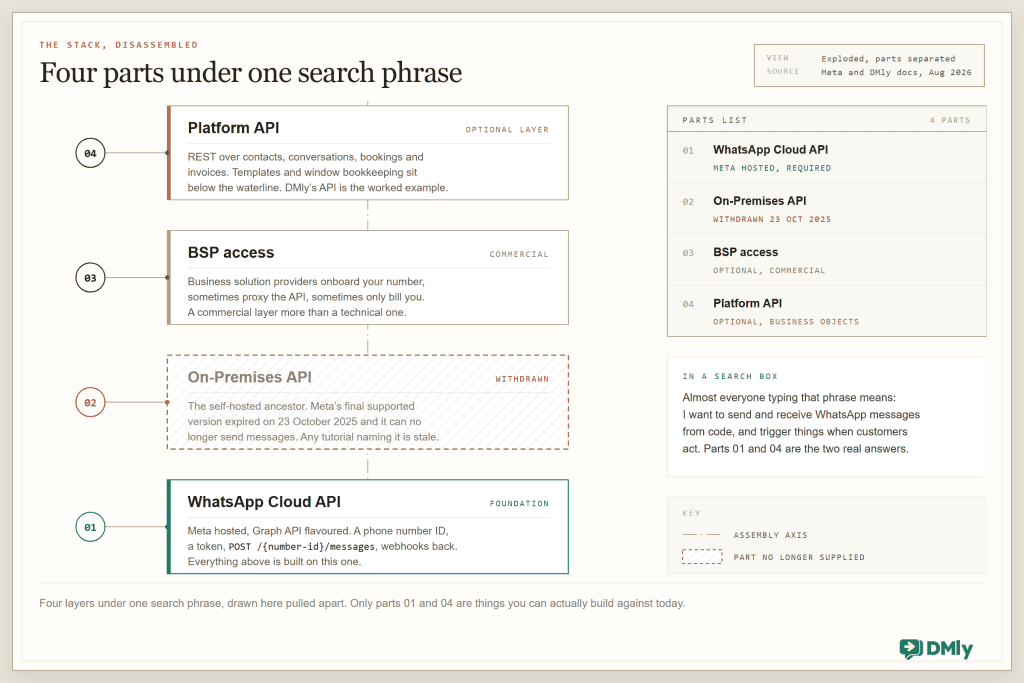
Quick definitions, then we build. The Cloud API is Meta’s hosted API for the WhatsApp Business Platform: you register a WhatsApp Business Account, get a phone number ID and a token, and speak Graph-API-flavoured JSON to it. The On-Premises API was its self-hosted ancestor; Meta’s own notice says the final supported version “expired on October 23, 2025” and it can’t send messages anymore, which makes a surprising amount of older content on this topic actively harmful. BSPs (Business Solution Providers) are Meta’s partner tier; depending on the provider you get onboarding, billing, sometimes a proxied API. And platform APIs sit at the top: opinionated REST over business concepts, with the Cloud API plumbing handled underneath.
One prerequisite no layer saves you from: this is the official, opt-in, policy-bound WhatsApp. Libraries that puppet WhatsApp Web with a headless browser are a different thing entirely, they get numbers banned, and nothing below applies to them. If your number isn’t on the API yet, the setup routes (including the one that skips Facebook business verification at the start) are covered in our standalone walkthrough.
Path One: Building Directly on the Cloud API
The direct path gives you everything and does nothing for you. I mean both halves of that sentence.
The moving parts: a WhatsApp Business Account (WABA) holding one or more phone numbers, each with a phone number ID (an opaque ID, not the E.164 number), a system-user access token, and the Graph API endpoint. Sending a text is one authenticated POST to that phone number ID’s /messages endpoint, carrying a messaging_product of whatsapp, the recipient’s number and a text body. That is the whole request.
POST /106540352242922/messages
Content-Type: application/json
Authorization: Bearer EAAJB...

{
  "messaging_product": "whatsapp",
  "recipient_type": "individual",
  "to": "+16505551234",
  "type": "text",
  "text": {
    "preview_url": true,
    "body": "As requested, here's the link to our latest product: https://www.meta.com/quest/quest-3/"
  }
}
Delightfully simple, and that simplicity is the trap. The request is the easy 10 per cent. The other 90 per cent is state you now own, and none of it is optional:
- The 24-hour customer service window. Free-form messages like the one above only deliver inside 24 hours of the customer’s last inbound message. Outside it, you must send a pre-approved template, so your database now tracks a rolling window per contact, and your send path branches on it. Get it wrong and sends fail at runtime, not at code review.
- Templates as deployable artifacts. Templates are created, categorised (Marketing, Utility, Authentication), submitted, and reviewed by Meta. A promotional sentence in a “utility” template gets it recategorised and billed as marketing. Since 1 July 2025 you’re billed per delivered template message, so template category is now a line item, and your finance person will eventually ask you about it.
- Quality ratings and the pause ladder. Every template carries a quality rating (Green, Yellow, Red) fed by user blocks and reports. Meta can pause a poorly rated template for 3 hours, then 6, then disable it. Your reminder system needs to survive its template being benched mid-campaign.
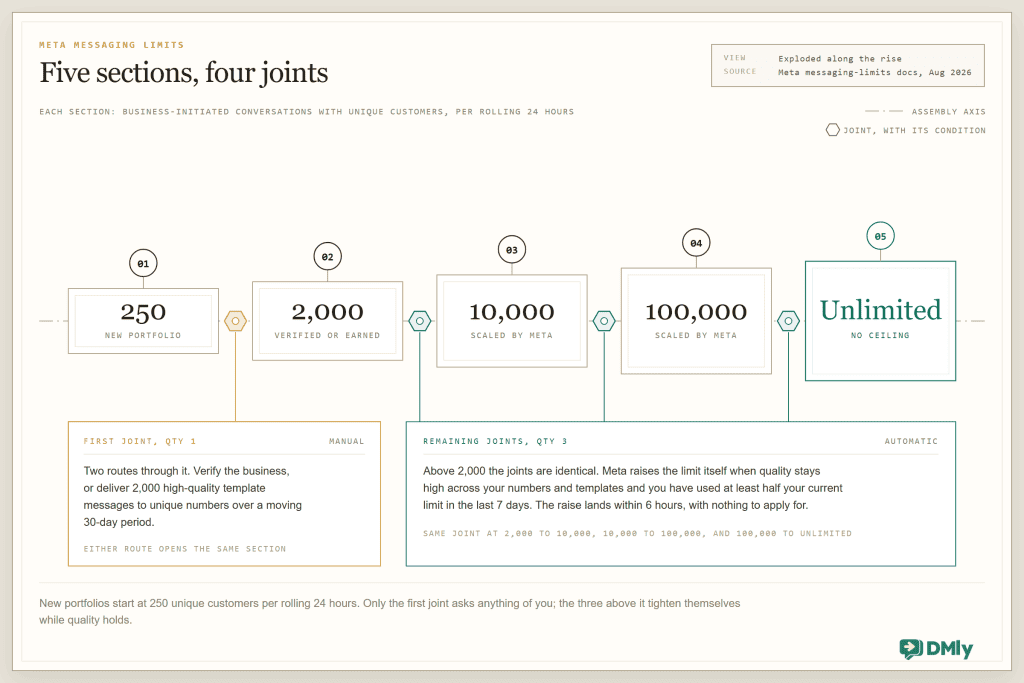
- Messaging limits that start small. A new business portfolio can open business-initiated conversations with 250 unique customers per rolling 24 hours. Reaching 2,000 takes business verification or 2,000 delivered high-quality template messages to unique numbers over a moving 30-day period; beyond that, Meta scales you automatically to 10,000, 100,000 and unlimited when you’re high quality and have used at least half your current limit in the last 7 days (the bump lands within 6 hours). Plan your launch curve around that ladder, not around your ambitions.
- Webhooks as your only ears. Inbound messages, delivery receipts, template status changes and quality alerts all arrive as webhook POSTs to an endpoint you verify with Meta once and defend forever.
Billing deserves one paragraph of respect, because it bites through the API too. Template messages are billed per delivered message at category rates. Free-form replies inside the window are free until 1 October 2026; from that date every business phone number gets 1,000 free service messages a month, resetting monthly with no rollover, and Meta charges from the 1,001st at the same rate as that market’s utility messages. Utility templates sent inside an open window become chargeable on the same date and carry no free allowance at all, so that, rather than the service replies, is usually the new unit cost your finance model needs. And the payment method attached to the WABA can itself fail in ways that stop template delivery cold. When sends start erroring and the code hasn’t changed, check billing before you check your code; our post on Cloud API billing and payment errors exists because this happens constantly.
When is the raw path right? When messaging is your product (you’re building your own inbox UI or a vertical SaaS), when you need every capability the day Meta ships it, or when your scale justifies owning the plumbing. It’s a real path. I’ve walked it. Budget for the window tracker, the template pipeline, the webhook infrastructure, and the on-call rotation that now includes “Meta paused our template” as an incident category.
Path Two: Building Against a Platform API
The other path starts one storey up, and the plain-English version is that somebody else keeps the annoying records for you. A platform API gives you REST over the things your product actually discusses with the business: contacts, conversations, appointments, invoices. The Cloud API is still down there, but templates, window bookkeeping and channel plumbing belong to the platform. I’ll use DMly’s API as the worked example for the obvious reason that it’s ours and I can quote it precisely; the architectural shape generalises to its category.
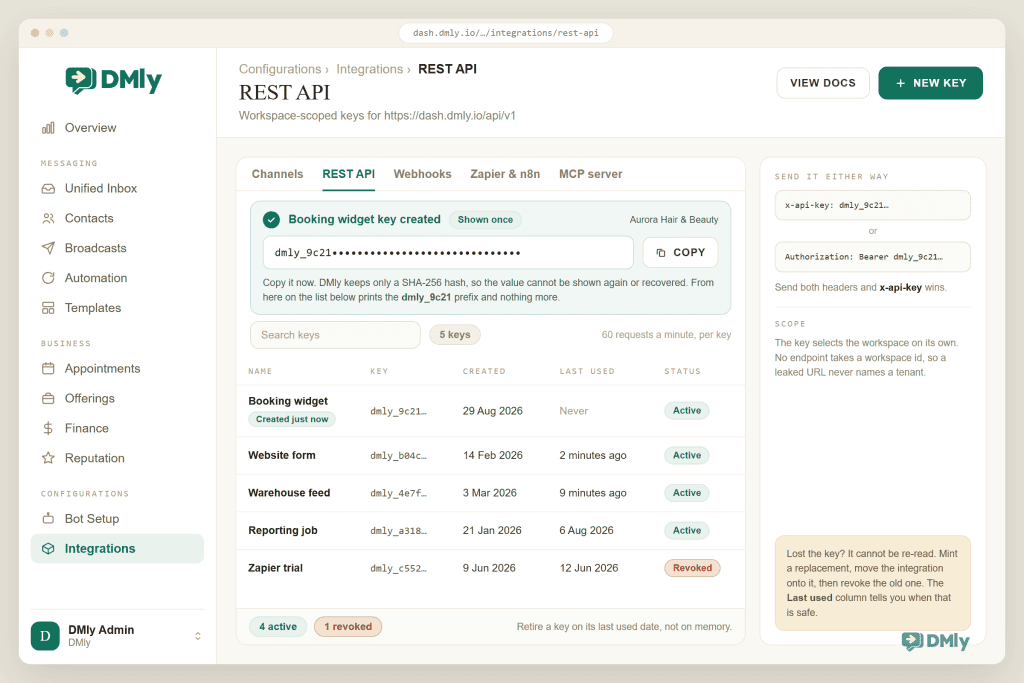
The basics, verbatim from the reference: base URL https://dash.dmly.io/api/v1, JSON in and out, UUIDs everywhere, and a workspace-scoped key created under Configurations → Integrations → REST API. That key travels either as an x-api-key header or as an Authorization: Bearer header, and both are accepted.
curl https://dash.dmly.io/api/v1/contacts \
  -H "x-api-key: dmly_xxxxxxxxxxxx"

# or, equivalently
curl https://dash.dmly.io/api/v1/contacts \
  -H "Authorization: Bearer dmly_xxxxxxxxxxxx"
Two details in the auth design tell you someone has been burned before, which is the quality I look for in an API. The key is shown once and only a SHA-256 hash is stored, so it cannot be recovered later; and the key itself selects the workspace, so no endpoint takes a workspace ID and a leaked URL never identifies a tenant. If you send both headers, x-api-key wins. Each key has its own last_used_at, which makes retiring old integrations an audit rather than a guess.
The send-message call is worth reading closely, because the request shape is the philosophy. You POST /messages with a contact_id and a body, and that is the whole thing.
POST https://dash.dmly.io/api/v1/messages

{
  "contact_id": "9b1f2c3d-4e5a-6b7c-8d9e-0f1a2b3c4d5e",
  "type": "text",
  "body": "Hi Jane, your appointment is confirmed for 3pm tomorrow.",
  "kind": "dm",
  "media": null,
  "template_id": null,
  "parameters": []
}
No phone number. You message a contact, and the message lands in that contact’s conversation thread, the same one the human team sees in the inbox. For a template send you pass a template_id and the ordered parameters for its placeholders. And the window rule hasn’t vanished; it has moved to where you can catch it: a send that can’t go out (closed window, missing template) comes back as a 422 with a message saying so, instead of a delivery that silently never happens. Your integration handles an HTTP status; the per-contact window ledger is somebody else’s job. That trade is the whole pitch of this layer, in one endpoint.
The rest of the surface is wide because the platform is: contacts with tags, notes and pipeline stages; segments; conversations and messages; broadcasts (create, approve, send); automations you can list, activate and pause; appointment availability, booking, rescheduling and cancellation; services, staff, classes; products and plans; invoices (create draft from line items, send, record payments, void); orders, payments, coupons, subscriptions, gift cards; media upload. That inventory is why the interesting builds here aren’t chatbots, they’re integrations: your booking widget writing real appointments, your fulfilment system sending the “it’s shipped” template, your data warehouse fed by events.
Operational numbers you’ll want on a sticky note: 60 requests per minute per API key on the workspace API (the agency API runs at 120, the MCP server at 120), with X-RateLimit-Limit and X-RateLimit-Remaining on every response and Retry-After arriving only on the 429. Errors come as a small envelope, a human message plus an optional per-field errors object on validation failures, and the reference is refreshingly blunt about retry discipline: don’t retry 401, 403 or 422, they won’t self-resolve; back off exponentially on 429 and 5xx; and since POSTs aren’t idempotent, check before re-creating, or you’ll learn about duplicate invoices from a customer.
A budget note: Separate keys per integration isn’t just hygiene, it’s throughput: the 60/min budget is per key, so your website form, your warehouse sync and your reporting job each get their own lane, and one runaway loop doesn’t starve the others. Name the keys after the integration; future-you is grateful.
The Verdict Nobody Wants: You’ll Probably Use Both
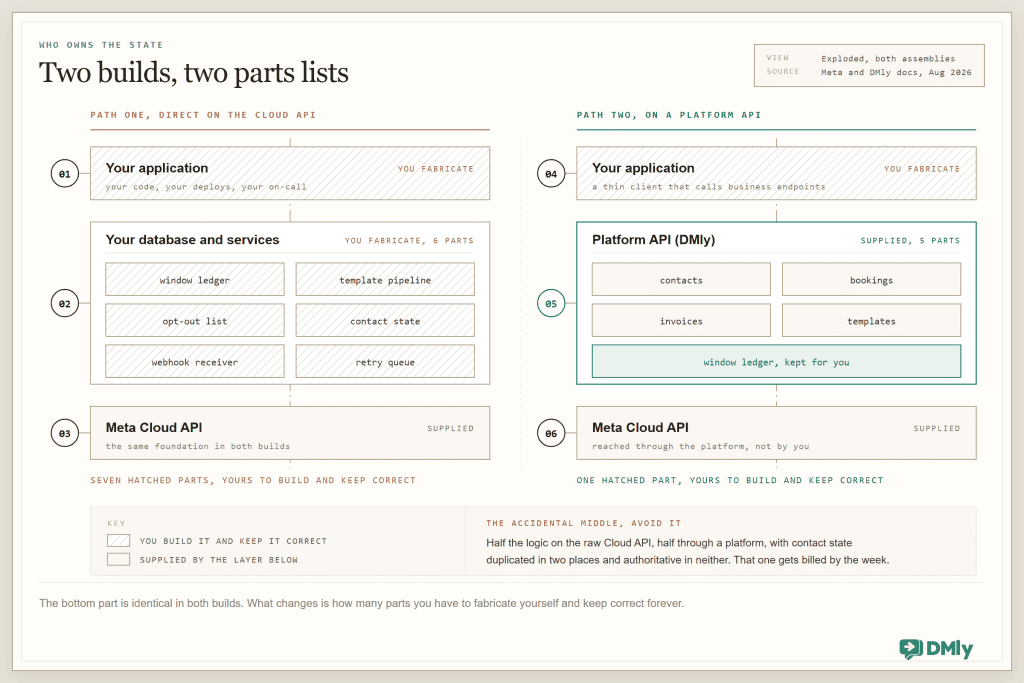
Fifteen years of integration work has left me with exactly one architecture heuristic I still trust: build against the highest layer that owns the state you don’t want to own. For WhatsApp automation, the state in question is per-contact windows, template lifecycles, quality ratings, opt-outs and conversation history. If your product needs to own those (you’re building a messaging product), go direct to the Cloud API and own them properly. If your product needs to use messaging around business objects (bookings, orders, invoices, support), build on the platform layer and spend the saved quarter on your actual product.
The hybrid shows up more than either purist answer: platform API for the business integration, and a thin direct-API awareness for the edges, usually reading Meta’s documentation to understand why something upstream behaves as it does. What I actively recommend against is the accidental middle: half your logic calling raw Cloud API, half through a platform, both maintaining contact state, neither authoritative. I’ve inherited two of those. Both rewrites were billed by the week.
The five-question decision checklist: Answer these before writing a line. Is messaging the product, or a feature of the product? Who should own the per-contact window ledger, you or a vendor? Do you need channels beyond WhatsApp on the same contact record? Will a non-developer ever need to change the conversational logic (if yes, that logic belongs in a flow builder, not your codebase)? And when Meta changes a rule, as it did with per-message pricing in July 2025, do you want that migration on your roadmap or on someone else’s? Three or more answers pointing at the vendor means start on the platform layer.
Webhooks Are Half the API
Every messaging integration is two integrations: the one where you call them, and the one where they call you. The second one is where production incidents live, so let me spend real words on it.
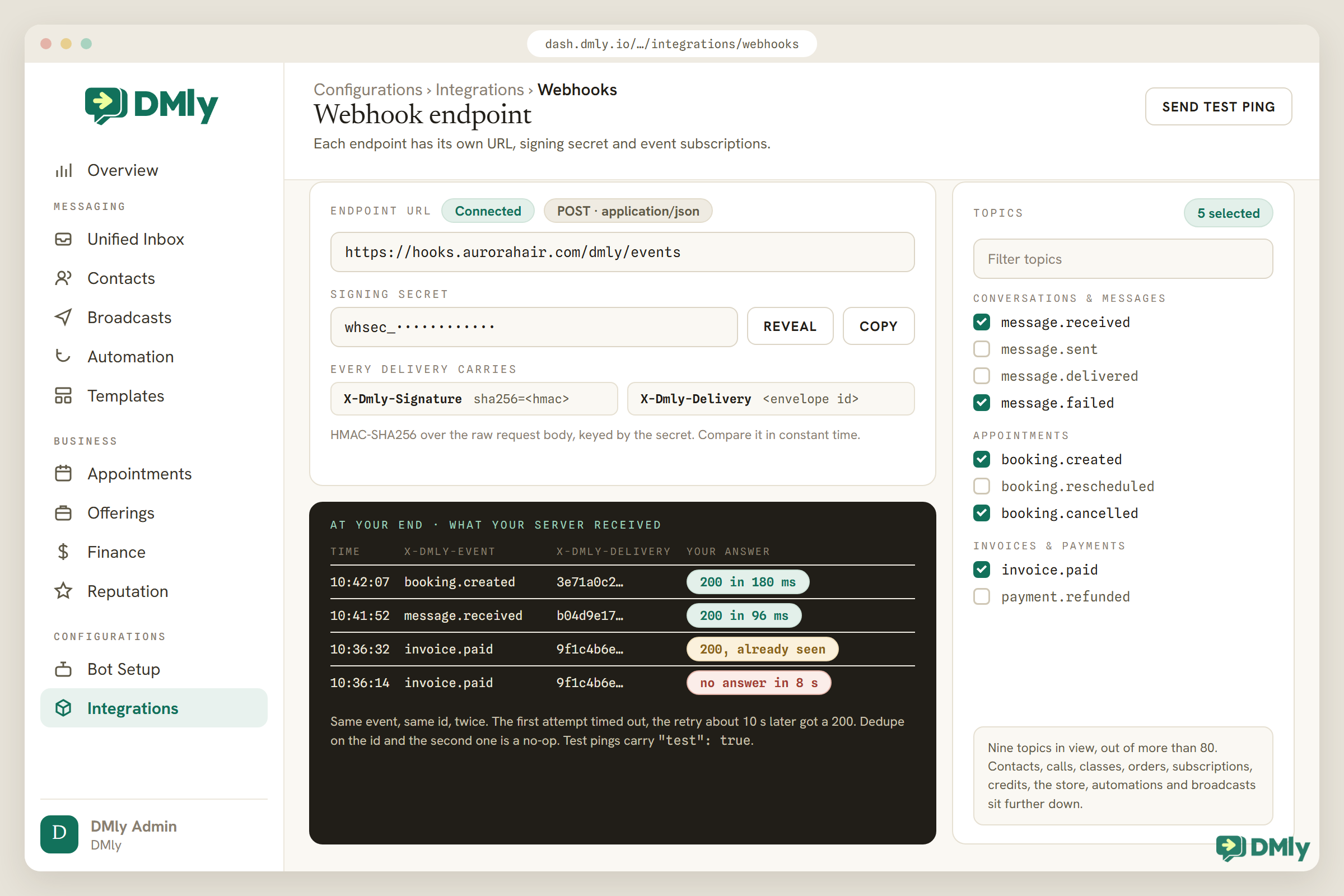
On the DMly side, you register an endpoint under Configurations → Integrations → Webhooks and pick from more than 80 topics spanning contacts, Facebook lead forms, conversations, calls, message lifecycle, appointments, classes, invoices, orders, payments, subscriptions, credits, the store, automations and broadcasts. Every delivery is a POST with a stable envelope (id, event, occurred_at, workspace_id, data) and a signature header, X-Salesbot-Signature, carrying an HMAC-SHA256 of the raw request body keyed by your secret. The docs even remind you to compare signatures in constant time because == leaks timing; when an API’s documentation warns you about timing attacks, someone on that team has done this before.
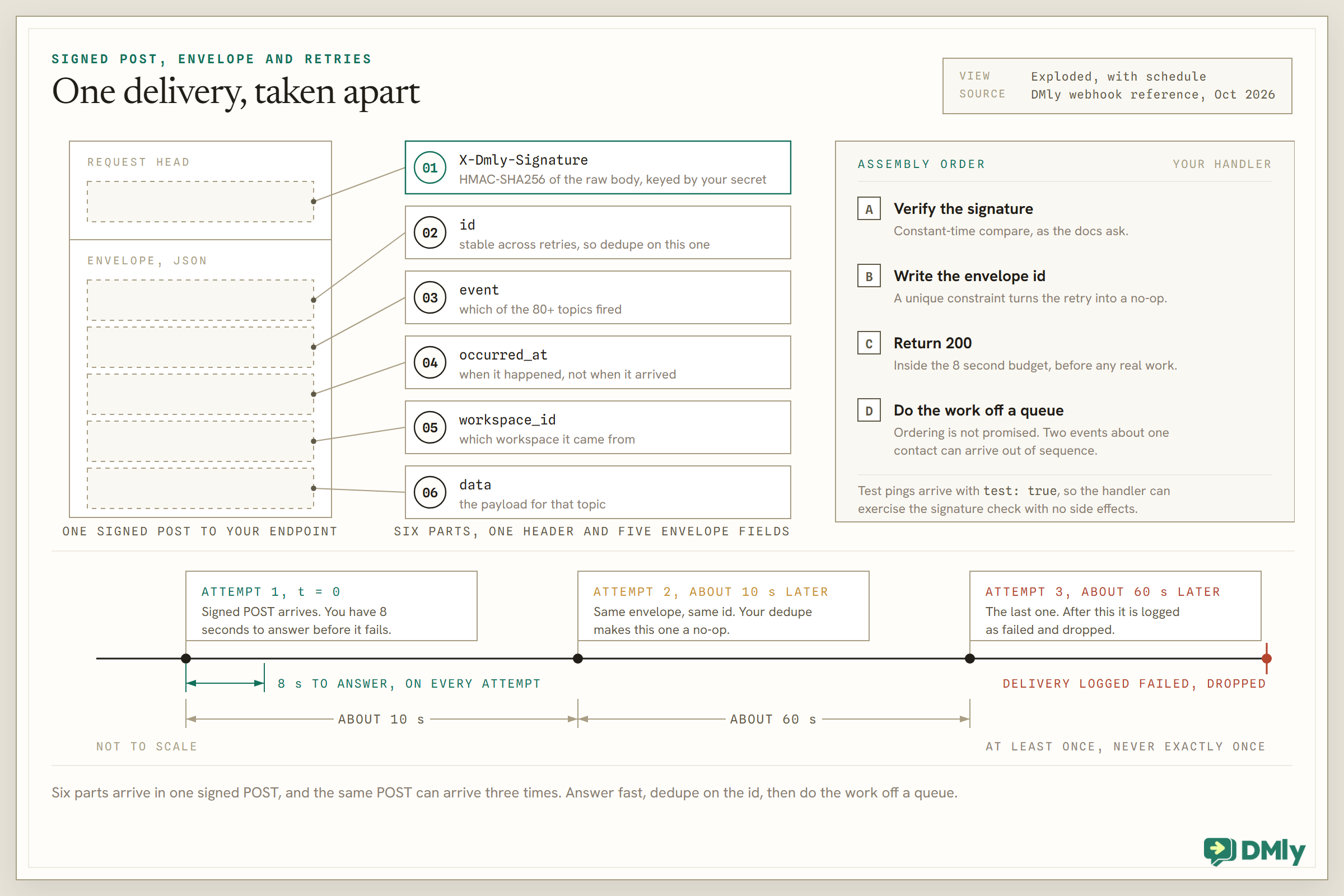
The engineering pattern that survives contact with this schedule is boring and universal: verify the signature, write the envelope id somewhere with a uniqueness constraint, return 200, and do the actual work off a queue. Respond fast because the budget is 8 seconds; dedupe on id because delivery is at-least-once and the id is stable across retries; and never assume ordering, because two events about the same contact can arrive out of sequence on a bad day. Test pings arrive with "test": true in the payload, so your handler can wave them through without side effects.
On the Meta side the shape rhymes: you verify your endpoint with Meta once via a challenge handshake, then receive inbound messages, statuses and template updates as POSTs. Same discipline applies. If your integration polls where it could subscribe, you’re burning your 60/min on asking “anything yet?”, which is precisely the anti-pattern webhooks exist to end.
What to Build First: Five Integrations, Ranked by Payback
These are the five WhatsApp automation API integrations worth building first, ranked from my own build logs by time to visible value.
- Website lead to CRM contact. Your existing form does a
POST /contactswith a tag, and every lead lands where the conversation will happen. An afternoon of work; the sales team notices the same week. Creating contacts through the API gets a walkthrough of its own. - Event notifications out of your own system. Order shipped, results ready, table booked: your backend calls the send-message endpoint with a
template_idwhen the window’s likely closed. This is the integration that replaces the SMS bill. - The warehouse feed. One webhook endpoint, a queue, and inserts into your analytics store. Suddenly response times, booking flows and payment events sit next to the rest of your product data. Nobody rolls this back once it exists.
- Invoice-on-completion. When your system marks a job done: create a draft invoice from line items, then send. Two endpoints, and the money conversation moves into the chat where it gets answered.
- Automation control. List, activate and pause automations from your own admin panel or on a schedule: the seasonal-hours flow toggled by cron rather than by memory. Small, strangely satisfying, and a good first taste of the automations surface.
You’ll notice “build a chatbot” isn’t on the list. Conversational logic is what the platform’s no-code flow builder is genuinely good at, and rebuilding it over the API is usually effort spent proving a point. The API earns its keep where your systems and the messaging need to agree on facts.
The WhatsApp Automation API Walls You’ll Hit
Every one of these has interrupted a sprint I was part of. Now they can merely interrupt your reading, which is the cheaper way to meet them.
| The wall | What it looks like | What actually works |
| The 24-hour window | Free-form sends fail for quiet contacts; on DMly’s API it’s a clean 422, on raw Cloud API a runtime error after you shipped | Branch on it by design: template path for cold sends, free-form for open windows. Never “fix” it by spamming re-engagement templates; that road ends at the quality rating. |
| Template review and the pause ladder | A campaign waiting on approval; a live template paused 3h, then 6h, then disabled on poor quality | Submit templates days early, keep a plain fallback approved, and treat a pause as a content smell, not an infrastructure bug. |
| The 250 starting limit | Launch day plans meet a 250-conversation ceiling | Verify the business early or earn the 2,000 tier with quality sends over 30 days; the ladder above 2,000 climbs itself if quality holds. |
| Rate limits | 429 with Retry-After, usually from a backfill loop | Respect Retry-After exactly (the docs are right: early retries just burn budget), queue writes, and give each integration its own key and lane. |
| Non-idempotent POSTs | A retry storm creates three identical invoices | Check-before-create on anything financial, and keep your own idempotency record keyed by your source event. |
| The 8-second webhook budget | Slow handlers marked failed, then double-processed on retry | Ack fast, work async, dedupe on the envelope id. The retry ladder (10s, 60s, then dropped) forgives slowness twice, not forever. |
| The key you can’t re-read | The dmly_ key was pasted into a chat, the chat scrolled away, the key is gone | It’s hashed server-side by design. Mint a replacement, migrate, revoke the old one; last_used_at tells you when it’s safe. |
| Billing failures upstream | Template sends stop although code is untouched | Check the WABA’s payment method before debugging; see the billing errors guide. |
| Ghosts of setups past | Odd behaviour on numbers shared with the phone app, or errors like the 131060 companion-device case | Understand coexistence mode before mixing the Business app and the API on one number. |
Zapier, n8n and MCP: The Doors That Aren’t REST
Three adjacent surfaces round out the developer story, each with a distinct job. Zapier exposes DMly triggers only, which makes it the right tool for “when X happens in DMly, do Y over there” and the wrong one for driving DMly from outside. The n8n node is the self-hosted automation crowd’s version and goes both ways; it has a full build guide of its own. And the MCP server is the newest door: it exposes workspace operations (contacts, conversations, bookings, invoices, revenue summaries, even saving automation flows) as tools an AI agent can call, authenticated per key or OAuth connection at 120 requests per minute. If your roadmap includes “let our AI assistant operate the business account”, MCP is the layer built for exactly that, and REST-versus-MCP is a big enough question that it gets its own article.
Agencies running white-label deployments get one more surface: a separate reseller API (120/min per agency key) for provisioning client workspaces, plans and subscriptions programmatically, with its own webhook events. Different audience, same design language.
Get a key and send something
The whole first integration, key, contact, message, webhook, fits in an afternoon. Every DMly plan includes the REST API, webhooks and the MCP server, and the trial needs no card.
WhatsApp Automation API Questions Developers Ask
Is there a free WhatsApp automation API?
Meta doesn’t charge for API access itself; you pay per delivered template message, at rates that vary by category and country. Free-form replies inside the 24-hour window are free too. From 1 October 2026 every business phone number gets 1,000 free service messages a month and Meta charges only from the 1,001st, while utility templates sent inside an open window become chargeable from that date with no free allowance of their own. Platforms charge for their layer on top; DMly’s plans include the API and pass Meta’s rates through without markup. The “free WhatsApp API” results promising unlimited everything are unofficial web-scraping libraries, and they end with banned numbers.
Can I use my existing WhatsApp number with the API?
Yes, numbers can be migrated onto the Business Platform, and coexistence mode lets a number serve the Business app and the API side by side, with real constraints worth understanding first; our coexistence guide covers them. What you can’t do is run the same number on two API platforms at once.
REST API or MCP server: which should I integrate?
REST when code is calling: deterministic, versioned, yours to orchestrate. MCP when an AI agent is calling: the tools carry their own descriptions and the agent composes them. They cover the same workspace, so this is an interface choice, not a capability choice. Deep comparison coming as its own piece.
What are the DMly API’s rate limits?
60 requests per minute per API key on the workspace REST API, 120 for the agency API and 120 for MCP connections, with limit and remaining counts on every response and a Retry-After header on 429s. Budgets are per key, so separate integrations should hold separate keys.
How do I send a WhatsApp message from my app in practice?
Through DMly: POST /messages with a contact_id and body, adding a template_id plus parameters when the customer’s window is closed; a 201 returns the message, a 422 tells you why it couldn’t send. Directly on Meta: POST to /{phone-number-id}/messages with a messaging_product of whatsapp. The difference is who tracks the window: the platform, or your database.
Do webhooks or polling make more sense for reading events?
Webhooks, almost without exception: more than 80 topics exist so you never poll, and polling spends your rate limit asking questions events would answer. The one discipline they demand is idempotent handling, since delivery is at-least-once. There is a deeper webhooks-versus-polling comparison to come.
How do I test all this without messaging real customers?
Make yourself the customer. Keep a personal number saved as a contact in a test workspace, send to it, reply from it to open and close the window on demand, and run one real payment or booking through any money-adjacent flow. On the webhook side, DMly’s test pings arrive with a test flag set to true in the payload, so your handler can exercise the signature check without side effects, and the delivery log shows you what was sent and when. Gateways have sandbox credentials for the payment leg. None of this is glamorous; all of it beats discovering a bug in front of a customer.
Is the On-Premises API still an option?
No. Meta’s notice is unambiguous: the final supported On-Premises version expired on 23 October 2025 and it can no longer send messages. Anything you build today builds on the Cloud API, directly or through a platform.
The Definition, Settled
So, the phrase you searched for. There is no single WhatsApp automation API; there is a stack, and the honest version of this guide fits in four sentences. Meta’s Cloud API is the foundation, and it hands you power along with a ledger of windows, templates, ratings and limits to maintain. Platform APIs like DMly’s sit above it and trade that ledger for business objects and a 422 when something can’t send. Pick the layer whose problems you want as your day job, wire the webhooks like you mean it, and send your first message this afternoon rather than after the architecture meeting. The meeting goes better once something works.
Writing about WhatsApp automation, bookings and growth for local business.
Turn WhatsApp into your busiest channel.
Start free and run message, bookings, payments and reviews in one place.
