
What Are Webhooks? A Simple Guide for Business Automation
A webhook is an automatic message one system sends to another the moment an event happens. When a customer pays, books, cancels or messages you, the platform where that event occurred pushes a small packet of data to a web address you have chosen, and the system at that address reacts immediately. No checking, no refreshing, no waiting for a sync.
That is the entire definition, and I have deliberately given it to you in the first paragraph, because the word itself is what keeps most business owners from understanding webhooks. It sounds like specialist infrastructure. It is closer to a doorbell: press once when someone arrives, rather than having the whole house peer through the window every thirty seconds.
I have spent years wiring webhooks between messaging platforms, booking systems and accounting tools, and the pattern is always the same: the concept takes five minutes, the vocabulary takes five weeks, and the expensive mistakes all come from the vocabulary. So this guide does the whole job in order: what are webhooks, how they work step by step, how they differ from APIs and polling, what businesses actually use them for, how to set one up in DMly, and the honest answer to whether you need one at all.
What are webhooks, in one line? A webhook is a message a platform sends to a web address you choose, automatically, the instant a specific event happens, so another system can react in real time.
How Do Webhooks Work, Step by Step?
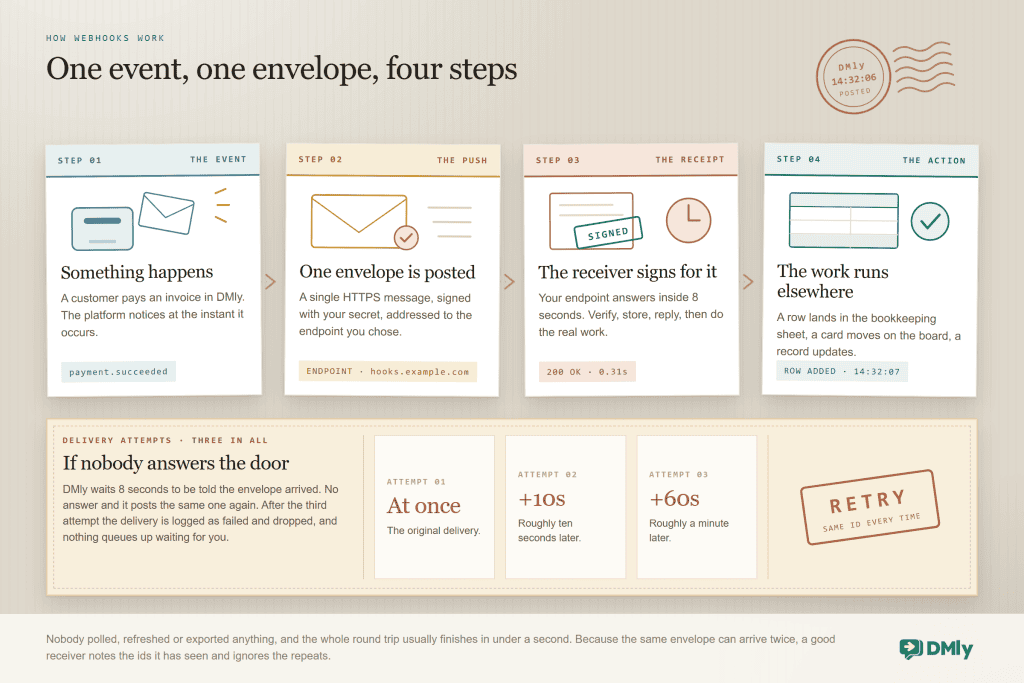
Webhooks work in four steps, and once you have those four, the rest of this guide is only detail. An event happens, the platform sends a secure message to the web address you chose, the receiving system confirms it arrived, and your automation runs.
Three words carry the whole subject, and pinning them down now saves the confusion later:
- Event. The thing that happened: an invoice was paid, an appointment was cancelled, a new contact messaged you. Platforms publish a list of the events they can announce; DMly’s webhook catalogue has more than 80 of them.
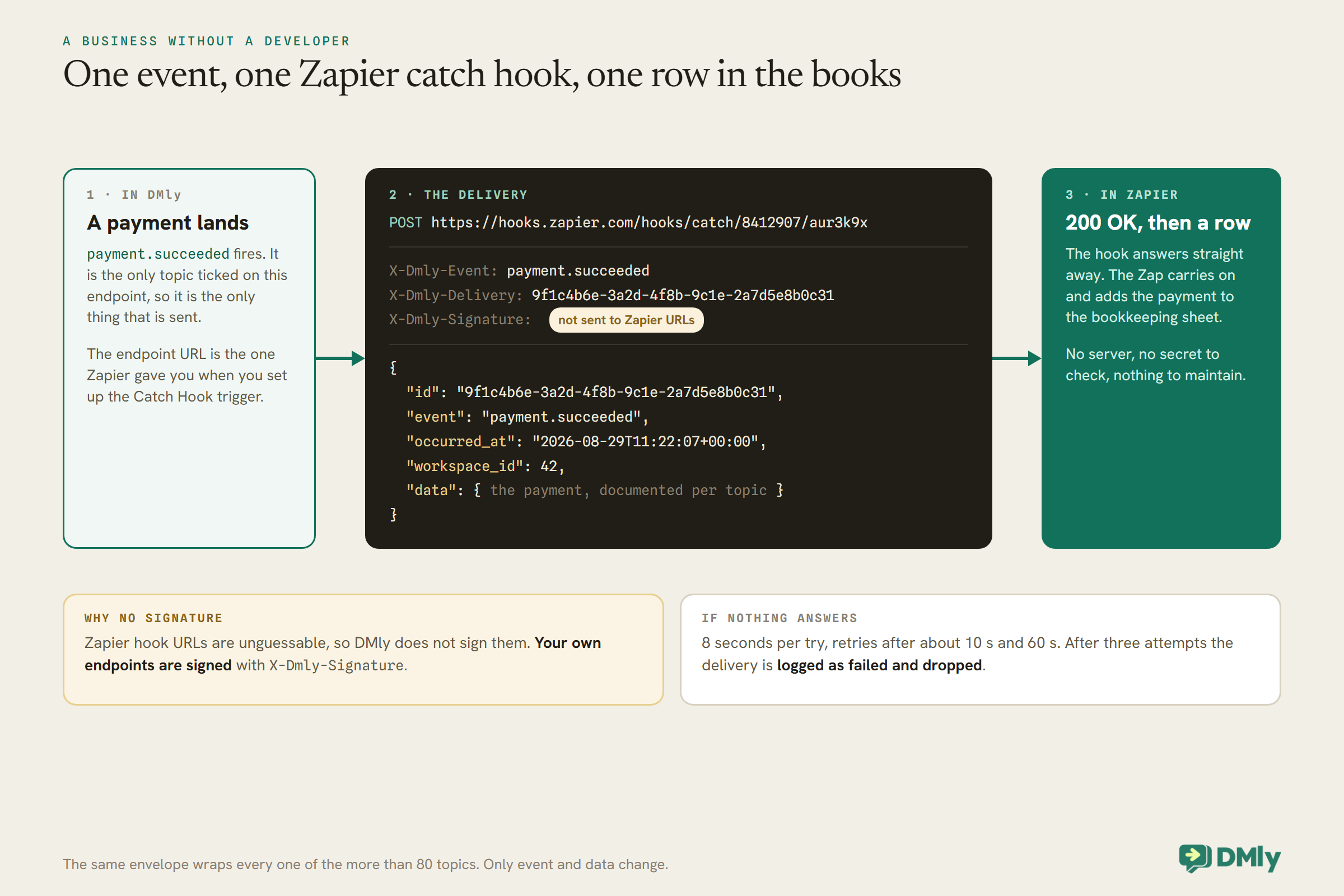
- Endpoint. The web address that receives the message. It can belong to your own software, or to a no-code tool like Zapier or n8n that catches webhooks for people who do not run servers.
- Payload. The contents of the message: which event, when it happened, and the details (who paid, how much, against which invoice). It arrives as structured data any modern tool can read.
One property matters more than any other for reliability, and it is worth absorbing now: webhook delivery is at-least-once, not exactly-once. If the platform is not sure your endpoint received the message, it sends it again. DMly, for example, waits 8 seconds for an acknowledgement, then retries after roughly 10 seconds and once more after roughly 60, three attempts in total. Every delivery carries an id that stays the same across retries, so a well-built receiver notes the ids it has seen and ignores repeats. Skip that and one hiccup turns a payment notification into two rows in the accounts.
Webhook vs API vs Polling: What’s the Difference?
The difference is direction. An API is how your system asks a platform for something; a webhook is how the platform tells your system something. Polling is using an API to ask the same question over and over because nobody is telling you.
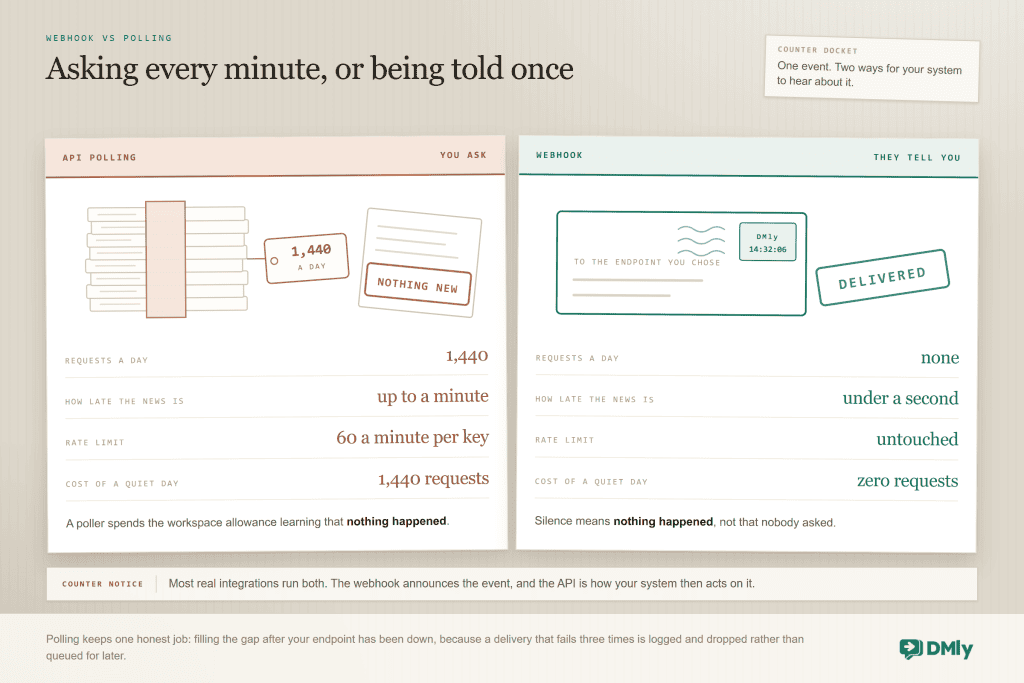
Put side by side:
| Method | Direction | Speed | Best for |
| Webhook | Platform pushes to you | Real time, typically under a second | Reacting to events: a payment, a booking, a cancellation |
| API call | You pull from the platform | On demand | Doing things and fetching things: create a contact, send a message, look up an invoice |
| Polling | You pull, repeatedly, on a timer | Delayed by the polling interval | Backfilling gaps, and platforms that offer no webhooks |
They are collaborators, not competitors. A complete integration usually pairs a webhook (“an invoice was just paid”) with API calls (“fetch the full invoice, then mark the job released in our system”). Polling’s remaining honest job is recovery: if your endpoint was down for an hour, the missed events are not redelivered forever, so you ask the API to fill the gap. There is a dedicated comparison of webhooks against API polling, and if you have a developer who wants the full API picture, our guide to the WhatsApp automation API is written for them.
What Are Webhooks Used For? 7 Business Automation Examples
Webhooks keep your other systems in step with the place your customer activity actually happens. That means your accounting, your spreadsheets, your fulfilment, your reporting and your internal alerts. Here are seven examples working in real small businesses, all using events DMly actually publishes:
- Payments into your accounts, automatically. The payment succeeded event adds a row to the bookkeeper’s spreadsheet or accounting tool the moment money arrives. Month-end becomes a check instead of a re-typing exercise.
- New WhatsApp leads into a sales sheet. Contact created and contact tagged events feed the pipeline spreadsheet your sales person refuses to give up. The leads arrive; nobody exports anything.
- Bookings onto the operations board. Appointment booked, rescheduled and cancelled events keep a rota board or planning tool current, so staffing decisions are made against the real diary.
- Orders into fulfilment. Order confirmed tells the warehouse or the kitchen without anyone forwarding screenshots.
- Failed subscription payments into a team alert. The moment a member’s renewal fails, a message lands in the staff channel, while DMly’s own retries run in parallel.
- Everything into a data warehouse. Subscribe the events you report on and store them. Once messaging, bookings and payments sit next to your other data, questions like “which channel produces repeat customers” finally have answers.
- Stage changes into anything at all. When a contact moves pipeline stage, DMly emits a
contact.stage_changedevent. Notably, there is no matching automation trigger inside the flow builder for that change, so the webhook is not just one route to reacting to it; it is the only route.
Notice what none of the seven do: message the customer. That is deliberate, and it is the next section.
Do You Need a Webhook, or Just an Automation?
Here is the answer most webhook guides never give: if the reaction you want happens inside DMly, you do not need a webhook at all. You need a flow.
DMly’s no-code flow builder already reacts to the same events from the inside: a booking confirmed, an invoice overdue, a payment succeeded, a tag applied. If what you want is “send a WhatsApp message, add a tag, wait three days, request a Google review”, the flow builder does all of it with no endpoint, no code and nothing to host. I have watched businesses pay for a fortnight of development to build a webhook receiver whose only job was to send a message back into the platform the event came from. That is a long walk around a very short corner.
So the decision is one question. Where does the thing that must react live? Inside DMly: build a flow and stop reading this section. Outside DMly (your accounts package, your warehouse software, your spreadsheet, your own app): that is what webhooks are for. And using both at once is normal: the flow thanks the customer while the webhook tells your books.
The middle ground nobody mentions: For “add a row to a spreadsheet when X happens”, you may not even need the webhook. DMly flows include a Send to Google Sheets step and an HTTP Request step, so a flow can push data out directly. No endpoint, no secret, nothing to maintain. For a lot of small businesses, that step is the entire integration.
What Webhook Events Does DMly Send?
You get more than 80 events to choose from, and you only ever receive the ones you tick. DMly publishes those topics across fifteen families: contacts, Facebook lead forms, conversations, calls, message lifecycle, appointments, classes, invoices, orders, payments, subscriptions, credits, the store, automations and broadcasts. Nothing is sent that you did not subscribe to. The list keeps growing, so for the full, current set call GET /api/v1/webhooks/events.
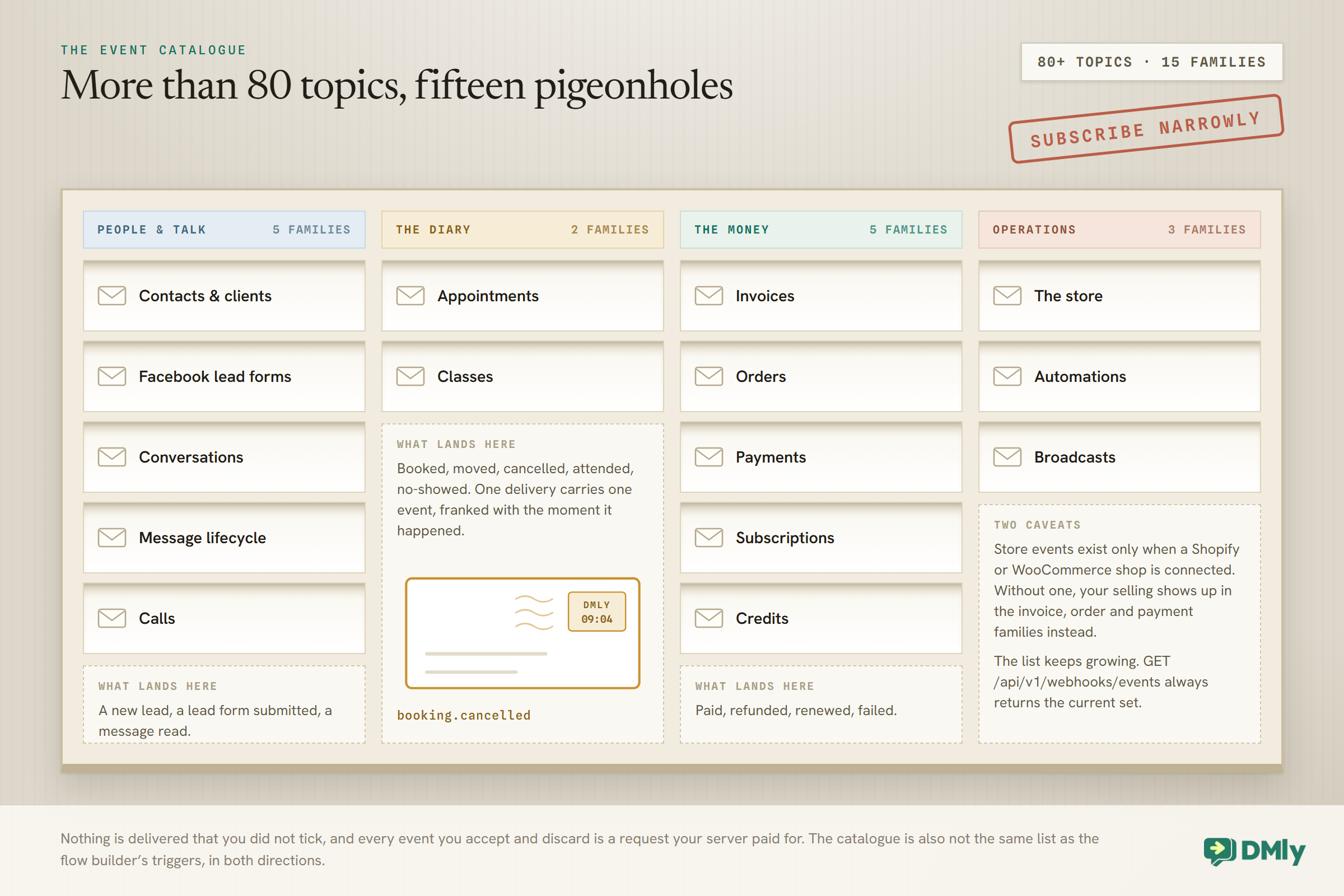
Three catalogue caveats that save planning pain. The store.* events, including abandoned checkout, exist only when a Shopify or WooCommerce shop is connected; if you sell through DMly invoices and WhatsApp, your events live in the invoice, order and payment families instead. The stock-level events under offerings are documented as not currently emitting, which is exactly the kind of line to re-read on the day you plan around it. And the webhook catalogue is not the same list as the flow builder’s triggers, in both directions, which is why the stage-change example earlier needs a webhook at all.
What Data Does a Webhook Payload Contain?
A webhook payload contains an identifier, the event name, a timestamp, the workspace it belongs to, and a data section with the event’s details. Every DMly webhook arrives in that same envelope, which means you learn the shape once and every topic reads the same way.
| Field | The question it answers | Why it matters |
id | Which message is this? | Stays identical across retries, so it is how your receiver recognizes and ignores a duplicate delivery. |
event | What happened? | The topic name, such as a payment succeeding or an appointment being cancelled. Automations branch on this. |
occurred_at | When did it happen? | The moment of the event, not the moment of delivery. On a retry those differ, and time-sensitive logic should use this one. |
workspace_id | Whose business is this? | Irrelevant for one workspace; essential for an agency whose single endpoint serves forty client workspaces. |
data | The details | The event-specific contents: the contact, the amount, the service, the staff member. Documented per topic. |
Read aloud, a payment webhook says: message 8f2c, a payment succeeded, at 14:32 today, in your workspace, and here are the amount, the customer and the invoice it settles. If a colleague asks what data the webhook will send them, that sentence and this table are the answer.
Webhook Examples by Business Type
The mechanics never change; what earns the wiring differs by trade. Here is where webhooks tend to pay off first, business by business.
- Salons and clinics: appointment booked and cancelled events feeding the staff rota tool, and payment succeeded feeding the accounts. Practices with compliance duties also like the audit trail a warehouse of events provides.
- Gyms and studios: subscription payment failed into a staff alert channel, because a failed renewal caught the same morning is a saved membership, and class no-show events into whatever tracks member engagement.
- Ecommerce and D2C brands: order confirmed into fulfilment, and, with a connected Shopify or WooCommerce store, the store family’s abandoned checkout event into your own remarketing stack.
- Agencies: one endpoint, many workspaces, with
workspace_iddoing the sorting. Client onboarding events and billing events flow into the agency’s own systems, which is how a white-label operation reports across forty clients without logging into forty dashboards. - Anyone with a bookkeeper: the payment succeeded row into the ledger spreadsheet. The least glamorous integration on this page and the one that pays for itself in the first month.
Webhooks, Zapier, n8n or the API: Which Should You Use?
Use webhooks when another system must react to a DMly event; the API when your system needs to make something happen in DMly; Zapier when you want the webhook’s job without hosting anything; and n8n when you want the no-code canvas on your own infrastructure. They overlap less than the marketing suggests:
| Route | Direction | Right when |
| Webhooks | Events out, the instant they happen | Something outside DMly must react to something inside it, and a developer or no-code tool receives it. |
| REST API | Commands in | Your software needs to create contacts, send messages or raise invoices in DMly. |
| Zapier | Events out, no code, triggers only | You want to catch events without running anything. Note it listens to DMly; it cannot drive it. |
| n8n | Both directions, self-hosted | You want visual workflows plus the ability to call back into DMly, on infrastructure you control. |
Most working setups pair two of them: a webhook or Zapier for tell-me-when, the API for now-do-this. A fuller decision guide comparing all four is on the way, and the developer-depth version of the API story lives in our API and integrations guide.
How to Set Up a Webhook in DMly (No Code Required)
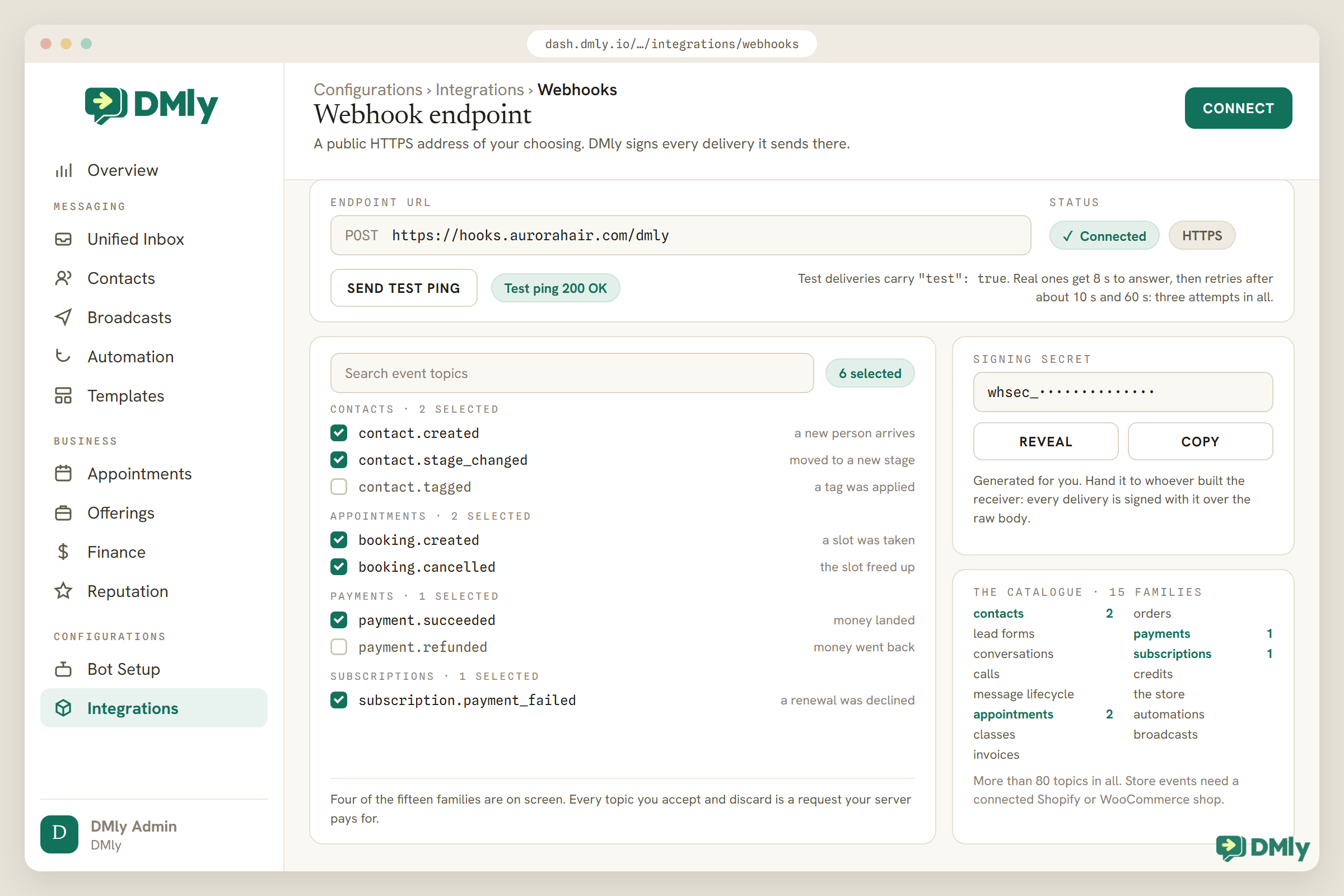
Setting one up takes about five minutes and does not involve writing anything. Add your endpoint address under Configurations, tick the events you want, and send the test ping. Here is the full sequence, including the receiving end for those of you without a developer.
- Get an endpoint URL. If a developer runs your receiving system, they will give you one. If not, Zapier or n8n will: both hand you a URL that catches webhooks, then let you build the “and then do this” part by dragging boxes. Zapier is the gentler on-ramp; n8n is the one you can self-host.
- Add it under Configurations → Integrations → Webhooks. The endpoint must be publicly reachable and HTTPS. That is not fussiness; it is the difference between customer data travelling in an envelope and on a postcard.
- Subscribe narrowly. Tick the topics you will act on, not all of them. Six useful subscriptions beat the full catalogue every time.
- Copy the signing secret. DMly generates one automatically; the Signing secret panel has Reveal and Copy. Give it to whoever built the receiver, so they can verify each message genuinely came from your workspace. One documented quirk: Zapier URLs skip signature verification, because Zapier’s own URLs are unguessable and Zapier does not check signatures anyway; your own endpoints are signed.
- Send the test ping. It confirms the endpoint is reachable and the signature check works. Test deliveries carry a
"test": trueflag so a well-built receiver can wave them through without side effects. Repeat the ping any time someone changes the receiving end.
Are Webhooks Secure?
Webhooks are secure when two conditions hold, and both of them sit on the receiving side. The endpoint uses HTTPS, and every incoming message has its signature checked. Skip the second and anyone who discovers your address can send you invented events, which matters enormously on the day those events touch money.
The mechanics are simple to describe. Each DMly delivery carries a signature computed from the exact raw message using your signing secret. The receiver recomputes it and compares; a mismatch means the message did not come from your workspace and gets dropped. Two implementation details separate a good receiver from a vulnerable one, and DMly’s documentation is unusually direct about both: verify against the raw bytes as they arrived, not a reformatted copy, and compare signatures in constant time, because a plain equality check leaks timing information an attacker can use. When a platform’s docs warn you about timing attacks, someone on that team has been burned before, which is the kind of paranoia you want under your payment events.
Beyond signatures, the practical security posture is short: keep the signing secret out of chat logs and code repositories, prune subscriptions you no longer use, and treat the endpoint URL itself as semi-secret even though the signature is your real defence.
Why Do Webhooks Fail? The Four Usual Causes
Webhooks fail quietly, which is what makes them worth checking on purpose. Nothing goes red on your screen; the other system simply stops learning things. When it happens, the cause is almost always one of these four, in this order of likelihood:
| Cause | What happened | Fix |
| Nobody subscribed to that event | The endpoint works; the topic you assumed was ticked never was | Check the subscription list first, always. This one is the most common by a distance. |
| The endpoint went down | DMly tried three times across roughly a minute, then logged the delivery as failed and dropped it; events during the outage are gone | Bring the endpoint back, then backfill the gap through the API. Nothing queues waiting for you. |
| The signature check rejects everything | Usually verifying against a reformatted body rather than the raw bytes | Verify the exact payload as received; re-run the test ping to confirm. |
| The event never existed | No connected store means no store events; a documented topic that does not emit yet will never arrive | Re-read the catalogue’s caveats before debugging your own plumbing. |
The prevention habit costs thirty seconds: send the test ping at setup and after every change to the receiving end. It converts silent failure into immediate, visible failure, which is the only kind you can fix on the same day. There is a longer diagnostic walkthrough in our guide to debugging failed webhooks.
One duty sits on the receiving side and deserves its own paragraph, because it is the difference between a webhook integration that runs for years and one that causes a mess every few months. Answer fast, work later. The 8-second acknowledgement budget is generous for saying “received” and hopeless for doing real processing, so the receiving pattern that survives is: verify the signature, store the message, reply immediately, then do the actual work from a queue. A receiver that processes first and replies last will occasionally overrun the budget, get retried, and process the same payment twice, at which point somebody blames the webhook for what was an architecture choice. If a developer builds your receiver, that pattern plus deduplication on the envelope id is the whole brief; if Zapier or n8n receives for you, they already behave this way, which is a large part of what you are paying them for.
Webhook FAQs
What are webhooks, in simple terms?
A webhook is an automatic message one system sends to another when something happens. When a customer pays or books, the platform pushes the details to a web address you chose, and the system at that address reacts instantly. It is a doorbell, where the alternative is checking the door every minute.
What is the difference between a webhook and an API?
Direction. An API is how your system asks a platform to do or fetch something; a webhook is how the platform tells your system that something happened. Real integrations use both: the webhook announces the event, and API calls act on it.
Do I need a developer to use webhooks?
Not necessarily. With Zapier or n8n as the receiving end, you paste their URL into DMly and build the rest visually. You need a developer when the receiver is your own software or the data needs transforming. And if the reaction happens inside DMly itself, you need neither: the flow builder handles it without a webhook.
What data does a webhook send?
A structured payload with a stable envelope: a unique id (unchanged across retries, which is how you spot duplicates), the event name, when it occurred, the workspace it belongs to, and a data section carrying the specifics such as the contact, the amount or the booking. Each DMly topic’s exact payload is documented individually.
What happens if my endpoint is offline?
DMly retries after roughly 10 seconds and again after roughly 60, three attempts in total, then logs the delivery as failed and drops it. Missed events are not redelivered later, so after an outage you backfill from the API rather than waiting for the queue that does not exist.
Are webhooks free?
DMly includes webhooks, the REST API and the flow builder on every plan, and Meta charges nothing for events arriving at your own systems. Your only cost is the receiving end: a Zapier or n8n plan if you go no-code, or hosting if a developer builds it.
Can a webhook send a WhatsApp message?
Not by itself. A webhook only announces that something happened; sending a WhatsApp message is a command, which is the API’s job or, far more simply, a DMly flow’s. If the message you want to send goes to the customer the event is about, skip the webhook entirely and build the flow: it reacts to the same event from inside the platform, with the 24-hour window and template rules already handled for you.
Webhook vs polling: which should I use?
Webhooks for reacting to events, because they arrive in real time and cost nothing on quiet days; polling only to backfill after downtime or when a platform offers no webhook for the data you need. Polling as a primary strategy spends your API rate limit asking questions that events would have answered.
React to events without writing code
More than 80 webhook events, a signing secret managed for you, and a flow builder that handles the inside-DMly reactions without any endpoint at all. Included on every plan; the trial needs no card.
Explore DMly webhooks and integrations
The Short Version
Webhooks are the tell-me-when layer of business automation: one signed message, at the moment of the event, to the address you chose. Use a flow when the reaction lives inside DMly, a webhook when another system needs to know, and the API to act on what the webhook announced. Subscribe narrowly, verify signatures, dedupe on the id, and send the test ping whenever anything changes.
That is the whole subject. The word was never the hard part.
Writing about WhatsApp automation, bookings and growth for local business.
Turn WhatsApp into your busiest channel.
Start free and run message, bookings, payments and reviews in one place.
