
It is 11pm, the salon is long closed, and the owner is scrolling back through the appointment book on their phone. Sarah used to come every six weeks for her roots. The last booking was in June. Did she move? Was something wrong last time? Did she find somewhere cheaper, or just get busy? There is no way to know from the diary, and by morning the thought is gone until the next time it surfaces at 11pm.
Every salon has a list of Sarahs, and most never get a message. The ones who drifted away for no particular reason can be among the easiest clients to win back, because they already know where you are and how good you are. To win back salon clients you mostly need to notice they have gone quiet and send one warm message before the gap becomes a habit.
This guide does that in DMly: defining “90 days since a visit” honestly, which is harder than it sounds, building the list, writing the message, following up once, and measuring who came back. It builds on our guide to WhatsApp automation for salons.
Why 90 Days, and Why It Is Worth Doing
90 days is a starting point, not a rule. Choose the gap that means “missed a visit” for your clients.
For a client on a six-week cycle, 90 days means they have missed roughly one appointment. That is the moment a win-back message has the best chance: the habit has slipped once, but not for so long that they have settled somewhere else. For clients who come every four weeks, 60 days may be the better line; for a twice-yearly highlights client, 90 days is normal and means nothing.
If your salon has very different rhythms, run the win-back separately for different groups, such as regular colour clients and occasional cut clients, each with its own gap. The method below works for any number of days.
Step 1: Decide What “Hasn’t Visited” Means in DMly
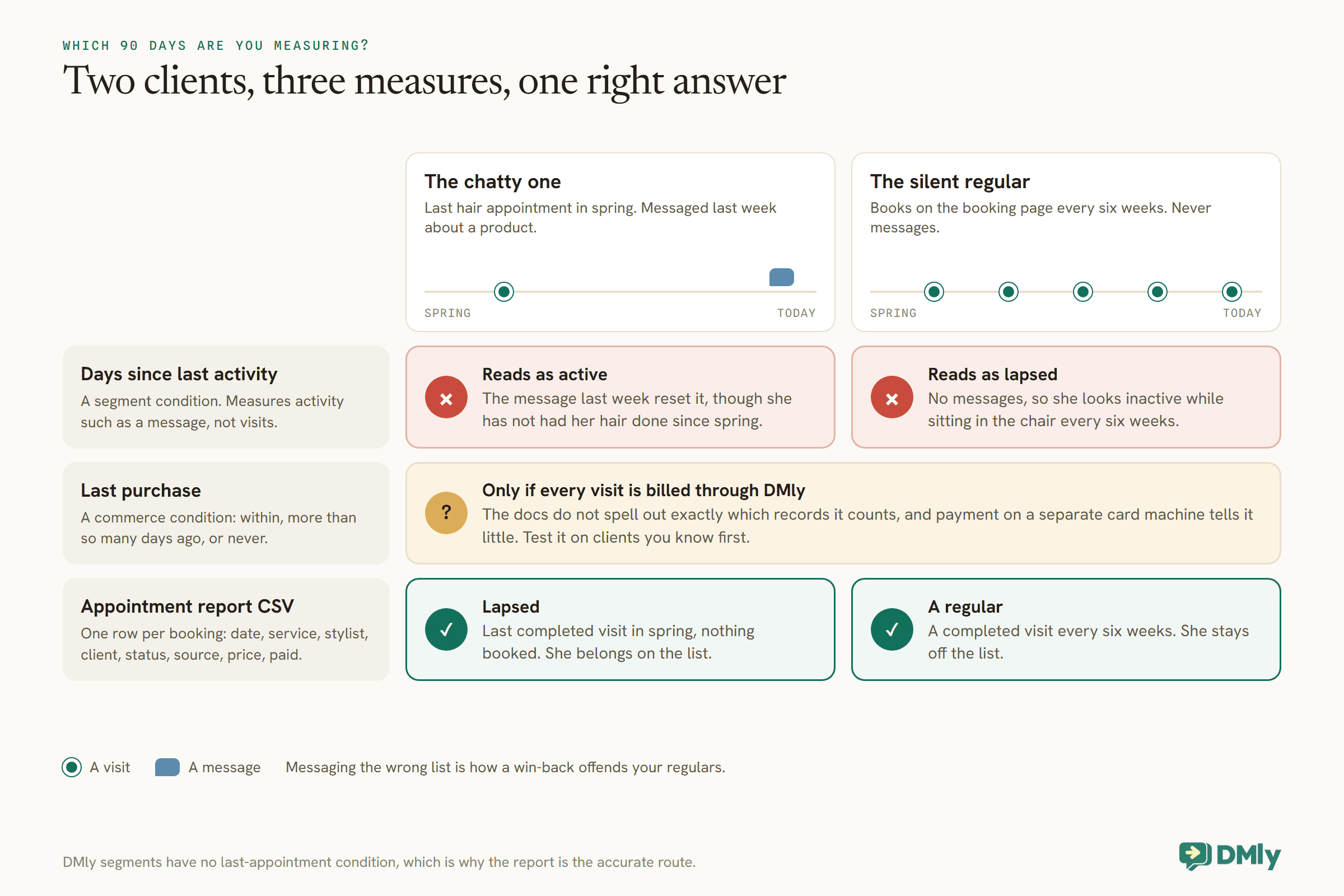
DMly can measure three different things that look like “hasn’t been in”. Only one of them is actually a visit.
This is the step most win-back guides skip, and it matters, because messaging the wrong list is how a win-back offends your regulars. DMly’s segments, the saved rules you send broadcasts to, do not have a “last appointment” condition. They offer two conditions that people reach for instead:
- Number of days since last activity. This measures the client’s last activity with you, such as a message, not their last appointment. DMly’s docs warn that a segment built on it “loses a contact the moment they reply to you”. A client who messaged last week to ask about a product is not “inactive”, even if they have not had their hair done since spring. And a regular who books through the booking page and never messages can look inactive while sitting in the chair every six weeks.
- Last purchase. A commerce condition: within the last so many days, more than so many days ago, or never purchased. It can track visits if your appointments are billed through DMly, but the docs do not spell out exactly which records it counts, and a salon that takes payment on a separate card machine will find it says little about visits. Test it on a few clients you know before trusting it.
The only record that is truly about visits is your appointments. DMly’s Appointment report, under Configurations, then Reports, then Appointments, downloads as a CSV with one row per booking: the date, service, stylist, client, status, source, price and whether it was paid. That file can tell you, for certain, when each client last had a completed appointment.
Step 2: Build the List to Win Back Salon Clients From
An hour with a spreadsheet once a month gives you a list you can trust. Then a tag makes it hold still.
- Download the bookings. In the Appointment report, set the date range to the last year or so, filter the status to completed if you want only real visits, and download the CSV.
- Find each client’s last visit. In a spreadsheet, sort by client and date, or use a pivot table, to get each client’s most recent completed appointment. Keep the clients whose last visit is more than 90 days ago, and who have nothing booked in the future.
- Tag them in DMly. A tag is the right tool here. DMly’s docs describe a tag as the only thing in DMly that holds still: unlike a segment, it does not change underneath you when a client replies. Name it for the month, such as
winback-2026-10.
The spreadsheet step, worked through
Here is the spreadsheet part in more detail, because it is where most people stop. Say the report CSV has a few thousand rows over the last year. The steps are the same in Google Sheets or Excel:
- Keep the completed visits. Filter the status column to completed. Cancelled, no-show, expired and payment-failed bookings are not visits. One caution: on DMly’s default setting, an appointment nobody marked is closed as completed about a day later, so a client who never came can show as completed unless your team marks no-shows.
- Find each client’s latest visit. A pivot table with the client in the rows and the latest (maximum) date in the values gives one line per client with their last visit.
- Mark who has something booked. From the full CSV, list clients with any booking dated in the future. They are not lapsed, whatever their last completed visit says.
- Keep the lapsed ones. Clients whose last visit is more than 90 days ago, with nothing booked, are your list.
- Match them to contacts. The report names the client but does not carry their phone number, and DMly’s import matches people by phone or email. So export your contacts too, which gives name, phone and current tags, and look each lapsed client up by name. Watch for two clients with the same name; check those by hand.
The result is a short file of contact rows (name, phone, existing tags plus the new win-back tag) ready to import, or a list short enough to tag by hand from the Contacts page.
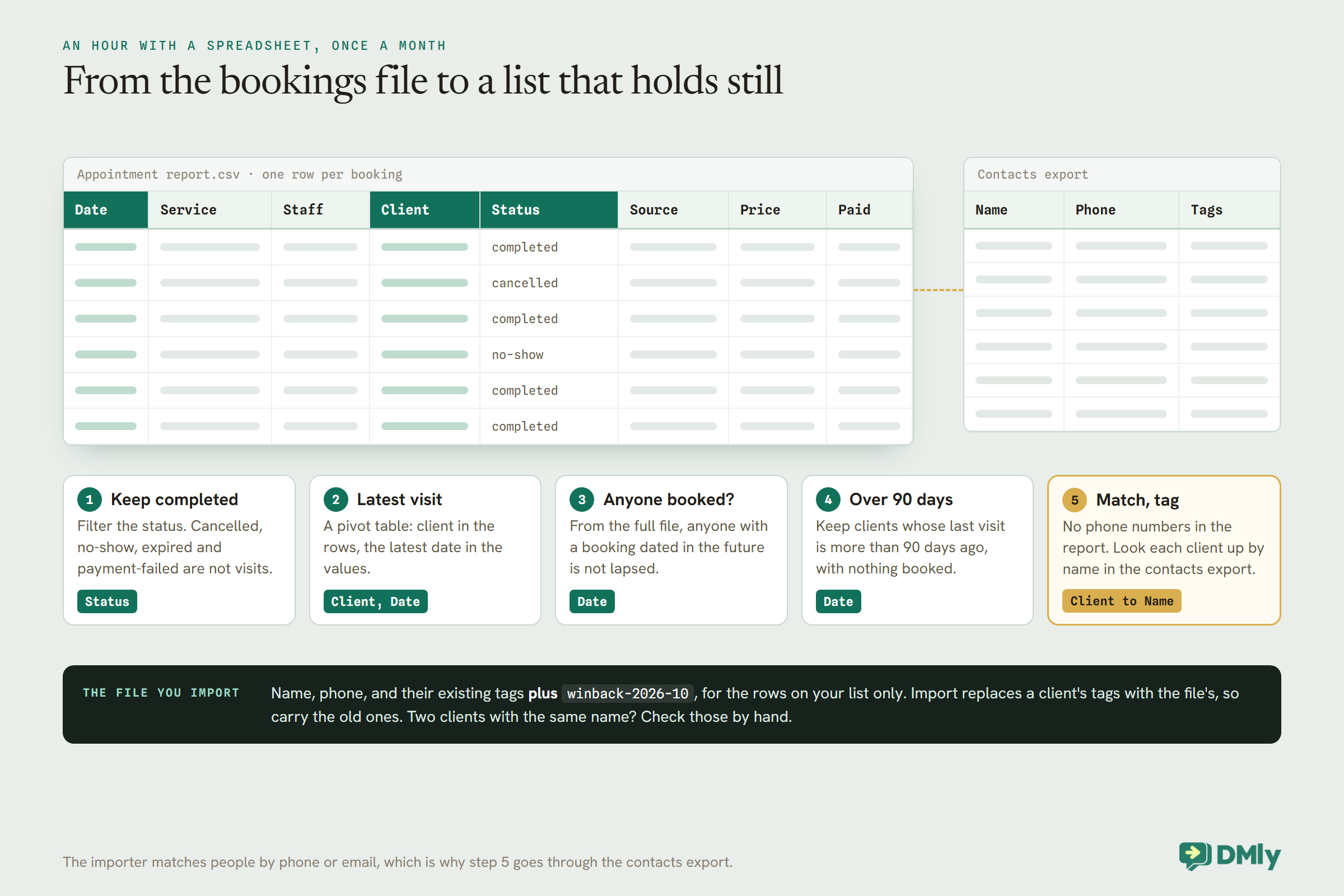
There are two ways to apply the tag. For a short list, search for each client on the Contacts page, tick them, and use Add tag from the bar that appears; the selection follows you across pages. For a long list, use the contacts export and import. The contacts export includes each client’s current tags, and DMly’s docs describe exactly this round trip: export, add tags in a spreadsheet, and import it back. Be careful with one detail: importing replaces a client’s tags with whatever the file says, so add the new tag alongside their existing tags, and only import the rows for the clients on your list.
Also mark clients the monthly check does not catch, such as a regular who told you they have moved away, with a tag like do-not-winback, so you can exclude them.
Step 3: Turn the Tag Into an Audience
A broadcast in DMly goes to one saved segment. Build the segment around your tag, and make it safe.
DMly’s broadcasts have no filters of their own: you pick one saved segment. Build it under Contacts, then Segments, with:
- Contact tags: your win-back tag, such as
winback-2026-10. - Exclude contacts with tags:
do-not-winback, and the Unsubscribe tag, which DMly’s docs recommend excluding from any broadcast segment even though opted-out clients are already filtered. - Marketing opt-in is opted in, which in DMly means the client has not opted out of your messages.
- Reachable on channel WhatsApp.
One detail catches people out: segment counts are scoped to the channel you have selected, so build and check it with your WhatsApp channel selected. And a segment decides who matches, not who is reachable: a client with no WhatsApp identity, or who has opted out, will not receive the message even if they match.
Step 4: Write One Warm Message
A win-back message should sound like a person who noticed, not a campaign that fired.
Because these clients have not messaged you recently, the message goes as an approved WhatsApp template, and a message inviting someone back is marketing. DMly’s own win-back template for lapsed clients, dmly_rebook_nudge, is filed as marketing, which is what to expect for yours. Write it once, submit it for approval, and use it in a broadcast to your segment. Here is a starting point to adapt:
Hi {{1}}, it’s been a little while since we last saw you at Ivy & Oak, and we’ve missed you! If you’d like to come back in, here’s the link to book: {{2}}. And if anything wasn’t right last time, just reply and tell us. We’d genuinely like to know.
Four things make it work. It is short. It names the salon, because a client who has drifted may have forgotten your number. It gives one easy action, the booking link. And it invites a reply, which opens the conversation and sometimes tells you something you needed to hear.
One message, or one per group?
A broadcast fills in contact details, such as the client’s name, but it does not know what service they last had. If you want the message to mention colour for colour clients and cuts for cut clients, split the list in the spreadsheet using the report’s service column, and give each group its own tag and its own segment: winback-2026-10-colour and winback-2026-10-cut, say. Then write two templates. A colour client who reads “your roots are probably due” feels noticed in a way a general message cannot manage. Keep it to two or three groups at most; beyond that, the extra templates and segments cost more time than they return.
Should you add an offer?
You do not have to. Some lapsed clients simply got busy, and a friendly nudge is enough. If you want to add an incentive, a modest fixed amount off the next visit is easier to budget than a percentage, and it can be a coupon with a validity window and a per-contact limit of one, so it cannot be shared or reused. Keep incentives well away from reviews: Google prohibits offering anything in exchange for a review.
When a Stylist Leaves
Clients follow people. When a stylist moves on, a group of their regulars can lapse at once, and they need a different message.
Salons know this pattern: a popular stylist leaves, and some of their clients quietly stop booking. They are not unhappy with the salon; they have simply lost the person they came for. A generic “we’ve missed you” does not speak to that. The Appointment report can find them, because it breaks bookings down by stylist: filter to the departed stylist, and the clients whose last visit was with them are the group to contact.
For this group, the message is an introduction rather than a reminder. Tell them, warmly and without drama, that their stylist has moved on, name who you would recommend for them and why, and give the link to book with that person. If the new stylist is happy to, a short personal line from them makes a real difference. Tag this group separately, such as winback-stylist-maya, so you can see how many stayed.
Step 5a: Test, Then Schedule the Send
Send the message to yourself first, then choose a sensible time for everyone else.
DMly’s broadcast wizard has a Send test message option that sends the real template to one number, down the same path a client’s message takes, so it catches a wrong parameter or a template Meta has not approved. It is a real send, so it costs what a template costs, and the test number must already be a contact on the channel: message your salon’s WhatsApp number from the test phone once first.
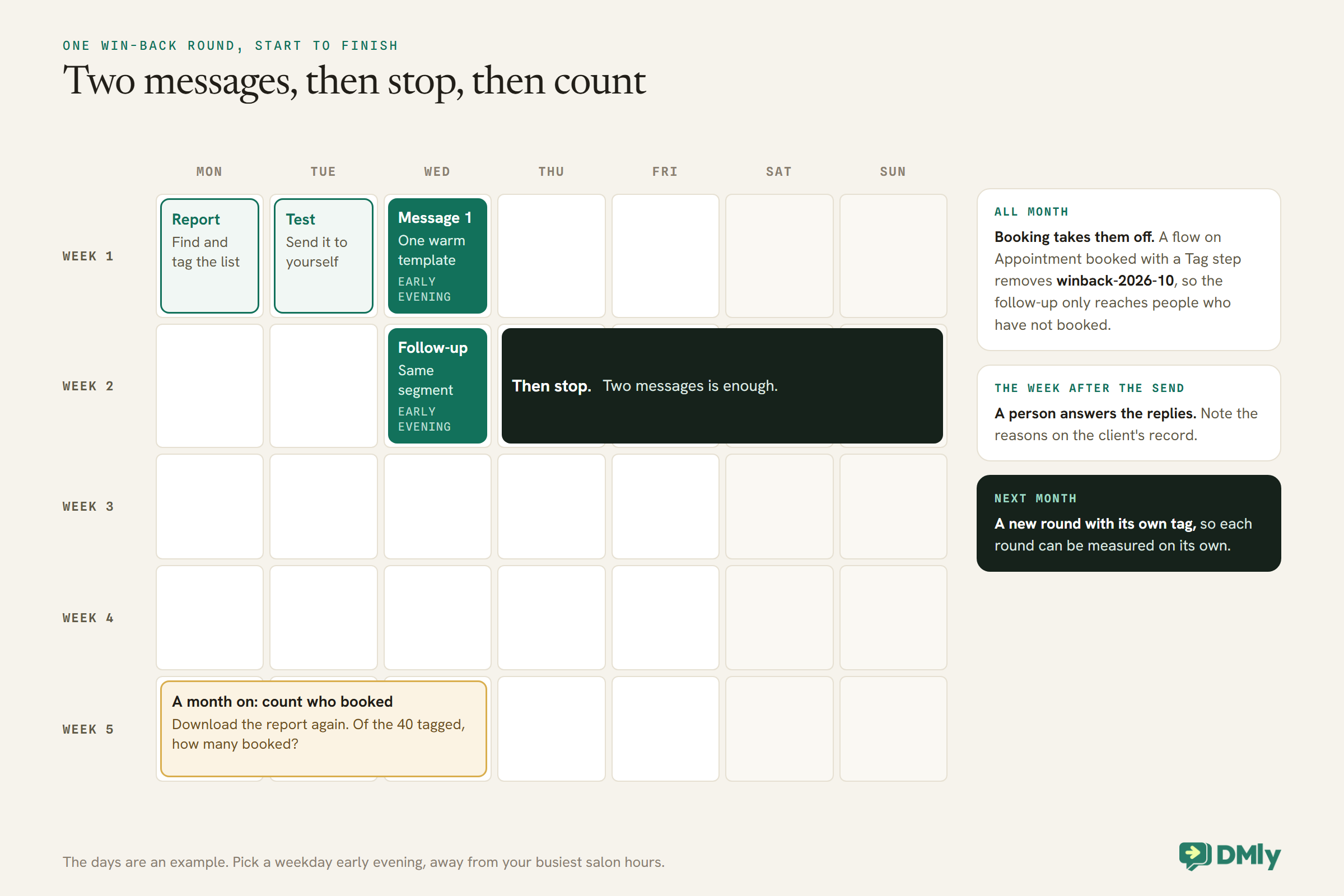
Then schedule it. Schedule for later lets you choose a time, either at the same moment for everyone or at the same local time in each client’s own timezone. For a win-back, a weekday early evening, when people are home and thinking about their week, is a reasonable choice; avoid your busiest salon hours, because replies will arrive while the team is with clients. One more detail from the docs: the audience breakdown shown while you set up the broadcast is an estimate, not a count, so do not plan against its numbers.
Step 5b: Follow Up Once, Then Stop
One follow-up a week later is reasonable. More than that turns a welcome nudge into a reason to block you.
A week after the first message, send one more to the clients who have not booked or replied. The simplest way is to keep the list accurate as people respond:
- When a client books, take them off the list. A small flow on the Appointment booked trigger with a Tag step set to remove
winback-2026-10does it automatically, so the segment only contains people who still have not booked. - When a client replies, a person answers. A reply means a conversation, and the 24-hour window is open, so answer it properly. Remove the tag by hand if they have told you they are not coming back, and add
do-not-winback. - Send the follow-up to the same segment. A week later, only the people who have neither booked nor been removed will still match.
Then stop. Two messages is enough. Anyone who has not responded by then has made a quiet decision, and a third message costs you a marketing rate and some goodwill for little return.
Step 6: Listen to the Replies
A win-back message is also a question. Some of the answers are worth more than the booking.
Some clients will reply with a reason: they moved, they had a baby, money is tight, or the last colour was not quite right. Each of those deserves a human answer, and the last one deserves a particularly good one. A client who tells you what went wrong has given you the chance to fix it, and one who had a bad experience and hears “thank you for telling us, can we put it right?” is often more loyal afterwards than one who never had a problem.
Make sure someone owns the replies for the week after a win-back goes out. Note the reasons on the client’s record, because a pattern (three clients mentioning the same stylist, or the same price rise) is information the diary could never give you.
Some replies will be a polite “please don’t message me”. Only the standard stop words, such as STOP or UNSUBSCRIBE, opt a client out automatically. A reply in ordinary words does not, and DMly’s docs describe no button to opt someone out on their behalf. So when someone asks not to be contacted, add your do-not-winback tag, which your segment excludes, and tell them that replying STOP will stop all automated messages. If they must never be messaged at all, blocking them from the conversation also stops manual replies. Respecting the request quickly keeps your number in good standing.
Could This Be Fully Automatic?
Partly. The honest answer is that the most accurate version still needs the monthly spreadsheet.
DMly offers a Win back lapsed clients automation, whose out-of-window message is the dmly_rebook_nudge template. The docs do not describe what starts it, so check how it decides who is lapsed before you rely on it, and compare its idea of “lapsed” with your appointment report. If your salon bills every visit through DMly, a segment on Last purchase more than 90 days ago may be accurate enough to use directly, once you have tested it against clients you know. If it is, DMly’s Scheduled date trigger can run a flow for an audience you choose on a recurring date, which its docs recommend over a broadcast when a send repeats, so a monthly send to that segment can run without anyone scheduling it.
For most salons, a monthly round works well: an hour with the report, a new tag, one message, one follow-up. It is also the version you can measure cleanly, which matters when you are deciding whether to keep doing it. Our guide to sending bulk messages on WhatsApp covers sending broadcasts safely.
Step 7: Measure Who Came Back
Count bookings from the tagged group, not messages sent.
A month after each round, download the Appointment report again and check which of the clients you tagged have booked since the message. Because each round has its own tag, the answer is clean: of the 40 clients tagged winback-2026-10, how many booked? The broadcast report tells you how the send went; the appointments tell you whether it worked.
That number also tells you what the round is worth. If it cost 80 marketing messages at your country’s rate and brought back six clients who each spend a few hundred a year, it paid for itself many times over. If it brought back nobody, change the message, the offer or the gap, and try again next month.
Fewer Clients to Win Back Next Time
The best win-back is the one you never need. A few habits keep clients from drifting in the first place.
- Ask at the till. Booking the next appointment before the client leaves is the simplest way to stop a gap opening.
- Remind them properly. A client who misses one appointment through forgetting can slide into not coming at all. Reminders that actually arrive, on an approved template, matter; our guide to automatic WhatsApp appointment reminders covers them.
- Follow up after each visit. A rebooking message timed for when the client is usually due catches most drift before it reaches 90 days.
- Notice unhappiness early. A complaint handled well at the time keeps the client; one noticed three months later usually does not.
Run the monthly win-back round as a safety net under those habits, and watch the list get shorter.
What It Costs and What to Keep in Mind
- Marketing rate per delivered message. Meta bills each win-back template at the marketing rate for the client’s country; DMly adds no markup. Each recipient also counts against your DMly plan’s broadcast and template allowance. Our pricing by country rate card shows the rates.
- Permission. Marketing messages should only go to clients who agreed to hear from you. Our guide to WhatsApp opt-in covers how to ask, and a client who replies STOP is opted out of automated messages from then on.
- Your number’s reputation. A win-back sent to people who never wanted to hear from you invites blocks and reports. A clean, consented list protects the number you use for reminders.
Mistakes to Avoid
- Using “days since last activity” as “days since last visit”. It measures messages, not appointments.
- Messaging from a segment that moves. Freeze the list with a tag.
- Importing tags without the client’s existing ones. Import replaces tags.
- More than two messages. After the follow-up, stop.
- No exit when they book. Remove the tag on Appointment booked.
- Nobody answering the replies. The reasons are the most useful part.
- Tying an offer to a review. Google prohibits it.
Frequently Asked Questions
How do I find salon clients who haven’t visited in 90 days?
The accurate way is DMly’s Appointment report CSV: find each client’s last completed appointment in a spreadsheet and keep those more than 90 days ago with nothing booked. DMly’s segments have no last-appointment condition.
Can I use “days since last activity” instead?
As a rough proxy only. It measures the client’s last activity, such as a message, and a reply resets it. A silent regular can look lapsed and a chatty lapsed client can look active.
What should a win-back message say?
Short and warm: name the salon, say you have missed them, give the booking link, and invite a reply in case something was wrong. An offer is optional.
How many messages should I send?
Two at most: one message and one follow-up a week later, only to clients who have not booked or replied. Then stop.
Is a win-back message marketing?
Yes. Plan for it to be a marketing template, billed at Meta’s marketing rate and sent only to clients who agreed to hear from you.
Can I win back clients on Instagram instead?
Not reliably. Instagram only lets businesses send automated messages within 24 hours of the client’s last message and has no templates, so there is no way to start a new conversation with a client who has gone quiet. WhatsApp templates are what make a win-back possible.
How do I know if it worked?
Tag each round separately, then check a month later how many tagged clients booked, using the Appointment report.
Sarah, Six Weeks Later
The 11pm scroll through the diary is the owner noticing, too late and with no way to act. The monthly round turns that into a system: a list you can trust, one warm message, one follow-up, a person answering replies, and a count of who came back. Some Sarahs moved away. Some just needed asking.
That is how to win back salon clients without guessing and without nagging. Download the report this week, find your first list, and send the message you would want to receive.
Writing about WhatsApp automation, bookings and growth for local business.
Turn WhatsApp into your busiest channel.
Start free and run message, bookings, payments and reviews in one place.
