
How to Automate Student Enquiries With an AI Admissions Assistant
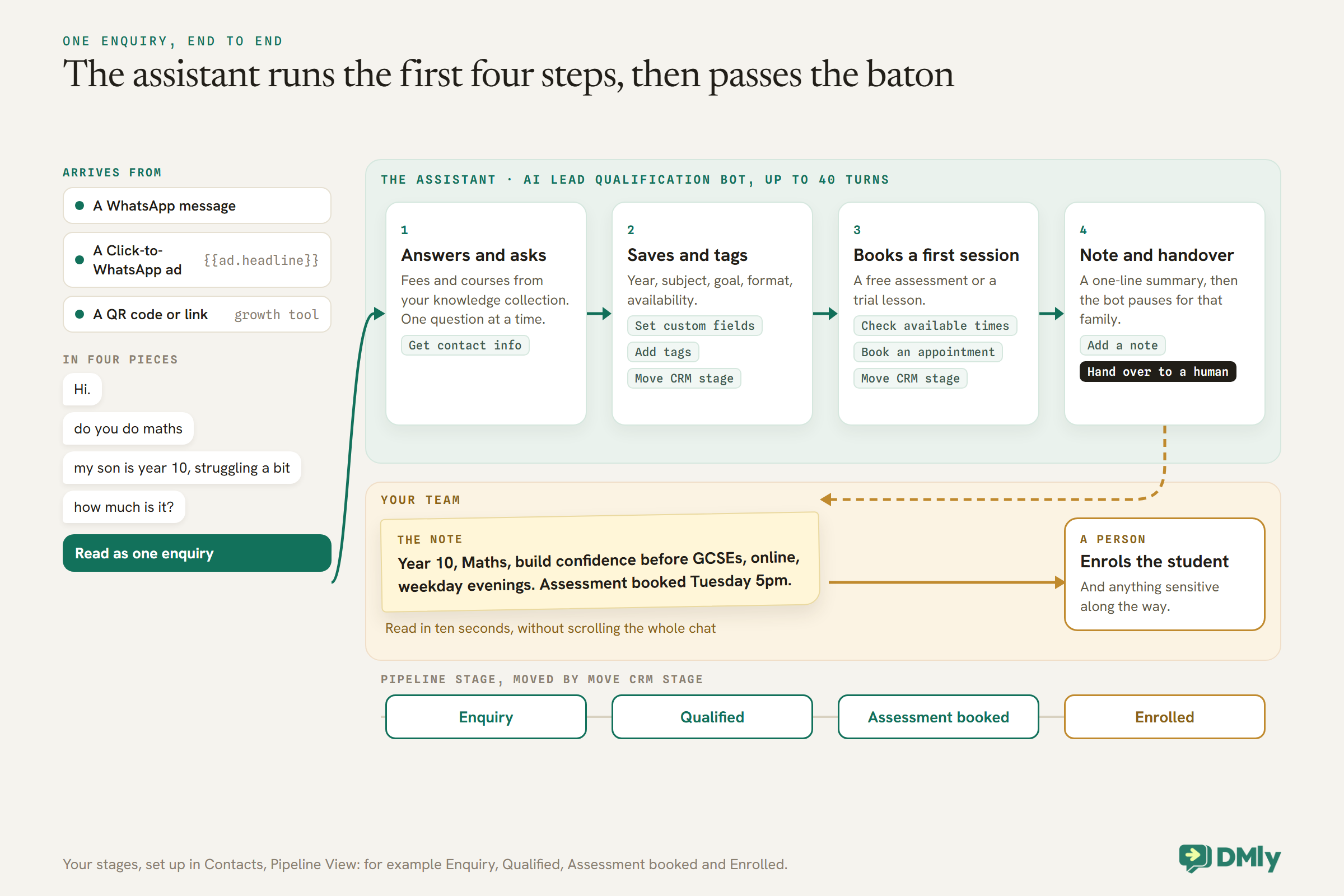
“Hi.” A minute later: “do you do maths”. Then: “my son is year 10, struggling a bit”. Then, after a pause: “how much is it?”. Four messages, one enquiry, and none of them quite enough on its own. The parent is not being unhelpful; this is how people type on a phone. By the time a tutor sees the chat between lessons, the parent may have sent the same four messages to two other tuition centres, and the one who answers first, clearly, with a time to come in, has a head start.
An AI admissions assistant is built for exactly that moment. It can read the fragments as one enquiry, answer the question about fees from your own price list, ask the one or two things it still needs to know, book an assessment or trial lesson, and pass a tidy summary to your team. Done well, a parent gets a complete answer in minutes, and your admissions person starts every conversation already knowing who the student is and what they need.
This guide builds one in DMly: what it should and should not handle, where enquiries come from, what counts as a qualified enquiry, the template to start from, the knowledge and booking tools it needs, the instructions to give it, how to treat information about children, the handover, following up quiet enquiries, measurement and costs. For the wider picture, see our guide to WhatsApp AI chatbots for small businesses.
What an AI Admissions Assistant Should, and Should Not, Do
It handles the first conversation. Decisions about a student’s needs, money and wellbeing stay with people.
| The assistant handles | A person handles, every time |
| Which subjects, levels and courses you offer | Special educational needs, health or wellbeing concerns |
| Fees, formats and timetables, from your own material | Fee discounts, payment plans and hardship requests |
| Finding out the student’s year, subject, goal and availability | Any safeguarding concern |
| Booking an assessment or trial lesson | Complaints, and anyone upset |
| Saving the answers and moving the enquiry along | Promises about grades or results |
| A clear summary for your team | Visa or immigration questions for international learners |
WhatsApp’s Business Messaging Policy supports the right-hand column in two ways. It says not to use WhatsApp to “send or request any health related information, if applicable regulations prohibit” it on systems without heightened protections, and it expects automated chats to offer a prompt, clear route to a person. An assistant that never asks about a child’s health or needs, and hands over the moment a parent raises them, stays well away from both.
Where Enquiries Come From
An enquiry can start in several places. Each has its own trigger, and each tells you something.
- A WhatsApp message to your number: the WhatsApp message trigger. The general case.
- A Click-to-WhatsApp ad or a post that opens a chat: the Click-to-WhatsApp ad trigger, set to any ad or one specific ad ID. The contact’s source is stamped with the ad’s headline, such as “WhatsApp ad: GCSE Maths Autumn”, and the first ad that brought them in keeps the credit. The flow can quote the ad back with
{{ad.headline}}, so a parent who tapped an ad for a GCSE revision course is greeted about that course, not with a generic hello. - A QR code or link on a flyer, a school newsletter advert or your website: a DMly growth tool, with the WhatsApp URL trigger narrowed to that one link, so you know which flyer worked.
Two rules to know. Only one automation ever answers a given message, and DMly blocks publishing a second automation that also replies to every message on the same channel. And if you run two flows on Any ad on the same number, only the older one ever answers, with no warning. Keep one catch-all assistant, pin ad-specific flows to specific ad IDs, and test which automation answers a first message from an ad before you launch a campaign.
There is also a money reason to love ads that open WhatsApp. When someone reaches you from a Click-to-WhatsApp ad or a Page button and you reply within 24 hours, Meta opens a 72-hour free entry point window in which your messages are free. For a centre running enrolment ads, that can cover much of an admissions conversation. Our Click-to-WhatsApp marketing guide covers ads, links and attribution in depth.
Step 1: Decide What a Qualified Enquiry Looks Like
Before the assistant asks anything, decide what your team needs to know, and where each answer will live.
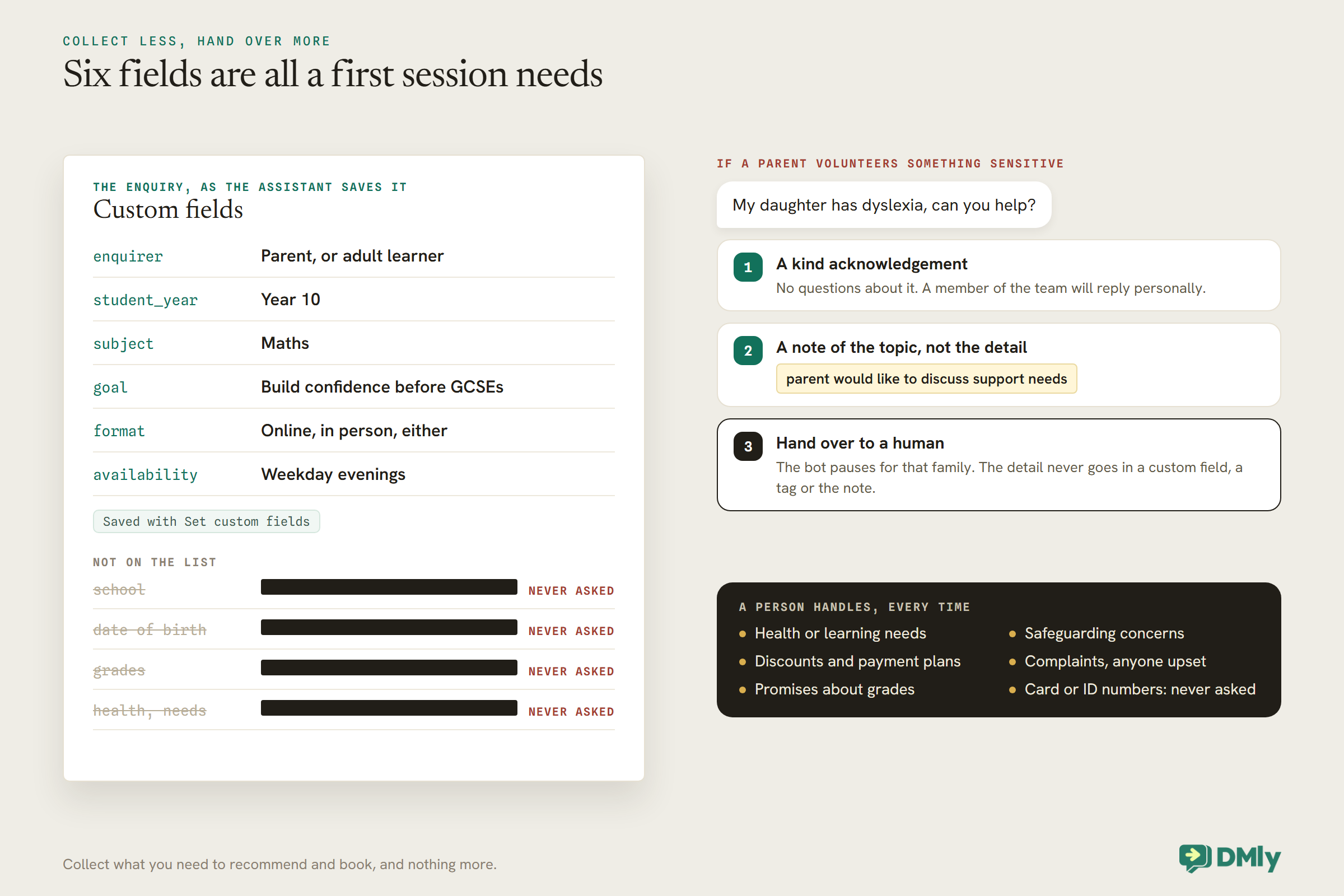
For most tutors and centres, five or six facts are enough to recommend a course and book a first session. Create a custom field for each in your workspace settings first, so the assistant has somewhere to put the answers and your segments can use them later:
| Custom field | Example answer |
enquirer | Parent, or adult learner |
student_year | Year 10 |
subject | Maths |
goal | Build confidence before GCSEs |
format | Online, in person, either |
availability | Weekday evenings |
Then set up the pipeline the enquiry moves along, in Contacts → Pipeline View: for example Enquiry, Qualified, Assessment booked and Enrolled. And create a small set of tags for what the enquiry is about, such as interested-gcse-maths or interested-coding-course, which become the lists you message when a new course opens.
Notice what is not on the list: the student’s school, their grades, anything about their health or needs. Collect what you need to recommend and book, and nothing more.
Step 2: Start From the AI Lead Qualification Bot
DMly ships a template for exactly this job, with the right tools already switched on.
Create a new automation on your WhatsApp channel and choose the AI Lead Qualification bot from the template picker. It installs as a draft with three steps: a trigger, one AI Reply step and an end. Its description says it “greets visitors, qualifies inbound leads, captures their details, tags hot leads, and hands strong prospects to a human”, and it arrives with eight CRM tools ticked:
- Get contact info, to see who it is talking to before asking;
- Update phone number, to save a number typed in the chat;
- Set custom fields, to store the answers from Step 1;
- Add tags and Remove tags;
- Move CRM stage, to advance the enquiry along your pipeline;
- Add a note, to leave your team a summary;
- Hand over to a human, which pauses the bot and passes the chat on.
Because the AI step leads to the end, it stays in the conversation and answers the parent’s next message too, up to 40 turns, which is what lets it ask a follow-up question. The trigger fires on every inbound message, not just the first; the Only respond once per contact toggle changes that, but for an admissions assistant you usually want it answering throughout the enquiry.
If you would rather not use AI at all, DMly also ships a fixed-question Lead Qualification Flow that asks set questions and branches on the answers. It never waits on an AI provider and costs no AI replies. One catch if you use it: as installed, its “hot lead” branch assigns the conversation to nobody, so open that step and pick a person, or hot enquiries sit unassigned.
Step 3: Give It Your Prospectus
An admissions assistant is only as good as what it can read. Give it the answers your team gives every day.
Build a collection at Settings → AI Knowledge. You can add files (PDF, TXT and MD, up to 20 MB), web pages, FAQs and pasted text, and a source is searchable as soon as its status reads ready. A useful admissions collection holds:
- Courses and levels: what each covers, who it suits, how long it runs, group size.
- Fees and formats: prices, what is included, online versus in person, how payment works.
- Timetables: when groups run, and how one-to-one times are arranged.
- Tutors: short biographies, subjects and qualifications.
- Policies: cancellations, make-up lessons, what happens in the first session.
Two settings catch people out. A new AI step, and each AI template, arrives with AI Knowledge set to No knowledge, so choose your collection on the Built-in Tools tab or the assistant never searches it. And if you connect your own AI provider, use OpenAI or Google Gemini for this step: DMly’s docs say Claude and DeepSeek cannot search documents, so an assistant on either answers from its instructions alone. DMly’s own shared AI searches collections normally. When an answer comes from a web page source, the assistant appends that page’s address, at most two links per reply, which makes your course pages a handy source.
Step 4: Let It Book an Assessment or Trial
An enquiry that ends with a booked first session is worth far more than one that ends with “someone will call you”.
The lead qualification template has no booking tools ticked. Add them on the same Built-in Tools tab, which shares one checkbox list between CRM and booking tools:
- For a one-to-one assessment or trial lesson: List bookable services, List staff for a service if families choose a tutor, Check available times and Book an appointment. Always include Check available times, or the assistant can offer times you cannot honour.
- For a trial place in a group class: List upcoming classes and Book a class.
If the assessment is paid and set to take payment before booking, DMly holds the slot for 15 minutes and sends the family a Pay button with the amount, which is the deposit if the service takes one; the assistant is told the amount so it can say what is owed, but never writes the payment link itself. A free assessment books straight away. Create the assessment or trial as its own service, such as “Free Maths assessment (30 min)”, so it is easy for the assistant to find and for your team to spot on the calendar.
Step 5: Write the Admissions Instructions
The instructions are the assistant’s job description. Write them the way you would brief a new admissions officer.
Open the AI step’s Prompt tab and adapt the built-in prompt. {{business_name}} becomes your workspace name and {{first_name}} the contact’s first name. A starting point:
You are the admissions assistant for {{business_name}},
a tuition centre. Be warm, clear and brief. Say you are an
automated assistant and that a person is one message away.

Your job:
- Treat several short messages as one enquiry.
- Answer questions about courses, fees, formats and
  timetables using the knowledge only. Never guess a price.
- Find out, one question at a time, only what you still
  need: who is enquiring (parent or learner), the student's
  year, the subject, the goal, online or in person, and
  availability. Save each answer with Set custom fields.
- Tag the interest, e.g. interested-gcse-maths, and move
  the stage to Qualified when you have the answers.
- Offer the free assessment. Use Check available times and
  Book an appointment. Only say it is booked when the tool
  confirms it. Then move the stage to Assessment booked.
- Add a note summarising the enquiry for the team.

Never:
- Ask about health, special needs, grades or the school.
  If a parent mentions them, say a member of the team
  will reply personally, add a note, and hand over.
- Promise results or grades.
- Offer discounts or payment plans: hand over.
- Ask for card numbers or ID numbers.
- Answer anything unrelated to the centre.
If the assistant ignores a tool you ticked, the fix is almost always in the instructions: tell it in words when to use it. And keep the Fallback message on the Prompt tab. The template ships with a friendly line saying a member of the team will follow up; if you clear it, a family whose message hits an AI error gets nothing at all.
Parents, Students and Information About Children
Many enquiries are about a child. Collect less, and hand over more.
A parent enquiring about a child is giving you information about someone who is not in the conversation. Keep the assistant to the facts needed to recommend and book: year group, subject, goal, format, availability. It should not ask for the child’s school, date of birth, grades or anything about health or learning needs. If a parent volunteers something sensitive, such as a diagnosis or a difficulty at school, the right response is a kind acknowledgement, a note that the parent raised something for the team, and a handover. Do not store the detail itself in a custom field, a tag or the note; a line such as “parent would like to discuss support needs” is enough for your team to pick up.
WhatsApp’s policy also says not to ask people to share full card numbers or ID card numbers in the chat. Payment belongs on DMly’s payment links, and identity checks, if you need them, belong somewhere other than a chat.
Whether your local rules say more about children’s data is a question for your own advisers. The assistant can collect less; it cannot make that judgement for you.
Step 6: A Handover Your Team Can Act On
The assistant’s last job is a summary a person can read in ten seconds.
When the assistant hands over, the bot pauses for that family and the AI stops its turn, so it cannot talk over the person picking up. Decide who that person is. If several people share admissions, add Auto-assign to an agent so handed-over enquiries go round-robin; for a small team, Move to unassigned queue lets whoever is free take it.
The note is what makes the handover fast. Ask the assistant for one line in a fixed shape: who, what, goal, format, availability, and what happened (“assessment booked Tuesday 5pm” or “asked about a payment plan”). Your admissions person should never need to scroll the whole chat to know what the family wants.
Tell families what happens next, too. “One of our team will reply here, usually within a few hours during the week” sets an honest expectation. If nobody answers in the evenings, say so; the assistant can still book the assessment in the meantime.
Following Up Enquiries That Go Quiet
Some families stop replying halfway. One well-timed follow-up is worth sending; three are not.
DMly has a Customer didn’t reply trigger for WhatsApp, which fires when a contact does not reply to your last message. It is the natural start for a single gentle follow-up: “Just checking whether you’d still like to book Maya’s free assessment. Here are this week’s times.” Check the trigger’s timing settings when you build it, and keep the follow-up to one message.
For enquiries that went quiet more than a day ago, a free-form message cannot reach them outside the 24-hour window, so a later follow-up has to be a template. A reminder about the course a family asked about, with an invitation to book, is marketing under Meta’s template categorisation guidelines, so it needs the family’s permission for that kind of message and is billed at the marketing rate. A short sequence of template steps with Stop when the contact replies switched on, so anyone who answers goes straight to a person, is the tidy way to run it.
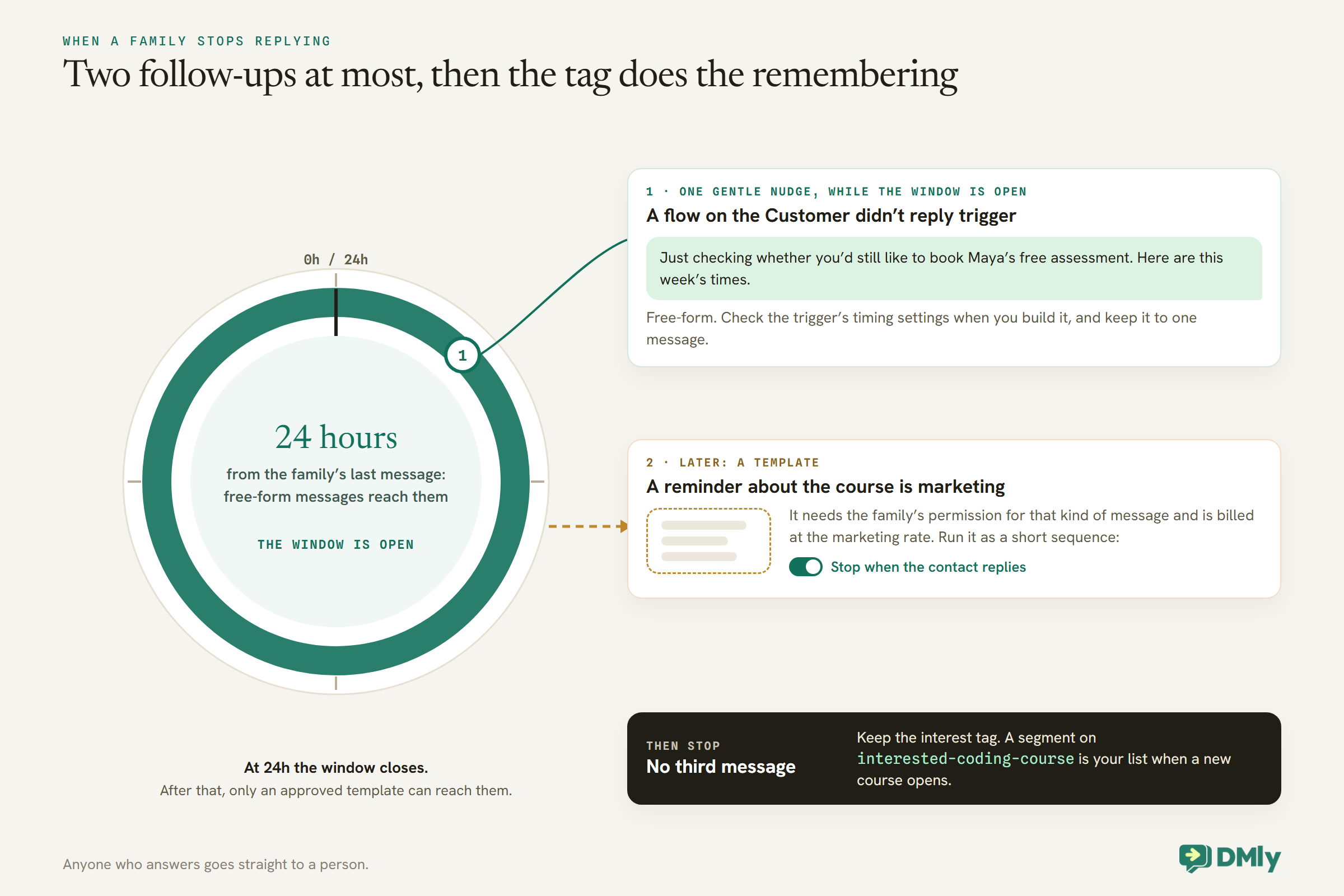
Your tags pay off later as well. When a new course opens, a segment on interested-coding-course is a ready list of families who asked about it, to message if they agreed to hear from you.
Measuring Admissions
Count enquiries, assessments and enrolments, and where each one came from.
- The pipeline shows how many enquiries sit at each stage. The board shows at most 300 contacts, favouring the most recently active, which is plenty for enquiries but a reason to move enrolled students out of it.
- The source on each contact shows where they came from, including the ad headline for Click-to-WhatsApp enquiries.
- The Ads report, under Configurations → Reports → Ads, shows conversations, new contacts and revenue per ad, and spend once your Meta ad account is connected.
- Growth tool cards count scans and clicks for each flyer or link.
The number that matters most is assessments booked per enquiry. If it is low, read a handful of conversations where the family stopped replying; look for a missing answer in your knowledge collection, or an assistant asking too many questions before offering a time.
Test It With Real Enquiries
If your plan lets you connect your own AI provider, the step’s Playground tab runs your setup against a test message and shows which tools it used, against demo data. On plans that use DMly’s shared AI only, that tab is hidden, so test from a staff phone instead. Either way, send the enquiries your centre actually gets:
- Four fragments, like the ones at the top of this article.
- “How much is GCSE maths online?” (a price from your collection, or a guess?)
- “Can I book an assessment on Tuesday?” (does it check times before confirming?)
- “My daughter has dyslexia, can you help?” (a kind reply, no questions about it, a note and a handover)
- “Is there a discount for siblings?” (a handover, unless your policy is in the collection)
- An enquiry from an adult learner, to check it does not ask about “your child”.
What It Costs
Two running costs: AI replies and WhatsApp messages.
DMly’s AI agent is on every plan. Replies on DMly’s shared AI count against your plan’s monthly AI Replies allowance; on plans that allow it, connecting your own AI provider key makes replies unmetered on your own account. On the WhatsApp side, admissions conversations happen inside the 24-hour window the family opened. From 1 October 2026, Meta charges for free-form service messages beyond the first 1,000 per business phone number each month, except inside the 72-hour free entry point window that opens when someone arrives from a Click-to-WhatsApp ad or Page button and you reply within 24 hours. Follow-up templates are billed separately at the marketing rate. Our breakdown of what a WhatsApp chatbot costs puts numbers on it.
Mistakes to Avoid
- Knowledge left on “No knowledge”. The assistant guesses fees.
- No booking tools. Every enquiry ends with “someone will call you”.
- Asking everything at once. One question at a time, and only what you still need.
- Storing sensitive details about a child. Note the topic, not the detail.
- Two automations answering everything. Only one replies; give one a keyword or pause it.
- Two “Any ad” flows on one number. Only the older one answers.
- An unassigned “hot” branch in the fixed-question flow. Pick a person.
- Chasing quiet enquiries more than once or twice. Families notice.
Frequently Asked Questions
What does an AI admissions assistant do?
It answers enquiries from your own course material, finds out what each student needs, saves the answers, books an assessment or trial, and hands a summary to your admissions team.
Which DMly template should I start from?
The AI Lead Qualification bot. It arrives with the CRM tools for saving answers, tagging, moving the pipeline stage, noting and handing over. Add booking tools yourself.
Can it book a trial lesson?
Yes, with the booking tools switched on: Check available times and Book an appointment for a one-to-one session, or List upcoming classes and Book a class for a group trial.
What should it ask a parent?
Only what you need to recommend and book: year group, subject, goal, format and availability. Nothing about health, learning needs, the school or grades; a person handles those.
Can I see which ad an enquiry came from?
Yes. A Click-to-WhatsApp enquiry’s source is stamped with the ad’s headline, and the Ads report shows conversations, contacts and revenue per ad.
Is the conversation free?
Messages inside the 72-hour free entry point window after an ad or Page button are free. Otherwise, from 1 October 2026, service messages are charged beyond 1,000 free per number each month, and AI replies count against your DMly allowance unless you use your own key.
Four Messages, One Answer
Go back to the parent who typed in four pieces. With the build above, the assistant reads them as one enquiry, gives the fee from your price list, asks whether online or in person suits, offers three times for a free assessment and books the one they pick. Your admissions person opens the chat to a one-line summary and a booking already on the calendar, and the parent has an answer before the other centres have read their message.
That is what an AI admissions assistant is for: the first conversation, handled quickly and kindly at any hour, with the decisions that matter left to the people who make them.
Writing about WhatsApp automation, bookings and growth for local business.
Turn WhatsApp into your busiest channel.
Start free and run message, bookings, payments and reviews in one place.
