
Every AI chatbot demo goes well. The presenter types “what are your opening hours?” and the bot answers perfectly. “Do you have anything for sensitive skin?” A lovely paragraph. Now watch what the demo does not show. Nobody asks it to book an appointment for Thursday at three, or to move one that already exists. Nobody asks something the bot does not know, to see whether it admits it or invents an answer. Nobody says “I want to speak to a person” to see how quickly one appears. And nobody mentions what the next month’s bill will be once the AI has answered five thousand messages.
Choosing among the best AI chatbots for WhatsApp Business is mostly about those unshown moments. This guide compares seven platforms on the things that decide whether an AI chatbot helps or hurts: what it can do beyond answering, how it hands over to people, how its AI is priced, and who it suits. Prices and plan details were read on each vendor’s own pricing page on 25 September 2026.
A disclosure, up front: DMly publishes this blog, and DMly is one of the tools compared. We have tried to describe every platform, including our own, by what its own pages and documentation say, and to say plainly where each one is the better choice. For the broader category, see our guide to the best WhatsApp Business software for small businesses.
What an AI Chatbot for WhatsApp Business Is in 2026
A business assistant on the WhatsApp Business Platform, answering about your business and acting on your data.
An AI chatbot for WhatsApp Business is not ChatGPT with your logo on it. It runs on the WhatsApp Business Platform, answers questions about your business from material you give it, and, in the better tools, takes actions: books an appointment, tags a lead, looks up an order, or hands the chat to a person. Meta’s terms for the platform make the line explicit. In a section headed “AI Providers” (last modified 23 September 2026), they prohibit companies from using the platform to offer general-purpose AI assistants where the AI is the “primary (rather than incidental or ancillary)” thing being offered, as Meta decides. A business assistant answering about its own products is the ordinary, permitted use.
Every tool in this guide has the same three layers underneath:
- Knowledge: what the AI answers from, such as your website, documents and FAQs.
- Actions: what the AI can do, not just say, through built-in tools or integrations.
- Handover: how the conversation reaches a person, and whether the AI stops talking when it does.
And every one has the same three costs: the platform subscription, the AI usage (priced very differently from tool to tool), and Meta’s own charges for WhatsApp messages.
How We Compared Them
Four questions, answered from each vendor’s own pages.
- What can the AI do beyond answering? Book, sell, qualify, route?
- How is the AI priced? Included allowance, credits, a separate add-on, per conversation or per outcome?
- What does a small business actually pay to get AI on WhatsApp? The cheapest plan where the AI works on WhatsApp, not the cheapest plan overall.
- Who is it for? Local service businesses, support teams, ecommerce, or developers?
We did not score tools on accuracy of answers, because that depends on the material you give them far more than on the platform. Any tool answering from a thin, out-of-date FAQ will answer badly. Every price below excludes Meta’s WhatsApp charges unless we say otherwise.
What to Prepare Before You Choose
An hour of preparation makes every trial more honest, and every sales call shorter.
- Your material: the FAQ, price list, policies and service descriptions the AI will answer from. If they do not exist in writing, write them first; no tool can answer from knowledge you have not given it.
- Your top three actions: the things you want the AI to do, not say. Booking, qualifying, finding an order, taking a deposit. This single list rules tools in or out faster than any feature table.
- Your handover rules: which questions must always reach a person, and who that person is at each hour of the week.
- Your numbers: roughly how many WhatsApp conversations you have in a month, and how many contacts you talk to. Most AI pricing, and some platform pricing, scales with one of them.
The Quick Answer: Best by Situation
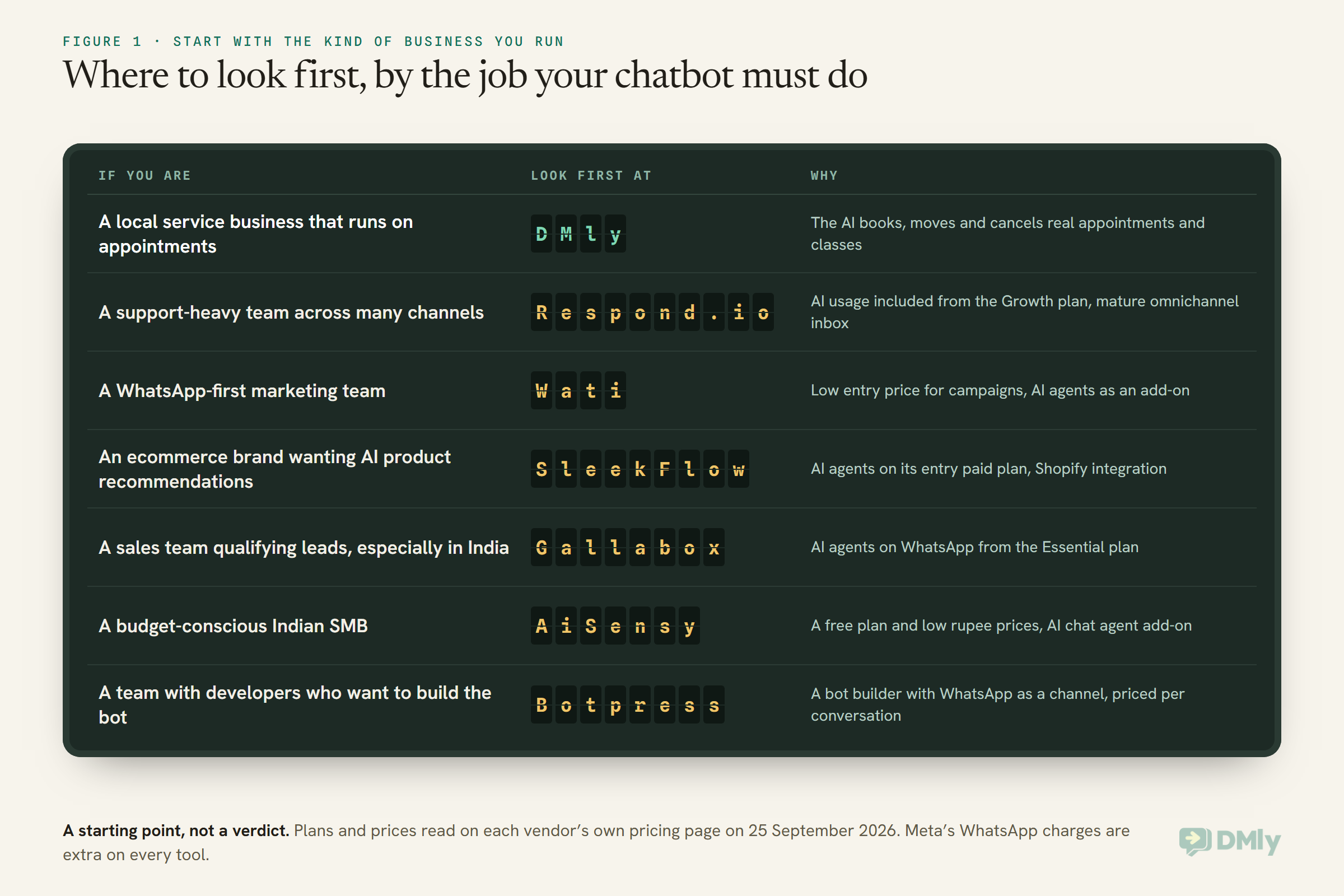
| If you are… | Look first at | Why |
| A local service business that runs on appointments | DMly | The AI books, moves and cancels real appointments and classes, with bookings, payments and CRM in one platform |
| A support-heavy team across many channels | Respond.io | AI agents with AI usage included from the Growth plan, and a mature omnichannel inbox |
| A WhatsApp-first marketing team | Wati | Low entry price for WhatsApp campaigns, with AI agents as an add-on when you need them |
| An ecommerce brand wanting AI product recommendations | SleekFlow | AI agents on its entry paid plan, with a Shopify integration for recommendations and checkout |
| A sales team qualifying leads, especially in India | Gallabox | AI agents on WhatsApp from the Essential plan, plus lead pipeline and AI voice higher up |
| A budget-conscious Indian SMB | AiSensy | A free plan and low monthly prices in rupees, with an AI chat agent add-on |
| A team with developers who want to build the bot | Botpress | A bot-building platform with WhatsApp as a channel and conversation-based pricing |
The Best AI Chatbots for WhatsApp Business, Reviewed
1. DMly: best for local businesses whose AI should book
What the AI does. DMly’s AI agent answers from knowledge collections you build from files, web pages, FAQs or pasted text, and it can act through built-in tools: reading and tagging the contact, moving pipeline stages, noting, handing over, and, the part that sets it apart for service businesses, listing services, checking real availability, and booking, moving and cancelling appointments and classes. With AI ordering switched on, it can also search your products, build an order with sizes and add-ons, quote the total from your own prices and fees, and hand the order to your team to confirm. For anything the built-in tools do not cover, you can define custom functions that call your own endpoints.
How the AI is priced. The AI agent is on every plan. Each plan includes a monthly allowance of AI replies on DMly’s shared AI (500 on Starter, 5,000 on Growth, 20,000 on Premium), and Premium can connect your own AI provider key for unmetered replies. Plans are $29, $65 and $149 a month billed yearly, and DMly states it adds no markup to Meta’s WhatsApp rates.
Watch out for. DMly’s AI has no tools for Shopify or WooCommerce orders: order lookups and checkout links run as separate store flows, and its AI ordering works on the products you keep in DMly, not on your synced store catalogue. If you connect your own AI provider, DMly’s docs say Claude and DeepSeek cannot search your documents, so use OpenAI or Gemini for knowledge-heavy assistants.
Best for: salons, clinics, gyms, tutors and other businesses where “can I book for Thursday?” is the most common message.
2. Respond.io: best for support-heavy, omnichannel teams
What the AI does. Respond.io lists AI Agents, AI Agents for voice calls, AI prompts, AI assist and AI chat summaries among its AI features, alongside workflows and a team inbox across many channels.
How the AI is priced. Its pricing page says AI usage is included at no extra cost on the self-service Growth, Advanced and Enterprise plans, under a fair use policy. With 1,000 monthly active contacts selected and monthly billing, Starter is $79 a month, Growth $159 and Advanced $279. The page is clear that WhatsApp fees are not included in any subscription.
Watch out for. Pricing scales with monthly active contacts, so check the tier your volume puts you in, and note that the plan with AI included is Growth, not Starter.
Best for: teams whose main job is answering customers across WhatsApp, Instagram, email and more, and who want AI inside a mature support inbox.
3. Wati: best for WhatsApp-first marketing teams
What the AI does. Wati lists Astra AI Agents that can be created and deployed to web, WhatsApp and voice, alongside chatbots, campaigns and a team inbox. Every plan includes a monthly allowance of AI Co-pilot credits (250, 500 or 1,500).
How the AI is priced. Plans are Growth at $39, Pro at $79 and Business at $199 a month, billed annually. Astra AI Agents appear on the Pro plan as “Astra add-on, priced separately”, so budget for the add-on on top of the plan. Message charges are billed per Wati’s rate card.
Watch out for. The AI agent is an add-on, not part of the plan price, and Growth includes three users with no option to add more.
Best for: teams whose WhatsApp work is mostly broadcasts, click-to-WhatsApp ads and lead capture, adding AI when the volume justifies it.
4. SleekFlow: best for ecommerce brands wanting AI recommendations
What the AI does. SleekFlow lists AI Agents on every plan, and describes AgentFlow with a Shopify integration so agents can recommend products and drive checkout. Premium adds AI agents with custom integrations.
How the AI is priced. Pro is US$109 a month billed monthly (US$1,308 a year billed yearly), starting with 500 monthly active contacts and 10 user accounts; Premium is US$279 a month. WhatsApp adds a US$15 monthly number hosting fee, with conversation rates per SleekFlow’s rate card.
Watch out for. The entry plan is priced on 500 monthly active contacts; check how much a busier month would cost.
Best for: Shopify brands, particularly in Asia, that want an AI agent recommending products inside an omnichannel inbox.
5. Gallabox: AI agents for lead qualification
What the AI does. Gallabox’s plans are built around speed-to-lead and qualification. AI agents on WhatsApp and Instagram, an inbox AI copilot and drip campaigns arrive on Essential; Advanced adds AI voice on WhatsApp and phone, lead pipeline management and appointment booking management.
How the AI is priced. Plans are billed annually: Basic at $112 a month includes web AI agents but not AI agents on WhatsApp, Essential at $248 includes them with 2,000 AI credits a month, and Advanced at $474 includes 8,000. WhatsApp conversation fees are billed separately.
Watch out for. The cheapest plan does not put AI agents on WhatsApp; Essential is the real entry point for this use.
Best for: sales-led businesses that want an AI agent to qualify inbound WhatsApp leads and pass the good ones on fast.
6. AiSensy: best for budget-conscious Indian SMBs
What the AI does. AiSensy sells an AI Chat Agent add-on that it describes as understanding and replying in natural language, with knowledge base answers, long-term memory and tool calling, alongside broadcasting, retargeting and a shared inbox.
How the AI is priced. AiSensy has a Free Forever plan, Basic at ₹1,500 a month and Pro at ₹3,200 a month, billed monthly. The AI Chat Agent costs ₹1,350 a month for 1,000 AI messages, purchased separately on top of any plan, with separate charges beyond that. Its pricing page lists per-message rates for India.
Watch out for. 1,000 AI messages a month is a modest allowance for a busy inbox; check what additional AI messages cost before you rely on it.
Best for: Indian businesses starting with WhatsApp marketing on a tight budget and adding an AI agent later.
7. Botpress: best for teams who want to build the bot
What the AI does. Botpress is a platform for building AI agents, with WhatsApp listed among its channels, plus webchat, a help center and, on higher plans, team routing and analytics. It is a builder rather than a WhatsApp inbox.
How the AI is priced. Botpress prices by conversations and includes AI spend: Free with 25 conversations, Plus at $150 a month billed annually with 250 conversations and $25 of AI usage, and Team at $750 a month billed annually with 1,500 conversations and $150 of AI usage. Extra conversations are sold in packs, which top up automatically.
Watch out for. You build more yourself, and conversation packs auto-recharge; its FAQ says auto-recharge cannot be turned off.
Best for: teams with a developer or agency who want full control over the bot’s logic and are happy to build it.
Comparison at a Glance
| Platform | Cheapest plan with AI on WhatsApp | How the AI is priced |
| DMly | Starter, $29/mo billed yearly | Monthly AI reply allowance per plan; own keys on Premium |
| Respond.io | Growth, $159/mo monthly (1,000 contacts) | AI usage included from Growth, fair use |
| Wati | Pro, $79/mo billed annually, plus the Astra add-on | Add-on priced separately; co-pilot credits included |
| SleekFlow | Pro, US$109/mo monthly | AI agents included on Pro |
| Gallabox | Essential, $248/mo billed annually | Monthly AI credits per plan |
| AiSensy | Any plan plus AI Chat Agent, ₹1,350/mo | Add-on for 1,000 AI messages a month |
| Botpress | Check which plans include the WhatsApp channel; Free has 25 conversations, Plus is $150/mo billed annually | Per conversation, AI spend included |
All prices exclude Meta’s WhatsApp charges and were read on 25 September 2026. Billing periods differ between vendors, so compare like with like before deciding.
The Five Ways AI Is Priced, and Why It Matters
The subscription is the easy number. The AI pricing model decides what a busy month costs.
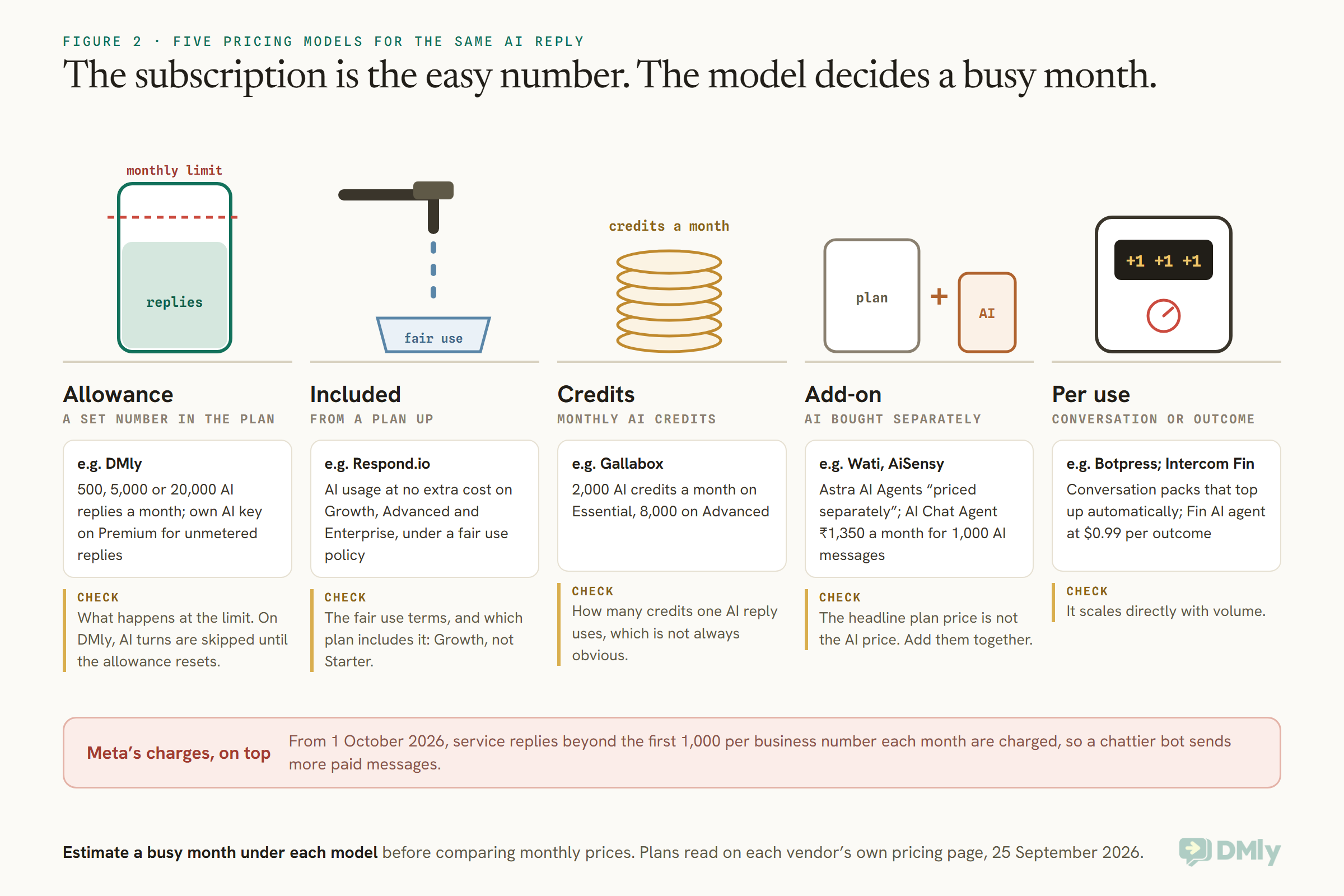
- An allowance in the plan is predictable until you exceed it. Check what happens at the limit: on DMly, AI turns are skipped with a note until the monthly allowance resets, unless you move to your own AI key on Premium.
- AI included under fair use is simplest to budget, but read the fair use terms and which plan includes it.
- Credits make you ask how many credits one AI reply uses, which is not always obvious.
- A separate add-on means the headline plan price is not the AI price. Add them together.
- Per conversation or per outcome scales directly with volume. Intercom, for example, prices its Fin AI agent at $0.99 per outcome; Botpress sells conversation packs that top up automatically.
Meta’s Charges, on Top of Every Tool
From 1 October 2026, an AI chatbot’s replies can cost money on Meta’s side too.
Whatever platform you choose, WhatsApp messages are billed by Meta. From 1 October 2026, Meta charges for free-form service messages, the replies a chatbot sends inside the 24-hour window, beyond the first 1,000 per business phone number each month, and it also charges for utility templates sent in response inside an open window. That changes how you should think about a chatty bot: three short AI replies where one clear one would do can triple the service messages. The exception is the 72-hour free entry point window, which opens when a customer arrives from a Click-to-WhatsApp ad or a Page button and you reply within 24 hours; messages in that window are free. Our explainer on the October 2026 pricing change has the detail.
How to Test Them in a Week
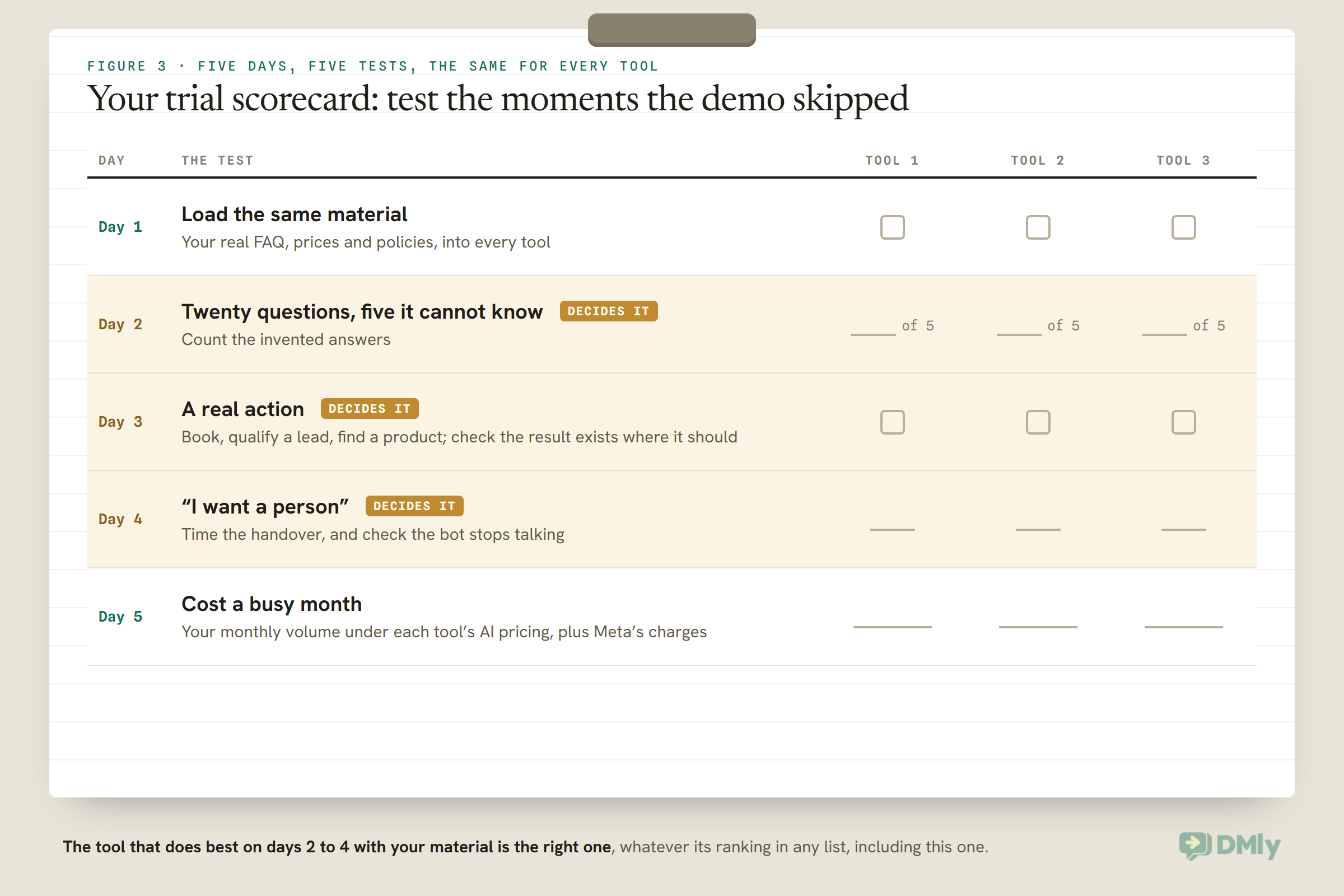
Every tool offers a trial. Use it to test the moments the demo skipped.
- Give each tool the same material: your real FAQ, prices and policies.
- Ask the same twenty questions, including five it cannot possibly know. Count the invented answers.
- Try an action: book an appointment, qualify a lead, find a product, whatever your business needs. Check the result exists where it should.
- Say “I want a person” and time how long the handover takes, and whether the bot stops talking.
- Estimate a busy month: your monthly message volume under each tool’s AI pricing, plus Meta’s charges.
The tool that does best on steps 2 to 4 with your material is the right one, whatever its ranking in any list, including this one.
Plan for Leaving Before You Join
You may switch platforms one day. Ask how, before you sign.
Your WhatsApp number, your approved templates, your contacts and your conversation history all live with the platform you choose. Before committing, ask each vendor three questions: how you would move your WhatsApp number to another provider, whether you can export your contacts and conversations, and what happens to your AI’s knowledge and flows. Some vendors describe migration as part of their onboarding: Wati’s pricing page, for example, lists moving from another business solution provider among its dedicated onboarding services. A vendor who answers these clearly is usually one that is confident you will stay.
If Your Business Handles Sensitive Conversations
Clinics, schools, finance and legal firms need stricter handover rules than any feature list shows.
WhatsApp’s Business Messaging Policy says not to use WhatsApp to send or request health related information where your regulations prohibit it on systems without heightened protections, and it expects automated chats to offer a prompt, clear route to a person. Whatever tool you choose, the AI’s instructions should keep it to administrative questions and hand anything clinical, financial or legal to a person. Test exactly those questions in your trial, and be sceptical of any vendor that says its chatbot makes you compliant: compliance depends on how you use the tool, and is a question for your own advisers.
Red Flags When Choosing
- No clear handover. A bot that cannot pass a conversation to a person, or keeps talking after it has, will cost you customers.
- An AI price you cannot estimate. If you cannot work out a busy month’s AI bill from the pricing page, ask before you sign.
- Answers from the open web. Your prices and policies are not on the internet; an assistant searching the web for them will be wrong.
- Unofficial WhatsApp connections. Prefer tools that connect through WhatsApp’s official Business Platform, and ask any vendor that cannot say how it connects. Automating the ordinary WhatsApp app sits outside that platform and its rules.
- Compliance promises. Be wary of any claim that a chatbot makes you compliant with health or data law; that depends on how you use it.
Frequently Asked Questions
What is the best AI chatbot for WhatsApp Business?
It depends on what the chatbot must do. For booking appointments, a platform whose AI can book, such as DMly; for omnichannel support, Respond.io; for ecommerce recommendations, SleekFlow. Test with your own questions before deciding.
Can I put ChatGPT on WhatsApp for my business?
You can use a business assistant built on large language models, answering about your own business, through an official platform. Meta’s terms prohibit offering general-purpose AI assistants as the main product on the WhatsApp Business Platform.
How much does a WhatsApp AI chatbot cost?
A platform subscription, the AI usage (an allowance, credits, an add-on or per conversation, depending on the tool) and Meta’s message charges. Among the tools here, the cheapest plan with AI on WhatsApp ranged from a free tier or a few thousand rupees a month to several hundred dollars, before Meta’s charges and any AI add-on.
Are AI chatbot replies free on WhatsApp?
Not always. From 1 October 2026, Meta charges for service messages beyond 1,000 free per business number each month, except inside the 72-hour free window after a Click-to-WhatsApp ad.
Can an AI chatbot book appointments on WhatsApp?
Some can. DMly’s AI agent has booking tools that check real availability and book, move and cancel appointments and classes; Gallabox lists appointment booking management on its Advanced plan.
Do I need developers?
Not for most of these tools, which offer templates and no-code builders. Botpress suits teams who want to build more themselves, and custom functions on any platform need someone who can build an endpoint.
What the Demo Did Not Show
Go back to the demo that went perfectly. The questions that decide the choice were the ones nobody asked: book me for Thursday, what do you not know, get me a person, what will this cost in a busy month. Every tool in this guide answers some of those better than others, and the only way to know which suits you is to ask them yourself, during a trial, with your own material.
The best AI chatbots for WhatsApp Business are the ones that answer your customers honestly, do the job your business needs done, hand over gracefully, and cost what you expected. Use this guide to shortlist; use a week of testing to decide.
Writing about WhatsApp automation, bookings and growth for local business.
Turn WhatsApp into your busiest channel.
Start free and run message, bookings, payments and reviews in one place.
