
WhatsApp Business Greeting Message Examples: 30 Templates You Can Copy
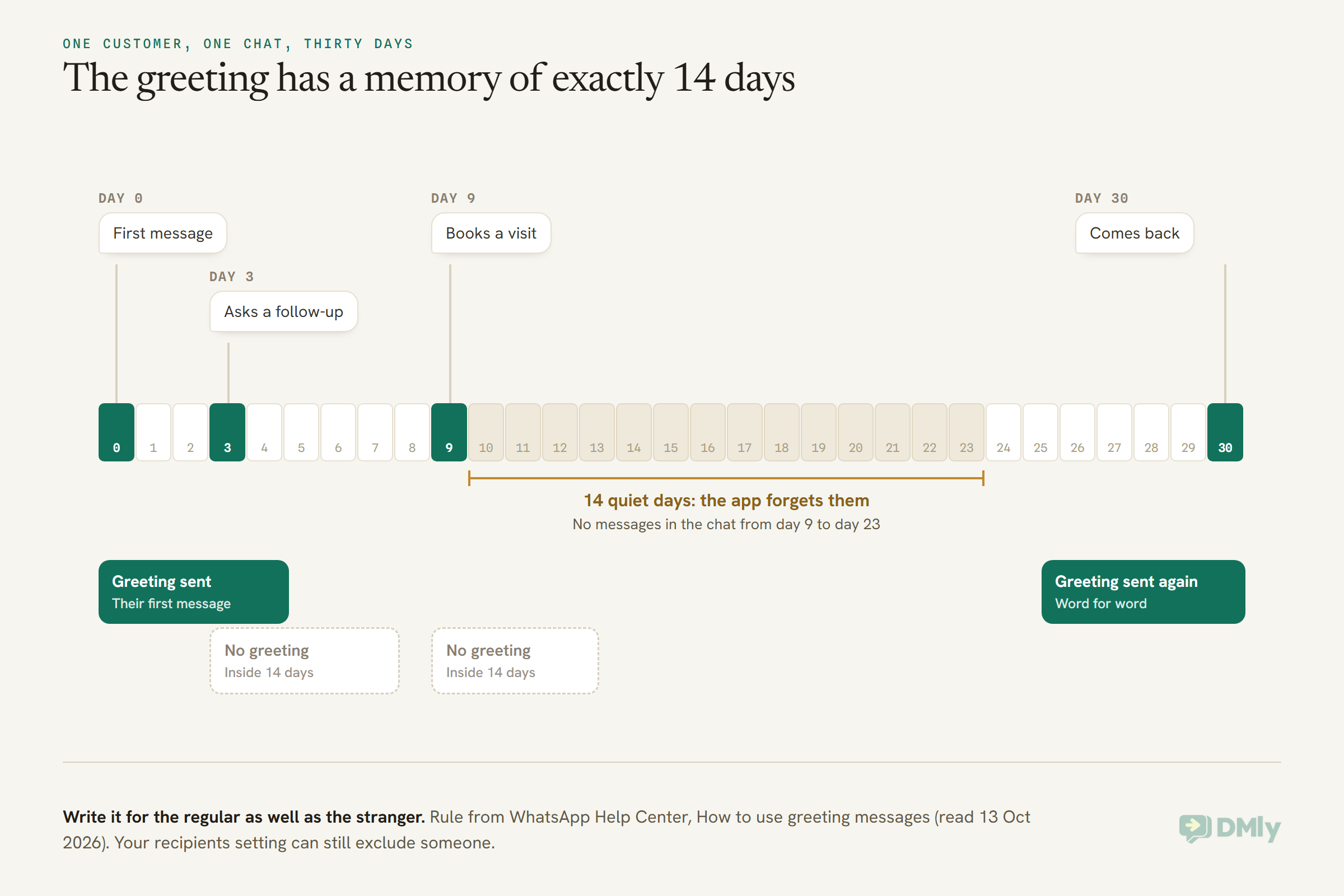
A WhatsApp Business greeting message has a memory of exactly fourteen days. The first time a customer writes to you, it says hello. If they write again next week, it stays quiet. If they go fourteen days without messaging you and then come back, it says hello again, word for word, as if you had never met.
That one rule decides more about what you should write than any list of greeting ideas. Your greeting isn’t only for strangers. It also goes to the regular who books every six weeks, the client who paid you last month, and the parent who messaged in September and is back in October. “Welcome! Let us tell you a little about who we are” reads oddly to someone who has been coming to you for years.
So the templates below are written for both people: the one who has never heard of you, and the one who knows you well and simply went quiet for a fortnight.
In this guide, we’ll look at what the greeting message is and exactly when it sends, how to set it up in the WhatsApp Business app, how it differs from an away message, a quick reply and an API welcome message, and then 30 greetings you can copy. We’ll finish with how the same job works on the WhatsApp Business API with a platform like DMly, where your welcome is an ordinary reply in the chat rather than an approved template.
What Is a WhatsApp Business Greeting Message?
A WhatsApp Business greeting message is an automatic reply that the WhatsApp Business app sends when a customer messages you for the first time, or for the first time after 14 days with no messages in your chat. You write it once, switch it on, and the app sends it for you.
WhatsApp’s own Help Center suggests something like “Hi there! How can I help you today?” That’s a fine start, but it’s also the greeting every other business on your customer’s phone is using. We can do better, and the rest of this page is about how.
Here is what’s worth knowing before you write a word:
- It is one message. Everyone who gets it gets the same text. You can choose who receives it, but not write a different one for each person.
- It sends from your phone. WhatsApp says your device needs an active internet connection for greetings to go out. A phone that’s switched off at night sends nothing.
- It is not a Meta template. There’s nothing to submit, no approval to wait for and no charge per message. It’s a setting in the free app.
- It switches off if you connect Meta Business Agent. WhatsApp disables greeting messages automatically when Meta Business Agent (Meta’s own AI assistant for the app) is connected. To use greetings again, you have to remove it.
- It belongs to the app, not the API. If your number runs on the WhatsApp Business API through a platform, the greeting setting isn’t what answers people. Your platform is. We’ll cover that further down.
How to Set Up a WhatsApp Business Greeting Message in the App
To set up a WhatsApp Business greeting message, open the Tools tab in the WhatsApp Business app, tap Greeting message, turn on Send greeting message, write your text, choose your recipients and save. It takes about two minutes. The steps are the same on Android and iPhone, with two small differences in wording.
- Open the Tools tab and tap Greeting message.
- Turn on Send greeting message.
- Edit the message. On Android, tap Greeting message, write your text and tap OK. On iPhone, tap the message under Message, write your text and tap Save.
- Tap Recipients and pick who gets it (the table below explains the options).
- Tap Save.
If you don’t see a Tools tab, update the app first. WhatsApp’s own troubleshooting list starts there too.
Which recipients setting should you choose?
| Option | Who gets the greeting | When it makes sense |
| Everyone | Everyone who messages you | Most businesses. It’s the simplest, and the 14-day rule already stops it repeating in an active chat. |
| Everyone not in address book (Android) / Exclude my contacts (iPhone) | Only people who aren’t saved in your phone’s contacts | When you save your regulars, and you’d rather they never got a “nice to meet you” message. |
| Everyone except… | Everyone apart from the people you pick | When a handful of people (suppliers, staff, family) message the business number and shouldn’t be greeted. |
| Only send to… | Only the people you pick | Rarely right for a greeting. New customers aren’t on your list yet, so they’d get nothing. |
“Everyone not in address book” is the quiet fix for the 14-day problem. If you save customers as you get to know them, your regulars stop receiving the stranger greeting. It only works as well as your saving habit, though, so the templates further down are written to survive being read by a regular anyway.
If your greeting message isn’t sending
WhatsApp lists the usual causes, and they’re worth checking in this order:
- Meta Business Agent is connected. Greetings are switched off automatically while it’s connected.
- Your recipients setting is excluding the person. “Only send to…” and “Everyone except…” catch people out.
- The 14-day rule. If that customer messaged you in the last 14 days, they won’t get a greeting. This is the one that fools you when you test it from your own second phone.
- The feature needs a nudge. Go to Tools, Greeting message, turn Send greeting message off, wait a moment and turn it back on.
- The app is out of date, or the phone needs a restart. Update WhatsApp Business and restart your device.
Greeting Message vs Away Message vs Quick Replies vs a Welcome Message
A greeting message answers new and returning customers automatically, an away message answers while you’re unavailable, quick replies are saved text you insert yourself, and a welcome message is the API version of a greeting that a platform sends for you. People mix these up all the time, and it matters, because each one is written differently.
| Message | Where it lives | When it sends | Write it to… |
| Greeting message | WhatsApp Business app, Tools | A customer’s first message, or their first after 14 quiet days | Make a good first impression and get one useful answer back |
| Away message | WhatsApp Business app, Tools | While you’re away, on the schedule you set | Say when you’ll reply and what to do if it’s urgent |
| Quick replies | WhatsApp Business app, or saved replies in a shared inbox | Only when you insert one by hand | Answer a common question in one tap |
| Welcome message | Your API platform, as an automation | When you decide: a first message, an ad, a QR code, a keyword | Greet, then route the person to the right answer |
Away messages have their own page: our guide to WhatsApp away messages and business-hours auto-replies covers scheduling, holidays and the after-hours flows. If you’re choosing which saved answers to keep at your fingertips, see WhatsApp quick replies worth saving. And if the greeting is the first of several automatic answers you want, how to set up automated WhatsApp replies walks through the other three.
One practical point if you use both the greeting and the away message in the app: send a test from a phone that has never messaged you, outside your hours, and read what arrives. Make sure the two messages make sense side by side, and that neither promises something the other contradicts.
How to Write a WhatsApp Greeting Customers Actually Answer
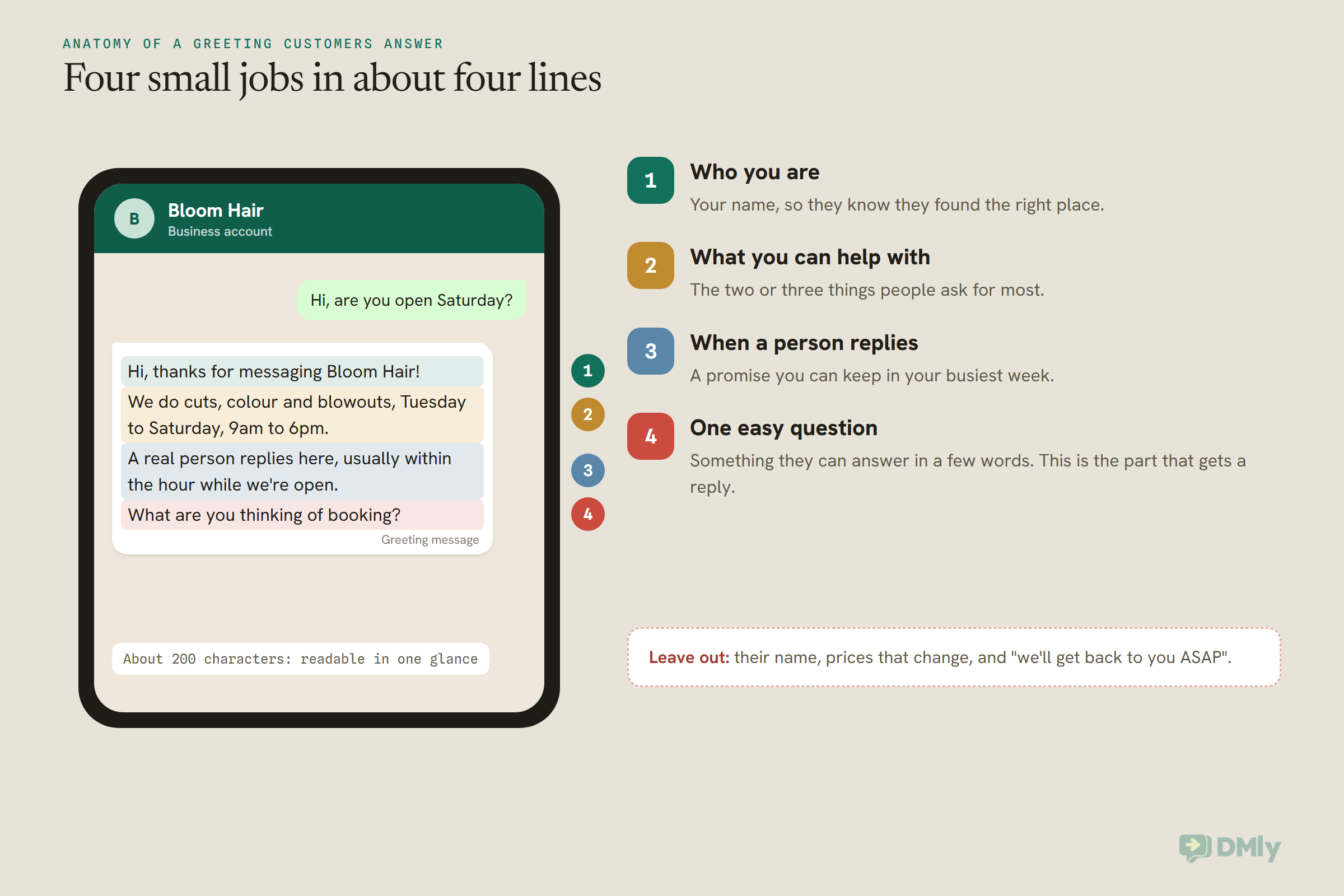
A good greeting does four small jobs in about four lines: it confirms who you are, says what you can help with, sets an honest expectation of when a person replies, and ends with one easy question. That last part is the one most greetings forget, and it’s the one that gets a reply.
A few rules that make the difference between a greeting people answer and one they scroll past:
- Lead with the answer they came for. Opening hours, what you do, how to book. People read the first line in the notification and decide from there.
- Say a real person is coming, and roughly when. “Usually within the hour while we’re open” is better than “as soon as possible”, because it’s a promise with a shape. Only make it if it’s true in your busiest week.
- End on one question. “What are you thinking of booking?” gets an answer. “Let us know how we can help” gets silence, or a paragraph you then have to untangle.
- Don’t use their name. The app’s greeting is one fixed message, and WhatsApp’s Help Center describes no way to drop a customer’s name in. Even where you can (on the API), a brand-new contact’s saved name is often just whatever they set on their own profile.
- Leave out prices that change. A greeting sits unchanged for months. If your prices move, the greeting quietly starts lying.
- Write for the regular too. Because of the 14-day rule, avoid “nice to meet you” and “let us introduce ourselves”. “Thanks for messaging” works for everyone.
- Keep it short. WhatsApp doesn’t publish a length limit for the app’s greeting, so length is a choice. Around 150 to 350 characters, four to six short lines, reads in one glance. Every template below shows its character count so you can compare.
- One emoji, at most. If you wouldn’t put one in a message you typed yourself, leave it out.
If you’d rather start from a generated draft for your trade and tone, our free welcome message generator fills in your business name and hours for you. The 30 below are for when you want to see the options side by side.
30 WhatsApp Business Greeting Message Examples You Can Copy
Here are 30 WhatsApp Business greeting message examples, grouped by situation, each with its character count and a note on where it fits. Replace anything in [square brackets] with your own details. Character counts include the brackets as written, so your real version will be a little longer or shorter.
Two labels you’ll see on every note:
- App: works as the WhatsApp Business app’s greeting message, with no approval needed.
- API: works as a welcome reply on the WhatsApp Business API. Because the customer wrote first, it goes out as a free-form service message inside the 24-hour window, not as a template. (More on cost further down.)
These are written for the greeting slot specifically. For the replies that come after it (booking confirmations, reminders, payment requests, review requests and more) our library of 110 WhatsApp Business message templates has the rest.
WhatsApp greeting messages for first-time enquiries (1 to 14)
The most common job: someone has found you and has a question. Each one is shaped for a type of business, so the “what we help with” line and the closing question fit what that customer actually wants.
1. Hair salon or barber (US)
Hi, thanks for messaging [Salon]! I’m [your name] and I look after bookings. Tell me the service you have in mind (cut, color, blowout) and a day that suits you, and I’ll check the book. A real person replies here, usually within [time].
About 235 characters. App and API. Naming the person who replies makes a small salon feel like a small salon. Use your own spelling of “colour” if you’re outside the US.
2. Dental or medical clinic
Hello, and thank you for contacting [Clinic]. For appointments, please tell us whether you’re a new or existing patient and roughly when you’d like to come in. If you’re in pain or have swelling, please call us on [phone] so we can see you sooner. We reply to messages [hours].
About 275 characters. App and API. The urgent route matters more than anything else in a clinic greeting: never let a chat be the only door for someone in pain. Keep symptoms out of the conversation until a person is reading it.
3. Restaurant or café
Hey, thanks for messaging [Restaurant]! Looking for a table? Send us the day, the time and how many of you, and we’ll confirm it right here. Menu and opening times: [link]
About 170 characters. App and API. Asking for all three booking details at once is the exception to the one-question rule: they’re three parts of one answer, and people send them together.
4. Estate agent or realtor (UK or US)
Hi, you’ve reached [your name] at [Agency]. If you’re asking about a property, send me the address or the link to the listing and I’ll come back to you with viewing times. Thinking of selling instead? Just say “valuation”.
About 220 characters. App and API. Two kinds of enquiry, two clear routes. On the API, “valuation” can be a keyword that starts its own flow.
5. Plumber, electrician or home services
Thanks for getting in touch with [Business]. To get you a price faster, send a photo of the problem and your area or zip code. We’re out on jobs most of the day, so replies come between visits, usually within [time].
About 215 characters. App and API. Asking for a photo first saves a site visit for small jobs. Swap “zip code” for postcode, PIN code or neighbourhood depending on where you work.
6. Online store (India)
Hi! Welcome to [Store]. Ask us anything about sizes, delivery or payment. For an order you’ve already placed, send your order number and we’ll check it for you. Delivery across India usually takes [days].
About 205 characters. App and API. Splitting “new question” from “existing order” up front saves a round of “what’s your order number?” later.
7. Gym, yoga or fitness studio
Hey, welcome to [Studio]! Thinking about trying a class? Tell us which one and which day, and we’ll save you a spot. Questions about memberships are welcome too. A coach replies here between sessions.
About 200 characters. App and API. If you add a first-class offer here, that’s fine in the app and in a free-form API reply. If you ever turn the same words into a template to send outside the window, the offer makes it a Marketing template.
8. Tutor or learning centre (Nigeria)
Good day, and thank you for reaching out to [Centre]. Please tell us your child’s class or the exam they’re preparing for (WAEC, NECO, JAMB or IGCSE) and the subjects. We’ll reply with available times and fees in [currency].
About 225 characters. App and API. Naming the exams tells a parent immediately that you teach what their child needs. Fees in naira are best sent by a person, not printed in a greeting that sits unchanged for a term.
9. Photographer or videographer
Hi, thanks for your message! I’m [your name], the photographer behind [Business]. What are you planning, and what’s the date? Send me those two things and I’ll tell you straight away whether I’m free.
About 200 characters. App and API. For date-driven work, availability is the first question. Everything else can wait until you know you’re free.
10. Bakery or custom cakes (UK)
Hello from [Bakery]! For a custom cake, send us the date you need it, how many people it’s for and any photos you love. We need at least [days] days’ notice for custom orders. Fancy something ready-made? Ask what’s in the cabinet today.
About 235 characters. App and API. The notice period goes in the greeting because it’s the thing people most often find out too late.
11. Car repair or garage (US)
Thanks for contacting [Garage]. Tell us the make, model and year of your car and what’s going on (noises, warning lights, anything you’ve noticed). We’ll reply with the next available slot. Broken down? Call [phone] instead.
About 225 characters. App and API. Make, model and year is the answer a mechanic needs before anything else, so ask for it straight away.
12. Hotel, guesthouse or holiday rental (Gulf)
Welcome to [Hotel], and thank you for your message. To check availability, please send your dates and the number of guests. Our team replies [hours, time zone]. If you’re staying with us and need help now, please call reception on [phone].
About 240 characters. App and API. Guests write from other time zones, so name yours. Separating “planning a stay” from “staying now” keeps urgent requests out of a slow queue.
13. Pet groomer or vet clinic
Hi! Thanks for messaging [Business]. Tell us your pet’s breed, size and what they need (full groom, bath, nail trim) and we’ll suggest a time. New furry clients are always welcome.
About 180 characters. App and API. For a vet clinic, add the same urgent-route line as template 2: an emergency should never wait in a chat.
14. Accountant, lawyer or consultant
Hello, thank you for contacting [Firm]. Please tell us briefly what you need help with (for example a tax return, bookkeeping or a company registration) and we’ll arrange a short call. Please don’t send documents or ID here until we’ve spoken.
About 245 characters. App and API. The last line protects your customer and you. A chat is a poor place for passports and bank statements before you’ve even agreed to work together.
Greetings that also work for returning customers (15 to 18)
These are written for the 14-day rule. They read naturally to a first-time customer and to someone who has been coming to you for years, so you don’t need to save every regular in your phone to avoid an awkward hello.
15. The all-purpose “new or returning” greeting
Hi, thanks for messaging [Business]! Whether we’ve met before or this is your first time, you’re in the right place. Tell us what you need and we’ll pick it up from here.
About 170 characters. App and API. The safest greeting on this page if you can only choose one.
16. Salon, spa or clinic regulars
Hello, or hello again! Thanks for messaging [Business]. If you’d like your usual, just say “same again” with a day that suits you and we’ll find a time. New to us? Tell us what you’re after.
About 190 characters. App and API. Regulars rebook faster when they don’t have to explain what “the usual” is.
17. Restaurant regulars
Good to hear from you! First visit or fiftieth, send us the day, the time and how many of you, and we’ll get your table sorted. Anything else, just ask.
About 150 characters. App and API. Short and warm, and it doesn’t pretend to remember who’s writing.
18. Online store, past order or new order
Thanks for messaging [Store]! Asking about an order you’ve already placed? Send the order number. Shopping for something new? Tell us what you’re looking for and we’ll help you find it.
About 185 characters. App and API. Returning customers usually come back about an order, so give that path first.
Greetings that still work after hours (19 to 22)
The greeting sends whenever a first message arrives, including at 11pm, so it shouldn’t promise a fast reply it can’t keep at night. These four stay honest around the clock. They aren’t a replacement for a proper away message (that’s covered in our away messages guide); they’re greetings that don’t break when you’re closed.
19. Day or night, one message
Thanks for messaging [Business]! We’re here [hours]. If you’re writing outside those hours, your message is safe and it’ll be first in the queue when we open. If we’re open, we’ll reply shortly.
About 195 characters. App and API. Works at any hour because it tells the customer how to read the wait.
20. Clinic with an emergency route
Thank you for contacting [Clinic]. Our team reads messages [hours]. If you have an urgent problem outside these hours, please call [number]. Otherwise, leave your message here and we’ll reply when we open.
About 205 characters. App and API. Put your real out-of-hours number in. If you don’t have one, name the local emergency service instead of leaving the line out.
21. Online store with a self-serve link
Hi! Our team is online [hours and time zone], but you can ask us anything anytime. To track an order now, use [link]. For everything else, leave your question here and a person will reply when we’re back.
About 205 characters. App and API. A tracking link answers the most common late-night question without anyone waking up.
22. Trades and call-out businesses
Thanks for your message! We might be on a job or done for the day, but we read everything. Send your area and what’s wrong, and we’ll come back to you with a time as soon as we can.
About 180 characters. App and API. Honest about being busy without sounding like a brush-off.
Holiday and busy-season greetings (23 to 25)
Swap your greeting for a few days when your hours change, then swap it back. Set a reminder for the day you reopen, because a holiday greeting left on in February is worse than none.
23. Year-end closure
Season’s greetings from [Business]! We’re closed from [date] and back on [date]. Messages sent now will be answered in order when we return. Thank you for a lovely year, and happy holidays!
About 190 characters. App and API. Works for Christmas and New Year closures in the US, UK, Nigeria and anywhere else that shuts down at year end.
24. Festival or national holiday
[Festival greeting] from all of us at [Business]! We’re closed on [dates] for the holiday and reopen on [date]. Leave your message here and we’ll reply as soon as we’re back.
About 175 characters. App and API. Fill the first line with the greeting your customers use: “Happy Thanksgiving”, “Happy Diwali”, “Eid Mubarak”, “Happy Independence Day”. Keep the closure dates exact.
25. Busy season, slower replies
Thanks for messaging [Business]! It’s our busiest time of year, so replies are taking up to [time] right now. Everything gets answered in order. If you’re asking about [most common question], the quick answer is [answer].
About 220 characters. App and API. Answering the question everyone is asking this month cuts your queue before it forms. Wedding season, exam season, the run-up to Christmas: whichever is yours.
Multilingual WhatsApp greeting messages (26 to 30)
Only promise a language your team actually reads. A greeting in Arabic followed by replies in English is worse than an English greeting. Two languages in one message works well in the app, where the greeting can’t change from person to person.
26. English and Spanish (US)
Hi! Thanks for messaging [Business]. Write to us in English or Spanish and we’ll reply in the same language.
¡Hola! Gracias por escribir a [Business]. Escríbenos en inglés o en español y te responderemos en el mismo idioma.
About 225 characters. App and API. Lead with the language most of your customers use, then the second.
27. English and Hindi (India)
Hi! Thanks for messaging [Business]. You can write to us in English or Hindi.
नमस्ते! [Business] में आपका स्वागत है। आप हिंदी या English में लिख सकते हैं, हम उसी भाषा में जवाब देंगे।
About 180 characters. App and API. Many customers in India will happily mix the two, so “write in whichever is easier” is the real message here.
28. English and Arabic (UAE, Saudi Arabia, Gulf)
Hello! Thank you for contacting [Business]. We’re happy to reply in English or Arabic.
مرحباً! شكراً لتواصلك مع [Business]. يسعدنا الرد عليك بالعربية أو بالإنجليزية.
About 165 characters. App and API. Keep the business name in the script your customers know it by, and check the Arabic line with a native speaker on your team before it goes live.
29. English and Malay (Malaysia)
Hi! Thanks for messaging [Business]. You can write to us in English or Bahasa Melayu.
Hai! Terima kasih kerana menghubungi [Business]. Anda boleh menulis dalam Bahasa Melayu atau English, dan kami akan membalas dalam bahasa yang sama.
About 235 characters. App and API. The same pattern works for Bahasa Indonesia, Tagalog or French: greeting first, language promise second.
30. Language buttons (API only)
Hi! Welcome to [Business]. Which language would you like to continue in?
Buttons: English / Español / Français
About 70 characters of message text. API only: the app’s greeting can’t carry buttons. On a platform, each button can lead to its own branch in a flow, so the rest of the conversation happens in the language the customer picked. WhatsApp caps reply buttons at three, with titles of 20 characters or fewer.
Before you paste: Read your chosen WhatsApp Business greeting message out loud as if you were a regular customer who last messaged three weeks ago. If any line sounds like you’ve forgotten them, soften it. That’s the 14-day rule at work.
Greeting Messages on the WhatsApp Business API: Welcome Replies, Not Templates
On the WhatsApp Business API there is no greeting message setting like the app’s; instead, your platform sends a welcome reply as an ordinary free-form message inside the 24-hour window the customer opened by writing to you. That’s an important difference, and it’s mostly good news.
So everything above still applies: a WhatsApp Business greeting message written for the app works word for word as an API welcome. What changes is who sends it, when, and how many versions you can have.
If you’re not sure which side of that line you’re on, our comparison of the WhatsApp Business app vs the API explains the split. In short: the app is free and lives on one phone, while the API runs through a platform so a team, automations and integrations can all share one number.
Does a welcome message need Meta’s approval?
No. Approved templates are for messages you start, or messages you send more than 24 hours after a customer’s last message. A welcome reply goes out seconds after the customer wrote to you, so it’s a normal reply. You can write it, change it and test it without waiting on Meta. If you want the full picture of what needs a template and what doesn’t, see WhatsApp message templates explained.
This matters even more for US customers. Meta currently doesn’t deliver marketing templates to US phone numbers at all, so for a US business the conversation the customer starts, and your welcome reply inside it, is where your WhatsApp relationship happens.
What does a welcome message cost on the API?
Since 1 October 2026, Meta charges for service messages, which are the free-form replies you send inside the 24-hour window. Each business phone number gets 1,000 free service messages a month, which don’t roll over, and after that you pay your market’s rate per message. One greeting per new customer is a tiny share of that allowance for most small businesses.
There’s one more free route. When someone messages you from a click-to-WhatsApp ad and you reply within 24 hours, Meta opens a 72-hour free entry point window in which your messages aren’t charged at all. Our guide to service messages vs templates goes through exactly what you’re charged for.
Ice breakers and commands: Meta’s built-in conversation starters
Meta offers two small features on API numbers that sit next to a welcome message:
- Ice breakers: up to four tappable suggestions (80 characters each, no emoji) shown to someone the first time they open a chat with you. Tapping one simply sends its text to you as if the customer had typed it.
- Commands: up to 30 slash commands, such as /menu or /hours, each up to 32 characters with a short hint.
Ice breakers are useful for greetings because they put the right words in the customer’s mouth. Write “I’d like to book” as an ice breaker and you know exactly what message to listen for. One catch from Meta’s docs: if someone arrives through a wa.me link with pre-filled text, the ice breakers are hidden.
If your number uses coexistence
Coexistence lets you keep the WhatsApp Business app on your phone while the same number runs on the API. Meta’s coexistence documentation lists the app’s messaging tools, including the greeting message and the away message, as unchanged in the app. So if you also build a welcome message on your platform, a new customer could receive both. Pick one front door, switch the other off, and test. Our WhatsApp coexistence guide covers what else changes.
How to Set Up a WhatsApp Welcome Message in DMly
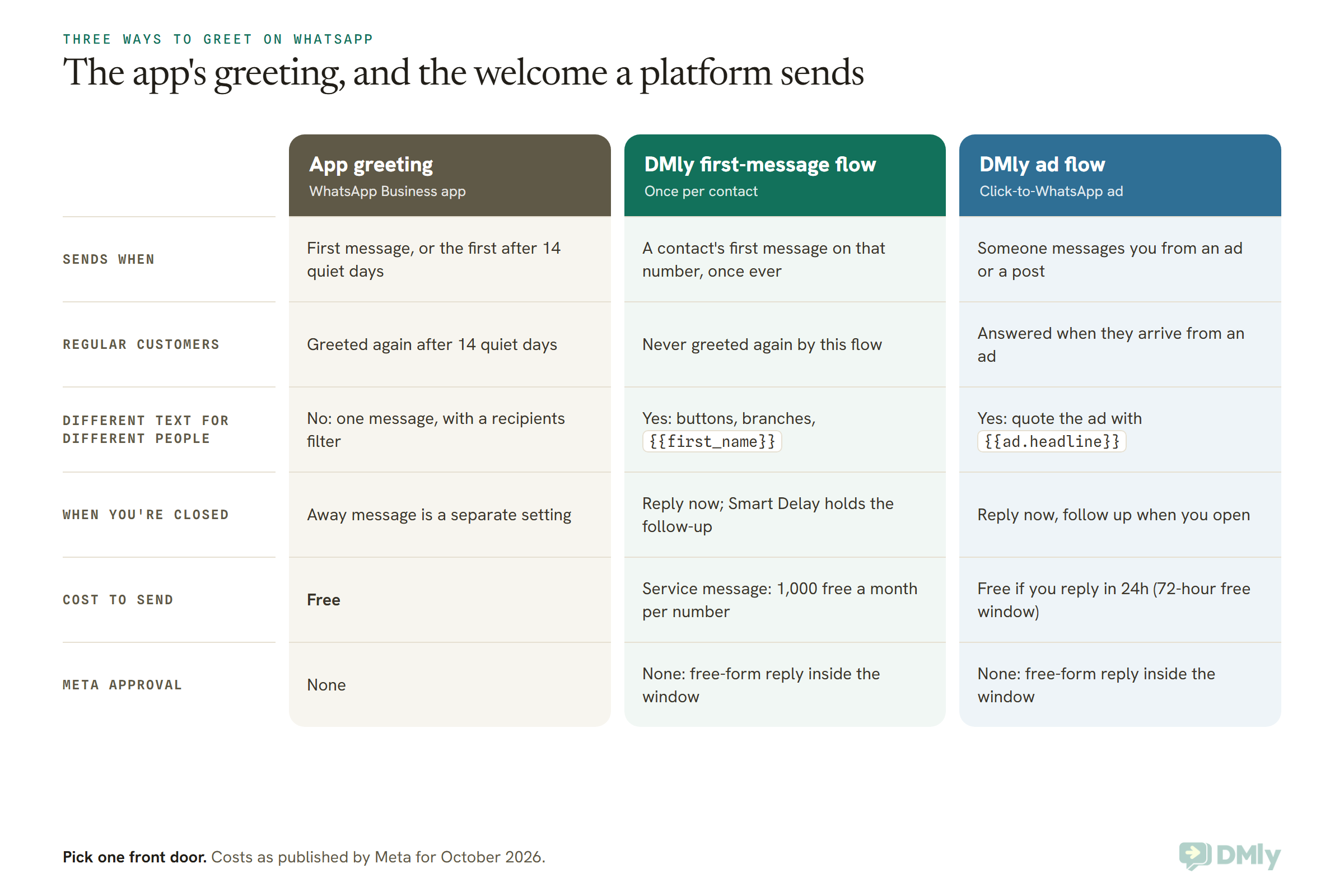
In DMly, a WhatsApp welcome message is built as an automation: a flow on the WhatsApp message trigger with “Only respond once per contact” turned on, so each new customer gets your greeting once and never again. With a platform like DMly you can also greet people differently depending on how they arrived, which the app can’t do.
There are a few routes, and it’s worth knowing which one does what before you build anything.
Route 1: a first-message flow (the closest thing to the app’s greeting)
- Create a new automation on your WhatsApp channel. DMly fills in the WhatsApp message trigger for you.
- Leave the keywords empty, so it answers any first message, and turn on Only respond once per contact on the trigger.
- Add a text step with your greeting, or a Buttons Message step if you want tappable choices (one to three buttons, titles of 20 characters or fewer, and a message body of up to 1,024 characters).
- Publish it.
Two things behave differently from the app, and both are useful to know:
- Once means once. “Only respond once per contact” never fires a second time for that person, even after months of silence. So there’s no 14-day re-greeting, and the regular-customer problem disappears. If someone says they didn’t get the greeting, check the logs: DMly records it as
once_per_contact. - Only one automation answers a message. If a customer’s very first message is “how much is a haircut” and you have a flow with the keyword “how much”, the keyword flow wins and the greeting stands down. DMly picks the most specific match: a flow for a specific ad, then any ad, then keywords, then a catch-all.
One snag to plan around: DMly won’t let you publish two catch-all automations that both reply to everything on the same channel. If you already run an AI reply that answers every message, that’s your front door. Either tell the AI in its instructions how you’d like it to open a first conversation, or give one of the two automations keywords of its own.
Route 2: greet people by where they came from
This is where a platform earns its keep. Instead of one greeting for everyone, you can match the greeting to the door the customer walked through:
- Click-to-WhatsApp ads: the Click-to-WhatsApp ad trigger fires when someone messages you from an ad or a post that opens a WhatsApp chat. It can cover any ad or one specific ad, and your first message can quote the ad they tapped with
{{ad.headline}}. An ad flow always takes priority over a keyword, so someone who taps your ad and types “hi” gets the ad’s welcome. Our click-to-WhatsApp marketing guide covers building the ads themselves. - QR codes and links: the WhatsApp URL trigger fires when someone arrives through one of your DMly growth links or QR codes, and can be narrowed to one link. A QR code on a shop counter and one on a flyer can each say a different hello.
Route 3: the New contact trigger (use with care)
DMly also has a New contact trigger, which fires the first time someone reaches you on any channel. It sounds like the obvious choice for a welcome, but it behaves differently from a message trigger. It’s an event, and DMly runs every automation that matches an event rather than choosing one. So a New contact greeting and a keyword reply can both go out, and the customer receives two messages. It also won’t fire for someone who first reached you on Instagram and later writes on WhatsApp, because they’re already a contact. And it does fire when you add a contact by hand or through the API, so a “thanks for messaging us” could go to someone who never messaged you. For a WhatsApp greeting, Route 1 is usually the cleaner build. New contact is better for quiet jobs like tagging, or adding the person to a list.
The welcome toggle and ice breakers in Bot Setup
Under Configurations → Bot Setup, with your WhatsApp number selected, the Conversational Components tab holds a switch called Show a welcome message to new conversations, up to four Ice breakers and up to 30 Commands.
WhatsApp ice breakers in DMly are questions only: tapping one sends its text to you as an ordinary message, and nothing answers it by itself. So pair each one with a keyword flow. For example, add the ice breaker “I want to book an appointment”, then build a flow with the keyword “book”. DMly’s documentation doesn’t yet describe what the welcome switch sends or where its text is written, so if you try it, test it from a number that has never messaged you before relying on it alongside a Route 1 flow.
After hours on the API
DMly doesn’t have a business-hours setting for messages. The pattern that works is to greet immediately at any hour (templates 19 to 22 are written for exactly this), then use a Smart Delay step in Wait until mode to hold any follow-up until your opening hours. You pick the days and a From and To time. One detail worth knowing: the window is read on the customer’s own clock when DMly knows their time zone, and otherwise falls back to the system default, usually UTC. The full build is in our guide to WhatsApp away messages.
Test Your Greeting Before a Customer Does
Test a greeting from a phone number that has never messaged your business, because both the app’s 14-day rule and a once-per-contact flow will stay silent for any number you’ve used before. This is the step people skip, and it’s why so many “my greeting isn’t working” questions turn out to be working perfectly.
- Borrow a phone. A friend’s or family member’s number that has never written to you. Your own second phone probably has.
- Send what a real customer would send. “Hi”, then a question like “are you open Saturday?” Check the greeting arrives once and the second message doesn’t trigger it again.
- Test after hours. If you use an away message too, write in after closing and read both messages together.
- Read it on the lock screen. The first line is all most people see before deciding to open the chat.
- Check your links and numbers. Tap every link and call every number in the greeting. A wrong digit in an emergency line is the kind of mistake you don’t want to find out about from a customer.
- On the API, check the logs. If a test greeting doesn’t arrive, look for
once_per_contactor a keyword flow that answered first.
Frequently Asked Questions
What is a WhatsApp Business greeting message?
It’s an automatic message the WhatsApp Business app sends when a customer messages you for the first time, or for the first time after 14 days without messages in your chat. You set it up once under Tools, Greeting message, and choose who receives it.
How often does the greeting message send?
Once when someone first messages you, and again whenever they message after 14 days of inactivity in your chat. Someone who has messaged you in the last 14 days won’t get it.
Why is my greeting message not sending?
The usual causes are Meta Business Agent being connected (it switches greetings off), a recipients setting that excludes the person, the 14-day rule, an out-of-date app or a phone without internet. Test from a number that has never messaged you.
Can I put the customer’s name in a greeting message?
Not in the app. WhatsApp’s Help Center describes the greeting as one fixed message and offers no name placeholder. On the API, a platform like DMly can insert {{first_name}}, but for a brand-new contact that’s whatever name they set on their own profile, so a greeting without a name is usually safer.
Does a greeting message need approval from Meta?
No. In the app it’s a simple setting. On the API, a welcome reply goes out inside the 24-hour window the customer opened, so it’s a free-form message and doesn’t need an approved template.
Is the WhatsApp greeting message free?
In the WhatsApp Business app, yes. On the API, a welcome reply counts as a service message: since 1 October 2026 Meta charges for these, with 1,000 free a month per business phone number, and replies to click-to-WhatsApp ad conversations are free within the 72-hour free entry point window.
Can I have different greetings for different customers?
In the app you get one greeting, with a recipients filter to decide who receives it. On the API you can greet by ad, by QR code or link, or by what the customer typed, because each is its own automation.
Should I use a greeting message and an away message together?
You can, and many businesses do. Write the greeting so it still reads honestly at night (templates 19 to 22 are built for that), then test both together from a fresh number after hours.
The Fourteen Days, Remembered
Your WhatsApp Business greeting message will forget every customer who goes quiet for fourteen days. You can’t change that, but you can write for it. Thank people for messaging instead of introducing yourself. Promise a reply time you’ll keep in your busiest week. End on one easy question. Do that, and the greeting reads just as well to the regular coming back after a month as to the stranger who found you this morning.
Pick one template from the 30 above, change the brackets, and test it from a borrowed phone today. When one greeting for everyone stops being enough, and you want a different hello for the ad, the QR code on the counter and the regular who’s never been greeted twice, that’s the point where a welcome flow on a platform like DMly takes over the job.
Writing about WhatsApp automation, bookings and growth for local business.
Turn WhatsApp into your busiest channel.
Start free and run message, bookings, payments and reviews in one place.
