
How Bakeries and Cake Shops Can Take Custom Cake Orders on WhatsApp
Every baker learns mise en place before they learn anything clever: weigh everything, line it up, then start. Custom cake orders on WhatsApp need the same discipline, and they rarely get it. The ingredients are lined up on the bench, but the order itself arrives in pieces across four days of chat.
A photo from Pinterest on Monday. “For Saturday” on Tuesday. “Oh, and my son can’t have nuts” on Thursday, after the sponge is baked. Nobody did anything wrong. The order simply never had a place to sit before you started working on it.
This guide is about giving it one. We’ll look at the details every custom cake order needs before you quote, three ways to collect them inside WhatsApp, where an AI assistant helps and where it should step aside, how to take a deposit and the balance without chasing, how to keep track of dates you’ve promised, and the exact messages to send from first enquiry to collection. Where we show how to do it in DMly, every step comes from DMly’s own documentation.
What Makes Custom Cake Orders on WhatsApp Different From Other Food Orders
Custom cake orders on WhatsApp are slow, one-off and designed together with the customer, so they need a quote, a deposit and a fixed date, not a checkout button. A pizza order is finished in two minutes. A birthday cake can take two weeks from the first “hi” to the moment someone carries the box out of your door.
That changes what you need from the chat. A restaurant wants speed: menu, order, pay, done. A cake shop wants accuracy, and a written record of what was agreed. Our guide to WhatsApp automation for restaurants covers the fast kind of food ordering. This one is about the slow kind.
Here’s how the two compare.
| A takeaway order | A custom cake order | |
| Time from first message to handover | Minutes to an hour | Days or weeks |
| Price | Fixed, from the menu | Quoted, often after a conversation |
| Payment | All at once | Usually a deposit, then a balance |
| What can go wrong | Wrong item, late delivery | Wrong date, wrong spelling, a missed allergy, a design nobody agreed |
| What the chat must hold | The order | The brief, the photos, the quote, the changes and the sign-off |
The good news is that WhatsApp is already where most of these conversations happen. Customers like it because they can send you a photo of the cake they want and ask questions without phoning. You like it because everything is in writing. The trouble only starts when the writing is scattered.
The Cake Brief: Nine Details to Collect Before You Quote
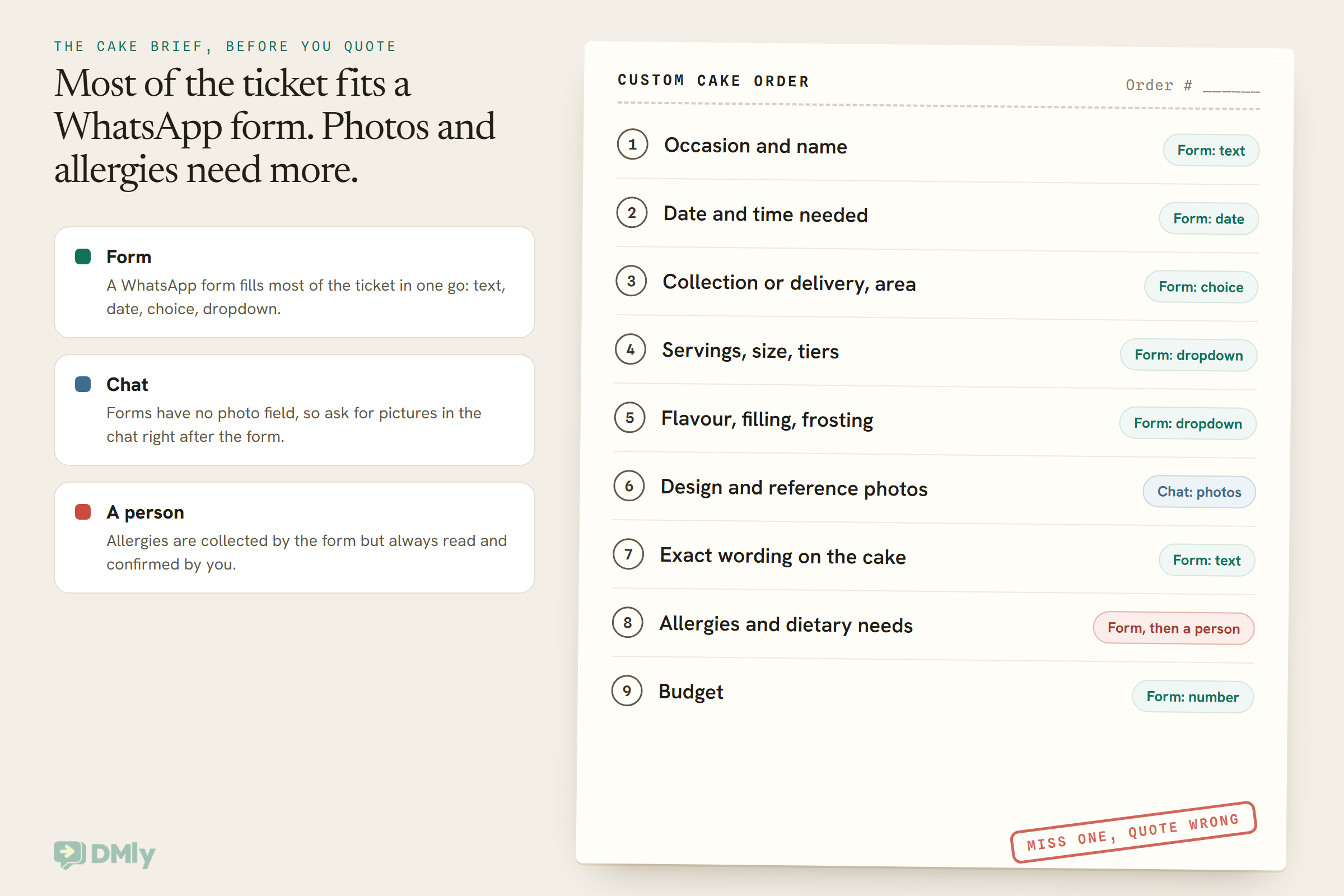
Before you quote a custom cake, you need nine details: the occasion, the date and time, collection or delivery, servings, flavours, the design, the exact wording, allergies and the budget. Miss one and you either quote wrong or bake wrong.
Think of it as the order’s mise en place. Here’s each detail, and why it earns its place.
- The occasion and whose name. A first birthday, a fortieth, a baby shower, a wedding. It tells you the style before you’ve seen a photo, and it’s the polite way to find out a name.
- The date and time it’s needed. Not just “Saturday”. The date, and whether that’s 10am or 6pm. This is the detail that decides whether you can say yes at all.
- Collection or delivery. If it’s delivery, which area. Delivery changes the price, the box and the timing.
- Servings, size and tiers. Ask how many people it needs to feed. Most customers don’t know what an eight-inch cake looks like, but they know how many guests are coming.
- Flavour, filling and frosting. Give them your list rather than an open question, or you’ll be quoting on a flavour you don’t make.
- The design, with photos. Reference pictures, colours, a theme. This is the one detail that’s easier to send than to type.
- The exact wording on the cake. Ask them to type it out, spelled exactly. “Happy Birthday Ayo” and “Happy Birthday Ayọ̀” are different cakes to the person who reads it.
- Allergies and dietary needs. Nuts, eggs, dairy, gluten, and anything else. Ask every time, even if the answer is usually “none”.
- The budget. Not everyone will answer, but those who do save you quoting a three-tier cake to someone who wanted a single tier.
Name and phone number come free on WhatsApp, which is one of the nicest things about taking orders there.
From First Message to Collection: The Six Stages of a Custom Cake Order
A custom cake order moves through six stages: enquiry, brief, quote, deposit, production and collection. Each stage has a job, a person or a bot doing it, and a message that moves the customer to the next one.
- Enquiry. The customer messages you. This opens WhatsApp’s 24-hour window, which means you can reply freely, with any text, photo or form, for the next 24 hours. If the window and its rules are new to you, our explainer on how WhatsApp’s 24-hour messaging window works is a five-minute read.
- Brief. You collect the nine details. A form or a short run of questions does most of this without you.
- Quote. You, a person, look at the brief and the photos and send a price. This is the one stage that should almost never be automatic for a bespoke cake.
- Deposit. The customer pays part of the price to hold the date. Until then, the date isn’t theirs.
- Production. You confirm the design, set a cut-off for changes, and bake. The balance is due before collection.
- Collection or delivery. A reminder the day before, a “ready” message on the day, and a thank-you afterwards.
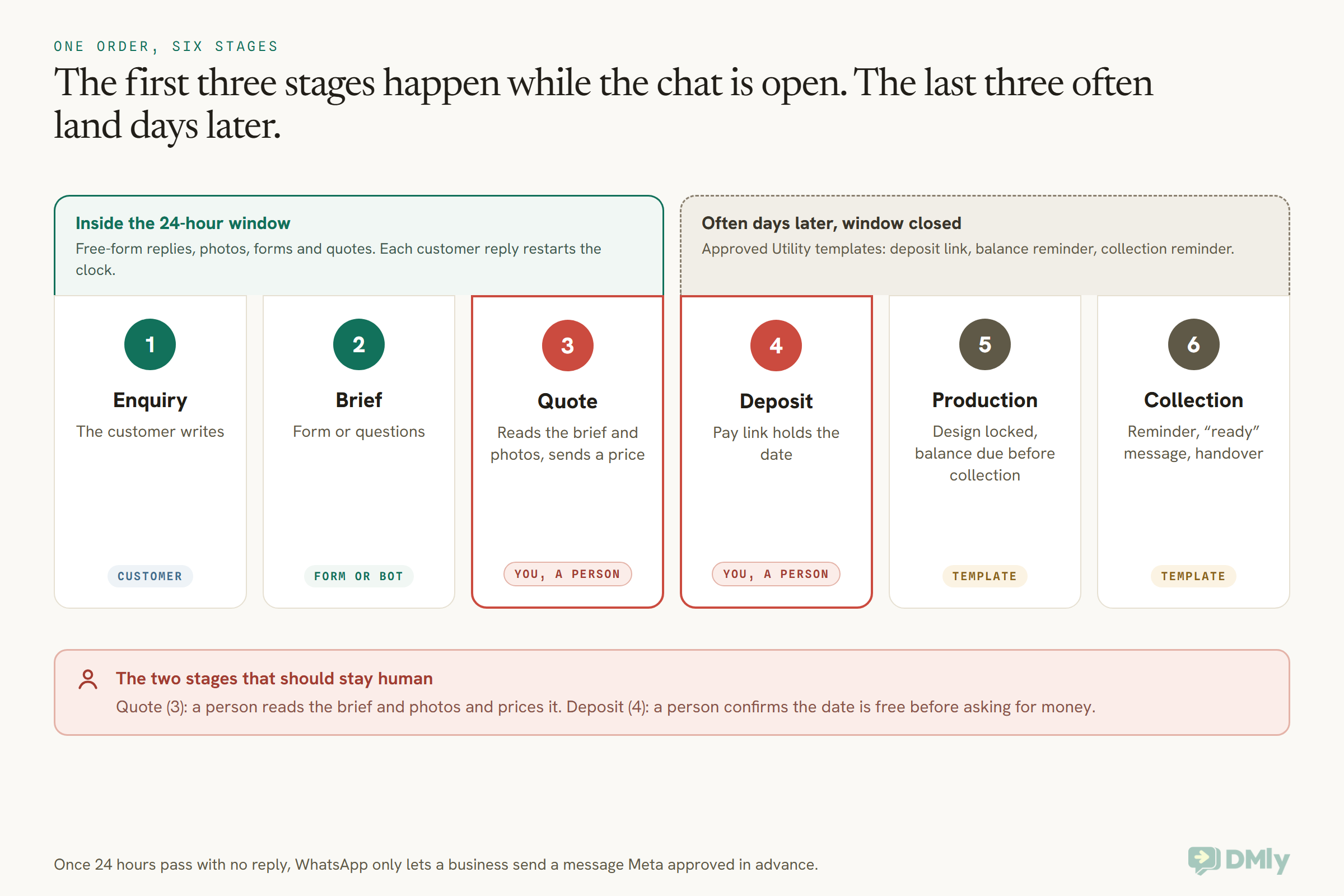
Notice where the time goes. The first three stages often happen in one evening, while the customer is chatting with you. The last three happen days or weeks later, when the chat has gone quiet. That’s why the later messages need to be approved templates: once 24 hours pass with no reply from the customer, WhatsApp only lets a business send a message Meta has approved in advance.
Set your own lead times too, and write them down where customers will see them. For example: three days’ notice for a single-tier cake, ten for a tiered one, and no new orders for a date once you’ve taken your limit. Those are illustrations, not rules. Your numbers depend on your oven, your team and your week.
How to Collect the Cake Brief on WhatsApp: Three Ways
You can collect a cake brief on WhatsApp with a saved reply you paste, an in-chat form the customer fills in, or a short run of automatic questions. All three work. They suit different sizes of business and different amounts of setup time.
1. A saved reply with the questions in it
The simplest version is a message you’ve written once and paste every time someone asks for a cake. In DMly these are Saved replies, kept in the reply box of the Unified Inbox. You give each one a title, such as “Cake brief”, and any teammate can drop it into a conversation in one click.
Two things to know. Saved replies don’t fill in names or other details for you; the text goes in exactly as written, and you add the personal bit before you send. And they’re ordinary messages, so they only work while the 24-hour window is open. That’s rarely a problem here, because you’re replying to someone who just messaged you. Our guide to the WhatsApp quick replies worth saving has more on building a small library of them.
A saved reply is perfect for a home baker taking a handful of orders a week. Its weakness is that the answers come back as one long message, or several, and you still have to pick them out.
2. A WhatsApp form (the neatest option)
A WhatsApp form opens over the chat when the customer taps a button. They fill in boxes and dropdowns without leaving WhatsApp, and tap submit. Meta calls these WhatsApp Flows; DMly calls them forms, and you can build one inside DMly without going near Meta’s own tools.
You’ll find them under Configurations → Bot Setup → WhatsApp → Forms. Start from Untitled form, then add one field per detail. The field types are Text, Email, Phone, Number, Paragraph, Dropdown, Choice, Date and Opt-in, and each one can be marked Required. For a cake brief that looks like this:
- Occasion: Dropdown (birthday, wedding, baby shower, anniversary, other).
- Date needed: Date.
- Collection or delivery: Choice.
- Delivery area: Text, not required.
- How many people: Dropdown with your size bands.
- Flavour and Filling: Dropdowns with only what you actually bake.
- Wording on the cake: Text, with a label that says “exactly as it should be written”.
- Allergies or dietary needs: Paragraph, required, so “none” has to be typed.
- Budget: Number, not required.
Give the form a Form title customers will understand (“Your cake order”) and a clear Submit button label. Then Publish. A published form can’t be edited in place, because Meta doesn’t allow it; if you change it later, DMly quietly makes a fresh copy that you publish again.
You can send the form three ways: from an automation, from the Inbox with the Send a form icon, or as an Open form button on a message template. The Inbox route needs the 24-hour window open. The template button is the one that reaches a customer after the window has closed.
How it works, if you’re curious. The customer’s answers land on their contact profile under Flow answers, with the question, the answer and the date. When an automation sent the form, the answers are also available to the next step as tokens like {{nfm.field_2}}, so you can thank them by echoing a detail back. Two catches from DMly’s docs: the step’s COMPLETED output fires on the customer’s next message, whether or not they submitted the form, and you can’t branch the flow on a form answer. So keep the message after the form neutral (“Thanks, we’ll look at this and come back to you with a price”) rather than assuming they filled it in.
One thing a form can’t do is take a photo. There’s no picture field in DMly’s form designer. That’s fine: the very next message can ask for one.
3. Automatic questions, one at a time
If you’d rather the chat feel like a conversation, an automation can ask each question in turn and wait for the answer. DMly’s User Input step has a Save answer to setting, so an answer can go straight onto a custom field on the contact, such as cake_date or cake_wording. Unlike a form answer, a saved field can be used later: a Condition step can branch on it, and a message can read it back with {{custom.cake_wording}}.
This is the right choice when you want the flow to do something different depending on an answer. “Collection” could lead to your address and opening hours. “Delivery” could ask for the area.
| Saved reply | WhatsApp form | Automatic questions | |
| Setup time | Five minutes | Half an hour | An hour or so |
| What the customer sees | A list of questions to answer | A tidy form over the chat | One question at a time |
| Where answers end up | In the chat, for you to read | Flow answers on the contact | Custom fields on the contact |
| Can the flow act on an answer? | No | No | Yes |
| Photos | Ask in the same message | Ask in the next message | Ask as one of the questions |
| Best for | A home baker | A busy shop | A shop with collection and delivery |
What to do with the design photos
Customers will send screenshots, Pinterest pins, photos of a cake from someone else’s party and, sometimes, a voice note describing all of it. In DMly they arrive in the conversation like any other message, and they’re kept with it. If your privacy policy or a client contract says customer files must stay in storage you control, the workspace owner can switch on Custom storage and send new media to your own S3-compatible bucket.
When the design is agreed, save the one reference photo that matters to the customer’s profile. Each contact has a Documents card on the Files & letters tab that takes JPG, PNG, WEBP and PDF files up to 20 MB. That way, whoever decorates on Saturday morning opens the contact and finds the agreed picture, not the eleven that came before it.
Then write what you agreed back to the customer in words. “Two tiers, pale pink buttercream, gold drip, three fresh roses, no fondant figures” is the line you’ll both point to if there’s any question later.
Can an AI Assistant Take Custom Cake Orders on WhatsApp?
An AI assistant can take orders for your standard cakes on WhatsApp, but a truly custom cake should be quoted by a person. The line between the two is whether the price can come from a list.
DMly’s AI ordering works from your own products. You add them in Offerings → Products with a price and tax, then give each one ordering rules under Finance → AI Ordering Settings. The rules are a good fit for a cake menu:
- Variants for sizes, each with its own price: six-inch, eight-inch, ten-inch.
- Options and modifiers for choices and add-ons, with a minimum and maximum and an added price: a choice of sponge, a choice of frosting, a piped message, fresh flowers.
- Preparation time in minutes, which the AI checks against the time the customer asks for. Two days is 2,880 minutes.
- Fulfilment: pickup, delivery or both, with what the AI must collect for each, such as a requested time, an address or a landmark. Delivery zones each carry their own fee, and are matched by the area’s name; DMly doesn’t measure distance.
You then install the AI Shopping Assistant or AI Food Ordering Assistant template and publish it. If you have a long list of cakes to add, the AI Catalogue Builder can draft names, descriptions and categories from a pasted list, though it never fills in prices, tax or stock for you.
What happens next is the part that suits a bakery. By default the AI doesn’t confirm anything. It builds a draft order in Finance → Orders as the customer chooses, then hands the conversation to your team, pauses itself and leaves a note linking to the order. No stock is taken, no invoice is raised and no payment is asked for until you’ve looked at it. You can let the AI confirm orders and send payment links later, once you trust it, but the templates ship with both switched off.
The limits are written into DMly’s docs, and every one of them is a good rule for cakes anyway. The AI can’t give discounts. It hands allergy and dietary questions to a person when your product details don’t answer them, and the food template never promises that anything is allergen-free. Changes to a confirmed order, cancellations and refunds go to your team. And if a teammate takes over the chat, the AI stops changing the order.
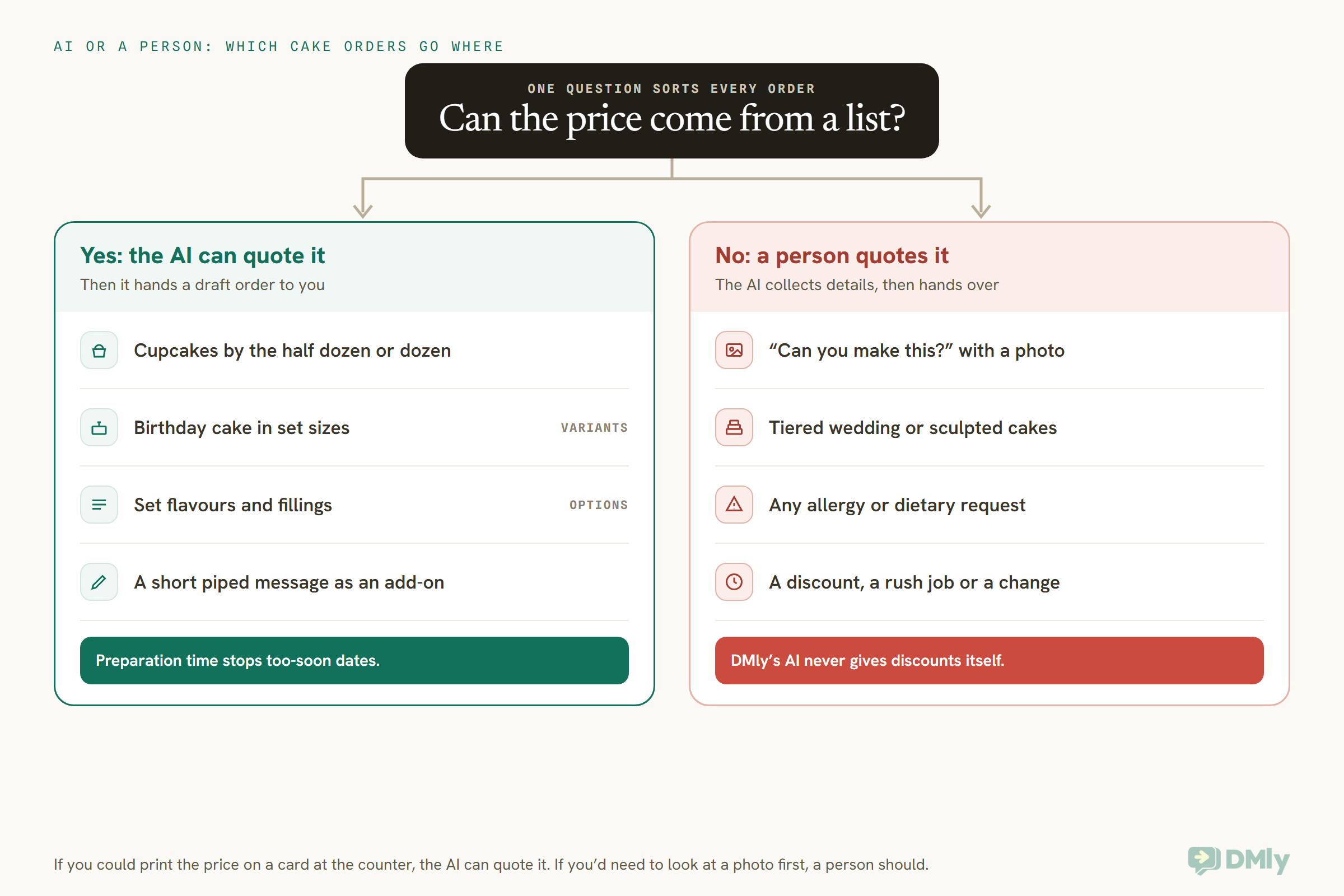
For the bespoke cakes on the right of that chart, the AI still has a job. With its Set custom fields tool switched on, it can ask the brief questions in conversation and write the answers onto the contact. With Move CRM stage it can move the contact to your “Brief received” stage, and with Hand over to a human it passes the chat to you to quote. DMly’s docs don’t say the AI looks at photos, so treat design pictures as something a person reviews. AI replies are included on every DMly plan; how many you get each month depends on the plan.
If you’d rather customers browse your standard cakes inside WhatsApp itself, Meta’s own catalogue is another option, with its own rules for what gets approved. Our guide on how to create a WhatsApp Business catalog that gets approved walks through it.
How to Quote and Take a Cake Deposit on WhatsApp
To take a cake deposit on WhatsApp, send the quote in writing, then send a payment link for the deposit, and only hold the date once that payment is recorded. A promise to pay isn’t a deposit, and neither is a screenshot of a bank app.
Start with the quote. Write it so the customer can say yes to it in one word: what they’re getting, the total, the deposit, when the balance is due, and your change and cancellation terms. There’s a copy-ready version in the messages section below.
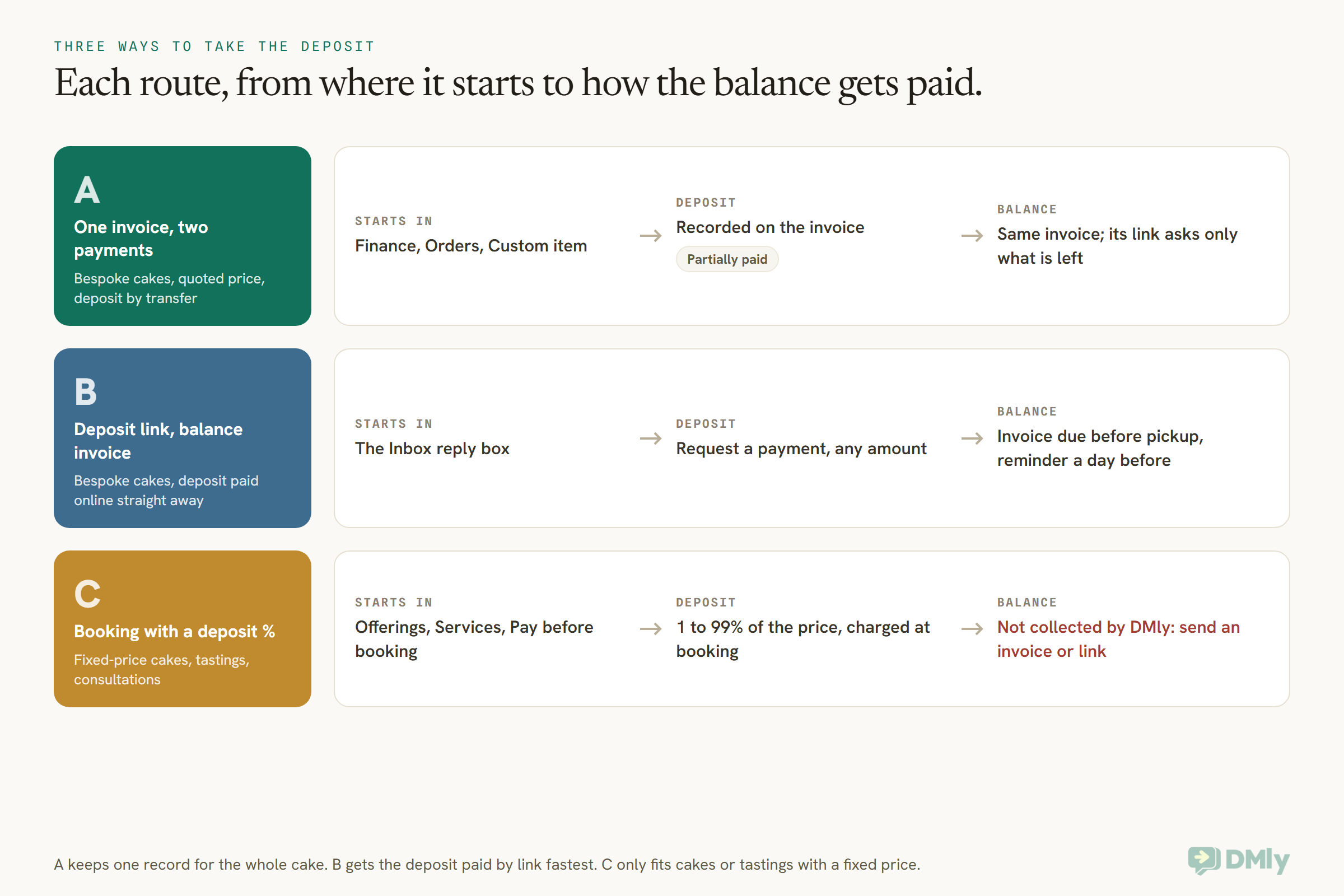
Then take the money. In DMly there are three tidy ways to do it, and which one fits depends on whether your cakes have fixed prices.
Route A: one invoice, paid in two parts
This suits a bespoke cake with a quoted price. Because the price is one-off, build it as an order first: in Finance → Orders, start a new order, use Custom item for a line like “Two-tier birthday cake, vanilla and raspberry, for 14 Nov”, and confirm it. Then use Generate invoice and send the invoice on WhatsApp.
If the customer pays the deposit by bank transfer, cash or card machine, record it on the invoice with Record payment. The invoice moves to Partially paid, and here’s the useful part: the invoice’s pay link always asks for the Balance due, not the original total. Share it again nearer the day and it’s re-minted for exactly what’s left. You never work out the remainder yourself.
Route B: a deposit link now, an invoice for the balance later
This suits a baker who wants the deposit paid online, by link, the moment the quote is accepted. In the Inbox, use Request a payment: it creates a payment link for any amount you choose, with no invoice behind it, and sends it into the chat. The payment lands in Finance → Payments like any other.
Later, send an invoice for the balance, with the due date set a few days before collection. DMly’s Invoice payment reminder automation (from the template library) then messages the customer a day before that due date with a Pay invoice button, and skips the message if they’ve already paid. If you’d like more on that chase, our guide to automatically reminding customers about unpaid invoices covers it in depth.
Route C: a booking with a deposit, for fixed-price cakes or tastings
If you sell cakes at fixed prices, or charge for a tasting or design consultation, DMly’s booking system can take the deposit for you. Set up the cake or the tasting as a service in Offerings → Services, choose Pay before booking, and enter a Deposit from 1 to 99 per cent. The booking is only confirmed once the deposit is paid. Two points from DMly’s docs: the percentage is taken of the full price including tax, and DMly doesn’t collect the balance for you, so send an invoice or a link for the rest. Our guide on accepting appointment deposits or full payment at booking goes through the settings.
Which payment methods the link can offer
A payment link opens your payment provider’s own checkout page. DMly connects to Stripe, PayPal, Paystack, Flutterwave, Razorpay, MyFatoorah, Mercado Pago and Monnify, so most bakers can use the provider they already have: Stripe or PayPal in the US and UK, Razorpay in India, Paystack, Flutterwave or Monnify in Nigeria, MyFatoorah in the Gulf, Mercado Pago in Latin America. If you connect more than one, choose which one takes the money under Finance → Settings → Gateways, in the Charge through setting. Our guide to sending WhatsApp payment links has the wider picture.
Bank transfers deserve their own mention, because many cake customers prefer them. In Nigeria and Ghana, a Paystack link can open straight onto a one-time bank account, and the payment confirms itself when the transfer lands. Monnify can send a one-off account number into the chat, confirmed the same way. Anywhere else, you can save your own bank details under Finance → Settings → Gateways and send them with an I’ve paid button; you then check your statement and choose Confirm transfer under Finance → Payments. Don’t also record the same money on the invoice, or it counts twice.
One setup step that catches people out. For every payment provider, you have to add DMly’s webhook address in the provider’s own dashboard. DMly can’t do it for you. Without it, a customer can pay successfully and DMly will still show the deposit as unpaid. Send yourself a small invoice and pay it before you rely on any of this.
Keeping the Order Book: Dates, Stages and Capacity
The order book for custom cakes is three things: a stage for every order, a clear record of the date, and an honest limit on how many cakes you take per day. DMly handles the first two well. The third is still yours to keep.
A stage for every order
DMly’s Pipeline View, under Contacts, shows your contacts as cards in columns. Every workspace starts with Lead, Engaged and Customer, and you can rename, add and reorder them. For a cake shop, try:
Enquiry → Brief received → Quoted → Deposit paid → In production → Ready → Collected
Drag a card along as the order moves. On a busy Thursday you can see at a glance who’s waiting for a quote, whose deposit hasn’t come in and which cakes are due out. Our guide to building a WhatsApp sales pipeline that maintains itself shows how far you can take this.
The stages can also send messages for you. DMly’s Pipeline stage changed trigger can be narrowed to the stage a contact moved from and the stage it moved to. So one automation can fire when a card lands in Ready and send the “your cake is ready” message, and another can fire when a card lands in Deposit paid and send the confirmation. Drag the card, and the customer hears from you.
A pipeline stage sits on the contact rather than on one order, so a customer with two cakes on the go shares one card. If that happens often, add a tag per order, or keep the details in an internal note on the conversation, where you can @ mention whoever decorates. Mentions only stay private inside a note, so never type one in the reply box.
A clear record of the date
Save the date on the contact as a custom field, such as cake_date, using DMly’s date type under Settings → Custom fields. A question step can save it for you, and a segment can then find everyone whose field is filled in. Read it back in messages with {{custom.cake_date}}.
You might be tempted to use DMly’s Birthday / key date trigger to send a reminder before that date. We wouldn’t for a one-off order. It’s built for dates like birthdays and anniversaries, and DMly’s docs don’t say whether it matches the year, so it may fire again next year. Use one of these instead, both of which are documented to track a real date:
- The balance invoice’s due date. Set it a day or two before collection, and the invoice reminder doubles as your “see you soon” nudge.
- A collection slot. Create a short service such as “Cake collection” with No payment required and reminder times set, then add the booking by hand from the Calendar for the agreed time. DMly then sends its booking confirmation and reminders on WhatsApp. They use DMly’s appointment templates, so read their wording first and make sure “appointment” reads sensibly to someone collecting a cake.
An honest daily limit
We looked, and DMly has no setting for “maximum cakes per day”. Nothing stops a customer, a teammate or an AI agreeing a fourth wedding cake on a Saturday you’ve already filled. Keep the count yourself, in your diary or a shared calendar, and check it before you send any deposit link. That check is the main reason the deposit stage in our timeline stays with a person.
Cake Order Messages to Copy for Each Stage
These cake order message templates cover the whole journey, from the first reply to the thank-you. Messages sent while the chat is open are ordinary replies and need no approval. Messages likely to go out after the 24-hour window closes need an approved template, and we’ve marked which category Meta is likely to put each one in. Our explainer on marketing, utility and authentication templates covers why the category matters.
1. First reply to a cake enquiry
Hi [Name], thank you for thinking of us for your cake! To give you a proper price, we need a few details. Tap the button below and it takes about two minutes. If you have pictures of cakes you love, send them here straight after.
Button: Start my cake order
Category: none needed. It’s a reply inside the window, sent with a form step or the Inbox form icon.
2. Asking for photos after the form
Thanks, [Name]. Now the fun part: send us any photos of cakes, colours or themes you like. Screenshots are perfect. Tell us what you like about each one, for example “this colour, but not the flowers”.
Category: none needed, inside the window.
3. The quote
Here’s your quote, [Name]:
[Cake description, size, flavours, design notes]
For: [day, date] at [time], [collection / delivery to area]
Wording: “[exact wording]”
Allergies noted: [none / details]
Total: [amount]. A deposit of [amount] holds your date; the balance of [amount] is due by [date].
Design changes are welcome until [date]. If you cancel after paying the deposit, [your policy].
Reply YES and we’ll send the deposit link.
Category: none needed if sent while the chat is open, which it usually is. If you can’t quote within 24 hours, start with a short Utility message tied to their enquiry (“Your cake quote for [date] is ready”) and send the details once they reply.
4. The deposit request
Thank you, [Name]! Here’s the link for your [amount] deposit. Your date isn’t held until it’s paid, so if you’d like to keep [date], please pay today.
Button: Pay deposit
Category: Utility if it goes out after the window has closed. In DMly a payment link sent outside the window uses the dmly_payment_request template, which is listed as Utility.
5. Booking confirmation
You’re booked, [Name]. Deposit received. Your [cake description] will be ready for [collection / delivery] on [day, date] at [time]. The balance of [amount] is due by [date]. We’ll remind you the day before.
Category: Utility. It confirms a specific order, with no offer in it.
6. Design sign-off and the change cut-off
Hi [Name], here’s the final design we’ve agreed: [one-line description]. If anything needs changing, please tell us by [cut-off date]. After that we’ll be baking!
Category: Utility, as an update about their order. Keep it free of offers.
7. Balance reminder
Hi [Name], a quick reminder that the balance of [amount] for your cake on [date] is due by [due date]. You can pay with the button below.
Button: Pay invoice
Category: Utility. DMly’s invoice reminder template does this job for you.
8. Ready for collection
Good news, [Name]: your cake is ready! You can collect it from [address] until [time] today. Please keep it flat in the car, and somewhere cool until the party.
Category: Utility. Send it automatically when the order’s card moves to Ready.
9. After collection
Thank you for choosing us for [occasion], [Name]. We hope everyone loved it. If you took a photo of the cake at the party, we’d love to see it!
Category: Marketing if sent as a template. Meta counts thank-you notes as relationship-building messages, even with no offer in them. If the customer messaged you within the last 24 hours, for example to say they’d collected, send it as an ordinary reply instead.
10. Next year’s occasion
Hi [Name], it’s nearly a year since we made [occasion] cake for [name]. If you’re planning this year’s, we’d love to help. Reply CAKE to start.
Category: Marketing. Only send it to customers who agreed to hear from you, and know that Meta currently doesn’t deliver marketing templates to US (+1) phone numbers at all.
Allergens, Changes and Cancellations: Put Them in Writing
Allergy details, change cut-offs and cancellation terms should all be agreed in writing in the chat before the deposit is paid. WhatsApp gives you that writing for free, as long as you ask the questions.
On allergens, the rules depend on where you bake, so check your own food regulator. Two examples. In the US, the FDA lists nine major food allergens: milk, eggs, fish, crustacean shellfish, tree nuts, peanuts, wheat, soybeans and sesame. In England, Wales and Northern Ireland, the Food Standards Agency names 14 allergens, and says that when food is sold by distance selling, such as online or by phone, allergen information must be given both before the purchase is completed and when the food is delivered. A WhatsApp order is a fair candidate for that description, and the FSA’s own advice is to give the information in writing at both points.
In practice that means three things:
- Ask about allergies on every order, as a required question.
- Put what you were told in the quote, so the customer confirms it in writing.
- Never promise “allergen-free” unless your kitchen can truly deliver it. DMly’s own food ordering template refuses to make that promise, which is a sensible line to copy.
For changes, set a cut-off and say it twice: once in the quote and once in the design sign-off. For cancellations, decide your deposit policy before you need it and put it in the quote. If you refund, the refund goes back through your payment provider or your bank; in DMly, voiding an invoice credits back only what’s still unpaid, so money already paid stays on the record.
Setting Up Custom Cake Orders on WhatsApp in DMly, Step by Step
Setting up custom cake orders on WhatsApp in DMly takes about an afternoon: a payment provider, a form, a few fields, your pipeline stages and two or three automations. Here’s the order to do it in.
- Connect a payment provider. Go to Configurations → Integrations, open your provider’s tile and paste its credentials. Add DMly’s webhook address in the provider’s own dashboard. If you connect more than one, pick the one that takes the money under Finance → Settings → Gateways → Charge through. Pay yourself a small test invoice.
- Write two saved replies. In the Inbox reply box, open Saved replies and create “Cake brief” and “Deposit policy”. Even with a form, you’ll use these daily.
- Build the cake form. Go to Configurations → Bot Setup → WhatsApp → Forms, choose Untitled form, add the fields from the brief, set the title and submit button, Save, then Publish.
- Define your custom fields. Under Settings → Custom fields, add
cake_dateas a date andcake_wordingandcake_allergiesas text, if you’ll collect them with question steps. - Set your pipeline stages. Go to Contacts → Pipeline View and use Add stage for Brief received, Quoted, Deposit paid, In production, Ready and Collected.
- Create the enquiry automation. Start a new automation on your WhatsApp number with a keyword trigger such as CAKE. Add a WhatsApp Form (Flow) step with your form and a button label of up to 20 characters (“Start my cake order” fits). After it, a neutral thank-you that asks for photos, then a Handover to Human step so the quote comes from you.
- Add the money automations. From the template library, install Invoice payment reminder for balances. If you take transfers to your own account, Send bank details for a new invoice fires when an invoice is sent.
- Add the stage messages. Build one automation on Pipeline stage changed, narrowed to the Ready stage, that sends message 8 above as an approved Utility template. Repeat for Deposit paid with message 5.
- Optional: AI for standard cakes. Add your fixed-price cakes in Offerings → Products, give them ordering rules in Finance → AI Ordering Settings, install the AI Shopping Assistant or AI Food Ordering Assistant template, read its prompt, and publish. Leave confirmation and payment links off to begin with.
- Put the link everywhere. Add your WhatsApp link, with CAKE pre-typed if you can, to your Instagram bio, website and the card in every cake box.
Before you go live, test it as a customer would. Message your own number from a personal phone, type CAKE, fill in the form, send a photo, and walk the order all the way to Ready. You’ll find the awkward wording in five minutes.
How This Looks in Six Markets
These are illustrations of how the same workflow adapts, not case studies.
- A home baker in Houston. Takes eight to ten orders a week, so a saved reply is enough for the brief. Deposits by Stripe link through Route B, and the balance by invoice. Because marketing templates don’t currently reach +1 numbers, next year’s birthday message goes out by text message, or not at all, rather than as a WhatsApp template.
- A cake studio in Bengaluru. Sells standard designs in three sizes with set flavours, and adds an eggless option as a Variant if that’s something it bakes. The AI quotes the standard range and hands bespoke requests to the owner. Deposits through Razorpay.
- A bakery in Lagos. Most customers prefer transfer, so deposits go out as Paystack transfer-only links or a Monnify account number in the chat, both of which confirm themselves. Paystack charges 1% capped at ₦300 for a transfer, according to DMly’s docs, which is worth knowing on a large wedding cake.
- A cake shop in Manchester. Uses the form with a required allergy question, repeats the answer in the quote, and puts a written allergen note in the box at collection, matching the FSA’s before-and-at-delivery advice.
- A patisserie in Dubai. Takes most orders for events weeks ahead, uses MyFatoorah for deposits, and relies on the Pipeline View to see which cakes are due each weekend.
- A baker in São Paulo. Uses Mercado Pago for the deposit link and a short “Cake collection” service so customers get a reminder before pickup.
What It Costs to Run
The running cost of cake orders on WhatsApp is mostly Meta’s message charges and your payment provider’s fees. Neither is large per order, but both are worth knowing.
- Replies while the chat is open. Since 1 October 2026 Meta charges for these service messages on the WhatsApp Business Platform, but each business phone number gets 1,000 free a month. A small bakery may never pass that. Our guide to service messages versus templates explains what you’re actually charged for.
- Utility templates for deposit links, balance reminders and collection messages are charged per message at your market’s utility rate, and from 1 October 2026 that includes utility messages sent while the chat is open.
- Marketing templates, such as next year’s birthday message, are charged at your market’s marketing rate, and need the customer’s agreement.
- Click-to-WhatsApp ads. When a customer starts the chat from one, Meta opens a free entry point window during which your messages aren’t charged.
- Payment fees are set by your provider, not by DMly.
The free WhatsApp Business app on your phone isn’t charged at all. The charges above apply to the WhatsApp Business Platform, which is what tools like DMly connect to.
Frequently Asked Questions
How do I take custom cake orders on WhatsApp without losing details?
Collect the same nine details for every order before you quote: the occasion, date and time, collection or delivery, servings, flavours, design photos, exact wording, allergies and budget. A saved reply, a WhatsApp form or automatic questions can collect them, and the quote should repeat them back so the customer confirms them in writing.
Can customers send cake photos through a WhatsApp form?
Not through a form built in DMly, because its form designer has no photo field. Ask for photos in the chat straight after the form instead. They arrive in the conversation, and you can save the agreed one to the customer’s Documents card.
How much deposit should I take for a custom cake?
That’s your decision, and it should cover what you’d lose if the customer cancelled late. Whatever you choose, state it in the quote along with your cancellation terms. If you use a DMly booking to take it, the deposit is set as a percentage from 1 to 99.
Can I send a cake order form to someone who messaged me last week?
Not from the Inbox, because sending a form there needs the 24-hour window to be open. You can send an approved template with an Open form button, which reaches customers outside the window, or send any approved template and wait for them to reply.
Will an AI chatbot take bespoke cake orders for me?
It can take orders for standard cakes with fixed prices, and by default it hands each draft order to you to check. For bespoke cakes it can collect the brief and pass the chat to you, but the quote should come from a person who has looked at the photos.
How do I remind customers to pay the balance and collect their cake?
Send the balance as an invoice with a due date a little before collection, and use DMly’s Invoice payment reminder automation, which messages a day before the due date and skips customers who have paid. For a collection reminder, book a short collection slot or send a “ready” message when you move the order to its Ready stage.
Do I need the WhatsApp Business API for this?
You can take orders by hand on the free WhatsApp Business app. Forms, automations, payment links and approved templates need the WhatsApp Business Platform, which DMly connects to.
The Order, in Its Place
Mise en place isn’t about being tidy for its own sake. It’s about knowing, before you crack the first egg, that everything you need is in front of you. Custom cake orders on WhatsApp deserve the same moment.
Give the order a place to sit: a brief that collects all nine details, a quote that repeats them back, a deposit that holds the date only once it’s paid, and a stage on your board that tells you, and the customer, what happens next. Then the nut allergy arrives on Monday, in the form, not on Thursday after the sponge is baked.
Start small. A saved reply and a payment link will do on day one. Add the form when you’re tired of scrolling for answers, and the stage messages when you’re tired of typing “your cake is ready”. The baking was always the hard part. The ordering shouldn’t be.
Writing about WhatsApp automation, bookings and growth for local business.
Turn WhatsApp into your busiest channel.
Start free and run message, bookings, payments and reviews in one place.
