
Every instructor does two counts before a class starts, and class no-shows live in the gap between them. The first count is the list: twenty names booked into the spin class. The second is the room: sixteen bikes moving, four with nobody on them, and two people at the door asking if there’s space because the class showed as full.
You can’t make those two counts match every time. People get ill, trains are late, kids need picking up. But you can close most of the gap, and you can do it without turning into the gym that fines everyone for breathing. In this guide, we’ll go through why a class no-show costs more than an empty bike, how reminders, a cancellation deadline, prepayment and a no-show fee each do a different job, a policy you can adapt, and exactly what DMly does with a class seat (including the parts it doesn’t automate, so nothing surprises you on a Monday).
Why Class No-Shows Cost a Gym More Than an Empty Spot
Class no-shows cost you twice: the member who booked and didn’t come, and the member who wanted that place and couldn’t get it. A one-to-one booking that goes unused wastes an hour of someone’s time. A class seat that goes unused wastes a place somebody else would have paid for or turned up to.
Think about what actually happens when a full class runs four short:
- The waitlist never moved. The people queuing for that class were told it was full. Some of them stopped trying to book it.
- The instructor taught to a gap. A small group class feels flat with empty spots. Members notice, and a class that feels flat is easier to skip next week.
- Your timetable looks wrong. If the 6pm class is “always full” on paper but half-empty in the room, you might add a second session you don’t need, or cancel a quieter class that people actually attend.
- The no-shower learns nothing happens. If booking and not coming has no consequence, booking “just in case” becomes the habit. That’s the real driver of class no-shows in most gyms: not bad people, but booking that costs nothing to abandon.
So the goal isn’t punishment. It’s making the easy thing (cancelling in time) easier than the lazy thing (not turning up), and making a place cost just enough to be worth keeping.
One thing you won’t find here is a figure telling you what your no-show rate “should” be. We haven’t found a gym-specific rate measured at source that we’d trust, and a number borrowed from clinics or restaurants would mislead you. Measure your own instead; there’s a section on how near the end.
First, Know Which Bookings Are Classes and Which Are Appointments
Before you change any setting, sort your timetable into two piles: group classes, where many members share one session, and one-to-one sessions such as personal training or an induction. They need different tools, and in DMly they genuinely behave differently.
In DMly, the type is set on the service itself, at Offerings → Services, where a service is either an appointment or a Class. A spin class, a HIIT circuit or a reformer pilates session is a class: it has a Capacity, an optional waitlist and a fixed start time. A personal training session is an appointment: one member, one trainer, one slot.
Here’s why the pile matters. A booked class seat gets the same confirmation and reminders as an appointment, but the automations around it are different. Booking a seat fires Class booked, not Appointment booked. Cancelling a seat fires only Class cancelled. And marking a seat attended or no-show fires no automation at all. So anything you’ve read about “an automatic message after a no-show” applies to your personal training sessions, not to your classes.
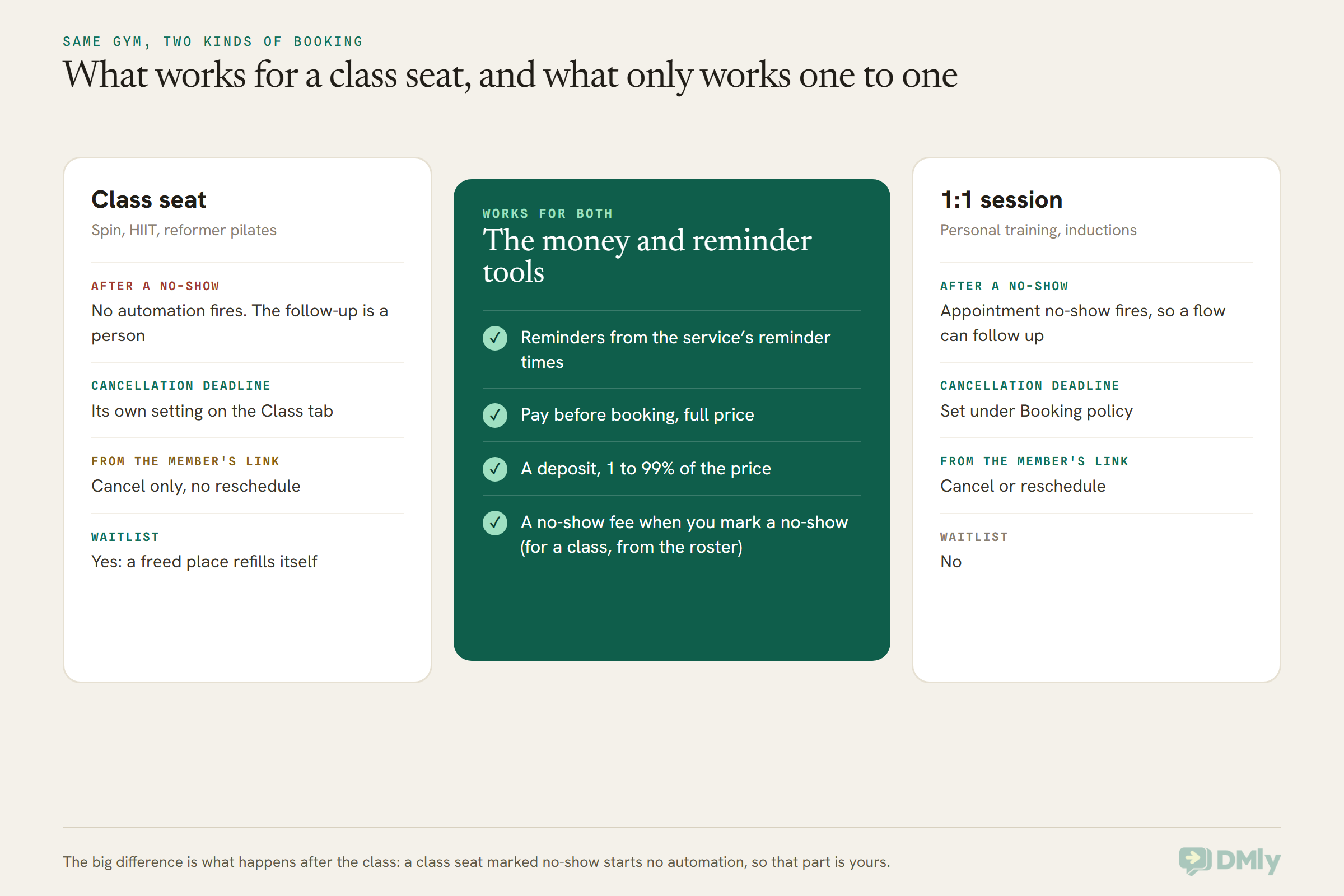
If you only run classes, keep reading anyway. Plenty of gyms find that the one-to-one pile (inductions, PT, body composition checks) is where an automated no-show follow-up is worth building, and classes are where reminders and the waitlist do the heavy lifting.
What Happens to a Class Seat, From Booking to Roster
A class seat passes through five moments where you can prevent a no-show or recover from one: the booking, the reminders, the cancellation deadline, the class itself and the roster afterwards. Each of the tools in this guide sits at one of those moments.
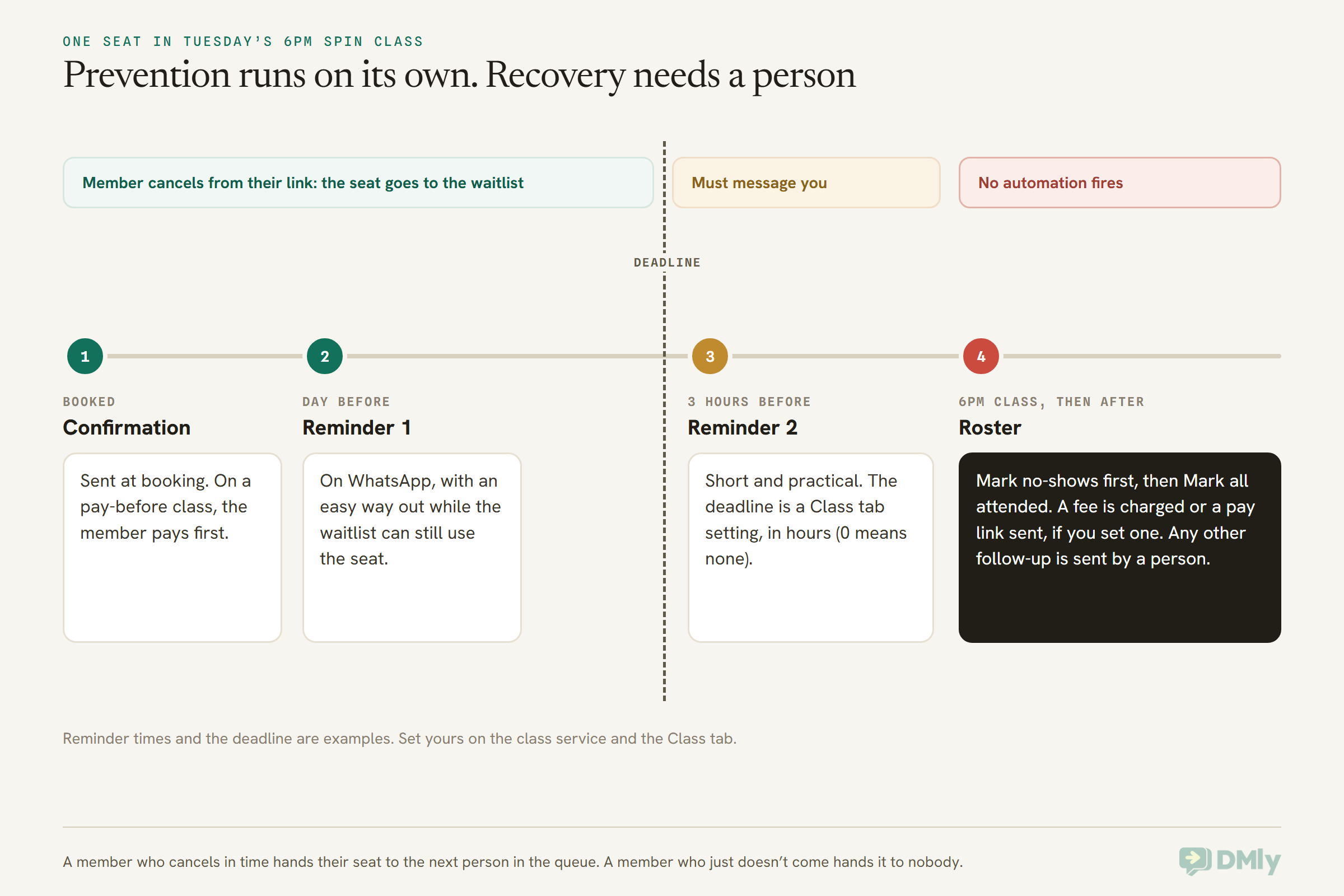
Notice that the waitlist sits inside the green stretch. A member who cancels in time hands their seat to the next person in the queue automatically. A member who just doesn’t come hands it to nobody. That’s the whole case for reminders and a sensible deadline in one picture.
Class Reminders on WhatsApp That Make Cancelling Easy
Reminders are the cheapest way to cut class no-shows, because most missed classes are forgotten or quietly abandoned, not deliberately skipped. A reminder catches the member who forgot, and it gives the member who can’t make it a moment to cancel while their seat is still useful to someone else.
In DMly, class reminders come from the class service itself. Open the class at Offerings → Services and set its reminder times (for example, a day before and a few hours before). A booked seat creates a normal booking behind the scenes, so those reminders go out exactly as they would for a one-to-one appointment, on the member’s channel, which for most gyms means WhatsApp.
A few details decide whether they actually arrive:
- The reminder template must be approved. Most reminders land outside WhatsApp’s 24-hour window (the period after a member’s last message when you can reply freely). Outside it, WhatsApp only delivers a pre-approved template. DMly installs a reminder template for this,
dmly_appointment_reminder, filed as Utility. If it isn’t approved, the reminder is dropped rather than sent as plain text, so check its status in Templates before you rely on it. - Missed reminders aren’t caught up. If a member has opted out, the reminder is skipped, not retried later. If you pause the bot on a member’s chat, test whether their reminders still go before you rely on it.
- People on the waitlist get nothing. A waitlisted member holds a place in the queue but has no booking yet, so no reminders go to them until they’re promoted into a seat.
- Pay-before seats wait for the money. On a class you charge for up front, no confirmation and no reminders are scheduled until the payment clears.
Two reminders suit most gym classes: one the day before, when there’s still time for a waitlisted member to take the place, and one a few hours before, when the member is deciding whether to pack a bag. More than that starts to feel like nagging.
What a good class reminder says
The reminder’s real job is to make cancelling the obvious thing to do if plans changed. Name the class and the time, say how to cancel, and say why it matters (someone’s waiting). Here are three you can adapt. They’re written to stay in the Utility category: about one booking, with no offers.
1. The day-before reminder (Utility)
Hi [Name], see you tomorrow at [time] for [class] with [instructor]. Can’t make it? Please cancel from your booking link before [deadline] so someone on the waitlist can take your bike. Thanks!
2. The same-day reminder (Utility)
Hi [Name], [class] starts at [time] today at [gym]. Bring water and a towel. If something’s come up, let us know here and we’ll free your place.
3. For a class with a waitlist that’s always long (Utility)
Hi [Name], you’re booked into [class] at [time] tomorrow. It’s full with people waiting, so if you can’t come, please cancel before [deadline]. It takes ten seconds and gives someone else the spot.
Keep offers, upsells and “while you’re here, try our new class” lines out of reminders. Meta’s category rules say a message that promotes something is marketing, and a reminder that becomes marketing needs marketing consent and can’t be delivered at all to US (+1) numbers. Our guide to WhatsApp message templates explained covers the three categories, and there are more wordings in our appointment reminder message templates.
Letting members cancel in the chat
A member who reads “let us know here” and replies “can’t make it, sorry” needs someone, or something, to act on that reply. You’ve got three options:
- A person cancels it. Whoever is on the inbox cancels the seat from Appointments → Calendar. Fine for a small gym with someone at the desk.
- The member uses their own link. Every booking has a private manage page where a member can cancel a class seat (but not reschedule it). Point them back to it.
- An AI assistant does it. DMly’s AI Class Booking bot template can list classes, book, show and cancel a member’s class bookings in the chat, using the Cancel a class booking tool. Test how it handles a cancellation inside your deadline before you switch it on, and read our guide to building a WhatsApp AI assistant for a gym first.
One small gap to know about: when a class seat is cancelled, DMly doesn’t send its own cancellation message (it does for one-to-one appointments). If you want members to get a “you’re cancelled, thanks for letting us know” reply, build a small flow on the Class cancelled trigger. That trigger is real and does fire for seats. For the bigger picture of two-way reminders, see two-way appointment reminders on WhatsApp; remember that the reschedule button belongs only on one-to-one reminders.
Set a Class Cancellation Deadline Members Can Live With
A cancellation deadline draws the line between a member giving their place back in time and a late cancellation that’s nearly as bad as a no-show. Without one, a member can cancel thirty seconds before class and technically have done nothing wrong.
In DMly, classes have their own Cancellation deadline (hours) on the Settings → Class tab of Appointments, separate from the one for one-to-one appointments under Booking policy. It starts at 0, which means a member can cancel from their link right up to the start time. Set it to the number of hours you need to realistically refill a seat.
How many hours? Think about who’s on your waitlist and when they decide. A few rules of thumb:
- Early morning classes need a deadline the evening before. Nobody on a waitlist is checking WhatsApp at 5:30am to grab a 6am spot.
- Lunchtime and evening classes can usually work with a few hours, because people decide during the working day.
- Small specialist classes (reformer, a strength cohort) might want a longer deadline, because the waitlist is shorter and each seat matters more.
The deadline only limits what members can do themselves. You can always cancel a seat from the calendar, even five minutes before class. That gives you room to be kind when a member messages to say their child is ill.
What happens to a late cancellation
Here’s the part to be honest about: DMly has no late-cancellation fee. A no-show fee exists (more on that below), but cancelling late, inside your deadline, doesn’t charge anything on its own. So a late canceller who messages you leaves you with a choice:
- Cancel the seat. The place goes to the next person on the waitlist, which is often the best outcome for the class. No fee is charged. If your policy says late cancellations pay, send a payment link yourself from Finance.
- Leave the seat booked and mark a no-show after class. The no-show fee applies if you’ve set one. But the seat isn’t released, so the waitlist never moves. Use this only when it’s too late for anyone to take the place anyway.
Whichever you choose, write it into your policy so the front desk doesn’t make it up on the spot.
Deposits and Prepayment for Gym Classes: Where They Fit
Money up front cuts class no-shows because a seat that cost something is worth turning up for, but how much you take, and when, should depend on the kind of class. A member on an unlimited plan, a drop-in visitor and someone booking a six-week course are three different situations.
Pay before booking for drop-ins
For drop-in classes, the simplest version is to take the full price at booking. In DMly, set the class service’s payment mode to Pay before booking, with a price above zero. The seat is held while the member pays, and only becomes a confirmed booking (with its confirmation and reminders) once the payment clears. If they don’t pay, the hold expires and the seat goes back on sale.
This needs a connected payment gateway. DMly connects Stripe, PayPal, Paystack, Razorpay, MyFatoorah, Mercado Pago and Monnify, plus Flutterwave for Nigeria. Without a gateway, a pay-before class can’t be booked at all: the member sees a message asking them to contact you instead.
Deposits: for personal training and for classes
A Deposit lets a pay-before service take part of the price up front, as a percentage from 1 to 99. The booking page shows what’s paid now and what’s due at the session, and the checkout charges exactly the deposit. DMly doesn’t chase the balance: take it in person, or send an invoice or a link yourself. A booking only shows as paid once the full price is in, so deposit-only bookings show as not paid, which is how you spot who still owes you.
For personal training and other one-to-one sessions, that works on the booking page, the Calendar, the AI agent, the mobile app and the API. Classes take a deposit too: DMly’s docs say a class service on Pay before booking has the same Deposit field, and every seat checkout (the booking page, a waitlist promotion, a batch enrolment) then asks for the deposit, not the full price. The balance is yours to collect, as with any deposit.
Honestly, for most gym classes a deposit is the wrong shape anyway. A drop-in class is a small amount; splitting it into a deposit and a balance creates two payments for one session. Deposits make more sense for the expensive end: a workshop, a six-week course, a small-group block or a PT package. For a course, many gyms find it cleaner to sell the course as one paid item and enrol the group using DMly’s Batches.
Class packs: the prepayment you might already have
If you sell class packs or credit-based memberships, you’re already taking money up front. In DMly, a Plan grants a member credits, and a class service with a Credit cost takes credits when the member books. Two rules matter for class no-shows:
- A no-show already costs the member a credit. The credit is taken at booking, and nothing gives it back: not a cancellation, not a no-show. For a pack holder, a no-show isn’t free, even with no fee set.
- So does a cancellation. If your policy says cancelling in time keeps your credit, you’ll need to give it back yourself with Add credits on the member’s profile. Otherwise your policy and your software disagree, and the member notices first.
Also know that a short balance doesn’t stop a booking: a member with fewer credits than the class costs can still book, and no credit is taken. If a pack must be enforced, check balances. Our guide to class capacity and waitlists covers paid classes in more depth.
The paid waitlist: a promotion is not a free seat
On a pay-before class, a member promoted off the waitlist doesn’t get a confirmed seat. They’re sent a checkout link and have to pay within a payment hold; if they don’t, the seat goes to the next person. That’s good for you (the seat keeps moving) but it can feel abrupt to a member who gets promoted at an awkward hour. Tell waitlisted members in your policy that a freed place has to be paid for quickly. By default a promoted place is held for two hours (the Waitlist place length under Slot held for payment, which you can change), so put your own setting in the policy.
And keep your gateway connected while any paid class has people waiting. If DMly can’t create a checkout link when it promotes someone, it confirms the seat anyway and marks it paid without a payment, rather than leave the member stranded.
Using a No-Show Fee to Cut Class No-Shows Without Losing Members
A no-show fee works on class no-shows because it gives booking a small cost that only applies to people who neither came nor cancelled. It’s the tool most likely to change behaviour, and the one most likely to upset someone, so set it up carefully.
In DMly, the No-show fee can be set on the class service at Offerings → Services, or as a workspace default at Appointments → Settings → Booking policy. The service’s own fee wins; set a service’s fee to 0 to exempt it from the default. It works whatever the payment mode, including No payment required, which matters for gyms: your unlimited members’ free classes can still carry a no-show fee.
How the fee is actually taken
The fee is charged only when someone marks the seat as a no-show. For a class, that’s the cross next to the member’s name on the roster. Then:
- If the member has a saved card, it’s charged straight away, and the member gets a message saying a missed booking has been charged and inviting them to reply if they think it’s wrong.
- Otherwise, they’re sent a payment link on the channel they use.
Here’s the gym-specific bit. Cards are saved only when a member sets up automatic payment for a subscription. Most salons and clinics have few of those. Gyms have lots: every member on an auto-renewing monthly membership has a card on file. So at a gym, a no-show mark often means an immediate card charge, not a polite link. Make sure members agreed to that when they joined, in writing, and that your front desk knows a tap on the roster moves real money. (Saved cards work on Stripe, PayPal, Paystack, Razorpay and MyFatoorah; not on Mercado Pago, Monnify or Flutterwave, where members get a link.)
A few more rules from DMly’s docs:
- Once per booking. Marking the same seat a no-show twice doesn’t charge twice.
- Not refunded if you change your mind. Switching the seat back to booked doesn’t refund the fee. A mistaken mark means a manual refund, so the roster needs care.
- Separate from any deposit or prepayment. DMly doesn’t subtract what the member already paid. If the prepayment is meant to be the penalty, leave the fee blank.
- It needs a gateway. With none connected, nothing is charged and your team gets a No-show fee not collected alert. Connect one within 30 days and DMly sends the link itself.
Mark the roster in the right order
At the end of class, mark the no-shows first, then use Mark all attended for everyone else. Mark all attended only changes seats still at Booked, and leaves seats you’ve already marked No-show alone, so doing it in that order is safe. Unpaid pay-before seats can’t be marked either way; they show an Unpaid flag instead.
If you forget, you’re not stuck. About a day after a class, DMly closes the session off, but the roster still lets you mark Attended or No-show afterwards. What you can’t rely on is DMly deciding for you: it never marks anyone a no-show on its own, so a no-show nobody marks is never charged.
No “first one free” setting
Many gyms want a grace no-show before any fee. DMly doesn’t have a setting for that: if a class has a no-show fee, every seat you mark as a no-show is charged. You’ve got two honest ways round it:
- Start with no fee for everyone, mark no-shows anyway (so you have the record), and decide by hand which repeat no-showers get a payment link or a conversation.
- Set a small fee for everyone and explain it at signup. Simple, predictable, and nobody can say they were singled out.
What you shouldn’t do is set a fee and then quietly not mark people you like. The roster is also your attendance record, and loyalty points for classes are awarded on Attended, so a skewed roster skews everything else.
After a Class No-Show: The Follow-Up Is a Person, Not a Flow
DMly doesn’t run any automation when a class seat is marked no-show, so the follow-up message after class no-shows is sent by a person. That surprises people, because one-to-one appointments do have an Appointment no-show trigger. Class seats don’t fire it, and they don’t fire any class trigger either. If you’ve read that you can build a class no-show flow, there’s nothing for it to run on.
The good news is that a person is usually better at this anyway. A member who missed one class doesn’t need a message at all. A member who’s missed three in a row might be about to quit, and an automated “we noticed you missed class!” is the wrong tone for that.
Here’s a simple weekly routine:
- Go to Appointments → Bookings, open the Past tab, and set the status filter to no-show. Every control writes to the address bar, so bookmark the filtered view as “this week’s no-shows”.
- Look for names that appear more than once.
- For first-timers, do nothing. If a fee was charged, DMly has already told them.
- For repeats, open their conversation in the inbox and send a short, human note. Tag them (for example “repeat no-show”) so the next person sees the history.
Set up a couple of Saved replies in the inbox so this takes seconds. Saved replies don’t fill in names or times, so insert the text and add the personal bit by hand. And remember the 24-hour window: if the member hasn’t messaged you in the last day, a free-text reply won’t send on WhatsApp, and you’ll need an approved template instead.
4. A note after a second or third miss (send inside the 24-hour window, or as a Utility template)
Hi [Name], it’s [your name] from [gym]. We’ve missed you at [class] the last couple of times. No problem at all, just checking everything’s OK. If the time doesn’t work any more, tell us and we’ll help you find one that does.
5. When a fee was charged and the member disputes it (inside the window)
Thanks for letting us know, [Name]. I’ve checked Tuesday’s roster and I can see what happened. [Explain, and refund if it was our mistake.] Sorry for the hassle.
6. Telling a member about the policy after their first fee (Utility)
Hi [Name], you were marked as not attending [class] on [date]. Under our class policy, missed classes without cancelling by [deadline] have a [fee] charge. If you think this is wrong, just reply here.
Keep these about the member’s booking. The moment a follow-up becomes “come back, here’s 20% off a PT session”, Meta treats it as marketing: it needs the member’s marketing consent, and it won’t be delivered to US numbers at all. For members who have drifted away entirely, that’s a win-back conversation, which is a different job from managing class no-shows.
Personal Training No-Shows Are Easier to Automate
Personal training sessions are one-to-one appointments in DMly, so every tool works on them, including an automatic message when a session is marked no-show. If you run PT, inductions or assessments, this is where automation earns its keep.
For a PT service:
- Deposits are documented. Set the service to Pay before booking and enter a Deposit percentage. A PT package or a first session is exactly where a deposit makes sense.
- The no-show trigger fires. Marking a PT session a no-show fires Appointment no-show, so you can build a flow that sends a rebooking link or alerts the trainer. DMly also has a Utility template,
dmly_appointment_no_show, as the fallback for its no-show follow-up automation when the client is outside the 24-hour window. - Members can reschedule. Unlike a class seat, a PT booking can be moved from the member’s link, within your Reschedule deadline (hours) under Booking policy. A reschedule instead of a no-show is a win.
One setting to check for PT: under Appointments → Settings → Booking policy, Appointments nobody marked defaults to Count as completed. That means a session nobody marked is closed as completed about a day later, the member is thanked for coming, and no fee is charged. If you charge PT no-show fees, switch it to Wait for review, so unmarked sessions wait for a trainer to settle them. Class sessions are closed the same way, but their roster can still be marked afterwards.
Our general guide on how to reduce appointment no-shows with WhatsApp automation covers one-to-one no-show flows in more depth.
Let the Waitlist Catch What the Reminders Free Up
Reminders and a deadline only cut class no-shows if a freed seat gets filled, and that’s the waitlist’s job. Turn on Enable waitlist for any class that regularly fills.
When a booked member cancels, DMly promotes the first person in the queue and messages them automatically. A free class gets the class confirmation; a pay-before class gets a checkout link. It also fires the Class seat opened trigger, so you can add a flow that sends anything extra. Joining the queue fires Joined class waitlist, which is a good moment to say “we’ll message you here if a place opens, so keep notifications on.”
The waitlist is also why your cancellation deadline matters. A seat freed the evening before is very likely to be filled. A seat freed ten minutes before class probably isn’t, unless your gym is busy enough that someone is standing at the desk. For the full mechanics, see our guide to how the room refills itself, and for the different ways members can book in the first place, see how to automate fitness class bookings on WhatsApp.
A Gym Class No-Show Policy You Can Adapt
A good no-show policy is short, says what happens in each case, and matches what your software actually does. Here’s a starting point. Change the numbers, and check every line against your DMly settings before you publish it.
Our class booking policy
Booking: book your place on our booking page or by messaging us on WhatsApp. Each class has a limited number of places, so please only book classes you plan to attend.
Reminders: we’ll message you on WhatsApp the day before and a few hours before each class.
Cancelling: you can cancel from your booking link up to [X] hours before class. Your place then goes to the next person on the waitlist.
Late cancellations: inside [X] hours, message us and we’ll do our best. [Say what happens: no charge / the class counts as used / a fee of [amount].]
No-shows: if you don’t attend and didn’t cancel, [your class credit is used / a no-show fee of [amount] applies, charged to the card on your membership or sent as a payment link].
Waitlist: if a place opens, we’ll message you. For paid classes, you’ll need to pay within a short time to keep the place.
Questions or a mistake? Just reply on WhatsApp and a person will sort it.
Put the policy on your booking page description, in your welcome message for new members, and in your membership terms. A fee nobody was told about is the fastest way to turn a no-show into a cancellation of the whole membership.
Which Mix Suits Your Gym
The right mix depends on what your members pay for and how full your classes run. A membership gym with free classes and a boutique studio selling single rides need different levers.
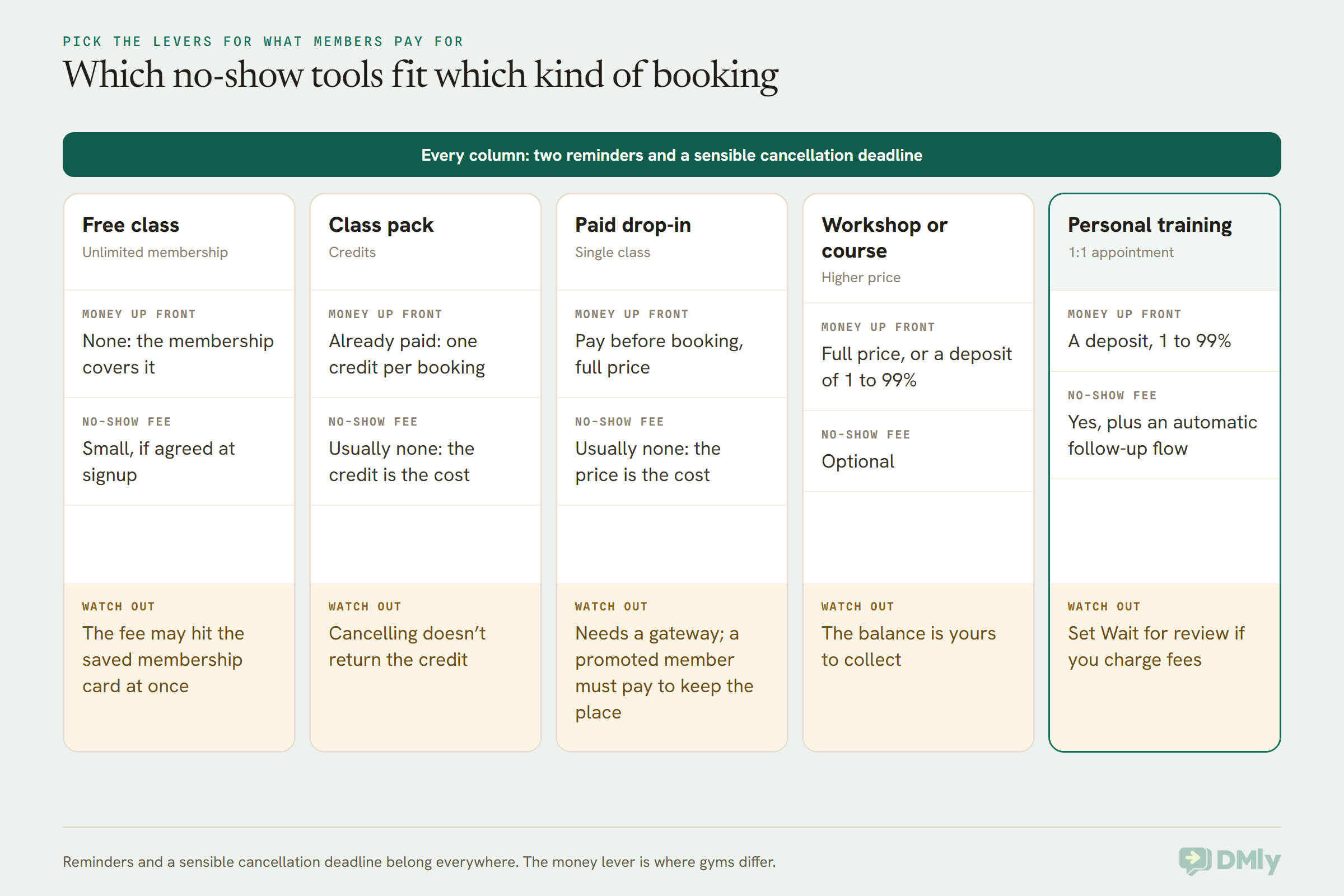
A few illustrative setups (the businesses are examples, and the amounts are placeholders, not recommendations):
- A boutique cycling studio in Austin sells single rides and ten-ride packs. Drop-ins pay before booking; pack holders spend a credit at booking. With every booking already paid for, reminders and a twelve-hour deadline do most of the work. Members have US numbers, so every reminder and follow-up stays strictly Utility, because marketing templates won’t reach them.
- A CrossFit box in Bengaluru runs unlimited monthly memberships with auto-pay through Razorpay. Classes are free to book, so a small no-show fee in rupees, agreed at signup, is the only cost of a missed class. Because cards are saved, the front desk is trained to mark the roster carefully.
- A gym in Lekki, Lagos runs early-morning bootcamp sessions with a waitlist. The deadline is set the evening before, so waitlisted members wake up already promoted. It takes payment through Paystack for drop-ins and keeps naira amounts simple.
- A reformer pilates studio in Manchester has eight beds per class and a long waitlist. A late cancellation is nearly as costly as a no-show, so it cancels late seats to refill them and sends a payment link in pounds by hand when its policy says so.
- A personal training studio in Dubai takes a deposit on every first session and charges the balance on the day. PT no-shows trigger an automatic rebooking message; its small group classes are followed up by the trainer in person.
How to Tell Whether Class No-Shows Are Falling
Measure class no-shows for four weeks before you change anything, then four weeks after, using the same classes. Without a before number, you’ll be guessing whether the fee or the reminders made a difference.
In DMly, the numbers live at Configurations → Reports → Appointments. The page shows cards for Total bookings, Completed, No-show rate, Revenue (paid) and Avg class fill, and you can filter by service, staff, status and dates. Filter to one class service at a time.
Two cautions:
- The No-show rate only counts what you marked. If the roster isn’t marked, an unmarked seat is eventually closed as completed, and your no-show rate looks better than reality. The number is only as good as the end-of-class habit.
- Check the formula once. The docs don’t say exactly which bookings sit in the No-show rate’s denominator (cancelled ones, for example). Download the CSV for a week, count it by hand, and compare.
Alongside the no-show rate, watch late cancellations (how many seats were cancelled inside your deadline, which you’ll see in the cancelled bookings for that class) and whether the waitlist actually moved. A class where no-shows fell but nobody was promoted from the waitlist hasn’t really gained anything.
Frequently Asked Questions
What is a fair no-show policy for gym classes?
A fair policy reminds members before every class, lets them cancel online up to a clear deadline, and only charges people who neither came nor cancelled. Tell members the rules at signup and in your booking page, keep any fee small, and have a person handle disputes and genuine emergencies.
Do WhatsApp reminders really reduce class no-shows?
Reminders help most with the members who simply forgot, and they give members who can’t come a moment to cancel while the place can still go to the waitlist. We don’t print a percentage, because we haven’t found a gym-specific figure measured at source; measure your own no-show rate for four weeks before and after.
Can DMly send an automatic message when someone misses a class?
Not for a class seat. Marking a seat no-show on the roster fires no automation in DMly. If you set a no-show fee, DMly does send the fee message or payment link itself. Any other follow-up is sent by a person. Personal training sessions are different: the Appointment no-show trigger does fire for them.
Can I take a deposit for a gym class in DMly?
Yes. Set the class service to Pay before booking and enter a Deposit percentage from 1 to 99. Every seat checkout, including a waitlist promotion or a batch enrolment, then asks for the deposit instead of the full price. DMly doesn’t collect the balance, so take it at the class or send a link yourself.
Does a no-show fee charge the member’s card automatically?
Only if the member has a saved card, which in DMly means they set up automatic payment for a subscription, as many gym members on monthly memberships have. Otherwise the member is sent a payment link. The fee needs a connected payment gateway and is charged once per booking.
Can members reschedule a class instead of cancelling?
No. A class seat can be cancelled from the member’s link but never moved to another session. If they want a different class, they cancel and book the new one, or you move them from the calendar. One-to-one sessions such as personal training can be rescheduled.
What happens to a class pack credit when a member doesn’t show?
The credit was taken when they booked, and DMly doesn’t give it back for a no-show or a cancellation. If your policy returns credits for cancelling in time, add the credit back yourself from the member’s profile.
The Head Count, Matched
You’ll never get the list and the room to match every single class. But with a few settings, the gap that’s left is the honest one: people who were genuinely ill, or stuck, and who’ll tell you about it. Here’s how to cut class no-shows this week:
- Sort your timetable into classes and one-to-one sessions.
- Set two reminder times on every class service, and check the reminder template is approved.
- Set a class cancellation deadline on the Class tab that gives your waitlist time to fill the place.
- Decide your money lever per class: membership, credits, pay before booking or a no-show fee.
- Write the policy down, and put it where members will actually read it.
- Train the front desk to mark no-shows first, then Mark all attended, at the end of every class.
- Check this week’s no-shows every Monday, and talk to the repeat names yourself.
If you’d like reminders, the waitlist, payments and the member conversations in one place, you can start a free DMly trial and set up your first class today. For everything else WhatsApp can do for a gym, from memberships to renewals, see our guide to WhatsApp automation for gyms.
Writing about WhatsApp automation, bookings and growth for local business.
Turn WhatsApp into your busiest channel.
Start free and run message, bookings, payments and reviews in one place.
