
Fee Reminder Message to Parents: 20 Templates and How to Send Them Automatically on WhatsApp

For years, the fee reminder message to parents travelled home in a book bag. A slip of paper, folded twice, carried by the one person in the family who had no say in paying it and every reason to feel bad about it.
Sometimes it arrived. Sometimes it came out three weeks later, soft from a lunchbox, after the deadline had passed. And the child who carried it knew exactly what it said, because children always do.
WhatsApp fixes the delivery. The message goes straight to the adult who pays, on the phone they actually read, on the day you choose. What it doesn’t fix by itself is the wording, the timing, or the small question of who in a family is the right person to ask. In this guide, we’ll look at what a good fee reminder says, who it should go to, when each message goes out, which ones WhatsApp treats as Utility and which as Marketing, twenty templates you can copy, and how to send them automatically so they stop as soon as a parent pays.
What Makes a Good Fee Reminder Message to Parents?
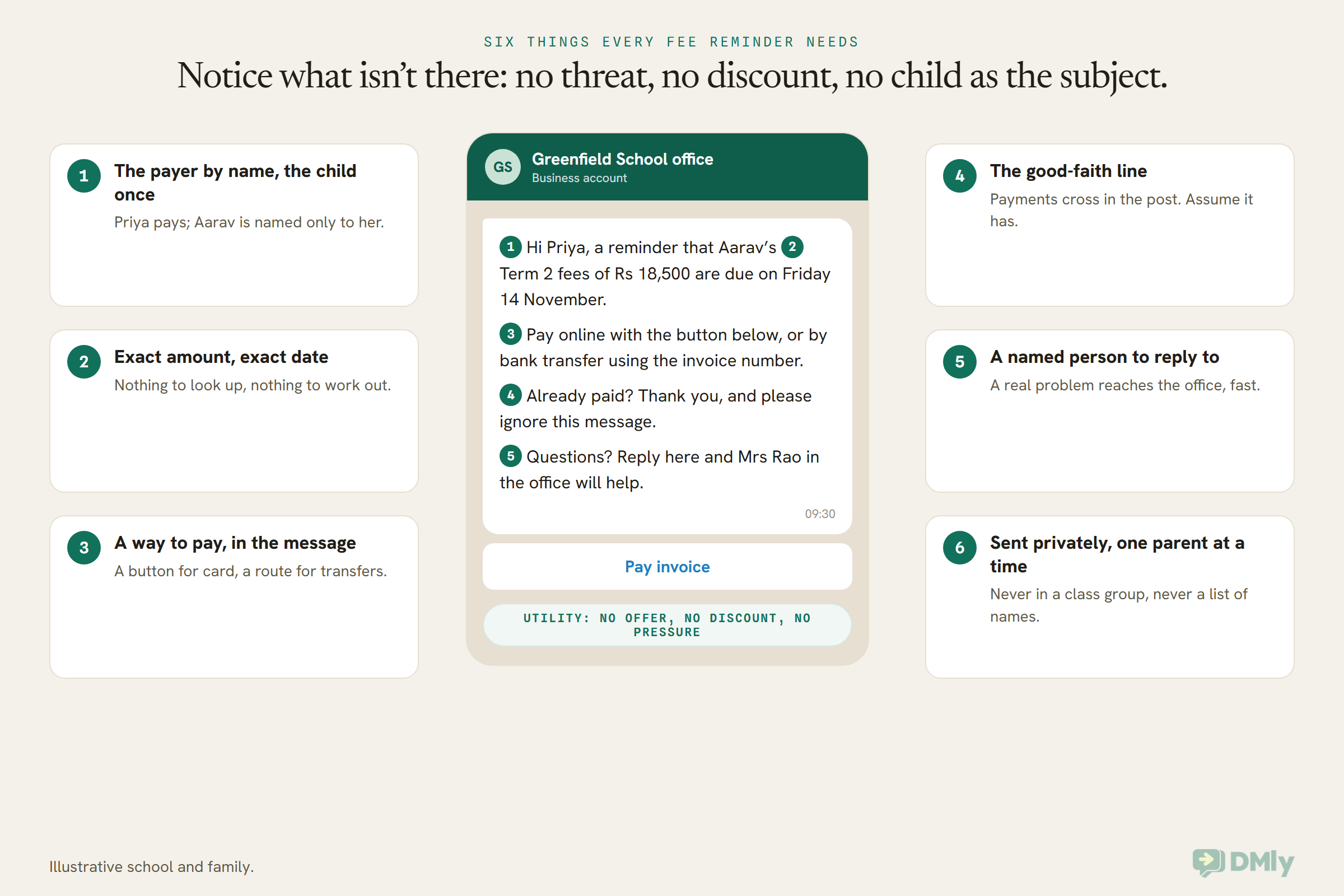
A good fee reminder message to parents names the person paying, mentions the student once, states the exact amount and due date, gives a way to pay in the same message, and tells the parent who to talk to if there’s a problem. It assumes good faith, it’s sent privately, and it never makes the child the subject of the debt.
That sounds obvious written down. In practice, most fee reminders fail on one of six small things:
- The amount is vague. “Your outstanding balance” makes a parent go and look something up. “£1,240 for the spring term” doesn’t.
- The date is vague. “Soon” and “at your earliest convenience” read as “whenever”. A day and a date read as a deadline.
- There’s no way to pay in the message. If paying means finding an email from September, the parent will mean to do it later.
- It goes to the wrong adult. The parent who drops off isn’t always the parent who pays.
- It sounds like an accusation. Many “late” payments are already in transit, or waiting on a payday that’s three days away.
- Nobody is named. A parent with a real problem needs a person, not a reply-to address.
Get those right and the tone mostly takes care of itself. The figure below shows all six in one short message.
Who Should Get the Fee Reminder: The Parent, Not the Child
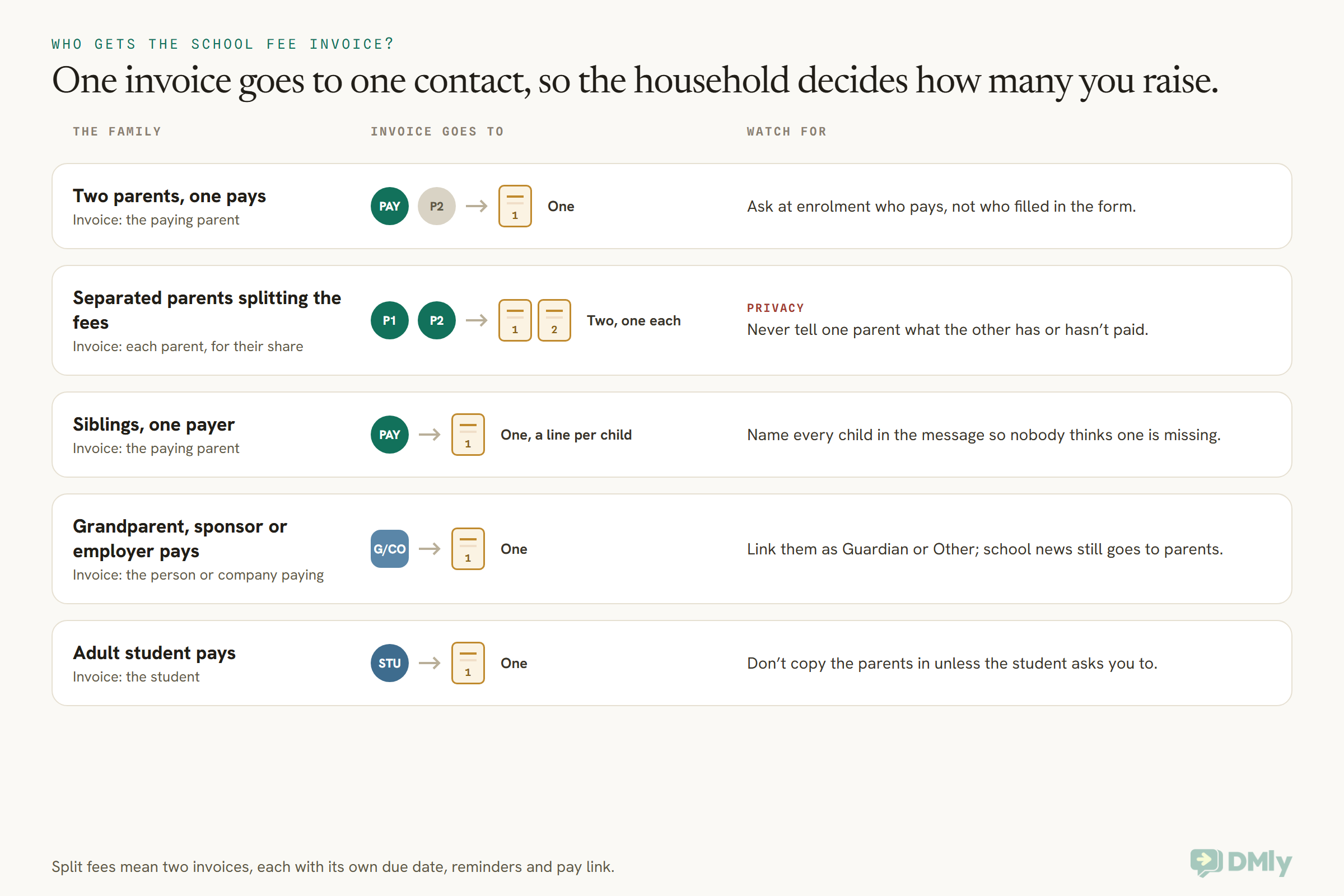
Send the fee reminder to the adult who pays the fees, on their own WhatsApp number, and mention the student only as the reason for the bill. Never send it to the student, even an older one, unless the student is the one paying.
That rule is easy until you meet real families. One parent enrols and the other pays. Parents who live apart split the fees down the middle. A grandparent pays for two grandchildren. A company pays a staff member’s school fees. A 19-year-old at a training centre pays their own.
So before you write a single reminder, decide who the bill belongs to. In DMly, that decision is simple because an invoice goes to exactly one contact. Whoever you raise the invoice for is the person who gets the invoice message, the reminders and the pay link. Raising an invoice for someone also makes them a client in DMly, which just means a contact who’s been billed.
Keep the student’s details on the parent’s record
The child doesn’t need their own contact for fees to work. Add the student’s name and class to the paying parent’s record as custom fields (DMly’s name for the extra details you keep on a contact), for example student_name and class. Then any message can say “Aarav’s Term 2 fees” by reading {{custom.student_name}} from the parent’s own record.
If you’d also like the family connected, DMly has Family & linked contacts on each contact’s Linked tab. You can link two people as Parent, Child, Spouse, Guardian, Sibling or Other. It’s worth knowing what that does and doesn’t do: linking is not merging. Each person keeps their own conversations, tags, invoices and appointments. So linking a second parent as Spouse means you can see the relationship, but it does not send them a copy of the other parent’s fee reminders.
That’s usually what you want. The parent paying gets the reminders, and the other parent isn’t chased for money they never agreed to pay.
Separated parents and split fees
This is the case worth thinking through before term starts. If two parents each pay half, raise two invoices, one to each parent, each for their share. Each invoice then has its own due date, its own reminders and its own pay link, and each parent only ever sees their own balance.
Never write “we’re still waiting for Dad’s half” in a message to Mum. It isn’t your information to share, and it pulls you into an argument you can’t win.
When to Send a School Fee Reminder Message: The Fee Calendar
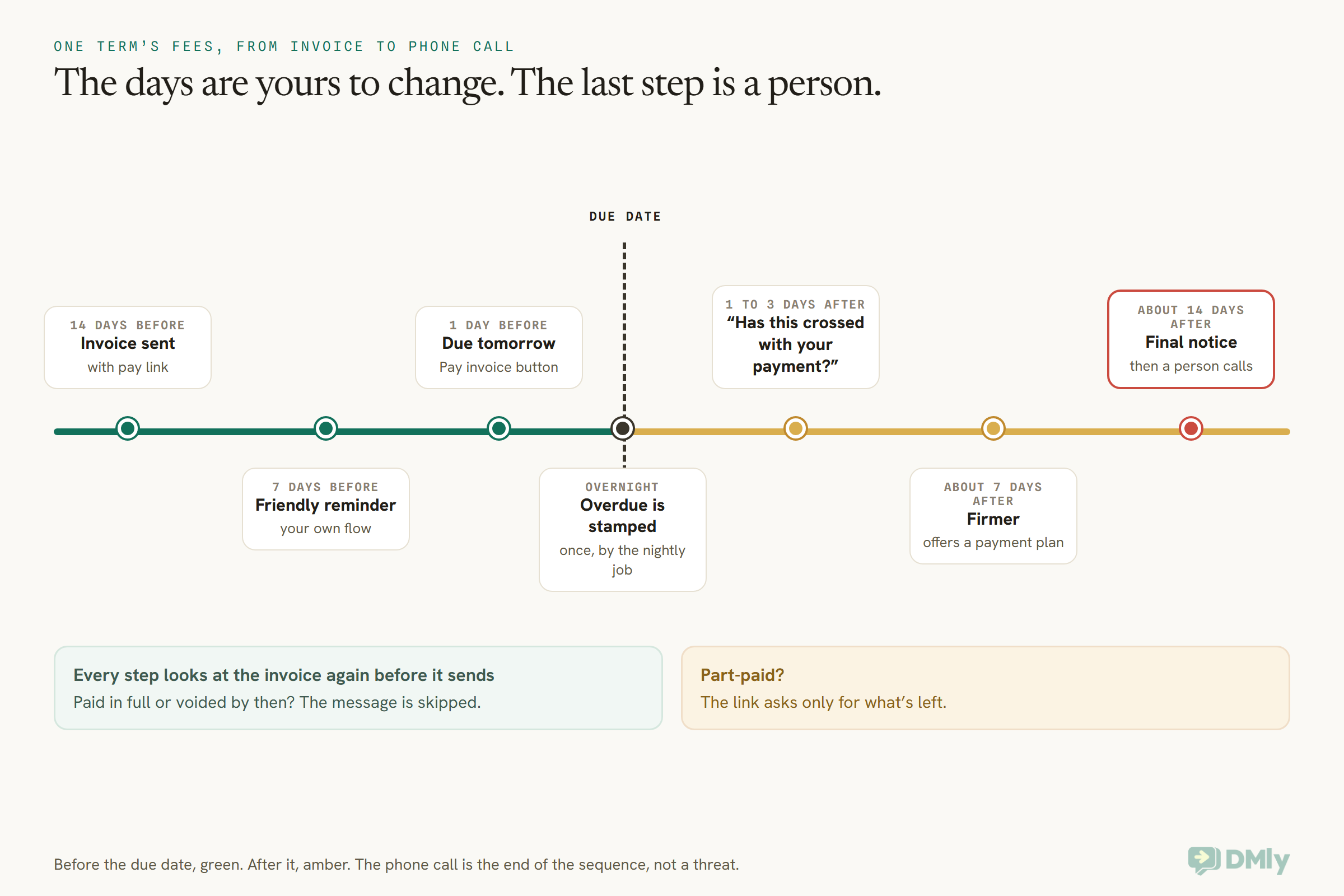
Send the first school fee reminder message with the invoice, about two weeks before the due date, then one a week before, one the day before, and a short sequence after the due date that ends with a phone call, not a threat. The exact days matter less than deciding them once and letting the system keep to them.
Here’s a calendar that works for most schools, nurseries and tuition centres:
- About 14 days before: the fees invoice goes out with the pay link. This is the notice, not a reminder.
- 7 days before: a short, friendly reminder for parents who meant to pay and haven’t yet.
- 1 day before: the “due tomorrow” reminder, with the button to pay.
- Due date: nothing, or a “due today” message if your parents tend to pay on the day.
- 1 to 3 days after: a gentle “has this crossed with your payment?” message.
- About 7 days after: a firmer message offering to talk about a plan.
- About 14 days after: a final written notice, then a person calls.
Two rules make the calendar safe to leave running. Every reminder checks the bill first, and stops if it’s been paid or cancelled. And the sequence ends with a human, because by the third week the parent who hasn’t paid usually can’t, not won’t.
Two school-specific timing rules
Avoid the first day back. Parents are buying shoes, finding PE kits and reading twelve other messages from you. A fee reminder that lands on the first morning of term gets lost. Send the invoice a week or two before term, and keep the first week for welcome messages.
Mind paydays. If many of your families are paid at the end of the month, a due date on the 28th will always look “late” on the 26th. Where you can, set due dates a few days after the usual payday, and you’ll send fewer overdue reminders without doing anything else.
Utility or Marketing? The Rule Behind Every Fee Reminder Message
A plain fee reminder, one that tells a parent what’s owed, when and how to pay, is a Utility message on WhatsApp. Add a discount, an early-bird offer or a push to re-enrol, and it becomes Marketing. That one line decides whether the message can reach every parent and what it costs.
Here’s why it matters. When a parent hasn’t messaged you in the last 24 hours, WhatsApp only delivers a pre-approved message, called a template. Every template has a category, and Meta, WhatsApp’s parent company, decides it:
- Utility is for messages about something the person already has or asked for: an invoice, a payment, a booking. Meta’s own example of a utility account alert is a reminder that a monthly payment will be billed on a date. Utility templates must not include offers or “attempt to secure renewals”.
- Marketing is everything promotional, plus anything mixed. Meta’s examples of marketing include “Your subscription will expire on {{date}}! Renew today to save {{discount}}.” A fee reminder with an early-bird discount is the same message.
| Message | Category | Why |
| “Term 2 fees of £1,240 are due on 9 January” | Utility | About a bill the family already has |
| “Your payment of $310 has been received” | Utility | A receipt for their own payment |
| “Your instalment of ₦150,000 is due Friday” | Utility | A plan the parent agreed to |
| “Pay by 30 November and save 5%” | Marketing | An offer, even inside a reminder |
| “Secure your child’s place for next year” | Marketing | An attempt to secure a renewal |
| “Fees are due, and don’t miss our open day!” | Marketing | Mixed content is marketing |
Marketing templates need the parent’s marketing opt-in, cost more per message, and, as of October 2026, Meta does not deliver them to US phone numbers (+1) at all. So if you run an after-school club in Texas and you want to announce an early-bird rate, WhatsApp isn’t the channel for that part. Keep the reminder plain on WhatsApp and send the offer by email or SMS. Our guide to WhatsApp opt-in and how to collect consent covers the opt-in side in full.
The safe habit is simple. One message, one job. The reminder reminds. If you have an offer, send it separately, to parents who said yes to offers.
20 Fee Reminder Message to Parents Templates You Can Copy
Below are twenty fee reminder templates for parents, grouped by when you’d send them, each with its WhatsApp category and a note on when it fits. Swap the words in [square brackets] for your own details. The amounts and currencies are examples from different countries; use your own.
Every one of these is written to be firm but kind. They state facts, assume good faith, and give the parent somewhere to go. None of them threatens to keep a child out of an exam or a class. If your written fees policy does include a consequence, number 9 shows how to state it plainly, once.
Before the due date
1. Term fees invoice (the notice)
Hello [Parent name], the [term] fees for [Student name] are now ready. The total is [£1,240.00], due on [Friday 9 January]. You can pay online with the button below, or see the full invoice here: [invoice link]. Thank you, [School name] office.
Button: Pay invoice
Category: Utility. This is the bill itself, so it’s the clearest utility message there is. In DMly, sending an invoice already sends a message like this for you (more on that below), so you may only need this wording for your own flows.
2. Monthly tuition notice
Hi [Parent name], here’s [Student name]’s tuition for [December]: [$310.00], due on [1 December]. Pay here in under a minute: [Pay button]. If you’d like to set up automatic monthly payments, just reply AUTO and we’ll send you a secure link.
Category: Utility. Offering to set up automatic payment is about how the parent pays an existing bill, not a sales offer, so it should stay utility. Good for after-school programmes, music lessons and tutoring billed by the month.
3. One week before
Hello [Parent name], a quick reminder that [Student name]’s [Term 2] fees of [Rs 18,500] are due on [Friday 14 November]. If you’ve already paid, thank you, and please ignore this. Any questions? Reply here and [Mrs Rao] will help.
Category: Utility. The friendliest reminder in the set, because it’s the one most parents are glad to get. Keep it short.
4. The day before
Hi [Parent name], just a reminder that [Student name]’s fees of [AED 6,800] are due tomorrow, [Sunday 11 January]. You can pay now with the button below. Thank you!
Button: Pay invoice
Category: Utility. This is the message DMly’s ready-made Invoice payment reminder automation sends for you, with the amount, the due date and a Pay invoice button, so you may not need to write it at all.
5. Due today
Good morning [Parent name]. Today is the due date for [Student name]’s [January] fees of [RM 450]. If you’ve already sent it, thank you. If not, you can pay here: [payment link].
Category: Utility. Optional. Use it only if your parents tend to pay on the day; otherwise three messages in a week starts to feel like a lot.
After the due date
6. First overdue reminder (one to three days late)
Hello [Parent name], our records show [Student name]’s [Term 2] fees of [£1,240.00] were due on [9 January] and haven’t reached us yet. Payments sometimes cross with our reminders, so if you’ve already paid, thank you and please ignore this. If not, you can pay here: [payment link].
Category: Utility. “Haven’t reached us yet” is doing a lot of work: it’s true, it’s neutral, and it leaves room for a payment in transit.
7. Second overdue reminder (about a week late)
Hello [Parent name], [Student name]’s fees of [₦450,000] for [first term] are now [7] days past the due date of [15 September]. Please pay by [Friday 26 September] using the link below. If something is making that difficult, please reply or call [Mr Okafor] on [number] and we’ll work something out with you.
Button: Pay invoice
Category: Utility. Firmer, because it gives a new date. Kind, because it offers a conversation before anything else happens.
8. “Can we help?” (offering a plan)
Hi [Parent name], we noticed [Student name]’s [term] fees are still open. We know the start of term is expensive. If paying in two or three parts would help, reply PLAN and [Ms Garcia] will set it up with you. If you’d rather pay in full, the link is here: [payment link].
Category: Utility. A payment plan for an existing bill isn’t a promotion, but keep the wording plain. Phrases like “special offer” or “limited time” would tip it into marketing.
9. Final notice before a policy step
Dear [Parent name], [Student name]’s fees of [$2,150.00] for [fall semester] remain unpaid since [September 5]. As set out in our fees policy, [the next step is a meeting with the bursar / a late fee of $25 is added on October 1]. We would much rather sort this out together, so please call [Mrs Patel] on [number] or reply here before [September 30].
Category: Utility. State only a step your written policy actually contains, and state it once. Never mention exams, trips or a child’s place in class unless your published policy says so, and even then, say it to the parent in a conversation first, not in an automated message.
10. Reply to “I’ve already paid”
Thank you, [Parent name], and sorry for the extra message. Could you send a screenshot or the transfer reference? I’ll match it to [Student name]’s account today and confirm here.
Category: none needed. The parent just messaged you, so the 24-hour window is open and this is an ordinary reply. Always apologise first: most of the time they’re right.
Instalments and part payments
11. Instalment plan confirmation
Hi [Parent name], as agreed today, [Student name]’s [Term 2] fees of [Rs 36,000] will be paid in [three] parts: [Rs 12,000] by [10 November], [Rs 12,000] by [10 December] and [Rs 12,000] by [10 January]. You’ll get a reminder before each one. Thank you for working this out with us.
Category: Utility. Send it the same day you agree the plan, so both sides have the dates in writing.
12. Instalment due reminder
Hello [Parent name], a reminder that the [second] instalment of [₦150,000] for [Student name]’s fees is due on [Friday 10 October]. Pay here: [payment link]. Thank you for keeping to the plan.
Category: Utility. “Thank you for keeping to the plan” is worth keeping in. It recognises the parent’s effort, and it costs nothing.
13. Part payment received, balance remaining
Thank you, [Parent name]. We’ve received [£620.00] towards [Student name]’s [spring term] fees. The remaining balance is [£620.00], due by [6 February]. When you’re ready, this link is for the balance only: [payment link].
Category: Utility. In DMly the pay link always matches what’s still owed, so “for the balance only” is true without you working anything out.
14. Paid in full
Thank you, [Parent name]! [Student name]’s [Term 2] fees are now paid in full. Your receipt is here: [receipt link]. We look forward to a great term.
Category: Utility. DMly sends a payment receipt automatically when a payment is confirmed, so use this wording only if you want your own thank-you on top. Never add “and why not book our holiday camp?” here: that turns a receipt into marketing.
Special situations
15. Bank transfer details
Hello [Parent name], to pay [Student name]’s fees of [₦185,000] by transfer, please use: [Bank name], account [0123456789], account name [Greenfield Schools Ltd]. Please use the reference [BT-1042] so we can match it quickly. Tap I’ve paid once it’s sent, and we’ll confirm.
Button: I’ve paid
Category: Utility. For schools where most parents pay by bank transfer, as in Nigeria. DMly can send your account details with an I’ve paid button for you, covered in the setup section.
16. Card payment failed on a monthly plan
Hi [Parent name], this month’s payment of [$310.00] for [Student name]’s [after-school programme] didn’t go through. It’s usually an expired card. You can update it securely here: [card update link]. We’ll try again in a couple of days.
Category: Utility. “Usually an expired card” keeps it about the card, not the parent. Only promise a retry if your system really does retry; DMly’s subscriptions do, two days apart.
17. One-off fee: trip, exam entry or uniform
Hello [Parent name], the fee for [Student name]’s [Year 6 trip to the science museum] is [AED 350], due by [20 November] so we can confirm numbers. Pay here: [payment link]. If cost is a concern, please speak to [Ms Haddad] in confidence.
Category: Utility. A fee for something the family has signed up to. The last line matters: many schools quietly help with trip costs, and parents won’t ask unless you open the door.
18. One parent’s share of split fees
Hi [Parent name], your share of [Student name]’s [Term 1] fees is [£620.00], due on [12 September]. You can pay here: [payment link]. This message is about your share only.
Category: Utility. “Your share only” reassures the parent that you’re not discussing the other parent’s money with them, and it’s the only mention of the arrangement you need.
Marketing messages: send separately, to opted-in parents
19. Early-bird discount for next term
Hi [Parent name], [Student name]’s [Term 3] fees will be [S$1,450]. Pay by [15 March] and we’ll take [5%] off. Use the link below whenever you’re ready. Reply STOP if you’d rather not get offers like this.
Button: Pay early
Category: Marketing. The discount makes it marketing, even though it’s about fees. Send it only to parents who agreed to offers, and remember it won’t be delivered to US (+1) numbers. Never mix it into a reminder for fees that are already due.
20. Re-enrolment with a sibling discount
Hello [Parent name], places for [September] are now open. As [Student name]’s family, you can re-enrol before [30 April] and any brother or sister joining gets [10%] off their fees. Reply YES to keep [Student name]’s place, or ask us anything.
Category: Marketing. Asking a family to renew is exactly what Meta lists as marketing, with or without the discount. It still belongs on WhatsApp for opted-in parents; just don’t file it as Utility, because a promotion filed as Utility is a rejection.
Turning the brackets into variables
When you submit one of these as a WhatsApp template, each [bracket] becomes a numbered variable: {{1}}, {{2}} and so on. When the message sends, DMly fills each one from the parent’s record or the invoice. These are the ones you’ll use most:
| Bracket in the template | DMly fills it with | Good to know |
| [Parent name] | {{first_name|there}} | The part after the bar is used if a name is missing |
| [Student name] | {{custom.student_name}} | Type the field name exactly as you defined it |
| [amount] | {{invoice.amount_due}} {{invoice.currency}} | Amounts come without a symbol, so add the currency |
| [due date] | {{invoice.due_date}} | Shows as 2026-11-14, not “Friday 14 November” |
| [invoice link] | {{invoice.pdf_url}} | The invoice PDF a parent can open without logging in |
Two of those deserve a note. The due date comes out as a plain year-month-day date, so write the sentence around it (“due on 2026-11-14”) or keep the day name out of the template. And the invoice tokens only work in a flow that started from an invoice event, such as Invoice sent or Invoice overdue. Put {{invoice.amount_due}} in a broadcast and it comes out empty.
If you’d like more school message ideas for Nigeria in particular, our WhatsApp messages for talking to parents set covers start of term, results and sports days as well as fees.
How to Send a Fee Reminder Message to Parents Automatically
To send fee reminders automatically, raise each family’s fees as an invoice with a due date, send it on WhatsApp, and switch on a reminder automation that counts down to that date and stops when the invoice is paid. With a platform like DMly, the whole chain lives in one place: the invoice, the pay link, the reminders and the parent’s replies.
Here’s the setup, step by step. It takes an afternoon the first time, and then it runs every term.
Step 1: Set your Finance defaults
Go to Finance → Settings and set your Default currency and Default due days. Do this before your first invoice, because the defaults are copied onto each invoice as it’s created.
One setting catches people out: Default due days ships as 0. Left at 0, an invoice has no due date at all and never goes overdue. For a school, it’s usually better to type the real due date on each fees invoice anyway, since every family’s deadline is the same day.
Step 2: Connect how parents will pay
Connect a payment gateway under Configurations → Integrations. DMly has built-in gateways for Stripe, PayPal, Paystack, Razorpay, MyFatoorah, Mercado Pago and Monnify, and Flutterwave is live for Nigeria too. If you connect more than one, choose which one takes the money under Finance → Settings → Gateways → Charge through.
Then do the step everyone skips: add the gateway’s webhook address in the provider’s own dashboard. DMly doesn’t do it for you. Without it, a parent can pay successfully and the invoice still says unpaid, which means your next reminder goes to someone who’s already paid. Test it by sending yourself a small invoice and paying it.
Step 3: Add your fees to Offerings
Invoice lines come from your catalogue, so add each fee as an item in Offerings: “Year 4 tuition, Term 2”, “Lunch, Term 2”, “Exam entry fee”. When you add one to an invoice, its name and price are copied across, so raising next year’s fees later never changes this year’s bills.
Step 4: Set up each paying parent
Make sure the paying parent is a contact with their WhatsApp number, and add the student_name and class custom fields to their record. Define the fields first under Settings → Custom fields so everyone on your team spells them the same way. If you bring families in from a spreadsheet, the import can fill custom fields too, though an import doesn’t start any automations.
Step 5: Raise and send the invoices
Open Finance → Invoices, start a new invoice, pick the parent, add the fee lines and set the due date. Put the student’s name in Notes for client so it appears on the invoice PDF. Check the amount, then send: once an invoice is sent it can’t be deleted, only voided.
Sending does three things at once. It marks the invoice as sent, adds the amount to the parent’s statement, and messages the parent on WhatsApp using DMly’s approved dmly_invoice_sent template, with the pay link. The parent can also open the invoice as a PDF without logging in to anything.
For a school with hundreds of families, raising invoices one by one is real work. DMly’s REST API can create and send invoices, and if you use Claude, the DMly connector for Claude can raise and send invoices by conversation. Either way, check a handful by hand before the rest go out. Our guide to creating and sending invoices through WhatsApp walks through the invoice side in more detail.
Step 6: Switch on the ready-made reminders
Go to Automations → New automation and search the template library for two automations:
- Invoice payment reminder starts when an invoice is sent, waits until a day before the due date, and messages the parent with the amount, the due date and a Pay invoice button. When the wait ends it looks at the invoice again, and if it’s been paid or voided, the reminder is skipped.
- Overdue invoice escalation starts when an invoice goes overdue, sends the pay link, waits three days and follows up.
Both install as drafts. Change the wording to sound like your school, then turn them on. When a parent’s 24-hour window is closed, which it usually is, the payment reminder goes out on DMly’s own approved invoice template, so that version’s wording isn’t yours to edit.
Step 7: Add your own reminders (optional)
Want the one-week reminder too, or your own words outside the window? Build a flow:
- Start it on the Invoice sent trigger.
- Add a Delay set to Before the invoice due date, for example 7 days. If the invoice is paid while the delay is waiting, the flow leaves through the delay’s skipped branch and nothing is sent.
- Add a WhatsApp template step with one of your own approved Utility templates, such as number 3 above, and fill its variables from the table in the template section.
One limit to plan around: DMly’s docs don’t list a variable for the pay link itself, so a custom template can’t simply drop the link into its text. Use the invoice PDF link ({{invoice.pdf_url}}), or add a quick-reply button such as “Send me the link”, so the parent’s tap opens the window and a Send Payment Link step can follow. Test whichever you choose with your own number before the first real family gets it.
Overdue works differently from the countdown. The Invoice overdue trigger fires once per invoice, on the night it goes overdue, and never again. So if you want reminders at three, seven and fourteen days late, build them inside one flow with delays, the way the escalation template does.
Step 8: Check for double messages
For invoice and payment events, DMly runs every active automation that matches. Two automations on Invoice sent that both message the parent means the parent gets both. Before term starts, list your automations and make sure each reminder day is covered once.
Monthly Tuition or Termly Fees: Subscriptions or Invoices?
Use a subscription for fees that repeat on a fixed monthly or yearly cycle, ideally with a saved card; use invoices with set due dates for termly fees, one-off charges and instalment plans. The two send different reminders, so pick the one that matches how you actually bill.
| Subscription | Invoice | |
| Best for | Monthly tuition, music lessons, after-school clubs | Termly fees, trips, exam entries, instalments |
| How it bills | Each period, on its own | When you raise and send it |
| Reminder before payment | Renewal reminder 3 days before, on by default | Invoice payment reminder, a day before due |
| When a card fails | Retries twice, two days apart, then pauses | Not applicable: parent pays the link |
| Unpaid bills | Pauses after three unpaid periods | Goes overdue; your escalation takes over |
If you bill by the month
A subscription in Finance → Subscriptions bills a parent on a plan you create in Offerings → Plans, with a recurring interval of a day, week, month or year. With auto-charge on, the parent saves a card once through a secure link, and DMly charges it each month and sends a receipt. Three days before each renewal it reminds the parent, which covers template 2 without you writing a flow.
Without auto-charge, DMly still raises each month’s invoice overnight and sends the pay link. But here’s the part to know: once three of a subscription’s invoices are unpaid, it pauses itself and DMly sends the parent no message about it. Keep an eye on paused subscriptions, and treat the third unpaid month as a conversation, not a status.
One more catch for card failures: outside the 24-hour window, DMly’s own “payment failed” message has no room for the card update link. To send template 16 with its link, build a flow on Subscription payment failed with your own template that carries {{subscription.update_card_link}}.
If you bill by the term
Terms rarely line up with calendar months, and DMly’s docs describe plan intervals as a day, week, month or year. So for termly fees, invoices are the natural fit: one per family per term, each with a real due date, each counted down by the reminder automation. Our WhatsApp automation guide for tutors goes further into term blocks and lesson packs if you run a tuition centre.
Instalments and Part Payments Without the Maths
For an agreed instalment plan, raise one invoice per instalment, each with its own due date, so each one gets its own reminders; for an occasional part payment, just let the parent pay what they can against the one invoice. DMly keeps the balance right either way.
Here’s what happens with a part payment. When a parent pays part of an invoice, it moves to Partially paid. The next pay link you share is re-minted for whatever is still owed, so you never have to work out the remainder or send a new invoice. The parent’s statement, a running ledger of what they’ve been billed and what they’ve paid, updates by itself.
For a planned schedule, though, separate invoices are cleaner. The reminder automation counts down to an invoice’s due date, and one invoice only has one. If you agree three payments on three dates, three invoices give you three countdowns, three receipts and a plan that runs itself. If you’ve already sent the full-term invoice, void it (voiding needs the admin Issue refunds permission) and raise the instalments. Voiding credits back only the unpaid part, so anything the parent already paid stays recorded.
Payments that don’t come through a gateway, such as cash at the office, a cheque or a bank transfer, can be recorded against the invoice with Record payment. Just never record the same money twice. If a transfer was confirmed under Finance → Payments, that is the recording.
How Parents Pay: Cards, Transfers and Local Gateways
The best school fees reminder on WhatsApp ends with a way to pay that parents in your country actually use, whether that’s a card checkout, a local gateway or a bank transfer. The reminder only works if the next tap is easy.
- US and UK: card checkouts through Stripe or PayPal are the usual route, and a saved card on a subscription suits monthly fees.
- India: Razorpay is one of DMly’s built-in gateways and opens Razorpay’s own checkout page.
- Nigeria and Ghana: many parents pay by transfer. With Paystack, a pay link from a flow step can open straight onto a one-time bank account. The parent sends the exact amount from their banking app and the invoice settles itself. That account expires 30 minutes after the parent opens the page and only accepts the exact amount, so tell first-time parents. Monnify can also send an account number in the chat that confirms itself. Flutterwave is live for Nigeria as well.
- Gulf: MyFatoorah is DMly’s built-in gateway for the region, alongside Stripe and PayPal where they operate.
- Anywhere, with your own bank account: DMly can send your account details with a reference and an I’ve paid button. The payment shows as Customer says paid under Finance → Payments, and someone in your office confirms it against the bank statement. There’s even a ready-made flow, Send bank details for a new invoice, that does this when an invoice is sent. It’s a good fit for tuition centres in Malaysia, the Philippines or anywhere a card checkout isn’t how parents pay.
Our guide to sending WhatsApp payment links covers the link side in more depth, including what each kind of link does.
Tone: Firm, Kind and Never About the Child
A fee reminder message to parents should be firm about the facts and kind about the person: exact amounts and dates, no judgement, no pressure on the child, and always a human to talk to. The money is between you and the parent. Keep it there.
Some rules worth writing into your office handbook:
- Never message the student about fees. Not on WhatsApp, not in class, not through a note. Children feel debts they can’t do anything about.
- Never name a family to other families. No fee reminders in class WhatsApp groups, and no “the following families still owe” lists. Send every reminder one to one.
- Don’t threaten exclusion from exams, trips or lessons unless your written policy says so, and even then, have that conversation with the parent before it ever appears in an automated message.
- Assume good faith twice. The first and second reminders should both leave room for “it’s already on its way”.
- Offer a plan before a penalty. Families who are struggling usually say so if you ask first.
- Sign with a name. “Mrs Rao in the office” gets a reply. “Accounts Department” gets ignored.
- Stop when you’ve stopped. If the office has agreed a plan, make sure the old reminders aren’t still running against the old invoice.
For a deeper look at the general escalation and when to stop chasing, our guide on how to automatically remind customers about unpaid invoices covers it for every kind of business.
What to Do When Parents Reply
Every fee reminder invites replies, so decide in advance what each common reply means and who in the office answers it. A reply also opens WhatsApp’s 24-hour window, so your answer can be a normal, typed message.
| The parent replies | What it means | What to do |
| “Already paid” | Probably true | Apologise, ask for the reference, check the webhook if it was online |
| “Can I pay half now?” | A plan request | Agree it, then void and raise instalment invoices |
| “The amount is wrong” | A sibling, a discount or a missing line | Check the invoice; void and reissue if it’s wrong |
| “I’ve sent the transfer” | A manual payment to confirm | Match it on the bank statement, confirm once |
| “Stop” or just “cancel” | “Stop” is an opt-out; a bare “cancel” gets a question first | Read the warning below |
The one-word reply that stops everything
In DMly, a contact who sends stop or unsubscribe as their whole message is opted out at once, on every channel. That stops automations and broadcasts, and it also blocks manual replies and payment links to that parent. A bare cancel, end or quit works differently on WhatsApp: DMly asks first, offering STOP to stop all messages or STOP OFFERS to stop promotions only, and mutes nothing until the parent chooses. By SMS, those words still opt a parent out straight away.
For fees, that’s still a trap. A parent who replies “cancel” meaning “cancel the lunch plan” gets DMly’s question, and one who taps STOP to make it go away has opted out of every message from you, including the next fee reminder. (STOP OFFERS is the gentler choice: reminders and receipts still go.) If it happens, call or email the parent, and only Resubscribe them under Contacts → Suppressions if they ask you to. And in your own templates, use reply words like PLAN or LINK, never CANCEL.
Six Schools, Six Fee Reminder Setups
The right fee reminder setup depends on how your parents pay and how your year is shaped. These six are illustrative, not real customers, but each one shows a different combination of the pieces above.
An after-school programme in Houston
Monthly fees of $310, billed as a subscription with auto-charge, so most families never see a reminder at all, just a renewal note three days ahead and a receipt. Template 16 runs on a flow for failed cards. The early-bird summer camp offer goes out by email, because marketing templates aren’t delivered to US numbers.
A coaching centre in Pune
Termly fees of Rs 18,500, raised as invoices with Razorpay pay links. A custom one-week reminder (template 3) plus the ready-made day-before reminder. Templates submitted in both English and Hindi, one per language, so each parent gets the version they read.
A private school in Lagos
First-term fees of ₦450,000, often paid in parts. The bursar agrees plans by phone and raises one invoice per instalment, each with its own reminder. Paystack transfer links for parents who pay from their banking app, and the I’ve paid route for those who prefer the school’s own account.
A music school in Manchester
Termly lessons at £1,240, invoiced three weeks before term with Stripe pay links. Separated parents are common, so split fees are two invoices with template 18. The escalation flow stops at a phone call; nothing automated ever mentions a child’s lessons.
A nursery in Dubai
Fees of AED 6,800 a term with MyFatoorah links, plus one-off charges for trips (template 17). Templates in English and Arabic. Due dates are set a few days after the usual payday, so fewer invoices look late on the day they fall due.
A tuition centre in Kuala Lumpur
Monthly fees of RM 450, paid mostly by bank transfer. The Send bank details for a new invoice flow sends the account details with an I’ve paid button, and an office assistant confirms transfers each afternoon under Finance → Payments.
For the bigger picture of how DMly fits a school or training centre, from enrolment enquiries to lesson reminders, see DMly for education and tutoring.
What Fee Reminders Cost to Send
Each fee reminder sent as a template outside the 24-hour window is a paid Utility message, priced by Meta per country; replies inside the window are mostly covered by a free monthly allowance. For most schools the total is small, but it’s worth knowing how it adds up.
- Utility templates (the reminders above) are charged per delivered message at your parents’ country rate. Utility is cheaper than marketing in Meta’s price lists.
- Replies you type inside the window are “service” messages. Since 1 October 2026 they’re charged, but each business number gets 1,000 free a month first.
- Utility templates sent inside an open window are also charged since 1 October 2026.
- DMly adds no markup to Meta’s rates. Your DMly plan includes a monthly allowance of broadcast and template messages; see DMly pricing for the current numbers.
The cheapest reminder is the one you don’t send. Auto-charge for monthly fees, due dates after payday, and a reminder that skips itself once the fees are paid all cut the count without making anything less clear.
When a Fee Reminder Doesn’t Go Out
Most missing fee reminders come down to four things: no due date, a template that isn’t approved, a parent who opted out, or a payment the system never heard about. Here’s where to look.
| What you see | Likely cause | Fix |
| No reminder, and the invoice never went overdue | No due date (Default due days left at 0) | Set a due date on the invoice, and set the default |
| Invoice sent, parent got nothing | dmly_invoice_sent not approved and the window closed | Check the template’s status; check the parent is on WhatsApp |
| Parent paid online, reminder still came | Gateway webhook not set up | Add the webhook in the provider’s dashboard; test with a small invoice |
| Parent shows as paying twice | A transfer confirmed and also recorded by hand | Record each payment once |
| One parent gets nothing at all | They opted out (a one-word “stop”, or STOP after DMly’s question) | Check Contacts → Suppressions; call them |
| Message arrived with a gap in it | A variable with no value | Add a fallback, like {{first_name|there}} |
| A reminder stopped after you edited it | An edited approved template goes back to Pending | Wait for Meta to re-approve before term |
| Parents got the same reminder twice | Two automations on the same trigger | Keep one automation per reminder day |
Frequently Asked Questions
How do I write a fee reminder message to parents?
Address the paying parent by name, mention the student once, give the exact amount and due date, include a way to pay, and name someone to reply to. Add a line for parents who’ve already paid, and leave out threats, discounts and anything about the child’s place in class.
Is a school fee reminder a Utility or Marketing message on WhatsApp?
A plain reminder about fees the family already owes is Utility. It becomes Marketing as soon as you add an offer, such as an early-bird discount, or try to get the family to re-enrol. Marketing templates need the parent’s opt-in and aren’t delivered to US (+1) numbers.
Should fee reminders go to the parent or the student?
To the adult who pays. Keep the student’s name on the parent’s record as a custom field so the message can mention them, but never send the reminder to the child. The only exception is an adult student who pays their own fees.
How many fee reminders should I send?
Usually three before the due date (the invoice, a week before, a day before) and two or three after, ending with a phone call. Every reminder should check the bill first and stop if it’s been paid.
Can I send a fee reminder message to parents automatically on WhatsApp?
Yes. In DMly, send each family’s fees as an invoice with a due date, then switch on the Invoice payment reminder and Overdue invoice escalation automations. The reminder waits until a day before the due date and skips itself if the invoice has been paid or voided.
What if parents pay in instalments?
For a planned schedule, raise one invoice per instalment with its own due date, so each gets its own reminder. For an occasional part payment, the parent can pay part of one invoice, and the next pay link asks only for the balance.
Can I mention that a child can’t sit exams if fees aren’t paid?
Only if your written fees policy says so, and even then, talk to the parent before it appears in any automated message. Most schools find a plan offered early works far better than a threat sent late.
The Book-Bag Letter, Delivered Properly
The old fee slip had one job and two problems: it went to the wrong person, and nobody knew whether it had arrived. A fee reminder message to parents on WhatsApp fixes both. It reaches the adult who pays, it lands on the day you choose, and it stops itself once the fees are in.
What’s left is the part only you can do: decide who pays in each family, set due dates that match your parents’ lives, keep every message plain and private, and make sure a person is on the other end when someone writes back. Start with templates 1, 3, 4, 6 and 7, add the rest as your families need them, and keep the child out of it.
If you’d like to send your first fee reminders this term, you can start a 7-day DMly trial with no card, connect your gateway, and test the whole chain on your own number before a single parent gets a message.
Writing about WhatsApp automation, bookings and growth for local business.
Turn WhatsApp into your busiest channel.
Start free and run message, bookings, payments and reviews in one place.
