
Donation Thank-You Message Templates and How to Send Donation Receipts Automatically
For a lot of people who give to a small charity online, the only donation thank-you message they ever get is a line on their bank statement. A string of capital letters, half a name, an amount. Nothing that says the money arrived, who it reached, or whether anyone noticed.
That isn’t because the charity is ungrateful. It’s because the thank-you is the job with no deadline. The appeal has a target and a closing date. The thank-you just waits for a quiet afternoon that never comes, and by the time someone gets to it, the donor has moved on.
WhatsApp can close that gap in minutes rather than weeks. A receipt can land in the same chat where the donor tapped the payment link, and a real thank-you can follow straight after, in your words, without anyone on your team sitting at a desk. In this guide, we’ll look at the three different messages a donor actually needs, what DMly sends for you and what it doesn’t, which messages WhatsApp treats as Utility and which as Marketing, twenty-two templates you can copy, how to send donation receipts automatically, and the tax paperwork that a chat message can’t replace.
Receipt, Thank-You or Tax Receipt: Three Different Jobs
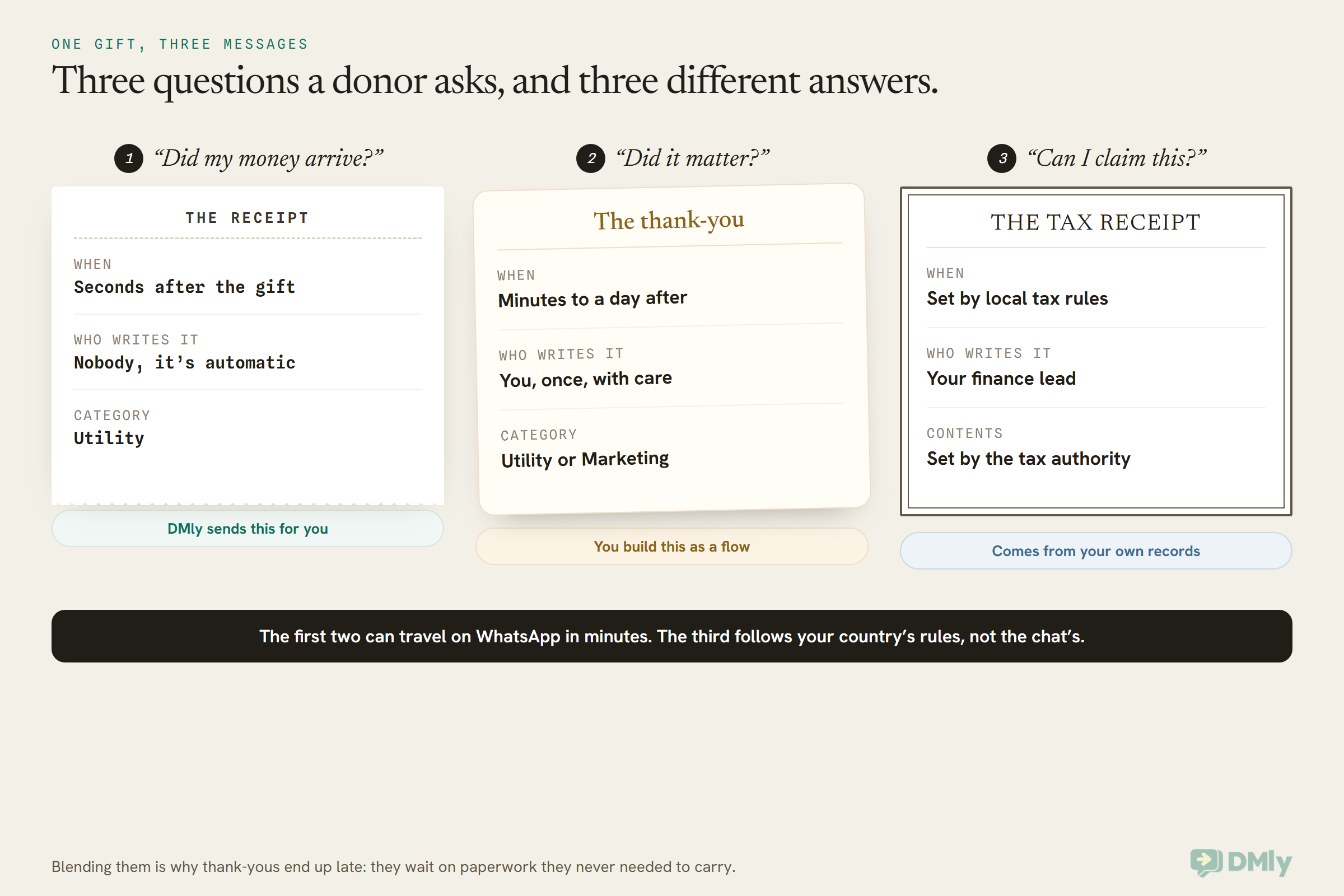
A donation thank-you message, a donation receipt and a tax receipt are three different messages, and most small organisations blur them into one. Each one answers a different question for the donor, and each has its own rules.
- The receipt answers “did my money arrive?” It’s short, factual and instant: the amount, the date, a reference. It’s proof, not gratitude.
- The thank-you answers “did it matter?” It comes from a person, says what the gift makes possible, and asks for nothing.
- The tax receipt answers “can I claim this?” It’s a formal document whose contents are set by your country’s tax authority, and in many places it has to say specific things in a specific way.
Keeping them apart makes each one better. The receipt can go out in seconds because it doesn’t need anyone to write it. The thank-you can be warm because it isn’t carrying a reference number. And the tax receipt can be done properly, by whoever is responsible for it, without the donor waiting on it for basic reassurance.
| Receipt | Thank-you | Tax receipt | |
| Main job | Proof the money landed | Show the gift mattered | Let the donor claim tax relief |
| Best timing | Instantly | Within a day | Whatever your tax rules require |
| Tone | Plain and factual | Warm, specific, human | Formal |
| Asks for anything? | No | No | No |
| Sent by DMly automatically? | Yes, once switched on | Yes, once you build the flow | No |
What DMly Sends When a Donation Lands
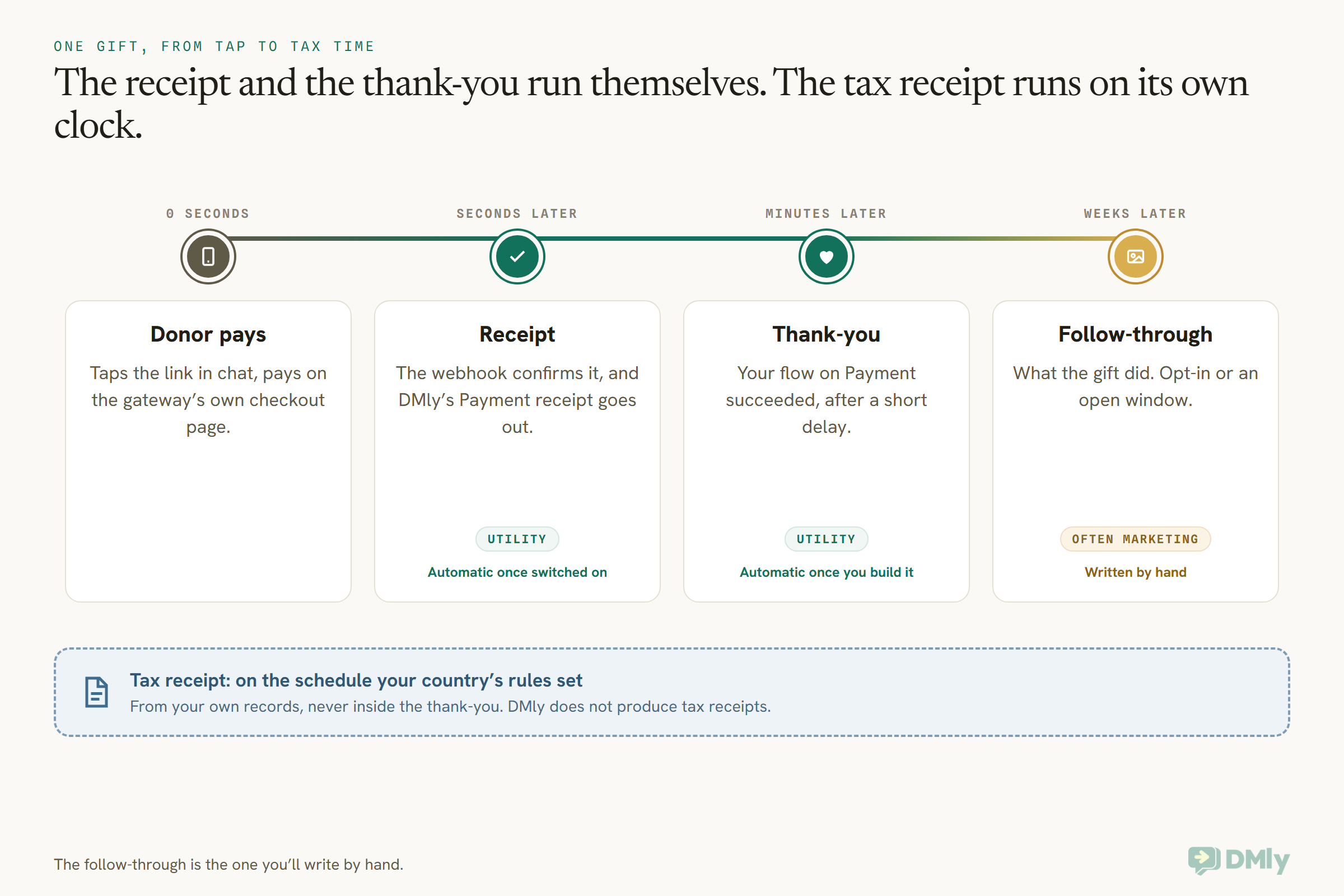
When a donor pays you online through DMly, DMly can send them a payment receipt on WhatsApp by itself, within moments of the money being confirmed. You don’t build anything for this. You switch it on, make sure its template is approved, and it goes.
Here’s what’s actually happening, in plain words. DMly has a set of ready-made WhatsApp messages it sends when things happen in your workspace (it calls them notifications). One of them is Payment receipt. According to DMly’s docs, it goes out whenever someone pays you online: a pay link you sent from a chat, a pay link sent by a flow or the AI agent, an invoice, or a booking deposit. It also goes out when you confirm a bank transfer the donor told you they’d sent.
It does not go out for a payment you record by hand, such as cash handed over at an event. DMly does that on purpose, so that back-filling last year’s gifts doesn’t message hundreds of people. If you want those donors thanked, that’s a message you send yourself (template 7 below is written for it).
A few more things worth knowing before you rely on it:
- It rides on a WhatsApp template called
dmly_payment_receipt, which is Utility. DMly ships it, and you can read its wording under Messaging → Templates → System. Outside the 24-hour window (the day after a person last messaged you), WhatsApp only delivers approved templates, so if this one isn’t approved and the donor hasn’t messaged recently, nothing reaches them. - The donor is told to expect it. After paying, the checkout sends the donor back to a short DMly page that thanks them and returns them to the chat. That page says the payment is being confirmed and that the receipt will arrive in the chat. So switch the receipt on before you start collecting, or you’ve made a promise nobody keeps.
- Monthly gifts are separate. A subscription renewal has its own receipt, switched on for each subscription by default, which we cover further down.
- It isn’t a tax receipt. It’s a WhatsApp message confirming a payment. Nothing in DMly’s docs says it carries the wording any tax authority asks for, and you shouldn’t present it as one.
What about a PDF?
DMly’s documents are invoices. If you take a gift through the invoice route, DMly gives the donor a public link to a PDF, branded from your business details: your logo, address, email, phone and registration number. That’s genuinely useful for a corporate donor or a pledge that needs paperwork. But it is an invoice document, numbered like INV-0001, not a receipt template and not a tax certificate. The invoice prefix is one setting for the whole workspace, so changing it to suit donations changes it for everything else you invoice too.
A one-off gift taken with a plain payment link (the most common way to take a donation on WhatsApp) has no invoice behind it, so there’s no PDF at all. The WhatsApp receipt is the record the donor holds, alongside their own bank statement.
What a Good Donation Thank-You Message Says
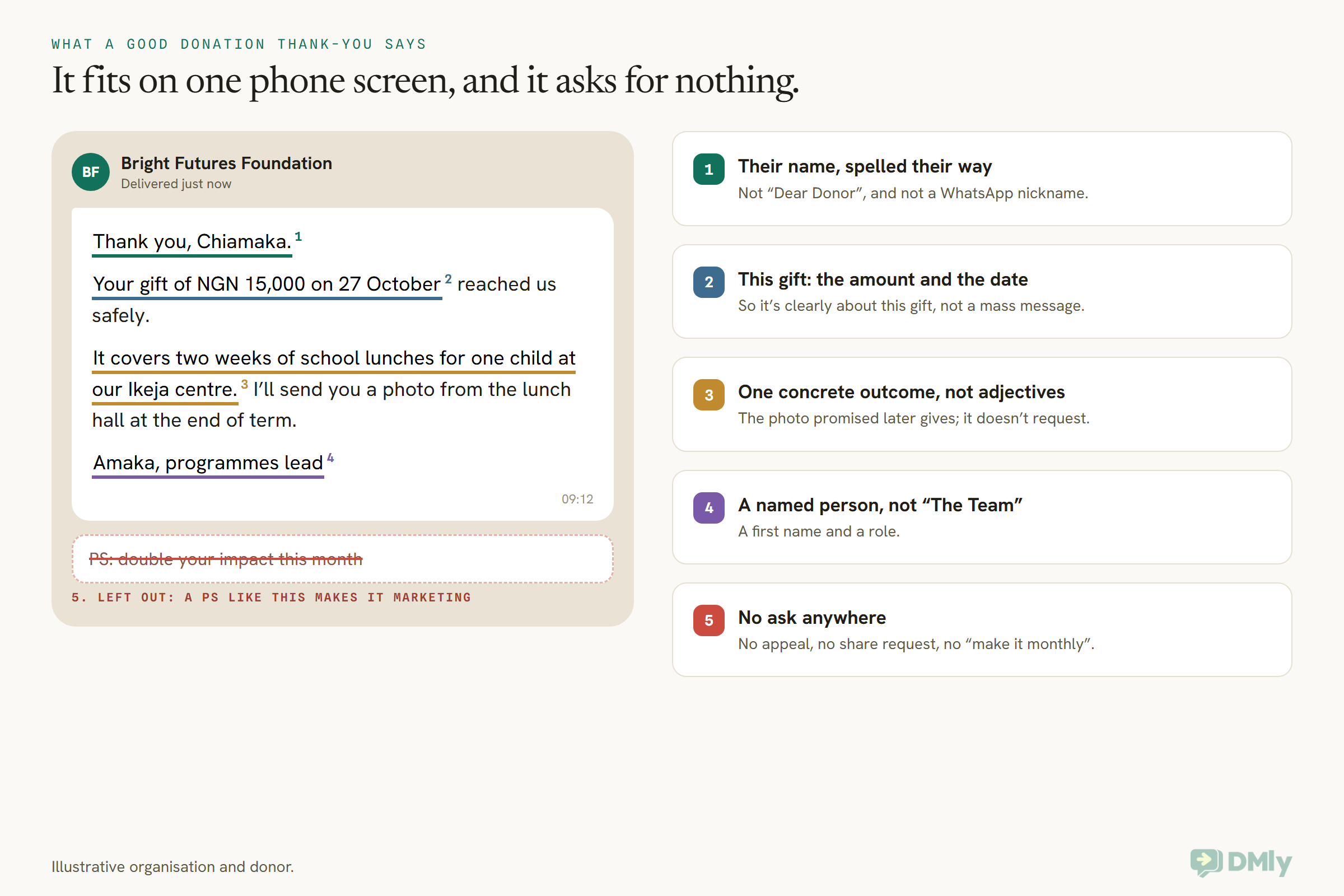
A good donation thank-you message is short, comes from a named person, says one concrete thing the gift makes possible, and asks for nothing. That last part is the one most organisations break, and it’s also the part that decides how WhatsApp categorises the message.
Five things make the difference:
- Their name, spelled the way they spell it. Not “Dear Donor”, and not whatever nickname their WhatsApp profile shows (more on that in the data section).
- The gift itself. The amount and the date, so the thank-you is clearly about this gift and not a mass message.
- One specific outcome. “This covers a week of school lunches for one child at our Ikeja centre” beats a paragraph of warm adjectives. If you don’t know yet what this gift will fund, say what gifts like it fund.
- A human sign-off. A first name and a role. “Amaka, programmes lead” sounds like a person. “The Team” sounds like a machine.
- No ask. No “share this appeal”, no “make it monthly”, no “we’re still £3,000 short”. Those can come later, in their own message, to people who’ve agreed to hear them.
Is a Donation Thank-You Message Utility or Marketing?
A donation thank-you message is Utility when it’s about the donor’s specific gift and promotes nothing; it becomes Marketing the moment it asks for more, or when it’s general gratitude not tied to a transaction. Meta decides in the end, but its rules are clear enough to write to.
Why does this matter? Two reasons. A Marketing template only goes to people who’ve agreed to receive marketing from you, and it’s billed at the marketing rate. And WhatsApp doesn’t currently deliver marketing templates to US phone numbers (+1) at all. So if your thank-you template gets classed as Marketing, your American donors simply never receive it.
Here’s how Meta’s own guidance (its template categorization page, read 27 October 2026) lines up with donor messages:
- Utility templates must be non-promotional and specific to the user’s own order, account or transaction. Meta’s examples include “Thank you! Your order {{order_number}} is confirmed.” A gift receipt or a thank-you that names this gift’s amount and date fits that shape.
- Marketing includes asking for money. Meta’s own sales example, word for word, is a template “actively seeking {{donations}} to meet our fundraising goal”. So any appeal is Marketing.
- Marketing also includes “build customer relationships”: messages like “Thank you for being a valued customer” or a year-end reflection. A general “thanks for all your support” note with no specific gift in it lands here.
- Mixed content is Marketing. A receipt with “PS: double your impact this month” tacked on is a Marketing template, not a Utility one with a bonus line.
| Donor message | Likely category | Why |
| Receipt with amount, date and reference | Utility | Confirms a specific transaction |
| Thank-you naming this gift, no ask | Utility | About the donor’s own gift, non-promotional |
| Monthly gift renewal receipt or card failed notice | Utility | About an arrangement the donor set up |
| Bank transfer acknowledgement | Utility | About a specific payment |
| Impact update (“the borehole is finished”) | Meta decides, often Marketing | Relationship-building unless clearly about the donor’s own gift |
| Giving anniversary or “thanks for a year of support” | Marketing | Relationship message, not a transaction |
| “Make it monthly”, match-funding push, appeal, campaign update | Marketing | Asks for more money |
There’s a simpler way round all of this for many thank-yous: send them while the conversation is open. If the donor messaged you in the last 24 hours (say they asked “how can I give?” and you sent a payment link), you can reply in your own words without any template at all. We’ve explained the window in more detail in our guide to how WhatsApp’s 24-hour messaging window works, and the three template categories in WhatsApp message templates explained.
22 Donation Thank-You Message Templates You Can Copy
Below are twenty-two donation thank-you message templates, grouped by the moment they’re sent, each with its WhatsApp category and a note on when it fits. Swap the words in [square brackets] for your own details. Amounts and currencies are examples from different countries; use yours.
If you turn any of these into a WhatsApp template, remember Meta’s small rules: a template can’t start or end with a variable, so keep real words around each blank, and give every blank a sample value when you submit it.
The receipt
1. Plain receipt (if you write your own)
Hi [Name], your donation of [$50.00] to [Organisation] arrived safely on [27 October 2026]. Your reference is [reference]. A proper thank-you is on its way. [Organisation]
Category: Utility. DMly’s own Payment receipt already covers this job, so you’ll usually only need this wording for gifts DMly doesn’t receipt automatically, or in a flow on a channel where you’ve switched the built-in one off. Never send both: two receipts for one gift looks like a double charge.
2. Receipt for a gift made at an event (recorded by hand)
Hi [Name], thank you for your gift of [₹2,000] at [the Diwali family fair] on [8 November]. We’ve recorded it against your name, reference [reference]. If anything looks wrong, just reply here. [Sender name], [Organisation]
Category: Utility. Cash or card-machine gifts you record yourself get no automatic receipt in DMly, so this fills the gap. Send it the same day while the event is fresh.
3. Receipt with a document attached
Hello [Name], thank you for your gift of [£500.00] to [Organisation]. Your receipt is here: [document link]. Please keep it for your records. [Sender name], [role]
Category: Utility. Use this when you’ve produced a formal receipt or tax document in your own system and want to deliver it on WhatsApp. The link is to your document; DMly doesn’t generate tax paperwork.
The first thank-you
4. First-time donor
Thank you, [Name]. This is your first gift to [Organisation], and it means a lot to us. Your [$25] helps [keep the pantry open on Saturday mornings]. I’ll let you know what it made possible. [Sender name], [role]
Category: Utility if it names this gift and asks for nothing. First gifts deserve their own message: a first-time donor is still deciding whether you’re the kind of organisation that notices.
5. Repeat donor
[Name], thank you again. Your gift of [₦10,000] on [27 October] reached us safely. People like you giving more than once is what lets us [plan the next term] instead of guessing. [Sender name], [Organisation]
Category: Utility, kept to this gift. Resist “you’re one of our most loyal supporters!” here. It drifts into relationship-building, which Meta treats as Marketing.
6. Larger gift
[Name], I wanted to thank you personally for your gift of [RM 2,000]. It covers [a full month of the mobile clinic’s fuel and supplies]. I’d love to tell you more about it if you ever have ten minutes. Thank you. [Sender name], [Director]
Category: Utility in tone, but the “ten minutes” offer could tip it. If you send it as a template and it comes back Marketing, drop the last sentence. Better still, send it inside the window or have your director send it as a plain reply.
7. Gift we noticed late
Hi [Name], I’m sorry this thank-you is late. Your gift of [$100] on [12 October] reached us safely, and it’s helping [stock the winter coat drive]. Thank you for your patience as well as your generosity. [Sender name]
Category: Utility. A late thank-you is still far better than none. Use it for back-filled gifts recorded by hand, or after you’ve fixed a payment that didn’t reconcile.
8. In memory of someone
Dear [Name], thank you for your gift of [£50] in memory of [Margaret Hughes]. We’ve noted her name with your donation. It will go towards [our family support service], which is what we hope she’d have wanted. With warm wishes, [Sender name]
Category: Utility. Keep it gentle and short, and double-check the name of the person being remembered before it sends. Getting that name wrong is the one mistake donors don’t forget.
9. A gift made on someone else’s behalf
Hi [Name], thank you for your gift of [$75] in honour of [Jordan’s birthday]. If you’d like us to send Jordan a short note saying a gift was made in their name, just reply with their first name and number and we’ll do that. [Sender name], [Organisation]
Category: Utility. Never message the honoured person without the donor’s go-ahead and their own consent to hear from you. You’re only offering; the donor decides.
10. Business or corporate gift
Hello [Name], thank you to everyone at [Company] for your gift of [₹50,000] to [Organisation]. The invoice and payment record are here: [invoice link]. If your finance team needs anything else from us, reply here and [Sender name] will help.
Category: Utility. Companies usually want paperwork, which is the main reason to use DMly’s invoice route for a gift: the PDF carries your registration number and address.
11. Gift in reply to a faith or festival appeal
Thank you, [Name]. Your [Ramadan] gift of [MYR 300] reached us safely and will go to [the community food packs]. May it be accepted. [Sender name], [Organisation]
Category: Utility if it stays about this gift. If your gifts carry religious meaning (zakat, tithes, offerings), use the words your community uses, and be sure the money goes where the donor intended. Our guide to AI messaging for churches covers what should never be left to automation in a faith setting.
Monthly givers
12. Welcome to monthly giving
Hi [Name], thank you for setting up a monthly gift of [$20] to [Organisation]. Your first gift went through today, and the next one will be on [27 November]. You’ll get a reminder a few days before each one. If you ever want to change or stop it, just reply here.
Category: Utility. It’s about an arrangement the donor just made. “Just reply here” is deliberate: it gives them a person to ask, rather than a keyword (see the “cancel” trap below).
13. Monthly renewal thank-you
Thank you, [Name]. Your monthly gift of [£15.00] went through today, [1 December]. This month it’s helping [run the Thursday youth club]. [Organisation]
Category: Utility. DMly already sends a receipt on each auto-charged renewal, so treat this as optional, and don’t send a second receipt on top of it. If you add the outcome line, keep it to one sentence.
14. Card failed, gently
Hi [Name], your monthly gift of [$20] didn’t go through this time. Usually that just means a card has expired. If you’d like to keep giving, you can update your card here: [card update link]. No action needed if you meant to pause. Thank you either way.
Category: Utility. “Thank you either way” matters: a donor who chose to stop should feel thanked, not chased. In DMly the card update link is available to a flow as {{subscription.update_card_link}}.
15. Giving anniversary
[Name], a year ago this week you started giving [$20] a month to [Organisation]. Over that year your gifts helped [serve 48 Saturday breakfasts]. Thank you for sticking with us. [Sender name]
Category: Marketing. It’s relationship-building, not a transaction, so it needs marketing opt-in and won’t reach US numbers as a template. Send it inside an open window if you can, and only print a figure like “48 breakfasts” if your records really show it.
Bank transfer donors
16. “I’ve paid”, acknowledged
Thank you, [Name]. We’ve got your message that you sent [₦25,000] with reference [BT-reference]. We’ll check our account and confirm here shortly, usually within [one working day].
Category: Utility. DMly already thanks the donor when they tap I’ve paid, so you may not need this. It’s useful when a donor tells you in a plain message instead.
17. Transfer confirmed
Good news, [Name]: your transfer of [₦25,000] has arrived. Thank you! It’s going straight to [the girls’ scholarship fund]. [Sender name], [Organisation]
Category: Utility. When your team confirms a transfer in DMly, the built-in receipt goes out, so this works best as the thank-you that follows it, not a second receipt.
After the gift
18. The follow-through (what happened)
Hi [Name], in October you gave [$40] towards [the shelter’s new kennels]. They were finished this week, and the first six dogs moved in on [Tuesday]. Thank you for being part of it. [Sender name]
Category: Meta decides, often Marketing. It’s about the donor’s gift, but it’s an update rather than a transaction. Send it to donors who’ve opted in to updates, or inside an open window. It’s the message donors remember most, so it’s worth the opt-in.
19. Year-end giving summary
Hi [Name], here’s your giving summary for [2026]: [3] gifts to [Organisation], totalling [$180.00]. If any of this doesn’t match your records, reply here and [Sender name] will look into it. Thank you for this year.
Category: Utility if it sticks to the donor’s own figures. DMly doesn’t build per-donor annual statements for you; you’d pull the totals from the finance report export (see the tax section). Check the numbers before anything goes out.
20. Refund confirmed
Hi [Name], we’ve refunded your gift of [£30.00] as you asked. It should reach your account within the time your bank usually takes. Thank you for thinking of us, and you’re always welcome back.
Category: Utility. Refunds happen: a duplicate payment, a wrong amount. A kind refund message keeps the door open. In DMly, the Payment refunded trigger can send it.
21. Gift Aid declaration request (UK)
Hi [Name], thank you for your gift of [£20]. If you’re a UK taxpayer, [Organisation] may be able to claim Gift Aid on it at no cost to you. If you’d like that, you can fill in a short declaration here: [form link]. No need to do anything if not.
Category: Meta decides. It’s about the donor’s own gift and asks for no money, but it does ask them to act. The declaration itself must live on your own form with the wording HMRC requires; the WhatsApp message only points to it.
22. The appeal, kept separate
Hi [Name], you helped us [open the Saturday pantry] last year. This winter we’re aiming to [serve 200 families]. If you’d like to give again, you can do it here: [link]. Reply STOP if you’d rather not hear about appeals.
Category: Marketing, always. It’s here so you can see the line clearly: the appeal never rides inside a thank-you. It needs marketing opt-in, won’t reach US numbers as a template, and is best sent weeks after the thank-you, not minutes.
Turning brackets into DMly variables
When a flow sends one of these after a gift, DMly can fill some brackets for you. Amounts arrive as plain numbers (50.00, no symbol), so put the currency next to them yourself.
| Bracket | DMly token | Where it works |
| [Name] | {{first_name}} | Anywhere |
| [amount] | {{payment.amount}} {{payment.currency}} | Flows started by a payment event |
| [reference] | {{payment.reference}} | Flows started by a payment event |
| [invoice link] | {{invoice.pdf_url}} | Flows started by an invoice event |
| Monthly amount, next date | {{subscription.price}}, {{subscription.next_billing_date}} | Flows started by a subscription event |
| [card update link] | {{subscription.update_card_link}} | Flows started by a subscription event |
Two catches. Dates from a subscription come out as 2026-12-01, which reads oddly in a warm message, so you may prefer to leave the date out. And the outcome line (“two weeks of school lunches”) has no token: write it into the template, which is why one template per programme or appeal often works better than one for everything.
How to Send Donation Receipts Automatically in DMly
To send donation receipts automatically in DMly, connect a payment gateway, switch on the Payment receipt notification, make sure its WhatsApp template is approved, and take gifts through a DMly payment link. Then build one flow for the human thank-you. Here’s the order to do it in.
Step 1: Connect a payment gateway, and add its webhook
Go to Configurations → Integrations and open your gateway’s tile. DMly has built gateways for Stripe, PayPal, Paystack, Razorpay, MyFatoorah, Mercado Pago and Monnify, and Flutterwave is available too for Nigeria. You paste your API keys from the provider’s own dashboard.
Then do the step people skip: add DMly’s webhook address in the provider’s dashboard (the tile shows it). The webhook is how the provider tells DMly the money arrived, and the receipt hangs off it. Without it, a donor can pay successfully and DMly still thinks they haven’t, so no receipt goes out at all. If you have more than one gateway, choose which one donations go through under Finance → Settings → Gateways → Charge through. Our guide to creating online payment links walks through this part.
Step 2: Check the receipt templates are approved
Open Messaging → Templates → System and look for dmly_payment_receipt and dmly_payment_request. The second one is what carries a payment link to a donor outside the 24-hour window, so you need it too. If either is missing, it’ll be under Available to install. Install it and wait for Meta’s approval, which usually takes minutes. Taking bank transfers to your own account? Add dmly_bank_transfer_details as well.
Step 3: Switch on the Payment receipt notification
Go to Workspace Settings → Settings → Notification settings, on the Client & staff messages tab. First set the Default WhatsApp number at the top, because it decides which templates the cards can use. Then find Payment receipt under the Finance notifications, switch it on, tick WhatsApp, check the template shows Approved, and press Save. While you’re there, look at Payment failed and Renewal reminder, which matter for monthly givers.
You can tick Email as well, if you collect donor emails and want them to have a copy in their inbox. That’s a good idea for anyone who’ll need their gifts for tax time.
Step 4: Fill in your business details
Anything DMly generates as a document (an invoice PDF) is branded from your workspace’s business details: name, logo, address, email, phone and registration number. Put your charity or NGO registration number there now, so it appears on every PDF you send from here on.
Step 5: Choose how you’ll take gifts
For most one-off gifts, the simplest route is a payment link for any amount, with no invoice behind it. A donor asks “how can I give?”, someone on your team uses Request payment in the inbox, types the amount the donor named, and the donor taps Pay without leaving the chat. The same step exists in flows and as a quick automation action, so a keyword like GIVE can send it without a person. Our guide to sending WhatsApp payment links covers the options.
Use an invoice instead when the donor needs a document, such as a company gift or a pledge paid in parts. See how to create and send invoices through WhatsApp. Invoice lines come from your Offerings catalogue, so you’d set up a donation item there; test whether you can set the amount per invoice in your workspace before you promise a donor a custom figure.
One small trap: if you’ve turned on Collect tips at checkout (some organisations that also run a café do), invoice and booking pay links show a tip page first. That’s odd for a donation. Payment links from Request payment never show it.
Step 6: Build the thank-you flow
This is where your words come in. Create a new automation on your WhatsApp channel and start it on the Payment succeeded trigger (under Payment events). Then:
- Add a Smart Delay of a few minutes, so the thank-you lands after the receipt rather than on top of it.
- Add a Send Template step with your approved thank-you template (number 4 or 5 above works well), filling its blanks with
{{first_name}}and{{payment.amount}} {{payment.currency}}. A template is what reaches donors outside the 24-hour window. - Add a Tag step, for example donor-2026, so you can find and group donors later.
- If you also take other kinds of payment (a charity shop, event tickets), add a Condition so only donations get the thank-you. Tagging donors when you send the link and checking for that tag is one way; check which condition options your workspace offers.
Don’t add a receipt to this flow. The builder will warn you that “a workspace notification already fires on this event”, because the Payment receipt notification is already sending one. Two receipts for one gift is the fastest way to get a worried “was I charged twice?” reply. And remember that every automation on Payment succeeded runs: two thank-you flows means two thank-yous.
Step 7: Test it with a real gift
Pay yourself a small amount through a real link, from a phone that isn’t on your team. Check the payment shows as paid in Finance → Payments, the receipt arrives, then the thank-you, with the right name and amount. If the payment never flips to paid, it’s almost always the webhook from step 1.
Which Donation Route Gives Which Receipt
Not every way of taking a gift produces a DMly receipt. This table is worth checking before you tell donors “you’ll get a receipt on WhatsApp”, because the honest answer depends on how they paid.
| How the gift was taken | Automatic receipt? | Payment succeeded fires? | Document? |
| Request payment (inbox, flow or quick automation) | Yes | Yes | No |
| Invoice pay link | Yes | Yes | Invoice PDF |
| Monthly gift with auto-charge | Yes, the subscription’s own receipt | Subscription renewed fires; check Payment succeeded in a test | Each period’s invoice |
| Monthly gift without auto-charge | When the period’s invoice is paid online | Yes, on payment | Each period’s invoice |
| Paystack transfer-only link, or Monnify account in chat | Yes, once the provider confirms | Yes | Only if it paid an invoice |
| Your own bank account with “I’ve paid” | Yes, when your team taps Confirm transfer | Yes, on confirm | Only if it paid an invoice |
| Cash or card machine, recorded by hand | No | Check in a test | Only if recorded on an invoice |
Two notes on Nigeria, where transfers are often the default. A Monnify transfer for less than the amount asked is not marked paid, and no receipt goes out “for money that isn’t all there”; your team gets an alert instead. And when a donor pays into your own account and taps I’ve paid, confirming it under Finance → Payments is the recording. Don’t also record it on the invoice, or the donor shows as having given twice.
Tax Receipts: What a WhatsApp Message Can’t Do
A WhatsApp receipt or donation thank-you message is not a tax receipt, and DMly does not produce tax-deductible receipts. Whether a donor can claim relief, and what paperwork they need, is set by their country’s tax rules and your organisation’s registered status. DMly’s own docs are blunt about tax generally: it applies the rates you configure and does not file or report anything for you.
What the chat can do is make the formal paperwork easier to deliver and easier to prepare. Here’s what we read at the source, and where you’ll need your own adviser.
United States
The IRS (pages read 27 October 2026) says a donor claiming a deduction for a gift of $250 or more needs a contemporaneous written acknowledgment from the charity. It must give your organisation’s name, the amount of a cash gift (or a description, not a value, for a non-cash one), and a statement that no goods or services were given in return, or a description and good-faith estimate of any that were. “Contemporaneous” generally means the donor has it by the date they file that year’s return. There’s no prescribed format.
Separately, if a donor pays more than $75 and gets something back (a gala dinner ticket, say), the charity must give a written disclosure explaining that only the amount above the value of what they received is deductible, with a good-faith estimate of that value. And for any cash gift, the donor needs a bank record or a written communication from the charity showing the charity’s name, the date and the amount.
Could a WhatsApp message carry some of that? The IRS says there’s no set format, but whether your receipt meets the rules is a question for your accountant, not for us or a template. A common approach is to send a formal acknowledgment from your donor or accounting system (template 3 delivers it) and, for donors who give through the year, a year-end summary that covers every gift.
United Kingdom
For Gift Aid, HMRC’s guidance on GOV.UK (read 27 October 2026) says a declaration can be made in writing, verbally or online, and must include your charity’s name, the donor’s full name and home address, which donations it covers, a statement that the donor wants Gift Aid to apply, and an explanation that they must pay at least as much UK Income Tax or Capital Gains Tax as all charities will claim on their gifts that year. A verbal declaration needs a written confirmation that tells the donor they can cancel within 30 days. You must keep declaration records, and most charities keep them for six years.
A WhatsApp thank-you isn’t a declaration. Collect the declaration on your own form, using HMRC’s template wording if you’re unsure, and use template 21 to point donors to it.
India, Nigeria and everywhere else
In India, donations to approved organisations can qualify for a deduction under section 80G, and the certificate process runs through the Income Tax Department’s own systems, not through a chat message. We couldn’t read the current rules at the source while writing this, so check the forms and deadlines with your CA. In Nigeria, the treatment of donations depends on the organisation’s status and the donor’s own tax position; check with your tax adviser. The same goes for the Gulf, South-East Asia and anywhere else: ask locally, and write the answer into your process.
Where DMly helps with the paperwork
- Year-end totals. The finance report (Reports → Finance) can export a CSV with one row per payment in the dates you choose, including the client, the date, the gross and net amounts, the currency and the reference. That’s the raw material for a giving summary or your tax filing. Exporting is admin-only by default.
- One donor’s history. A donor’s profile shows a Payments tab and their lifetime value, once they’re at the Client stage (taking a payment usually moves them there).
- A document with your details. The invoice route gives a PDF with your registration number. Invoice notes can carry a line your adviser approves, but remember it’s still titled as an invoice.
- Delivery. However you produce the formal receipt, WhatsApp is a good way to get it to the donor. Template 3 is written for it.
Monthly Donors: Receipts That Renew Themselves
For monthly giving, DMly’s subscriptions handle the recurring receipt: each auto-charged renewal sends the donor a receipt, and a reminder goes out three days before each charge. We cover the full setup in the WhatsApp automation for NGOs guide; here’s what matters for thanking and receipting.
- Each giving level is a Plan. A donor who gives an unusual amount can be put on a plan with a Price override, so you don’t need a plan for every figure.
- Auto-charge needs the donor to save a card once, through a link DMly sends. That works on Stripe, PayPal, Paystack, Razorpay and MyFatoorah. Mercado Pago and Monnify can’t auto-charge, so a monthly gift on either is collected with a pay link each month instead.
- Receipts, reminders and failure notices are on by default for each subscription. You can turn any of them off for one donor with Edit notifications, for example a donor who asked for no monthly messages.
- When a card fails, DMly tells the donor and retries, pausing the gift after three failed attempts. Template 14 is a kinder follow-up you can send from a flow on Subscription payment failed.
Get the Donor Details Right Before the First Thank-You
An automatic thank-you is only as good as the contact record behind it. A few minutes here saves the awkward ones.
- Check names. A contact who first messaged you on WhatsApp may be saved under their profile name, which can be a nickname, an emoji or a business. Fix it before the thank-you goes out, or use a greeting that works without a name.
- Importing old donors sends nothing. A CSV import in DMly never triggers automations, so loading last year’s donor list won’t fire a wave of thank-yous. It also means imported donors aren’t thanked until they give again. If you tick the box saying you have consent to send them marketing, record how you got it.
- Never invite a one-word “cancel”. In DMly, a reply that is only the word stop or unsubscribe opts the contact out of all messages, straight away. A bare cancel, end or quit on WhatsApp gets a question first (STOP for all messages, STOP OFFERS for promotions only), and by SMS it opts the contact out at once. Either way, a donor who replies “cancel” to stop a monthly gift doesn’t stop the gift: it keeps running, and if they then tap STOP, they’re opted out of your messages instead. That’s why template 12 says “just reply here” rather than “reply CANCEL to stop”.
- Opted-out donors get nothing automated. Once someone opts out, DMly’s docs say automated messages don’t reach them and even a payment link from the inbox is refused. If they still give, tick Email on the receipt notification so they have a record another way, and test whether it arrives.
- Respect anonymous givers. If someone asks not to be named, tag them, and keep them out of any segment you use for public thank-you lists or donor walls.
- Consent for updates. The follow-through and appeal messages need marketing opt-in. Our guide to WhatsApp opt-in and consent covers how to collect it and prove it.
Six Organisations, Six Thank-You Setups
Every setup below uses the same building blocks; what changes is the gateway, the currency and the paperwork around them. These organisations are illustrative, not DMly customers.
A food pantry in Chicago
Stripe, USD. One-off gifts by payment link, with the built-in receipt by WhatsApp and email. A thank-you flow sends template 4 or 5. Because marketing templates don’t reach US numbers, the pantry sends its follow-through photos as replies inside open conversations, and its finance volunteer sends formal acknowledgments for gifts of $250 and up from the donor database.
An animal shelter in Pune
Razorpay, INR. Most gifts come after an adoption-day post, when people message to ask how to help, so the thank-you goes inside the open window with no template needed. The shelter’s CA handles 80G certificates; the WhatsApp chat delivers them with template 3.
A girls’ education NGO in Lagos
Paystack with transfer-only links, plus Monnify for donors who prefer an account number in the chat. Receipts go out when the provider confirms the transfer. The team uses template 17 as the thank-you, and checks the Part payment received alerts weekly for donors who sent a little less than they meant to.
A hospice in Bristol
Stripe, GBP. After the receipt, template 21 points UK donors to the hospice’s own Gift Aid declaration form. Gifts made in memory get template 8, sent by a named member of the family support team, never by an anonymous flow name.
A community kitchen in Kuala Lumpur
Stripe, MYR. Monthly givers are on subscriptions with auto-charge. The built-in renewal receipt covers the paperwork, and once a quarter the coordinator sends template 13’s outcome line to donors who’ve opted in to updates.
A music school charity in Mexico City
Mercado Pago, MXN. Mercado Pago can’t auto-charge a saved card, so monthly givers get a pay link each month, and template 13 thanks them each time the link is paid. The finance lead exports the year’s payments from the finance report for the annual tax receipts.
When a Donation Receipt Doesn’t Arrive
Most missing receipts come down to one of five things, and the first one causes most of them.
| What you see | Likely cause | Fix |
| Donor paid, DMly still shows it unpaid, no receipt | The webhook isn’t set up in the provider’s dashboard, or its secret is wrong | Add or re-copy it. Don’t record the payment by hand as well, or it counts twice when the webhook arrives |
| Payment shows as paid, no WhatsApp receipt | Payment receipt is off, WhatsApp isn’t ticked, or the template isn’t approved and the window is closed | Check the notification card and the template status |
| Donor got two receipts | A flow on Payment succeeded also sends a receipt | Remove the receipt from your flow; keep only the thank-you |
| Donor got two thank-yous | Two active automations on Payment succeeded | Every matching automation runs: pause one |
| Event donor got no receipt | The gift was recorded by hand, which never sends one | Send template 2 or 7 yourself |
| Donor says they never got anything at all | They replied “stop” at some point, or chose STOP after a “cancel”, and are opted out | Check Contacts → Suppressions; only resubscribe if they ask |
Frequently Asked Questions
What should a donation thank-you message say?
Use the donor’s name, mention this gift’s amount and date, say one concrete thing it makes possible, and sign off with a real person’s name. Leave out any ask. A short, specific message beats a long, warm one.
Is a donation receipt on WhatsApp a tax receipt?
No. DMly’s receipt confirms that a payment arrived. Tax receipts have contents set by your country’s tax authority, such as the IRS written acknowledgment for US gifts of $250 or more, and they come from your own records. WhatsApp can deliver one, but the chat message isn’t one.
Can I send donation receipts automatically?
Yes, for gifts paid online through DMly. Switch on the Payment receipt notification, make sure the dmly_payment_receipt template is approved, and set up your gateway’s webhook. Gifts you record by hand, like cash at an event, don’t get an automatic receipt.
Is a thank-you message for a donation Utility or Marketing?
It’s usually Utility if it names the specific gift and promotes nothing. It becomes Marketing if it asks for another gift, pushes monthly giving or match funding, or is a general relationship message. Meta makes the final call when you submit the template.
How soon should I thank a donor?
The receipt should arrive within seconds, and the thank-you within a day, ideally within minutes. The follow-through about what the gift achieved can wait weeks, until there’s something real to show.
Can I thank US donors on WhatsApp?
Yes, with Utility templates or replies inside the 24-hour window. WhatsApp doesn’t currently deliver Marketing templates to US (+1) numbers, so anniversary messages, updates and appeals sent as templates won’t reach them.
Can donors stop a monthly gift by replying “cancel”?
Not in the way they’d expect. On WhatsApp, DMly answers a one-word “cancel” with a question about stopping messages, and a donor who taps STOP is opted out of messages, while the monthly gift keeps running. Ask donors to reply in their own words, and have a person stop the subscription.
The Statement Line, Rewritten
Go back to that line on the donor’s bank statement: the capital letters, the half a name, the amount. It’s still there after you set all this up. The difference is that it’s no longer the only thing they have.
Now, seconds after they tap Pay, there’s a receipt in the chat saying the money arrived. A few minutes later, there’s a donation thank-you message from someone with a name, saying what the gift will do. Weeks later, maybe, there’s a photo. And when tax time comes, the proper paperwork arrives from whoever is responsible for it, because nobody tried to make a chat message do that job.
None of it needs a quiet afternoon. Switch the receipt on, write one good thank-you, build the flow, and test it with your own small gift today. If you’d like to see how the rest of your supporter journey fits around it, from volunteers to appeals, start with our guide to WhatsApp automation for NGOs, or see what DMly for NGOs and non-profits includes.
Writing about WhatsApp automation, bookings and growth for local business.
Turn WhatsApp into your busiest channel.
Start free and run message, bookings, payments and reviews in one place.
