
AI Messaging for Churches: What to Automate, What It Costs, and What Must Never Be Answered by a Bot
Somewhere in your church’s message history there is a conversation that begins late at night and does not mention an event, a rota or a car park. Somebody has had a diagnosis. Somebody has lost their mother. Somebody is asking, in a roundabout way that takes four messages to arrive at, whether anybody would notice if they stopped coming.
That message must never receive an automatic reply. Not a clever one, not a warm one, not a well-written one. It is the clearest line in this whole subject, and it is the reason to take the rest of it seriously: every hour of automated question-answering, event reminding and rota chasing exists so that a person has the time and the attention to answer that message properly. That is the first rule of AI messaging for churches, and everything else has to protect it.
So this guide to AI messaging for churches is not a list of things a bot can do. It is a division of labour. What follows is what is genuinely safe to automate in a church, what it costs, which of your messages the platforms will charge you for and why, and where the line sits with the mechanics of holding it.
AI messaging for churches starts with the messages that stay human
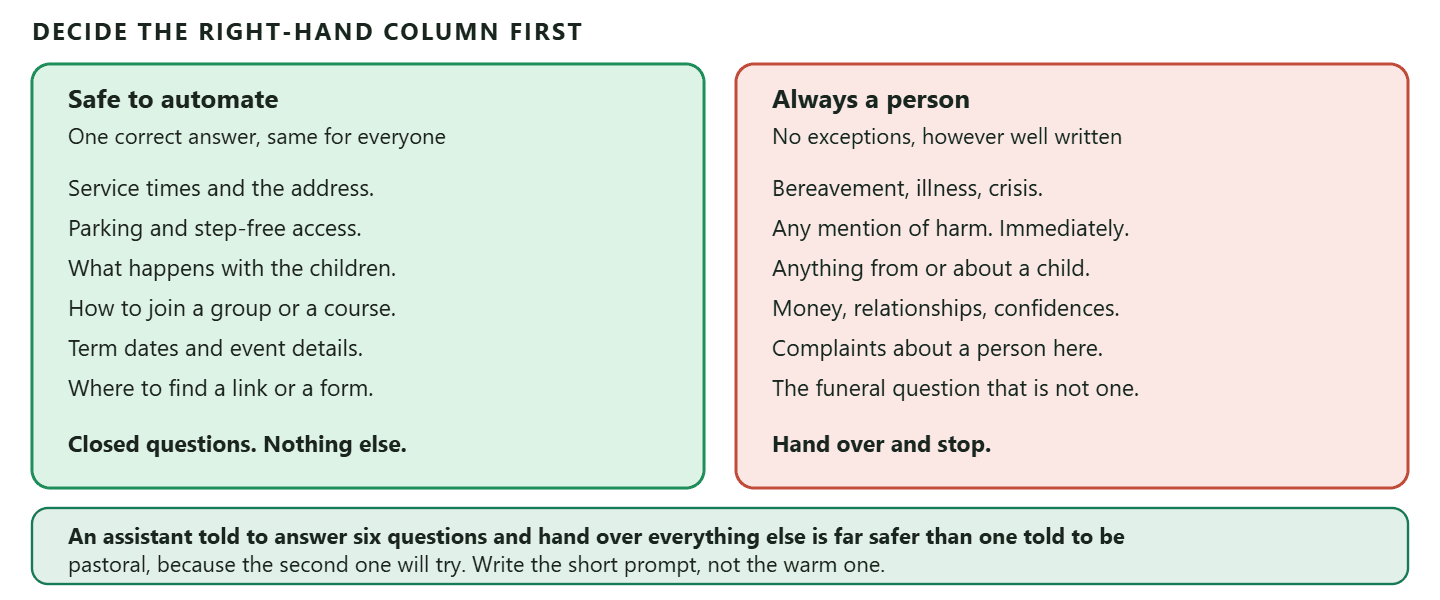
Decide what the AI must never handle before you decide what it will, because the second list is easy and the first one is not. Every workable design here is built outwards from that decision rather than towards it. In a church the untouchable set is larger than in a business, and it is not obvious to software.
- Anything about bereavement, illness or crisis. Including the ones that arrive disguised as a practical question about a funeral date.
- Anything that mentions harm to themselves or to somebody else. This goes to a named person immediately and to your safeguarding process, not into a queue.
- Anything from or about a child or a young person. Different rules, different people, different record keeping.
- Money troubles, relationship troubles, and anything said in confidence. A benevolence request is a pastoral conversation that happens to involve a number.
- Complaints about a person in the church. The one category where an automated reply reads as the institution closing ranks.
The practical way to hold that line is not a cleverer prompt, it is a shorter one. Give the assistant a small, closed job: service times, the address and parking, what happens with children during the service, how to join a group, who to contact about a baptism or a wedding. Then instruct it to hand over rather than attempt anything else. An assistant told to answer six questions and pass on everything else is far safer than one told to be pastoral, because the second one will try.
Three mechanics worth knowing before you rely on the line holding: Three mechanics worth knowing before you rely on the line holding The handover really does stop it. When the assistant hands a conversation to a person during its turn, it stops immediately rather than talking over your team. There is a kill switch. A single workspace setting turns off every AI step in every flow at once; the flows keep running, the step is skipped, and a note appears in the conversation so whoever opens it knows why the bot went quiet. That is the switch you want to know about on the worst week, not to go looking for. And you can slow it down. A pause before an AI reply is configurable up to five seconds, because an instant answer to a heavy message reads as nobody listening.
The platforms do not have a category for what you are
This is the part that surprises every church that starts sending on WhatsApp, and it is worth knowing before the first invoice rather than after. You are not a business, you are not selling anything, and none of that changes how your messages are classified or priced.
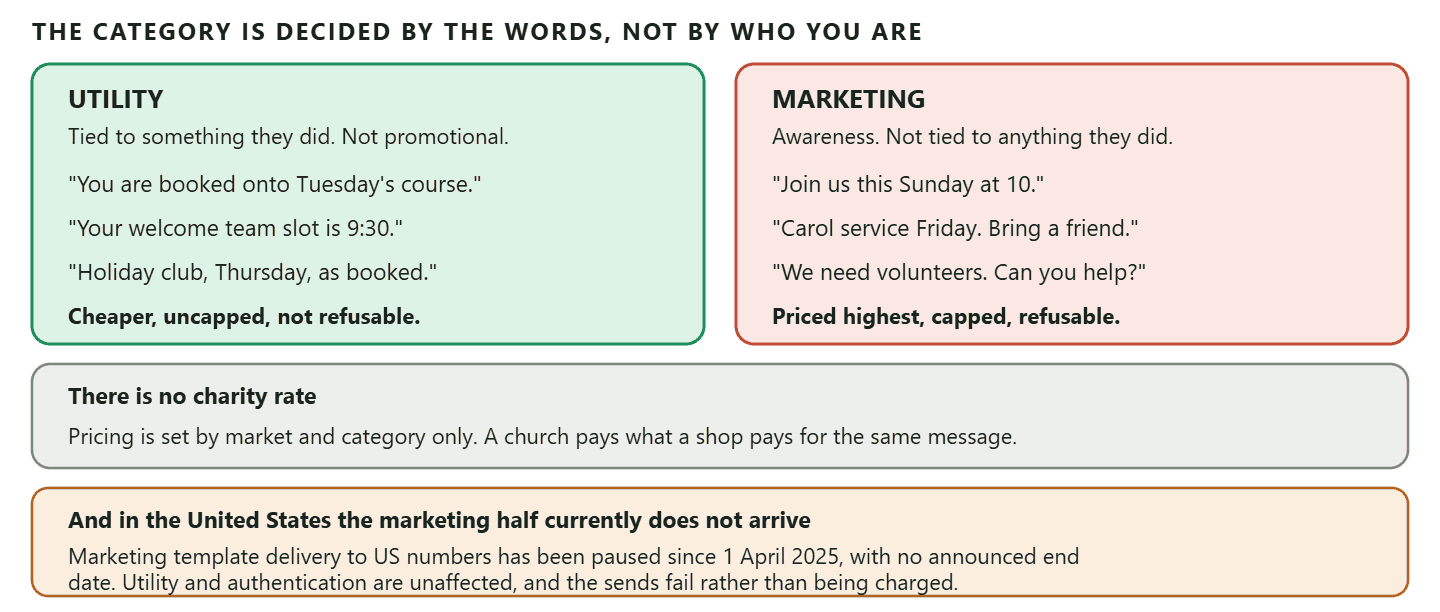
Meta’s pricing is set by two things and only two: the market your recipient’s number belongs to, and the category of the message. There is no charity rate, no nonprofit tier and no religious-organisation exemption. A message from a church costs what the same message from a shop costs.
Then the categories, which is where the real cost lives. Outside a 24-hour window from the member’s last message to you, you can send only approved templates, and a template is either utility, authentication or marketing. Meta defines marketing templates as ones that “enable businesses to achieve a wide range of goals, from generating awareness to driving sales and retargeting customers”, and a utility template has to be non-promotional and either specific to something the person did or requested, or essential.
Read your own church messages against that and the answer stops being comfortable.
| The message | Category | Why |
| “You are booked onto the Tuesday course. It starts at 7pm in the hall.” | Utility | It follows a booking they made and sells nothing |
| “Your slot on the welcome team this Sunday is 9:30.” | Utility | It follows a commitment they made and is specific to them |
| “Reminder: your child is booked into holiday club on Thursday.” | Utility | Same again, tied to a specific booking |
| “Join us this Sunday at 10. All welcome.” | Marketing | Awareness, not tied to anything they did |
| “Carol service this Friday. Bring a friend.” | Marketing | An invitation is promotional in the platform’s terms |
| “We are short of volunteers for the food bank. Can you help?” | Marketing | An appeal to the whole list is not specific to anyone |
Everything a church most wants to send is in the second half of that table. The invitation, the service reminder, the appeal. Those are marketing templates, which means the highest rate per message, a cap on how many marketing messages any one person will accept from you in a period, and a setting the member can switch off in two taps that stops all of them without them ever leaving your congregation.
And in one market the answer is currently zero: And in one market the answer is currently zero Marketing template delivery to United States phone numbers has been paused since 1 April 2025 and is still paused, with no announced end date. Utility and authentication templates are unaffected, and the sends fail rather than being charged. So a US church cannot broadcast “Join us on Sunday” over WhatsApp templates at all today. What still works is everything tied to something the person did, and everything inside a conversation they started. That is not a workaround, it is a genuinely better way to run a church list, and the rest of this page is largely about it.
The per-market rates move, so they live on the WhatsApp Business API rate card by country rather than here. If you want the categories and their costs set out in full, with the arithmetic, that is in our guide to which messages count as marketing and what the category costs.
One dated change to put in next year’s budget. From 1 October 2026, Meta begins charging for two things that used to be free: service messages, meaning your free-form replies inside the 24-hour window, and utility templates sent inside an open window. For a church that answers a lot of questions and sends a lot of booking confirmations, that is a real change rather than a footnote.
AI messaging for churches should be built on the rhythm you already have
A church has a shape almost no other organisation has, and it is the thing to design around. There is a fixed weekly gathering, a small number of annual peaks everybody can name a year in advance, and a membership that mostly does not change week to week. A shop has none of that and an NGO has campaigns instead.
That shape is unusually kind to automation, for one reason: almost everything you send is either predictable or tied to something a person actually signed up for, which is exactly the half of the table that is cheap, uncapped and cannot be switched off. The trick is to reshape the messages you already send so more of them qualify.
- Instead of a Sunday broadcast to everyone, let people sign up for the things they care about: the prayer list, the youth updates, the men’s breakfast. Then the message is tied to their own choice.
- Instead of an all-church rota appeal, confirm each volunteer’s own slot. Six hundred people do not need to be told the welcome team is short. The eleven people on the welcome team do.
- Instead of announcing a course to the whole list, announce it once, then let the bookings carry the rest of the conversation.
That is a better congregation experience as well as a cheaper one. The reason people mute a church WhatsApp list is almost never that the church sent something bad. It is that they were sent eleven things that were not for them.
Two entry points do most of the recruiting. A QR code on the welcome desk, the pew card and the noticeboard, and a link in the bio and the email footer. A trackable one is worth the extra minute because it tells you which one people actually use, and the mechanics of what a link can and cannot tell you are in our guide to click-to-chat links and what they cannot measure. One warning specific to a church: on WhatsApp the source stamp and the greeting flow fire for brand new contacts only, so a long-standing member who scans the poster at the door simply opens a chat with no greeting and no source recorded. In a congregation that is most of the people scanning it.
Small groups and courses are the part that fits best
If you automate one thing beyond answering questions, make it the thing with seats. Courses, small groups, holiday clubs and anything with a capacity are the closest fit between what a church runs and what the tooling is built for.
A session has a capacity, which is the seat count for one session rather than for the course in general. When it is full, people can join a waitlist and are promoted automatically when somebody cancels, which removes the single most annoying administrative job in the building. Marking a seat attended or a no-show fires its own trigger, so the follow-up can be automatic without anybody watching a list. And a session can be repeated as a series, which is how a term-long course gets set up once.
One documented gap to plan around, as of September 2026: One documented gap to plan around, as of September 2026 There is no screen for editing a series after it exists. Changing the capacity or the details across a whole run of sessions is not something you can do in one action once the series is created, so set the capacity deliberately before you generate the term rather than after. Worth checking the documentation again before you rely on this paragraph, because it is the kind of gap that gets filled.
Volunteer shifts work on the same machinery, and because they are covered properly in our guide to volunteer coordination, shifts and waitlists for nonprofits, they are not repeated here. The same page covers taking donations by payment link and running monthly giving on subscription machinery, which is the honest answer to the giving question: there is no giving product, there is a finance module built for selling services that can be pointed at a gift, and that page explains how.
Who can read the conversation
A church inbox holds things a shop’s inbox does not, and the access question deserves an actual decision rather than a default. This is the one part of the setup worth doing slowly.
Team members get one of three base roles, Admin, Member or Viewer, with the Member role being the everyday operator who works the inbox, contacts, appointments and campaigns. Where a church usually needs more than that is in the middle: the person who runs the events calendar does not need to read pastoral threads, and the youth worker’s conversations should not be open to everybody with a login.
Two things make that possible. There are per-member access restrictions alongside the base role, and where those are not granular enough you can build a custom role with exactly the permissions you want and assign it at the invitation. A custom role replaces the base role’s access, with one exception worth remembering: Admin always has full access regardless. So the number of Admins is the real access-control decision, and in most churches it should be a very small number.
Two habits go with it. Agree in advance which conversations move out of the shared inbox into a private channel, and tell people. A member who assumes they are messaging the minister and finds they were messaging the church office will not make that mistake twice, and not in the direction you want.
Three ways the assistant goes quiet without telling anyone
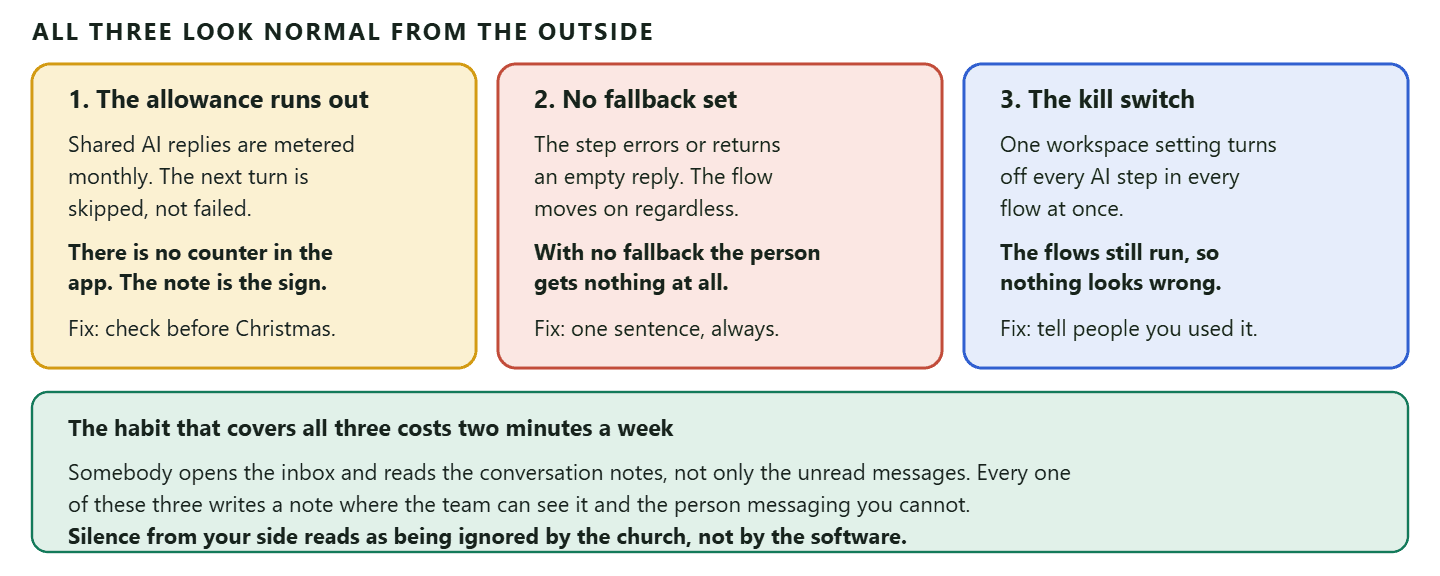
An automated answer that fails silently is worse than no automation, because the church believes the question was handled. There are three documented ways that happens, and all three are avoidable once you know them.
One: the monthly allowance runs out. On the shared AI, replies are metered against your plan’s monthly allowance. When it is reached, the next AI turn is skipped rather than failing, and a note goes into the conversation saying the limit was reached and resets next month. The part that catches people is that there is no running counter anywhere in the app: the documentation says plainly that the first sign you have reached the cap is that conversation note. A church’s two busiest weeks of the year fall on fixed dates that everyone knows in advance, which is exactly when this bites.
Two: the step fails and there is nothing to say. If the AI step errors or returns an empty reply, the flow moves on rather than getting stuck. If a Fallback message is set, the contact receives it. If it is empty, the contact gets nothing at all and the note in the conversation is the only sign anything happened. Set the fallback. One sentence is enough: say a person will reply and roughly when.
Three: somebody used the kill switch and did not say. Turning off AI replies for the workspace skips every AI step in every flow. The flows still run, so from the outside everything looks normal. Each skipped step is noted in the conversation, but only your team sees that.
The habit that covers all three costs about two minutes: somebody opens the inbox on Monday and reads the notes, not just the unread messages. What a messaging tool can and cannot report is set out honestly in our guide to the metrics worth tracking after you automate messaging, including the ones nothing in this category reports.
One inbox, because a church is genuinely multi-channel
Churches are one of the few organisations where four channels is normal rather than ambitious. The older members are on SMS or the phone, the middle are on WhatsApp, the parents are in a Facebook group, the youth are on Instagram, and the website has a contact form nobody checks.
This is the part of AI messaging for churches that a shop never has to think about, and the practical value of bringing those channels into one place is not tidiness. It is that a question asked on Instagram at 9pm and a question asked on WhatsApp at 9pm get the same answer and the same speed, and that when somebody moves between channels the history moves with them. The case for that, and the honest limits of it, is set out in our guide to running one inbox across every channel.
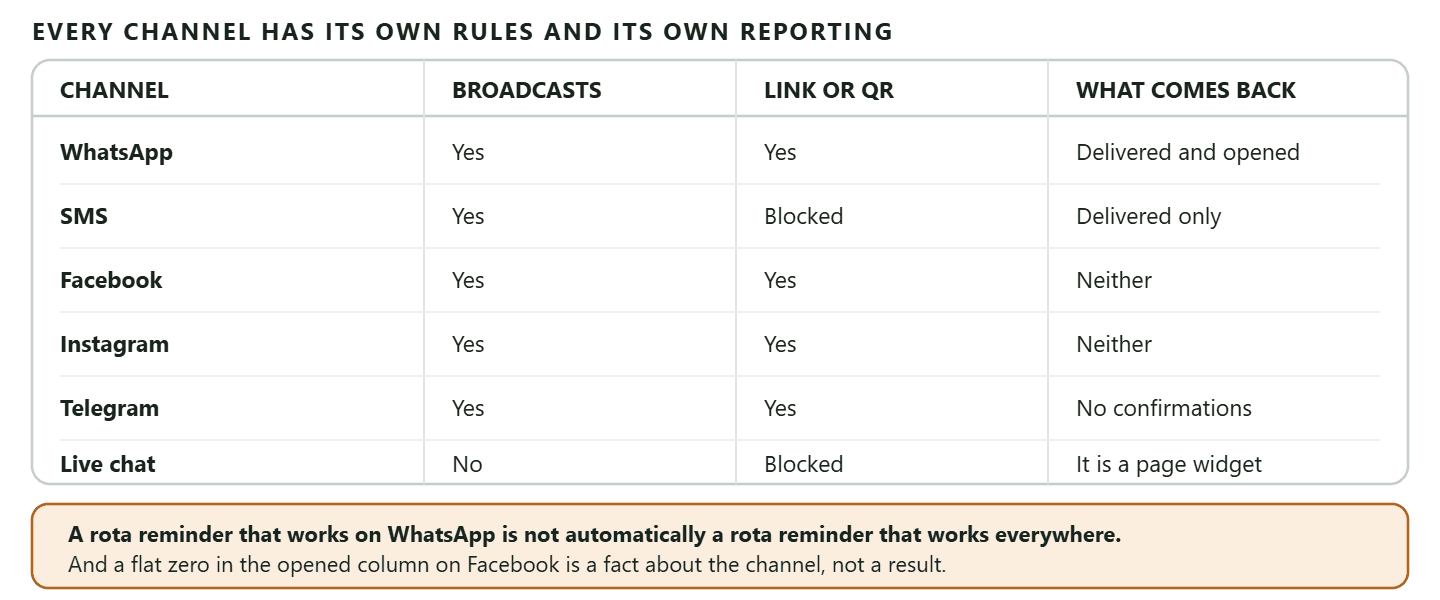
One caution that applies particularly here. Each channel has its own rules and its own reporting, and they are not the same. Broadcasts do not exist on live chat at all, delivery confirmations arrive on some channels and never on others, and a message you can send freely on one channel needs an approved template on another. A rota reminder that works on WhatsApp is not automatically a rota reminder that works everywhere.
An AI messaging for churches setup you could run this term
Concrete, and in an order that means the risky part is last.
- Write the never list first, the right-hand column of figure 1, and agree it with whoever holds safeguarding. Everything else waits for this.
- Connect one channel, not four. Whichever your congregation already uses most. Add the second one when the first is genuinely running.
- Build the six-answer assistant. Service times, address and parking, children, groups, weddings and baptisms, and how to reach a person. Instruct it to hand over on anything else. Set the fallback message.
- Put a trackable QR code on the welcome desk with a sentence that says what people get: “Scan for service times and to join a group. A person replies.”
- Move the rota onto confirmations. Each volunteer gets their own slot, which is a utility message, rather than everyone getting an appeal, which is not.
- Set up one course with a capacity and a waitlist, and let it run a term before you do a second.
- Only then think about broadcasts, and send them to people who signed up for that specific thing rather than to everybody.
Two numbers are worth watching in the first term, and neither is a vanity number: how many questions the assistant answered without a person, and how many conversations were handed over and how quickly a person arrived. The first tells you whether AI messaging for churches is earning its place in yours. The second tells you whether the promise on the QR code, that a person replies, is actually true.
Frequently asked questions
What is AI messaging for churches?
Using automation and an AI assistant to handle the repetitive half of a church’s messages, so that service times, directions, group sign-ups and event details are answered instantly on whichever channel somebody asks, while anything pastoral goes straight to a person. The value is not that software answers better. It is that it answers the questions that do not need judgement, which frees people for the ones that do.
Should an AI ever reply to a pastoral message?
No. Bereavement, illness, crisis, anything mentioning harm, anything from or about a child, and anything said in confidence all go to a named person. Build the assistant with a short closed list of things it may answer and an instruction to hand over on everything else, because an assistant told to be pastoral will attempt it.
Do churches get a discount on WhatsApp messages?
No. Pricing is set by the recipient’s market and the message category only. There is no charity rate, no nonprofit tier and no religious exemption, so a church pays what a shop pays for the same message.
Is a Sunday service reminder a marketing message?
Yes, in the platform’s terms, if it goes to people outside an open conversation and is not tied to something they did. An invitation generates awareness, which is the definition of a marketing template, so it carries the highest rate, an adaptive per-person cap and an opt-out. A confirmation of a course booking or a volunteer’s own rota slot is utility, which is cheaper and cannot be refused the same way.
Can a church in the United States send service invitations on WhatsApp?
Not as marketing templates. Delivery of marketing templates to United States phone numbers has been paused since 1 April 2025 with no announced end date, and the sends fail rather than being charged. Utility templates and anything inside a conversation the member started still work, which in practice means building the whole thing around sign-ups and confirmations.
Can we take giving through the same system?
There is no giving or donations feature as such. What exists is a finance module built around invoices, payment links and subscriptions for selling services, which can be pointed at one-off and recurring gifts. How to do that, and what it does not give you, is covered in our guide for nonprofits rather than here.
Why did our assistant stop answering?
Three documented possibilities. The monthly AI replies allowance was reached, in which case the turn is skipped and a note says so. The step errored or returned nothing and no fallback message was set, in which case the person got nothing at all. Or somebody turned off AI replies for the whole workspace, which skips every AI step while the flows carry on running. All three leave a note in the conversation that only your team can see.
How do we stop a church list feeling like spam?
Send fewer things to more specific groups. People rarely mute a church list because one message was bad; they mute it because eleven messages were not for them. Let people choose the prayer list, the youth updates or the men’s breakfast separately, and the same volume of messages becomes wanted rather than tolerated.
The shape that works in a church is narrow automation and a wide human margin: an assistant with six answers and a clear instruction to hand over, sign-ups instead of broadcasts, confirmations instead of appeals, and one inbox so a question asked on Instagram at 9pm gets the same answer as one asked on WhatsApp. DMly runs that shape natively, with a flow builder whose handover stops the bot dead, roles and custom permissions for who may read what, and courses with capacity and a waitlist that fills itself.
Writing about WhatsApp automation, bookings and growth for local business.
Turn WhatsApp into your busiest channel.
Start free and run message, bookings, payments and reviews in one place.
