
Customer Follow-Up Message Templates: 25 Examples for WhatsApp
Every customer conversation is a rally, and a customer follow-up message is simply you noticing that the ball has stopped on your side of the net. They asked a question, you answered, and then nothing. You sent a price, they said “let me think”, and the chat went still. Someone bought, someone visited, someone complained. In each case the rally paused, and the only question that matters is whose shot it is now.
Most businesses get this wrong in one of two ways. Either they wait politely for a customer who was never going to serve again, or they hit the ball three more times into an empty court. Both lose the point.
WhatsApp adds one rule of its own, and it changes how you write every follow-up: after 24 hours of silence from the customer, you can’t just type. In this guide, we’ll look at the six moments that call for a follow-up, which side of that 24-hour line each one usually falls on, 25 messages you can copy, how long to wait between them, and how to send them by hand or automatically in DMly.
What Is a Customer Follow-Up Message?
A customer follow-up message is a short message you send after something has already happened between you and a customer, to move it one step forward or close it kindly. It isn’t a cold promotion and it isn’t a broadcast. It refers to a specific thing: the price you sent, the parcel that arrived, the haircut on Saturday, the problem they reported.
That specific thing is what makes a follow-up welcome rather than annoying. “Just checking in!” with nothing attached feels like spam. “Did the replacement charger arrive okay?” feels like service.
The good ones pass three tests:
- It names the thing. The quote number, the service, the order, the date. If the customer has to scroll up to remember what you mean, it’s too vague.
- It offers one next step. Book, reply, pay, confirm, tell us. Not three. A follow-up with a menu of options is a brochure.
- It gives an easy way out. “No worries if not” or a “Not right now” button lets people say no without ghosting you, and a no is far more useful than silence.
Hold onto that third one, because there’s a word you must never use for it on WhatsApp. We’ll come to that.
Customer Follow-Up Messages and the 24-Hour Window: Type It, or Use a Template?
If the customer messaged you in the last 24 hours, you can type any follow-up you like. If they didn’t, WhatsApp only lets you send a pre-approved message template. That one rule decides more about your follow-ups than any copywriting tip.
Here’s how it works in plain words. When a customer messages you, or calls your WhatsApp number, a 24-hour window opens. Inside it you can send ordinary messages, which Meta calls service messages. When the window closes, you can only send a message template that Meta has reviewed and approved in advance. Two details catch people out:
- The clock runs from the customer’s last message, not yours. Replying doesn’t buy you more time. If they went quiet at 3pm on Tuesday, the window shuts at 3pm on Wednesday however many times you’ve written since.
- Every template has a category, and Meta decides it. A Utility template follows up on something the customer did or asked for, with no selling in it. A Marketing template is anything that promotes, persuades or nudges towards a purchase. Mix the two and it’s marketing.
Our guide to how WhatsApp’s 24-hour messaging window works covers the window in full. For follow-ups, the category question is the one to get right, because Meta’s own examples draw the line in places you might not expect:
- “We’ve delivered your order, let us know if there was any issue” is Utility: feedback tied to a specific order.
- “Your application is pending, log in to pick up where you left off” is Marketing: Meta calls it retargeting, a nudge to someone who engaged with you, and says these are marketing “even if requested by users”.
- “We apologise for the delay, we’ve added a credit to your account” is Marketing too. An apology with a goodwill gift attached is retargeting in Meta’s book.
- A thank-you note for being a valued customer is Marketing: Meta files it under building customer relationships.
- A general “how are we doing?” survey is not Utility. Meta only approves feedback requests as Utility when they’re tied to a specific order, visit or conversation.
Three more things follow from the category:
- Marketing templates need marketing consent. The customer should have agreed to hear promotional messages from you. Our guide to WhatsApp opt-in covers how to collect it and prove it.
- US numbers don’t receive marketing templates at all. Meta doesn’t currently deliver marketing template messages to WhatsApp users with +1 US numbers. For a US customer, a persuasive follow-up has to go inside the window, or by email or SMS.
- Marketing templates have a per-person limit. Meta caps how many marketing templates each person receives, and the cap adapts to how engaged they are. A blocked send comes back as error 131049; wait at least 24 hours before trying that person again. Marketing messages sent inside an open window don’t count towards it.
On cost: since 1 October 2026 Meta charges for messages inside the window too, both typed service messages and utility templates, though each business number gets 1,000 free service messages a month. If you want the full picture, our explainer on service messages versus templates walks through what you’re actually charged for. The point for follow-ups is simple: fewer, better messages cost less.
How to Use These Follow-Up Message Templates
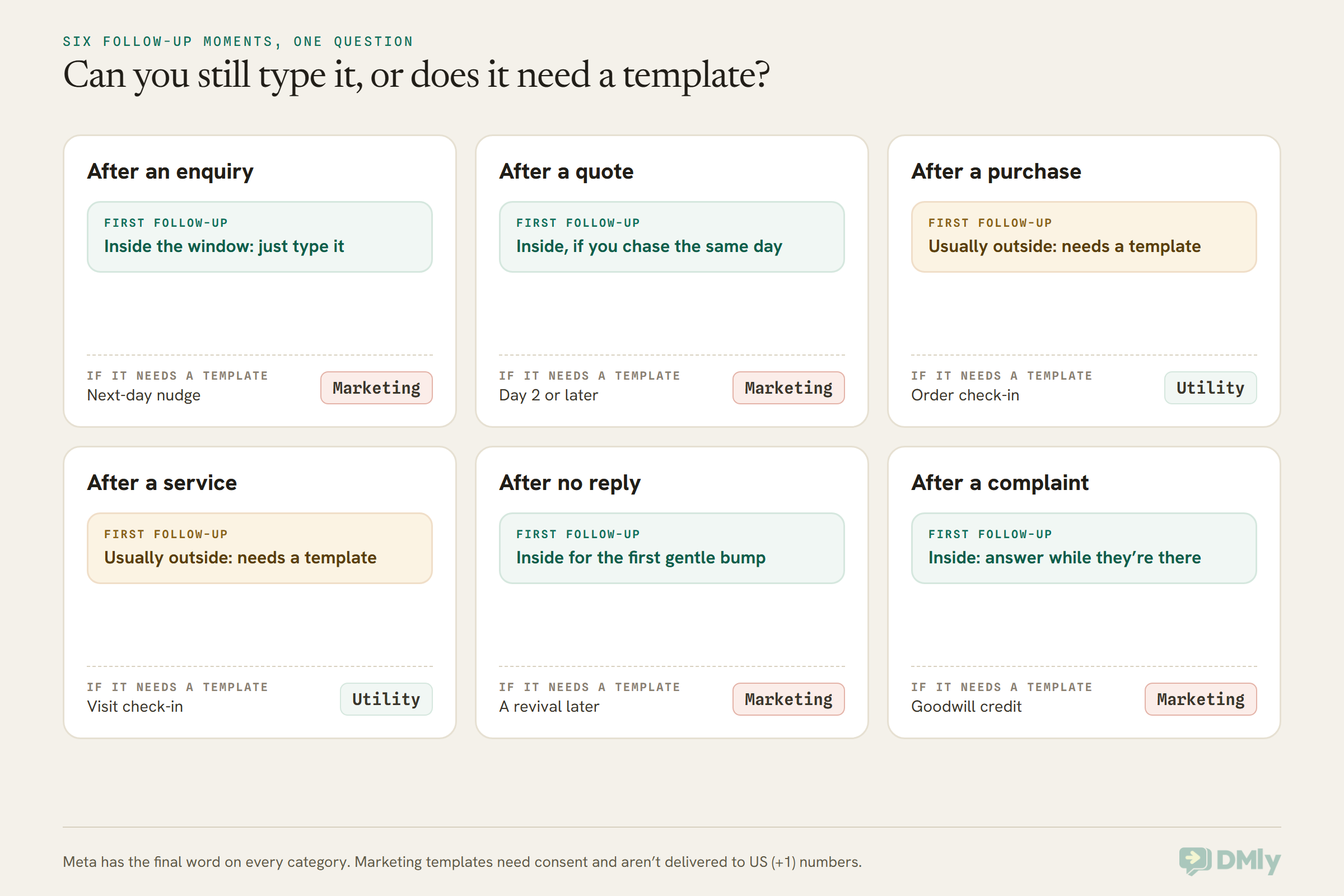
Each customer follow-up message below comes with two notes: whether it usually goes inside the window, and the category it will most likely get if you submit it as a template. “Most likely” is honest: Meta reviews every template and has the final word on its category.
A few house rules before you copy anything:
- Square brackets are the bits you change. In a template, each one becomes a numbered variable, like
{{1}}, with a sample value for Meta’s reviewer. - A template can’t start or end with a variable. Meta wants text around it. That’s why the template versions below end on words, not on a [Name] or a [Link].
- Button labels stay short. WhatsApp allows 25 characters per button, so “Yes, book me in” works and “Yes please, I would like to book” doesn’t.
- Marketing ones carry an opt-out line. “Reply STOP to opt out” in the footer is the standard.
- Never ask anyone to “reply CANCEL”. On DMly, a reply that is only the word
stoporunsubscribeopts the customer out of all your messages, including the ones your team types by hand. A lonecancel,endorquitmakes DMly ask whether they want to stop all messages or only offers (on SMS it opts them out straight away). Neither cancels their booking or their order. Offer a button such as “Change my booking” or “Not for me” instead, and let a person handle it.
Typed messages are the easy case. If the customer’s still talking to you, you can write freely, use their name, and adjust the tone to the conversation. The templates are the ones that have to be right first time, because they go through review.
Follow-Up Messages After an Enquiry (1 to 5)
The best time to follow up on an enquiry is the same day, while the customer’s window is still open and they still remember asking. An enquiry is a customer who served first. Your job is to return the ball before they wander off to the next business they messaged.
1. The “did that answer it?” check, a few hours later
Hi [Name], just checking my last message answered your question about [service]. If anything’s unclear, ask away. Happy to help.
Window: inside, so type it or send it as a saved reply. As a template: not needed. This is the follow-up that converts most quietly, because it invites a second question rather than a decision.
2. The details you promised
Hi [Name], as promised, here are the details for [service or product]: [price], [what’s included], [how long it takes]. The quickest way to book is to reply with a day that suits you.
Window: inside, if you send it the same day they asked. As a template: if it slips past 24 hours, Meta will very likely treat it as Marketing, because it invites a booking. Send it while they’re still there.
3. The “here’s who to talk to” handover
Thanks for your patience, [Name]. [Colleague] looks after [service] and will message you here today with the answer. You don’t need to repeat anything; they’ve read the chat.
Window: inside. As a template: not needed. Use it when the enquiry needs someone else. The last line matters: nobody likes explaining themselves twice.
4. After a missed call
Hi, this is [Business]. Sorry we missed your call just now. What can we help with? Reply here and we’ll answer as soon as we’re free.
Window: Meta says a call to your WhatsApp number opens the window, just as a message does. Test it on your own account before you rely on a typed reply. As a template: if you need one, it reads as following up on the customer’s own action, so submit it as Utility and keep it free of offers.
5. The next-day nudge, outside the window
Hi [Name], it’s [Business]. You asked about [service] yesterday. If you’d still like a slot this week, tap below and we’ll find you a time.
Buttons: Yes, book me in / Not right now
Footer: Reply STOP to opt out
Window: outside. Category: Marketing. It asks someone who engaged with you to come back and buy, which is Meta’s definition of retargeting. That means marketing consent first, and it won’t reach US +1 numbers. One nudge, then leave it.
Follow-Up Message After a Quote (6 to 9)
A good follow-up message after a quote checks the customer received it, answers the hidden question, and makes a polite yes or no easy. After you send a price, the ball is genuinely in their court. They’re comparing, checking with someone at home, or quietly deciding it’s too much. Your follow-up should make each of those easy to say out loud.
A small note for DMly users: the docs don’t describe a separate quote or estimate document, so most businesses send prices as a message or a PDF. The follow-ups below work either way.
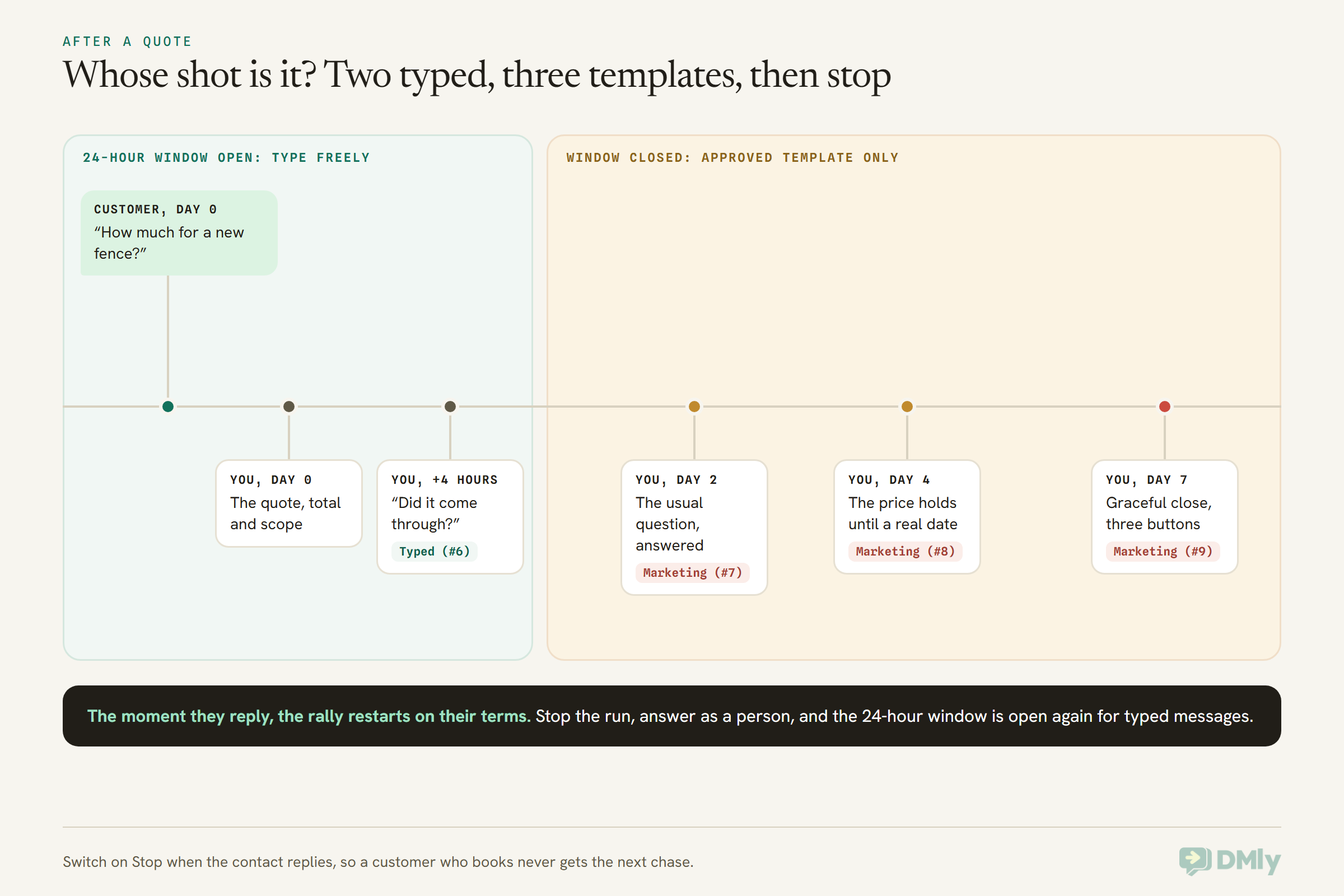
6. The same-day “did it come through?”
Hi [Name], just making sure the quote for [job] came through okay. It’s [amount] for [scope]. Any questions about what’s included, ask me here.
Window: inside, if the customer asked for the quote today. As a template: not needed. Repeating the total and the scope in one line saves them digging for the attachment.
7. The hidden-question answer, a day or two later
Hi [Name], one thing people often ask about [job] is [common question, for example whether materials are included]. In your quote they are. If it helps, I can also split it into [two stages or payments]. Just say.
Window: inside if they replied in the meantime, otherwise outside. As a template: Marketing. Offering a different way to pay is a call to action, however kindly worded. Use it when you know the usual objection for your trade: price, timing or what’s included.
8. The quote-expiry heads-up
Hi [Name], a quick note from [Business]: the price we quoted for [job] holds until [date], because [materials, availability or rates] change after that. If you’d like to go ahead, reply YES and we’ll pencil you in.
Footer: Reply STOP to opt out
Window: usually outside. Category: Marketing. Only send it if the date is real. A fake deadline is the fastest way to turn a maybe into a block.
9. The graceful close
Hi [Name], I won’t keep chasing about the [job] quote. If you’ve gone another way, no hard feelings, and if you have a second, a quick word on why would really help us. If you’d still like it done later, we’re here.
Buttons: Went elsewhere / Too expensive / Maybe later
Window: usually outside. Category: Marketing, most likely, because it leaves the door open to a sale. This is the last message about this quote. The buttons turn silence into an answer you can learn from.
Follow-Up Messages After a Purchase (10 to 13)
After a purchase, the follow-up that customers welcome is about the thing they bought, not the next thing you’d like to sell them. By the time a parcel arrives or a product has been used for a week, the window has usually closed, so these are mostly templates. Keep the first two plain and they can be Utility.
If the purchase never happened and the basket was left behind, that’s a different job with its own rules. Our guide to follow-ups that convert abandoned carts covers it.
10. The delivered check-in
Hi [Name], your order [order number] from [Business] shows as delivered. If anything’s missing or not right, reply here and we’ll put it right.
Window: outside. Category: Utility, as long as it stays like this. It mirrors Meta’s own utility example: a delivered order and an invitation to report a problem. Add “and here’s 10% off your next order” and it becomes Marketing.
11. The “how to get the best from it” note
Thanks for your order, [Name]. A few tips for your [product]: [tip one], [tip two]. The full care guide is here: [link]. Any questions about it, just reply.
Window: outside. Category: Utility is possible, because Meta treats product information tied to a specific purchase, like a warranty or a manual, as utility. Keep every line about what they bought. One “you might also like” and it’s Marketing.
12. The thank-you
[Name], thank you for choosing [Business] for your [product]. Orders like yours keep a small shop like ours going, and we don’t take it for granted.
Footer: Reply STOP to opt out
Window: outside. Category: Marketing. It surprises people, but Meta files thank-you notes under building customer relationships. If you’d rather not spend a marketing template on gratitude, put the thank-you inside message 10 or 11 instead, where it’s part of a utility message about the order.
13. The top-up reminder
Hi [Name], it’s been about [interval] since you bought [product] from [Business], which is roughly when people start running low. Want us to set another aside for you?
Buttons: Yes please / Not yet
Footer: Reply STOP to opt out
Window: outside. Category: Marketing. It’s a nudge to buy again. It works for anything that runs out: coffee, contact lenses, pet food, printer ink, skincare. Set the interval from your own sales history, not a guess.
Follow-Up Messages After a Service or Appointment (14 to 17)
A follow-up after a service checks how the customer is getting on, then asks for a review and a rebooking as separate messages. Most service customers book through a link or a call and don’t message you on the day, so by evening the window is often shut. That’s fine: a check-in about a specific visit can be Utility.
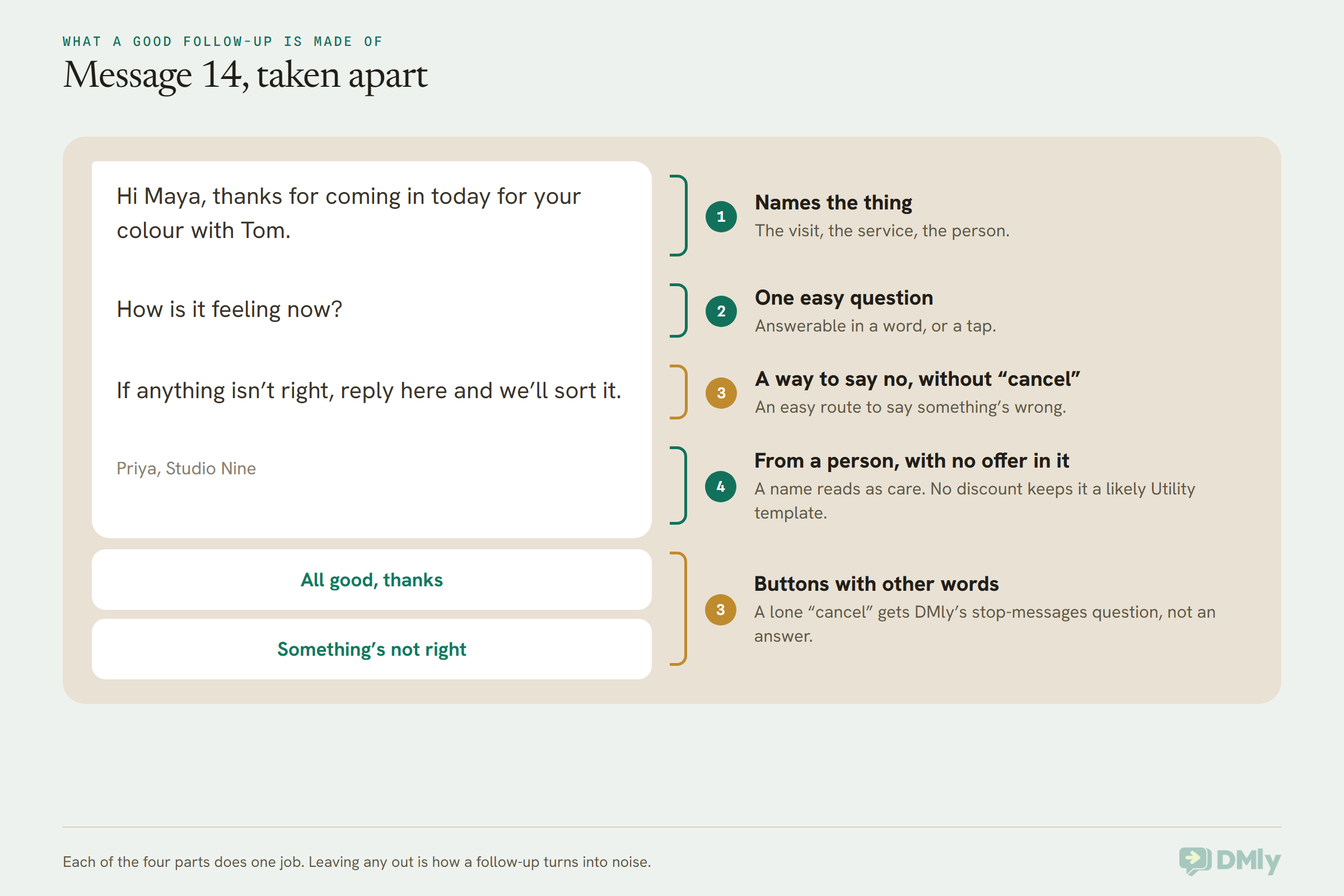
14. The same-evening check-in
Hi [Name], thanks for coming in today for your [service] with [staff name]. How is everything feeling now? If anything isn’t right, reply here and we’ll sort it.
Window: usually outside. Category: Utility, most likely: it asks for feedback on one specific visit, which is the kind Meta approves as utility. Keep offers out of it.
15. The aftercare reminder
Hi [Name], a quick reminder for the next [48 hours] after your [treatment]: [instruction one] and [instruction two]. If you notice [warning sign], please call us on [number] rather than waiting.
Window: usually outside. Category: Utility, most likely, because it’s essential information about their own treatment. Clinics, tattoo studios, physios and car-care businesses all have a version of this. Keep it general enough that it’s safe to arrive on a lock screen someone else might see.
16. The review request
Hi [Name], thanks again for visiting [Business]. If you have a minute, would you share how it went on Google? Every review helps a small business like ours get found.
Button: Leave a review
Footer: Reply STOP to opt out
Window: either. Category: Marketing. DMly’s own review request template, dmly_review_request, is marketing, and Meta holds it as marketing whatever it’s declared as. Send the same request to every customer, not only the ones you think were happy: Google prohibits selectively asking for positive reviews. If someone tells you something went wrong, get a person to them first, then they get the review request like everyone else. Our guide to asking for reviews after an appointment covers the timing.
17. The rebooking nudge
Hi [Name], it’s been about [interval] since your last [service] at [Business], which is usually when it’s time for the next one. [Staff name] has a few spaces next week. Shall we hold one for you?
Buttons: Yes, find a time / Not yet
Footer: Reply STOP to opt out
Window: outside. Category: Marketing. Time it to your natural cycle: six weeks for a cut, six months for a check-up, a year for a boiler service. If a customer’s been gone much longer than one cycle, that’s a win-back, and our win-back campaign guide is the better fit.
Follow-Up Message After No Response (18 to 21)
A follow-up message after no response should be shorter than the message it follows, ask something easy to answer, and stop after two tries. Silence isn’t always a no. Often the customer read your message on a bus, meant to reply, and forgot. A gentle bump catches those. A third bump only catches the people who were trying to ignore you.
18. The gentle bump
Hi [Name], just bumping this up in case it got buried. No rush at all.
Window: inside, if they messaged you within the last day. As a template: not needed. Short works here because it sits right under the message they didn’t answer.
19. The one-tap question
Hi [Name], to save you typing: is [the thing] still something you’re looking for?
Buttons: Yes, still keen / Not right now
Window: inside, typed, or as a template outside. As a template: Marketing, most likely, if the thing is a purchase. Buttons are the trick: a tap is far less effort than composing a reply, and “Not right now” is an answer you can act on.
20. The revival after weeks of silence
Hi [Name], it’s [Business]. We spoke a while back about [the thing]. If it’s still on your list, we’ve got [availability or something new and relevant]. Tap below if you’d like to pick it up again.
Buttons: Let’s talk / No thanks
Footer: Reply STOP to opt out
Window: outside. Category: Marketing. Send it once. If they tap “No thanks”, tag them and leave them out of future nudges about the same thing.
21. The “should I close this?”
Hi [Name], I’ll close this chat for now so it doesn’t sit open. If you need anything about [the thing] later, just send a message here and it’ll come straight to us.
Window: inside, typed. As a template: not needed. It ends the rally kindly, and it’s the honest alternative to a third chase. Plenty of customers reply to this one, precisely because it doesn’t ask for anything.
Follow-Up Messages After a Complaint (22 to 25)
After a complaint, the first follow-up should come from a person, inside the window, and say what happens next and when. A complaint is the one moment where the customer is very much still on court and watching what you do. Answer while they’re there. Automation’s job here is to get a human to them fast, not to talk for you.
If the complaint arrived as a public Google review rather than a message, reply there briefly and politely, then take the detail into a private chat.
22. The ownership reply
[Name], I’m sorry about [the problem]. That shouldn’t have happened. I’m [your name], and I’m looking into it now. You’ll hear back from me by [time today or tomorrow], even if it’s only to say where things are.
Window: inside, typed by a person. As a template: not needed. A name and a time are what turn an apology into a promise the customer can hold you to.
23. The fix confirmed
Hi [Name], an update on [the problem]: [what you’ve done, for example a replacement is on its way, tracking below]. If that doesn’t fully sort it, reply here and I’ll pick it up personally.
Window: inside if they’ve replied since; otherwise outside. As a template: Utility, most likely, if it’s a plain update on their specific order or case with nothing promotional in it.
24. The “did it stay fixed?” check, a week later
Hi [Name], it’s [your name] from [Business]. Just checking that [the fix] is still working as it should. If not, reply here and we’ll take it from there.
Window: outside. Category: Utility, most likely: feedback on one specific interaction. This is the follow-up almost nobody sends, and it’s the one customers remember.
25. The goodwill gesture
Hi [Name], we’re sorry again about [the problem] with your [order or visit]. As a thank-you for your patience, we’ve added [credit or voucher] to your account, ready to use whenever suits.
Footer: Reply STOP to opt out
Window: either. Category: Marketing. This is almost word for word one of Meta’s own marketing examples: an apology with a credit attached is retargeting. If you can, send it as a typed message inside the window, while you’re already talking.
How Long to Wait Between Follow-Ups
Time each customer follow-up message to how fast the customer decides, and cap every chase at two follow-ups after the original message. There’s no magic number of hours. A price enquiry for a haircut is decided today; a quote for a kitchen is decided over weeks. Here’s a sensible starting point for each moment:
| Moment | First follow-up | Second, if needed | Then |
| Enquiry | 2 to 4 hours, typed | Next day, template (#5) | Stop |
| Quote, small job | Same day, typed | Day 2, template | Graceful close (#9) at day 5 to 7 |
| Quote, big job | Same day, typed | About a week, template | Graceful close at 2 to 3 weeks |
| Purchase | On delivery (#10) | A week of use (#11) | Top-up at the natural cycle |
| Service | Same evening (#14) | Review request a day or two later | Rebook at the natural cycle |
| No reply | Next day, typed if you can | One more, then close (#21) | Leave them alone |
| Complaint | Within the hour, a person | When it’s fixed | A week later (#24) |
Two habits keep the timing humane. Send during sensible hours on the customer’s own clock, because a 6am nudge reads as spam whatever it says. And stop the moment they reply: a customer who answers your first follow-up and books should never receive your second.
How to Send Customer Follow-Up Messages in DMly
In DMly you can send a customer follow-up message three ways: by hand from the inbox with a saved reply, as a single automated step in a flow, or as a run of messages over days in a sequence. Start with the first, and automate the follow-ups you find yourself sending every week. Our guide to automating WhatsApp follow-up messages goes deeper into building them; here’s what you need for the templates above.
By hand: saved replies for the typed follow-ups
Messages 1, 3, 6, 18, 21 and 22 are typed, so save them as Saved replies. Open any conversation in the Unified Inbox, open Saved replies in the reply box, choose New saved reply, and give it a Title and a Message. Name it after the moment, like “Quote: did it come through”, so it’s easy to spot in a hurry. Our guide to WhatsApp quick replies worth saving has more on building the library.
Three things to know:
- Saved replies don’t fill in names. They have no variables, so the text goes in exactly as written. On the web it’s added below whatever you’ve already typed, so type “Hi Maya,” first and insert the reply underneath. In the mobile app it replaces what’s in the box, so insert first and add the name after.
- They’re shared with the whole team. Anyone can use, edit or delete any saved reply, so agree who owns the wording.
- They lock when the window closes. Once a WhatsApp conversation is past 24 hours, the Saved replies button greys out and you’ll need an approved template from the template picker instead.
Templates: get the outside-the-window ones approved first
Everything marked “outside” above needs to be an approved template before you can send it. In DMly that’s Messaging → Templates on your WhatsApp channel: select Add template, choose the Category (Marketing or Utility), write the Body (up to 1,024 characters), use Add variable for each bracket and give each one a sample value, then add buttons and a footer if you want them. Saving submits it to Meta straight away. Only templates marked Approved appear anywhere you can send them.
Choose the category honestly. A promotion filed as Utility is likely to be rejected, and Meta now approves a utility template it considers promotional as Marketing instead. If one comes back rejected, read Meta’s reason, fix that one thing and submit it again. DMly also has a built-in library of 64 ready-written templates, all Marketing, if you’d rather adapt one than start from a blank box.
One automatic follow-up: a flow with a wait
For a single follow-up that should fire on its own, build a flow: “when this happens, wait, then send this”. The event that starts it is the trigger, and the waiting step is Smart Delay. Triggers that fit the moments in this guide include:
- Appointment completed for messages 14 to 16. It fires when a booking is marked completed, including when DMly closes a past booking for you, unless you’ve set unmarked bookings to Wait for review.
- Conversation closed, which fires when a chat is marked done in the inbox. DMly’s docs call it the natural place for a follow-up such as a satisfaction question or a review request.
- Order delivered from a connected store, for message 10.
- Outgoing WhatsApp message, with Sent by set to A human agent, fires when someone on your team replies by hand. It can’t be narrowed to particular words, so it suits “after any agent reply” follow-ups such as a satisfaction check, not “after the quote” specifically.
- Customer didn’t reply, a WhatsApp trigger that fires when a contact doesn’t answer your last message. The docs describe it in a single line and don’t say how long it waits, so open its settings and test it on your own number before trusting it with message 18.
Smart Delay has three modes. Duration waits a set number of minutes, hours or days. Wait until holds the message until a time window you choose, such as weekdays 9 to 6, so an evening trigger doesn’t send at midnight. Until event waits for a date on the appointment, invoice or subscription the flow is about, such as “after the appointment”, and it has a SKIPPED exit for when waiting no longer makes sense, for example because the booking was cancelled.
After the wait, use Send Template for anything outside the window. For a review request, use the Request Google review step. For satisfaction scores, the CSAT Survey step, which is WhatsApp only. If you use the shipped Post-chat CSAT → Google review template, check that every score’s branch reaches the review step, with low scores going to a person first.
A run of follow-ups: a sequence
For a chase over several days, like messages 6 to 9 after a quote, use a sequence: a list of messages sent a set number of days apart, starting when a flow adds the customer to it. Go to Automation → Sequences → New sequence, give each step a Day, and set each step’s Send as:
- Standard send for a typed message, which only goes out inside the window.
- Utility template or Marketing message for an approved template, which goes out any time.
Then add a Sequence step to the flow that should start the run. That’s the only way into a sequence: there’s no button on a contact and no import.
Four settings decide whether a sequence behaves like a polite follow-up or a pest:
- Stop when the contact replies is off by default. Turn it on for follow-ups. Otherwise a customer who answers on day 0 and books still gets day 2 and day 7 asking them to book.
- From and To hours (9:00 to 20:00 by default) are read on the customer’s own clock when DMly knows their timezone, so a step that comes due at night waits for the morning.
- Typed steps need an open window. If a Standard send step comes due after the window closes, DMly holds it and retries roughly once an hour for about two days. If the customer never messages, their run stops there. Build every step after the first day as a template.
- Template steps need a WhatsApp contact. If a flow adds someone who has never messaged you on WhatsApp, a template step is skipped for them without warning. Make sure the people you subscribe are reachable on WhatsApp.
You can also stop a run deliberately with the Remove from sequence step in a flow, for example as soon as a booking comes in. It leaves the customer’s opt-out and tags alone, unlike Unsubscribe Contact, which opts them out of everything. You can see who’s mid-run from the sequence’s View subscribers option and take one person out by hand there. Handing a chat to a person with Handover to Human also ends that customer’s run, which is usually what you want after a complaint.
The “Cancel” Trap and Other Ways a Follow-Up Backfires
Most follow-ups that go wrong do so for one of five reasons, and only one of them is the wording.
- Inviting a one-word reply that opts people out. On DMly, a whole-message reply of
stop,stopall,stop all,unsubscribe,opt outoroptoutopts the customer out of every automated message, and manual replies are refused too until they opt back in. A lonecancel,quitorendworks differently on WhatsApp and the other chat channels: DMly asks first (“Reply STOP to stop all messages, or STOP OFFERS to stop promotions only”), mutes nothing, and still passes the message to your flows. On SMS it opts the customer out straight away. “Cancel my booking on Friday” doesn’t trigger it, because it’s more than one word. A bare “cancel” does. So never write “reply CANCEL”, “reply END” or “reply STOP if you’ve changed your mind” when you mean anything other than unsubscribe. - Chasing people who already acted. The customer paid, booked or replied, and the automation didn’t notice. Switch on Stop when the contact replies, or add a Remove from sequence step to the flow that records the booking.
- Typing after the window closed. A typed follow-up two days later won’t deliver. Anything past 24 hours of silence needs a template.
- Sneaking an offer into a Utility template. Add a discount to a delivery check-in and Meta can approve it as Marketing, or recategorise it later. You’ll pay the marketing rate and it won’t reach US numbers.
- Never stopping. A third and fourth automated chase converts almost nobody and gets you blocked. Blocks and reports lower your quality rating, which can limit every other message you send.
Which Customer Follow-Up Message Matters Most in Your Business
Every business needs all six moments eventually, but one usually matters more than the rest. Start there. These are illustrative examples, not case studies:
| Business | The follow-up to build first | Why |
| A roofing or fencing contractor in Texas | After a quote (#6 to #9) | Big quotes are decided over weeks, and US customers can’t receive marketing templates, so the typed same-day check carries the most weight. |
| A coaching institute in Pune | After an enquiry (#1, #2, #5) | Parents message several institutes at once about fees and batch timings; the first clear answer wins. |
| A fashion boutique in Lagos selling on Instagram and WhatsApp | After a purchase (#10, #11) | A delivered check-in catches sizing problems before they become a refund or a bad review. |
| A physiotherapy clinic in Manchester | After a service (#14, #15) | Aftercare reminders and a same-evening check-in are useful and very likely Utility. |
| A car detailing service in Dubai | After no reply (#18, #19) | Customers ask for a price from the car park and forget; a one-tap question brings them back. |
| An electronics shop in Kuala Lumpur | After a complaint (#22 to #24) | Faulty-item complaints decide whether a customer comes back, and the week-later check is rare enough to stand out. |
Prices in your follow-ups should be in the customer’s own currency and written the way they’d write them: $450, ₹18,000, ₦85,000, £120, AED 350, RM 299. Small thing, but a price in the wrong format reads like a mass message.
Frequently Asked Questions
What is a good customer follow-up message?
A good customer follow-up message names the specific thing it’s about (the quote, the order, the visit), asks one easy question or offers one next step, and gives the customer a comfortable way to say no. It’s shorter than the message before it and signed by a person where possible.
How do I write a follow-up message to a customer who hasn’t replied?
Keep it short, refer to your last message, and make answering effortless, ideally with a button such as “Yes, still keen” or “Not right now”. Send one gentle bump, then one closing message, and stop. If more than 24 hours have passed since the customer last messaged you, it has to be an approved WhatsApp template.
Can I send a follow-up on WhatsApp after 24 hours?
Yes, but only as a message template that Meta has approved. Plain typed messages are only allowed within 24 hours of the customer’s last message or call. A follow-up about a specific order or visit with no selling in it can usually be a Utility template; anything that nudges towards a purchase is Marketing.
Is a follow-up message marketing or utility?
It depends on what it says, not what you call it. Meta treats messages that follow up on something the customer did, with no promotion, as Utility: a delivered-order check, a visit check-in, an update on their case. Nudges to book or buy, thank-you notes, review requests and apologies with a credit attached are Marketing.
How many follow-up messages should I send?
Two after the original message is plenty for most moments, then stop or hand it to a person. For a big quote you can space them further apart, but the count stays the same. The aim is an answer, yes or no, not a sale at any cost.
Can I follow up with customers in the US on WhatsApp?
Yes, inside the 24-hour window, and with Utility templates outside it. Meta doesn’t currently deliver marketing templates to US +1 numbers, so persuasive follow-ups such as a quote nudge or a rebooking offer have to go while the customer’s still talking to you, or by email or SMS.
Should I tell customers to reply CANCEL if they don’t want more messages?
No. On DMly a one-word reply of “cancel” doesn’t cancel any booking. On WhatsApp it makes DMly ask whether the customer wants to stop all messages or only offers, which muddles a simple answer; on SMS it opts them out of everything. Use buttons with other words, such as “Change my booking” or “Not for me”, and keep “Reply STOP to opt out” for genuine unsubscribes.
Whose Shot It Is: Your Customer Follow-Up Message Checklist
Every customer follow-up message comes back to the same question from the top of this page: whose shot is it? If the customer just served, return it today while you can still type. If the ball’s in their court, make it easy for them to hit back, with one question and a button. And if they’ve walked off court, close the rally kindly instead of serving into an empty net.
- Pick the one moment that matters most in your business and save its typed follow-ups as saved replies this week.
- Submit the outside-the-window versions as templates now, Utility where they’re plain, Marketing where they persuade, so they’re approved before you need them.
- Cap every chase at two follow-ups, then a graceful close.
- Swap every “reply CANCEL” for a button with other words.
- When a follow-up gets sent every week, automate it with a flow or a sequence, and switch on Stop when the contact replies.
If you’d like more messages for other jobs, our library of 100+ WhatsApp business message templates covers welcomes, reminders, payments and promotions. And when you’re ready to stop sending follow-ups by hand, automating your WhatsApp follow-ups is the next step.
Writing about WhatsApp automation, bookings and growth for local business.
Turn WhatsApp into your busiest channel.
Start free and run message, bookings, payments and reviews in one place.
