
Appointment Reminder Message Templates: 25 Examples for WhatsApp and SMS
Here is the thing nobody tells you before you write your first reminder. Once Meta approves a WhatsApp template, you cannot edit it. Change a word and you are not updating anything, you are submitting a brand new template under a different name and waiting for approval all over again.
That single rule is why a good appointment reminder template is worth borrowing rather than inventing at nine o’clock the night before you go live. Get the wording close to right the first time and you can leave it running for years.
So below are 25 of them: standard reminders at different lead times, versions with a confirm or cancel button, ones that carry a deposit, industry wording for salons, clinics, gyms, tutors and restaurants, and shorter versions for SMS. Each is labelled Utility or Marketing, because that label decides whether it can reach someone who has not messaged you recently.
If you want the mechanics instead of the copy, our companion guide to sending automatic appointment reminders on WhatsApp covers where reminders come from, when they fire and why they sometimes do not.
How to Use These Appointment Reminder Templates
Two minutes of setup makes the difference between a template that sails through and one that comes back rejected. Three things to know before you paste anything.
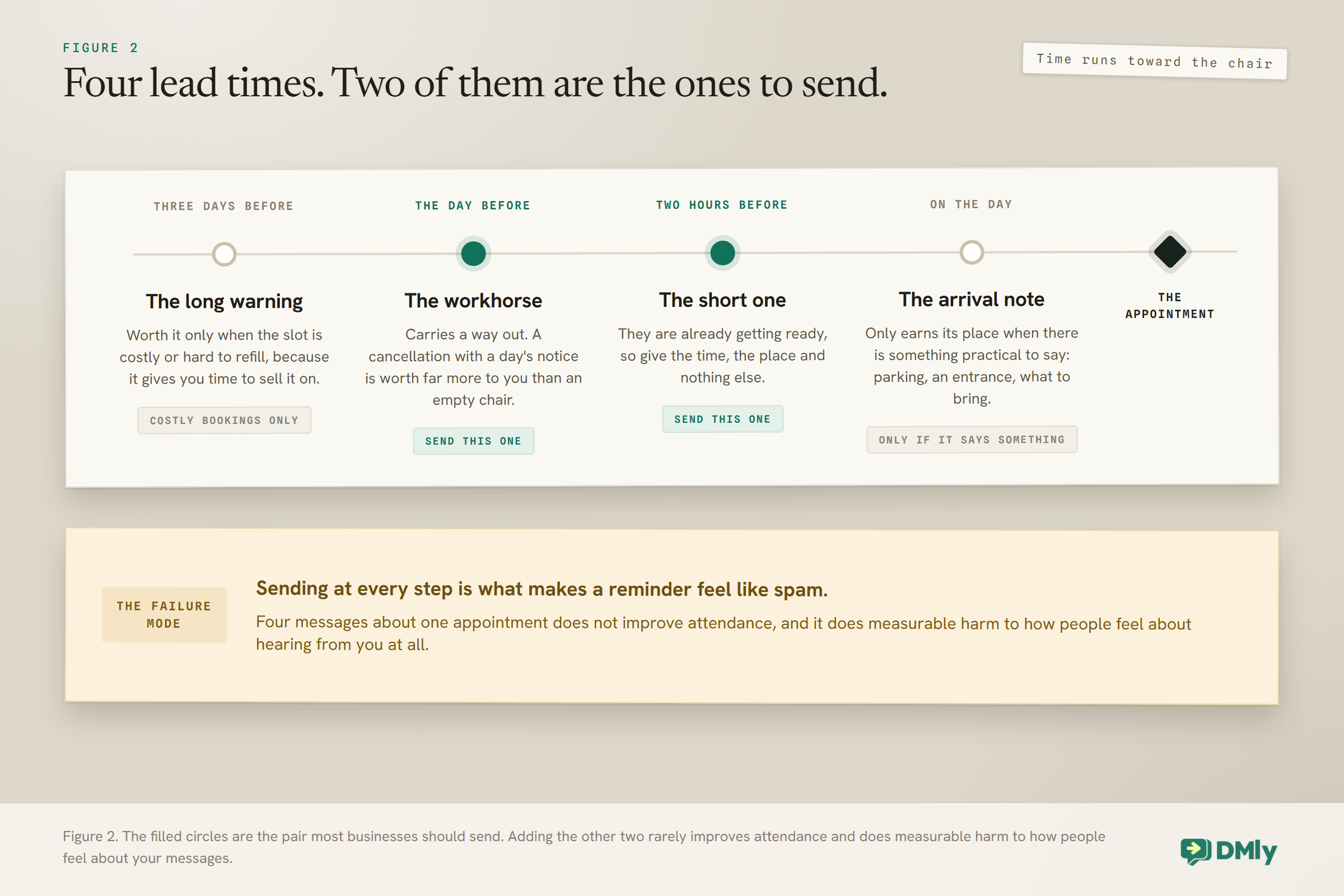
The curly braces are variables. Where you see {{1}} or {{2}}, that is a slot that fills itself with the customer’s name, the date, the service. Do not type the braces by hand. Use the Add variable button, which numbers them for you in order.
A template cannot start or end with a variable. Meta wants real text wrapped around it. “{{1}}, your appointment is tomorrow” fails review. “Hi {{1}}, your appointment is tomorrow” passes. Every example below already respects this, which is one of the quieter reasons to copy rather than compose.
Every variable needs a sample value. When you submit, you fill in an example of what will go in each slot, like “Amara” or “Thursday 14 March”. That sample is shown to Meta’s reviewer and is never sent to a customer, so make it realistic rather than clever.
Room to work with: The body of a template can run to 1,024 characters, so length is almost never your constraint. The header is 60 characters, the footer 60, and button text 25. You can have up to ten buttons, but only two of them can be links.
Why Every Reminder Here Is Labelled Utility
The category you file a template under decides whether it reaches people, and reminders are Utility. This is the single most useful thing to understand before you copy anything.
WhatsApp templates come in three categories: Marketing, Utility and Authentication. Meta reviews your template against the category you picked, so choosing honestly is not a formality. A reminder about an appointment the customer booked is a Utility message. It is transactional. They asked for it by booking.
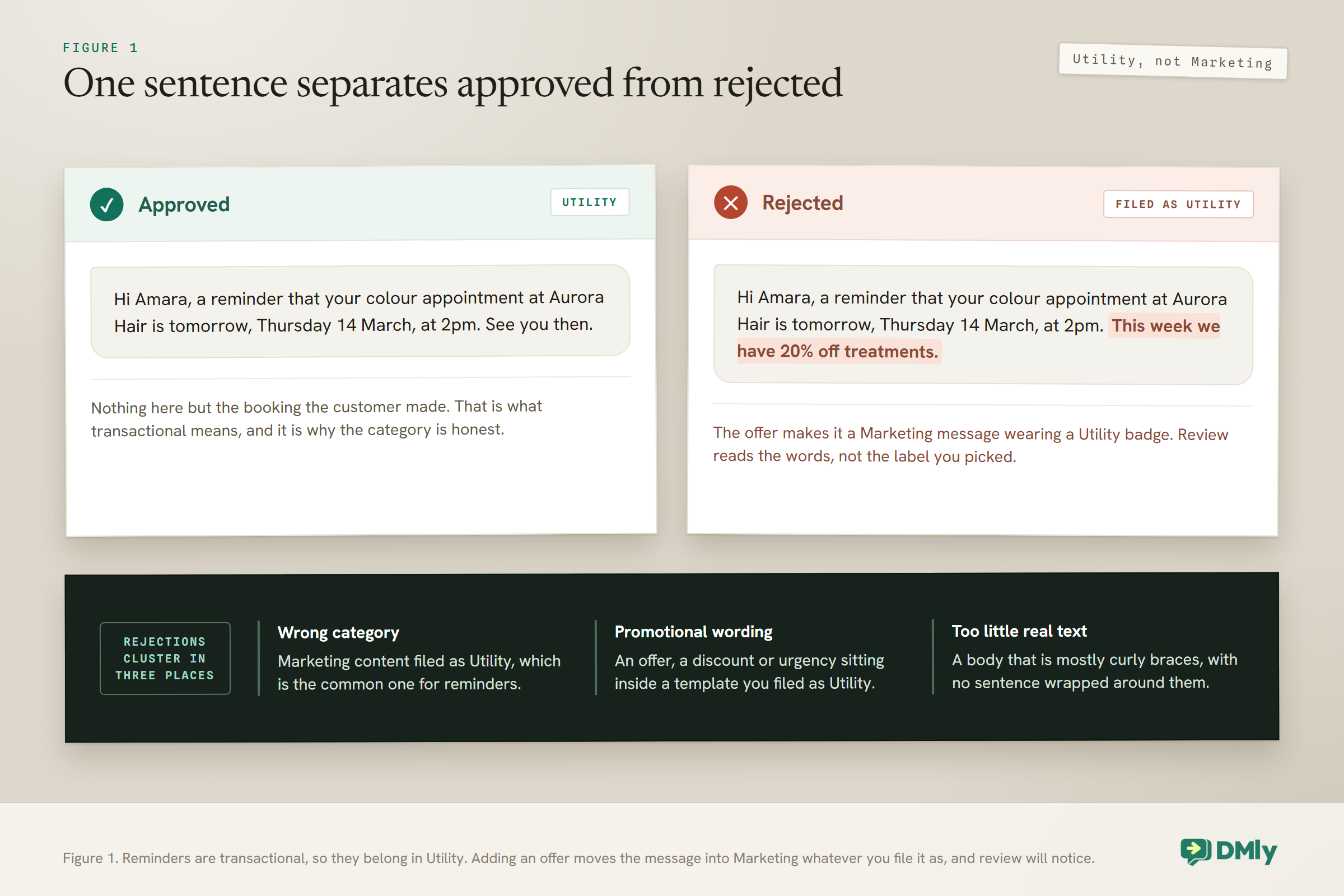
The moment you add an offer, it stops being Utility. “Your appointment is tomorrow at 2pm” is Utility. “Your appointment is tomorrow at 2pm, and this week we have 20% off treatments” is a Marketing message wearing a Utility badge, and that is one of the most common reasons a reminder template is rejected.
Rejections cluster around three causes: filing marketing content as Utility, using promotional wording inside a Utility template, and submitting a body that is mostly placeholders with too little real text.
Want versions tailored to your business? The free appointment reminder generator creates reminders with your details filled in.
Standard Appointment Reminder Templates for Any Business
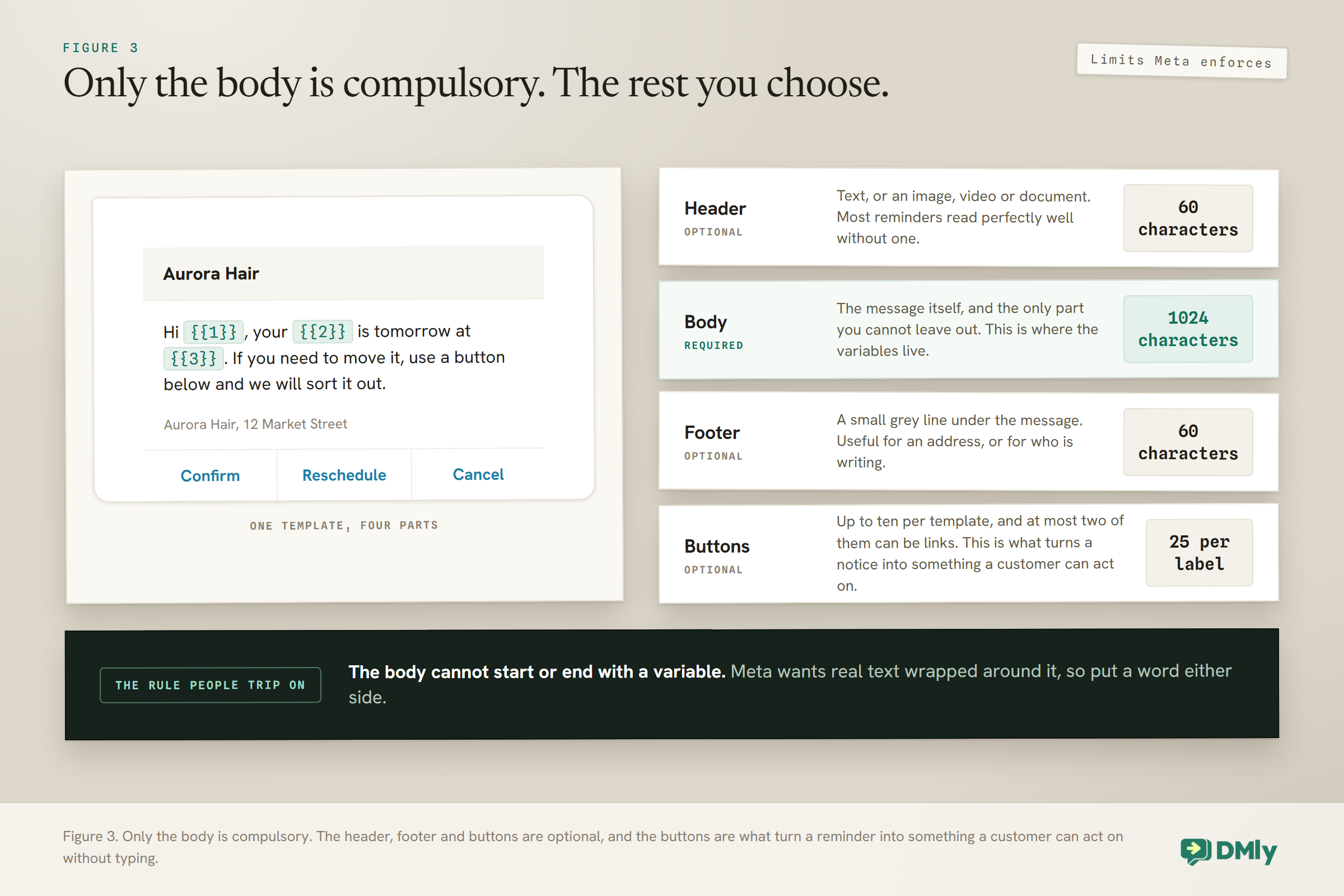
These are the workhorses. Pick one for each lead time you send at, usually a day before and an hour or two before.
1. The plain day-before reminder. Utility.
Hi
{{1}}, a reminder that your{{2}}at{{3}}is tomorrow,{{4}}, at{{5}}. See you then.
2. Day before, with an easy way out. Utility. This is the one most businesses should use, because a cancellation with 24 hours notice is worth far more than an empty chair.
Hi
{{1}}, your{{2}}is tomorrow at{{3}}. If you need to move it, reply CHANGE and we will sort it out.
3. Two hours before. Utility. Short, because at this point they are getting ready.
Hi
{{1}}, see you at{{2}}today for your{{3}}. We are at{{4}}.
4. Morning of, for an afternoon slot. Utility.
Morning
{{1}}. Today is your{{2}}at{{3}}. Nothing to bring, just yourself.
5. Three days before, for longer or costlier bookings. Utility. Useful when the slot is hard to refill.
Hi
{{1}}, you are booked in for{{2}}on{{3}}. It is a{{4}}appointment, so please let us know by{{5}}if anything changes.
Reminder Templates With Confirm, Reschedule and Cancel Buttons
Buttons turn a reminder from a notice into something the customer can act on without typing. That is worth more than better wording.
Keep the button text under 25 characters, and remember that of your ten possible buttons only two can be links. Give the cancel button more than one word, such as Need to cancel: a quick reply sends its label back as a message, and in DMly a message that is just the word cancel opts the customer out, leaves the booking in place, and stops your team replying until they opt back in.
6. Confirm or cancel, two quick replies. Utility.
Hi
{{1}}, your{{2}}is tomorrow at{{3}}. Can you still make it?
Buttons: Yes, see you then · Need to cancel
7. Confirm, move or cancel, three quick replies. Utility.
Hi
{{1}}, reminder for{{2}}on{{3}}at{{4}}.
Buttons: Confirm · Reschedule · Need to cancel
8. Manage it yourself, with a link button. Utility. The link points at the booking page so they change it without you.
Hi
{{1}}, your appointment on{{2}}is coming up. You can change or cancel it any time using the button below.
Button: Manage booking
9. Confirm with a deadline. Utility. Use when unconfirmed slots get released.
Hi
{{1}}, please confirm your{{2}}on{{3}}. If we have not heard by{{4}}we will offer the slot to someone on the waiting list.
Buttons: Confirm · Need to cancel
Reminders That Carry a Deposit or Balance
When money is attached, say the number and make paying a single tap. These are still Utility: you are telling someone about a transaction they entered into.
10. Balance due at the appointment. Utility.
Hi
{{1}}, your{{2}}is tomorrow at{{3}}. The balance of{{4}}is payable on the day, and we take cash, transfer or card.
11. Deposit not yet paid. Utility.
Hi
{{1}}, we are holding{{2}}on{{3}}for you. The{{4}}deposit has not come through yet, so the slot is not secured. You can pay it here.
Button: Pay deposit
12. Paid in advance, nothing to do. Utility. Underrated, because it removes a worry.
Hi
{{1}}, see you tomorrow at{{2}}. This one is already paid in full, so there is nothing to bring.
If deposits are new to you, our guide to WhatsApp appointment booking covers taking payment at the point of booking, which prevents most of the chasing these two templates are doing.
Appointment Reminder Templates Worded for Your Industry
The structure stays the same, the details change. These read as though a person at that business wrote them, which is the whole trick.
13. Salon or barbershop. Utility.
Hi
{{1}}, you are booked with{{2}}tomorrow at{{3}}for a{{4}}. Come with dry hair if you can, it saves us ten minutes.
14. Clinic or dental practice. Utility. Notice it names no condition, which matters.
Hi
{{1}}, this is a reminder of your appointment at{{2}}on{{3}}at{{4}}. Please arrive five minutes early. Reply CHANGE if you need a different time.
15. Physiotherapy or treatment course. Utility.
Hi
{{1}}, session{{2}}of your course is on{{3}}at{{4}}. Wear something you can move in.
16. Gym class or studio session. Utility.
Hi
{{1}}, you are on the list for{{2}}at{{3}}tomorrow. If you cannot make it, cancel here so someone on the waitlist can take your place.
Button: Cancel my spot
17. Tutor or lesson. Utility. Written to the parent.
Hi
{{1}},{{2}}has a lesson with{{3}}on{{4}}at{{5}}. Last week we were working on{{6}}.
18. Restaurant table booking. Utility.
Hi
{{1}}, we have your table for{{2}}tomorrow at{{3}}. We hold tables for 15 minutes, so let us know if you are running late.
19. Home visit or mobile service. Utility. The extra detail here prevents a wasted journey.
Hi
{{1}},{{2}}is coming to you on{{3}}between{{4}}and{{5}}. Please make sure someone is home and there is space to park.
Shorter Versions for SMS
SMS has no template approval and no 24-hour window, so the copy is freer, but the space is not. Keep to one segment where you can and put the business name first, because the number will not be recognised.
20. Standard SMS reminder.
Aurora Hair: hi
{{1}}, reminder of your{{2}}tomorrow at{{3}}. Reply CHANGE to move it.
21. SMS, same day.
Aurora Hair: see you at
{{1}}today. We are at{{2}}.
22. SMS with a link.
Aurora Hair: hi
{{1}}, your appointment is on{{2}}. Change or cancel:{{3}}
23. SMS fallback when WhatsApp did not reach them.
Aurora Hair: we could not reach you on WhatsApp. Your
{{1}}is tomorrow at{{2}}. Reply Y to confirm.
Watch the length. A plain SMS is billed in segments of about 160 characters, and a single accented character or emoji can drop the whole message to roughly 70 characters per segment. A reminder that quietly costs you three sends instead of one is easy to write by accident.
Whether you need SMS at all depends on your customers. Our guide to SMS marketing automation covers using it as a backup rather than a parallel channel.
Two Situations Worth Their Own Wording
A first-time customer and a customer who has let you down before are not the same reader.
24. First appointment with you. Utility. More detail, because they do not know your routine.
Hi
{{1}}, looking forward to seeing you tomorrow at{{2}}for your first{{3}}with us. We are at{{4}}, the entrance is{{5}}, and it takes about{{6}}.
25. After a previous no-show. Utility. Firm, not cold, and it does not mention the last time.
Hi
{{1}}, your{{2}}is on{{3}}at{{4}}. Please confirm below so we know to expect you, as we release unconfirmed slots the day before.
Buttons: Confirm · Need to cancel
Naming a customer’s previous no-show in a reminder reads as a telling-off, and people who feel told off cancel permanently. The policy does the work instead.
One more thing worth deciding: who is the message actually written to? Very often the person holding the phone is not the person attending. A parent books for a child. An assistant books for their boss. One friend books a table for six. Template 17 above is written to the parent for exactly this reason, and it changes the wording more than you would think.
Two small adjustments cover it. Name the attendee rather than assuming the reader is them, so “{{1}} has a lesson” rather than “your lesson”. And put the practical instruction where the reader can act on it, because the person who needs to bring the kit is the one reading the message, not the one attending.
If your bookings routinely come from one person on behalf of several, it is worth having a second version of your day-before template written in the third person, and choosing between them when you set the service up rather than trying to make one sentence serve both.
Wording That Gets an Appointment Reminder Template Rejected
These are the ones to recognise so you do not write them. Each fails for a specific, predictable reason.
| Do not submit | Why it fails |
| “Your appointment is tomorrow. Book a friend in this week and you both get 15% off.” | Promotional wording in a Utility template. Category rejection. |
“{{1}}, {{2}}, {{3}} at {{4}}” | Starts with a variable, and the body is mostly placeholders with too little real text. Two separate causes at once. |
“Hi {{1}}, see you at {{2}}” | Ends with a variable. Meta wants text after it. |
| “Don’t miss out, your slot is nearly gone.” | Marketing urgency on a booking the customer already made. |
There is one more that is not a rejection but is worse, because it passes review and then fails in the wild: writing a reminder that assumes the customer messaged you recently. If nobody has written to you in the last 24 hours and the template is not approved, nothing is sent at all. It is not downgraded to a plain message, and you get no warning.
The one that catches people out: Edits to a template Meta has already approved are not pushed. If you want to change the wording, you create a new template under a different name and wait for it to be approved. Plan for that: get the copy right before you submit, rather than intending to tidy it later.
Which Variables Actually Earn Their Place
Every variable you add is another way the message can read wrong, so put in the ones that change behaviour and leave out the rest. A template stuffed with slots also risks the “too little real text” rejection.
Four earn their place in almost every reminder:
- First name. Not the full name. “Hi Amara Okafor” reads like a letter from the council.
- The date, written out. “Thursday 14 March”, not “14/03” and not just “tomorrow”. People book weeks ahead and read messages in a hurry, and “tomorrow” is wrong the moment a message is delayed.
- The time. Obvious, and still the field most often left out of a badly written reminder.
- The service. This is what turns a generic notification into a real appointment in the reader’s mind. It is also what stops someone thinking you have messaged the wrong person.
Three more are worth adding when they are true for your business: the staff member’s name, which makes a reminder feel personal and reduces cancellations; the location, when you have more than one or when people struggle to find you; and the duration, when the appointment is long enough that people need to plan around it.
What to leave out: anything you cannot guarantee will be populated. A variable that fills with a blank leaves a gap in the sentence, and a reminder reading “your appointment with is on Thursday” is worse than one that never named the stylist at all.
Making These Sound Like Your Business
Change three things and a borrowed template stops sounding borrowed.
Use the words your customers use. If your clients say “my colour” rather than “my appointment”, write that. If they call the person rather than the service, name the person: “you are booked with Bisi” beats “you have a booking”.
Keep one specific detail. The line that makes a reminder feel human is usually the small practical one. Come with dry hair. Parking is behind the building. Bring your last prescription. That one sentence is what separates a reminder from a notification.
Decide who is speaking. “We look forward to seeing you” and “See you tomorrow” set different temperatures. Pick one and use it across every template so your messages sound like one business rather than four.
Where the tone sits also depends on the trade. A clinic reminder should be plainer than a salon reminder, and our guides to WhatsApp automation for salons and WhatsApp automation for clinics go into what each industry’s customers expect.
Getting Them Approved
Submit early, because approval is fast until it is not. Saving a template sends it to Meta straight away and marks it Pending. Most come back within minutes. Meta allows itself up to 24 hours, and that is longer than some reminder lead times.
Status is re-checked automatically every ten minutes, so there is nothing to refresh. Only templates showing Approved can actually be used.
Two habits save trouble later. Submit every reminder template you will need in one sitting, a week before you need them, rather than the night before your first booking. And name them so you can tell them apart at a glance, because once you start versioning wording you will have several that look similar in a list.
One risk worth knowing: if Meta revokes a template between the moment a message is scheduled and the moment it should go, the send fails rather than going out as something else. It is rare, and it is another argument for keeping your reminder copy plainly transactional so there is nothing to revoke.
A Checklist Before You Submit
Run each template past these six questions. They map onto the actual rejection causes rather than general writing advice, and they take about a minute per template.
- Is there any offer, discount or urgency in it? If yes, it is Marketing. Take it out or file it correctly.
- Does it start or end with a variable? Add words either side.
- Is there more real text than placeholder? If the body is mostly curly braces, write a fuller sentence around them.
- Have you filled a sample value for every variable? Realistic ones. The reviewer reads them.
- Does it say what to do if the answer is no? A reminder with no way to cancel converts a possible cancellation into a certain no-show.
- Would you be happy receiving it? Read it aloud. If it sounds like a system talking, rewrite the first line.
One extra habit that pays off later: keep a plain document of the wording you submitted, with the template name against it. Because approved templates cannot be edited, your record of what each one says is the only easy way to compare versions when you eventually write a second one.
Frequently Asked Questions
Can I edit an appointment reminder template after it has been approved?
No. Edits to a template Meta has already accepted are not pushed to the live version. To change the wording you create a new template under a different name and submit that for approval, then point your reminders at the new one. This is why it is worth starting from copy that already works rather than planning to refine it later.
Do appointment reminders need to be Utility templates?
Yes, in practice. A reminder about a booking the customer made is transactional, which is what Utility means. Meta reviews the template against the category you selected, so filing a reminder as Marketing is both more expensive and a mismatch. The moment you add an offer to the message it genuinely becomes Marketing, whatever you file it as.
How long does approval take?
Usually minutes. Saving the template submits it immediately and sets it to Pending, and status is re-checked every ten minutes so it updates on its own. Meta allows itself up to 24 hours, which is the reason to submit a week ahead rather than the day before, since some reminder lead times are shorter than the worst-case approval time.
Why did my reminder never arrive?
The most common reason is that the template was not approved and the customer’s 24-hour window had closed, in which case nothing is sent at all rather than being downgraded to a plain message. Reminders are also skipped, and not retried, when the booking is no longer confirmed, when the contact has opted out, or when the bot is paused for that person. Our companion guide to automatic appointment reminders walks through each case.
Can I put a discount in an appointment reminder?
You can, but it stops being a reminder. Adding a promotion makes the message Marketing, which means a different category, a different price and a real chance of rejection if you file it as Utility. If you want to promote something to people with upcoming appointments, send that separately as a Marketing message to a segment, and keep the reminder clean.
How many reminders should I send for one appointment?
Two is the sweet spot for most businesses: one the day before, which gives someone time to cancel and free the slot, and one a couple of hours before, which catches the people who simply forgot. A third rarely improves attendance and does make people more likely to mute or block you, which affects whether your future messages get delivered at all.
Are SMS appointment reminders different?
Yes, and simpler in one way. SMS has no template approval process and no 24-hour messaging window, so you can send the wording you want when you want. What SMS does not have is buttons, so the way out has to be a reply keyword or a link, and you are paying per message with much less room, which is why the SMS versions above are shorter and lead with the business name.
Writing about WhatsApp automation, bookings and growth for local business.
Turn WhatsApp into your busiest channel.
Start free and run message, bookings, payments and reviews in one place.
