
How to Get the WhatsApp Verified Badge: Green Tick (Now Blue), Meta Verified and Official Business Accounts
Search for the WhatsApp green tick and you will find a hundred articles telling you that you need press coverage, a famous brand and tens of thousands of messages a day before Meta will consider you. That advice is out of date, and it puts off a lot of businesses who would qualify today.
The WhatsApp verified badge is blue now. Its real name is Official Business Account status. And Meta’s current requirements for it are five specific, boring, administrative things, none of which is being famous.
There is a catch, and it is a big one, so it goes first rather than last.
Read this before you read anything else: If you use the free WhatsApp Business app, you cannot get this badge. Not with effort, not with time, not with a better application. Meta states that it does not grant Official Business Account status to WhatsApp Business app phone numbers. The badge exists only on the WhatsApp Business Platform, the API. If that is not where you are, the rest of this page is about a door you cannot open yet, and the section on your display name is the part worth your time.
The WhatsApp Verified Badge Changed Colour, Not Meaning
The green tick became a blue tick, and nothing else about it changed. Meta brought WhatsApp into line with the badge used on Facebook and Instagram, so what businesses spent years calling the green tick now shows up blue.
This causes a surprising amount of confusion, because people assume a colour change means a policy change, or that the blue tick is a new paid thing and the green tick was the free one. It is the same status with a new colour. If somebody promises to get you the green tick in 2026, they are either using the old name out of habit or they have not looked at this in a while.
The status itself is called an Official Business Account, usually shortened to OBA. Meta describes it as a business phone number belonging to a business that has been verified as authentic against specific criteria, and the badge appears as a blue checkmark next to the name.
You will see three different things called verification in this area, and keeping them apart saves a lot of wasted effort:
- Business Verification is Meta checking that your company is a real registered company, using documents. This one is a prerequisite for almost everything else.
- Display name approval is Meta checking that the name you want to show matches the business you just proved exists.
- Official Business Account status is the badge. It sits on top of the other two.
Most people asking how to get verified actually want the second one, because that is the change their customers will see. More on that shortly.
What Meta Actually Requires, and What It Does Not
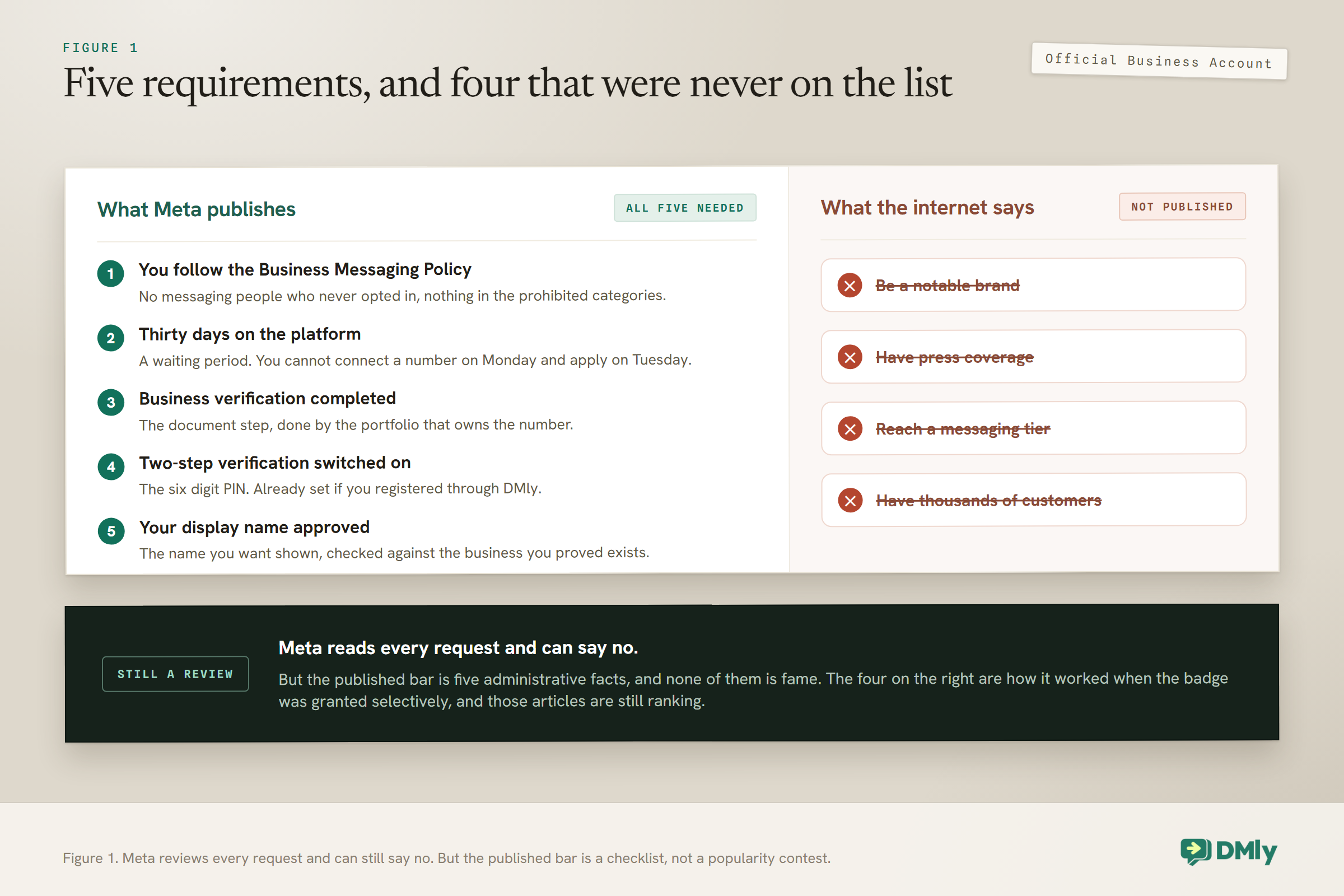
Meta’s documentation lists five requirements for the WhatsApp verified badge, and they are all administrative. Officially they are the criteria for Official Business Account status. Here they are, in plain terms:
- You comply with the WhatsApp Business Messaging Policy. In practice this means you are not doing the things that get accounts in trouble anyway: no messaging people who did not opt in, nothing in the prohibited categories.
- Your number has been on the WhatsApp Business Platform for at least 30 days. A waiting period, nothing more. You cannot connect a number on Monday and apply on Tuesday.
- The business portfolio that owns the number has completed Business Verification. The document step.
- Two-step verification is switched on for the phone number. A six-digit PIN, which you will have set already if you are connected through DMly, because the registration will not complete without it.
- Your display name has been approved. The name you want shown, checked against your real business.
Now the part that matters more than the list itself. Meta’s current documentation does not require brand notability, press coverage, a minimum messaging tier, or a certain number of customers. Those criteria are all over the internet, repeated by vendors and agencies, and they reflect how this worked when the badge was scarce and Meta granted it selectively to recognisable brands. That is not the current published standard.
Why the wrong version is everywhere: The old process was genuinely selective, and articles written then are still ranking. If you read that you need to be “a notable brand” with third-party press mentions, you are reading advice from an earlier era of the platform. Meta still reviews each request and can turn you down, so approval is not automatic. But the published bar is a list of five administrative facts, not a fame test.
If You Are on the Free App, Do This Instead
Most people reading about the green tick are on the WhatsApp Business app, which means the badge is closed to them. That is worth saying plainly rather than letting you read to the bottom of a guide before finding out. It is not a failure of your application, it is a category the badge does not cover.
To check whether your business is likely to qualify, use the free WhatsApp verification checker.
The good news is that the WhatsApp verified badge was never the thing doing most of the work. What builds trust with someone who does not know you is a profile that looks like a real business took ten minutes over it, and that is fully available on the free app.
Four things worth doing this week:
- Fill in every profile field. Business name, category, description, address, hours, email and website. An empty profile is the single strongest signal that an account might not be genuine, and a complete one is the cheapest counter to it.
- Use the same name everywhere. Your WhatsApp profile, your website, your Instagram, your Google listing. Spelled identically. Customers check, and inconsistency reads as carelessness at best.
- Add your photo or logo. A default avatar looks like a burner number to anybody who has been messaged by a scammer, which by now is everybody.
- Get people to save your number. A saved contact shows your name whatever your verification status, which is the same outcome the badge chases, achieved from the other direction. A short line at the end of a conversation asking them to save you costs nothing.
Then be honest about whether the API is worth moving to. The badge on its own is a weak reason. The strong reasons are being able to message from more than one phone, having your team share the conversation history, sending reminders and confirmations automatically, and not losing everything if a handset goes missing. Our guide to running one inbox across channels covers what that changes day to day. If those reasons apply to you, move for them and treat the badge as a bonus that arrives a month later.
Why Your Name Matters More Than the Badge
The change your customers actually notice is your business name appearing instead of a phone number, and that does not need the WhatsApp verified badge at all. This is the single most useful thing on this page, and it is buried or missing in most guides because the badge is the more exciting story.
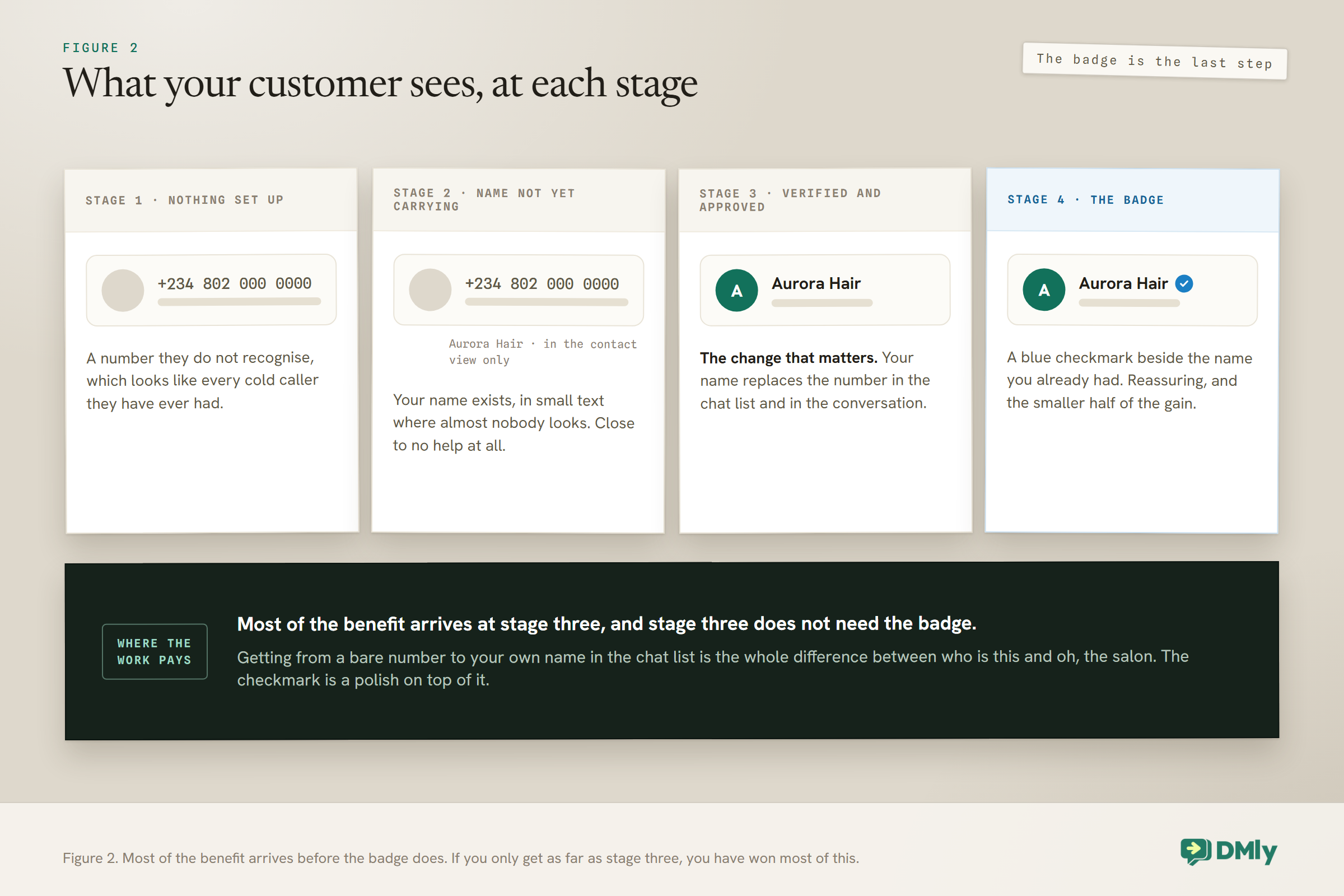
Think about what a customer sees when your message arrives. If nothing is set up, they see a phone number they do not recognise, which looks like every scam and every cold caller. Once your business is verified and your display name is approved, they see your business name in the chat list and in the conversation itself. That is the difference between “who is this” and “oh, the salon”.
Your display name has to follow Meta\u2019s rules too. The free display name validator checks it in seconds.
The badge adds a blue checkmark next to that name. Useful, reassuring, and genuinely worth having. But it is the smaller half of the improvement, and it arrives later.
Three conditions have to line up before your name replaces the number:
- Your display name is approved.
- Your business has completed Meta Business Verification.
- You have sent a reasonable volume of real messages. Meta does not publish the exact figure. The provider 360dialog puts it at 2,000 delivered messages to unique users within 30 days, outside customer service windows, which is the most specific number anyone states publicly. Treat it as a guide rather than a rule.
Before verification is complete, your name shows only in small text beside the number in the contact view, which is close to useless because nobody looks there. After it, the name carries.
Getting Your Display Name Approved First Time
Display name rejections are almost always about the relationship between the name and the business, not the name itself. Meta is checking one thing: can it confirm from the outside world that this name belongs to this company.
The rules are stricter than people expect:
- It has to match your branding exactly. Capitalisation and spacing count. “BrandName” and “Brandname” are treated as different names.
- It has to appear on your website. If the name you are asking for is not visible on the site the business owns, there is nothing for Meta to check against.
- It has to be at least three characters.
- It has to be the business. Not a person’s name, not a generic word, not a slogan and not a description of what you do.
- The link between your legal entity and the name has to be obvious. If your company is registered as one thing and trades as another, make that connection visible somewhere public before you apply.
The three rejection reasons that come up again and again are exactly those: no clear relationship between the registered company and the requested name, the name not appearing on the official website, and branding that does not match across your site, your Facebook page and your application.
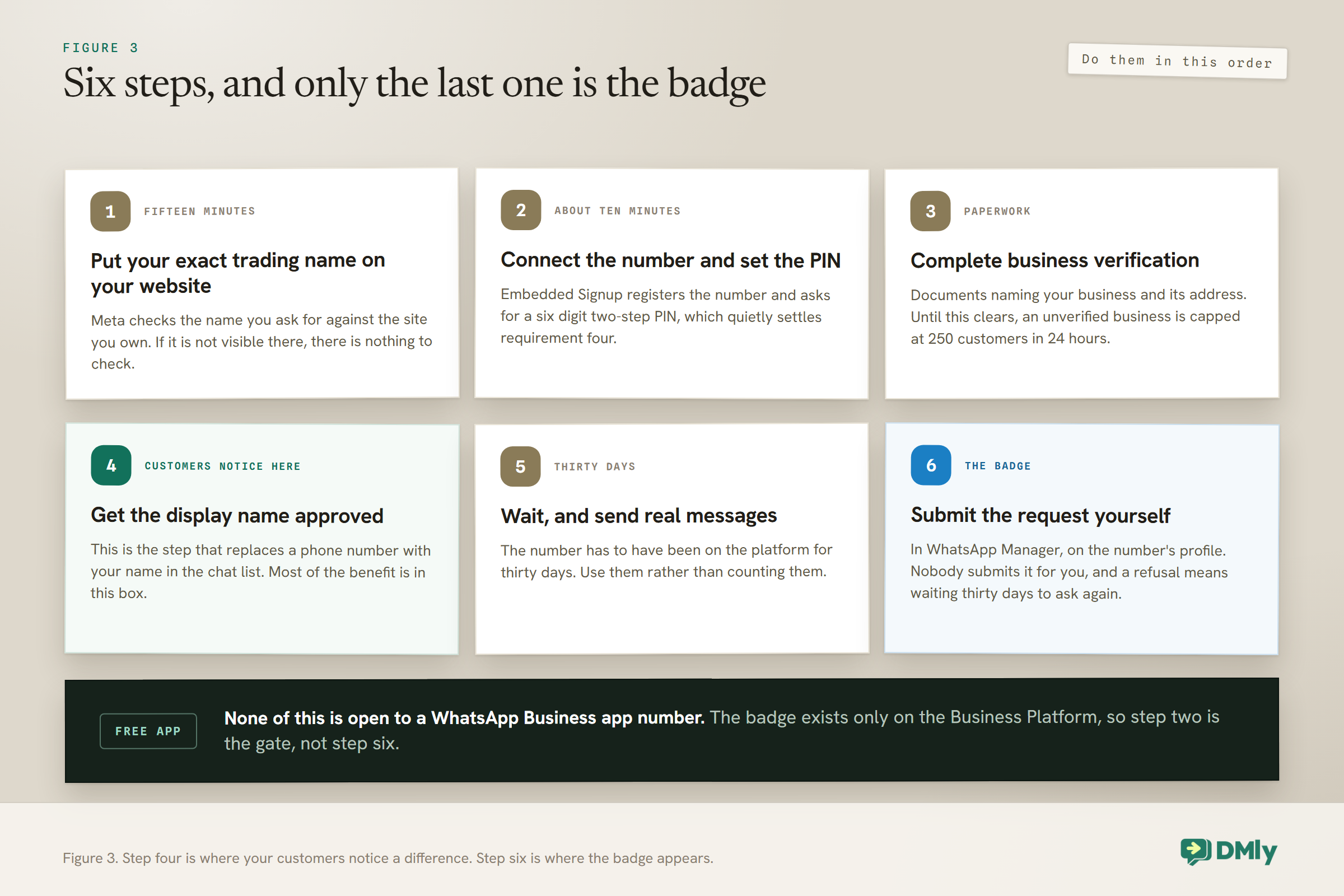
The fix for all three is the same and it is not technical. Before you apply, make your website say your name the way you are about to type it. That is usually a fifteen minute job and it is the difference between approved and rejected.
A trap for businesses that trade under a different name: Plenty of small businesses are registered as something like “Adeyemi Ventures Ltd” and trade as “Aurora Hair Studio”. That is completely normal and it is also the most common reason for a rejection, because Meta cannot see the connection. Put a line in your website footer or your about page naming the registered entity behind the trading name, and the relationship becomes checkable.
Business Verification: The Document Step
This is the one that involves paperwork, and it is worth doing early because everything else waits on it. Meta wants to see that your business is a real registered entity, using official documents.
What that means in practice depends on where you are, but the pattern is consistent: something official with your business name on it, something official with your business address on it, and the two matching what you entered in Meta’s forms. Certificates of incorporation, business registration documents, utility bills in the business name and bank statements are the usual accepted items.
If you are connecting WhatsApp through DMly, this is worth sorting before you start rather than during. DMly’s own guidance is to have your accepted business documents ready if your business is not already verified with Meta, because an unverified business starts limited: 250 customers in any 24 hours. That is enough to test with and not enough to run on.
The connection itself is quicker than the paperwork. Embedded Signup is the recommended route and takes about ten minutes. You will need a number that you own, that carries a country code, that can receive a one-time code by voice call or SMS, and that does not already have an active WhatsApp account on it. You will also set a six-digit two-step verification PIN during registration, which conveniently ticks off requirement four on the badge list before you have even thought about the badge.
If the wider setup is new to you, our guide to the WhatsApp Business API for small businesses covers the whole picture, including what the API costs and how messaging tiers work.
Meta Verified Is a Different Product
Meta Verified is a paid subscription. Official Business Account status is a free grant. They are not the same thing and buying one does not get you the other.
Meta Verified is the subscription you have seen advertised on Instagram and Facebook, which bundles a verified badge with impersonation protection and direct account support. Meta has been extending a business version of it, including to WhatsApp, and this is where a lot of confusion comes from, because now there are two routes to something that looks like a blue tick.
Two practical warnings before you go looking for it.
Availability and pricing vary by country and by tier, and the published figures for the WhatsApp tier are inconsistent enough that quoting one here would be misleading. Check what is actually offered in your own account rather than trusting a number in an article, including this one.
Meta bills per asset, not per business. A Facebook page, an Instagram account and a WhatsApp number are three separate subscriptions. Businesses that assume one subscription covers everything they run get an unwelcome surprise.
Which should you pursue? If you are on the API and you meet the five requirements, apply for Official Business Account status, because it costs nothing. Consider the subscription if you want the support and impersonation protection that come with it, or if the free route is not open to you. Do not buy a subscription believing it is a shortcut past the five requirements.
Requesting the WhatsApp Verified Badge, and What Happens If You Are Turned Down
You apply for the WhatsApp verified badge yourself. It is not something your platform does for you, and it is not something you wait to be offered. That surprises people who assume the badge arrives automatically once you qualify.
The request happens in Meta’s WhatsApp Manager rather than in DMly, because the badge belongs to your Meta account rather than to any messaging platform. The path runs through WhatsApp Manager, into your overview, to the business phone number you want, then to the profile section for the number, where Official Business Account has a submit button. If you have a developer, there is also an API for requesting it. Then you wait for a notification with Meta’s decision.
If you are turned down, the important number is 30 days. That is how long you must wait before submitting another request, so a rushed reapplication is not an option and there is no value in trying again immediately.
Use the wait properly. A denial usually means one of the five requirements was not actually satisfied, and the most common culprits are business verification not being fully complete and the display name relationship not being demonstrable. Fix the underlying thing rather than resubmitting the same application and hoping for a different reviewer.
Business verification comes first. Run the free Meta business verification checker to see whether your details are ready before you think about the badge.
One reassurance: being denied does not take anything away. Your business profile still carries your details, your messages still send, and your display name, if approved, still shows.
What the WhatsApp Verified Badge Will and Will Not Do For You
The badge is a trust signal, not a growth feature. It is worth having and it is not worth reorganising your business around.
What it genuinely does: it tells a customer who does not know you that the account is who it says it is. For anything involving money, appointments or personal details, that matters, and it matters most for the customer who has never dealt with you before.
What it does not do, despite what you will read:
- It does not raise your messaging limits. Those move on quality and engagement, which our guide to quality rating, messaging limits and bans covers properly.
- It does not protect you from being blocked or reported. A verified account that sends unwanted messages gets the same treatment as any other.
- It does not get your templates approved. Template review is its own process, covered in our guide to WhatsApp Business message templates.
- It does not make people reply. Answering quickly does that.
There is one thing worth knowing about impersonation, since it is the fear that sends most businesses looking for a badge in the first place. A checkmark makes a fake account easier to spot, but it does not stop anyone setting one up. If somebody is already impersonating you, the badge is a slow answer to an urgent problem: report the account to Meta, tell your customers on the channels you do control, and make sure the number you actually use is published somewhere official that people can check against. Do that first, then pursue verification.
The businesses that get the most out of verification are the ones that treat it as the last polish on an account that already works: good messages, prompt replies, people who wanted to hear from you. If that is not in place yet, our complete guide to WhatsApp Business automation is a better use of the next hour than an application form, and running your replies through one shared inbox will do more for how customers see you than a checkmark will.
Frequently Asked Questions
Can I get the WhatsApp verified badge on the free WhatsApp Business app?
No. Meta states that Official Business Account status is not granted to WhatsApp Business app phone numbers, alongside employee numbers and test accounts. The badge exists only on the WhatsApp Business Platform, the API. If you are on the free app and you want the badge, moving to the API is the only route, and it is worth doing for other reasons before it is worth doing for this one.
Is the WhatsApp green tick still a thing in 2026, or is it the blue badge now?
The status still exists, but the tick is blue now. Meta aligned the badge with the one used on Facebook and Instagram, so what businesses still call the green tick appears as a blue checkmark. Nothing about how you qualify changed with the colour. If a provider offers to get you the green tick, they are using the old name rather than selling you something different.
Do I need to be a well-known brand to get verified?
Not according to Meta’s current requirements, which list five things: messaging policy compliance, 30 days on the platform, completed business verification, two-step verification enabled and an approved display name. Notability, press coverage and messaging volume are not among them, although a great many guides still say they are because that reflects how the process worked in earlier years. Meta does review each request and can decline it.
How long does WhatsApp verification take?
The unavoidable part is 30 days on the platform before you can request the badge at all. Business verification and display name review take their own time on top, usually days rather than weeks, depending on how clean your documents and branding are. If your request is denied, you must wait 30 days before submitting another one, which makes getting it right first time worth more than moving fast.
What is the difference between Meta Verified and an Official Business Account?
Official Business Account status is free, granted by Meta when you meet the five requirements, and is the traditional badge. Meta Verified is a paid subscription that bundles a badge with impersonation protection and direct support. Availability and pricing for the WhatsApp tier vary by market, and Meta charges per asset, so a Facebook page, an Instagram account and a WhatsApp number are three separate subscriptions rather than one.
Why does my business name not show, even though it was approved?
Approval alone is not enough. Your name replaces the phone number in the chat list once the display name is approved, your business has completed Meta Business Verification, and you have sent a genuine volume of messages. Until business verification is finished, the name only appears in small text beside the number in the contact view, where almost nobody looks. If your name is approved but invisible, verification is the first thing to check.
Will the badge increase how many messages I can send?
No. Messaging limits move on your quality rating and on how people respond to your messages, not on whether you carry a badge. A verified account that sends messages people did not ask for will see its limits fall in exactly the same way an unverified one would. The badge and your sending capacity are separate systems that happen to sit next to each other.
Does the badge stop someone impersonating my business?
It makes a fake account easier to spot, but it does not prevent one being created. If somebody is impersonating you right now, treat that as a separate and more urgent job: report the account to Meta, tell your customers through the channels you control, and publish your real number somewhere official that people can check. The badge helps afterwards, not during. The paid Meta Verified subscription includes active impersonation monitoring, which is one of the few genuine reasons to consider it over the free route.
Can I change my display name after it has been approved?
Yes, but a change goes through review again, and while it is in review your account is in a less settled state than it was. It is worth getting the name right the first time rather than treating it as something you can iterate on. Before you submit any change, make sure the new name already appears on your website exactly as you intend to type it, because that is the check Meta is running and it is the reason most name reviews fail.
Writing about WhatsApp automation, bookings and growth for local business.
Turn WhatsApp into your busiest channel.
Start free and run message, bookings, payments and reviews in one place.
