
Automation Cut Response Time 70%: A Composite Case Study
Every automation company has a case study like this one. A lovely local business is drowning in messages, the software arrives, and a big percentage falls out of the sky. The number is usually real. The story is usually useless, because it hides the two things you’d need to repeat it: what exactly got built, and what exactly got measured.
So we’re doing this one differently, and that starts with being straight about the subject. The owner in this story is a composite. We’ll call her Maya, because a story needs a name, and she is really several dozen people: the salon and clinic owners who move onto DMly every month with the same drowning inbox. Every feature, limit, price and mistake below is real and checkable against our documentation. The traffic numbers are stated assumptions, chosen to be conservative, and we show every step of the arithmetic so you can argue with it. Or better, run it on your own inbox and send us the result.
The short version: Maya’s average first response time went from about four hours to about 74 minutes in three weeks of evenings. That’s the 70% in the headline. It’s 69% if you carry the decimals, and we do, further down. The interesting part isn’t the number. It’s where the cut came from, because it isn’t where most owners think.
The Inbox Before Anything Changed
Maya runs a hair and beauty studio across two locations: five chairs, two treatment rooms, a part-time front desk at one site and nobody at the desk at the other. Messages come in on WhatsApp mostly, plus Instagram DMs and the chat widget on her booking site. Call it 90 conversations in a normal week, which is what a healthy two-site studio does.
During opening hours, she and her team answered when their hands were free. Literally: between clients, mid-blow-dry, phone face-down by the till. A typical daytime message waited about 20 minutes. Not great, not scandalous.
The real damage was invisible from inside the studio. Nearly four in ten of her messages arrived after closing, most of them between 7pm and 11pm, which is when her customers finally sit down and plan their week. Those messages waited until the morning sweep, call it 10 hours. And those are precisely the messages that decide where the weekend’s bookings go, because a customer comparing two salons at 9pm books with the one that answers.
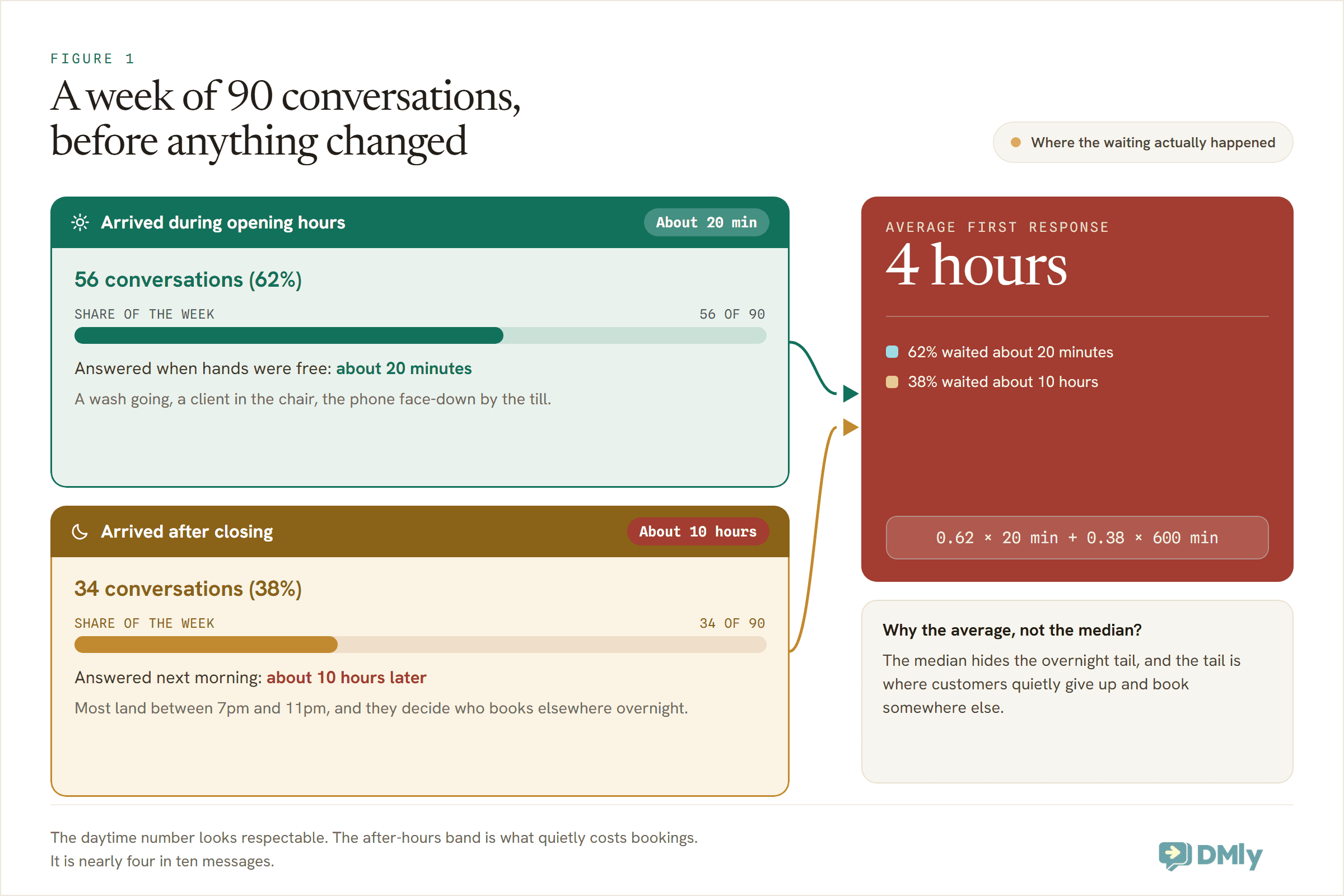
Blend the two bands and Maya’s average first response was around four hours. She would have guessed twenty minutes, because twenty minutes is what her working day felt like. That gap between the felt number and the measured one is worth pausing on: in HubSpot’s research, 90% of customers rate an immediate response as important or very important when they have a support question, and most define immediate as ten minutes or less. Four hours isn’t slow by the standards of a busy studio. It’s slow by the standards of the person holding the phone, and theirs are the standards that count.
And if four hours sounds bad but survivable, the wider benchmarks say something stranger: SuperOffice’s long-running customer service study puts the average business at 12 hours and 10 minutes to respond, and in Sprout Social’s index, 73% of social media users say they’ll buy from a competitor if a brand doesn’t respond on social. In other words, Maya was already better than average. Average is the problem.
What We Mean by Response Time (So You Can Check Us)
One honest paragraph of method before the story continues, because case studies love to leave this out.
The metric here is time to first reply: from the moment a customer’s first message arrives to the moment anything useful answers it, human or automated, with every hour of the week counted. We quote the average, not the median. The median is kinder and most dashboards prefer it, but the median politely ignores the overnight tail, and the overnight tail is where customers actually give up. If a number is going to flatter us, we’d rather it didn’t.
One more rule we held ourselves to: an automated reply only counts as answering if it resolves or usefully advances the question. A greeting that says “we’ll get back to you!” doesn’t stop the clock. It shouldn’t stop yours either.
The Build: Three Weeks, One Evening at a Time
Maya didn’t take a week off to become an automation engineer. The build happened in evening-sized pieces, in a deliberate order, and the order is half the lesson.
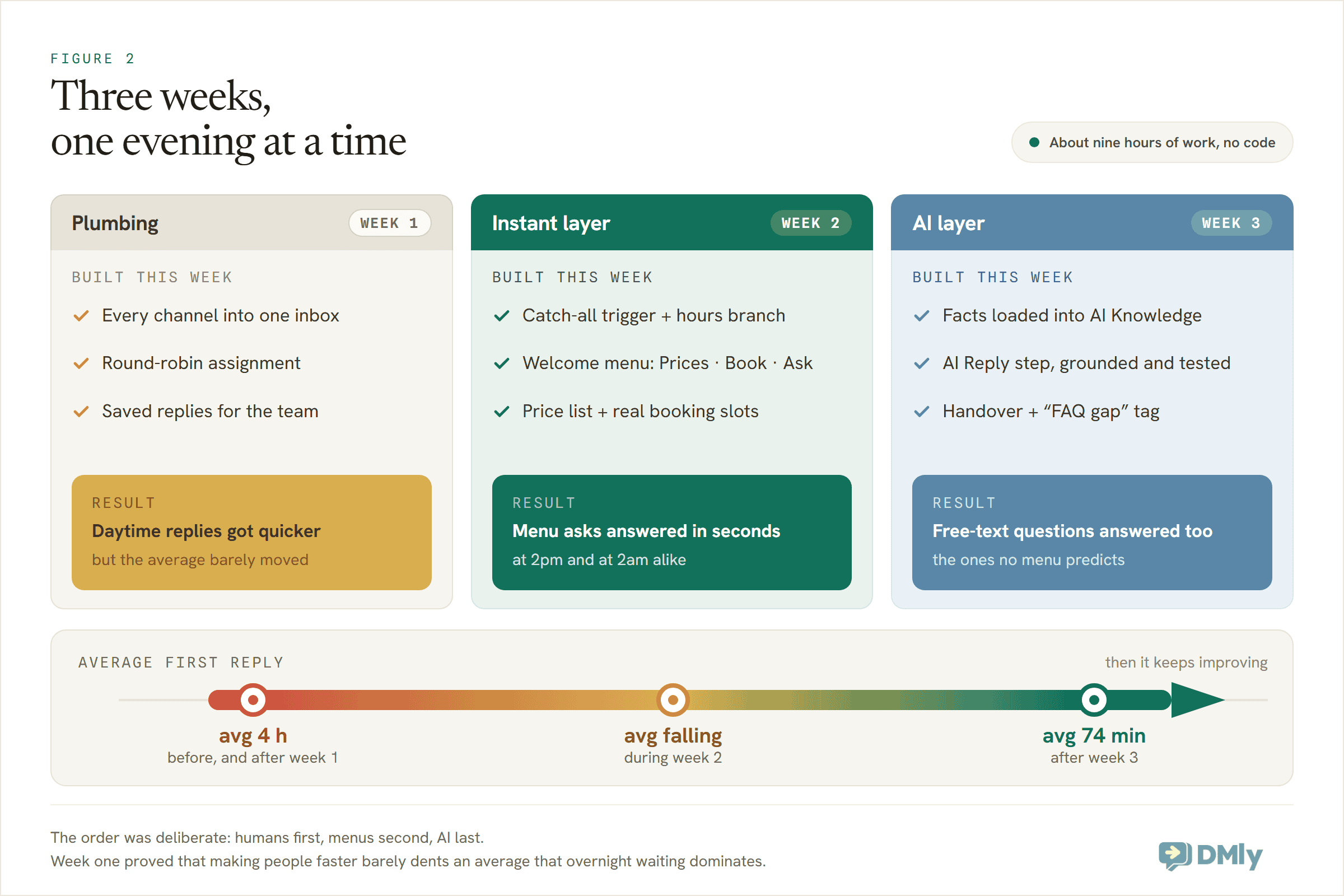
Week one was plumbing. All the channels (WhatsApp, Instagram, the site widget) into one shared inbox, so nobody was checking three apps. Round-robin assignment switched on, so every new conversation had an owner instead of being everyone’s job and therefore nobody’s. Saved replies written for the ten sentences the team typed most. Daytime replies got noticeably quicker, from about 20 minutes to about 12, because nothing was being re-found or re-typed.
And the average barely moved. That was week one’s real lesson, and it’s the one most businesses never learn because they never measure: making humans faster doesn’t touch an average that overnight waiting dominates. You cannot type your way out of being asleep.
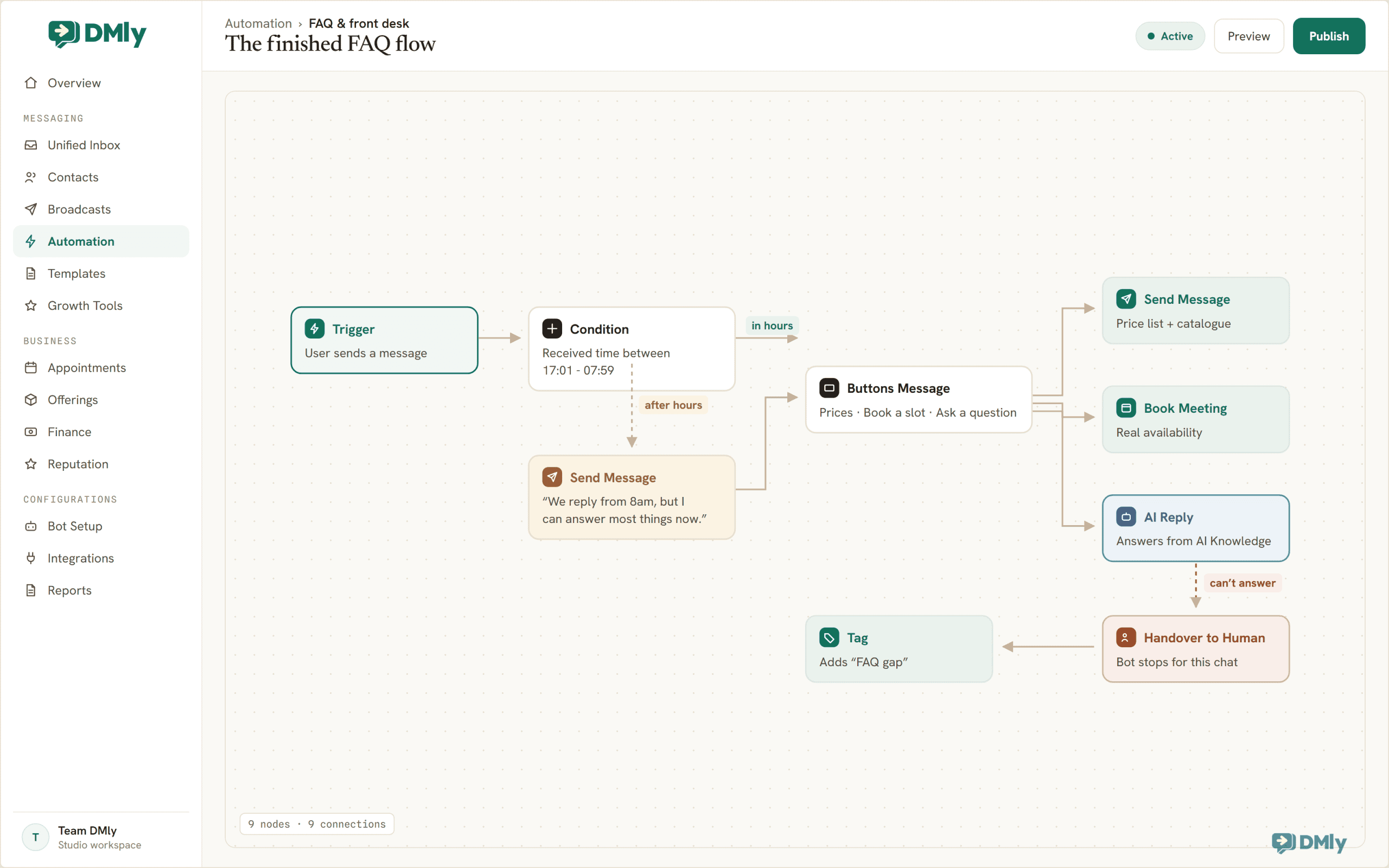
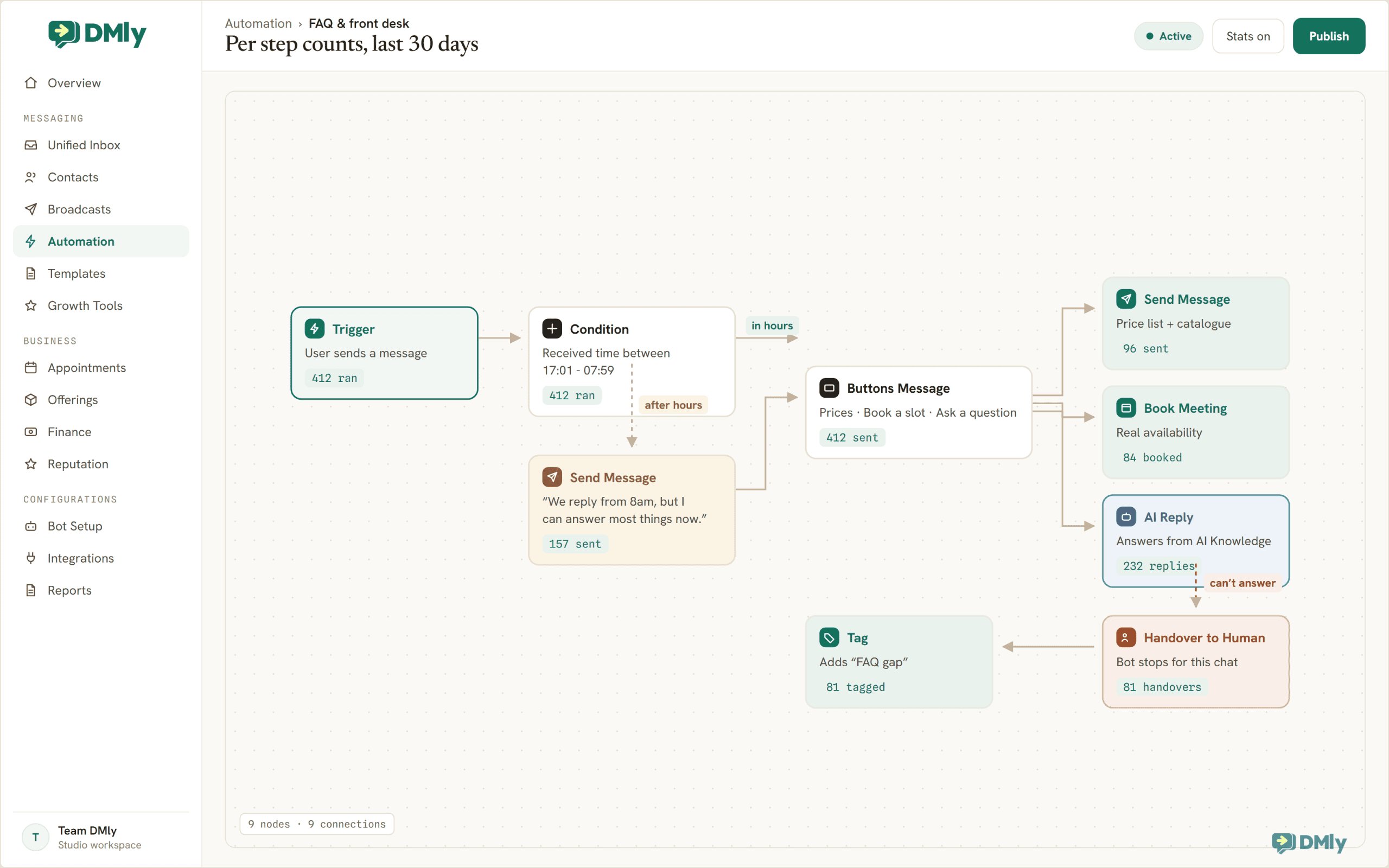
Week two built the instant layer. One automation in the flow builder: a catch-all trigger on every incoming WhatsApp message, a Condition on the time the message was received so after-hours chats get an honest one-liner first (“a teammate replies from 9am, but I can answer most things now”), then a welcome menu built as a Buttons Message: Prices, Book a slot, Ask a question. The price branch sends the list. The booking branch shows real open slots and takes the booking, which is the part that matters at 9pm. The whole pattern is the one we teach in our FAQ and auto-response guide, so we won’t rebuild it here.
Week three added the AI layer, for everything the menu didn’t predict. Maya’s prices, policies, hours, parking and aftercare went into AI Knowledge as question-and-answer entries. An AI Reply step took the “Ask a question” branch, grounded in that knowledge, with instructions to answer only from what it knows and to hand over to a human rather than guess. The handover tool comes switched on by default for new AI steps, which is the right default. Every handed-over chat got a tag, FAQ gap, which quietly became the most valuable list in the business. The Instagram and site-widget versions of the flow followed a week later: automations live per channel in DMly, so each channel got its own copy, trimmed to what that channel supports.
Total build time, honestly counted: about nine hours across three weeks, none of it code. Total cost: the entry plan, $29 a month billed yearly, whose 500 monthly AI replies covered Maya’s free-text volume with room to spare (her month runs to roughly 350).
Where the 70% Comes From
Now the arithmetic, in full, because this is the part case studies usually wave at.
Before. 62% of conversations arrived in hours and waited about 20 minutes. 38% arrived after hours and waited about 10 hours. The average: 0.62 × 20 + 0.38 × 600 = 240 minutes. Four hours.
After. Three months in, the system fully answers about 65% of conversations: the menu takes the bookings and price checks, the AI takes the free-text questions it can ground in Maya’s knowledge. Those customers wait effectively zero minutes, at 2pm and 2am alike. The other 35% reach a human: the ones who arrive in hours wait about 12 minutes (a calmer inbox is a faster inbox), and the after-hours handovers, about 13% of all conversations, wait for the morning sweep as they always did.
Run it: 0.65 × 0 + 0.22 × 12 + 0.13 × 540 = about 74 minutes.
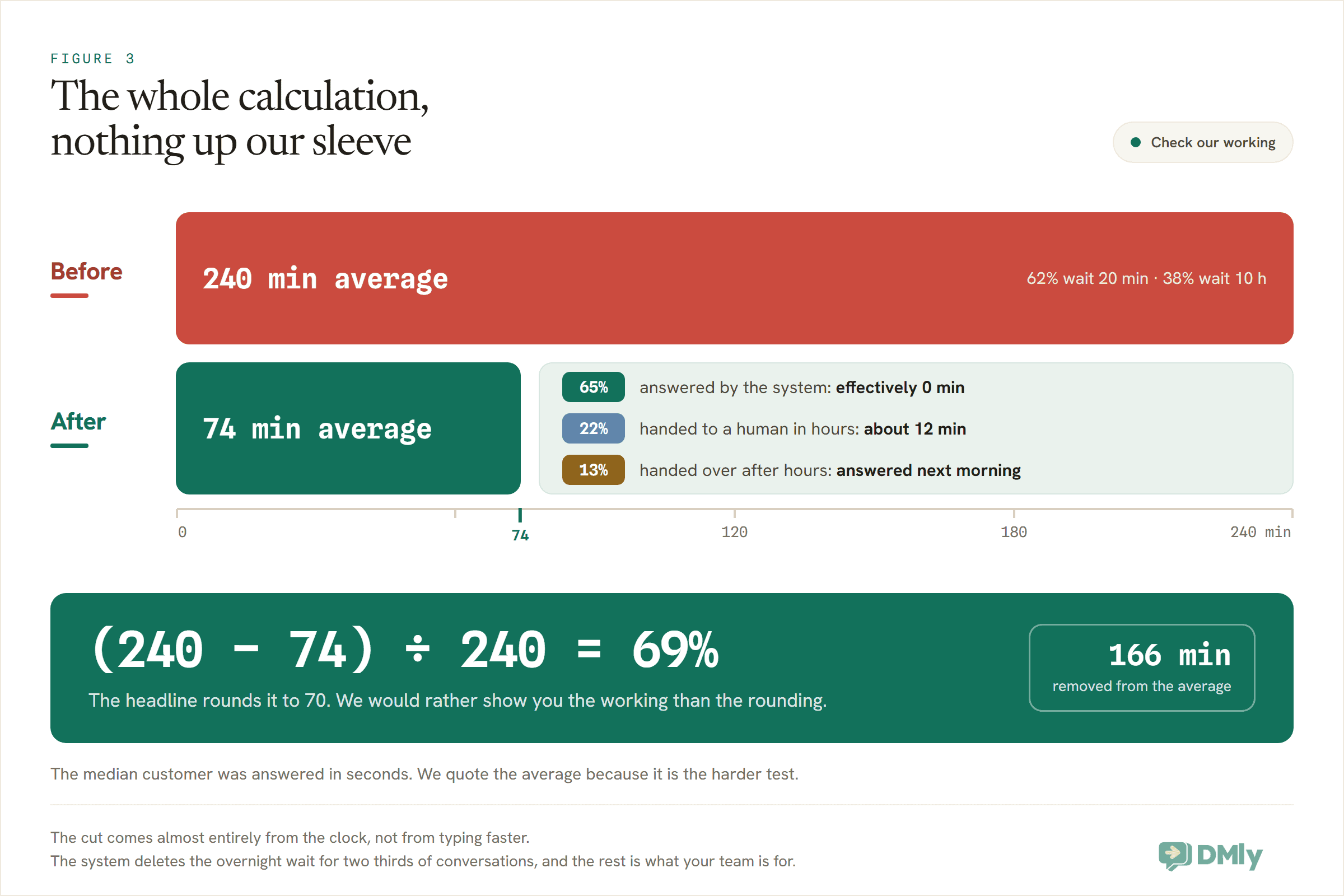
(240 − 74) ÷ 240 = 69%. The headline rounds it to 70, and now you know exactly what the rounding hides, which is more than most case studies will tell you. Meanwhile the median customer, the one whose question the system answers, went from a 20-minute wait to a few seconds. We lead with the average because it’s the harder test, and because it’s the number that includes the customers automation didn’t rescue.
Notice what the arithmetic is really saying. The cut didn’t come from answering hard questions brilliantly. It came from deleting the overnight wait for two-thirds of conversations. The 70% lives in the clock, not the cleverness. Which is encouraging, because the clock is the easy part to fix.
The Parts That Went Wrong
A case study you can trust needs a failure ledger. Here is Maya’s, kept honestly, because every one of these is a real trap in the product or the craft.
The AI had knowledge it couldn’t read. The first AI Reply step was set to a provider that, per our own docs, doesn’t search AI Knowledge (Claude and DeepSeek generate replies but skip document search; OpenAI and Gemini search). The bot chatted pleasantly and knew nothing. One dropdown change fixed it, but it cost an evening of confusion, so it earns its place here.
“From $30” is not a price. The knowledge originally said prices “start from” amounts, so the AI truthfully answered every price question with a from. Customers hate a from. The fix was in the knowledge, not the AI: exact prices, durations and what’s included, one entry per service. If a human would need to ask a follow-up to your policy text, so will the model.
The 20-character button. WhatsApp button titles cap at 20 characters, so “Book your next appointment” refused to fit and became “Book a slot”, which is honestly better copy. Constraints edit well.
Publish blocked, correctly. The second automation Maya tried to publish shared a keyword with the first, and DMly’s publish checks refused it until the conflict was resolved. Annoying for five minutes, and exactly right: two automations fighting over one message is how bots end up answering twice.
The night the AI hiccuped. One evening the AI step hit an error mid-conversation. The customer did not see silence; she saw the fallback message (the default reads, roughly, sorry, I could not process that just now, a team member will follow up shortly), and a note landed in the inbox for the morning. The lesson: the fallback fires on errors and empty replies, and it is the difference between a failure and a silent one. Keep it filled in; clearing it means a customer gets nothing at all.
Someone typed HUMAN in capitals. Early on, a customer hit the menu, didn’t want it, and typed HUMAN. It worked (the AI’s instructions route any request for a person straight to handover), but the fact that she felt she had to shout was feedback. The menu gained a plain Talk to us option, and asks for a person dropped to nearly none.
Ninety Days Later
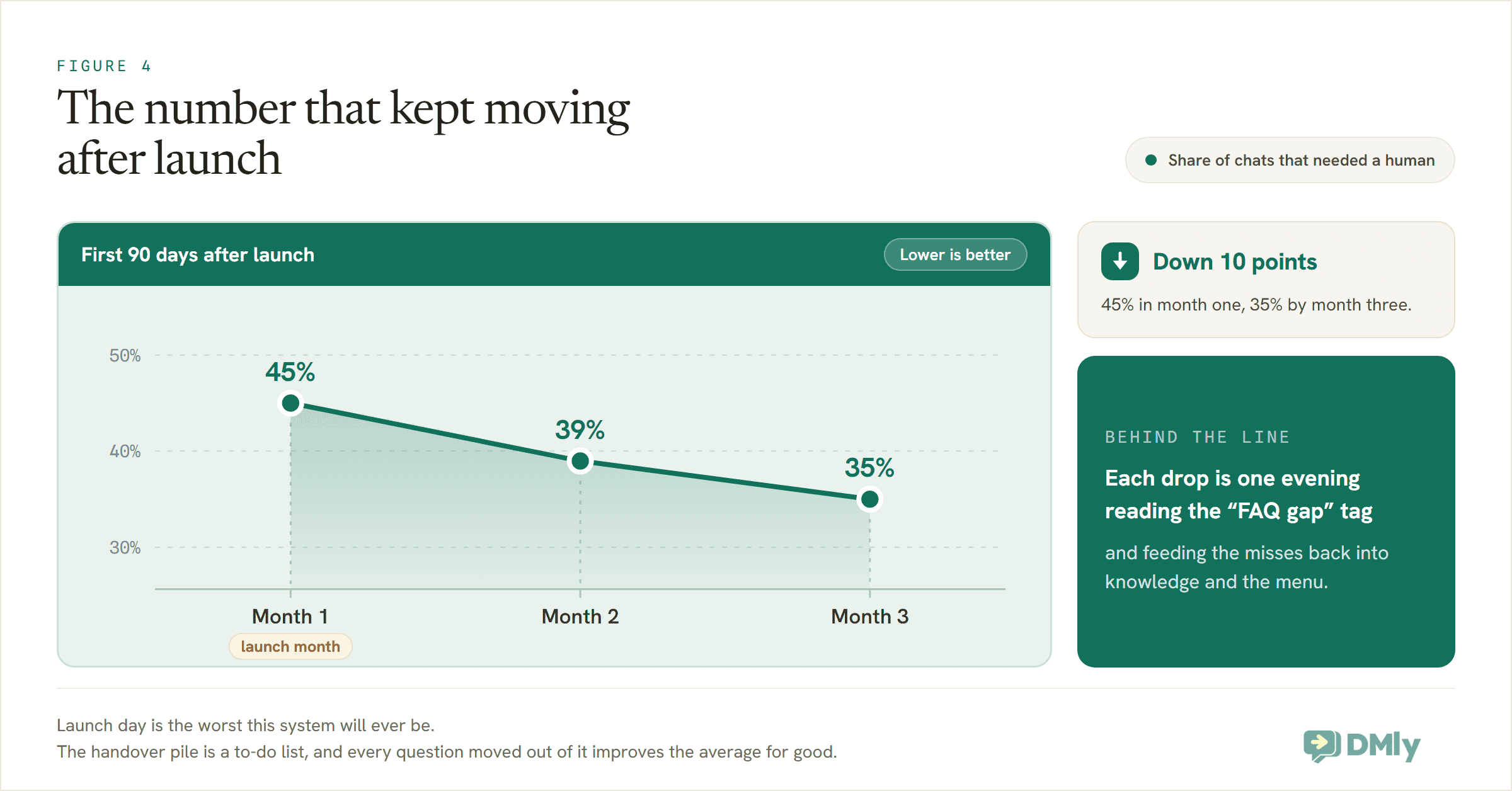
The launch-day system answered about 55% of conversations on its own. Ninety days later it answers about 65%, and the difference is not the software getting smarter on its own. It’s a habit that takes one evening a month: open the FAQ gap tag, read the handed-over chats, and feed the misses back in. A fact missing from knowledge gets added. A question everyone asks gets promoted to a menu button. A phrasing the keywords missed joins the list.
Two other numbers from the quarter worth reporting. After-hours bookings went from zero (by definition: nobody was awake to take them) to roughly a fifth of all bookings, which is the revenue face of the same response-time cut. And the post-chat CSAT survey Maya runs on WhatsApp (a CSAT Survey step in the flow; the scores land in Reports’ CSAT tab) settled around 4.6 out of 5, with the grumbles clustering exactly where you’d predict: conversations that needed a human after hours and had to wait for morning. The system’s remaining weakness is honestly its old one, shrunk.
What didn’t change: the team still answers about a third of conversations, and should. Complaints, custom colour consultations, the regular who books by voice note. Nobody wanted those automated, least of all Maya.
Run the Same Experiment on Your Inbox
The whole point of showing the working is that you can check it against your own business. The experiment costs one baseline week and three build evenings.
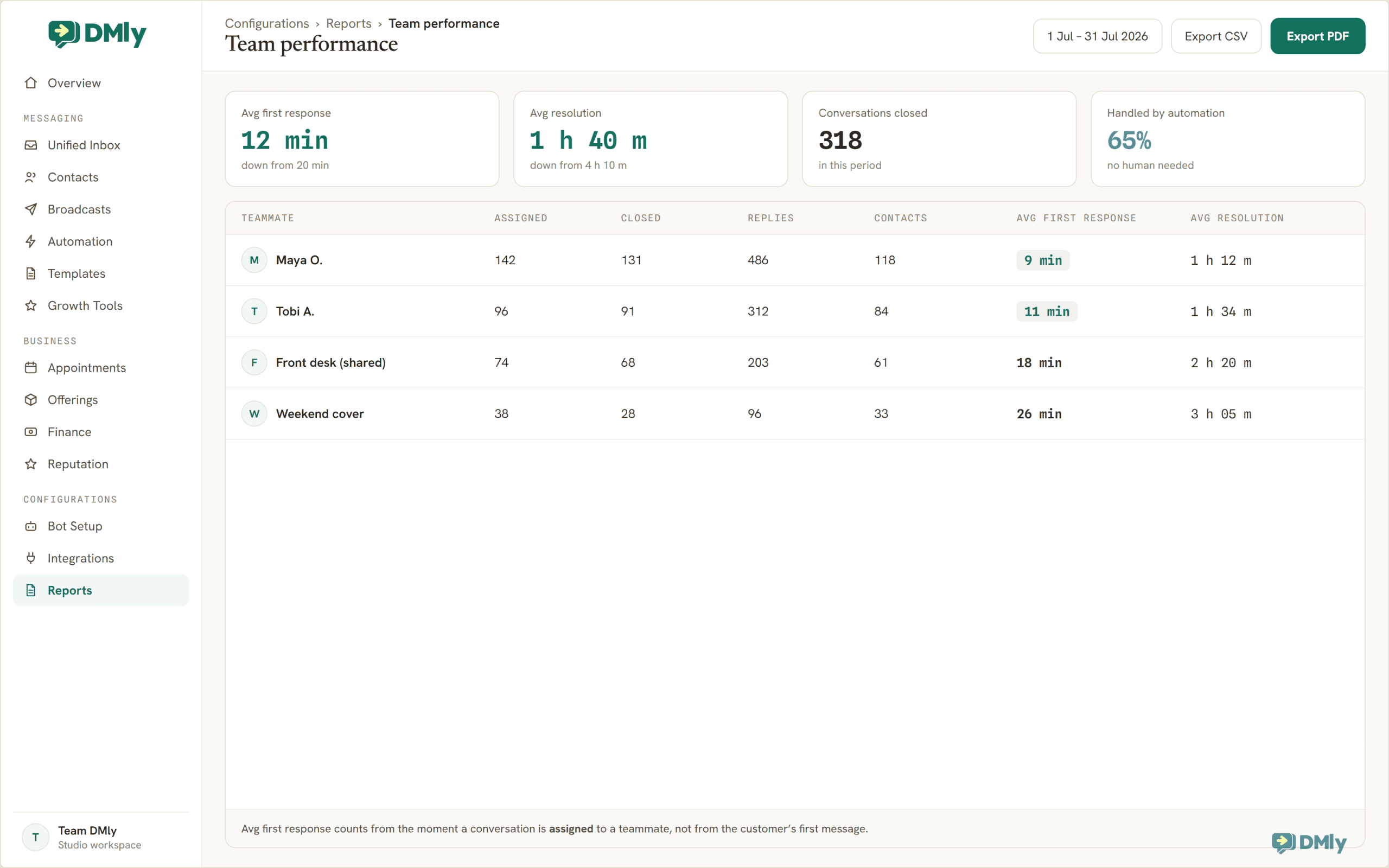
- Measure your before, honestly. Take last week’s conversations and note two things for each: when it arrived, and when it first got a useful reply. Include the weekend. One measurement caveat: DMly’s Team performance report shows each teammate’s Avg first response, but that clock starts when a chat is assigned, and your baseline should start when the customer speaks, so read the timestamps in the inbox for a week instead. Work out your in-hours wait, your after-hours share, and your blended average. This number will be worse than you think; Maya’s was twelve times worse than her guess.
- Write down your closed hours. They define the Condition rule and, more importantly, the share of your inbox currently waiting overnight. If your after-hours share is above 30%, automation will move your average dramatically; if you’re a 9-to-9 operation with 10% after hours, expect a real but smaller cut, and now you know why before spending a naira.
- Build the three layers in order. Inbox and saved replies first, menu and hours branch second, AI knowledge and handover third. The step-by-step is in the FAQ and auto-response guide; the build is an afternoon once your questions are audited.
- Mind the two traps from the failure ledger. Pick a provider that searches knowledge (OpenAI or Gemini), and write knowledge entries with exact prices and times, not froms.
- Re-measure after 30 days, same method. Same metric, same honest average, every hour counted. Then do the monthly FAQ-gap evening, and watch the answered share climb a few points a month.
- Tell us what you got. Seriously: the close of this article explains why.
The Honest Footnote
You read a case study about a composite, and you knew it the whole way through, because we told you in the second paragraph. Here’s why we wrote it anyway: the mechanism is the case. The arithmetic above doesn’t care whether the studio is called Maya’s or yours. It only cares about your after-hours share and your answered share, and both of those are measurable in your own inbox this week.
And here’s the standing invitation. If you run this build and your numbers come back, we want them: the before, the after, the handover rate, the part that went wrong. With your permission, the next version of this case study carries a real name and real dashboard screenshots, and we’ll happily let your numbers argue with ours. Until then, we’d rather show you honest arithmetic than borrow a testimonial.
Find your own 70%. Measure one honest week, then build the three layers with DMly: menu, AI knowledge, handover. Start the 7-day trial, no card, no code.
Writing about WhatsApp automation, bookings and growth for local business.
Turn WhatsApp into your busiest channel.
Start free and run message, bookings, payments and reviews in one place.
