
Omnichannel vs Single-Channel Messaging: Which Is Right for You?

Open your inbox and search for a customer you know has messaged you twice this year. If two of them come back, one from Instagram and one from WhatsApp, you have your answer to the omnichannel versus single-channel question, and it is not the one on your website.
Almost every business that says it runs several channels is really running several inboxes. That is not a criticism, and for a lot of businesses it is the correct setup. But it is a different thing from omnichannel messaging, it fails in a different way, and knowing which one you are actually running is the only way to decide whether to change anything.
This guide is the comparison itself: what each approach means in practice, the one difference that actually separates them, when single-channel is genuinely the better answer, the rules that differ from channel to channel and catch people out, what changes on 1 October 2026, and how to tell whether a tool is omnichannel or just wearing the word. If you want the full setup guide rather than the choice, that lives in our omnichannel inbox guide.
Omnichannel Messaging and Single-Channel Messaging, in One Paragraph Each
Single-channel messaging means every customer conversation happens in one place. One app, one login, one set of notifications. It might be WhatsApp, Instagram DMs, SMS or a live chat widget. Nothing is coordinated because nothing needs to be, and for a business where customers reliably use one channel, that simplicity is a genuine advantage rather than a limitation.
Omnichannel messaging means several channels behave as one system. The messages land in one inbox, the same person is one contact record whichever app they used, the history follows them across channels, and your automations and reporting work on the person rather than the channel. The word people reach for is “connected”, and the test for whether it is true is whether a customer ever has to repeat themselves because they switched app.
There is a third state, and it is where most businesses actually sit. Multi-channel means you are present on several channels, each in its own app, each with its own history. It looks like omnichannel from the outside and behaves like single-channel repeated three times from the inside. The difference matters because the failure mode is invisible to you and obvious to the customer.
The Real Difference Between Omnichannel Messaging and One Inbox
It is whether the same person is one customer or two in your system. Everything else follows from that. Take Ada, who asked about sizing on Instagram in March, bought the navy one, and comes back on WhatsApp in June with a follow-up.
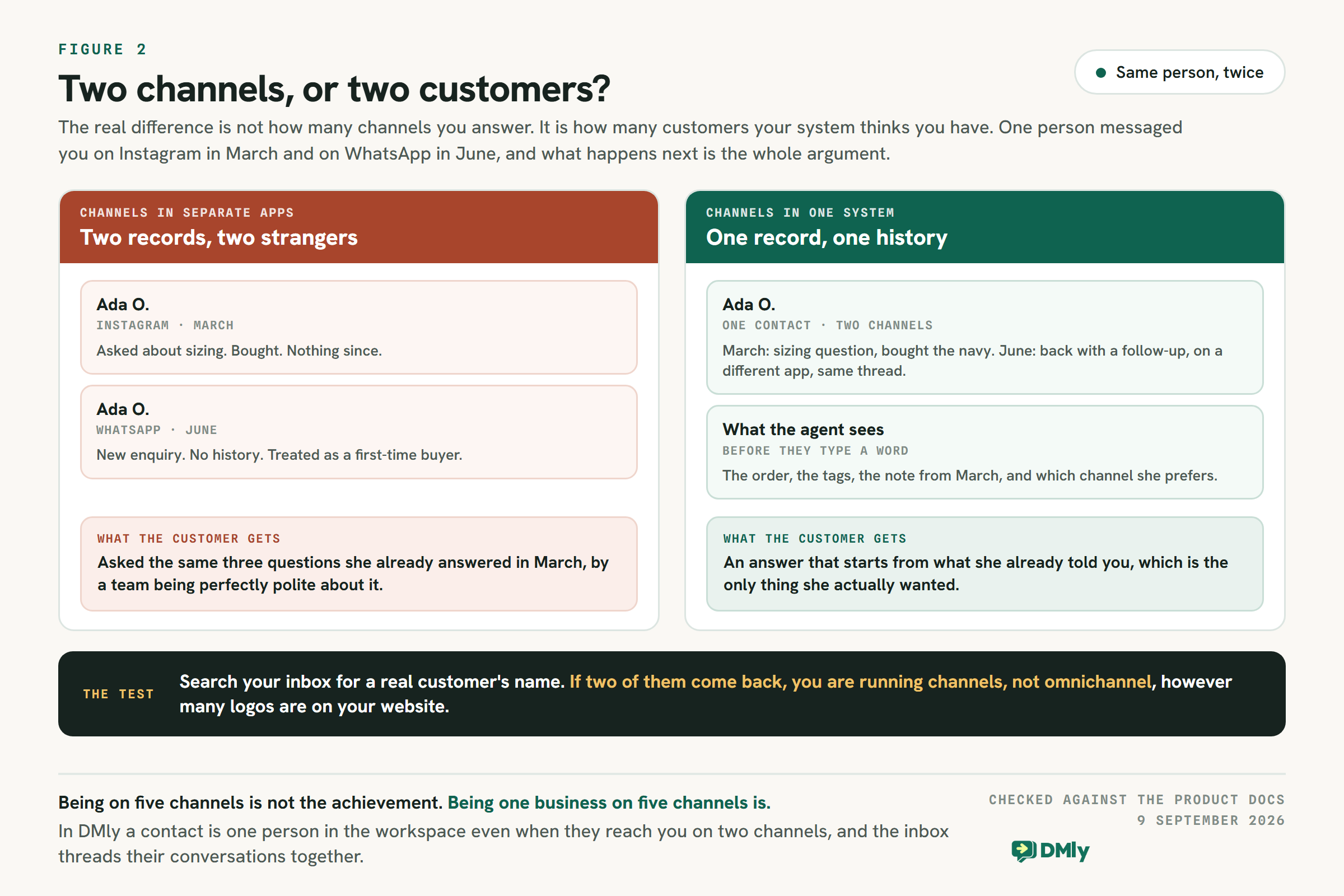
In a multi-channel setup she is two people. The Instagram Ada has an order history and a note. The WhatsApp Ada is a new enquiry with no context, so whoever picks it up asks what she bought, when, and what the problem is. Every question is reasonable. Together they tell a customer who has already spent money with you that she is a stranger.
In a connected setup she is one contact who happens to use two apps. The agent opens the thread and sees the March order, the tag, the note, and which channel she prefers, before typing a word. The reply starts from what she already told you, which is the entire thing she wanted.
That is the whole argument, and it is worth being unromantic about it. Omnichannel messaging is not about being everywhere. It is about not making a customer prove who they are because they changed app. A business on two channels with one contact record is doing more omnichannel messaging than a business on six with six.
When Single-Channel Is the Right Answer
Most comparison pages treat single-channel as the thing you grow out of. That is not honest. There are businesses for which one channel, answered well, beats three answered adequately, and it is worth naming them before spending money.
- Your customers genuinely use one channel. If 90 per cent of enquiries arrive on WhatsApp and the rest are phone calls, a second messaging channel adds a place to miss a message rather than a place to win one. Check this before assuming it; the answer is usually more lopsided than owners expect.
- One person answers everything. With a single owner or a single front-desk person on one device, the “shared inbox” problem does not exist. What you need is faster answers, not routing.
- Conversations are short and self-contained. A restaurant taking bookings does not usually need June’s conversation to make sense of March’s. The value of a persistent history is real but it is much smaller here than it is for a clinic or a B2B supplier.
- Volume is low enough that nothing gets lost. Twenty conversations a week can be held in someone’s head. Two hundred cannot, and that is the number that decides most of this, not ambition.
The failure mode of single-channel is specific, so watch for exactly it. It is not that you are missing out on reach. It is the moment a customer who normally uses WhatsApp sends an Instagram DM instead, gets a slower and worse answer because that app is checked less often, and quietly concludes you are disorganised. One customer doing that is noise. A pattern of it is the signal that the setup has stopped fitting.
Every Channel Has Its Own Rules, and Only One Has Templates
This is the part that turns an omnichannel plan into a surprise, and it is almost never in the comparison articles. Connecting channels does not make them behave the same. Each one decides for itself when you are allowed to message first, and they do not agree.
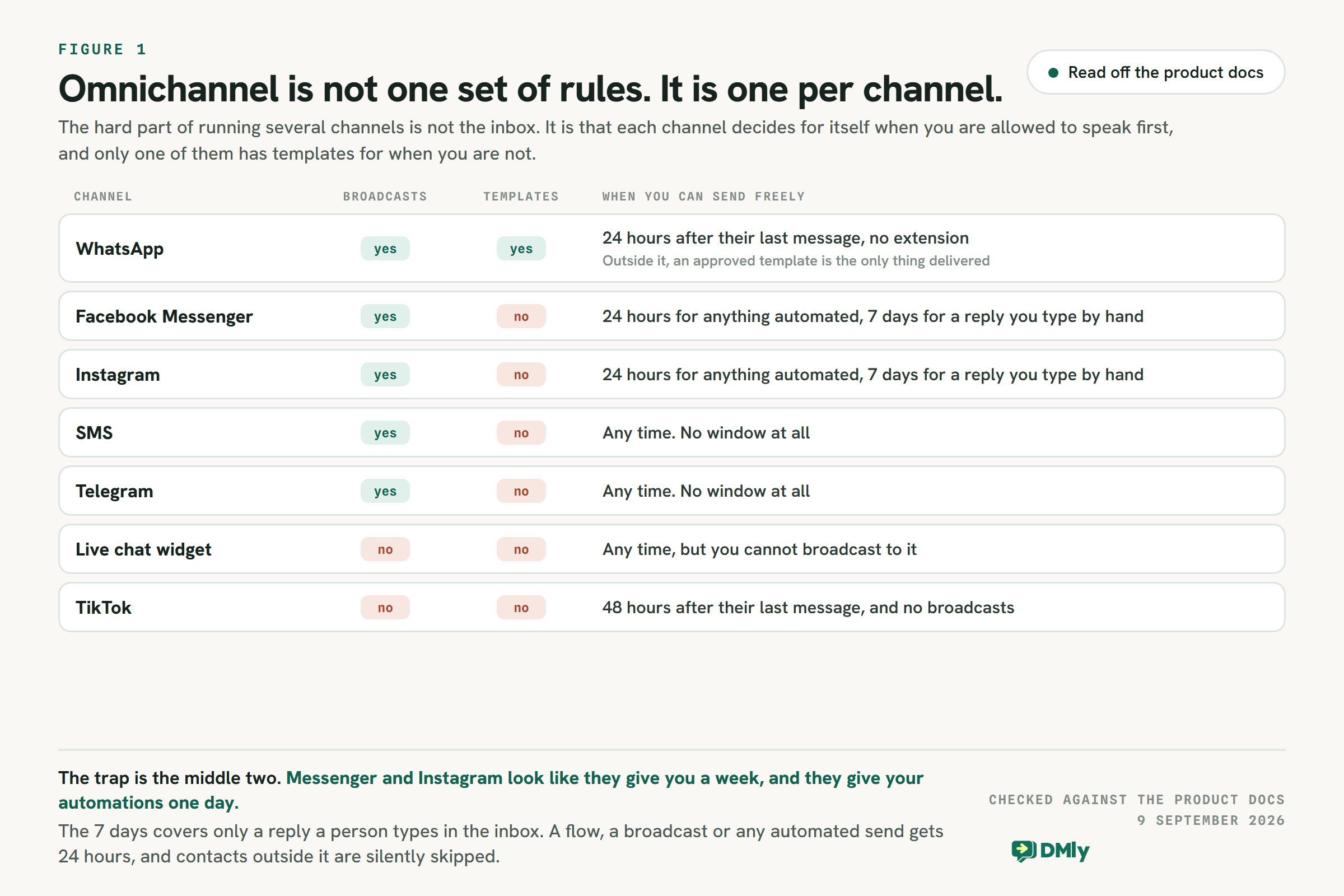
WhatsApp is the strictest and the most capable at once. You get 24 hours from the customer’s last message to write freely, with no extension, and outside that window the only thing Meta will deliver is a message template it has approved in advance. That applies to everything: flows, broadcasts, sequences, appointment reminders and replies you type by hand. It is also the only channel that has templates at all, which is why a business that needs to reach a customer who is not currently talking to it ends up on WhatsApp whatever else it runs. The mechanics are in our guide to the 24-hour messaging window.
Facebook Messenger and Instagram look more generous than they are. They give a person seven days to type a reply by hand, which sounds comfortable. Anything automated gets 24 hours. A flow, a broadcast or any scheduled send only reaches contacts who messaged inside the last day, and everyone outside that is silently skipped rather than reported as a failure. That gap between what the channel allows a human and what it allows your automation is the single most common cause of an omnichannel campaign that “worked” and reached a fifth of the list. There is more on each in the Instagram DM automation guide and the Messenger automation guide.
SMS and Telegram have no window at all. You can message any time, with no template and no approval. That freedom is exactly why they need more discipline from you rather than less: nothing in the platform will stop you sending something unwelcome. See the SMS automation guide and the Telegram guide for what each one is good at.
Two channels cannot be broadcast to at all. A live chat widget and TikTok both accept conversations and neither accepts a campaign. If a send has to reach widget visitors, it has to reach them somewhere else, which is a planning constraint rather than a bug. TikTok also runs a 48-hour reply window, longer than everyone else’s 24, and is covered in the TikTok DM guide.
None of this is an argument against running several channels. It is an argument against planning as though they are interchangeable, because the campaign you design for WhatsApp will not run on Instagram, and the one you design for SMS may not be legal to send at all.
What Changes on 1 October 2026, and on Which Channel
One more difference between channels arrives shortly, and it lands on exactly one of them. WhatsApp is the only channel here that Meta charges you per message for, and the way it charges changes on 1 October 2026.
From that date, every business phone number gets 1,000 free service messages a month, charged only from the 1,001st, with no rollover and a reset each month. Service messages are the ones you send inside a window a customer opened by writing to you. In the same change, utility templates get no free allowance at all, including inside that window. We set out what it means in practice in the October pricing change explainer, and you can run your own volumes through the pricing calculator.
The consequence for this decision is narrower than it sounds. A business answering questions on WhatsApp is affected less than one sending notifications, because the allowance sits on the answering side. But it does mean the channels are no longer comparable on cost: Instagram, Messenger, Telegram and your own widget do not meter messages this way, and SMS is billed by your own gateway rather than by Meta. If part of your reason for adding a channel is cost, that is now a per-channel question with a per-channel answer.
Permission Does Not Travel Between Channels Either
Windows are the rule people eventually learn. Consent is the one that catches teams out later, because it fails quietly and it fails after you have already sent the campaign.
On Facebook and Instagram, the notification opt-in is single-use. If a contact is outside the 24-hour window but holds one, a broadcast will use it to deliver the message, which sounds like a bonus and is really a withdrawal. Once spent, it is gone, and that person needs to give you a new one before you can reach them outside the window again. Send one campaign to a segment of opted-in contacts and you burn the opt-in of everyone in it who happened to be out of window at that moment. The people still inside the window are reached normally and keep theirs, which is why the same campaign can look fine and quietly halve your future reach.
Opting out, by contrast, is one state for the whole workspace. In DMly a contact who replies STOP is marked opted out and given an Unsubscribe tag automatically, and that applies wherever you might have messaged them next, not just on the channel they said it. That is the right behaviour and it is worth knowing, because it means a customer annoyed by an SMS campaign can remove themselves from your WhatsApp follow-ups too.
One detail worth having straight, since it looks like a bug the first time it happens: the tag follows the opt-out, not the other way round. Putting the Unsubscribe tag on someone by hand labels them and does not opt them out. The opt-out itself only happens when the contact sends an opt-out keyword or an automation runs the unsubscribe step.
And a counting quirk that makes campaign reports read strangely across channels. A contact who cannot be reached still uses up a recipient row. Someone deleted before the send is skipped rather than failed, so on that campaign your sent and failed figures will not add up to the recipient total. On Facebook and Instagram a contact outside the window with no opt-in is recorded as failed and shown as skipped in the delivery breakdown. None of that is wrong, but if you are comparing performance across channels you are comparing numbers that are counted differently.
So Which One Should You Run, Omnichannel Messaging or One Channel?
Three questions decide it, and they are worth answering about the business you have rather than the one you are planning.
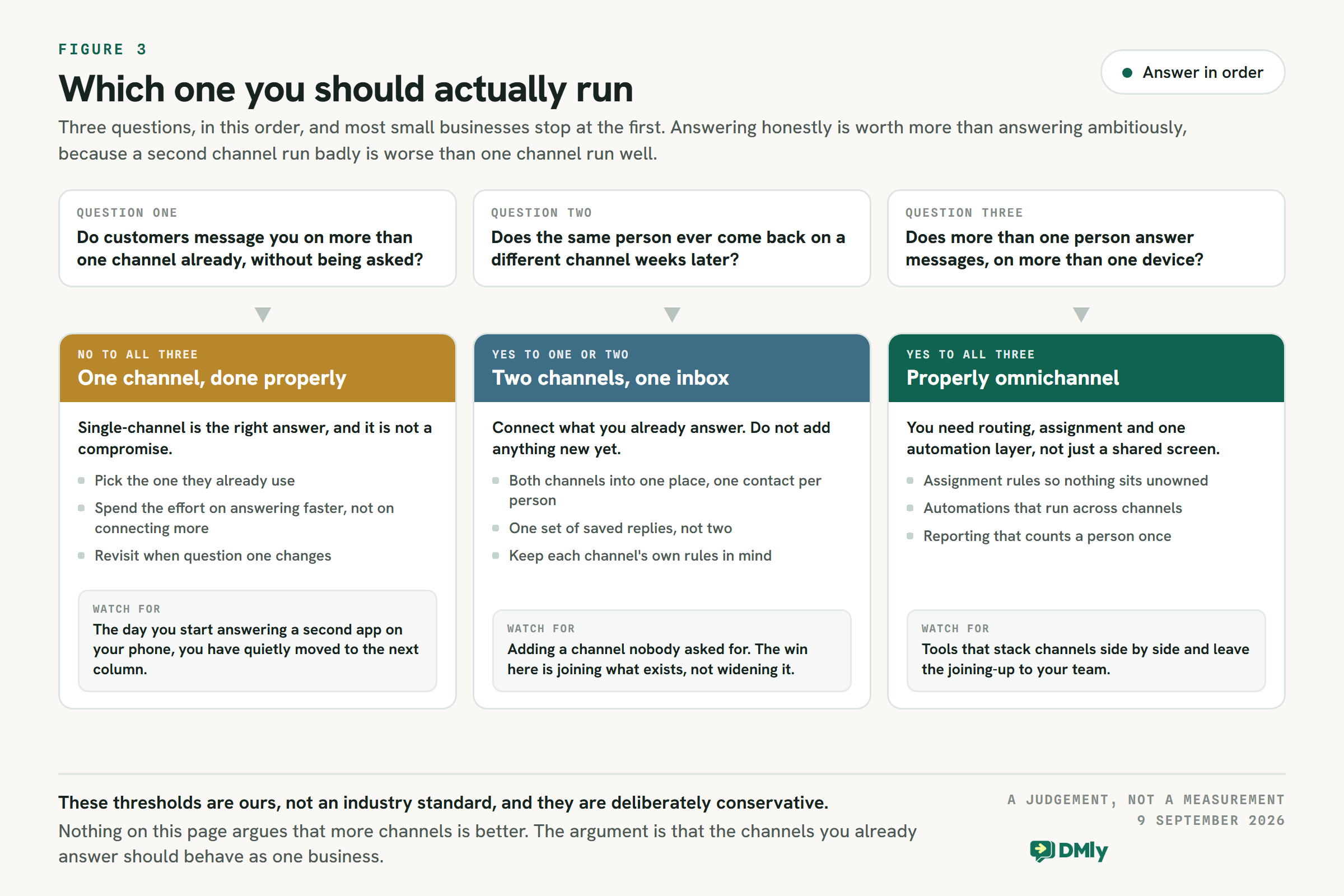
One: do customers already message you on more than one channel, without being invited to? Not “could they”, and not “are we on Instagram”. Look at the last month of enquiries and count. If the answer is no, the rest does not apply yet.
Two: does the same person ever come back on a different channel, weeks later? This is the question that decides whether shared history is worth anything to you. A business whose conversations end when the order ships gains much less from it than a clinic, a tutor or a supplier whose customers return.
Three: does more than one person answer messages, on more than one device? The moment two people can reply, you need assignment and visibility, and that requirement is independent of how many channels you run. Plenty of single-channel businesses need a shared inbox for this reason alone.
No to all three: run one channel, properly. Pick the one your customers already use, put your effort into answering faster and into the standing answers people always need, and check again in six months. This is a real answer, not a holding position, and a business in this box that spends a month connecting channels has spent a month on the wrong problem.
Yes to one or two: connect what you already answer, and add nothing new. The win is joining up the channels you are already on, so one person is one contact. Adding a fourth channel nobody asked for is how businesses end up with an unattended Telegram bot.
Yes to all three: you need the full thing. Not a shared screen, but assignment rules so nothing sits unowned, automations that run across channels rather than one per app, and reporting that counts a person once. That is the point at which the word omnichannel is doing real work.
Four Ways Omnichannel Goes Wrong
Adding channels is easy and reversible. What is not reversible is the impression left on a customer by a channel you were not really running. These are the four ways omnichannel messaging fails in practice, and each one is invisible from the inside.
The Unattended Channel
You connect a channel, nobody is made responsible for it, and it collects messages nobody answers. This is worse than not being there, because the customer can see you are present and concludes you are ignoring them specifically. It usually happens to the third channel, added because a tool made it easy rather than because anyone asked. The guard is simple: no channel goes live until a named person owns it and the alerts land somewhere they will be seen.
The Campaign That Reached a Fifth of the List
You build one message, send it everywhere, and the report says sent. What actually happened is that WhatsApp delivered through an approved template, SMS delivered to everyone, and Instagram and Messenger skipped every contact who had not messaged in the last 24 hours. Nothing errored. The fix is to read the per-channel breakdown rather than the headline number, and to plan the audience per channel rather than assuming one list reaches all of them.
Two Replies, One Customer
Shared access without assignment is not collaboration. Two people open the same conversation, both answer, and the customer receives two slightly different versions of your policy ninety seconds apart. It is a small thing that reads as disorganisation, and it gets more likely with every channel you add. Assignment and a visible owner per conversation is the cheapest fix in this entire article.
The Automation That Drifted
If a tool makes you build the same follow-up once per channel, you will also maintain it once per channel, and you will not. Within a quarter the WhatsApp version says one thing about your returns policy and the Instagram version says another, and nobody notices until a customer quotes the wrong one back at you. The test is whether one automation can serve a contact regardless of where they arrived, which is one of the checks below and the most predictive of the six.
How to Tell Whether a Tool Does Omnichannel Messaging or Just Says So
Every messaging tool now claims omnichannel messaging. Plenty of them mean “we support several channels”, which is multi-channel with better marketing. Six tests separate the two, and each one takes minutes on a trial account rather than a demo call.
One Contact, Not One Screen
The test: message the trial account from two different apps as the same person, then look at the contact list. If two contacts appear, the tool is stacking channels. If one appears with two threads, it is doing the actual job. This is the single most important check and almost nobody runs it before buying.
Continuity Across a Switch
The test: start a conversation on one channel, continue it on another, and see whether the agent view shows both without hunting. A tool that requires someone to search a second inbox to find the first half of a conversation has moved the work rather than removed it.
Automation That Crosses Channels
The test: build one follow-up and ask whether it can run for a contact regardless of where they arrived. If you have to build the same flow once per channel, you will maintain it once per channel too, and in practice that means it will drift out of sync within a quarter. There is a fuller treatment of what flows can and cannot do in the automation guide.
Honest Per-Channel Limits, Stated Up Front
The test: find where the tool tells you what each channel cannot do. A platform that publishes its window rules, its broadcast restrictions and its template requirements per channel is one you can plan against. One that presents every channel as identical will let you build a campaign that silently reaches a fraction of your audience and report it as sent.
Assignment and Notes, Not Just Access
The test: can two people work the same inbox without colliding? Assignment, internal notes and a visible owner per conversation are what stop two staff answering the same customer differently within a minute of each other. Shared access without assignment is not collaboration, it is a race.
Reporting That Counts a Person Once
The test: ask what the tool reports on. Per-channel message counts are easy and mostly useless. What you want is response time, resolution, satisfaction and volume attributed to people and to your team, not to apps. If a report cannot tell you whether one customer contacted you three times or three customers contacted you once, it will not help you improve anything.
Where DMly Sits, and Where It Does Not
We build one of these, so treat this section as what it is. Here is where DMly lands against the six tests above, including the parts that will not suit everyone.
What it does. WhatsApp, Facebook Messenger, Instagram, Telegram, SMS, a live chat widget and TikTok all land in the same inbox, and a contact is one person in the workspace even when they reach you on two channels, with the inbox threading their conversations together. Flows, sequences, tags, segments and reporting all work on the contact rather than the channel. Sequences in particular run across WhatsApp, Facebook, Instagram, Telegram, SMS, live chat and TikTok, so one follow-up pattern serves whichever channel a customer prefers. What that contact record holds is covered in the WhatsApp CRM guide.
What it is built around. WhatsApp first, and the documentation says so plainly: it is the only channel with templates, voice calling and a catalogue, and appointment reminders, invoices and review requests all assume it. If WhatsApp is not where your customers are, DMly is not the obvious choice, and that is a real limitation rather than a positioning statement.
Three limits worth knowing before you plan. A WhatsApp broadcast has no message box at all: step two of the wizard offers an approved-template picker and nothing else. That is our own decision rather than a Meta rule, taken because a broadcast audience is mostly outside the window, but it surprises anyone who has sent a Telegram or SMS broadcast, where there is a plain text box. Broadcasts are not available on live chat or TikTok at all. And a saved segment is a question rather than a list, so a broadcast scheduled last week goes to whoever matches when it sends, not to whoever matched when you built it. The broadcasts guide covers the audience side properly.
Where to look at the alternatives. We would rather point you at our own reviews than write four thin vendor summaries here, since a comparison page is not a directory. If you want to see how the market prices this, the roundup of WhatsApp automation tools is the place to start, and the individual reviews go into what each one actually publishes.
A Sensible First Month
If the three questions pointed you at connecting channels, the order matters more than the tooling.
- Count first. One month of enquiries, split by the channel they arrived on. Most businesses find one channel carries far more than they assumed, which changes what is worth connecting.
- Connect the two you already answer, and nothing else. Confirm the same person appears once, not twice.
- Write the standing answers once. Opening hours, prices, location, policy. One set, used on every channel, is where most of the speed comes from.
- Learn the window rules for each channel you connected, before you build a campaign rather than after one under-delivers.
- Only then add a third channel, and only if customers asked for it.
Omnichannel vs Single-Channel Messaging: Common Questions
What is the difference between multi-channel and omnichannel messaging?
Multi-channel means you are present on several channels, each with its own inbox and its own history. Omnichannel messaging means those channels share one contact record, so the same person is one customer whichever app they used. The visible difference is whether a customer ever has to repeat themselves after switching channel.
Is single-channel messaging always worse?
No. If your customers reliably use one channel, one person answers everything, and volume is low enough that nothing gets lost, single-channel is the better setup and connecting more would add places to miss a message. The point to change is when the same customer starts arriving on a second channel and getting a worse answer there.
Can I message customers on any channel whenever I want?
No, and the rules differ per channel. WhatsApp gives you 24 hours from the customer’s last message and requires an approved template outside it. Messenger and Instagram give a person seven days to type a reply but give anything automated 24 hours. SMS and Telegram have no window. TikTok has 48 hours and cannot be broadcast to, and neither can a live chat widget.
How many channels should a small business run?
As many as your customers already use and you can answer properly, which for most small businesses is one or two. A channel you check twice a week is worse than no channel at all, because customers can see you are there and conclude you are ignoring them.
Does omnichannel messaging need a bigger team?
Usually the opposite. The work that grows with channels is switching between apps and rebuilding context, and that is exactly what a shared contact record removes. What omnichannel messaging does need is a decision about who owns which conversation, which is a management question rather than a headcount one.
Which channel should I connect first?
The one your customers already message you on. If that is genuinely a tie, WhatsApp is the practical answer, because it is the only channel with approved templates, which is the only way to reach a customer once their window has closed.
Start with the count, not the tool. One month of enquiries split by channel will tell you which of the three answers above is yours. If it points at connecting what you already answer, start a 7-day DMly trial, no card and no code, and run the two-contacts test on your own customers.
Writing about WhatsApp automation, bookings and growth for local business.
Turn WhatsApp into your busiest channel.
Start free and run message, bookings, payments and reviews in one place.
