
Chatrace Review 2026: The Price, and the Agency Terms
Before comparing Chatrace with anything, answer a question you have probably already answered without noticing, and which no Chatrace review has thought to ask: are you buying this to run your own business, or to run somebody else’s?
It matters more here than on any other page in this comparison, because the most detailed terms Chatrace publishes are not about messaging. They are about how an agency keeps control of a client’s chatbot. Five of them, in one FAQ answer, including a sentence worth reading twice: “Your clients can’t remove you as admin.”
That reframing is the main correction in this Chatrace review, and the price is the second one. This page said the entry plan starts at $14 a month with a free tier below it. The entry price is $39, the free tier is not for running a business, and the ladder above $39 goes up to $575.
Everything below was read from Chatrace’s own pricing page on 6 September 2026, including the tier ladder behind their contact slider. We have not run the platform on a paid plan, so there is no verdict here on how it feels to use.
Chatrace Pricing in 2026, the Whole Ladder
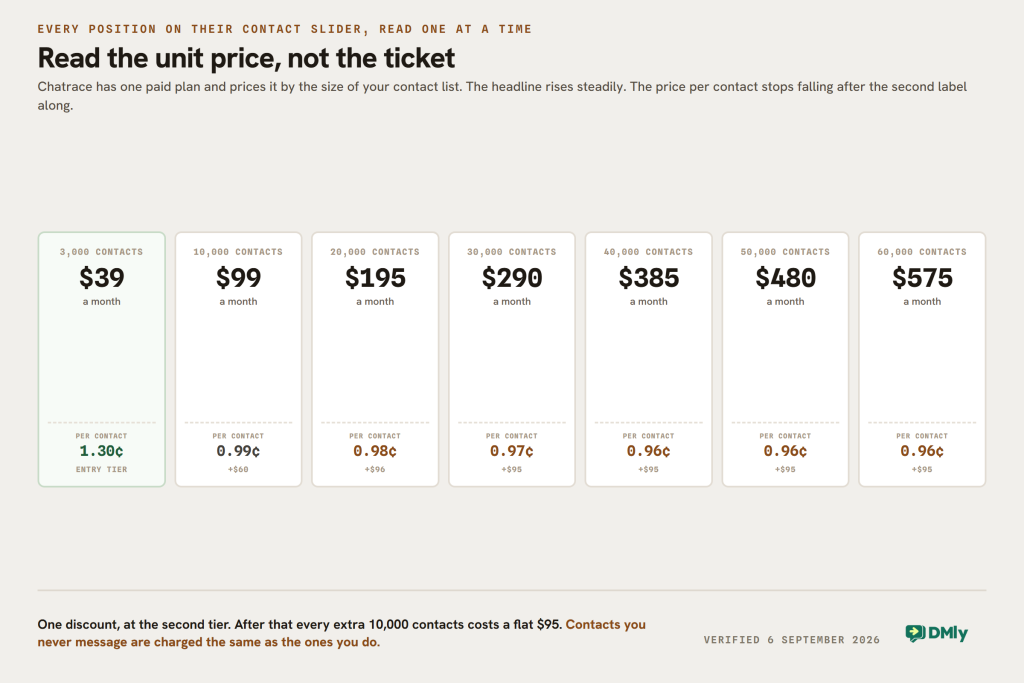
Chatrace sells one paid plan, called Pro, and prices it by the number of contacts. Their page says it plainly: “Pro accounts are billed based on your number of contacts.” The slider on the page runs through eight positions, and this is what each one costs.
| Contacts | Price a month | Per contact, our arithmetic | Step up from the tier below |
|---|---|---|---|
| 3,000 | $39 | 1.30 cents | Entry |
| 10,000 | $99 | 0.99 cents | +$60 |
| 20,000 | $195 | 0.98 cents | +$96 |
| 30,000 | $290 | 0.97 cents | +$95 |
| 40,000 | $385 | 0.96 cents | +$95 |
| 50,000 | $480 | 0.96 cents | +$95 |
| 60,000 | $575 | 0.96 cents | +$95 |
| Above 60,000 | Not published | The slider ends here |
Three things sit alongside the ladder and none of them was on this page.
- Five team members are included, and extras are $10 a month each. That is a generous seat count at this price: five people at $39 works out at $7.80 a seat, which is the cheapest per-seat figure of any platform in this batch of reviews.
- The price is per account, and an account is a chatbot. Their words: “Price is per account (chatbot). You can create unlimited accounts. 1 account can have many channels.” So the contact allowance is counted per bot, and running two separate brands means two subscriptions rather than one bigger one.
- Seven days free with no card, and a 30-day money-back guarantee. Their FAQ: “If you are unhappy with our service, we offer a 30-day money-back guarantee on any plan.” Billing is anchored to the day you upgrade, so upgrading on the 2nd means being billed on the 2nd every month thereafter.
There Is Exactly One Volume Discount in That Ladder
Run the arithmetic across the tiers and something useful falls out. The only real discount is the first step.
Going from 3,000 contacts to 10,000 takes the rate from 1.30 cents a contact down to 0.99. After that it barely moves: 0.98, 0.97, 0.96, 0.96, 0.96. Every additional 10,000 contacts above the first tier costs $95, flat, all the way to 60,000.
So Chatrace is not a platform that gets cheaper as you grow. It is a platform that gets cheaper once, at the second tier, and then charges a linear rate. If you are at 8,000 contacts, moving to 10,000 costs you nothing extra until you cross the line, and then it costs $60. If you are at 55,000, the next 5,000 contacts cost the same as the 5,000 before them.
That is worth knowing against platforms that meter messages rather than contacts. Chatrace charges for people on your list whether you message them or not, and a list that grows faster than your sending does will still move you up the ladder.
The Free Plan Exists, and It Is Not For Running a Business
This page described a free plan at $0 a month with up to 100 contacts. There is no such plan on their pricing page. The page carries one paid plan, one whitelabel tier and a seven-day trial, and nothing else.
A free plan does exist, and it is buried in the FAQ answer about what they offer agencies, where it is described in full: “Pro Plan for Free: Free plan for demo bots with access to all features. Just include the phrase Demo bot on any Facebook page and our system will automatically set a free plan.”
That is a demo tool for agencies pitching clients, not a free tier for a business. It gets you every feature at no cost, on a bot that announces itself as a demonstration, activated by a phrase on a Facebook page. It is a genuinely clever piece of product design and it is not what our page told readers it was.
The honest correction is that the cheapest way to run a real Chatrace bot is $39 a month, with seven days free first and a month to change your mind.
What Their Agency Terms Actually Say
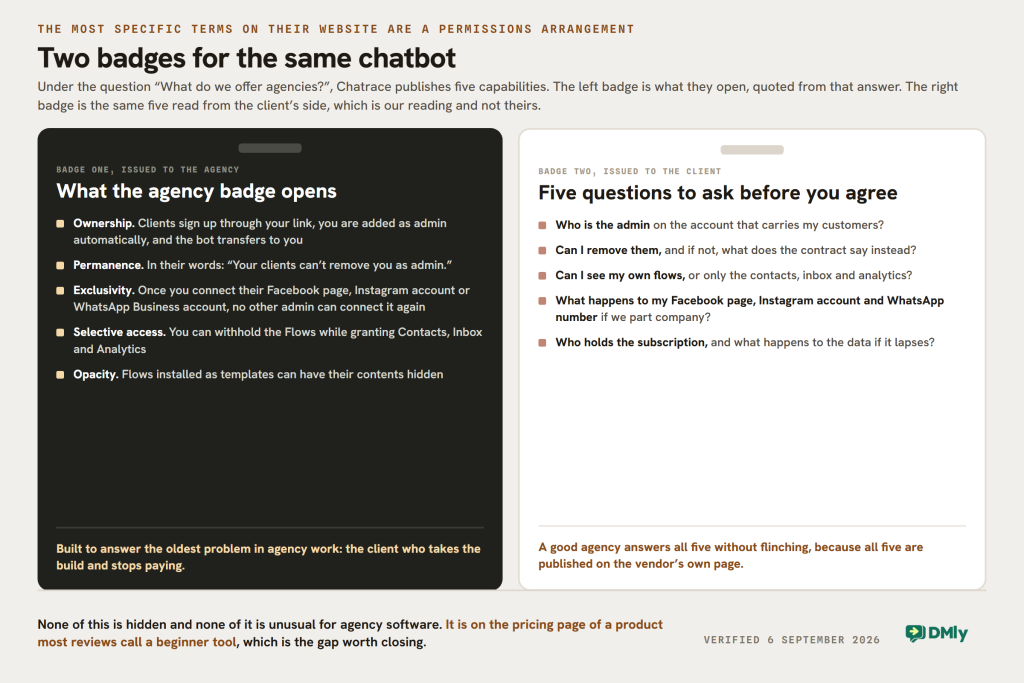
Under the question “What do we offer agencies?”, Chatrace publishes five capabilities. They are the most specific commitments anywhere on the site, they are all about control rather than messaging, and none of them was in this review.
| What they call it | What it does, in their words |
|---|---|
| Gain bot ownership | Agencies send clients a link to create their accounts. “After your clients create the account, you will be automatically added as an admin of the bot, and the bot ownership will be transferred to you. Your clients can’t remove you as admin.“ |
| Bot Protection | Once you connect a client’s Facebook page, Instagram account or WhatsApp Business account, “no other admin of the same resource can connect it again”, which prevents anyone else becoming an admin of that bot |
| Admins Roles | “You have the option to don’t give your client permission to access the Flows while giving him permission to access other resources like Contacts, Inbox, Analytics” |
| Flow Protection | Install your flows in a client account as a template and control the visibility of what is inside them |
| Pro Plan for Free | Free access to every feature on demo bots, triggered by the phrase “Demo bot” on a Facebook page |
Read as an agency, that list is excellent. The commercial problem with building a client’s chatbot is that the client can take it and stop paying you, and Chatrace has answered that problem four different ways. Nothing else in this comparison has thought about it as carefully.
Read as the client, the same list is a set of questions to ask before signing anything. Who is the admin on my bot. Can I remove them. Can I see my own flows. If we part company, what happens to the Facebook page, the Instagram account and the WhatsApp Business account that are connected through their agency’s Chatrace.
None of that is hidden and none of it is unusual for agency software. It is published on the pricing page of a product most reviews describe as a beginner tool for small businesses, which is the gap this page is closing. If an agency is proposing to build you a WhatsApp bot on Chatrace, ask which of these five is switched on for your account.
The Whitelabel Tier, Which Is the Real Product
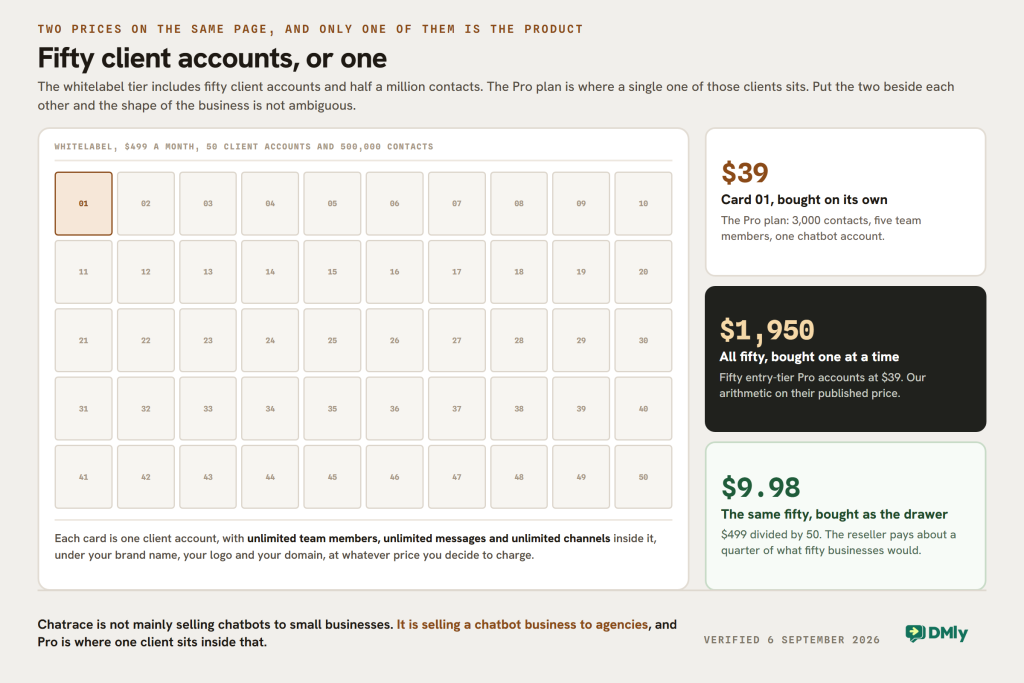
Above Pro sits a second published price this page never mentioned. $499 a month buys a whitelabel platform: your own brand name, logo and domain, the right to charge your customers whatever you like, priority support, 50 client accounts and 500,000 contacts, with unlimited team members, messages and channels inside each client account.
Put that beside the Pro ladder and the shape of the business is obvious. Fifty client accounts at $499 is $9.98 an account. The same fifty clients buying Pro individually at the entry tier would be $1,950 a month. Chatrace is not really selling chatbots to small businesses. It is selling a chatbot business to agencies, and the Pro plan is where a single client sits.
Two supporting facts for anyone weighing that. Chatrace is Chatrace LTD, registered at Kemp House, 128 City Road, London, and their FAQ says their server is located in the EU with a DPA available and that they are GDPR compliant. For an agency reselling into Europe, both of those are answers to questions clients ask.
Five Corrections to This Chatrace Review
| What this page said | What their page says on 6 September 2026 |
|---|---|
| Free plan at $0 a month, up to 100 contacts | No free plan on the pricing page. The only free plan is for demo bots, described in the agency FAQ |
| Pro starts at $14 a month, rising through $21 and $29 | Pro starts at $39 for 3,000 contacts and runs to $575 for 60,000 |
| “Limited to WhatsApp only (and a couple of platforms)” | Their own plan card lists an omnichannel inbox with human takeover and Facebook and Instagram comment automation, and says one account can have many channels |
| “Chatrace does not include a full CRM” | The Pro card lists “CRM & sales pipelines” as an included feature |
| “Not built for scaling” | They sell a $499 whitelabel tier with 50 client accounts and 500,000 contacts, and Pro allows unlimited accounts |
Three of those five ran against Chatrace unfairly, and they were the sort of claim that is easy to write and hard to defend. “Not built for scaling” was written about a company whose flagship product is a half-million-contact reseller platform. Whether the automation is deep enough for a given business is a real question, and it is not one this page had evidence for either way, so the adjectives have gone.
What survives is narrower and checkable. The Pro card names six things: AI-powered conversations, an omnichannel inbox with human takeover, CRM and sales pipelines, Facebook and Instagram comment automation, access to all integrations, and 24/7 support. It does not name bookings, invoices, payments or review collection, and there is no published number for messages, only for contacts.
Free Access to the API Is Not Free Messaging
One answer in their FAQ is accurate and easy to misread, and it is worth separating carefully because the same sentence appears on a dozen vendor sites. Asked whether you get the official WhatsApp Business API, Chatrace says yes, and adds: “since May 19th, 2022, Meta (formerly Facebook) has made access to the Official WhatsApp Business API free for all businesses around the world.”
That is true about access and says nothing about cost. What Meta removed in 2022 was the approval barrier: you no longer need a partner’s permission or a minimum size to get on the platform. The messages have always been charged, and they still are.
So a Chatrace bill has two halves, and their page only prices one of them. The subscription is $39 to $575 a month depending on your list. The messages are Meta’s, billed per message at a rate that differs in every market, and nothing on the Chatrace pricing page quotes those rates or says whether a markup is added. That is a question worth asking before signing, because the vendors in this category split roughly evenly between passing Meta’s rates through and adding a percentage.
It matters more this month than usual. From 1 October 2026 Meta begins charging for service messages, meaning the free-form replies your team types inside the 24-hour customer service window, and for utility messages sent in reply inside an open window. The first 1,000 service messages a month on each business phone number are free, and service messages carry no volume tiers, so the cost rises in a straight line with how much your team talks. On a platform priced by contacts rather than messages, that whole change lands outside the subscription.
Chatrace and DMly, Side by Side
We make DMly, so weigh this accordingly. The two products are close enough on the inbox to be compared honestly and different enough in the meter that the comparison usually settles itself.
| Question | Chatrace | DMly |
|---|---|---|
| Entry price | $39 a month for 3,000 contacts | $39 monthly, or $29 billed yearly, for 3,000 contacts |
| What the meter counts | Contacts only. No published message allowance | Contacts and broadcast or template messages, both published |
| Seats included | 5, then $10 each | 3, then $10 each |
| Growing the list | $99 at 10,000, then $95 per extra 10,000, flat to 60,000 | $65 at 10,000 contacts on Growth; extra contacts $15 per 1,000 |
| Multiple brands | Unlimited accounts, each billed separately | Profile sets at $15 a month add a number or profile on every channel |
| Channels | Omnichannel inbox, Facebook and Instagram comment automation | 7 plus SMS, including Telegram, TikTok and Google Business Profile |
| CRM | CRM and sales pipelines, included | CRM and pipelines, included |
| Bookings, invoices, payments, reviews | Not named on the plan card | In every plan |
| Agency and whitelabel | $499 a month, 50 client accounts, 500,000 contacts, plus five published agency control features | Whitelabel available, priced separately |
| Trial and refund | 7 days, no card, plus a 30-day money-back guarantee | 7 days, no card |
Two rows run in Chatrace’s favour and should be said plainly. Five seats against three at the same entry price, and a 30-day money-back guarantee we do not offer. A five-person team with a small list is genuinely cheaper on Chatrace.
The row that decides it for most readers is the second one. Chatrace publishes a contact allowance and no message allowance. Broadcast volume is the meter most businesses underestimate. That is fine if you know your sending volume and it is a real unknown if you do not, because a plan with no published message limit is a plan whose limits you find out later. Ask what happens at high volume before you commit a list to it.
Which One to Buy, by Situation
You are an agency building bots for clients
Chatrace, and it is not a close call. Bot ownership that transfers to you, clients who cannot remove you as admin, flow contents you can hide, role permissions that withhold the flows, connection locking on the client’s Facebook page, free demo bots, and a $499 whitelabel with fifty client accounts. Nothing else on this list has built for that job as deliberately.
An agency has proposed building your bot on Chatrace
Ask five questions before you agree, all of them answerable from their own page. Who is the admin. Can I remove them. Can I see and edit my own flows. Who owns the account if we part company. And what happens to my Facebook page, Instagram account and WhatsApp Business account, which their Bot Protection feature locks to whoever connects them first. A good agency will answer all five without flinching.
You are a five-person team with a small list
This is where Chatrace is genuinely competitive. Five seats and 3,000 contacts for $39 is $7.80 a seat, the cheapest per-seat figure in this batch, with a month to change your mind. The thing to check first is what you plan to send, because the plan is priced on who is on your list rather than on how often you write to them.
Your list is growing faster than your sending
Do the ladder arithmetic before you commit. Contacts you never message still cost money here, and above 10,000 the rate stops improving: every extra 10,000 is another $95 whether you send to them or not. A platform metering messages rather than contacts may suit a large dormant list better.
You run two brands from one business
Count the accounts, not the contacts. Chatrace prices per chatbot account, so two brands is two subscriptions, and the contact allowance does not pool between them. Two entry accounts is $78 a month rather than one $39 account with 6,000 contacts.
You also take bookings or get paid in the conversation
Neither the Pro card nor the whitelabel card names bookings, invoices, payments or reviews. If the job is running a service business rather than answering one, that is the half of the work missing, and it is the half DMly carries in every plan alongside the inbox.
The Verdict
Chatrace is an agency platform that also sells to businesses, and this page had it the wrong way round. The clearest, most specific things they publish are five ways for an agency to keep control of a client’s bot and a $499 tier for reselling fifty of them. The Pro plan is where one client sits inside that model, which is why it costs $39 and includes five seats.
Three of the criticisms on this page were simply wrong. It is not WhatsApp only, it does include a CRM with sales pipelines, and a company whose flagship product handles half a million contacts across fifty client accounts is not one that cannot scale. The price was wrong too, by 179 per cent, and the free plan we described is a demo tool for agencies.
Buy Chatrace if you are an agency, or if you are a small team of about five people with a list under 3,000 who want the cheapest seats in this category and a refund window. Read the five agency terms first either way, because they are the most consequential sentences on their website and almost nobody quotes them.
If your list grows faster than your sending, or bookings and payments belong in the same subscription as the messages, DMly’s plans start at $29 a month billed yearly with a published message allowance as well as a contact one.
Chatrace Review FAQs
How much does Chatrace cost in 2026?
One paid plan, called Pro, priced by contacts: $39 a month for 3,000, $99 for 10,000, $195 for 20,000, $290 for 30,000, $385 for 40,000, $480 for 50,000 and $575 for 60,000. Above that the slider stops and the price is not published. Five team members are included and extras are $10 a month. The price is per chatbot account and you can create unlimited accounts. There is a separate whitelabel tier at $499 a month.
Does Chatrace have a free plan?
Not one you can run a business on. Their pricing page has no free tier, only a seven-day trial with no card and a 30-day money-back guarantee. A free plan does exist, described in their agency FAQ: “Free plan for demo bots with access to all features. Just include the phrase Demo bot on any Facebook page and our system will automatically set a free plan.” That is a demonstration tool for agencies pitching clients.
Is Chatrace WhatsApp only?
No, and earlier versions of this page said so incorrectly. Their Pro plan card lists an omnichannel inbox with human takeover and Facebook and Instagram comment automation, and their pricing page states that one account can have many channels. They also confirm access to the official WhatsApp Business API, noting correctly that Meta opened that access to all businesses in May 2022.
What do Chatrace’s agency features actually do?
Five things, published under “What do we offer agencies?”. Bot ownership transfers to the agency when a client signs up through their link, and in their words “your clients can’t remove you as admin”. Bot Protection stops any other admin of the same Facebook page, Instagram account or WhatsApp Business account connecting it again. Admin Roles let an agency withhold access to the flows while granting contacts, inbox and analytics. Flow Protection hides the contents of installed templates. And demo bots run free.
What is the best Chatrace alternative?
It depends which Chatrace you were buying. If it was the agency platform, the honest answer is that few competitors have built the same controls, so compare on those rather than on features. If it was the $39 inbox for a small team, DMly starts at $29 a month billed yearly with a published message allowance alongside the contact one, plus bookings, invoices and payments in the same subscription, though it includes three seats rather than five.
Is this Chatrace review based on hands-on testing?
No, and we would rather say so. Every price, limit and quotation here was read from Chatrace’s own pricing page on 6 September 2026, including each position on their contact slider and the FAQ answers that only open when you click them. We have not run the platform on a paid plan, which is why the earlier version’s judgements about depth and scalability have been removed rather than rewritten. If something here has changed, tell us.
Writing about WhatsApp automation, bookings and growth for local business.
Turn WhatsApp into your busiest channel.
Start free and run message, bookings, payments and reviews in one place.
