
The appointment card on the fridge says “See you in six months”. It is the most familiar number in dentistry, and for many patients it is not the right one. In the UK, NICE’s guidance on dental check-ups says the interval between oral health reviews “should be determined specifically for each patient”, anywhere from three months to two years for adults. The six on the fridge card is a default, not a rule, and a system of dental appointment reminders built around a single default is reminding some patients too often and others too late.
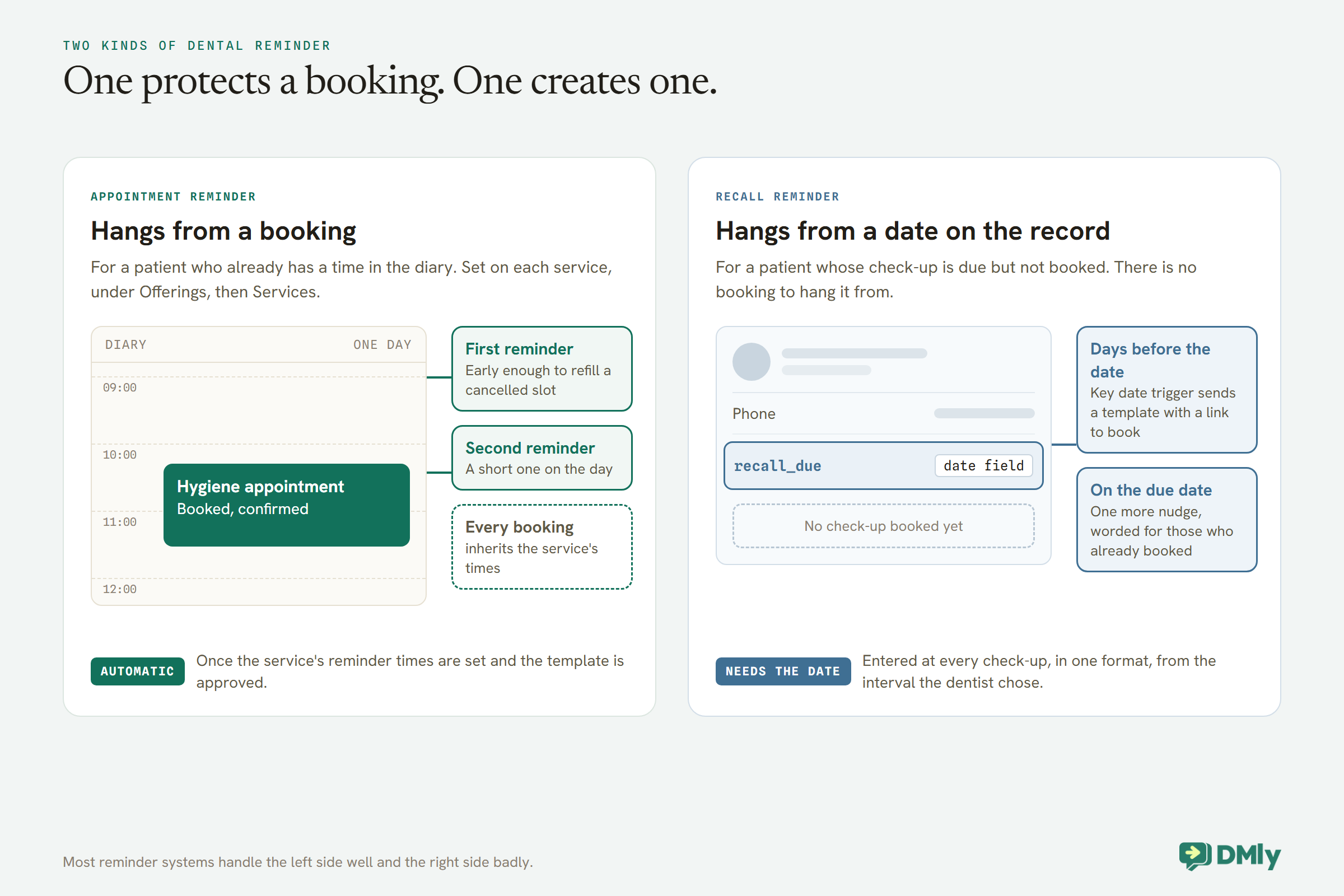
That is the first thing to get right about dental appointment reminders: a practice sends two different kinds. One reminds a patient about an appointment already in the diary. The other reminds a patient that their check-up is due, on the interval their dentist chose for them, so they book it. Most reminder systems handle the first well and the second badly.
This guide automates both on WhatsApp in DMly: reminders for booked appointments, set per treatment type; recall reminders that follow each patient’s own interval; how to handle children booked by a parent; and wording that reveals nothing to whoever glances at the phone. It builds on our guides to WhatsApp automation for clinics and automatic WhatsApp appointment reminders. Recall intervals are a clinical decision for your dentists; nothing here is clinical advice.
Two Kinds of Dental Reminder
An appointment reminder protects a booking. A recall reminder creates one.
- Appointment reminders go to patients who already have a time in the diary: the hygiene appointment next Tuesday, the filling on Thursday. Their job is to stop the appointment being forgotten, and to free the slot early if the patient cannot come.
- Recall reminders go to patients who are due a check-up but have not booked one. Their job is to bring the patient back on the interval their dentist recommended, before it drifts.
They are built differently in DMly. Appointment reminders belong to each service and fire from the booking. Recall reminders have no booking to hang from, so they come from a date on the patient’s record.
Part 1: Dental Appointment Reminders for Booked Visits
Set reminders on each treatment type, time them by how hard the slot is to refill, and word them for a lock screen.
Set them per service
In DMly, reminder times belong to each service, under Offerings, then Services, alongside its duration and price. Every booking of that service inherits them, whether it was made by the patient, by your team or through a WhatsApp bot. That lets a practice time reminders by what an empty chair costs:
| Appointment type | First reminder | Second reminder | Why |
| Check-up | 48 hours | 2 hours | Short, but worth refilling from a cancellation list |
| Hygiene appointment | 48 hours | 2 hours | A hygienist’s slot is hard to refill same-day |
| Longer treatment | 72 hours | 24 hours | An empty hour or more of dentist time |
| Consultation | 24 hours | None | Short and often booked close in |
These timings are an illustration; set yours by how quickly your practice can fill a cancelled slot. The first reminder is the one that earns its keep, because a cancellation that arrives two days ahead can be offered to someone else.
Watch the early-morning appointments
Reminder times are relative to each appointment: a day before, two hours before, and so on. That is exactly right for a 2pm hygiene appointment and awkward for an 8:00 check-up, whose two-hour reminder arrives at 6:00. If your practice opens early, consider whether a short second reminder is worth it for the first appointments of the day, or rely on the day-before reminder for those. DMly’s docs describe reminder times per service rather than quiet hours, so the timing is yours to design.
Make sure they arrive
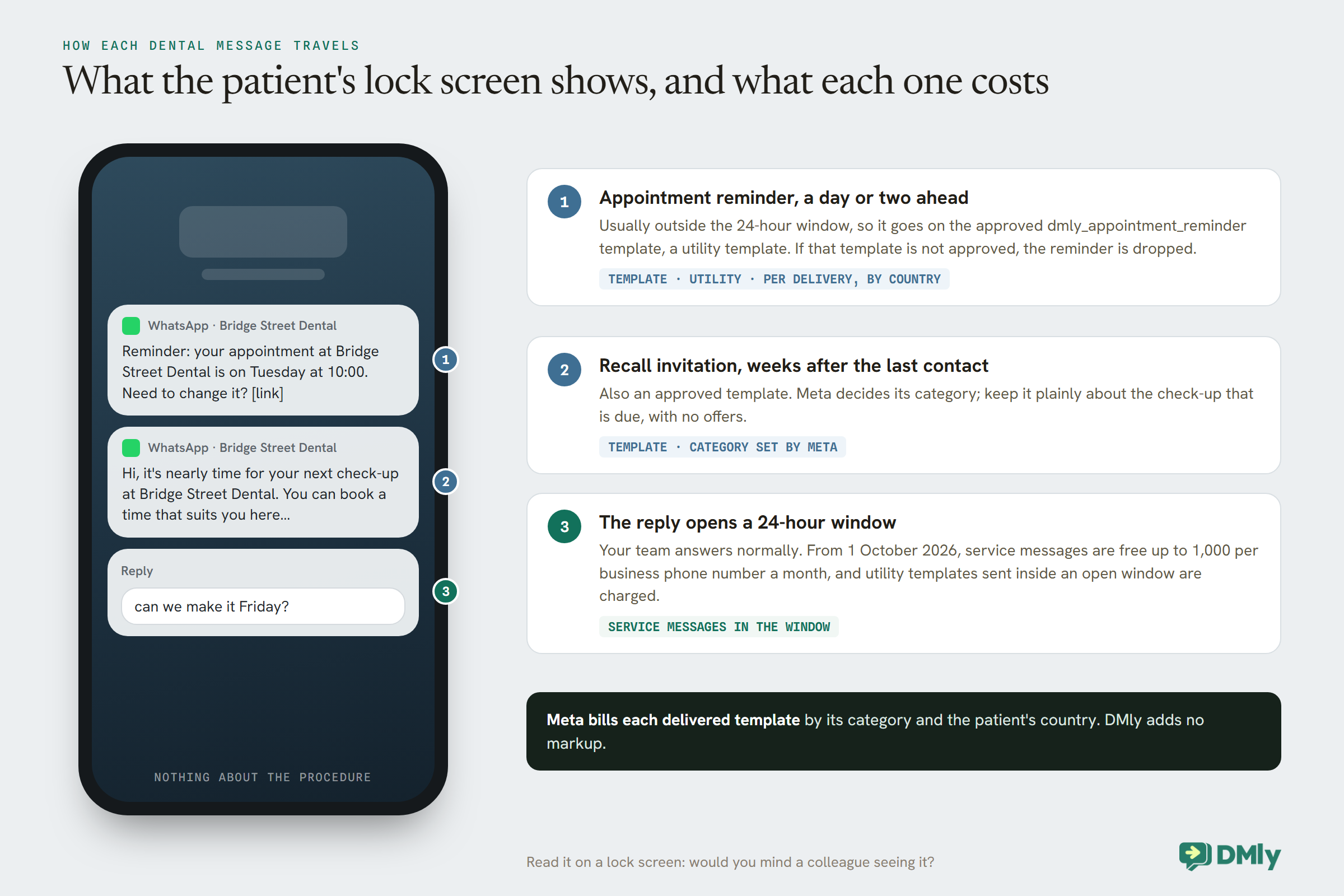
A reminder two days ahead usually lands outside WhatsApp’s 24-hour window, where only an approved template can be sent. DMly sends reminders on its dmly_appointment_reminder template, and if that template is not approved, the reminder is dropped rather than sent as plain text. Check it shows as approved under Messaging, then Templates, then System before relying on reminders.
A reminder is also skipped, not retried, if the booking is no longer confirmed, if the patient has opted out, or if the bot is paused for that patient. The last one catches practices out: when a receptionist takes over a conversation, the bot pauses for that patient, and their reminders stop until it is switched back on.
Put practical instructions in the confirmation, not the reminder
Each service has its own Confirmation message and Reminder message, which you can write to suit it. But the two reach patients differently. DMly sends booking messages as plain text when the patient’s 24-hour window is open, and on an approved template when it is closed. A confirmation for a booking the patient just made, especially one made in a WhatsApp conversation, usually goes out while the window is open, so the service’s own wording arrives. A reminder two days later usually does not, so the patient reads the reminder template’s approved wording instead.
So put anything specific to the visit into the confirmation: arrive ten minutes early, the new-patient form to complete, where to park, which entrance to use. Keep the reminder short and generic. Keep both administrative; anything clinical belongs in a conversation with your team, not in an automated message.
Courses of treatment: book the visits together
Some treatment runs over several visits. When the dates are known, your team can book them together from the Calendar: + Add another time adds further dates and times to the same booking, for the same patient, practitioner and service, up to 20 at once. Each is a real booking behind the scenes, with its own reminders, but the patient receives one confirmation listing the dates rather than a message per visit. It is a staff action; patients booking online still book one visit at a time. For visits of different types, book each type separately.
Word them for a lock screen
A reminder appears on the patient’s lock screen, where anyone nearby can read it. “Reminder: your appointment at Bridge Street Dental is on Tuesday at 10:00. Need to change it? [link]” is safe for every patient. A reminder that names a procedure is not. Keep reminder wording, and your service names, to the kind of visit, the day, the time and the practice. Include the reschedule link, {{appointment.reschedule_url}}, which opens the patient’s own booking page, because a patient who can move an appointment in two taps is less likely to miss it.
Part 2: Recall Reminders on Each Patient’s Own Interval
A recall system needs to know when each patient is due. That date comes from the dentist, not from a default.
NICE’s guideline, which applies in the UK, sets out how recall intervals should work. The dentist chooses the interval for each patient based on their oral health and risk, discusses it with them and records it. The shortest interval is three months; the longest is 12 months for patients under 18 and 24 months for adults. For practical reasons, it recommends intervals of 3, 6, 9 or 12 months for under-18s, and 3 to 24 months in three-month steps for adults, reviewed at each check-up. Outside the UK, follow your own professional guidance; the mechanism below works for any interval.
The practical consequence for automation is simple: a recall reminder must follow the date the dentist set, not a practice-wide six months.
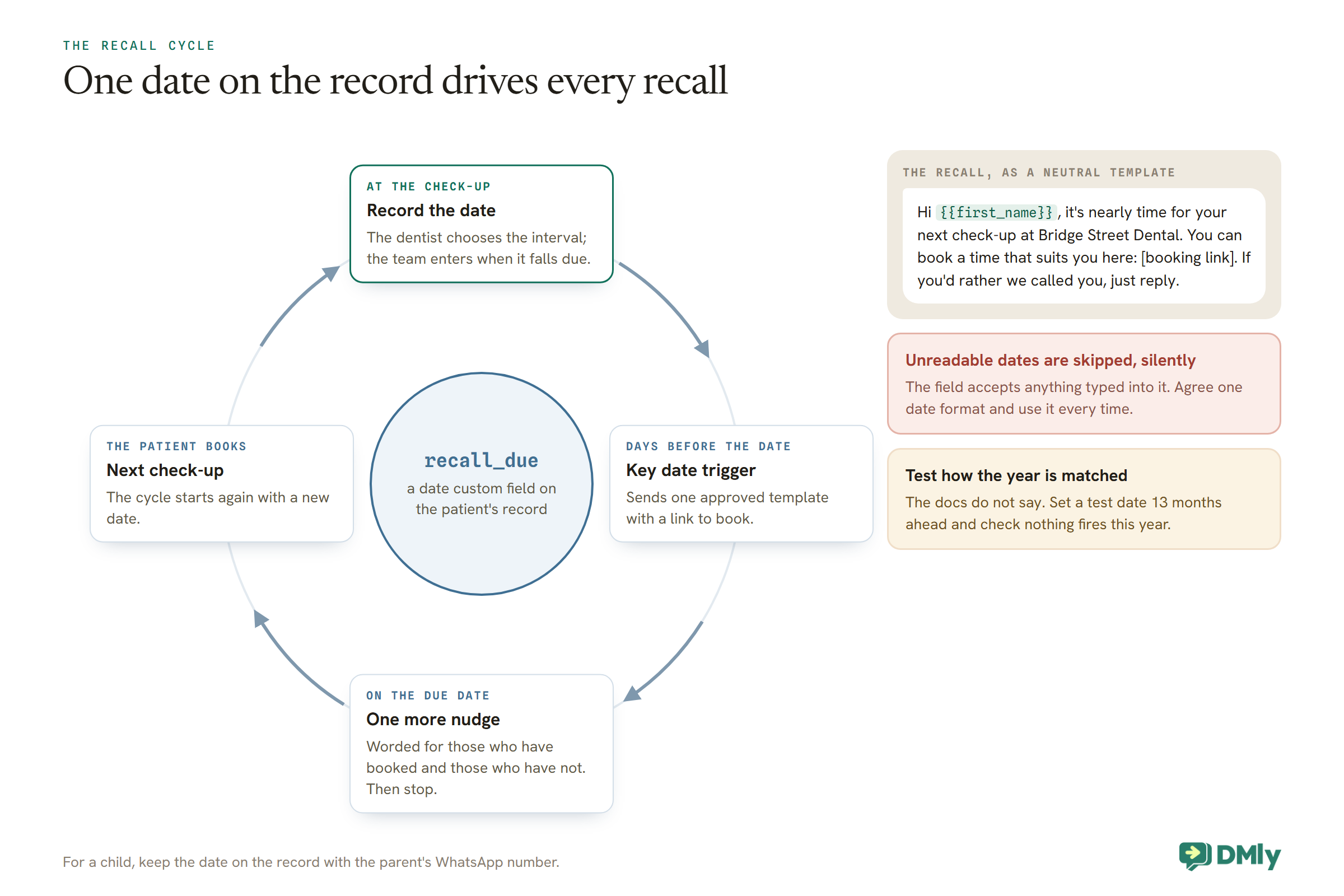
Step 1: Store the recall date on the patient’s record
Create a date custom field under Settings, then Custom fields, called something like recall_due. At the end of each check-up, when the dentist has chosen the next interval, the team enters the date it falls due on the patient’s record. DMly’s docs note that a date field will accept anything typed into it, but the trigger that reads it later skips any value it cannot read as a date, silently. Agree one date format and use it every time.
Step 2: Trigger the recall from the date
DMly’s Birthday / key date trigger can fire on a date custom field, not only on a birthday, and can fire a set number of days before the date. Build a flow on your WhatsApp channel with that trigger pointed at recall_due, set to fire, say, 21 days before. The flow sends one message: a neutral note that the patient’s check-up is due, with a link to book.
Hi {{first_name}}, it’s nearly time for your next check-up at Bridge Street Dental. You can book a time that suits you here: [booking link]. If you’d rather we called you, just reply.
Because the recall fires weeks after the patient last messaged you, it goes as an approved template. Meta decides each template’s category; keep the wording plainly about the check-up that is due, with no offers, and submit it for approval before you switch the flow on. The trigger only reaches patients who have the date filled in, which is another reason the end-of-check-up habit matters.
Check how the trigger treats the year before you rely on it. DMly’s docs describe the Birthday / key date trigger firing on the day of a date field, or a set number of days before it, and give anniversary as an example of such a field. They do not say whether the year is part of the match. If the trigger behaves like a birthday and repeats every year on the same day and month, a date more than about a year away could fire a year early. Test it before going live: set a test contact’s date 13 months ahead and check nothing fires this year. Until you have confirmed the behaviour, only enter dates that fall within the next 12 months, keeping later ones in a note, and clear or update each date once the recall has done its job.
Step 3: A second nudge, worded for both cases
Some patients will not book from the first message. A second flow on the same date field, set to fire on the due date itself, can send one more nudge. DMly’s docs do not describe a flow condition that checks whether a patient already has an appointment booked, so word the second message so it reads well either way: “If you’ve already booked your check-up, thank you. If not, here’s the link.” After that, stop, and let the team follow up personally with anyone who matters clinically.
Children and Families
Children usually do not have their own number. Their reminders need to reach whoever brings them.
DMly sends reminders on the channel of the contact the booking is for, and its docs note that a phone number is what lets confirmations and reminders reach someone on WhatsApp. A child’s record with no phone number cannot receive a WhatsApp reminder at all. Practices handle this in two ways. Some make the booking against the parent’s record, noting which child it is for. Others keep a separate record for the child and link it to the parent with DMly’s Linked contacts, which offers Parent, Child and Guardian relationships, then make sure bookings and recall dates sit where a phone number can receive them. Decide which your practice uses and apply it consistently, or a child’s recall can silently go nowhere.
For recalls, the same logic applies to the recall_due field: put it on the record that has the parent’s WhatsApp number, or the key date trigger will fire for a contact who cannot receive the message. Remember too that NICE’s longest interval for under-18s is 12 months, not 24.
Practices With More Than One Branch or Number
A dental group needs to know which number its reminders come from, and that the template is approved on each.
DMly sends WhatsApp notifications from a Default WhatsApp number, set in Workspace Settings, then Settings, then Notification settings. A patient who already messages you on one of your numbers keeps that number; the default is used when there is no WhatsApp conversation yet. For a group with a number per branch, that means a new patient who booked online may hear from the default number rather than their own branch’s. Say which branch the appointment is at in the confirmation, so the reminder from a different number does not confuse anyone.
Templates are approved per WhatsApp Business Account, and DMly only lists templates approved on the selected number’s account. If a branch’s number sits on its own account, check the reminder template is approved there too, or reminders from that number will not go out once the window has closed.
Patients Who Are Not on WhatsApp
Not every patient uses WhatsApp. Decide how they are reminded before one of them misses an appointment.
DMly sends reminders on the channel the booking is attached to, so a patient with no WhatsApp identity does not receive a WhatsApp reminder. DMly also supports SMS through a connected SMS provider, and our guide to automatic WhatsApp appointment reminders covers what happens when a patient cannot be reached on WhatsApp. For older patients or anyone who prefers a phone call, a short daily list of tomorrow’s patients who are not on WhatsApp, rung by reception, is still a perfectly good reminder system.
When Patients Reply
A reply to a reminder is a conversation, and a chance to fill the slot.
When a patient replies, WhatsApp opens a 24-hour window in which your team, or your booking flow, can talk to them normally. A patient who writes “can we make it Friday?” has handed you a slot to resell; answer it the same day. Reminders never notify your team, so a reply is often the first sign one went out, and replies need an owner at the times reminders land.
Keep replies administrative. If a patient replies with something clinical, “my tooth has been aching since the last visit”, that goes to a clinician, not to a script. WhatsApp’s Business Messaging Policy warns against using WhatsApp to send or request health information where your regulations prohibit it on systems without heightened protections, and your own rules decide what is appropriate; when in doubt, invite the patient to call.
Patients can also move their own appointments with the reschedule link, within the deadlines you set under Appointments, then Settings, in Booking policy. Both deadlines start at 0, so set them to match the cancellation policy you tell patients.
When a Reminder Frees a Slot
A cancellation two days ahead is only good news if someone fills the gap.
The point of an early first reminder is to surface cancellations while the slot can still be used. When one arrives, the quickest refill is usually a short, personal message to patients who wanted an earlier appointment. Keep a simple list for this: a tag such as wants-earlier, added by your team when a patient says they would take a cancellation, and a segment built on it. For a handful of patients, a message from the inbox is enough, if each has messaged you within the last 24 hours; for anyone quieter, it has to be a template. First to reply gets the slot.
Two cautions. Keep the list small and current, because a message about a slot that went an hour ago is just noise. And remove the tag once a patient has their earlier appointment, so they do not keep receiving offers they no longer need.
Should Patients Reply to Confirm?
Only if someone reads the replies. A “reply YES to confirm” that nobody checks teaches patients that replying does nothing.
Many practices are used to reminders that ask patients to confirm. In DMly, an appointment the patient booked is already confirmed (on a pay-before service, once the payment or deposit clears); a reply of “yes” does not change anything in the diary unless your team acts on it. So there are two honest options. Ask for no reply, and make cancelling or moving easy with the reschedule link. Or ask for a reply only if the patient cannot make it: “Can’t make it? Reply or use this link to change it.” That way every reply means something, and each one is a slot you can refill.
Is It Working?
Measure no-shows by appointment type, before and after, with every appointment marked.
DMly’s Appointment report, under Configurations, then Reports, then Appointments, shows a No-show rate, broken down by service and by practitioner, for any date range. Compare the same appointment types for the months before and after you change your reminders. One condition makes the number honest: every appointment must be marked Completed or No-show within about a day, because DMly closes past bookings itself after that and counts unmarked ones as completed. For recalls, the measure is simpler: of the patients whose recall fired this month, how many booked a check-up?
What Reminders Cost
Most dental reminders and recalls are template messages, which Meta charges per delivered message.
Meta bills each delivered template at a rate that depends on its category and the patient’s country, and DMly adds no markup. A reminder two days ahead is a utility template; a recall’s category is Meta’s decision. From 1 October 2026, two changes matter: service messages sent inside an open window become chargeable after a free allowance of 1,000 per business phone number each month, and utility templates sent inside an open window become chargeable too. Our guide to the October WhatsApp pricing change covers both, and the rate card by country shows what each message costs where your patients live.
The Habits That Make It Work
Automation sends the messages. Three front-desk habits decide whether they are right.
- Record the recall date at every check-up. In the agreed format, on the record with the right phone number.
- Mark appointments completed or no-show at the end of each day. On the default setting, DMly closes past bookings about a day later as completed, which fires Appointment completed, so an unmarked no-show counts as a visit in your reports and can be sent a thank-you.
- Switch the bot back on after every handled conversation. A paused bot skips that patient’s reminders.
Test Both Kinds Before Patients See Them
- Book a test appointment for yourself two days ahead from a phone that has not messaged the practice, and check the reminder arrives on the template.
- Read it on a lock screen. Would you mind a colleague seeing it?
- Set a test record’s
recall_dueto 22 days from today, and check the recall message arrives tomorrow. - Enter a date in the wrong format on another test record, and confirm nothing fires, so the team sees why the format matters.
- Cancel a test booking and check the reminder does not follow.
Mistakes to Avoid
- One recall interval for everyone. The dentist sets it per patient.
- Reminders that name a procedure. Keep to the visit, the time and the practice.
- Dates typed in different formats. The key date trigger skips what it cannot read, silently.
- Children’s records with no phone number. Their reminders go nowhere.
- An unapproved reminder template. Reminders outside the window are dropped.
- Answering clinical replies with a script. Pass them to a clinician.
- More than two recall messages. After that, a person should call if it matters.
Frequently Asked Questions
How far in advance should a dental practice send reminders?
Set the first reminder where a cancellation can still be refilled, often 48 to 72 hours for longer appointments, and a short second reminder on the day. Set them per appointment type in DMly.
Should every patient be recalled every six months?
Not according to NICE’s UK guidance, which says the interval should be set for each patient, from three to 24 months for adults and up to 12 months for under-18s. The recall reminder should follow the interval the dentist chose.
How do I automate recall reminders?
Store each patient’s recall due date in a date custom field, and use DMly’s Birthday / key date trigger to send a template a set number of days before it. Update the date at every check-up.
What if the dentist changes a patient’s recall interval?
Update the patient’s recall due date to match. The key date trigger works from whatever date is on the record, so the next recall follows the new interval without any change to the automation.
Can reminders go to a parent for a child’s appointment?
They go to the contact the booking is for, so the booking, or the recall date, needs to sit on a record with a WhatsApp number, usually the parent’s. Linked contacts can connect the child’s record to the parent.
What should a dental reminder say?
The practice, the day, the time and a link to change it. Nothing about the procedure, because reminders appear on lock screens.
Do WhatsApp reminders cost money?
Reminders and recalls sent outside the 24-hour window are template messages, charged by Meta per delivered message by category and country. DMly adds no markup.
The Number on the Fridge
“See you in six months” is a kind habit, and for some patients it is exactly right. For others it is too often or not often enough. Automating dental appointment reminders properly means honouring the interval each dentist chose: reminders that protect every booking, and recalls that follow each patient’s own date rather than a practice-wide default.
Set reminders on each appointment type, create the recall date field, agree the date format, and make recording it part of every check-up. After that, the reminders take care of themselves, and the diary fills from patients who were simply due.
Writing about WhatsApp automation, bookings and growth for local business.
Turn WhatsApp into your busiest channel.
Start free and run message, bookings, payments and reviews in one place.
