
The message arrives as a member is packing their bag: “That’s 10 classes. Your next drop-in is on us, just show this code at the desk.” Rewind five weeks and it is their second Tuesday spin, the one they nearly skipped. Rewind further and it is the evening they checked their points by sending one word to the studio’s WhatsApp and saw they were halfway. Before that, a coach ticking their name on the roster, class after class. The reward is the last thing that happened. Everything that made it worth having happened before it, one attended class at a time.
A good gym loyalty program is built backwards like that. Start from the behaviour you want, which for a gym is attendance, not spending, then choose a reward that feeds more of the same, and make sure members can see their progress along the way. Get that right and the program pays for itself in the thing that keeps members: habit.
This guide builds one in DMly: what to reward, the settings that make attendance earn points, the check-in routine that everything depends on, choosing a reward, the arithmetic of how long a member waits for it, telling members where they stand, milestones, birthdays and referrals, and how to tell whether it works. For the general principles, see our guide to building a loyalty program for a small business.
Step 1: Decide What Your Gym Loyalty Program Rewards
Reward the behaviour that keeps members. At a gym, that is showing up.
DMly’s loyalty points can be earned in one of two ways, and you pick one, not both:
- Earn per amount spent scales points with the bill: a member who buys more earns more.
- Earn per activity gives a flat number of points for each qualifying activity, whatever it cost. This is the default.
For most gyms and studios, per activity is the better fit. A member on a monthly membership pays the same whether they come once or twelve times, so spend-based points barely move for your most committed members. Per activity rewards each class attended equally, which is exactly the habit you want to build.
Spend-based points still suit a studio that sells a lot besides memberships: drop-in classes, personal training packs, retail. If most of your revenue arrives through separate purchases rather than one monthly fee, compare both before choosing. Either way, pick once and keep it: changing the rules on members halfway through a reward rarely goes well.
Step 2: Make Attendance the Thing That Earns
DMly lets you choose which status earns points for each kind of activity. Check the defaults.
The loyalty program lives at Finance → Settings, on the Loyalty tab. Under Earning conditions you choose the status that earns points:
| Setting | Choices | Default | For a gym |
| Class status | Attended or Booked | Attended | Keep Attended |
| Appointment status | Completed or Confirmed | Completed | Keep Completed (personal training) |
| Order status | Paid or Confirmed | Paid | Keep Paid |
Keep classes on Attended. On Booked, a member earns for reserving a place they never use, and a program meant to reward turning up would reward the opposite. With Attended, a member who books and does not come earns nothing, provided the seat is marked a no-show: class sessions are closed off the same way as appointments, so on the default setting a seat nobody marks is counted as completed about a day later. Mark the roster, or switch Appointments nobody marked to Wait for review.
Two more earning rules to know. A paid invoice earns points when it is paid, which means other purchases, such as a personal training pack or a retail invoice, earn too. And since an auto-charged membership renewal sends its invoice and marks it paid, check on a test member whether your renewals are earning points as well, so the program behaves the way you describe it to members. An invoice for an appointment earns when the appointment is completed, not when it is paid, and buying a gift card earns nothing until the card is spent.
Then set Points needed to redeem: the balance a member has to reach before a reward is created. The next steps help you choose it.
Step 3: The Check-In Routine Everything Depends On
With attendance earning points, the roster is your loyalty program. If nobody marks it, nobody earns.
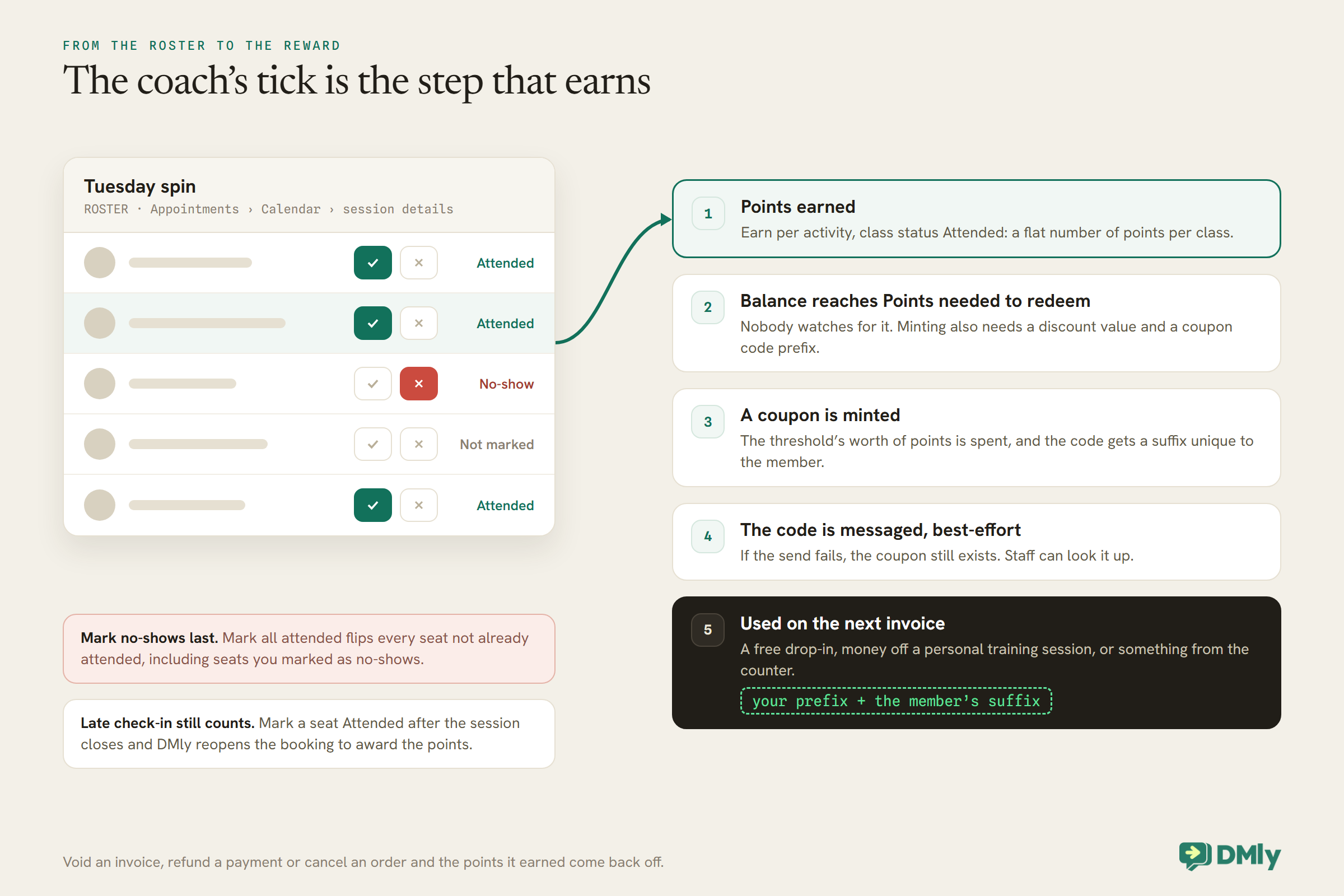
A class seat is only Attended when someone marks it. Open the session on Appointments → Calendar, and the Roster in its details panel shows every booked member with two buttons beside each: a checkmark for Attended and a cross for No-show. Marking a seat attended completes the booking behind it, which is what awards the points.
Three roster behaviours to build your routine around:
- Mark all attended catches no-shows too. Mark all attended applies Attended to every seat not already attended, including seats you marked as no-shows. Mark no-shows last, or you will hand points to people who did not come.
- Late check-in still counts. About a day after a session, DMly marks it completed and closes off its bookings, but you can still mark a seat Attended afterwards: DMly reopens the booking to apply it, so a late check-in still awards the points.
- Permissions matter. Checking people in needs the Edit team appointments permission, or being the staff member hosting the session.
For personal training and other 1:1 sessions, mark each session Completed or No-show yourself. Under the default setting, Count as completed, the automatic close about a day later counts an unmarked session as completed and awards the loyalty points, even to a member who never turned up. Set Appointments nobody marked (Appointments, Settings, Booking policy) to Wait for review so unmarked sessions wait at Needs review, award nothing, and trigger a daily reminder in the app for your team. Make both part of the coach’s end-of-class routine. It takes seconds, and it is the difference between a program that works and one members stop believing in.
Step 4: Choose a Reward That Brings Members Back
The best gym reward is one that is used in the gym. A free class beats a discount on the fee.
In DMly, every loyalty reward is a coupon. When a member’s balance crosses Points needed to redeem, DMly creates a coupon for them automatically, spends the threshold’s worth of points, and gives the code a suffix unique to that member, so it cannot be passed around. You never issue it by hand or watch for members reaching the threshold.
Loyalty is off until you switch it on, and minting a reward needs three settings on the Loyalty tab, not just the threshold: a redeem threshold above zero, a discount value above zero, and a coupon code prefix. Leave any one of them blank or at zero and members keep earning points while no reward is ever created, with nothing to tell you why. If members are earning but never receiving rewards, check all three.
A coupon takes money off an invoice or an order. That shapes what makes a good gym reward:
- A free drop-in class or a free guest pass. Set the reward as a fixed amount equal to your drop-in price, and it clears a drop-in invoice completely. It rewards attendance with more attendance, and a guest pass brings a friend through the door.
- Money off a personal training session. A good fit if you want members to try PT; the reward becomes a taster.
- Something from the counter. Water bottles, shakers, a drink. Cheap for you, visible to others.
Two coupon rules worth knowing. A coupon applies to the gross total, the subtotal plus tax, so a percentage coupon takes off more than you might expect. And a fixed-amount coupon never takes off more than the member owes; on a small bill it simply clears it.
A discount on the membership itself is the reward to avoid, for a practical reason as well as a strategic one. An auto-charged renewal sends its invoice and marks it paid in one go, which leaves no obvious moment for a coupon to be applied to it. And a cheaper month rewards the member for the thing they already do, paying, rather than the thing you want more of, coming in.
Step 5: Set the Threshold So the First Reward Arrives Soon
A reward that takes half a year to reach motivates nobody. Do the arithmetic before you launch.
With one point per attended class, the number of weeks to a first reward is simply the threshold divided by classes per week. At a threshold of 20:
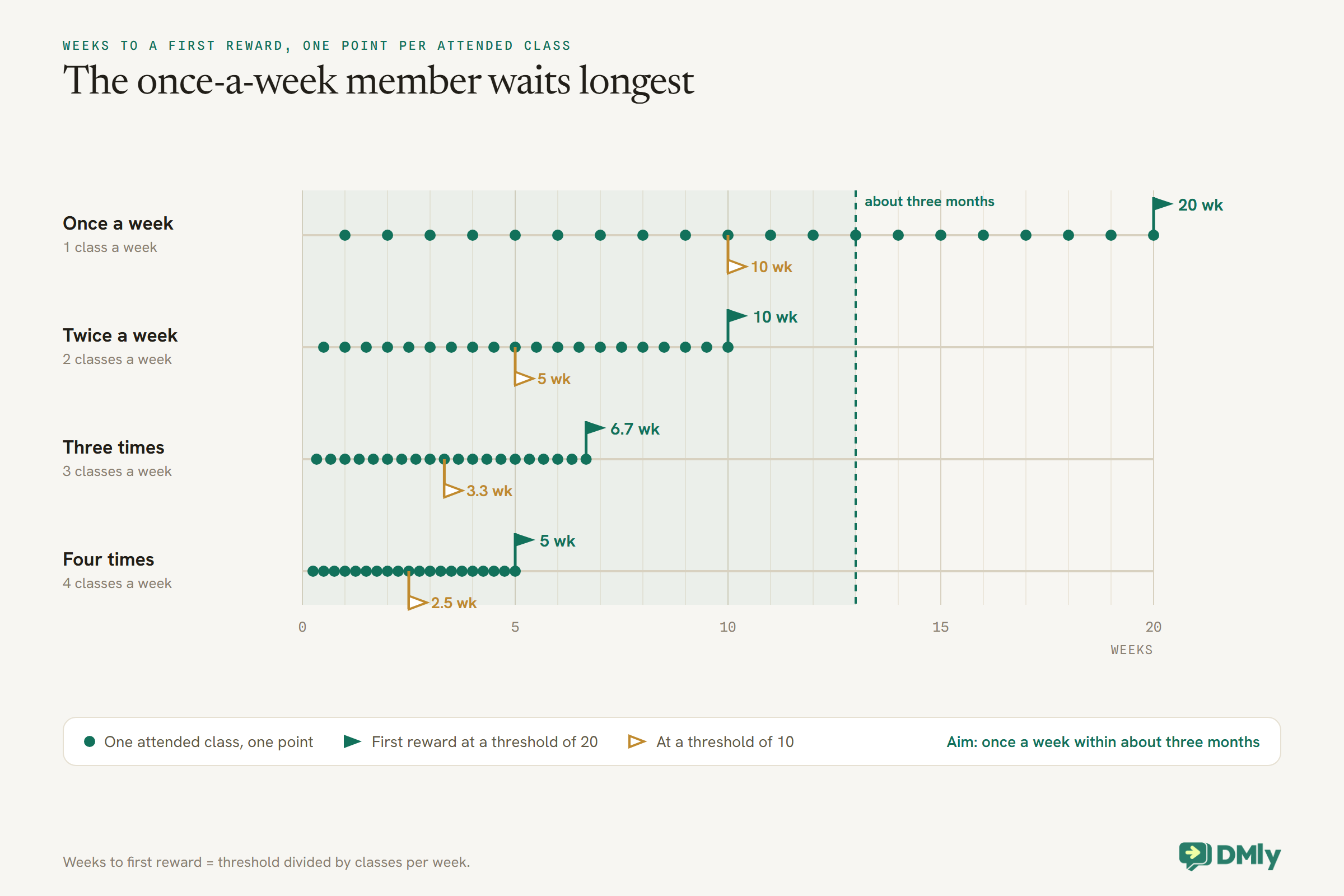
The member who comes once a week is the one a loyalty program most needs to reach, because they are closest to drifting away, and at a threshold of 20 they wait five months. A threshold of 10 brings that to ten weeks, and a twice-a-week member to five. Our suggestion: pick the threshold so a once-a-week member reaches the first reward within about three months, and make the reward modest enough that your four-times-a-week members earning one every few weeks is affordable.
To sanity-check the cost, divide the reward’s value by the number of classes it takes. A reward worth one drop-in class at a threshold of 10 classes gives back the value of one class in eleven, which you can compare with what a member pays per class on their membership.
Redeeming a Reward at the Desk
A reward only feels like a reward if using it is easy. Train the desk before launch.
A loyalty reward is an ordinary coupon, so it is used on an invoice. When a member shows their code for a free drop-in or money off a PT session:
- Create the invoice for the drop-in, session or item, as you normally would.
- Enter the code in Coupon code (optional). DMly checks it is still valid at that moment: inside its validity window, above any minimum, and within its limits. If it is not, the coupon is refused and the invoice is issued at full price, so check the total before you send it.
- Record the payment on the spot if anything is left to pay, rather than sending the invoice and chasing it.
If the reward exactly matches the drop-in price, the invoice comes to zero and the member simply books and turns up. A member whose code never arrived on WhatsApp still has a coupon, because delivery of the message is best-effort but the coupon exists either way; staff can find it for them. Tell the desk that one invoice takes one coupon: an automation’s Apply Coupon step does nothing on an invoice that already carries one, and it will not touch an invoice that is already paid.
When a Sale Is Undone
Refunds and voids take points back. Know how, so a member’s balance never surprises them.
Three things claw back loyalty points in DMly: voiding an invoice, refunding a payment on a paid invoice, and cancelling a confirmed order. It is deliberate: a sale that did not happen should not leave anyone closer to a free class. The claw-back also deactivates one still-unredeemed loyalty coupon for that member, so a reward minted from points you have just reversed stops working. A coupon the member has already used is left alone.
For a gym, the common case is a refunded membership month or PT pack. If you refund a member, tell them in the same message that points earned on that payment come off their balance, and check their balance on the client profile afterwards. If you decide to let them keep the points as goodwill, add them back with Adjust loyalty and a clear reason.
What About Tiers and VIP Levels?
DMly’s loyalty program is one rule and one threshold. Tiers are something you add around it.
DMly’s documentation describes a single earning method, a single set of earning conditions and a single redeem threshold. There are no built-in bronze, silver and gold levels, and because points are spent each time a reward is minted, a points balance is not a lifetime total you could hang a tier on.
If you want status levels, keep them simple and human. A tag such as founding-member or 100-club, added by hand when a member reaches a milestone, can drive a segment for a members-only event or an early booking window announcement. For spend-based programs, a segment on Total spend can list your biggest customers. Either way, the perk is something your team gives, not something the loyalty engine calculates, and it is worth asking whether a gym needs tiers at all: a points program members understand beats a tiered one they have to look up.
Step 6: Tell Members Where They Stand
Points nobody can see do not change behaviour. Make the balance one message away.
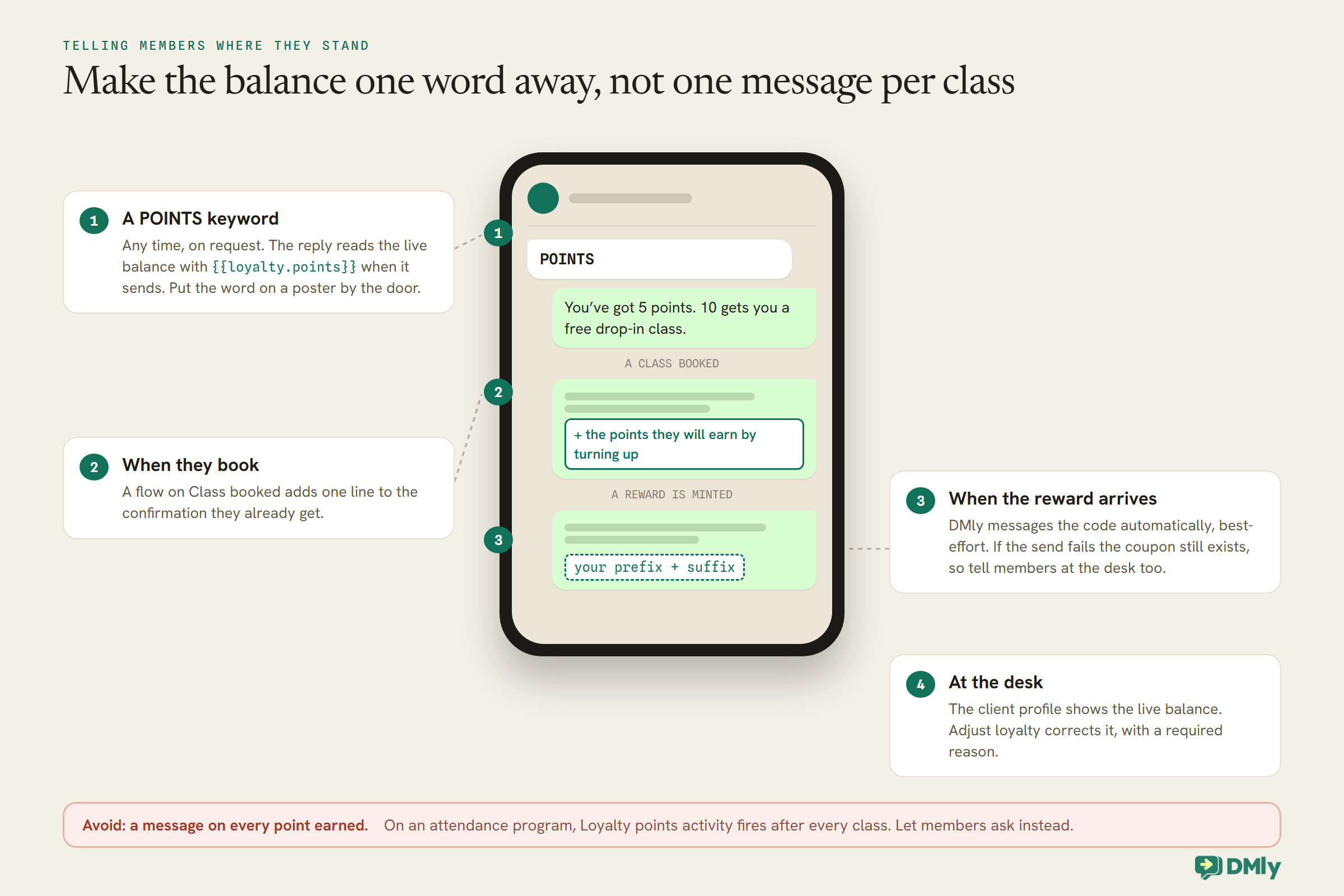
DMly has a live token, {{loyalty.points}}, that reads a member’s current points at the moment a message sends, in any flow. Use it in three places:
- A POINTS keyword. A small flow on a keyword such as
POINTSthat replies “You’ve got {{loyalty.points}} points. 10 gets you a free drop-in class.” Put the keyword on a poster by the door and in your welcome message. - The class confirmation extras. A flow on Class booked can add one line to what a member already receives, such as the points they will earn by turning up.
- When the reward arrives. DMly messages the coupon code to the member automatically when it is minted, on their active channel, and records it in the Inbox. Delivery is best-effort: if the send fails, the coupon still exists but the member never heard about it. Outside the 24-hour window a plain message may not go through, so tell members at the desk too, and train staff to look up a member’s coupon when they ask.
Do not message members every time they earn a point. The Loyalty points activity trigger can fire on points earned, redeemed or revoked, and on an attendance program “earned” happens after every class, which is far too often for a message. Save automatic messages for the reward itself, and let members check their progress whenever they like with the POINTS keyword.
If members ask how many points they have and the number looks wrong, the member’s client profile shows the live balance from the loyalty ledger, and Adjust loyalty lets you add or remove points with a required reason, so every correction is recorded.
Rewards Beyond Points: Ideas That Suit Gyms
Points reward the everyday habit. A few extras reward the moments members remember.
Milestones
Fifty classes, a hundred classes, a year of membership: these are worth marking with something a person does, not just a code. A segment on Loyalty points can list members above a level, but because points are spent each time a reward is minted, a balance is not a lifetime count. For true milestones, keep it simple: have coaches mention them, or count bookings per member in the Appointments report’s CSV download (one row per booking) and send a personal note. A shout-out in class costs nothing and means more than a template.
Birthdays
The Birthday / key date trigger fires on a contact’s birthday when the date is on their record, and a segment can target a Birthday month. A free class or a guest pass in a birthday message is a lovely touch. DMly’s birthday automation template uses dmly_birthday_offer as its fallback outside the 24-hour window, and that template is marketing, so it needs the member’s permission for marketing messages and is billed at the marketing rate.
Referrals and bring-a-friend
A member who brings a friend is the best advert a gym has. DMly lists a referral automation template whose out-of-window fallback, dmly_referral_invite, is also marketing; its docs do not describe the rest of how that automation works, so test it before you launch a referral offer on it. The simplest version needs no special tooling: a guest pass coupon your team gives out on request, with a per-contact limit of one so each guest can use it once, and a manual Adjust loyalty bonus for the member when their friend joins.
Free classes as credits
If your members already book with class credits, a free class can be a credit rather than a coupon. Your team can add one with Add credits on the member’s profile, or a flow’s Issue Credits step can grant it, for example at the end of a referral flow. Credits added that way never expire unless you set a date when adding them by hand, and remember that a member’s credits are one pool: a reward credit can be spent on any class that costs credits.
Step 7: Launch It So Members Notice
A loyalty program only works if members know it exists. Tell them once, clearly, then let it run.
- Run it quietly for a fortnight first. Check that marking attendance really adds points, that the numbers match your arithmetic, and that renewals behave as you expect.
- Write the rules in two sentences. “Every class you attend earns a point. Ten points gets you a free drop-in class.” If it takes longer to explain, simplify it.
- Announce it to members who opted in. A broadcast announcing the program is marketing under Meta’s template guidelines, so send it to members who agreed to that kind of message, and put the same news on posters and at the desk for everyone else.
- Give everyone a head start. A few starting points added with Adjust loyalty makes the first reward feel reachable. Keep the reason field consistent, such as “launch bonus”.
For what you can and cannot send about loyalty on WhatsApp, our explainer on how a WhatsApp loyalty program works covers the rules in more depth.
Step 8: Tell Whether Your Gym Loyalty Program Is Working
The question is not “are members earning points?” but “are they coming more often?”.
Compare attendance before and after launch in Configurations → Reports → Appointments, filtered by your class services: bookings, completed sessions and the no-show rate. Look especially at members who were coming once a week; they are the ones the threshold was chosen for. The coupons list’s Usage column shows how many rewards have been redeemed, and a segment on Loyalty points shows how many members are close to their next one.
If members earn rewards but never use them, the reward is wrong: too small, too awkward to redeem, or not something they want. If nobody reaches the first reward, the threshold is too high. Both are easy to change for new rewards; tell members before you do.
What It Costs
The program itself is part of DMly. The rewards and some messages are not free.
The real cost is the rewards: every free class you give away is a class you did not sell, which is why the arithmetic in Step 5 matters. The messages are the smaller cost. Replies to a POINTS keyword are free-form messages inside the 24-hour window the member opened; from 1 October 2026 Meta charges for those beyond the first 1,000 per business phone number each month. Birthday, referral and announcement messages are marketing templates, billed at your market’s marketing rate and counted against your DMly plan’s broadcast and template allowance.
Gym Loyalty Program Mistakes to Avoid
- Class status on Booked. Members earn for places they never use.
- Nobody marking the roster. With Attended as the rule, no check-in means no points.
- Marking no-shows before Mark all attended. It overwrites them.
- A threshold built for regulars. The once-a-week member waits months.
- A discount on the membership fee. There is no obvious moment to apply it to an auto-charged renewal, and it does not reward attendance.
- A message on every point earned. Keep automatic messages for rewards, and let a person mark the milestones.
- Promising the code always arrives by WhatsApp. Delivery is best-effort; tell members at the desk too.
- Marketing templates to members who never agreed to them. Birthday, referral and announcement messages need that permission.
Frequently Asked Questions
Should a gym loyalty program reward spending or attendance?
Attendance, for most gyms. Members on a fixed monthly fee spend the same whether they come or not, so per-activity points on attended classes reward the habit that keeps them.
How do members earn points for classes in DMly?
With class status set to Attended on the Loyalty tab, a member earns when a coach marks them Attended on the class roster. A late check-in after the session still awards the points.
What reward works best for a gym?
Something used in the gym: a free drop-in class, a guest pass or money off a personal training session. Every DMly loyalty reward is a coupon applied to an invoice, so a fixed amount equal to your drop-in price works well.
How do members check their points?
Set up a POINTS keyword flow that replies with the {{loyalty.points}} token, which reads the live balance when the message sends. Staff can also see the balance on the member’s client profile.
Can points be taken away?
Yes. Voiding an invoice, refunding a payment or cancelling an order takes back the points it earned, and deactivates one unredeemed loyalty coupon. Staff can also adjust points by hand with a reason.
Are birthday and referral messages allowed on WhatsApp?
Yes, as marketing templates sent to members who agreed to receive marketing messages from you. They are billed at the marketing rate.
The Same Story, Forwards
Play the story forwards now. A member books, turns up, and a coach ticks them in, which earns a point. At five points they send POINTS and see they are halfway. At ten, a code arrives for a free drop-in, and they bring a friend on it. None of it asked the member to spend more; all of it asked them to come back, which is what they wanted to do anyway.
That is what a gym loyalty program is for. Reward attendance, keep the roster honest, choose a reward that brings people through the door, set a threshold your once-a-week members can reach, and make the balance one word away.
Writing about WhatsApp automation, bookings and growth for local business.
Turn WhatsApp into your busiest channel.
Start free and run message, bookings, payments and reviews in one place.
