
How to Build a WhatsApp Win-Back Campaign for Inactive Customers
There is a version of the win-back campaign that works and a version that costs you your messaging tier, and the difference is entirely in who receives it.
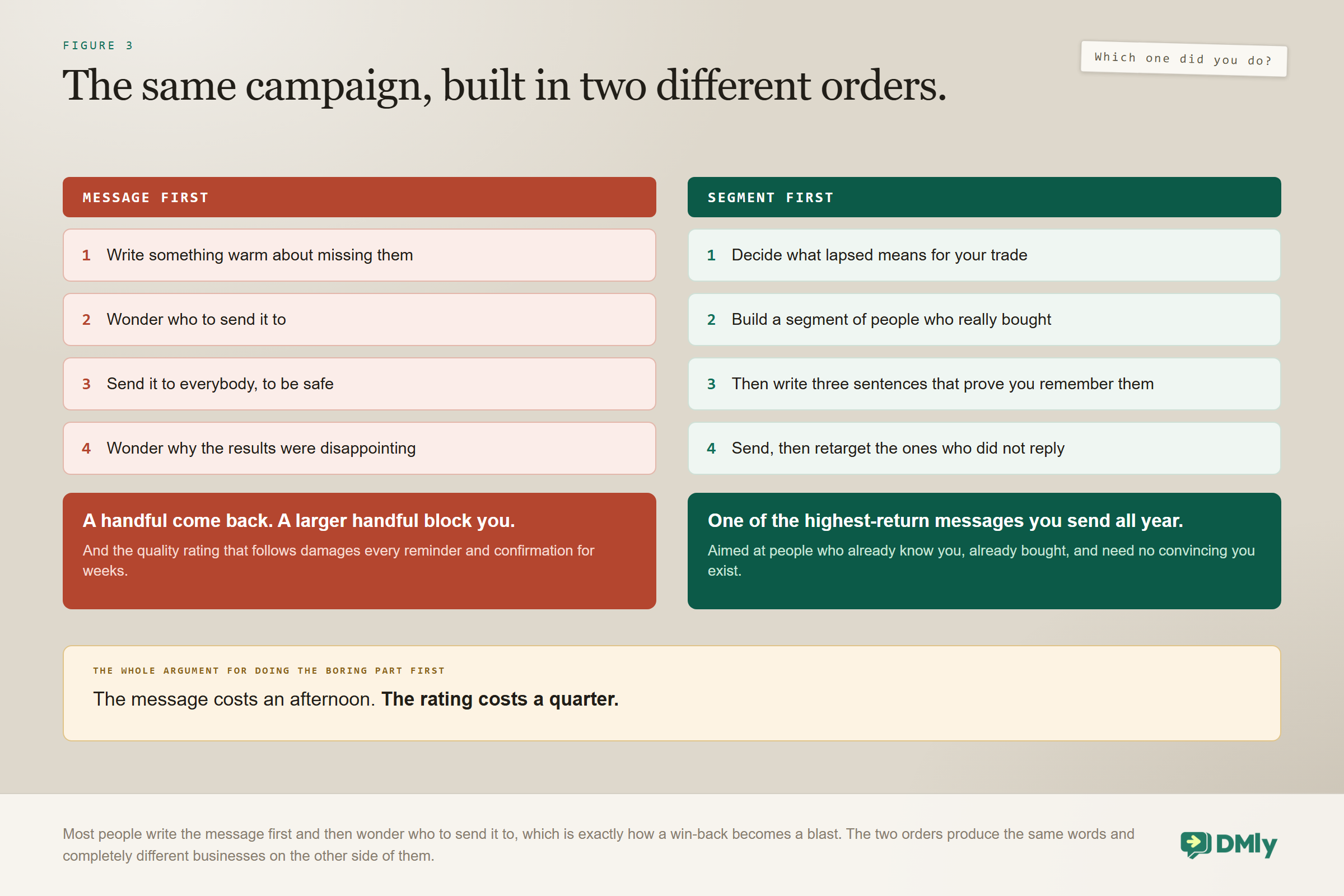
The failing version is easy to describe. Export everybody, write something warm about missing them, send it to the lot. A handful come back. A larger handful block you. Your quality rating takes a hit that quietly damages every reminder and confirmation you send for weeks afterwards, and you never connect the two events.
The working version starts somewhere much less exciting. A win-back campaign is built on a segment, and the segment is where nearly all the thinking goes. Get that right and the message almost writes itself, because you know exactly who you are talking to and why they stopped.
This guide covers the whole thing: deciding what inactive means for your trade, building the audience, the template, sending it without partial failures, the second wave that catches the people who ignored the first, and the three numbers that tell you whether it worked.
What a Win-Back Campaign Is, and What It Is Not
It is a one-off message to customers who used to buy from you and have stopped, aimed at a defined group rather than at everybody. It differs from an offer broadcast in that the audience is chosen by behaviour, and from a follow-up in that nothing the customer just did has triggered it.
The economics are why it is worth doing at all. These people already know you, have bought before, and need no convincing that you exist, so reaching them costs a fraction of what finding somebody new costs. The catch is the same fact from the other side: they are, by definition, people who have not heard from you in a while, which is exactly the audience most likely to react badly to a message they were not expecting.
Why this is possible on WhatsApp at all: A WhatsApp broadcast sends an approved template rather than free text, and a contact who last messaged you a year ago receives that template exactly like one who messaged an hour ago. The 24-hour window, which governs almost everything else on this channel, barely matters here. That is precisely why a win-back is possible on WhatsApp, and it is also why the responsibility for who gets it sits entirely with you rather than with the platform.
First, Decide What Inactive Means
Inactive is a number specific to your trade, and getting it wrong is the most common reason these campaigns underperform. Chase people too early and you irritate customers who were coming back anyway. Too late and they have already found somebody else.
Set the threshold at roughly one and a half times your natural repeat cycle. If customers normally return every six weeks, somebody at nine weeks is genuinely lapsing. If they return annually, ten months is your moment.
| Business | Natural cycle | Treat as inactive at |
| Hair salon | 6 to 8 weeks | 10 to 12 weeks |
| Barbershop | 3 to 4 weeks | 6 to 8 weeks |
| Restaurant or cafe | Days to weeks | 8 to 12 weeks |
| Gym or studio | Weekly attendance | 3 to 4 weeks without a visit |
| Dental or clinical recall | 6 to 12 months | Past the recall date by a month |
| Online shop | The replenishment gap | 1.5 times the typical reorder gap |
Write the number down before you open the segment builder. A campaign aimed at “people we have not seen in a while” is not a campaign, it is a mailing list.
Building the Win-Back Campaign Audience, Which Is the Actual Work
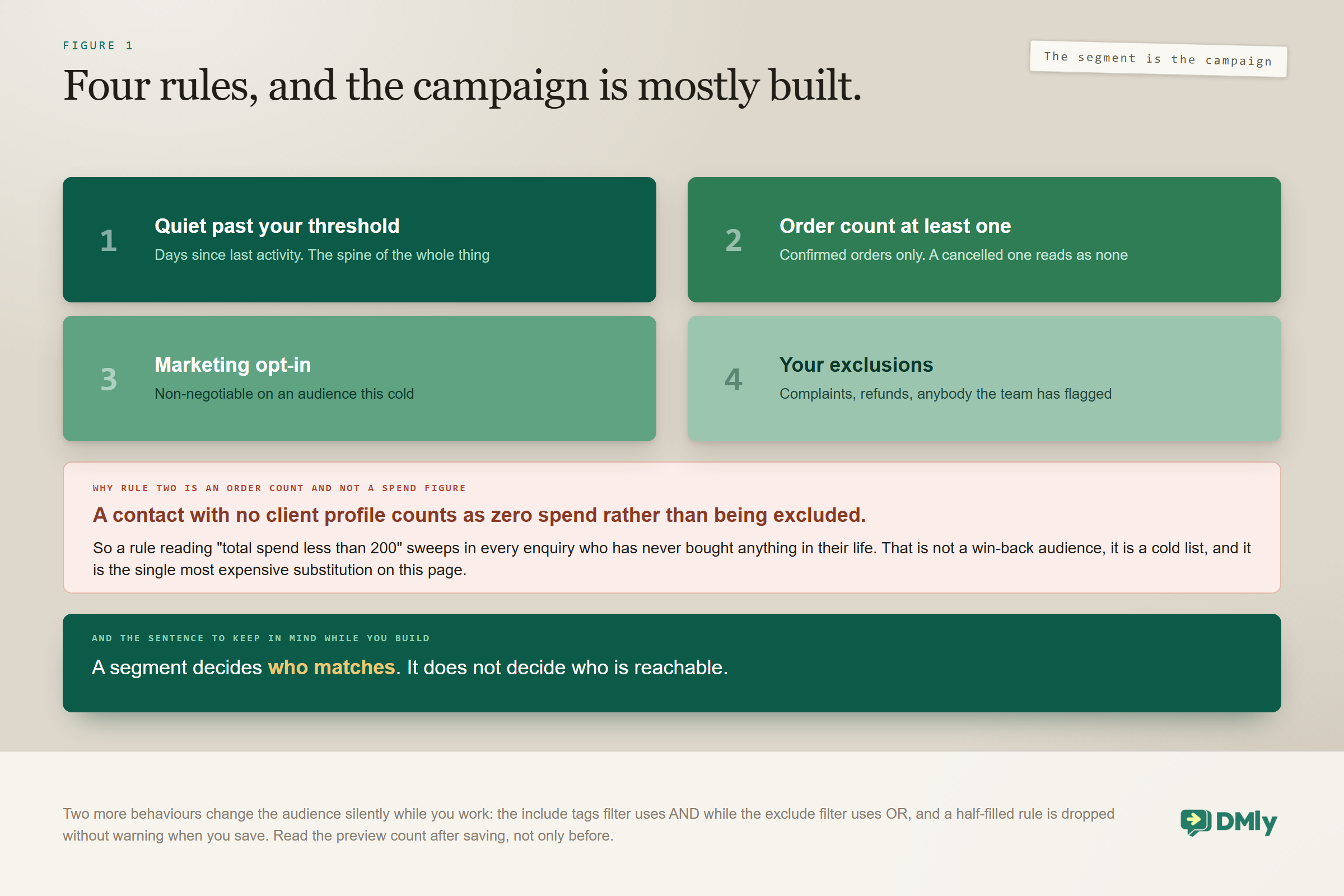
Four rules make a win-back segment, and leaving any one of them out changes who receives it in a way you will not notice until afterwards.
- Days since last activity, past your threshold. The spine of the whole thing.
- Evidence that they were a real customer. Order count of at least one. Read the warning below before you reach for a spend filter instead.
- Marketing opt-in. Non-negotiable. A win-back is a marketing message going to somebody who has not been in touch, which is the exact profile of a message people report.
- Exclusions. Tags for complaints, refunds, or anybody your team has flagged. Nothing undoes goodwill faster than a cheery “we miss you” to somebody who left unhappy.
The filter that quietly includes everybody who never bought: A contact with no client profile counts as zero total spend rather than being excluded. So a rule reading “total spend less than 200” silently sweeps in every enquiry who has never bought anything in their life, which is not a win-back audience at all, it is a cold list. Use order count at least 1 to separate customers from enquiries, and note that order count counts confirmed orders only, so somebody whose single order was cancelled reads as having none.
Two other behaviours of the segment builder are worth knowing while you are in it, because both change your audience silently. The include tags filter uses AND while the exclude tags filter uses OR, so picking two service tags to include reaches only the people who have had both. And a half-filled rule, such as a between with one number, is dropped without warning when you save, which leaves the audience wider than you designed it. Check the preview count after saving, not only before.
One more condition is worth adding that most people never touch: Reachable on channel, which filters to contacts who actually have an identity on the channel you are sending on. It keeps the count honest before you send. And a sentence from the documentation is worth holding on to while you build: a segment decides who matches, not who is reachable. Somebody can match your rules perfectly and still be skipped at the moment of sending.
The Template
A win-back is a marketing message, so it needs an approved marketing template, and filing it as utility to save money is simply a rejection. Meta reviews against the category you choose, and a promotion filed as utility is not a borderline call.
What works in the copy is specificity rather than sentiment. Three principles carry almost all of it.
- Reference what they actually had. “Your last colour was in March” beats “we miss you”, because it proves you know who they are.
- Give a reason to come back now. Not necessarily a discount. An opening, a new service, a seasonal moment, or simply that they are due.
- Make the next step one tap. Two specific times, or a booking link. “Let us know when suits” puts the work back on somebody who has already drifted.
Keep it under three sentences. A long win-back reads as an apology, and nobody was waiting for one. If you would rather adapt tested wording than start from a blank body, our library of message templates has win-back copy to work from.
And put a polite exit in the buttons. A “no thanks” button is doing real work: giving people an easy, dignified way out produces far fewer blocks than making them find the block button themselves, and blocks are what damage your number.
Three Angles That Beat “We Miss You”
The default message is sentimental, and sentiment is the weakest angle available, because it asks the customer to care about your feelings. Three alternatives consistently do better.
The due-date angle. “It has been about ten weeks since your last cut, which is usually when people are ready for the next one.” This works because it is factually about them, it implies you keep records, and it reframes the message as a service rather than a plea. It suits any business with a natural cycle, which is most of them.
The specific-opening angle. “We have had two cancellations this Saturday, 10:00 and 2:30, if you are due.” Scarcity that happens to be true. It answers the question a reader asks unconsciously, which is why this message today rather than any other day, and it converts because the next step is a tap rather than a decision.
The something-changed angle. “We have added evening appointments on Thursdays.” Genuinely useful to a customer who may have drifted because your hours stopped fitting their week. Save it until you have something real to report, and note that it is the only one of the three that gives a lapsed customer a new reason rather than an old one.
Sending It Without Breaking Anything
Two settings and one warning decide whether the campaign goes out cleanly.
Tick Reachable contacts only. It is unticked by default. Opted-out contacts never receive a broadcast, because they are blocked at the moment of sending on every channel, but without this box they are still expanded into the recipient list, take up a slot each, and land in your failed count. On a win-back, where the audience is old by definition, that makes the campaign look considerably worse than it performed.
Watch your messaging tier. This is the warning most people meet the hard way. DMly paces its sending steadily per channel rather than firing everything at once, but it does not enforce Meta’s tier limits, and Meta rejects the overflow. A large broadcast on a low tier partially fails, with some recipients getting the message and others silently not. If your list is big and your tier is not, split the campaign across several days rather than discovering the ceiling mid-send. Our guide to quality rating, messaging limits and bans covers how tiers rise.
Three things about the send that are not obvious: An empty audience is not an error. If your segment returns nobody, the broadcast is simply marked Sent with zero recipients, and from the outside that looks identical to a campaign that went out. On a win-back, where the segment is doing something complicated, this is the failure to check for first.
The count you see is an estimate taken when you build it. The real recipient list is expanded at send time, so a campaign you schedule for Thursday picks up everybody who crosses your inactivity threshold between now and then. That is genuinely useful here and worth relying on deliberately.
Template status can change between scheduling and sending. A template Meta pauses for quality shows as Rejected, and a scheduled campaign pointing at it will fail. If you build on Monday for a Thursday send, look at the template again on Thursday morning.
The Second Wave, Which Is Nearly Free
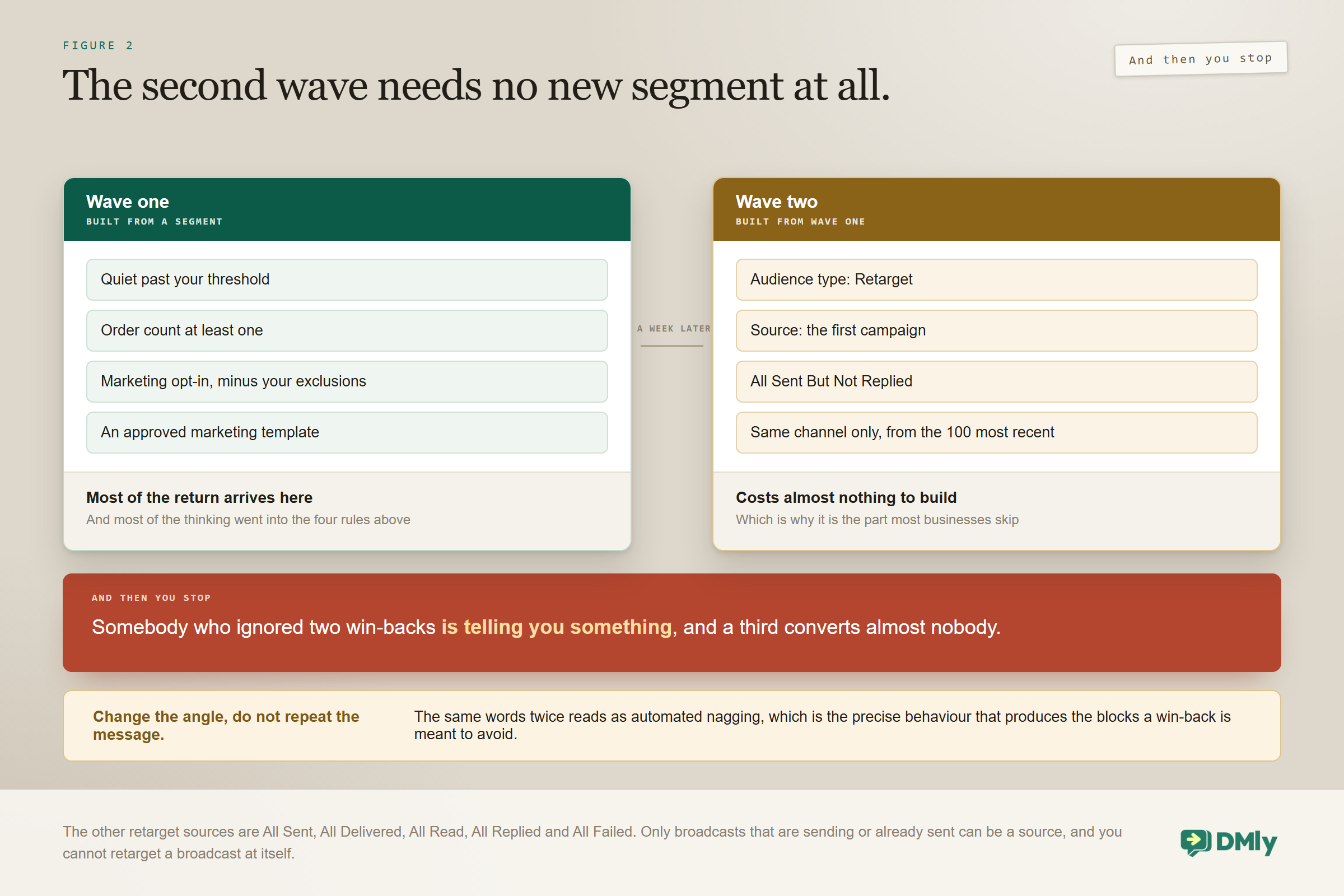
Most of the return comes from the first send, but a well-aimed second wave costs almost nothing to build, and this is where retargeting earns its place.
Rather than rebuilding a segment, set the audience type to Retarget and use the first campaign as the source, filtered by what people did with it. The option that matters for a win-back is All Sent But Not Replied: everybody who received the first message and did not respond. A single follow-up to that group a week later, with a different angle, typically adds a meaningful share on top of the first wave.
The other sources are All Sent, All Delivered, All Read, All Replied and All Failed. You can only retarget broadcasts on the same channel, from the 100 most recent, and only ones that are sending or already sent.
Two rules keep the second wave from becoming a third. Change the angle rather than repeating the message, because sending the same thing twice reads as automated nagging. And stop at two. Somebody who ignored two win-backs is telling you something, and the respectful answer is to leave them alone.
The Best Outcome Is a Reply, Not a Click
A win-back is the one campaign where the reply is worth more than the booking, because of what a reply does to the channel. This is the part almost nobody designs for, and it is free.
Every message a customer sends you restarts the 24-hour window. So the moment somebody answers your win-back template, even with “maybe next month”, you are back in ordinary conversation with them for a full day: no template, no approval, no category, no marketing rate. You can offer two specific times, answer a question about a price change, or simply say something human.
That is why a win-back template should invite a response rather than announce something. A message ending in a link asks for a decision from somebody who has already drifted. A message ending in a question asks for a sentence, and a sentence buys you a day of unrestricted conversation with a customer you had lost. The booking often happens in that conversation rather than in the template.
Two things follow. Route the replies to a person rather than to a bot, at least for the first hour after a send, because the replies to a win-back are the highest-value messages in your inbox that week and half of them will need a judgement an assistant cannot make. And watch the response time on them: the Team tab of Reports gives an average first response, measured from the moment a conversation is assigned rather than from when the customer wrote, so a reply that sat unassigned for two hours will not show up as slow anywhere.
Run the Win-Back Campaign as a Habit Rather Than an Event
A segment is a saved question rather than a saved list, and that single fact turns a win-back campaign from a project into a routine. It is re-answered every time you use it, so the same segment you built in March sends to a completely different group of people in June.
Nobody who came back is still in it, because their activity date moved. Everybody who has quietly crossed your inactivity threshold since is, without you doing anything at all. You build the audience once and it maintains itself, which is the opposite of the spreadsheet most businesses keep for this.
Three habits make that work in practice.
- Send it on a schedule you can keep. Quarterly suits most service businesses. The audience will be different each time, and it will usually be smaller each time, which is the sign that the campaign is working rather than the sign that it is running out.
- Tag the people who come back. Not to exclude them, since the segment already will, but so you can see next quarter how many of the returns from the last one stayed returned. That number tells you whether you are recovering customers or renting them.
- Revisit the threshold once a year. Repeat cycles move. A salon that added a longer-lasting treatment has a longer natural cycle than it did, and a threshold set against the old one now chases people who are not late at all.
And remember that the audience count is an estimate taken when you build the campaign, while the real recipient list is expanded at send. So a win-back scheduled a week out genuinely does pick up the people who lapse in between, which is exactly the behaviour you want from a routine.
Judging It on Returns, Not on Opens
The vanity metrics on this channel are unhelpfully flattering, so pick the three numbers that mean something before you send. Broadcasts report Sent, Delivered, Opened and Failed, and the open rate will look wonderful whatever you sent. It tells you the channel works, not that the campaign did.
- Bookings or orders traceable to the campaign in the fortnight after. The actual result, and the only one worth arguing about.
- Replies. Valuable in themselves, because a reply reopens the messaging window and lets a person take over in ordinary conversation.
- Opt-outs and blocks. The cost side of the ledger. A campaign that recovered eight customers and lost forty from your reachable list has not made you money.
Two numbers on that screen that are not what they look like: The Audience breakdown donut on the Schedule and Review steps, including its “opted out” figure, is documented as a placeholder: it always shows 95 per cent deliverable and 5 per cent opted out regardless of your actual data. Do not size a campaign on it.
And Sent plus Failed will not always add up to the recipient total, because a contact deleted before the send is skipped rather than failed. Nothing is broken when the totals disagree. If you need the reason a specific contact did not receive it, WhatsApp has exactly one place: the template’s Failed sends list in its performance drawer, which names each failed contact with a reason and a date, though it covers every send of that template rather than this one campaign.
Run it, read those three, and adjust the threshold before you run it again. Most businesses find their first attempt was aimed slightly too wide. Our guide to the metrics worth tracking covers how to hold numbers like these next to the ones about volume.
When Not to Run One
Three situations where a win-back is the wrong tool, and in all three it makes the underlying problem worse.
- Your quality rating is yellow or red. Fix that before sending marketing to a cold list, because a cold list is precisely what drove the rating down.
- You have no marketing opt-ins. Then you do not have a win-back audience, you have a compliance problem, and the fix is capturing consent going forward rather than sending anyway.
- Customers are lapsing faster than they used to. The campaign is treating a symptom. Something in the service changed, and a message will not hold them.
There is also a better long-term answer than any win-back, which is not needing one. A rebooking nudge timed to the natural cycle catches people before they lapse, and a loyalty programme gives them a reason to return that does not depend on you noticing they left. Win-backs recover the ones who slipped through. Retention is what keeps that number small.
Frequently Asked Questions
How long should somebody be inactive before I message them?
Roughly one and a half times your natural repeat cycle. A salon whose clients return every six to eight weeks should treat ten to twelve weeks as lapsed; a gym should look at three to four weeks without a visit. Set the number deliberately rather than defaulting to ninety days, because the right threshold is a property of your business rather than a convention.
Does a win-back campaign need a discount?
No, and leading with one trains customers to wait for the next discount. A specific reason to return now works as well or better: an opening this week, a new service, a seasonal moment, or simply that they are due. Save discounts for the second wave if the first does not land.
Can I message customers who never opted in to marketing?
No. A win-back is a marketing message going to somebody who has not been in touch, which is exactly the profile that generates blocks and reports, and those are what drive your quality rating down. Filter the segment on marketing opt-in and treat a small opted-in audience as an asset rather than a limitation.
Why did some of my broadcast fail?
Three usual causes. Opted-out contacts appear as failed unless you ticked Reachable contacts only. Your messaging tier was exceeded, so Meta rejected the overflow and the campaign partially delivered. Or the template’s status changed between scheduling and sending, which happens when Meta pauses one for quality. And if Sent plus Failed does not add up, that is a contact deleted before the send being skipped rather than failed.
My campaign says Sent but nobody received it. What happened?
Most likely your segment returned nobody. An empty audience is not treated as an error: the broadcast is simply marked Sent with zero recipients. Open the segment on the Contacts list with the Filters panel and read how many people it actually matches before you send anything to it.
How often can I run a win-back campaign?
Twice a year for any given customer is plenty, and the segment refreshes itself as new people cross your inactivity threshold. Running the same campaign at the same people quarterly is how a useful message becomes noise, and how a reachable list becomes a small one.
The Segment Is the Campaign
If you take one thing about win-back campaign design from this, let it be the order of work. Most people write the message first and then wonder who to send it to, which is exactly how a win-back becomes a blast.
Do it the other way round. Decide what lapsed means for your trade. Build a segment of people who genuinely bought and genuinely opted in. Exclude the ones who left unhappy. Check the count after you save it. And only then write the two or three sentences that prove you remember them.
Done that way, a win-back is one of the highest-return messages a small business sends all year, and it costs almost nothing. Done the other way, it is the most expensive message you will ever send, because you pay for it in a quality rating that takes months to recover. The wider mechanics of sending to a list are in our WhatsApp broadcasts guide, and the record underneath the segment is in our WhatsApp CRM guide.
Writing about WhatsApp automation, bookings and growth for local business.
Turn WhatsApp into your busiest channel.
Start free and run message, bookings, payments and reviews in one place.
