
Calendly Alternatives: Why Local Businesses Are Switching to All-in-One Appointment Platforms

Fifteen dollars, or forty eight. Those are both real monthly prices for putting online booking in front of a three-person salon, taken from two of the tools on this page on the same morning, on annual billing, for one location. Neither vendor is being unreasonable. The gap exists because they are not charging you for the same thing: one counts appointments, the other counts the people who log in. That difference is the whole story of Calendly alternatives for a local business.
It is also the useful way in. Calendly became popular for a good reason: share a link, let someone pick a time, and the endless “does Tuesday at 2 work?” conversation disappears. But it is priced per seat, and a local business has more staff than a consultant does, while the parts of the job that cost it money sit either side of the booking.
Once appointments involve customer messages, several staff, deposits, payments, reminders and follow-ups, scheduling is one step inside a much bigger operation. Plenty of businesses end up paying for Calendly and still paying for three other tools to handle everything around it.
This guide compares five Calendly alternatives for local businesses, with the arithmetic shown and every price read on the vendor’s own pricing page on 6 September 2026. We build DMly, which is first on the list, so treat our entry with the scepticism you would apply to any vendor writing about itself, and check the claims.
Calendly Is Good at Scheduling. But Is Scheduling Enough?
Calendly does its main job well and is priced for the job it does. You share your availability, customers pick a time, the appointment lands on the calendar. It also does automated reminders and follow-ups, multiple calendar connections, routing, and integrations with the rest of your stack.
Read on Calendly’s own pricing page today, its plans are Free, Standard at $10 per seat a month, Teams at $16 per seat a month, all billed yearly, and Enterprise from $15,000 a year starting at 50 seats. Paid monthly, Standard and Teams are $12 and $20. Two details in that structure matter more than the headline number:
- The free plan is one event type and one calendar connection. A salon offering a cut, a colour and a treatment has already outgrown it.
- Payments start on Standard. Connecting Stripe or PayPal, and therefore taking anything at the point of booking, is not on the free plan.
For someone scheduling meetings and consultations, that may be all they need, and there is no reason to move. Local businesses usually have more happening around the booking. A salon answers questions on WhatsApp before the appointment, takes a deposit, sends reminders, and wants the customer back in six weeks. A clinic has several people handling enquiries and appointments from the same patient.
So the question changes. Instead of “which tool makes booking easiest?”, it becomes “how much of the customer journey can we run without jumping between tools, and what does each vendor charge us for?”
What a Three-Person Salon Actually Pays
Here is the arithmetic behind the two numbers in the first line, so you can argue with it. The example is deliberately ordinary: one location, three people who need their own calendar and their own login, online booking with card payment, annual billing, prices as published on 6 September 2026.
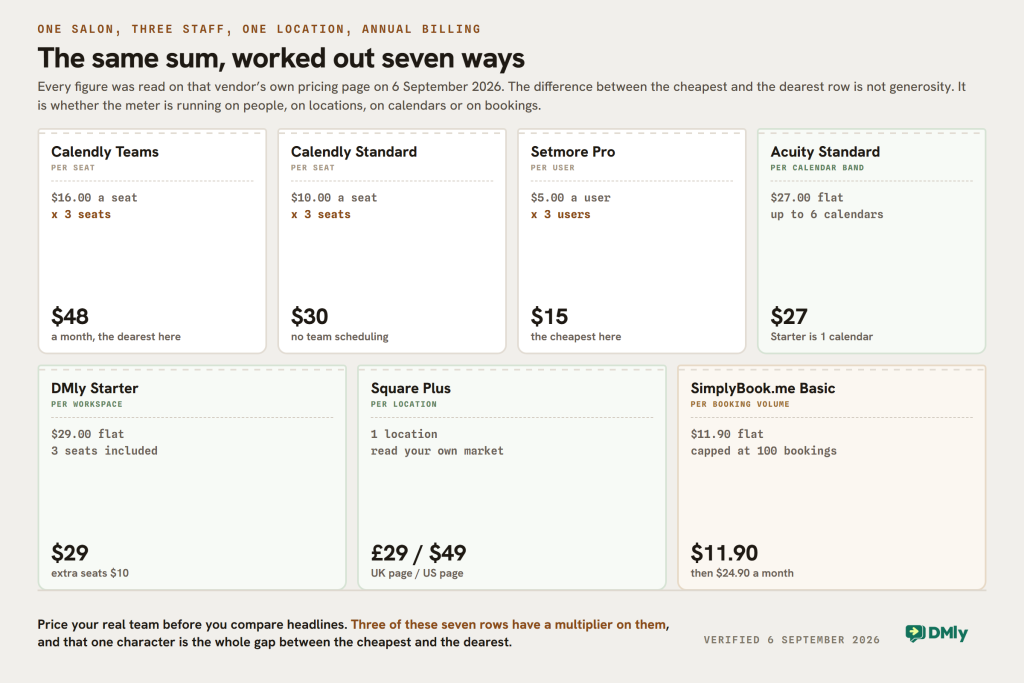
| Tool | What it charges for | Three people, one location |
|---|---|---|
| Calendly Teams | Per seat | $16 x 3 = $48 a month |
| Calendly Standard | Per seat | $10 x 3 = $30 a month, without team scheduling |
| Setmore Pro | Per user | $5 x 3 = $15 a month |
| Acuity Standard | Per calendar band, up to 6 | $27 a month, flat |
| Square Appointments Plus | Per location | £29 a month in the UK, $49 in the US |
| SimplyBook.me Basic | Per booking volume | $11.90 a month, capped at 100 bookings |
| DMly Starter | Per workspace | $29 a month, 3 seats included |
Three things fall out of that table that a feature list never shows you.
- Per-seat pricing punishes the businesses that need booking most. A consultant is one seat. A salon is three, a clinic is six, and the bill moves with your hiring rather than your revenue.
- The cheapest row is not the cheapest bill. Setmore at $15 is genuinely cheap for scheduling. If you then pay separately for the shared inbox, the CRM and the invoicing, the total is not $15.
- A capped row is a cliff, not a slope. SimplyBook.me Basic is $11.90 for 100 bookings a month. A busy salon does that in a fortnight, and the next tier up is $24.90.
The Real Reasons Local Businesses Look for Calendly Alternatives
The need for something else usually appears when the business starts asking its scheduling tool to do jobs it was never built for.
Customers do not always start with a booking link
Local customers want to talk first. Someone considering a £150 salon treatment has questions before they choose a slot. A homeowner sends photographs of a repair on WhatsApp before agreeing to a visit. When the conversation lives in one place and the booking in another, a person has to join them up by hand, every time.
Money is part of the appointment
Getting a name onto the calendar is not the job. You may need a deposit to stop no-shows, the full price up front for an expensive treatment, an invoice afterwards, or a record of what is still owed. Every tool on this page handles some of that, and they handle it differently enough that it is worth checking before you buy rather than after.
Several people deal with the same customer
A receptionist answers the first message, a colleague does the appointment, somebody else follows up. That makes shared context worth paying for. Staff need more than a calendar entry: they need the earlier conversation, the booking history and the customer’s details before they reply.
The relationship carries on afterwards
One booking should lead to the next. Salons want the six-week rebook, gyms want the trial visitor to join, restaurants want the diner back. Businesses also want feedback and a Google review while the visit is still fresh. At that point you are not shopping for a better calendar. You are shopping for a system that handles what happens around each appointment.
The Best Calendly Alternatives for Local Businesses in 2026
These five are not trying to solve the same problem. Two stay close to traditional scheduling and go deep on it, one ties booking to a payment terminal, one is a kit of parts, and one puts the conversation rather than the calendar at the centre. Prices are as published on 6 September 2026 and will drift.
1. DMly: Best for Managing the Full Customer Journey
DMly makes sense when appointments are one part of how you deal with customers rather than the whole of it. Customers book services on your booking page, and the same platform carries the conversations on WhatsApp, Instagram, Messenger, TikTok, Telegram, SMS and live chat, with a shared inbox, CRM, automation and AI agents behind them.
That suits salons, spas, gyms, clinics, restaurants and other local service businesses where a booking usually starts as a message.
What the booking side actually includes
Staff are bookable people, so slots are worked out per person from their own working hours in their own timezone. Alongside one-to-one appointments there are group classes with a seat count and a waitlist, which is the difference between a barber selling a slot once and a pilates studio selling the same hour twelve times. Google Calendar syncs both ways and Zoom adds a join link.
Two smaller things are worth naming because they usually cost extra elsewhere. A custom booking domain is on every plan including Starter, so clients book at your own address rather than ours. And the client portal lets a returning customer sign in with a one-time code sent on WhatsApp, with no password, to see their own booking history instead of messaging you to ask.
The honest limitation: there is no partial deposit
This is the one to check before you switch, because four of the five tools below advertise deposits and we should be plain about what we do instead.
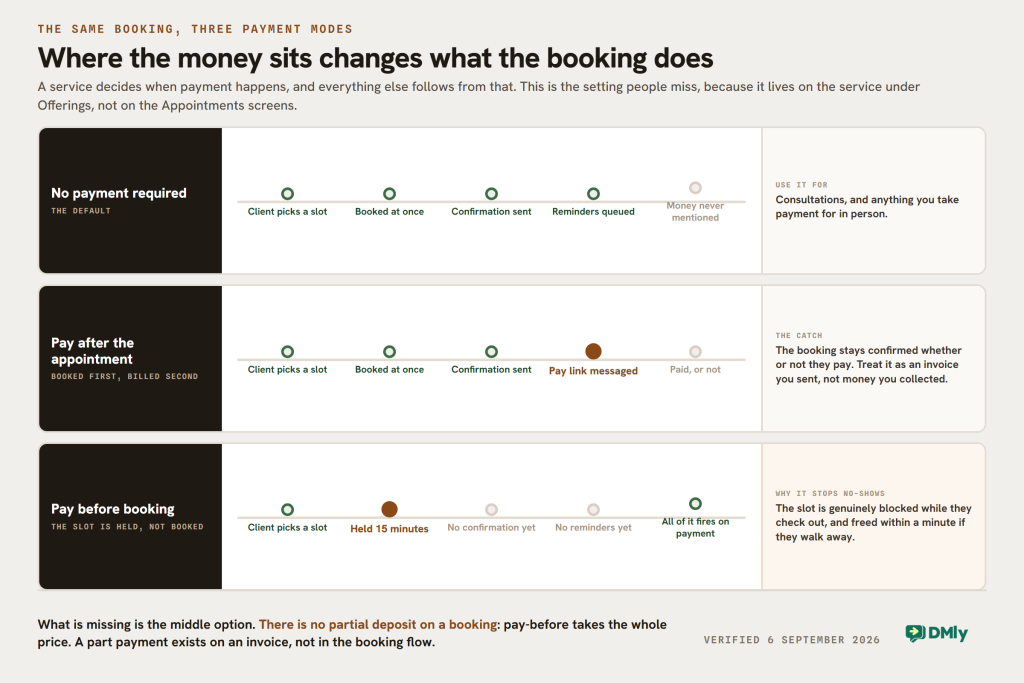
A service in DMly has three payment modes: no payment, pay after the appointment, or pay before booking. Pay-before holds the slot for 15 minutes while the customer checks out and turns it into a real appointment only when the payment clears, which is a genuinely strong anti-no-show mechanism because the slot is blocked for everyone else meanwhile. Pay-after confirms the booking and then sends a pay link.
What there is not is a partial amount. You cannot ask for 20% of a £150 treatment at booking and the rest on the day: pay-before takes the whole price. If a part payment is what you need, it exists on invoices sent from the chat, which carry a partially paid state, but not inside the booking flow. If deposits are the reason you are shopping, weigh that honestly against everything else here.
Two further edges worth knowing rather than discovering: the payment mode is a property of the service, set under Offerings rather than on the Appointments screens, and a booking you add by hand from the calendar takes no payment and sends no pay link whatever the service says.
DMly pricing
Read on the pricing page on 6 September 2026, billed yearly, with a 7-day trial that does not ask for a card:
- Starter, $29 a month: 3 team seats, 3,000 active contacts, 10,000 broadcast or template messages, 500 AI replies.
- Growth, $65 a month: 6 seats, 10,000 contacts, 50,000 messages, 5,000 AI replies.
- Premium, $149 a month: 15 seats, unlimited contacts, 300,000 messages, 20,000 AI replies and the option to bring your own AI provider key.
Extra seats are $10 a month on any plan, and the current numbers are always on the DMly pricing page. Bookings, invoices, payments, CRM, the shared inbox and automation are on Starter, so the plan you pick is about size rather than about which features you are allowed. WhatsApp message charges are paid to Meta directly at Meta’s own rates, with no markup added on top, which is a separate bill from the subscription on every platform that offers WhatsApp.
The honest summary: if all you want is a scheduling link, this is more platform than you need and Setmore or Acuity will serve you better. If you are currently paying separately for messaging, appointments, CRM, automation and payments, the comparison gets interesting. Our WhatsApp appointment booking guide walks through what that looks like end to end.
2. Square Appointments: Best If Payments Happen In Person Too
Square Appointments is the strongest option here when booking and taking money are the same event, and it is close to unbeatable if Square already runs your till.
Its free plan is unusually capable: unlimited staff calendars, a custom booking site, website booking, automated text and email reminders, integrated payments and invoices, plus booking through Instagram, Facebook and Google. Prepayments are on every tier including the free one, so you can require payment in advance for specific services without upgrading. Plus adds multiple locations, class bookings, waitlists, Google Calendar sync, appointment reporting and, importantly for a salon, a cancellation policy with a card on file and a no-show fee. Premium adds resource management and deeper staff controls.
Square Appointments pricing
Check your own country’s page, because the plans are not priced alike. The UK Appointments page lists Free at £0 for a single location, Plus at £29 a month per location and Premium at £69 a month per location. The US page for the same product lists Free, Plus and Premium at $0, $49 and $149 a month per location. That is not a currency conversion, and the bundles are not identical, so read the page for the market you trade in.
Card rates are the other half of the bill and they move with the plan: in the UK, in-person is 1.75% on Free and 1.6% on Plus and Premium, and online is 1.4% plus 25p for UK cards.
Square’s advantage over Calendly is not customer messaging. It is that the appointment, the card machine, the invoice and the customer record are already one system. Its weakness for this audience is the same one Calendly has: the conversation that produced the booking happens somewhere else.
3. Acuity Scheduling: Best for Deep Appointment Control
Acuity Scheduling is for businesses that want to go further into appointment management without moving into a messaging platform. Customers self-schedule, and you get different appointment types, multiple calendars, intake forms that collect what you need before the visit, automatic timezone conversion, packages and subscriptions, gift certificates and a waitlist.
Its own pricing page states that it accepts payments and deposits through Stripe, Square, PayPal or Venmo, which is the capability DMly does not match.
Acuity pricing
Billed annually: Starter $16, Standard $27, Premium $49 a month, all in US dollars, with a 7-day trial and no card required. Paid monthly they are $20, $34 and $61.
The tier is set by calendars, and that is the number to check first. Starter is one calendar, so a two-chair salon is already on Standard. Standard covers up to six and is also where text reminders, the waitlist, packages, memberships and gift certificates begin. Premium goes to 36 calendars and adds a HIPAA business associate agreement, hiding the Acuity logo on your scheduling page and custom API or CSS.
It is the best dedicated booking system on this list for consultants, coaches, wellness practitioners and anyone whose complexity lives inside the appointment itself rather than around it.
4. SimplyBook.me: Best If You Want to Assemble Your Own
SimplyBook.me takes a modular approach: a core booking system plus a catalogue of custom features you switch on depending on how you work. A booking website and widget, Facebook and Instagram booking, online and in-person payments, a point of sale, coupons, gift cards, a mobile admin app, and options for regulated businesses including HIPAA functionality.
Payments, deposits and tips are one of those switchable features and are available from the free plan upwards.
SimplyBook.me pricing
Billed annually, with the monthly rate in brackets: Free $0, Basic $11.90 ($13.90), Standard $24.90 ($29.90), Premium $49.90 ($59.90), then Enterprise on request.
Read the three numbers under the price, not the price. Each tier caps three separate things at once: included bookings a month, how many custom features you may switch on, and how many service providers you may have. Free is 50 bookings, 1 feature and 1 provider. Basic is 100, 3 and 5. Standard is 500, 8 and 15. Premium is 2,000, unlimited features and 30. A busy salon can pass the Basic booking cap in a fortnight, and the feature count is the one people forget: picking a fourth custom feature on Basic means moving up a tier, not paying a small add-on.
That flexibility genuinely suits clinics, tutors, fitness businesses and anyone whose booking process has a quirk in it that off-the-shelf tools refuse to bend around.
5. Setmore: Best Budget Calendly Alternative
Setmore is worth a look when you want capable scheduling without adding a serious monthly bill. The free plan runs up to four users with unlimited appointments, a branded booking page, email confirmations and reminders, payments, customer profiles, team calendars and integrations, and customers can book through Google, Facebook, Instagram or a button on your site. Payments go through Square, Stripe or PayPal.
Setmore pricing, and what the free plan leaves out
Free $0 for up to four users, and Pro at $5 per user a month billed annually, or $12 per user a month paid monthly. Three people on Pro is $15 a month, which is the cheapest row in the table above.
Their own plan comparison is clear about what the free tier does not carry, and the list matters for a salon: deposits, recurring appointments, video appointments, two-way calendar sync, custom availability per service and removing Setmore’s branding are all Pro. If you want a deposit to stop no-shows, you are on Pro, and Pro is still inexpensive.
Calendly vs DMly: What Is the Real Difference?
Both get a customer onto your calendar. They are built around different halves of the same journey.
Calendly puts the link at the centre. You share a booking link, the customer chooses a time, and Calendly’s workflows, routing and integrations connect that appointment to whatever else you run. It is excellent at the moment of scheduling and deliberately agnostic about everything either side of it.
DMly puts the conversation at the centre. The booking happens inside an exchange that began on WhatsApp or Instagram, and the same customer then moves through reminders, payment, follow-up and a review request without their history being spread across systems.
Neither is a better product in the abstract. The question is which half of the journey costs you the most time. If your customers arrive already knowing what they want and simply need a slot, Calendly is cheaper and simpler. If most bookings start with somebody typing a question, the link is the easy part and you are paying for the hard part elsewhere.
Why All-in-One Appointment Platforms Appeal to Local Businesses
Running a local business can mean running five or six pieces of software at once. One takes bookings, another holds customer messages, another sends campaigns, something else does invoices or reviews. That works, and every handoff between them creates admin: switching tabs, copying details, working out what happened elsewhere before answering a simple question.
The benefit of joining them up is context, not a smaller software bill. Take a message that arrives at nine on a Tuesday:
“Can I move tomorrow’s appointment to 3pm?”
If messaging and appointments are connected, whoever picks that up already knows who is asking and what they booked. They do not ask for a reference number, open a second platform and search. The same applies afterwards: payment, follow-up and a Google review request all continue from the same record rather than being rebuilt somewhere else.
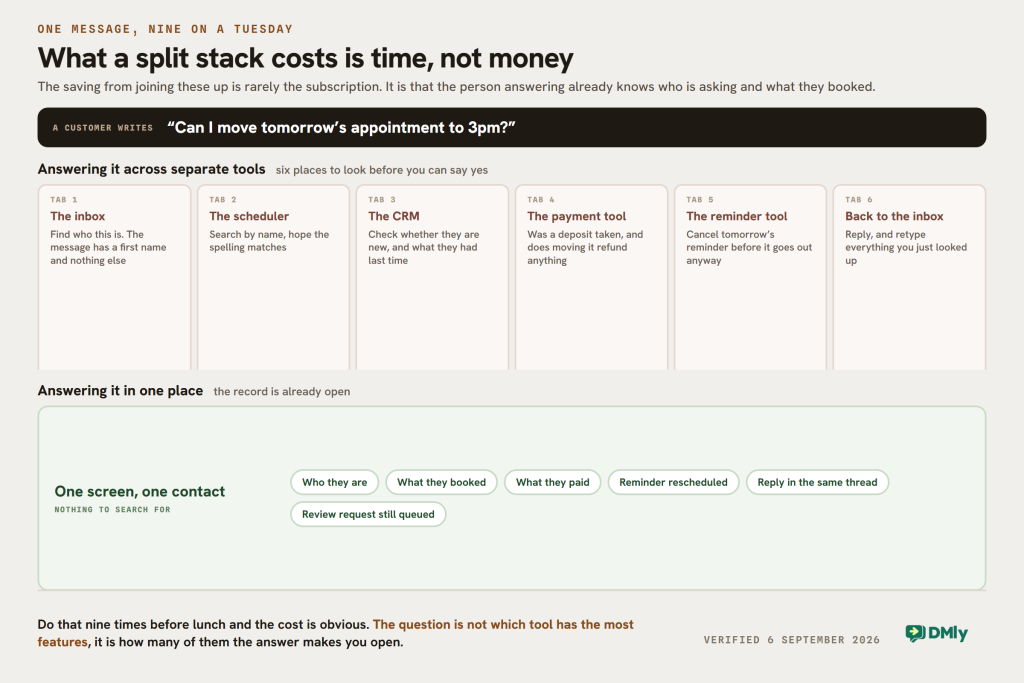
For small teams that means fewer repetitive tasks and fewer places to check. It also makes automation worth having, because a conversation, an appointment and a payment can trigger what happens next instead of sitting in separate systems as unrelated events. Our guide to running one inbox across every channel covers the messaging half of that in detail.
Which Calendly Alternative Should You Choose?
The right answer depends less on feature lists than on where appointments sit in your business, and on which unit you would rather be charged in.
- DMly, if bookings usually start as messages. Strongest here for local businesses handling customers on WhatsApp and social, who want the booking connected to CRM, automation, invoices, payments and review requests. Check the deposit limitation above first.
- Square Appointments, if you already take card payments in person. The tie to Square’s till and invoices is the point, and prepayments are on every tier including free.
- Acuity Scheduling, if the complexity is inside the appointment. Intake forms, appointment types, packages and deposits make it the best dedicated booking system on this list. Budget for Standard, not Starter, if more than one person takes bookings.
- SimplyBook.me, if your process has an awkward shape. The modular features bend around unusual requirements. Watch the booking cap and the feature count as much as the price.
- Setmore, if price is the deciding factor. Free covers four users and a lot of the basics; Pro at $5 a user adds deposits, recurring appointments and two-way calendar sync.
- Calendly, if it already does what you need. There is no reason to migrate for features you will not use. Just check what per-seat pricing does to the bill as you hire.
Final Thoughts
Calendly is still the right answer when the job is getting meetings onto a calendar. The reason local businesses go looking at Calendly alternatives is not that it does its job badly. It is that a booking is the middle of the story rather than the end of it, and the parts either side, the conversation before and the payment, reminder, rebook and review after, are where the time actually goes.
Work out which unit each vendor is counting, price your real team on it, and check the one capability you cannot live without before you migrate. On this page that capability is most often the deposit, and the answers genuinely differ.
Frequently Asked Questions
What Is the Best Calendly Alternative for Local Businesses?
It depends on where your time goes. If bookings start as messages, DMly is the most complete option here because appointments sit with the shared inbox, CRM, automation, invoices and payments. If the appointment itself is the complicated part, Acuity is the stronger dedicated booking system. If you already take payments in person, Square Appointments is hard to beat.
Is There a Cheaper Alternative to Calendly?
Yes. Setmore and Square Appointments both publish free plans, and SimplyBook.me does too, with different limits. Setmore Pro at $5 per user a month billed annually is the cheapest paid row for a small team.
Price is not the only number that matters, though. If replacing Calendly still leaves you paying separately for CRM, messaging and invoicing, the cheapest scheduler will not give you the lowest software bill.
Which Calendly Alternative Can Take a Deposit?
Acuity, SimplyBook.me and Setmore Pro all state that they take deposits, and Square Appointments offers prepayment on every tier plus a cancellation policy with a card on file from Plus upwards.
DMly does not take a partial deposit. It can require the full price before it confirms the slot, holding the time for 15 minutes while the customer pays, or confirm the booking and send a pay link afterwards. A part payment is possible on an invoice, but not inside the booking flow.
What Calendly Alternative Works With WhatsApp?
DMly is built for it: WhatsApp sits alongside the booking calendar, CRM, shared inbox and automation, so a customer can message you, ask what they need to ask, and get a slot without WhatsApp and the calendar being separate systems. Reminders and the client portal sign-in code go out on WhatsApp too.
Can I Replace Calendly With an All-in-One Business Platform?
Yes, as long as the platform covers the scheduling features you actually rely on. Make a list of those first, because the migration risk is always a small feature nobody mentioned rather than the big ones on the pricing page.
For a local business, moving to an all-in-one platform usually replaces more than Calendly. Instead of separate systems for appointments, customer messages, CRM, payments and follow-up, more of that work lives in one place, which is where the saving comes from.
How Much Does Calendly Cost in 2026?
Read on Calendly’s own pricing page on 6 September 2026: a free plan limited to one event type and one calendar connection, Standard at $10 per seat a month and Teams at $16 per seat a month when billed yearly, or $12 and $20 paid monthly, and Enterprise from $15,000 a year starting at 50 seats. Payments through Stripe or PayPal begin on Standard.
Writing about WhatsApp automation, bookings and growth for local business.
Turn WhatsApp into your busiest channel.
Start free and run message, bookings, payments and reviews in one place.
